D7 Lead Finder Pricing, Reviews, Pros and Cons (2026 Guide)
An honest breakdown of D7 Lead Finder pricing, real user reviews, and the pros and cons — including where its scraped leads fall short and how to fix the data before you send a single email.
D7 Lead Finder is one of the cheapest ways to pull a list of local businesses in bulk — but "cheap list" and "usable pipeline" are not the same thing. This guide breaks down D7 Lead Finder pricing, what real reviews say, and the honest pros and cons before you hand it your credit card.
TL;DR#
- D7 Lead Finder pricing starts low (entry plans around $16.90/mo) and scales by how many leads and daily searches you need — it's positioned as a volume scraper, not a precision tool.
- The core value is speed: type a niche + location, get a CSV of businesses with websites, phones, and sometimes emails, fast.
- The core weakness is data quality — scraped emails are often generic (info@, contact@), stale, or unverified, which tanks deliverability if you send cold.
- Reviews on G2 and Capterra are mixed: praise for price and simplicity, complaints about accuracy, duplicates, and support.
- The smart workflow: use D7 (or any scraper) to build the raw list, then verify and enrich it before outreach. That last step is where a tool like Tomba earns its keep.
What is D7 Lead Finder?#
D7 Lead Finder is a local lead-generation scraper. You enter a keyword (say, "dentists") and a location ("Austin, TX"), and it returns a list of matching businesses pulled from public web sources — business name, website, phone, address, social profiles, and, when available, an email address.
Think of it like a vending machine for local B2B lists. You put in a niche and a city, and out drops a CSV. That's genuinely useful for agencies, SEO shops, and SMB service sellers who need volume and don't want to hand-build lists in a spreadsheet.
What it is not is a verified contact database or an email-verification engine. The emails it surfaces come from scraping, not from validated records, so the quality varies wildly by industry and region. Keep that distinction in mind — it drives every pro and con below.

How much does D7 Lead Finder pricing cost?#
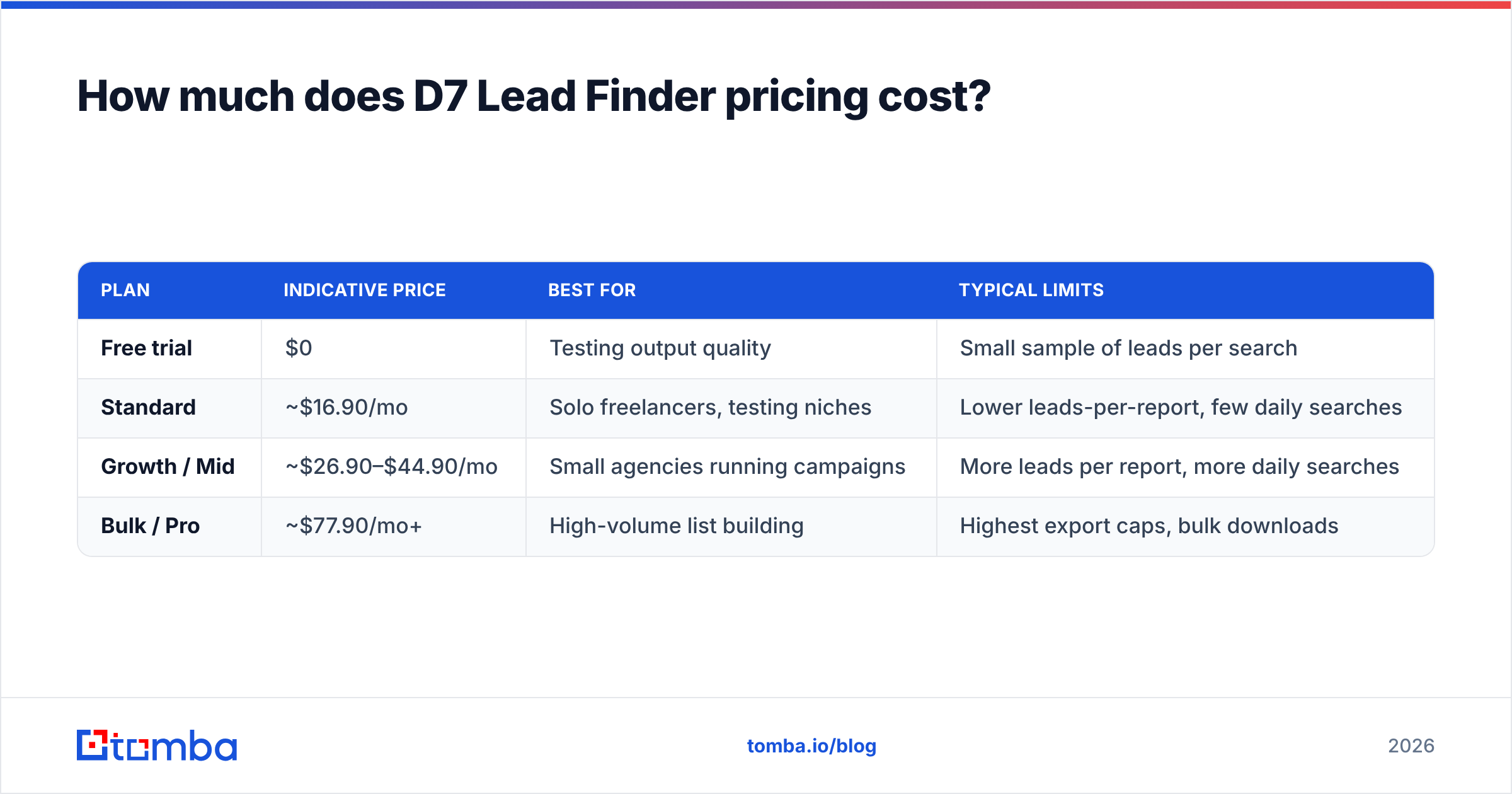
D7 Lead Finder uses tiered monthly subscriptions priced on two levers: how many leads you can pull per search/report and how many searches you can run per day. Entry pricing is aggressive — this is a budget tool — while higher tiers unlock bulk exports and more daily volume.
The table below reflects the commonly listed tier structure. Because scraper vendors adjust numbers often, treat these as indicative and confirm current figures on the official D7 Lead Finder pricing page before buying.
| Plan | Indicative price | Best for | Typical limits |
|---|---|---|---|
| Free trial | $0 | Testing output quality | Small sample of leads per search |
| Standard | ~$16.90/mo | Solo freelancers, testing niches | Lower leads-per-report, few daily searches |
| Growth / Mid | ~$26.90–$44.90/mo | Small agencies running campaigns | More leads per report, more daily searches |
| Bulk / Pro | ~$77.90/mo+ | High-volume list building | Highest export caps, bulk downloads |
A few things worth flagging about how this pricing actually behaves:
- The limits, not the sticker price, decide value. A $16.90 plan that caps you at a handful of leads per report can cost more per usable contact than a higher tier — because you burn searches re-running the same niche.
- Emails aren't guaranteed on every row. You pay for the search, not for verified emails. Many rows come back with a website and phone but no address you can actually email.
- No verification is included. Whatever emails you get are raw. Cleaning them is your job (and your cost) downstream.
For context, a dedicated finder-and-verifier like Tomba runs a free tier (25 searches/mo) and paid plans from $49/mo — you can see full Tomba pricing for the breakdown. D7 wins on raw entry price; the comparison gets more interesting once you factor in data you can actually use.
Is D7 Lead Finder worth it? The pros and cons#
Here's the honest ledger after weighing the pricing against what users report.
| D7 Lead Finder | |
|---|---|
| Price | ✅ Very low entry cost |
| Speed | ✅ Bulk local lists in minutes |
| Ease of use | ✅ Keyword + location, done |
| Email accuracy | ⚠️ Scraped, often generic/unverified |
| Verification | ❌ Not built in |
| Enrichment | ⚠️ Limited firmographic depth |
| Support | ⚠️ Mixed reviews |
| Best use case | Local SMB lists at scale |
The pros#
- Cost per list is hard to beat. For agencies that need lots of local prospects and will do their own filtering, the math works.
- Zero learning curve. No Boolean strings, no filters to master — type a niche and a city.
- Great for territory mapping. Want every plumber in three metros? D7 gets you a starting map quickly.
- CSV-first. Output drops straight into your CRM, dialer, or email verifier for the next step.
The cons#
- Deliverability risk. Generic and stale addresses drive bounces, and bounces hammer your sender reputation. Sending a raw D7 list cold is how new domains get burned.
- Duplicates and noise. Multiple reviewers mention repeated rows and closed businesses in exports.
- Shallow enrichment. You get contact basics, not deep firmographics (headcount, tech stack, revenue) that B2B targeting needs.
- Not for named-person outreach. If you need the decision-maker's direct email, a role-based scraper isn't the right tool — a find email addresses engine that works by name and domain is.
What do D7 Lead Finder reviews say?#
Aggregated feedback from third-party review sites paints a consistent picture: people like the price and speed, and get frustrated by the data quality.
- On G2 and Capterra, the recurring praise is affordability and how fast you can spin up a list for a new niche or city.
- The recurring criticism is accuracy — unverified emails, out-of-date listings, and duplicates — plus occasional notes about slow or thin support.
- Power users almost always describe a two-step process: scrape with D7, then clean/verify elsewhere. Nobody serious sends the raw export.
That last point is the real takeaway. The reviews aren't saying D7 is bad; they're saying it's an ingredient, not the meal. Judge it as a fast, cheap list source and it holds up. Judge it as a send-ready contact database and it disappoints.

D7 Lead Finder vs a verified email workflow#
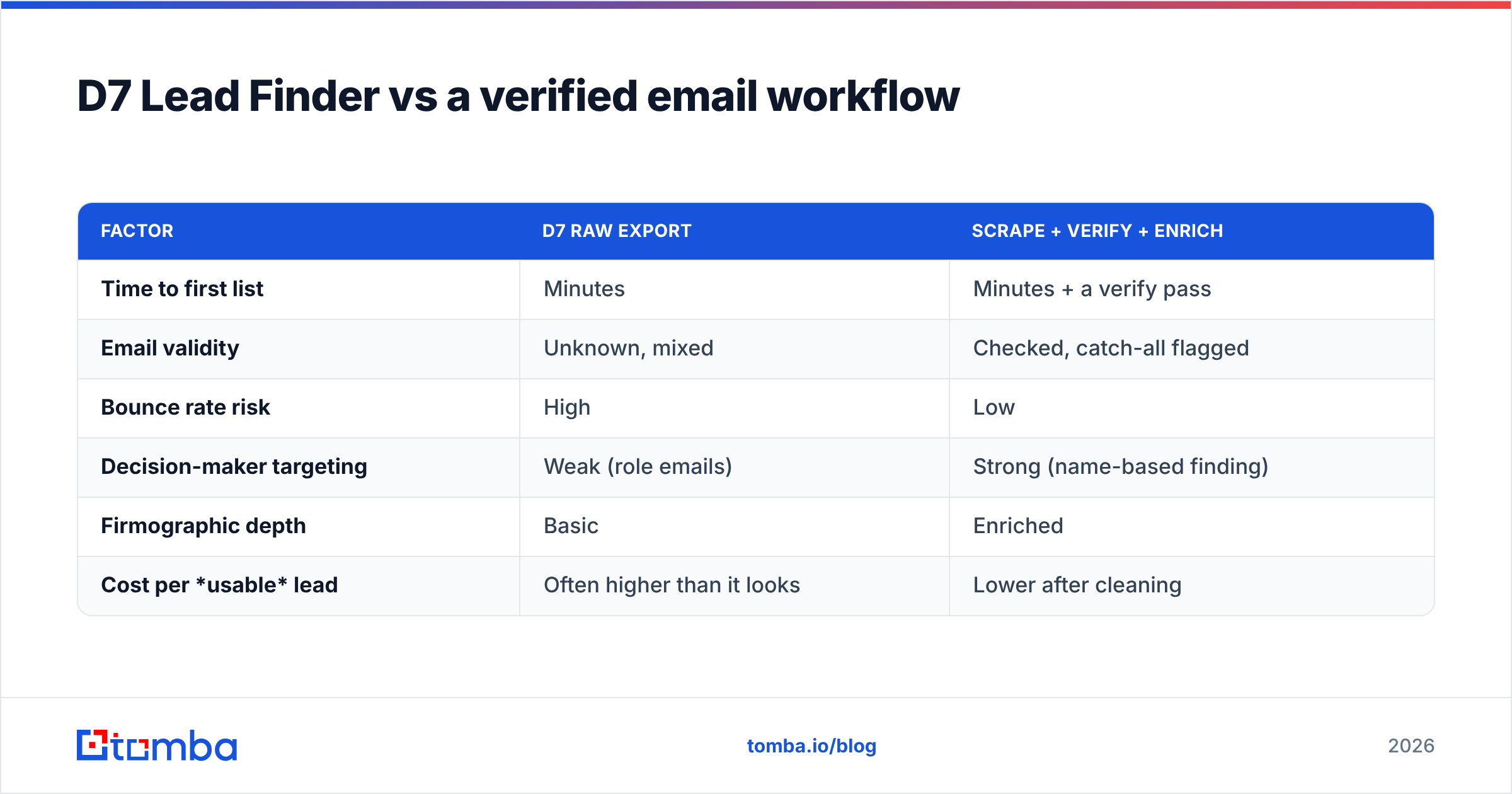
The most useful comparison isn't D7 versus another scraper — it's D7's raw output versus a workflow that turns that output into contacts you can safely email. Here's how the two approaches stack up on the things that actually decide reply rates.
| Factor | D7 raw export | Scrape + verify + enrich |
|---|---|---|
| Time to first list | Minutes | Minutes + a verify pass |
| Email validity | Unknown, mixed | Checked, catch-all flagged |
| Bounce rate risk | High | Low |
| Decision-maker targeting | Weak (role emails) | Strong (name-based finding) |
| Firmographic depth | Basic | Enriched |
| Cost per usable lead | Often higher than it looks | Lower after cleaning |
The point isn't to replace D7 — it's to add the step D7 skips. Once you have the list, run it through an email verification pass to kill invalids and flag catch-all domains, then use data enrichment to fill in the firmographics and, where possible, the named contact behind a generic inbox. That converts a cheap raw list into a campaign that won't torch your domain.
If you're scraping at volume, a bulk email finder lets you process the whole CSV in one shot instead of checking rows one at a time — which is the only sane way to handle a multi-thousand-row D7 export.
Who should actually use D7 Lead Finder?#
Good fit:
- Local marketing agencies selling web design, SEO, or ads to SMBs who need broad local coverage fast.
- Cold callers who care more about phone numbers than emails — D7's phone data is one of its stronger fields.
- Teams on a tight budget willing to trade polish for price and do their own cleanup.
Poor fit:
- B2B SDR teams chasing named decision-makers at specific companies — you need name-and-domain finding, not niche scraping.
- Anyone emailing from a new or warming domain, where a batch of bounces is genuinely dangerous.
- RevOps teams that need enriched, deduplicated records flowing into a CRM without manual scrubbing.
If you're in the second bucket, you'll get more from a purpose-built finder plus verifier than from a local scraper — and you'll spend less time fixing data than you saved buying it cheap.
How to get the most out of a D7 list#
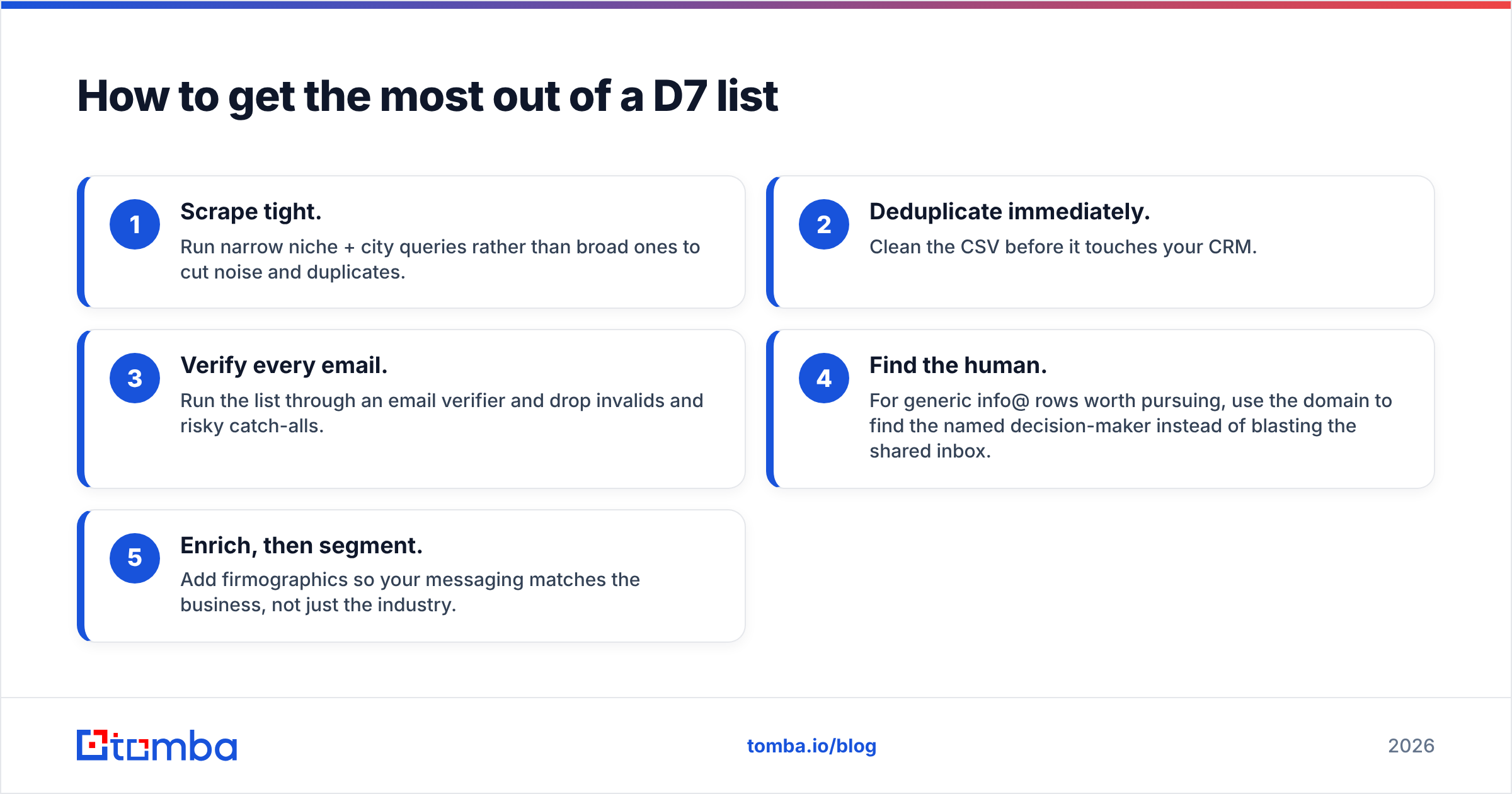
If D7's price wins you over, use it well. A simple pipeline:
- Scrape tight. Run narrow niche + city queries rather than broad ones to cut noise and duplicates.
- Deduplicate immediately. Clean the CSV before it touches your CRM.
- Verify every email. Run the list through an email verifier and drop invalids and risky catch-alls.
- Find the human. For generic info@ rows worth pursuing, use the domain to find the named decision-maker instead of blasting the shared inbox.
- Enrich, then segment. Add firmographics so your messaging matches the business, not just the industry.
Do this and a $16.90 scrape becomes a genuinely useful top-of-funnel motion. Skip it and you're paying to damage your own deliverability.
The verdict on D7 Lead Finder pricing#
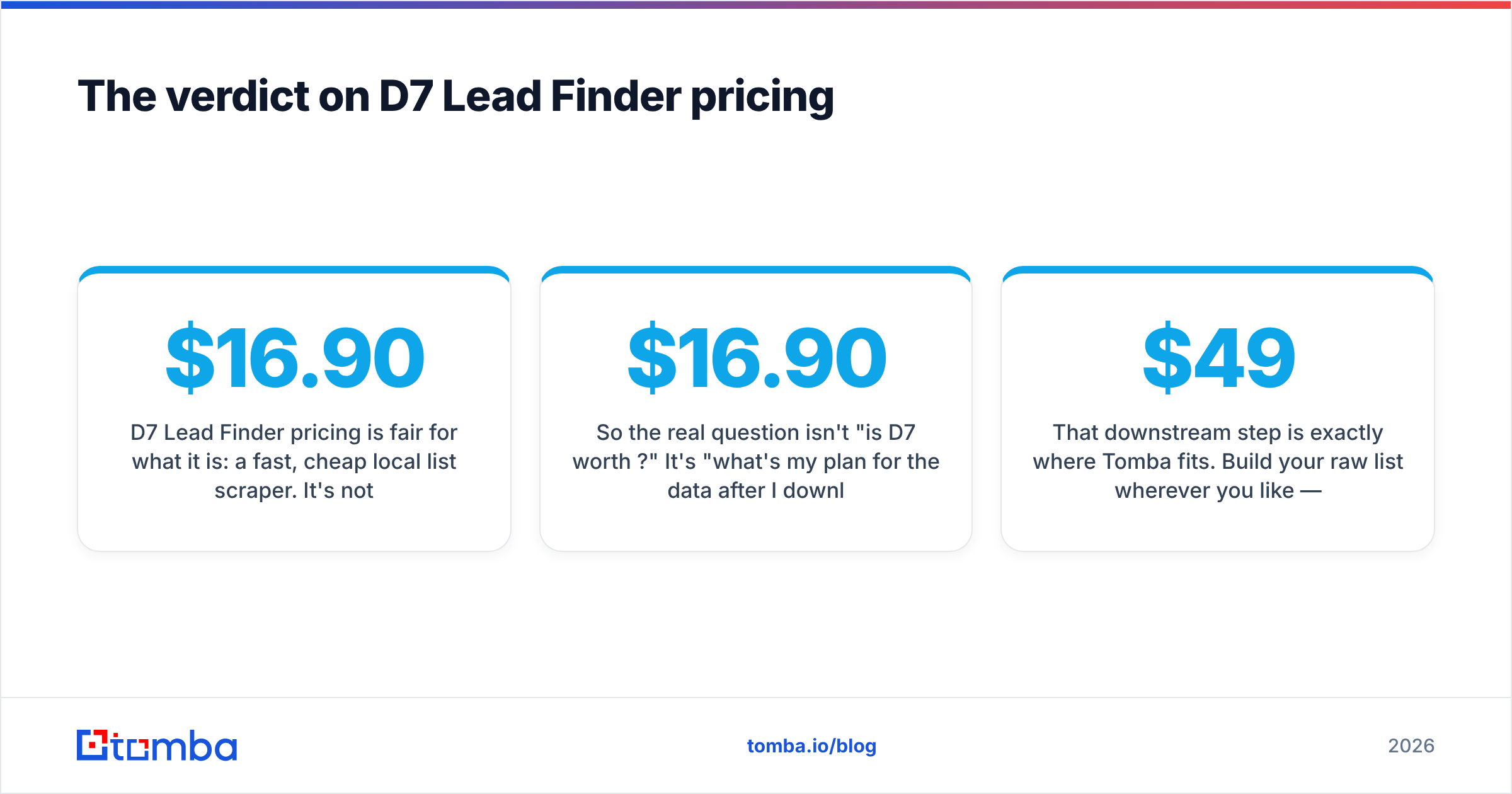
D7 Lead Finder pricing is fair for what it is: a fast, cheap local list scraper. It's not overpriced and it's not a scam — the reviews are mixed for the same reason a $16.90 tool is always mixed. It does one thing (bulk local scraping) well and leaves the hard part (verification, enrichment, named-contact finding) to you.
So the real question isn't "is D7 worth $16.90?" It's "what's my plan for the data after I download it?" If you have that plan, D7 earns its low price. If you don't, the cheap list ends up being the expensive mistake.
That downstream step is exactly where Tomba fits. Build your raw list wherever you like — then verify, enrich, and find the real decision-makers with the Tomba Email Finder. Start free with 25 searches a month, scale on Tomba pricing from $49/mo, and send campaigns to contacts you've actually confirmed are real. Cheap lists are easy. Deliverable ones are the whole game.
Related guides#
Ready to find emails that actually work?
Join 150,000+ professionals who stopped guessing and started sending. Free credits on signup — no credit card required.
Get the Tomba newsletter
Practical outbound tactics and product updates — once every two weeks.
About the author