D7 Lead Finder vs Findymail: Which Lead Tool Wins in 2026?
D7 Lead Finder scrapes bulk local leads; Findymail verifies B2B emails. We compare accuracy, pricing, and data quality to show which one actually fills your pipeline in 2026.
D7 Lead Finder vs Findymail: Which Lead Tool Wins in 2026?
Choosing between D7 Lead Finder and Findymail comes down to a single question: do you want volume or verified accuracy? These two tools live at opposite ends of the lead-generation spectrum. One dumps thousands of scraped local-business records into a CSV. The other hands you a smaller list of validated B2B emails ready for cold outreach. Pick the wrong one and you either drown in dead data or pay premium prices for leads you didn't need.
This comparison breaks down what each tool actually does, how the pricing really works, where the data comes from, and which one fits your workflow in 2026.
TL;DR#
- D7 Lead Finder is a bulk local-business scraper — great for raw volume (emails, phones, social handles) but weak on email verification and B2B targeting.
- Findymail is a B2B email finder and verifier built for cold outreach — higher accuracy, LinkedIn and Apollo workflows, but credit-based and pricier per lead.
- Bounce rate is the real cost. D7's unverified lists routinely bounce 30–40%; Findymail keeps bounces low but caps your monthly volume.
- Neither is the accuracy leader. Independent testing puts specialized finders like Tomba ahead on verified B2B coverage at a lower blended cost.
- Rule of thumb: D7 for local SMB spray-and-pray, Findymail for LinkedIn-based B2B, Tomba when you want both accuracy and API scale.

What is D7 Lead Finder?#
D7 Lead Finder is a lead-scraping tool aimed at agencies and local-service marketers. You type in a niche (say, "dentists in Austin") and it returns a list of businesses with whatever public contact data it can pull — business email, phone number, website, and social profiles.
Its selling point is raw volume at a flat monthly rate. You can generate thousands of records in a single session, and the interface is dead simple. For someone selling web design, SEO, or ads to local brick-and-mortar businesses, that firehose of generic info@ and contact@ addresses can be enough to start dialing and emailing.
The catch is data quality. D7 pulls from directories and public listings, so you get a lot of role-based addresses, outdated numbers, and records that were never verified. There's no serious deliverability layer, which is why cold campaigns built on raw D7 exports tend to bounce hard.
What is Findymail?#
Findymail is a B2B email finder and verifier built for outbound sales teams. Instead of scraping local directories, it works from professional identities — you feed it a LinkedIn profile, a Sales Navigator search, or an Apollo list, and it returns the person's verified work email.
Its reputation rests on two things: verification and list cleaning. Findymail runs found emails through its own validation and markets a low-bounce guarantee, which is exactly what cold emailers care about. It also has a popular "clean your Apollo export" workflow that re-verifies scraped emails before you send.
The trade-off is the pricing model. Findymail runs on monthly credits, and finding plus verifying burns through them faster than you'd expect on large campaigns. It's a precision instrument, not a volume machine.
D7 Lead Finder vs Findymail: Core differences#
Here's the honest side-by-side. Note that pricing shifts over time — always confirm on the vendors' own pages before buying.
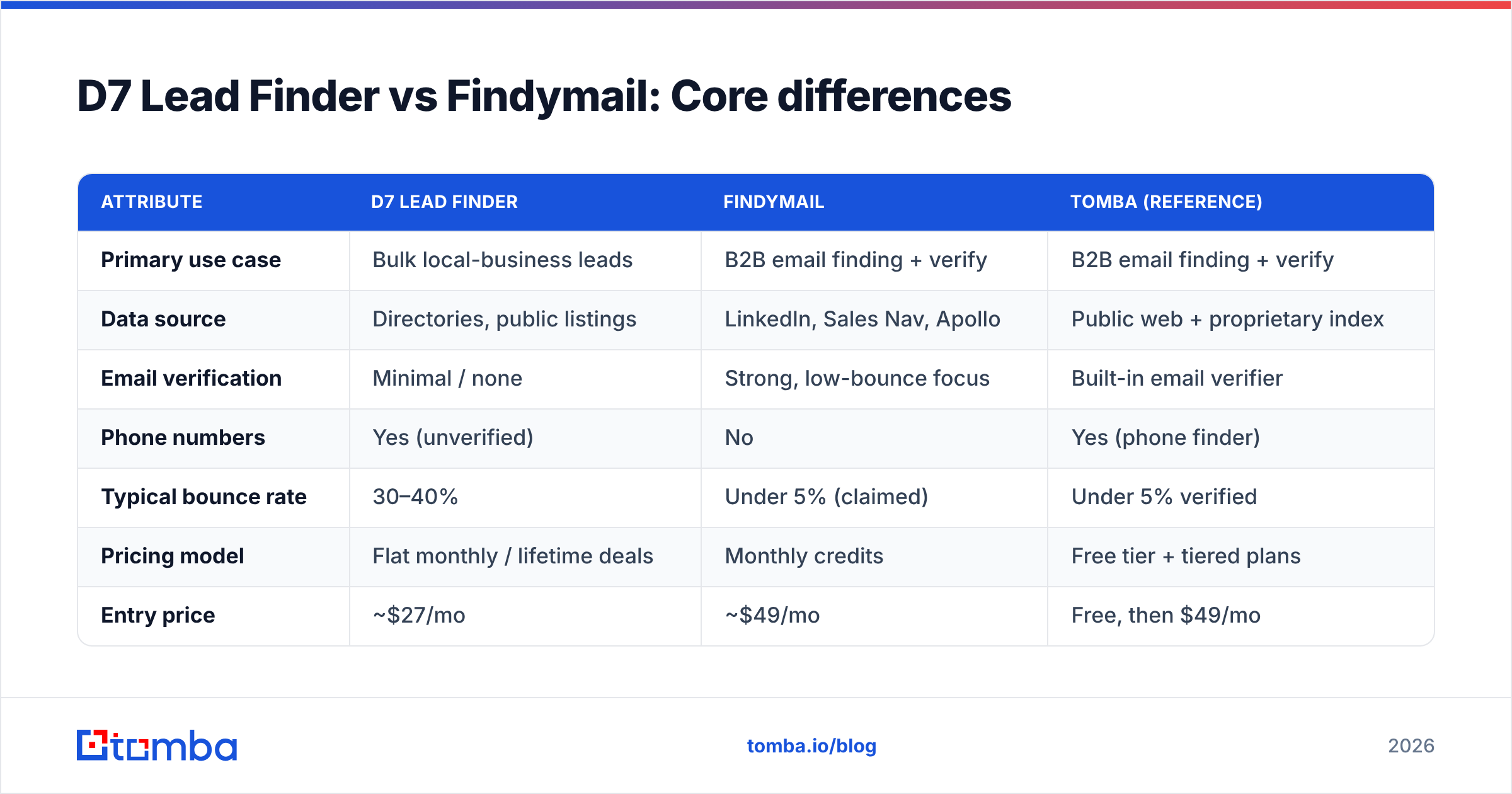
| Attribute | D7 Lead Finder | Findymail | Tomba (reference) |
|---|---|---|---|
| Primary use case | Bulk local-business leads | B2B email finding + verify | B2B email finding + verify |
| Data source | Directories, public listings | LinkedIn, Sales Nav, Apollo | Public web + proprietary index |
| Email verification | Minimal / none | Strong, low-bounce focus | Built-in email verifier |
| Phone numbers | Yes (unverified) | No | Yes (phone finder) |
| Typical bounce rate | 30–40% | Under 5% (claimed) | Under 5% verified |
| Pricing model | Flat monthly / lifetime deals | Monthly credits | Free tier + tiered plans |
| Entry price | ~$27/mo | ~$49/mo | Free, then $49/mo |
| API access | Limited | Yes | Full email finder API |
| Best for | Local SMB outreach | LinkedIn-driven B2B | Accuracy + scale |
The pattern is clear: D7 optimizes for quantity, Findymail for quality. D7 gives you more rows for less money; Findymail gives you fewer rows you can actually trust. Which matters more depends entirely on who you're selling to.

Is D7 Lead Finder better than Findymail for cold email?#
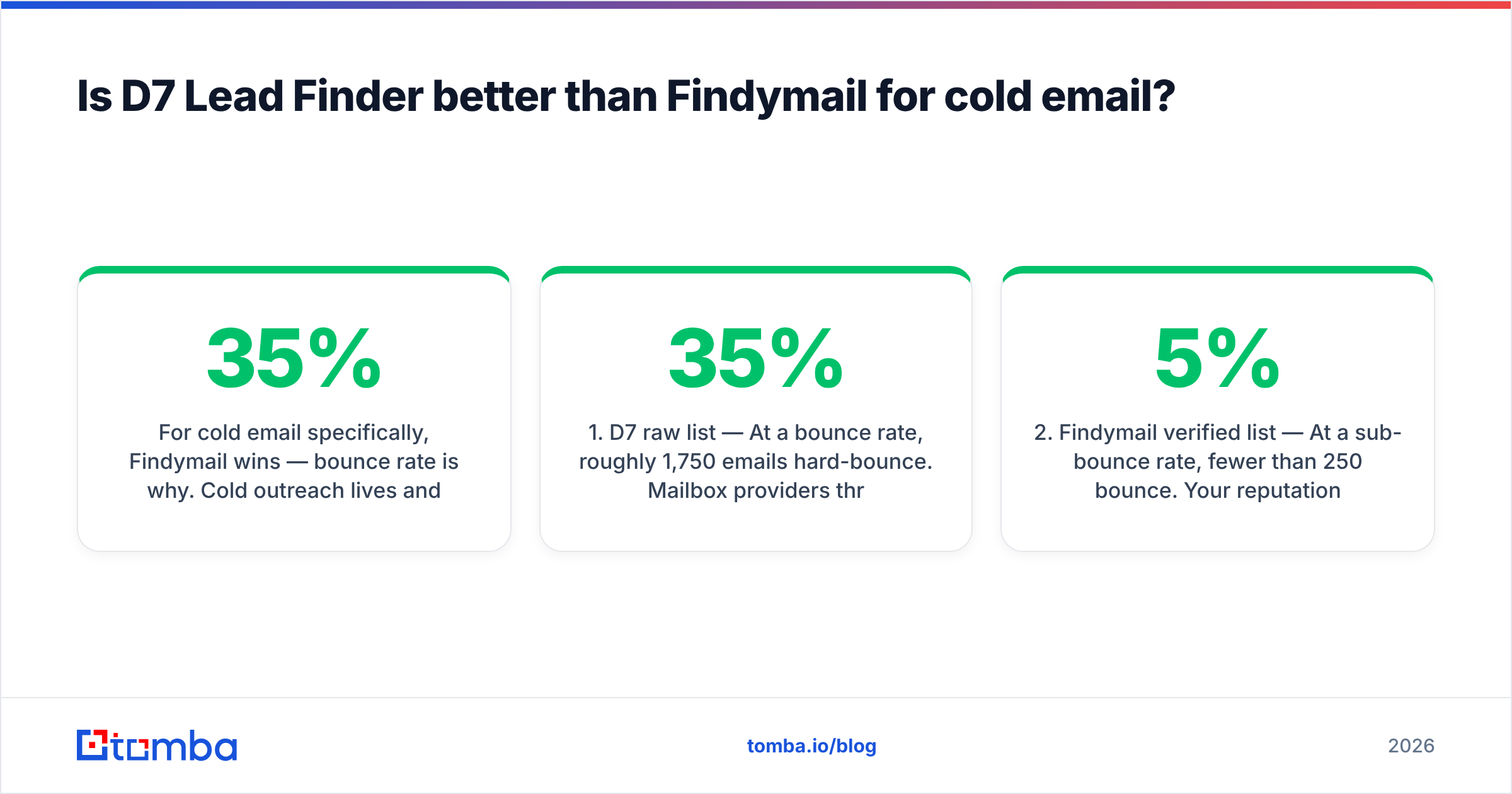
For cold email specifically, Findymail wins — bounce rate is why. Cold outreach lives and dies on your sender reputation. Modern inbox providers punish domains that hit spam traps and dead addresses, so a 35% bounce rate from a raw D7 list can quietly tank your deliverability for every campaign, not just the bad one.
Consider the math on a 5,000-contact send:
- D7 raw list — At a 35% bounce rate, roughly 1,750 emails hard-bounce. Mailbox providers throttle you, your domain reputation drops, and even valid recipients start landing in spam.
- Findymail verified list — At a sub-5% bounce rate, fewer than 250 bounce. Your reputation stays intact and inboxing holds.
- The hidden cost — Recovering a burned sending domain takes weeks of warmup. That downtime costs far more than the price gap between the two tools.
- The volume trap — More records only help if they're reachable. 5,000 unverified addresses can generate fewer real conversations than 1,500 verified ones.
If you insist on using D7 for its volume, at minimum run the export through a dedicated email verifier before you send a single message. Cleaning first turns a liability into a usable list.
How does the data quality compare?#
Data quality splits along two axes: coverage (how many contacts it finds) and accuracy (how many of those are correct and reachable).
D7 wins on coverage for local businesses because directories are dense with SMB listings. But those listings skew toward generic mailboxes — info@, sales@, hello@ — that rarely reach a decision-maker and often sit unmonitored. Great for a call center, weak for personalized outbound.
Findymail wins on accuracy for individual professionals. Because it starts from a real person's LinkedIn identity, the email it returns is tied to a named human at a known company. That's the difference between "someone at this dental office" and "Dr. Sarah Chen, practice owner."
For a deeper primer on how validation actually works under the hood, the concept of email deliverability is worth understanding before you commit budget to either tool.
Where both tools show gaps is verified B2B coverage at scale — finding the right person's confirmed email across large domains, in bulk, via API. That's the lane specialized finders are built for. Independent reviews on G2 consistently rank verification-first tools ahead of generalist scrapers on this metric.

What does each one actually cost?#
Sticker price is misleading. The number that matters is cost per usable, verified lead — the ones that don't bounce and reach a real buyer.
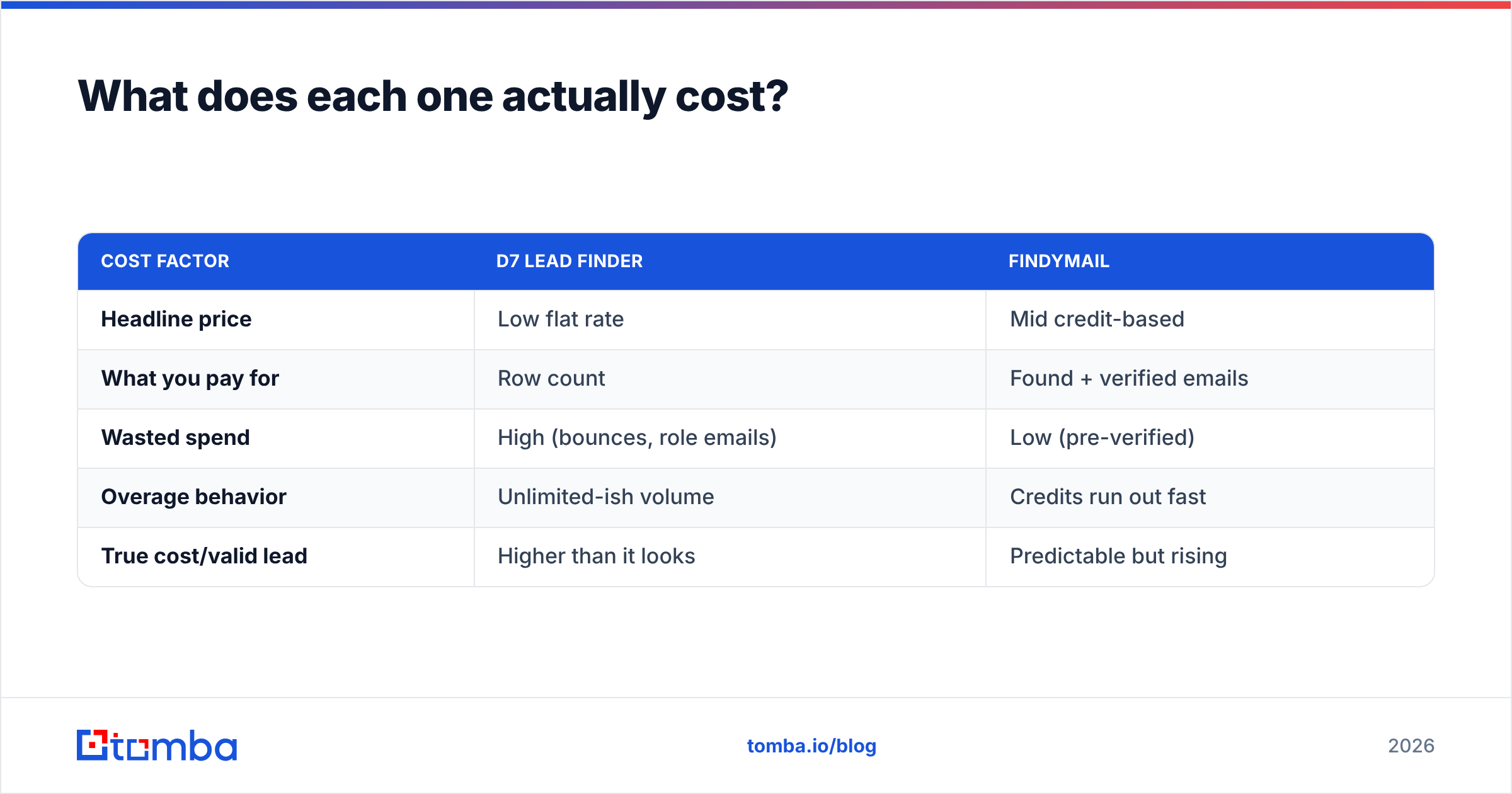
| Cost factor | D7 Lead Finder | Findymail |
|---|---|---|
| Headline price | Low flat rate | Mid credit-based |
| What you pay for | Row count | Found + verified emails |
| Wasted spend | High (bounces, role emails) | Low (pre-verified) |
| Overage behavior | Unlimited-ish volume | Credits run out fast |
| True cost/valid lead | Higher than it looks | Predictable but rising |
D7 looks cheap until you factor in the 30–40% you throw away and the reputation risk on top. Findymail looks pricey until you factor in that nearly every lead is usable — but heavy senders blow through credits and end up on expensive tiers.
This is exactly where a tool with a free tier plus transparent scaling changes the equation. You can compare full Tomba pricing against both: a free plan to test, then Starter at $49/mo, Growth at $99/mo, and Pro at $249/mo — with verification baked in rather than billed as a separate step.

When should you pick D7 Lead Finder?#
Choose D7 Lead Finder if:
- You sell to local businesses — restaurants, clinics, gyms, contractors — where directory data is dense and a phone number matters as much as an email.
- You run high-volume, low-touch outreach and care more about total dials than per-lead precision.
- Your team calls more than it emails, so bounce rate isn't your primary risk.
- Budget is tight and you'll accept doing your own verification pass afterward.
D7 is a blunt instrument, and for the right local-marketing use case, blunt is fine.
When should you pick Findymail?#
Choose Findymail if:
- You sell B2B and your buyers live on LinkedIn and Sales Navigator.
- Deliverability is sacred because you're running cold email at scale and can't afford a reputation hit.
- You already scrape with Apollo and need a reliable way to clean and re-verify those exports.
- You value fewer, better leads over a giant unverified dump.
Findymail is the safer choice for modern outbound — right up until credit costs start to sting.
Is there a better alternative to both?#
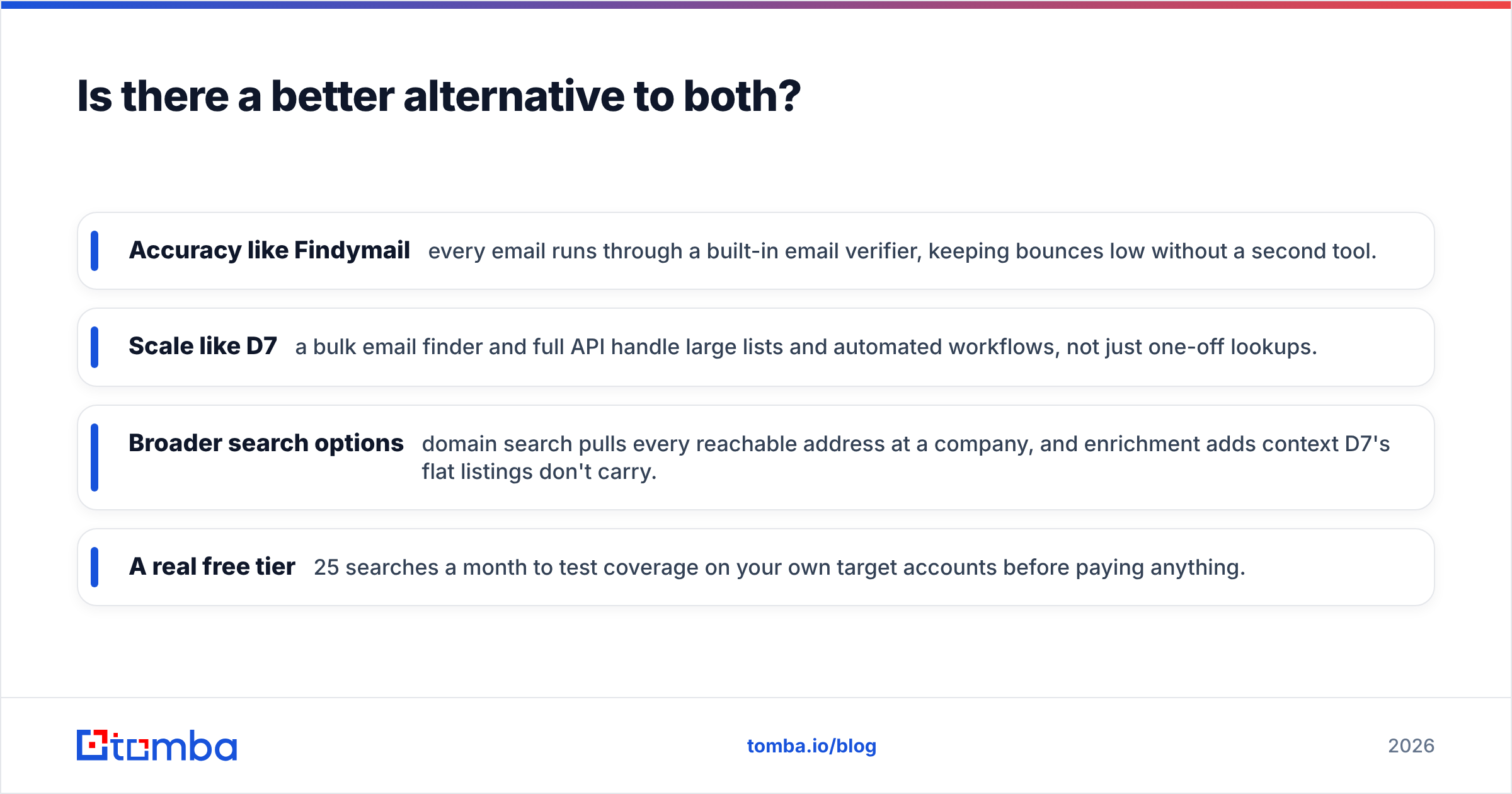
If you want Findymail's accuracy with D7's scale — and API access neither fully delivers — a specialized finder like Tomba is the third option worth testing. It's built as a verification-first B2B platform, so finding and validating happen in one pass rather than as two separate line items.
Where it fits between the two:
- Accuracy like Findymail — every email runs through a built-in email verifier, keeping bounces low without a second tool.
- Scale like D7 — a bulk email finder and full API handle large lists and automated workflows, not just one-off lookups.
- Broader search options — domain search pulls every reachable address at a company, and enrichment adds context D7's flat listings don't carry.
- A real free tier — 25 searches a month to test coverage on your own target accounts before paying anything.
If Findymail is the tool you're leaning toward but the credit ceiling worries you, it's worth reading a direct Findymail alternative breakdown to see how the numbers compare on your actual send volume. The founders of both Findymail and D7 built genuinely useful products — this isn't about one being junk. It's about matching the tool to your motion and your margin.
D7 Lead Finder vs Findymail: The verdict#
There's no universal winner — there's a winner for your use case:
- Local SMB outreach, phone-heavy, budget-first → D7 Lead Finder, with a mandatory verification pass.
- B2B cold email, LinkedIn-sourced, deliverability-first → Findymail.
- B2B accuracy plus bulk and API, without the credit ceiling → test a verification-first finder like Tomba against both before you commit.
The single biggest mistake teams make is treating raw lead count as the goal. It isn't. Conversations with real buyers are the goal, and those come from verified, well-targeted data — not the biggest CSV.
Start by defining who you actually sell to. If it's local businesses, D7's volume earns its place. If it's professionals at companies, you want verification in the loop from the first search — and that's exactly what a dedicated email finder is built to deliver. Spin up the free tier, run it against ten of your target accounts, and let the bounce rate settle the argument for you.
Sources worth checking before you buy: the official Findymail and D7 Lead Finder sites for current pricing, and verified reviews on G2 for real-world accuracy reports.
Related guides#
Ready to find emails that actually work?
Join 150,000+ professionals who stopped guessing and started sending. Free credits on signup — no credit card required.
Get the Tomba newsletter
Practical outbound tactics and product updates — once every two weeks.
About the author