Data Miner Pricing, Reviews, Pros and Cons (2026 Guide)
An honest breakdown of Data Miner pricing, real user reviews, and the pros and cons of the popular web-scraping extension — plus where it falls short for B2B contact data.
Data Miner is one of the best-known point-and-click web scrapers, but its pricing model confuses almost everyone who signs up. Page credits, per-row limits, and four paid tiers make it hard to know what you'll actually pay once you scale. This review breaks down Data Miner pricing, what real users say, and the honest pros and cons — so you can decide whether it fits your workflow before you spend a dollar.
TL;DR#
- Data Miner is a browser-based scraper, not a contact database. It pulls whatever is on a web page into a table or CSV — nothing more, nothing less.
- Pricing runs from a free tier to roughly $99+/mo, metered by "pages scraped" rather than seats, which trips up teams that scale volume.
- Pros: genuinely no-code, works on almost any site, strong pre-built recipes, and a fair free plan for light use.
- Cons: page-credit math gets expensive fast, no built-in data verification, and it does not find or validate email addresses.
- If your real goal is B2B contact data, a purpose-built email finder will beat a general scraper on accuracy and total cost.
What is Data Miner and who is it for?#
Data Miner is a Chrome and Edge extension (from dataminer.io) that turns web pages into structured data. Think of it like a photocopier for tables: you point it at a page, it recognizes the repeating structure — rows in a directory, products in a catalog, results in a SERP — and copies them into a spreadsheet you can export.
It is aimed at three kinds of users:
- Analysts and researchers who need to pull public data (listings, prices, reviews) without writing Python.
- Recruiters and sales teams scraping directories, marketplaces, or search results for leads.
- Ops and e-commerce folks monitoring competitor catalogs or pricing.
The appeal is that it is genuinely no-code. You install the extension, run a "recipe" (a saved scraping template), and get a CSV. Data Miner maintains a large public library of recipes for popular sites, so common jobs work out of the box.
The important thing to understand before we talk price: Data Miner extracts what is already visible on a page. It does not enrich, verify, or discover data that isn't rendered in your browser. That distinction drives most of the pros and cons below.

How does Data Miner pricing work in 2026?#
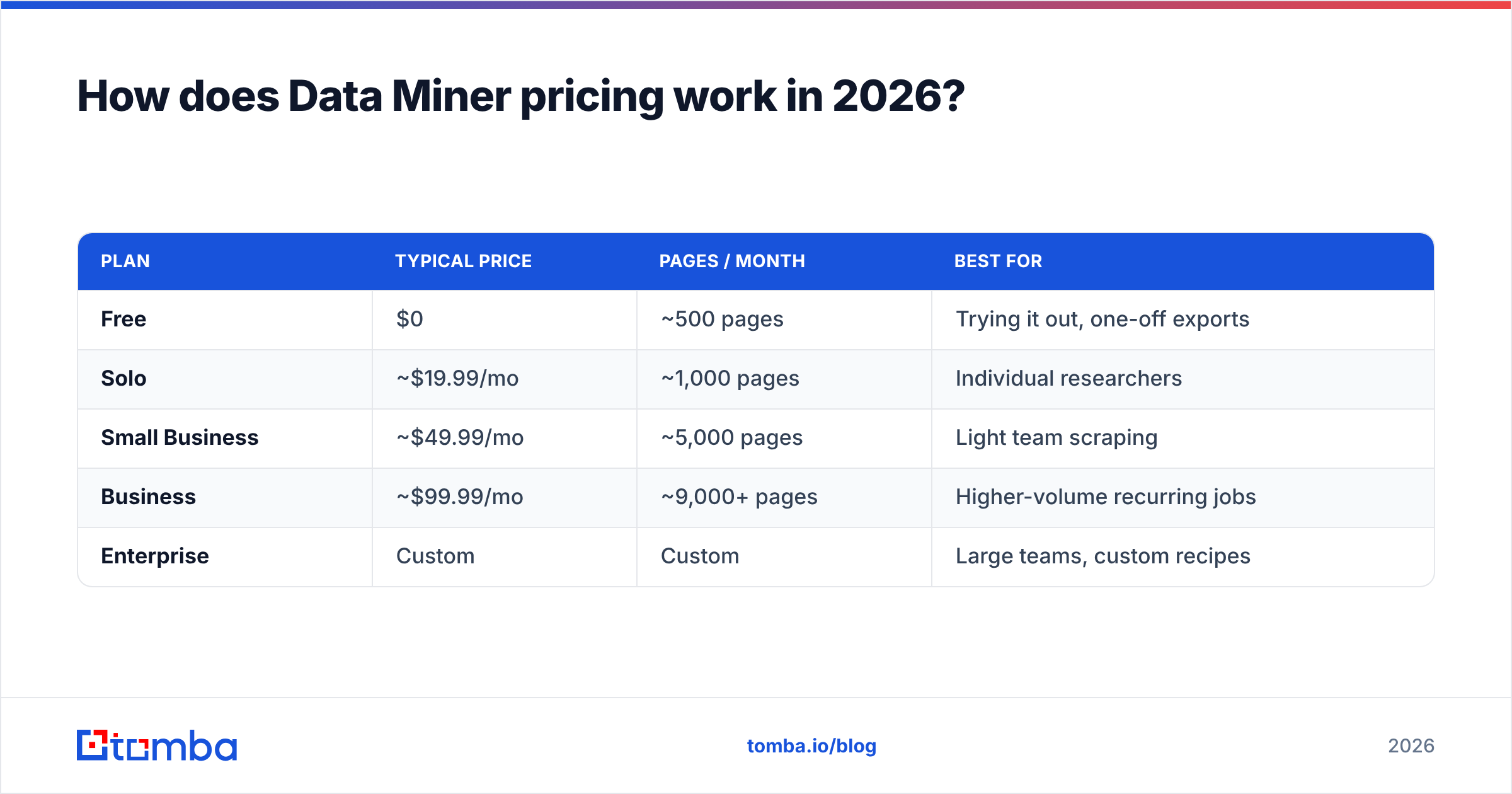
Data Miner meters usage by pages scraped per month, not by user seats. Every page load that the extension processes counts against your monthly allowance. That model is generous for occasional scraping and punishing for high-volume, multi-page jobs.
Below is the general shape of the plans. Data Miner adjusts limits and prices periodically, so treat these as directional and confirm the live numbers on their pricing page before you buy.
| Plan | Typical price | Pages / month | Best for |
|---|---|---|---|
| Free | $0 | ~500 pages | Trying it out, one-off exports |
| Solo | ~$19.99/mo | ~1,000 pages | Individual researchers |
| Small Business | ~$49.99/mo | ~5,000 pages | Light team scraping |
| Business | ~$99.99/mo | ~9,000+ pages | Higher-volume recurring jobs |
| Enterprise | Custom | Custom | Large teams, custom recipes |
A few things that catch people off guard:
- "Pages" ≠ "rows." One paginated directory with 50 result pages burns 50 page credits even if each page only yields a handful of rows. Deep scrapes drain allowances quickly.
- Overages don't roll over. Unused pages generally expire monthly, so you pay for headroom you may not use.
- Advanced features gate behind higher tiers. Automatic pagination, scheduled scraping, and bulk URL runs typically require Small Business or above.
Compared to metered data platforms, this is closer to how you'd budget for a utility than for software seats. If your volume is spiky, the free or Solo tier can be a bargain; if it's steady and large, costs climb fast.
What do Data Miner reviews say?#
Aggregated feedback on G2 and Capterra paints a consistent picture: users love the ease of setup and the recipe library, and they grumble about pricing math and support responsiveness.
What reviewers praise:
- Zero learning curve for basic jobs — install, click, export.
- Recipe library covers many popular sites, so you rarely start from scratch.
- Reliable on messy HTML where simpler scrapers choke.
What reviewers criticize:
- Page-credit pricing feels opaque until the first big scrape eats the monthly budget.
- Custom recipes have a learning curve the moment you leave the pre-built library.
- No data cleaning or verification — you get raw text, warts and all.
The recurring theme: Data Miner is excellent at getting data off a page and does nothing to tell you whether that data is accurate or usable. For lead-gen use cases especially, that gap matters, because scraped contact fields are frequently stale, malformed, or incomplete.
What are the pros and cons of Data Miner?#
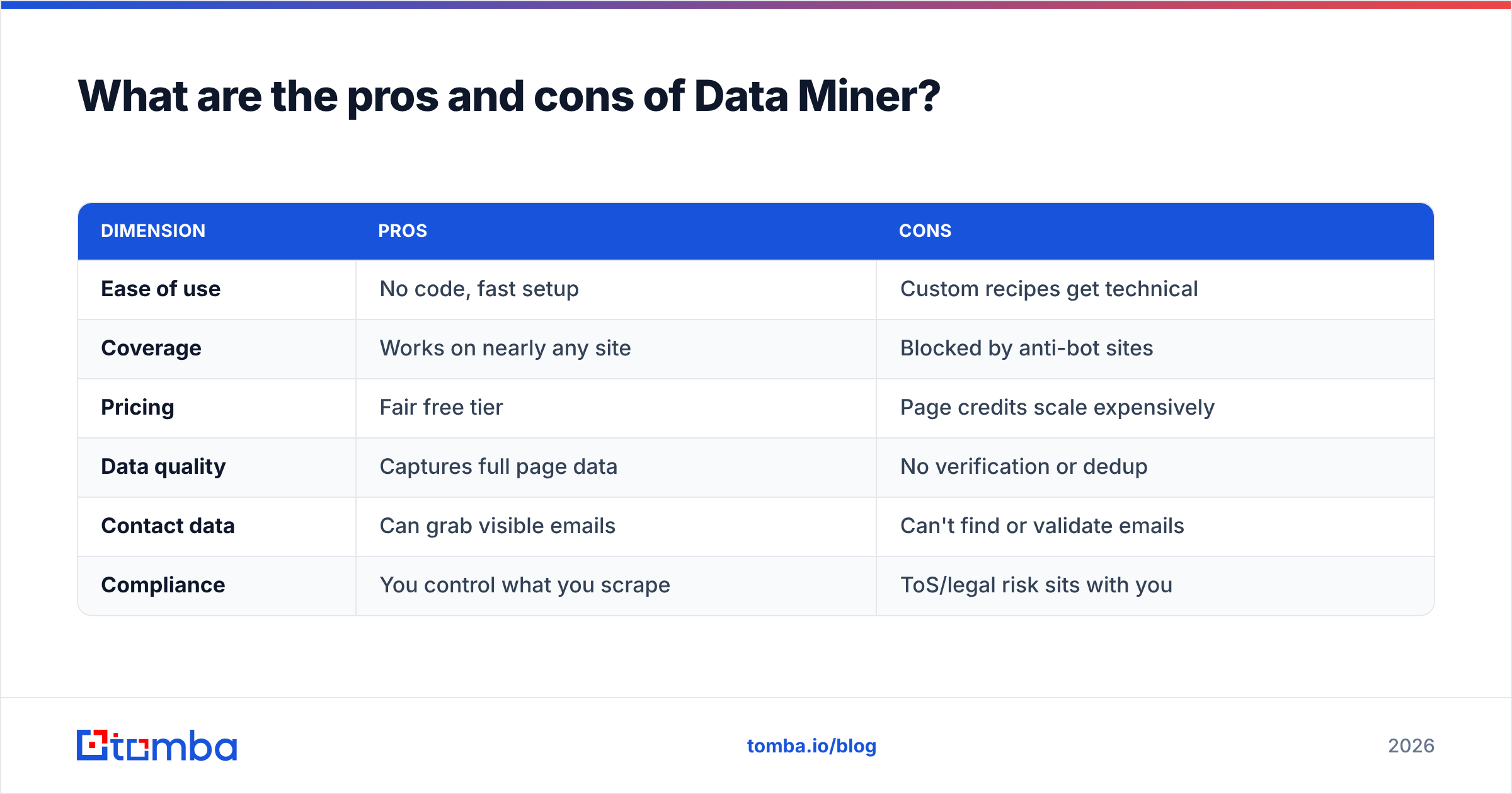
Here is the honest ledger after weighing the pricing and reviews.
| Dimension | Pros | Cons |
|---|---|---|
| Ease of use | No code, fast setup | Custom recipes get technical |
| Coverage | Works on nearly any site | Blocked by anti-bot sites |
| Pricing | Fair free tier | Page credits scale expensively |
| Data quality | Captures full page data | No verification or dedup |
| Contact data | Can grab visible emails | Can't find or validate emails |
| Compliance | You control what you scrape | ToS/legal risk sits with you |
The core takeaway: Data Miner is a strong general-purpose extractor and a weak contact-data tool. If you scrape product prices, public listings, or research data, it's a solid pick. If you're scraping to build a prospecting list, you inherit two hidden costs — verification and the emails that simply aren't on the page.
Is Data Miner worth it for B2B lead generation?#
Short answer: only as a first step, and rarely as the whole solution.
When you scrape a company directory or a LinkedIn-style page, you typically get names, titles, and company URLs — but not reliable, deliverable email addresses. Public pages either hide emails, show role addresses (info@, sales@), or display formats that bounce. You then face a choice every scraper eventually hits: keep scraping fragments, or switch to a tool built to find and verify the actual contact.

This is where a dedicated stack pulls ahead:
- Discovery — instead of scraping a page for whatever email happens to be visible, a domain search returns known email patterns and named contacts for a company.
- Verification — every address runs through an email verifier so bounces don't wreck your sender reputation.
- Enrichment — a scraped name-and-company row becomes a full record through data enrichment, adding role, seniority, and phone where available.
A general scraper can't do any of those three well, because it only sees the surface of the page. Purpose-built tools query verified data sources and validate results in real time. For prospecting, that difference is the whole game — a list of 5,000 unverified scraped strings is worth less than 500 verified, deliverable contacts.
Data Miner vs a dedicated email finder: which should you use?#
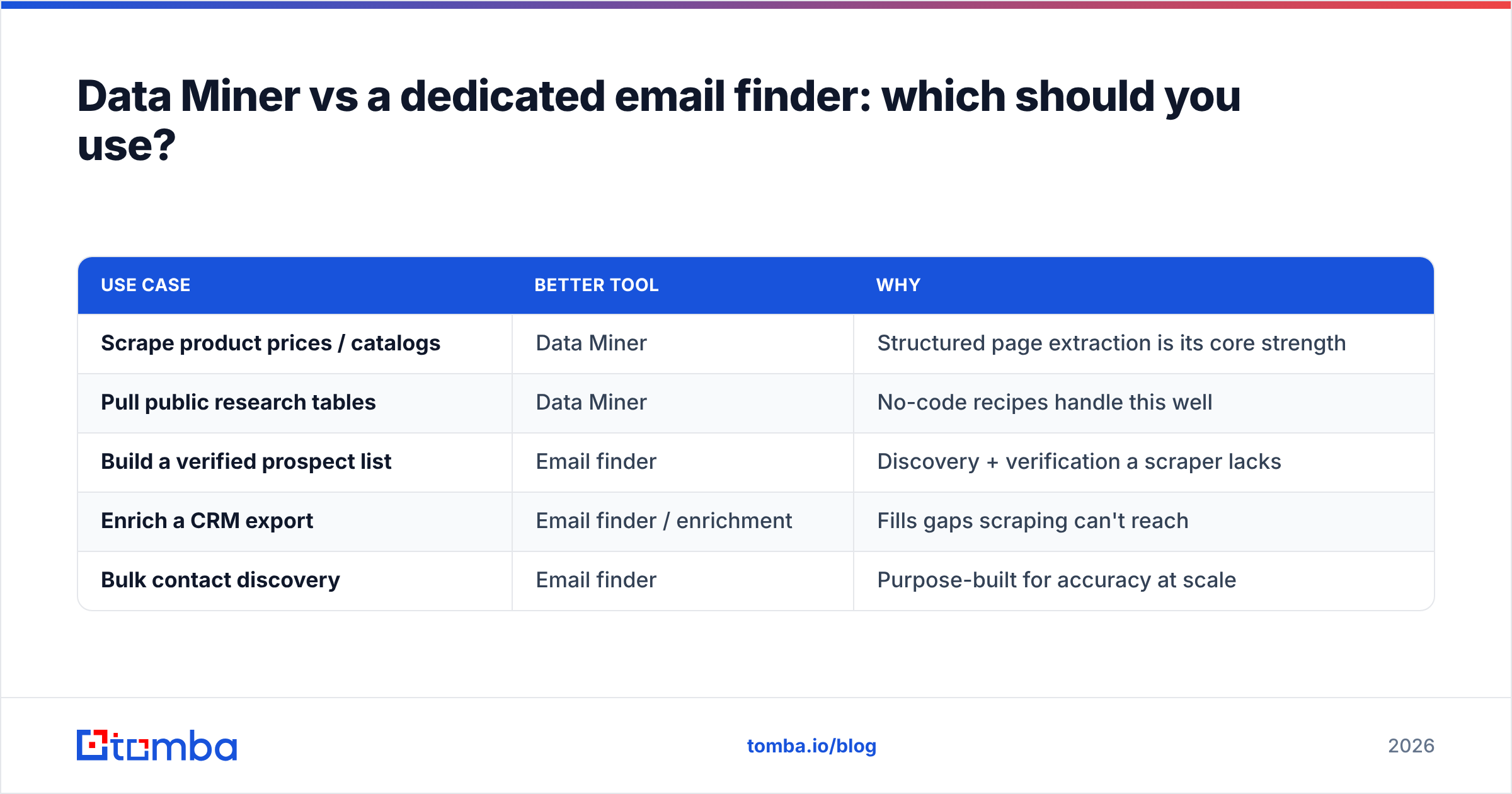
They solve different problems, so the honest answer is "it depends on the data you need." Use this to decide.
| Use case | Better tool | Why |
|---|---|---|
| Scrape product prices / catalogs | Data Miner | Structured page extraction is its core strength |
| Pull public research tables | Data Miner | No-code recipes handle this well |
| Build a verified prospect list | Email finder | Discovery + verification a scraper lacks |
| Enrich a CRM export | Email finder / enrichment | Fills gaps scraping can't reach |
| Bulk contact discovery | Email finder | Purpose-built for accuracy at scale |
If your workflow is genuinely both — scrape a source, then contact the people on it — the smart pattern is to use Data Miner for extraction and hand the company or domain list to a bulk email finder for the contact layer. You get scraping flexibility and deliverable data, instead of forcing one tool to do a job it wasn't designed for.
How much do the alternatives cost?#
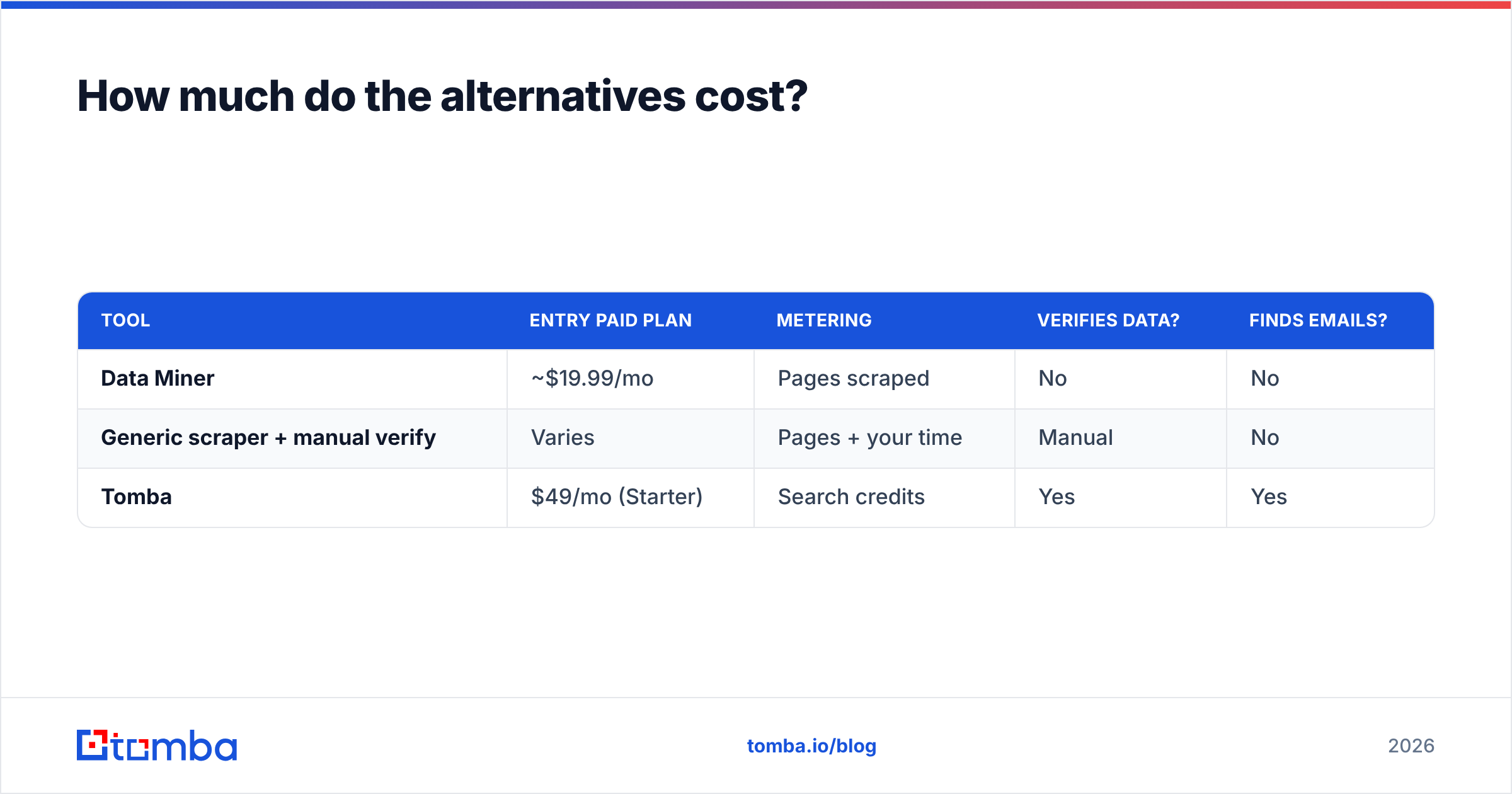
Cost comparisons only make sense when you compare like for like. Data Miner charges for pages; contact-data tools charge for lookups or credits. Here's a rough side-by-side for a lead-gen budget of around $49–$99/month.
| Tool | Entry paid plan | Metering | Verifies data? | Finds emails? |
|---|---|---|---|---|
| Data Miner | ~$19.99/mo | Pages scraped | No | No |
| Generic scraper + manual verify | Varies | Pages + your time | Manual | No |
| Tomba | $49/mo (Starter) | Search credits | Yes | Yes |
Tomba's published tiers are a free plan (25 searches/month), Starter at $49/mo, Growth at $99/mo, and Pro at $249/mo, with Enterprise custom — full details are on the Tomba pricing page. The point isn't that one is universally cheaper; it's that a scraper's low sticker price hides the verification work you still have to do afterward. When you price in the hours spent cleaning and validating scraped contacts, a purpose-built finder often wins on total cost.
Frequently asked questions#
Is Data Miner free? Yes, there is a free tier (around 500 pages per month) that's fine for occasional exports. Recurring or high-volume scraping requires a paid plan.
Does Data Miner find email addresses? No. It captures emails only if they are already visible on the page you scrape. It does not discover missing emails or verify whether an address is deliverable.
Why does my Data Miner plan run out so fast? Because it counts pages, not rows. Paginated or multi-page scrapes consume credits quickly — a single deep directory can burn hundreds of pages in one run.
Is Data Miner good for sales prospecting? It's useful for the extraction step but incomplete for prospecting. Pair it with an email finder and verifier, or use a dedicated tool that handles discovery and validation together.
What's the best Data Miner alternative for contact data? For B2B contact data specifically, a verified email-finding platform beats a general scraper on accuracy. Data Miner remains excellent for non-contact structured data.
The verdict#
Data Miner is worth it — for the job it was built for. If you need to pull structured, visible data off web pages without writing code, its free tier and recipe library make it one of the easiest tools on the market. The pricing is fair for light use; just go in knowing that page-credit metering scales faster than seat-based pricing, and budget accordingly.
But if the reason you're scraping is to reach people, Data Miner leaves you halfway there. It hands you raw page text and none of the verification or discovery that turns a list into revenue. That's a different tool's job.
Building prospect lists? Skip the scrape-then-clean cycle. Start with the Tomba Email Finder to find and verify professional email addresses by name, company, or domain — deliverable contacts instead of raw HTML. Try it free with 25 searches a month, no scraping required.
Related guides#
Ready to find emails that actually work?
Join 150,000+ professionals who stopped guessing and started sending. Free credits on signup — no credit card required.
Get the Tomba newsletter
Practical outbound tactics and product updates — once every two weeks.
About the author