Data Orchestration vs Data Integration: Key Differences
Data integration moves and merges your data. Data orchestration decides when, in what order, and what happens next. Here is how they differ and when your RevOps stack needs each.
Most teams use "data orchestration" and "data integration" as if they mean the same thing. They don't. One is about connecting systems so data can flow between them. The other is about coordinating that flow — deciding what runs, in what order, under what conditions, and what happens when a step fails.
Get the distinction wrong and you end up with a pipeline that technically moves data but silently ships duplicates, stale records, and half-enriched leads into your CRM. Get it right and your GTM stack runs like a kitchen at dinner rush: every station fires in sequence, nothing burns, orders go out complete.
TL;DR#
- Data integration is the plumbing: it connects sources (CRM, forms, enrichment APIs, warehouses) and moves or merges data between them via ETL, ELT, or APIs.
- Data orchestration is the conductor: it sequences, schedules, and conditionally triggers those integration jobs, handling dependencies, retries, and failures.
- You almost always need both — integration without orchestration is fragile, and orchestration without integration has nothing to coordinate.
- For B2B revenue teams, the highest-leverage use case is orchestrating lead enrichment and verification so only clean, deduplicated contacts reach sales.
- Tools like a reliable email finder API sit inside the integration layer; the orchestration layer decides when to call them.
What is data integration?#
Data integration is the practice of combining data from multiple sources into a unified, usable view. Think of it as the road network between cities: it's what physically lets a record travel from your web form to your CRM to your data warehouse.
Integration answers the question "how does data get from A to B, and how do we reconcile it once it arrives?" It covers three broad patterns:
- ETL (Extract, Transform, Load) — pull data out, clean and reshape it, then load it into the destination. Classic for warehouses.
- ELT (Extract, Load, Transform) — load raw data first, transform inside the warehouse. Common with modern cloud platforms like Snowflake or BigQuery.
- API / real-time integration — systems talk directly through APIs, syncing records as events happen instead of in nightly batches.
A concrete B2B example: a prospect fills out a demo form. Integration is what pushes that record into your CRM, matches it against existing accounts, appends firmographic fields, and stores a copy in your warehouse for analytics. The Tomba API is a good example of an integration-layer component — you call it, it returns verified contact data, and that data flows into wherever you point it.
Integration's job ends at "the data is connected and consistent." It does not, by itself, decide when to run, what to do first, or what happens when the enrichment API times out. That's a different discipline.
What is data orchestration?#
Data orchestration is the automated coordination of data workflows across systems — the sequencing, scheduling, and conditional logic that governs when and how integration jobs run. If integration is the road network, orchestration is the traffic control system deciding which trucks leave, in what order, and what happens when one breaks down on the highway.
Orchestration answers "in what order should these steps run, what depends on what, and how do we recover when something fails?" A single orchestrated workflow might:
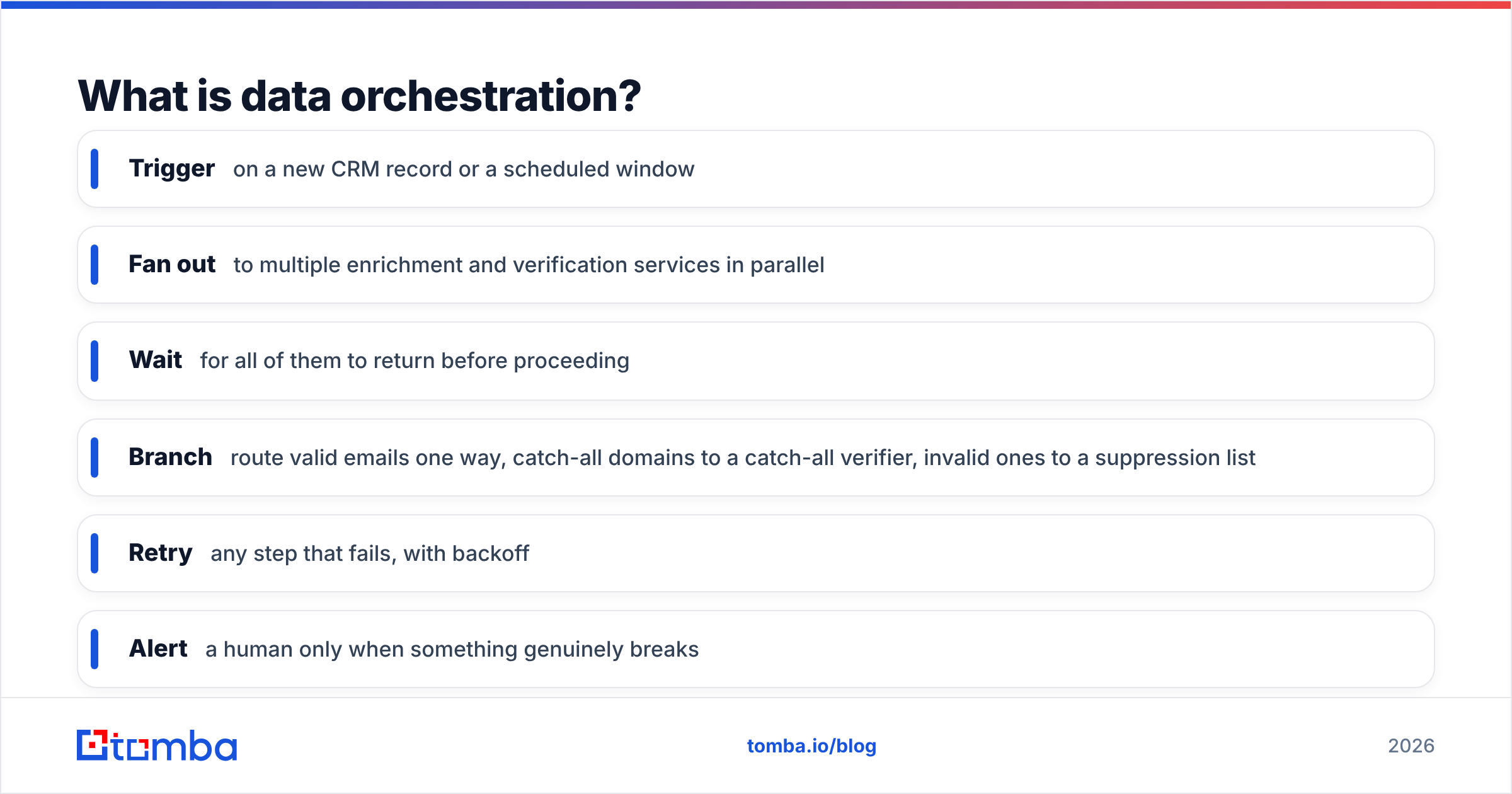
- Trigger on a new CRM record or a scheduled window
- Fan out to multiple enrichment and verification services in parallel
- Wait for all of them to return before proceeding
- Branch — route valid emails one way, catch-all domains to a catch-all verifier, invalid ones to a suppression list
- Retry any step that fails, with backoff
- Alert a human only when something genuinely breaks
Modern orchestration is usually built on tools like Apache Airflow, Dagster, or Prefect, which model workflows as directed acyclic graphs (DAGs) — a map of tasks and their dependencies. You can read more about the pattern in Airflow's own documentation. The point is that orchestration owns the control flow; integration owns the data flow.
Data orchestration vs data integration: what's the real difference?#
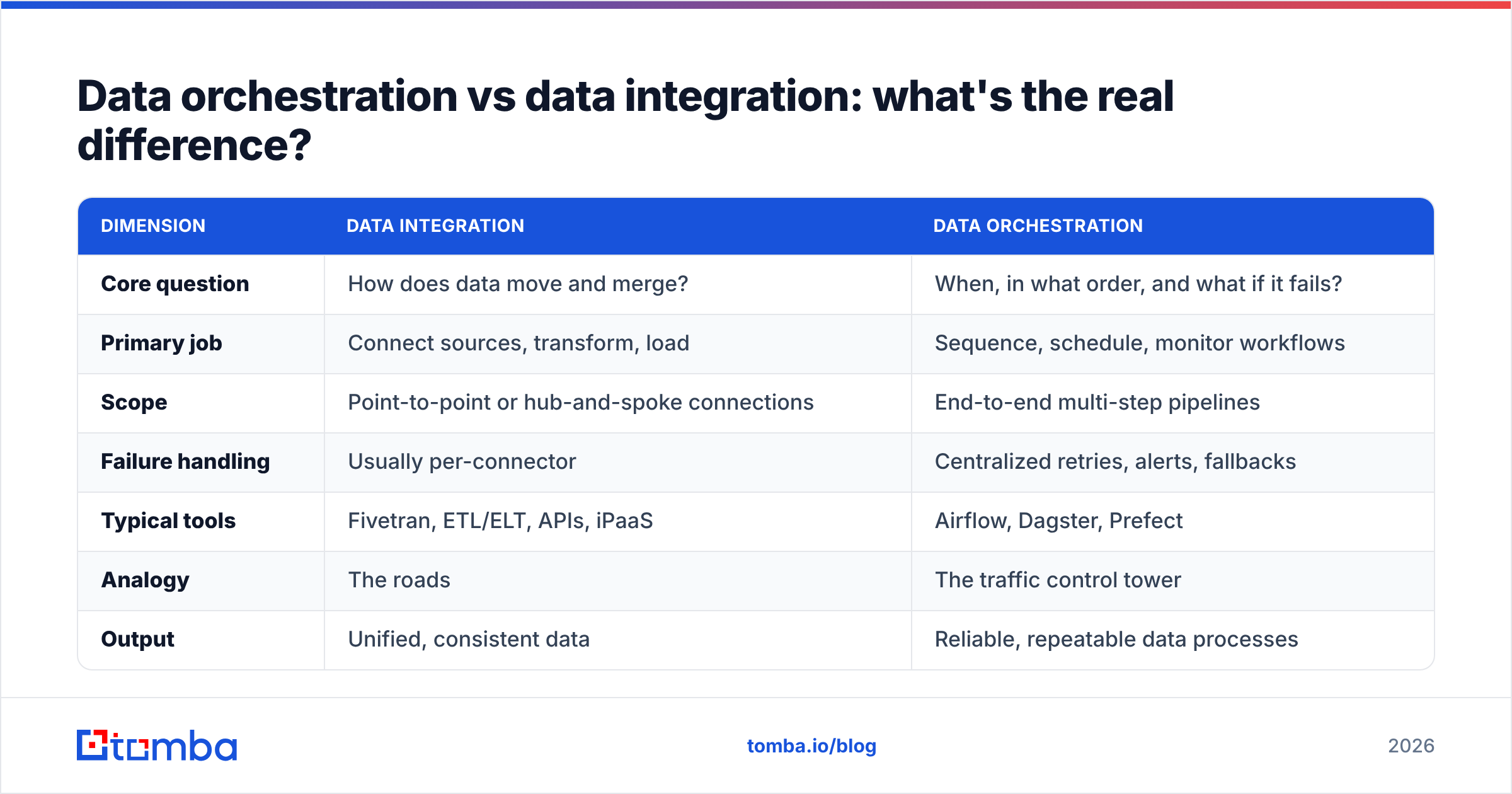
Here's the cleanest way to hold it in your head: integration connects, orchestration coordinates. Integration is a capability. Orchestration is a strategy for using that capability reliably at scale.
| Dimension | Data Integration | Data Orchestration |
|---|---|---|
| Core question | How does data move and merge? | When, in what order, and what if it fails? |
| Primary job | Connect sources, transform, load | Sequence, schedule, monitor workflows |
| Scope | Point-to-point or hub-and-spoke connections | End-to-end multi-step pipelines |
| Failure handling | Usually per-connector | Centralized retries, alerts, fallbacks |
| Typical tools | Fivetran, ETL/ELT, APIs, iPaaS | Airflow, Dagster, Prefect |
| Analogy | The roads | The traffic control tower |
| Output | Unified, consistent data | Reliable, repeatable data processes |
| Fails without | A destination and schema | Integrations to coordinate |
The two are complementary, not competing. Asking "orchestration vs integration — which should I use?" is a bit like asking whether a car needs an engine or a steering wheel. You need the engine to move (integration) and the wheel to control where you go (orchestration).
Do you need one, the other, or both?#
Almost always both — but you rarely build them in the same order. Most teams start with integration because you can't coordinate pipelines that don't exist yet. Orchestration becomes urgent once you have three, four, or ten integrations that must run in a dependable sequence.
Use this as a rough decision guide:
- You have 1–2 simple syncs (form → CRM). Integration alone, maybe with a native scheduler, is fine. Orchestration is overkill.
- You have multiple sources that must merge in order (enrich → verify → dedupe → load). You need orchestration, or you'll get race conditions and partial records.
- Failures are silent and expensive (bad emails tank deliverability, dupes inflate your CRM). Orchestration's centralized retry and alerting pays for itself fast.
- You're running the same multi-step job daily across thousands of records. Orchestration turns a fragile manual chain into a repeatable, monitored pipeline.
A quick gut check: if you've ever discovered at 9 a.m. that last night's data job "half ran" and nobody knew, you have an orchestration gap, not an integration gap.
What does this look like in a real B2B lead pipeline?#
Let's make it concrete with a lead-enrichment workflow, because this is where revenue teams feel the difference most. Say your marketing site captures 500 leads a day and you want only clean, sales-ready contacts in your CRM.
The integration layer provides the building blocks:
- A connector from your form platform to a staging table
- A domain search call to find likely contacts at a target company
- An email verifier call to confirm addresses are deliverable
- A data enrichment call to append title, company size, and location
- A load step into your CRM and warehouse
The orchestration layer makes it reliable:
- Trigger when 50 new leads land, or every 30 minutes — whichever comes first.
- Run enrichment and verification in parallel to save time.
- Gate the load step: only proceed once both return successfully.
- Branch on the verification result — deliverable emails load to CRM, risky ones route to a review queue, invalid ones hit suppression.
- If the enrichment API rate-limits you, retry with backoff instead of dropping the record.
- Deduplicate against existing CRM accounts before insert.
- On any hard failure, alert the RevOps channel — otherwise stay quiet.
Without orchestration, step 3 doesn't exist — so a lead whose verification call failed still loads, and now your sales team is emailing a bounce. That single missing gate is how "we have integrations" quietly becomes "our deliverability is tanking and nobody knows why." If you care about clean sender reputation, this coordination layer is not optional; it's the whole point. (For the downstream stakes, see the fundamentals of email deliverability.)
What tools sit in each layer?#
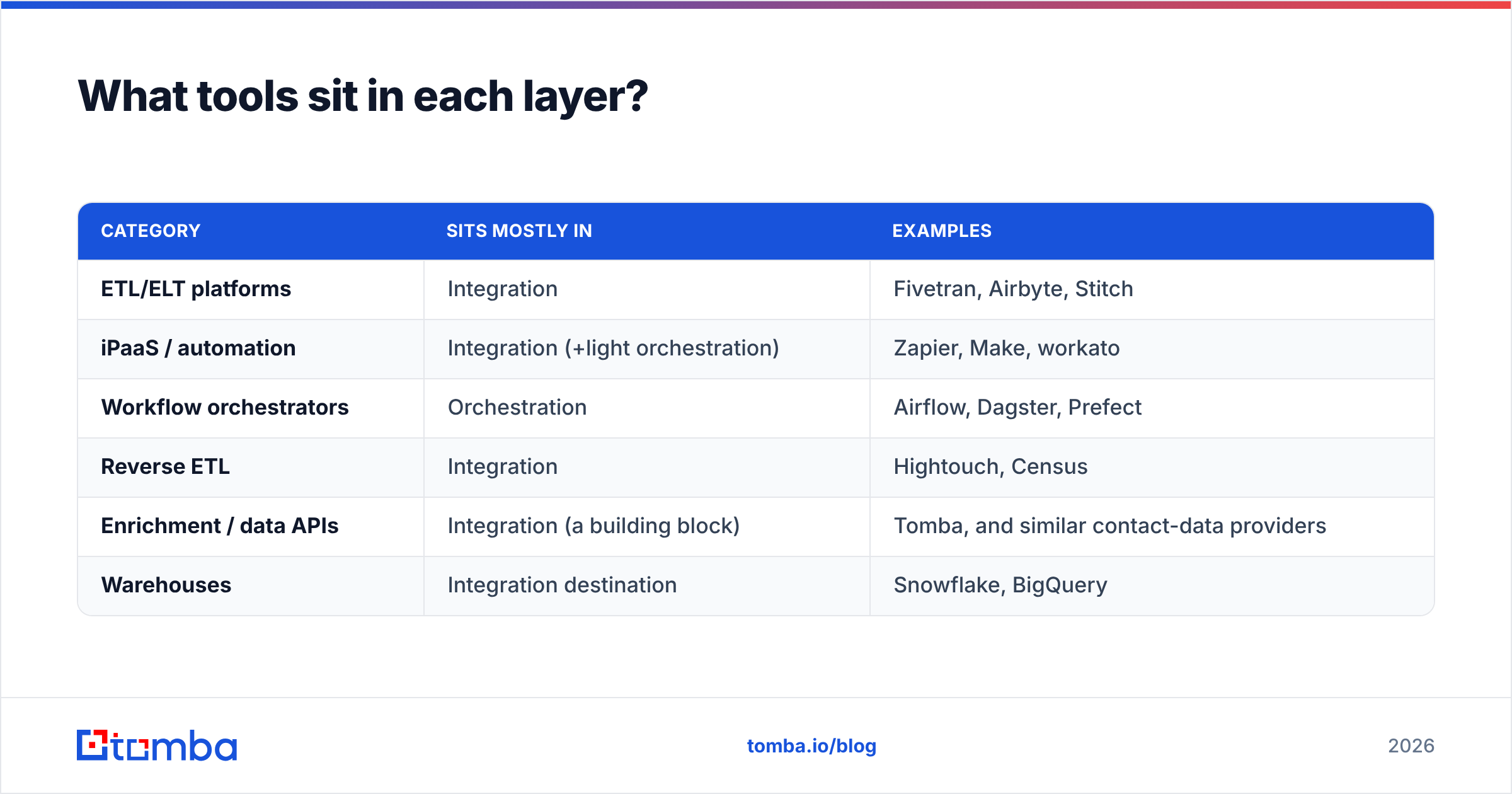
It helps to see where popular categories fall. Integration and orchestration tools increasingly overlap — many iPaaS platforms bundle light orchestration, and many orchestrators ship connectors — but the center of gravity still differs.
| Category | Sits mostly in | Examples |
|---|---|---|
| ETL/ELT platforms | Integration | Fivetran, Airbyte, Stitch |
| iPaaS / automation | Integration (+light orchestration) | Zapier, Make, workato |
| Workflow orchestrators | Orchestration | Airflow, Dagster, Prefect |
| Reverse ETL | Integration | Hightouch, Census |
| Enrichment / data APIs | Integration (a building block) | Tomba, and similar contact-data providers |
| Warehouses | Integration destination | Snowflake, BigQuery |
Notice that an enrichment provider is a building block inside the integration layer — a service the orchestrator calls at the right moment. That's the mental model to keep: your contact-data API is a station, orchestration is the line cook calling out the tickets. If you want to compare how leading platforms are categorized by real buyers, G2's data-integration grid is a useful neutral reference.
For revenue teams specifically, the practical wiring often runs through no-code connectors first. Tools like a Zapier integration or a native HubSpot integration let you assemble the integration layer without engineering, then add orchestration logic (conditions, delays, filters) on top as your volume grows.
How do you decide where to start?#
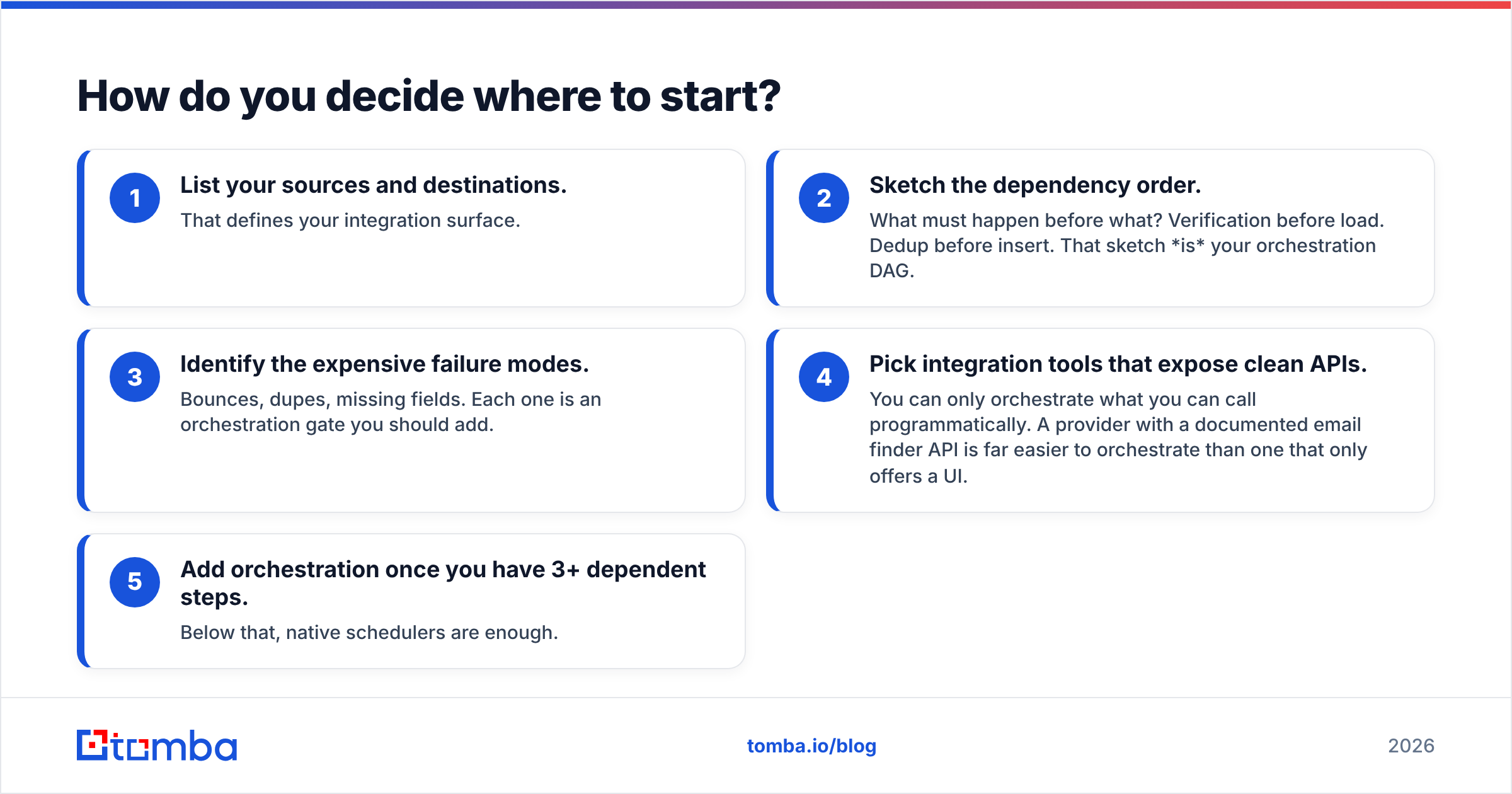
Start with the outcome, not the tool. Write down the end state you want — "every CRM contact has a verified email and complete firmographics, and no dupes get in" — then work backwards.
- List your sources and destinations. That defines your integration surface.
- Sketch the dependency order. What must happen before what? Verification before load. Dedup before insert. That sketch is your orchestration DAG.
- Identify the expensive failure modes. Bounces, dupes, missing fields. Each one is an orchestration gate you should add.
- Pick integration tools that expose clean APIs. You can only orchestrate what you can call programmatically. A provider with a documented email finder API is far easier to orchestrate than one that only offers a UI.
- Add orchestration once you have 3+ dependent steps. Below that, native schedulers are enough.
The mistake to avoid is buying a heavyweight orchestrator before you have anything to orchestrate — or, more common in B2B, wiring a pile of integrations with no coordination and calling it a "pipeline." One is premature; the other is a time bomb.
Frequently asked questions#
Is data orchestration just a fancy name for data integration? No. Integration connects and moves data; orchestration coordinates when and how those integration jobs run, including dependencies, retries, and failure handling. They operate at different layers.
Can data integration work without orchestration? Yes, for simple point-to-point syncs. But as soon as you have multiple steps that must run in a specific order, the absence of orchestration shows up as race conditions, partial records, and silent failures.
Which comes first when building a data stack? Usually integration — you need connected sources before there's anything to orchestrate. Orchestration becomes essential once you have several interdependent jobs.
Where does contact enrichment fit? An enrichment or verification API is a component of the integration layer — a service your orchestration workflow calls at the correct step, typically before loading records into a CRM.
Do small teams need orchestration tools like Airflow? Often not at first. No-code platforms with built-in conditions and filters cover most early-stage needs. Reach for dedicated orchestrators when you outgrow those, or when reliability and observability become business-critical.
Where Tomba fits in your pipeline#
Whether you lean heavily on orchestration or keep integration simple, the pipeline is only as good as the data flowing through it — and dirty contact data is the single fastest way to poison every downstream step. That's the slot Tomba is built for: a fast, verified email finder and enrichment API that plugs cleanly into whatever integration and orchestration layer you're running, from a Zapier integration to a custom Airflow DAG.
Start on the free tier (25 searches/month), then scale to Starter at $49/month or Growth at $99/month as your volume grows — full Tomba pricing is transparent, with no per-seat surprises. Wire it in as the verification-and-enrichment station in your workflow, let your orchestration layer decide when to call it, and stop shipping bounces to your sales team. Clean data in, reliable pipeline out.
Related guides#
Ready to find emails that actually work?
Join 150,000+ professionals who stopped guessing and started sending. Free credits on signup — no credit card required.
Get the Tomba newsletter
Practical outbound tactics and product updates — once every two weeks.
About the author