Data Segmentation in 2026: A Practical B2B Playbook
Data segmentation is the difference between a cold blast and a message that lands. Here's how B2B teams segment records for higher reply rates in 2026 — without over-engineering it.
Data Segmentation in 2026: A Practical B2B Playbook
Data segmentation is the practice of splitting a large pool of records — contacts, accounts, users — into smaller groups that share traits you can act on. Do it well and every email, call, and ad reaches people it actually fits. Do it badly (or not at all) and you're back to blasting one list and hoping.
This guide is the no-fluff version: what data segmentation is, the models that hold up in real pipelines, the fields worth segmenting on, and the failure modes that quietly drag down your reply rates.
TL;DR#
- Data segmentation groups records by shared, actionable traits so each message fits its audience — it is the single cheapest lever on reply and conversion rates.
- The four workhorse models are firmographic, demographic, behavioral, and technographic; most strong B2B motions blend two or three.
- Segmentation is only as good as the data underneath it — stale, unverified, or thin records turn clever segments into noise.
- Start with 3–5 segments you can genuinely message differently, not 30 you can't.
- Enrichment and verification are prerequisites, not afterthoughts: clean the record first, segment second.
What is data segmentation?#
Think of your database like a grocery store. Nobody wants a store where pasta, motor oil, and shampoo sit in one giant bin. You organize by aisle so shoppers find what fits them fast. Data segmentation is the same move applied to your contacts and accounts: you sort records into aisles — by company size, role, behavior, or tech stack — so the right offer reaches the right person.
Technically, segmentation is the process of applying rules or models to a dataset to produce mutually useful subsets. In B2B, those subsets drive targeting: which sequence a lead enters, which sales rep owns it, which case study you attach, which ad audience it lands in.
The payoff is concentration. A generic message to 10,000 people converts worse than a specific message to the 1,200 who actually have the problem you solve. Segmentation is how you find those 1,200.

What are the main types of data segmentation?#
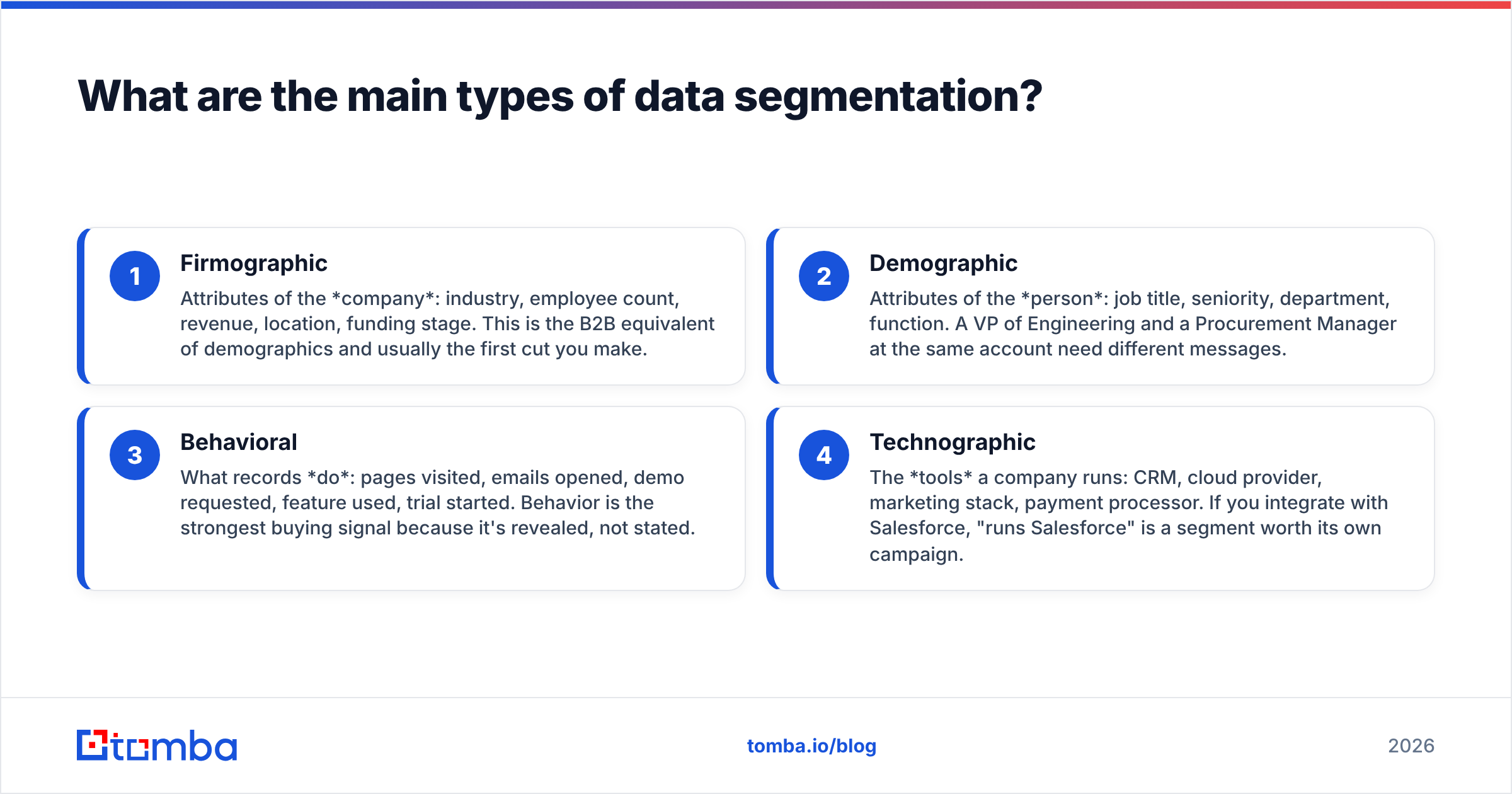
Most B2B segmentation falls into four categories. You rarely use just one — the strongest programs layer them.
- Firmographic — Attributes of the company: industry, employee count, revenue, location, funding stage. This is the B2B equivalent of demographics and usually the first cut you make.
- Demographic — Attributes of the person: job title, seniority, department, function. A VP of Engineering and a Procurement Manager at the same account need different messages.
- Behavioral — What records do: pages visited, emails opened, demo requested, feature used, trial started. Behavior is the strongest buying signal because it's revealed, not stated.
- Technographic — The tools a company runs: CRM, cloud provider, marketing stack, payment processor. If you integrate with Salesforce, "runs Salesforce" is a segment worth its own campaign.
There are more (psychographic, intent-based, lifecycle stage), but if you nail these four you cover the vast majority of real use cases.
Which segmentation model should you use?#
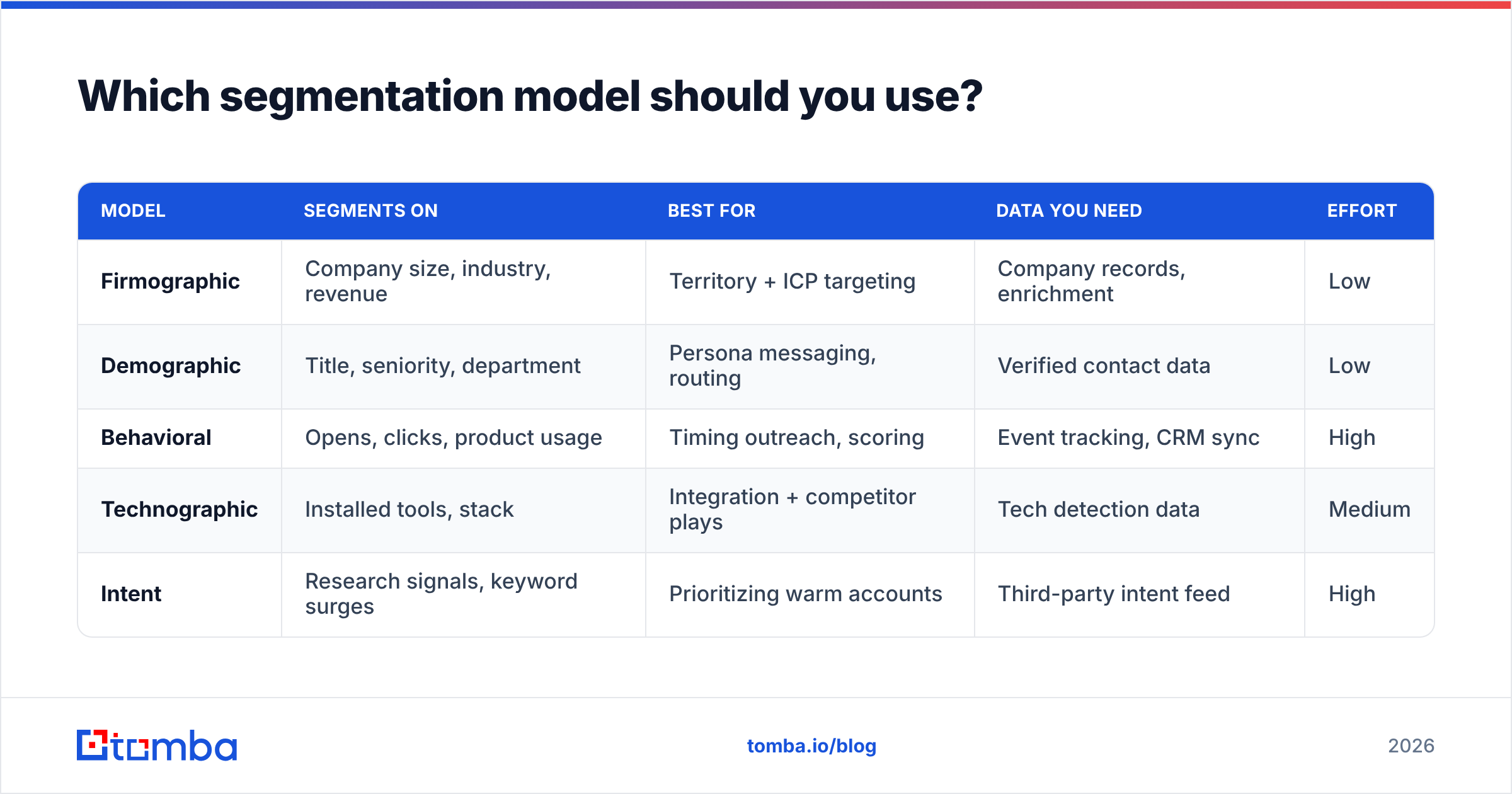
Here's a side-by-side to match the model to the job. Blend rather than pick a single winner.
| Model | Segments on | Best for | Data you need | Effort |
|---|---|---|---|---|
| Firmographic | Company size, industry, revenue | Territory + ICP targeting | Company records, enrichment | Low |
| Demographic | Title, seniority, department | Persona messaging, routing | Verified contact data | Low |
| Behavioral | Opens, clicks, product usage | Timing outreach, scoring | Event tracking, CRM sync | High |
| Technographic | Installed tools, stack | Integration + competitor plays | Tech detection data | Medium |
| Intent | Research signals, keyword surges | Prioritizing warm accounts | Third-party intent feed | High |
A practical default for outbound teams: start firmographic (who fits), add demographic (who to talk to), and layer behavioral once you have signal to act on. Technographic and intent are force multipliers you add as the motion matures.
What data do you actually need to segment on?#
Segmentation lives and dies on the fields you have. You can't segment by seniority if half your records have no title. Before you design segments, audit coverage on the fields that matter:
- Company: name, domain, industry, size band, HQ country
- Person: full name, verified work email, job title, seniority, department
- Behavioral: last activity date, engagement score, product events
- Firmographic depth: revenue band, funding, headcount growth
Most teams discover their limiting factor is contact quality, not segmentation logic. If your emails bounce, no segment saves the campaign. Run records through an email verifier before segmenting so deliverability isn't the hidden variable killing your results. And where fields are missing, data enrichment fills the gaps — appending titles, company size, and firmographics so your rules have something to bite on.
If you're building a segment from scratch — say, every decision-maker at companies in a target industry — a domain search pulls the contacts per company so you're segmenting a real, current dataset instead of a stale export.
How many segments should you create?#
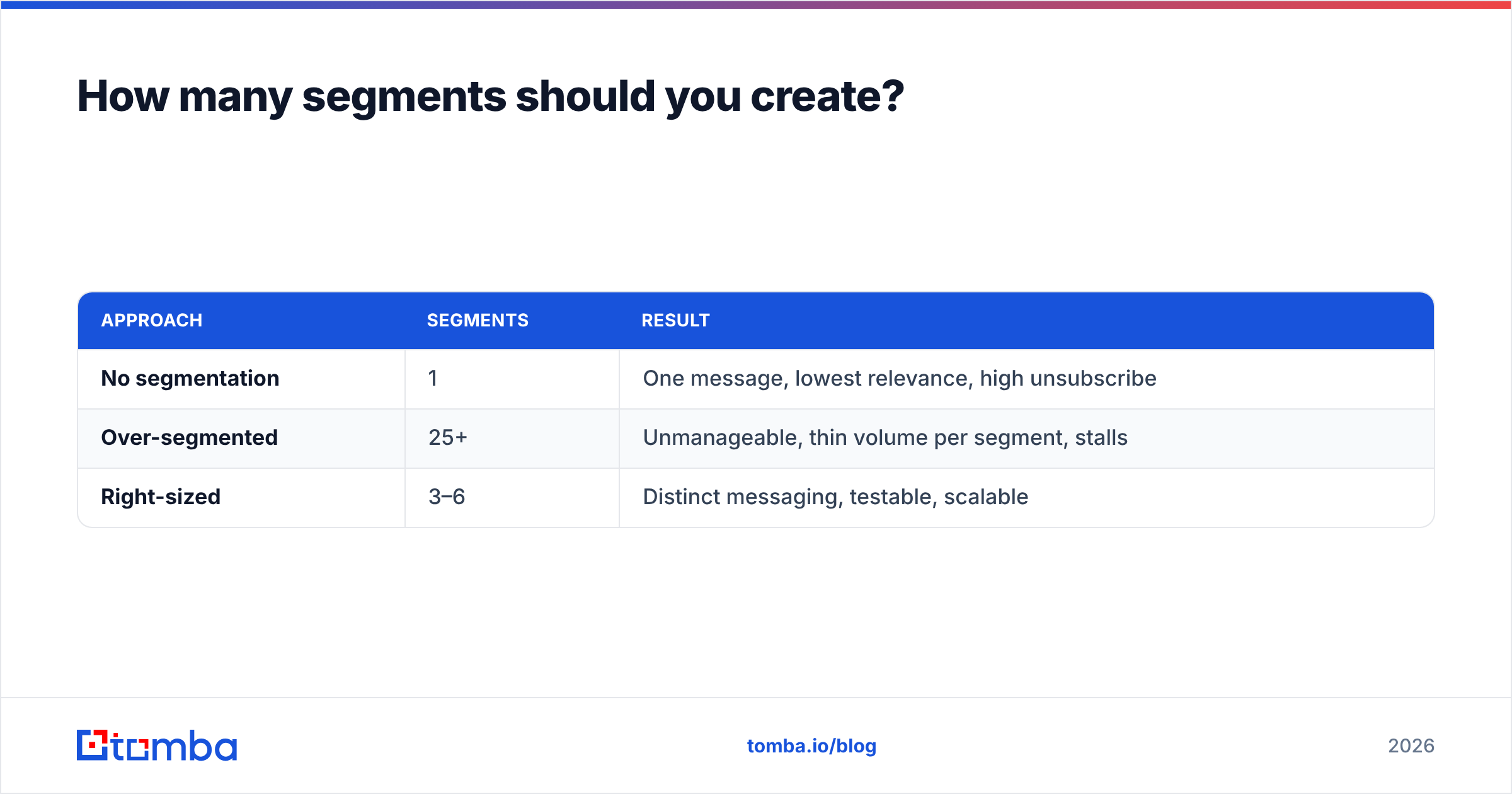
Fewer than you think. The most common mistake is building 30 segments you can't message differently. If two segments get the same email, they're one segment wearing two name tags.
A useful test: can you write a genuinely different first line, offer, or proof point for this segment? If not, merge it. Start with 3–5 segments that each earn distinct messaging, prove the lift, then split further only when a sub-group shows a clearly different response.
| Approach | Segments | Result |
|---|---|---|
| No segmentation | 1 | One message, lowest relevance, high unsubscribe |
| Over-segmented | 25+ | Unmanageable, thin volume per segment, stalls |
| Right-sized | 3–6 | Distinct messaging, testable, scalable |
HubSpot's research on list segmentation has repeatedly shown segmented campaigns outperform non-segmented sends on opens and clicks — but the gains come from actionable splits, not from splitting for its own sake. Read their guide to list segmentation for the marketing side of the math.

How do you keep segments from going stale?#
Segments decay because data decays. Roughly a third of B2B contact data goes stale every year — people change jobs, companies rebrand, domains lapse. Gartner and other analysts have long flagged data decay as a top driver of wasted marketing and sales spend. A segment built on last year's titles is quietly wrong today.
Three habits keep segments alive:
- Re-verify on a schedule. Run your active lists through verification quarterly so bounces and role changes surface before a campaign does.
- Re-enrich on trigger. When an account shows intent or a contact engages, refresh the record so routing and personalization use current data.
- Timestamp everything. Store a
last_verifiedandlast_enricheddate on each record so you can filter out anything gone cold.
For teams working at volume, a bulk email finder and bulk verification let you refresh thousands of records in one pass rather than one-by-one. And when you're standing up a new territory, pulling from a maintained B2B database beats scraping a list that's already aging the moment you export it.
What tools support B2B data segmentation?#
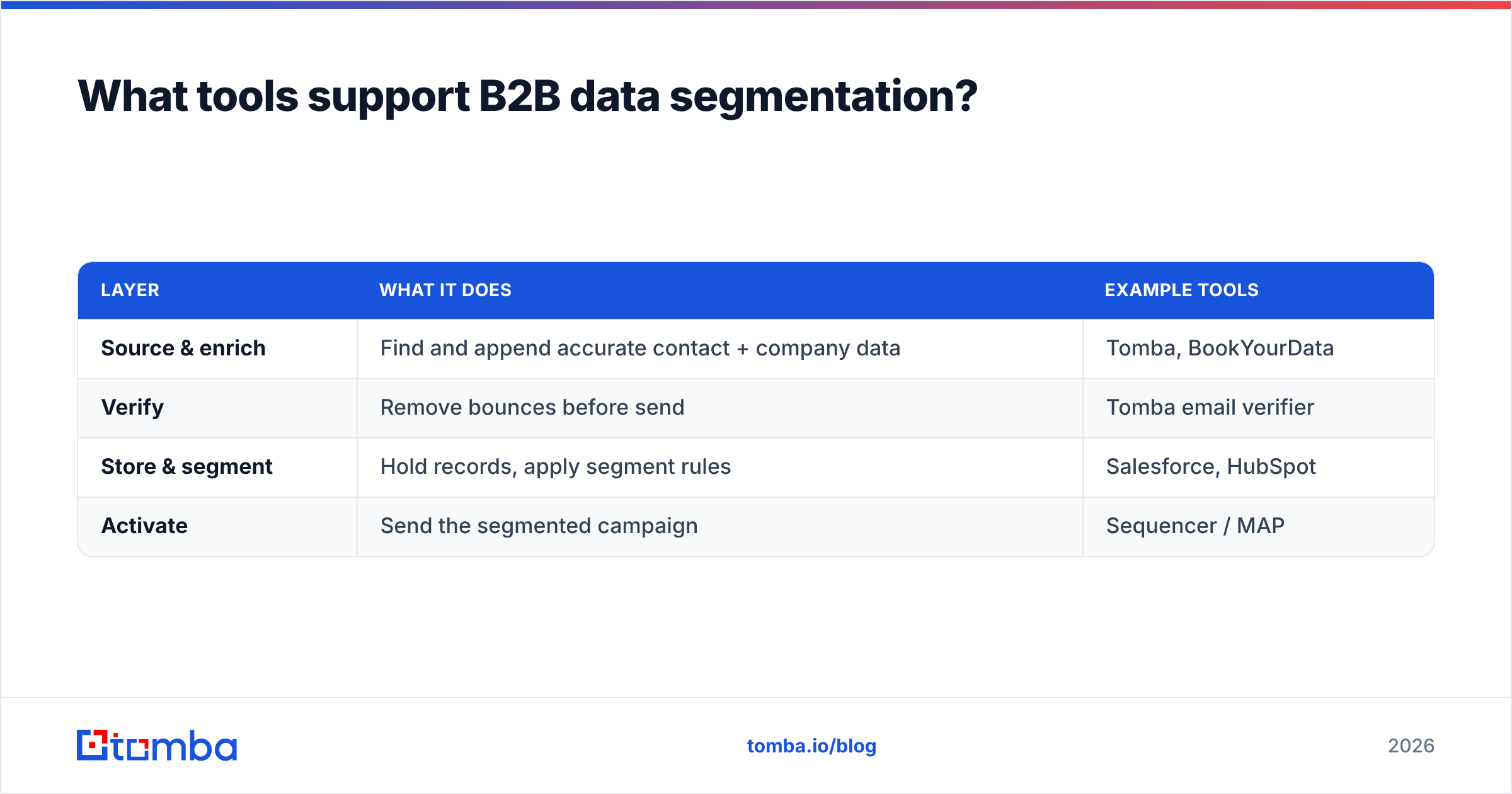
Segmentation itself usually happens in your CRM or sequencer — Salesforce, HubSpot, or your outbound tool of record. What varies is the quality of the data feeding those segments. Here's how the pieces fit:
| Layer | What it does | Example tools |
|---|---|---|
| Source & enrich | Find and append accurate contact + company data | Tomba, BookYourData |
| Verify | Remove bounces before send | Tomba email verifier |
| Store & segment | Hold records, apply segment rules | Salesforce, HubSpot |
| Activate | Send the segmented campaign | Sequencer / MAP |
BookYourData is a solid option when you want ready-built B2B lists to segment, and Salesforce's own data management docs cover the storage-and-rules layer well. Tomba's strength sits at the source-and-verify layer: getting accurate, current contact data into the segment in the first place, so the rules downstream have clean inputs. Segmentation logic in a great CRM still produces junk if the records are junk.
If you want the underlying concept without the jargon, a plain-language primer on what a CRM is helps frame where segmentation fits in the wider stack — the CRM is the shelf, segmentation is how you arrange it.
What does a good segmentation workflow look like?#
Here's a repeatable sequence that survives contact with real pipelines:
- Define the ICP. Write down the firmographics of a great-fit account before touching data.
- Assemble the raw list. Pull contacts by domain or industry, or start from a maintained database.
- Verify. Strip bounces and invalid addresses so segment counts reflect reality.
- Enrich. Append missing titles, size bands, and firmographics.
- Apply segment rules. Cut by firmographic first, then persona, then behavior.
- Message per segment. One distinct angle per group — different pain, proof, and CTA.
- Measure and merge. Kill segments that don't respond differently; split ones that do.
The order matters. Verify and enrich before you segment, not after — otherwise you're grouping records around fields that are wrong or missing, and every downstream number is off.
Common data segmentation mistakes#
- Segmenting on unverified data. Bounces inflate your segment sizes and torch your sender reputation. Clean first.
- Too many segments. If you can't write distinct copy for it, it isn't a segment.
- Set-and-forget. Segments decay; a quarterly refresh cadence is non-negotiable.
- Ignoring behavior. Firmographics tell you who fits; behavior tells you who's ready. Skipping behavior means good-fit accounts sit cold.
- No single source of truth. When two systems disagree on a contact's title, your routing and personalization break silently.
The bottom line#
Data segmentation is one of the highest-leverage, lowest-cost moves in B2B — but only when the data underneath it is accurate and current. The fanciest segment model in the world can't rescue a list full of bounced addresses and missing titles. Get the record right, then group it.
That's where getting your source data clean pays off first. Use the Tomba Email Finder to build accurate, current contact lists by domain, name, or company — then verify and enrich them so every segment you create is grouped around real, deliverable data. Start on the free tier (25 searches a month), and step up to Starter at $49/mo when you're ready to segment at scale. Clean data in, sharper segments out, better replies on the other end.
Related guides#
Ready to find emails that actually work?
Join 150,000+ professionals who stopped guessing and started sending. Free credits on signup — no credit card required.
Get the Tomba newsletter
Practical outbound tactics and product updates — once every two weeks.
About the author