Datanyze vs Kaspr (2026): Which B2B Data Tool Wins?
Datanyze leans on technographics and Chrome-based lookups; Kaspr pulls phones and emails straight from LinkedIn. Here's an honest, side-by-side breakdown of pricing, data quality, and fit.
Datanyze vs Kaspr: Which B2B Data Tool Actually Fits Your Workflow?
Choosing between Datanyze and Kaspr comes down to one question: do you prospect by technology or by person? Datanyze grew up as a technographics engine — it tells you what software a company runs. Kaspr grew up on LinkedIn — it pulls phone numbers and emails off profiles as you browse. They overlap in the "find a contact" step, but they solve very different jobs on either side of it.
This is a neutral, hands-on comparison. No vendor spin, just where each tool wins, where it frustrates, and where a purpose-built email finder like Tomba fills the gaps both leave behind.
TL;DR — Datanyze vs Kaspr in 30 seconds#
- Datanyze is best if your ICP is defined by tech stack (you sell to "companies using Shopify" or "teams on HubSpot"). Its technographics are the real draw; the contact data is secondary.
- Kaspr is best if you live on LinkedIn and want phone numbers and emails extracted from profiles and Sales Navigator lists in one click.
- Pricing: Datanyze runs a usage-credit model (a free 90-day trial, then paid tiers); Kaspr starts free with limited credits and scales to roughly $65/user/mo on annual billing.
- Accuracy: Both are solid for direct dials in their sweet spots, but neither is a dedicated email-verification engine — expect to double-check emails before you send.
- The gap both share: neither is built as a bulk, API-first email finder. If email is your primary channel, pairing either tool with a dedicated email verifier matters more than the Datanyze-vs-Kaspr choice itself.

What is Datanyze and who is it for?#
Datanyze is a sales intelligence tool best known for technographics — data about the technologies a company uses on its website and in its stack. If you're an SDR at a company that only sells to businesses running a specific CRM, ad platform, or e-commerce system, Datanyze lets you build lists filtered by exactly that signal.
Alongside technographics, Datanyze offers a Chrome extension that surfaces contact details (business email and direct-dial numbers) while you browse a company site or a LinkedIn profile. It was acquired by ZoomInfo, which shaped it into a lightweight, self-serve entry point rather than a full enterprise data platform.
Where Datanyze shines:
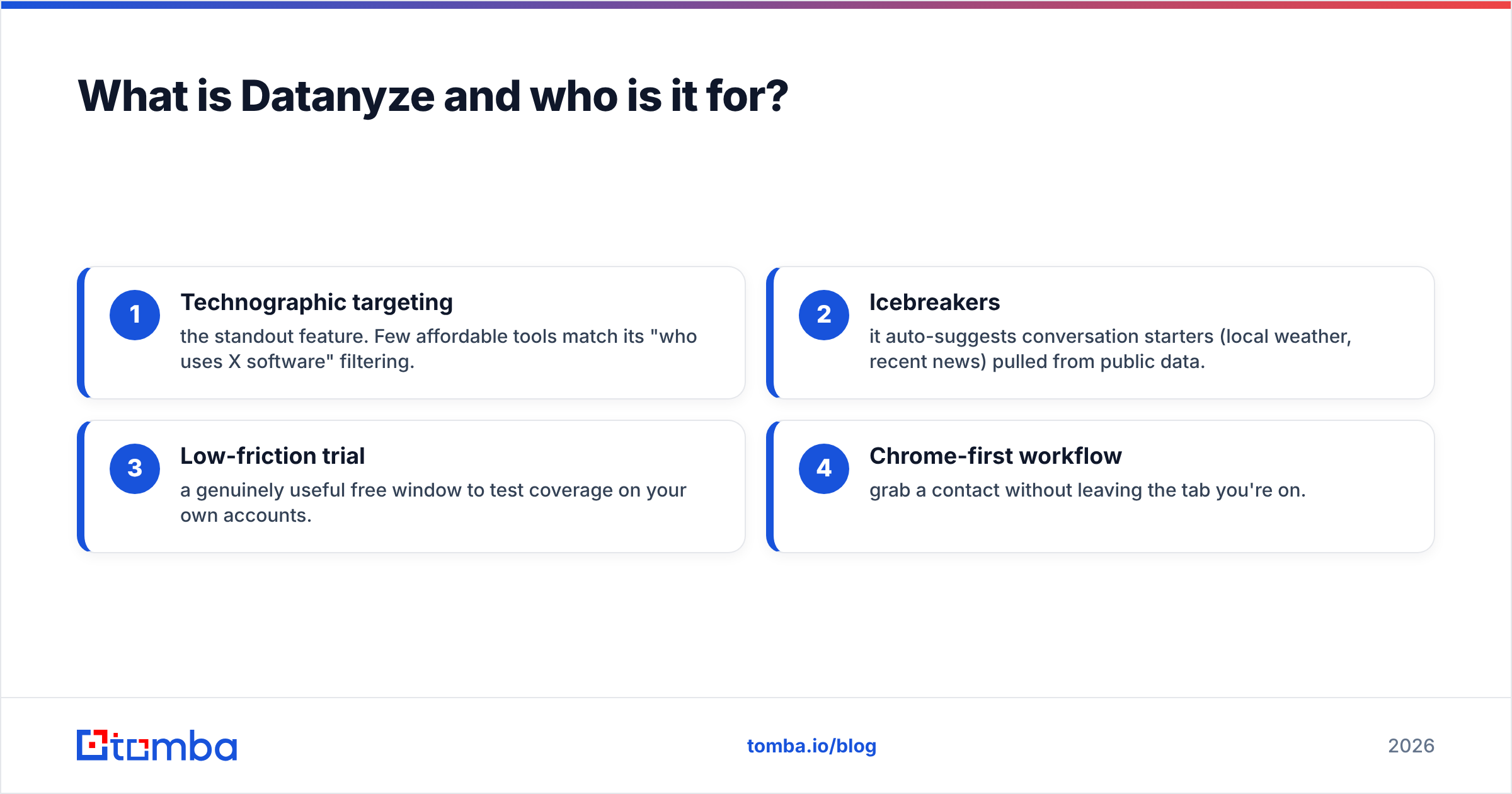
- Technographic targeting — the standout feature. Few affordable tools match its "who uses X software" filtering.
- Icebreakers — it auto-suggests conversation starters (local weather, recent news) pulled from public data.
- Low-friction trial — a genuinely useful free window to test coverage on your own accounts.
- Chrome-first workflow — grab a contact without leaving the tab you're on.
Where it struggles: contact volume and freshness are thinner than data-first platforms, and it's not designed for large bulk exports or programmatic pipelines.
What is Kaspr and who is it for?#
Kaspr is a LinkedIn-first prospecting tool. Its core motion is a Chrome extension that reveals phone numbers, emails, and other contact data directly from a LinkedIn profile, a Sales Navigator search, or even a LinkedIn group or event attendee list. Click a profile, hit reveal, and the contact drops into your dashboard or CRM.
Kaspr's headline strength is European phone-number coverage — it's often cited by EU-based sales teams for direct dials that other tools miss. It also bundles lightweight outreach features: LinkedIn sequences, tasks, and reminders, so it edges slightly into sales-engagement territory.
Where Kaspr shines:
- LinkedIn extraction — bulk-reveal contacts from Sales Navigator lists in a few clicks.
- Phone coverage — strong direct-dial data, particularly for European markets.
- GDPR posture — Kaspr publicly emphasizes compliance, which matters for EU teams.
- Built-in workflow — basic sequencing and CRM sync without a second tool.
Where it struggles: it's tethered to LinkedIn. If a prospect isn't active there, or you want to prospect by domain rather than by profile, Kaspr has less to offer. Credits also deplete quickly on high-volume teams.
Datanyze vs Kaspr: the head-to-head comparison#
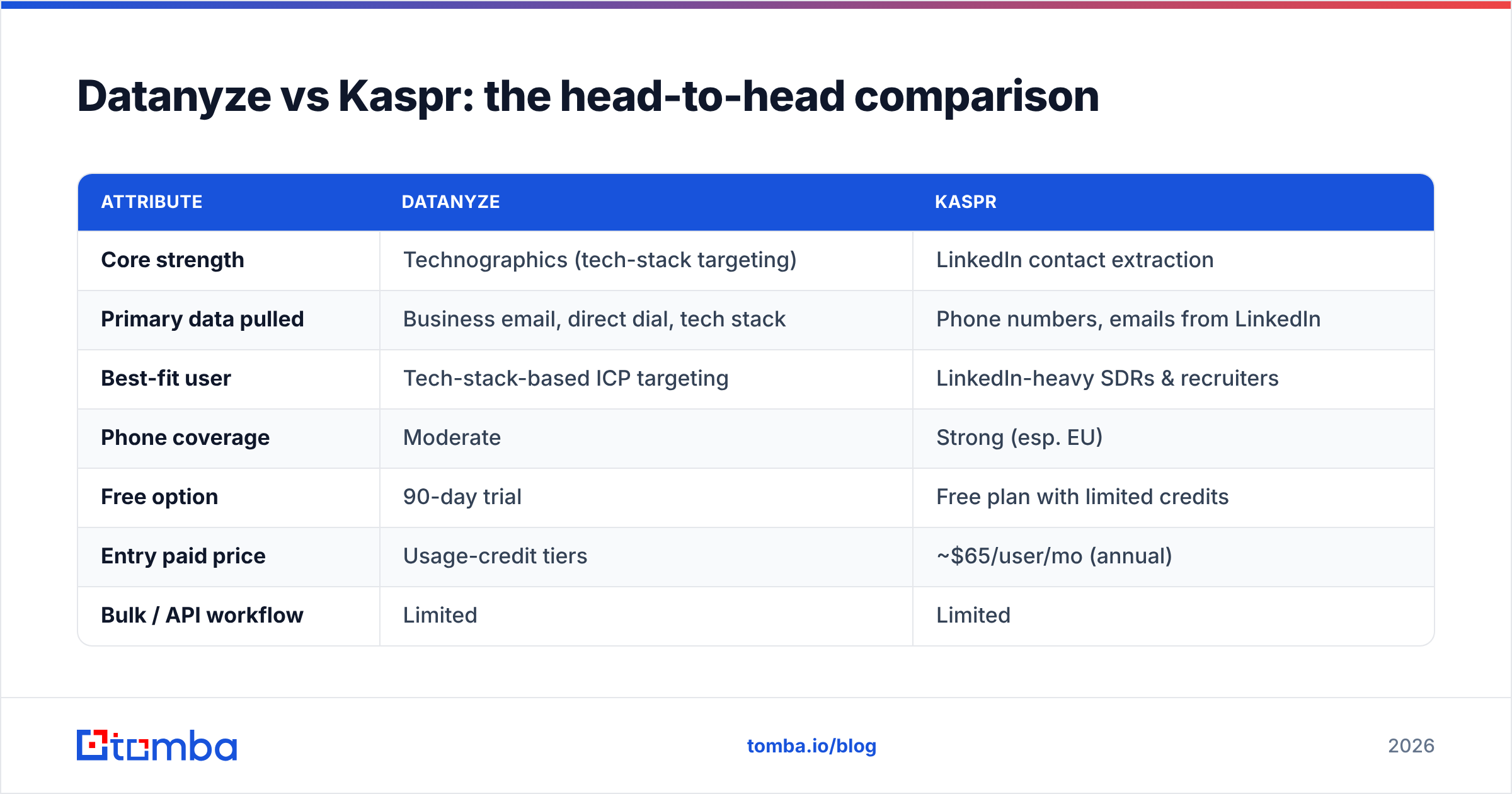
Here's the side-by-side on the attributes that actually change your buying decision.
| Attribute | Datanyze | Kaspr |
|---|---|---|
| Core strength | Technographics (tech-stack targeting) | LinkedIn contact extraction |
| Primary data pulled | Business email, direct dial, tech stack | Phone numbers, emails from LinkedIn |
| Best-fit user | Tech-stack-based ICP targeting | LinkedIn-heavy SDRs & recruiters |
| Phone coverage | Moderate | Strong (esp. EU) |
| Free option | 90-day trial | Free plan with limited credits |
| Entry paid price | Usage-credit tiers | ~$65/user/mo (annual) |
| Bulk / API workflow | Limited | Limited |
| Outreach features | Icebreakers only | LinkedIn sequences + tasks |
| Email verification | Not a dedicated verifier | Not a dedicated verifier |
The pattern is clear: these tools are complements to a data strategy, not the whole strategy. Datanyze answers "which companies fit my ICP?" Kaspr answers "how do I reach this specific LinkedIn person?" Neither is optimized for the third question most email-driven teams care about most: "Is this address deliverable at scale?"
Is Datanyze or Kaspr more accurate?#
It depends on the data type — and both have blind spots on email. Kaspr tends to lead on direct-dial phone numbers, especially in Europe, because that's the data class it invests in most. Datanyze is competitive on business emails and unbeatable on technographic signals, but its contact database is smaller, so coverage on niche or non-US roles can thin out.
The honest caveat for both: a revealed email is not a verified email. LinkedIn-sourced and scraped addresses go stale the moment someone changes jobs, and neither tool runs the kind of SMTP-level, catch-all-aware validation that protects your sender reputation. Sending to unverified lists is the fastest way to tank deliverability — independent research from vendors like HubSpot consistently ties list hygiene to inbox placement.
That's the practical reason many teams run a dedicated verification step regardless of which sourcing tool they pick. A quick pass through an email verification API strips out bounces before they ever hit your outbound sequence.

How do Datanyze and Kaspr pricing compare?#
Pricing is where the two diverge most in philosophy.
Datanyze uses a credit/usage model with a notably generous free trial (90 days), then paid tiers metered by credits. That structure rewards spiky, campaign-based usage — top up when you're building a list, coast otherwise.
Kaspr runs a per-user SaaS model: a free plan with a small monthly credit allotment, then paid tiers that land around $65 per user per month on annual billing, with more credits and workflow features as you climb.
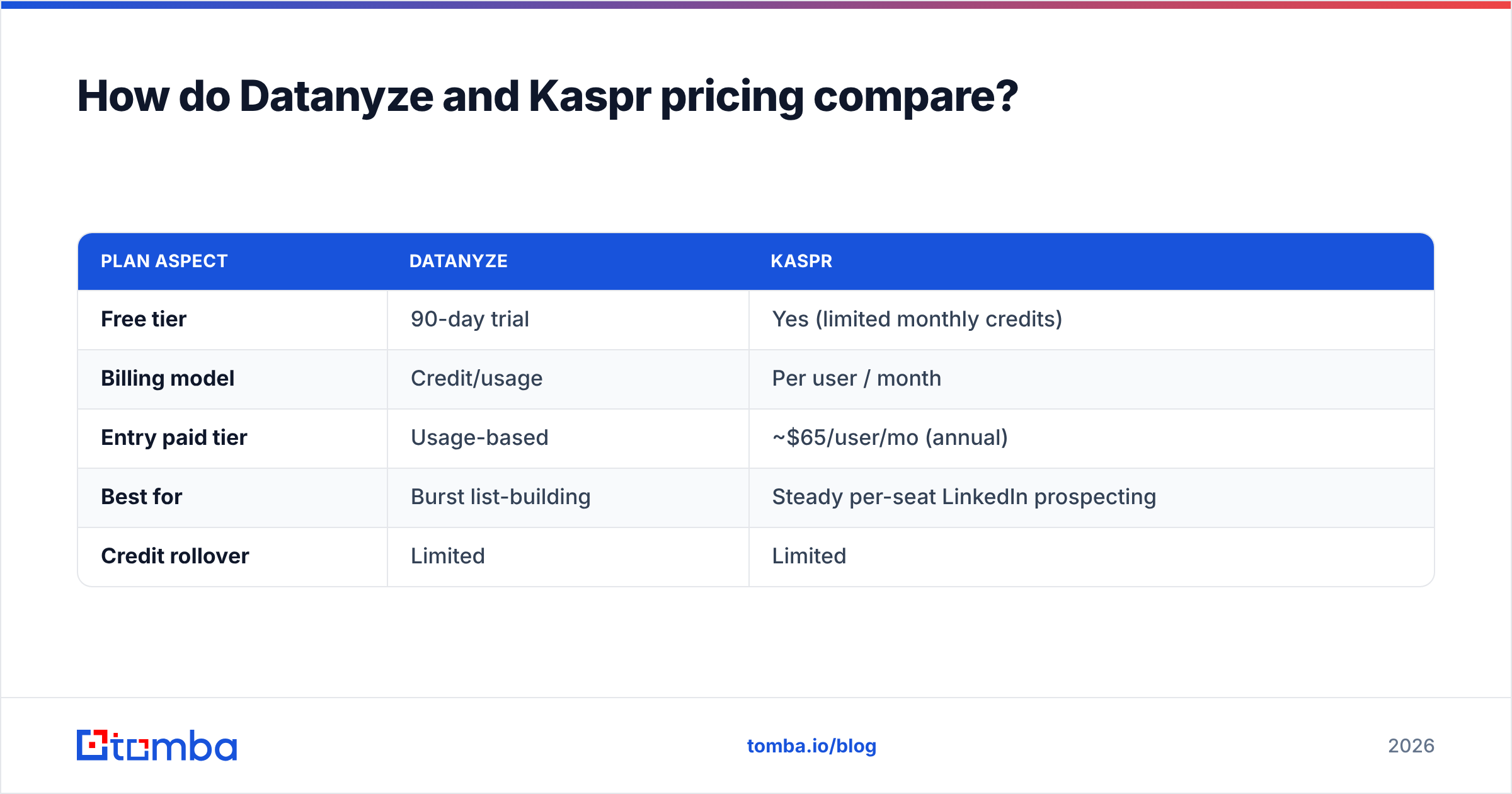
| Plan aspect | Datanyze | Kaspr |
|---|---|---|
| Free tier | 90-day trial | Yes (limited monthly credits) |
| Billing model | Credit/usage | Per user / month |
| Entry paid tier | Usage-based | ~$65/user/mo (annual) |
| Best for | Burst list-building | Steady per-seat LinkedIn prospecting |
| Credit rollover | Limited | Limited |
Neither is expensive by enterprise-data standards, but per-user pricing (Kaspr) can climb fast on a large SDR team, while credit models (Datanyze) can surprise you mid-campaign if a big list-build burns your balance. Whichever you choose, compare the effective cost-per-verified-contact, not the sticker price — a cheap credit that returns a dead email costs more than a slightly pricier one that lands.
For teams that want predictable, transparent per-credit economics on the email side specifically, it's worth benchmarking both against Tomba pricing, which starts free (25 searches/mo) and scales to a $49/mo Starter plan.
When should you use a dedicated email finder instead?#
Reach for a dedicated email finder when email is your primary channel and volume is high. Datanyze and Kaspr are excellent at their specialties — tech-stack targeting and LinkedIn extraction — but both treat email as one output among several, not the core product.
You'll feel the ceiling in three situations:
- Bulk work. Uploading 5,000 domains and getting back verified role-based contacts is a job for a bulk email finder, not a click-per-profile Chrome extension.
- API-first pipelines. If you're enriching leads inside your own app or CRM automatically, you want a documented email finder API with predictable rate limits.
- Domain-based prospecting. When you know the company but not the person, domain search returns every discoverable address at that company with confidence scores — no LinkedIn profile required.
This is where the comparison stops being "Datanyze vs Kaspr" and becomes "sourcing tool + verification layer." Many high-performing teams keep Kaspr or Datanyze for their signal advantage and route the resulting contacts through a dedicated finder-plus-verifier for the deliverability guarantee.
Datanyze vs Kaspr: which should you choose?#
Here's the decision boiled down:
- Choose Datanyze if your ICP is defined by technology and you want technographic filtering plus lightweight contact grab. The 90-day trial makes it low-risk to validate on your own accounts first. Cross-check its results against public review data on G2 before committing.
- Choose Kaspr if your team lives inside LinkedIn and Sales Navigator, needs strong European phone coverage, and wants basic sequencing built in. The free plan is a fair way to test extraction quality on your target personas.
- Add a dedicated email finder if email is your main outbound channel, you work in bulk, or you need API enrichment — because neither tool is engineered as a verification-grade email engine.
Notably, if you're comparing these against broader all-in-one platforms, tools like BookYourData occupy a different lane (pay-as-you-go verified B2B lists), and it's a respected option worth evaluating alongside the two here depending on whether you want a database or an extraction workflow.
The bottom line#
Datanyze and Kaspr aren't really competitors so much as neighbors: one sells the signal (who fits your ICP by tech stack), the other sells the access (how to reach a LinkedIn profile by phone or email). Pick based on which job is your bottleneck — and be honest that neither closes the deliverability gap on its own.
If your outbound rises or falls on cold email, that gap is the one that costs you the most. Tomba's email finder is built for exactly that step: find professional addresses by domain, name, or company, get a verification confidence score on every result, and push them into your workflow through the API, Chrome extension, or a spreadsheet. Start on the free tier, run your Datanyze or Kaspr list through it, and see how many "revealed" contacts were actually deliverable. That single check usually settles the debate faster than any feature chart.
Related guides#
Ready to find emails that actually work?
Join 150,000+ professionals who stopped guessing and started sending. Free credits on signup — no credit card required.
Get the Tomba newsletter
Practical outbound tactics and product updates — once every two weeks.
About the author