Datanyze vs LeadLeaper: Full 2026 Comparison and Verdict
Datanyze and LeadLeaper both promise quick B2B emails, but they win at different jobs. Here's an honest 2026 breakdown of accuracy, pricing, and the better-value pick.
Datanyze vs LeadLeaper: Full 2026 Comparison and Verdict
Choosing between Datanyze and LeadLeaper feels harder than it should, because both tools sell the same promise — grab a prospect's email in a couple of clicks — while solving very different parts of the prospecting problem. One leans on technographics and a Chrome-based contact grabber; the other is a lightweight LinkedIn email extractor built for volume. This comparison strips away the marketing and looks at what actually matters: data accuracy, credit math, workflow fit, and total cost.
TL;DR: Which tool should you pick?#
- Datanyze is best if you care about technographic targeting — knowing what software a company runs — and want a browser extension that surfaces contact + company data on the fly.
- LeadLeaper is best if your entire motion is LinkedIn, you want a free tier to grab emails in bulk, and you don't need firmographic depth.
- Accuracy is the real tiebreaker. Both tools guess-and-verify to some degree, and both leave you re-checking risky sends. Neither publishes a hard, independently audited valid-rate.
- Pricing favors LeadLeaper for low-volume LinkedIn scraping, but Datanyze's flat monthly credits are easier to forecast for a small team.
- If accuracy and cost-per-valid-email are your priority, a dedicated finder-plus-verifier like Tomba usually beats both — more on that below.
What is Datanyze and who is it for?#
Datanyze started life as a technographics company: it tracks the technologies a website runs (analytics, e-commerce platforms, ad tech, hosting) and pairs that signal with company and contact data. Today it's marketed as a lightweight B2B prospecting tool, primarily through a Chrome extension that pulls contact details and firmographics while you browse LinkedIn or a company site.
The ideal Datanyze user is a rep who sells based on tech stack — think a security vendor targeting companies running a specific CMS, or an agency prospecting sites on a particular e-commerce platform. That technographic angle is genuinely useful and something a pure email finder won't give you. Datanyze is owned by ZoomInfo, which shapes both its data lineage and its positioning as an entry point rather than a full platform.

Where Datanyze gets shaky is contact accuracy at scale. Because much of the email data is inferred or aggregated, you'll see a mix of verified addresses, guessed patterns, and stale records — so treating every result as send-ready is a mistake. Running exports through a dedicated email verifier before you load them into a sequence is the difference between a healthy sender reputation and a bounce spike.
What is LeadLeaper and who is it for?#
LeadLeaper is a much narrower product: it's a LinkedIn email extractor. You browse LinkedIn (or Sales Navigator) search results, click the extension, and LeadLeaper captures the profiles into a list with best-guess business emails attached. Its headline draw is a free plan that lets you pull a set number of leads each month with no credit card.
That makes LeadLeaper attractive to solo founders, recruiters, and early-stage SDRs who live inside LinkedIn and want emails without paying for a heavyweight suite. The workflow is fast, the learning curve is near zero, and bulk-capturing a page of search results takes seconds.
The trade-off is depth. LeadLeaper doesn't give you technographics, real firmographic filters, or a serious data platform behind it. And like most LinkedIn scrapers, the emails it returns are frequently pattern guesses rather than confirmed addresses — which again puts the verification burden on you. If your outreach depends on a clean list, that's not a detail you can skip.
Datanyze vs LeadLeaper: side-by-side comparison#
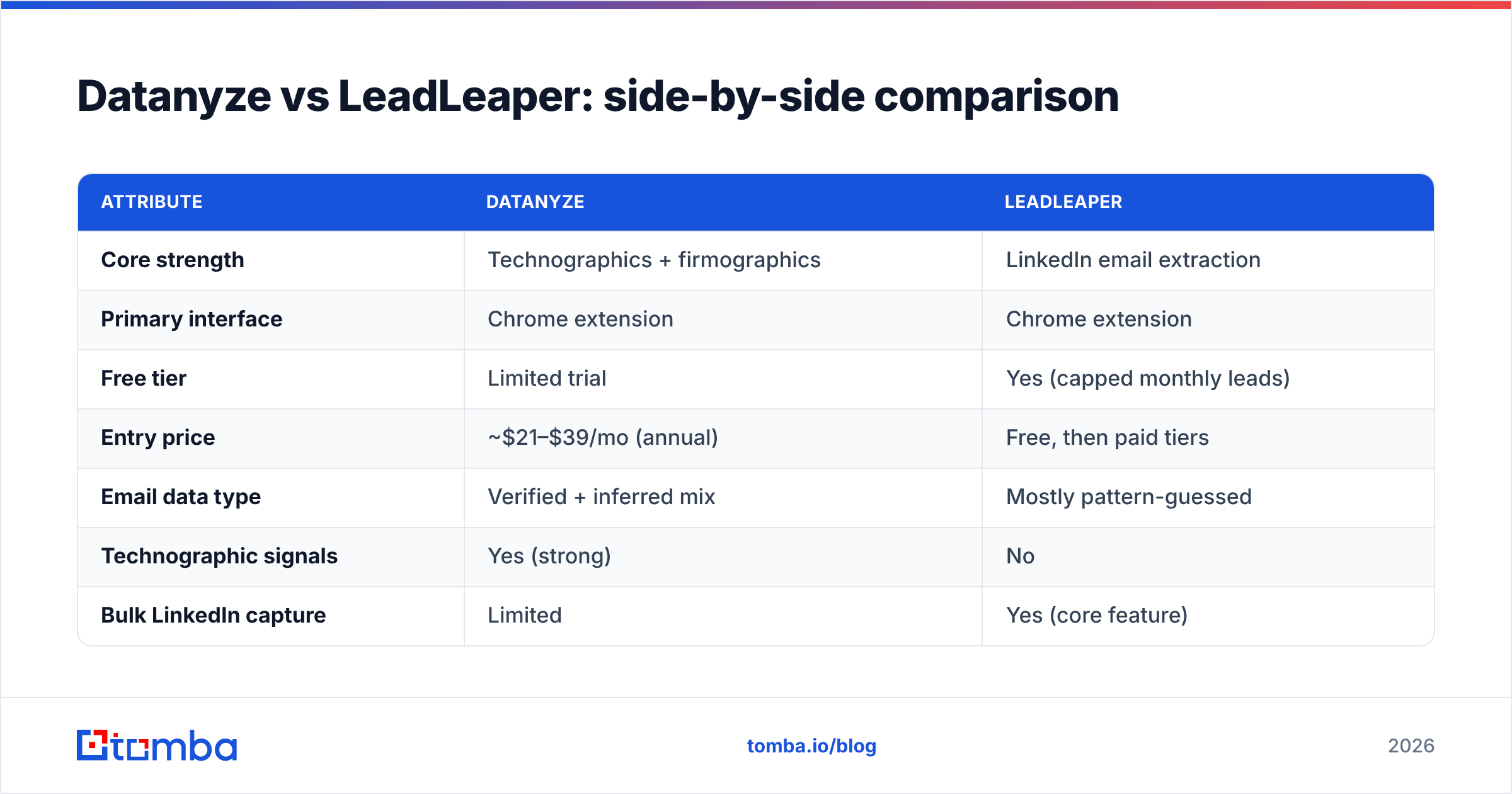
Here's the honest head-to-head. Both vendors keep exact figures fuzzy and change plans often, so treat pricing as directional and confirm on their own sites before you buy.
| Attribute | Datanyze | LeadLeaper |
|---|---|---|
| Core strength | Technographics + firmographics | LinkedIn email extraction |
| Primary interface | Chrome extension | Chrome extension |
| Free tier | Limited trial | Yes (capped monthly leads) |
| Entry price | ~$21–$39/mo (annual) | Free, then paid tiers |
| Email data type | Verified + inferred mix | Mostly pattern-guessed |
| Technographic signals | Yes (strong) | No |
| Bulk LinkedIn capture | Limited | Yes (core feature) |
| Built-in verification | Minimal | Minimal |
| Best for | Tech-stack-based targeting | High-volume LinkedIn scraping |
The pattern is clear. Datanyze wins on targeting intelligence; LeadLeaper wins on cheap LinkedIn volume. Neither wins decisively on the one metric that governs your reply rate: the share of emails that are actually valid and deliverable.
Is Datanyze or LeadLeaper more accurate?#
Accuracy is where both tools ask you to lower your expectations, and it's the single biggest reason to think beyond this two-way race.
Datanyze inherits data from a large aggregation pipeline, which means good coverage but variable freshness — job changes, mergers, and format changes all decay a percentage of records every quarter. LeadLeaper, by contrast, leans heavily on email permutation: it infers first.last@company.com-style addresses and returns them whether or not they've been confirmed against a mail server. That's why a LeadLeaper export can look complete and still bounce 20–30% of the time.
Three habits protect you regardless of which tool you use:
- Never send to an unverified "guessed" email. Route every address through SMTP-level verification first.
- Watch for catch-all domains. A catch-all accepts everything at the server, so "valid" can be a false positive — use a dedicated catch-all verifier to grade the risk.
- Re-verify on a cadence. B2B data decays ~2–3% per month; a list you scraped in Q1 is materially worse by Q3.

This is exactly the gap a purpose-built finder closes. The Tomba Email Finder pairs discovery with confidence scoring and built-in verification, so the output isn't a guess you have to babysit — it's a graded result. If your outreach depends on landing in the inbox, deliverability starts with the quality of the address, and email deliverability is downstream of the finder you trust.
How do the two tools fit into a real prospecting workflow?#
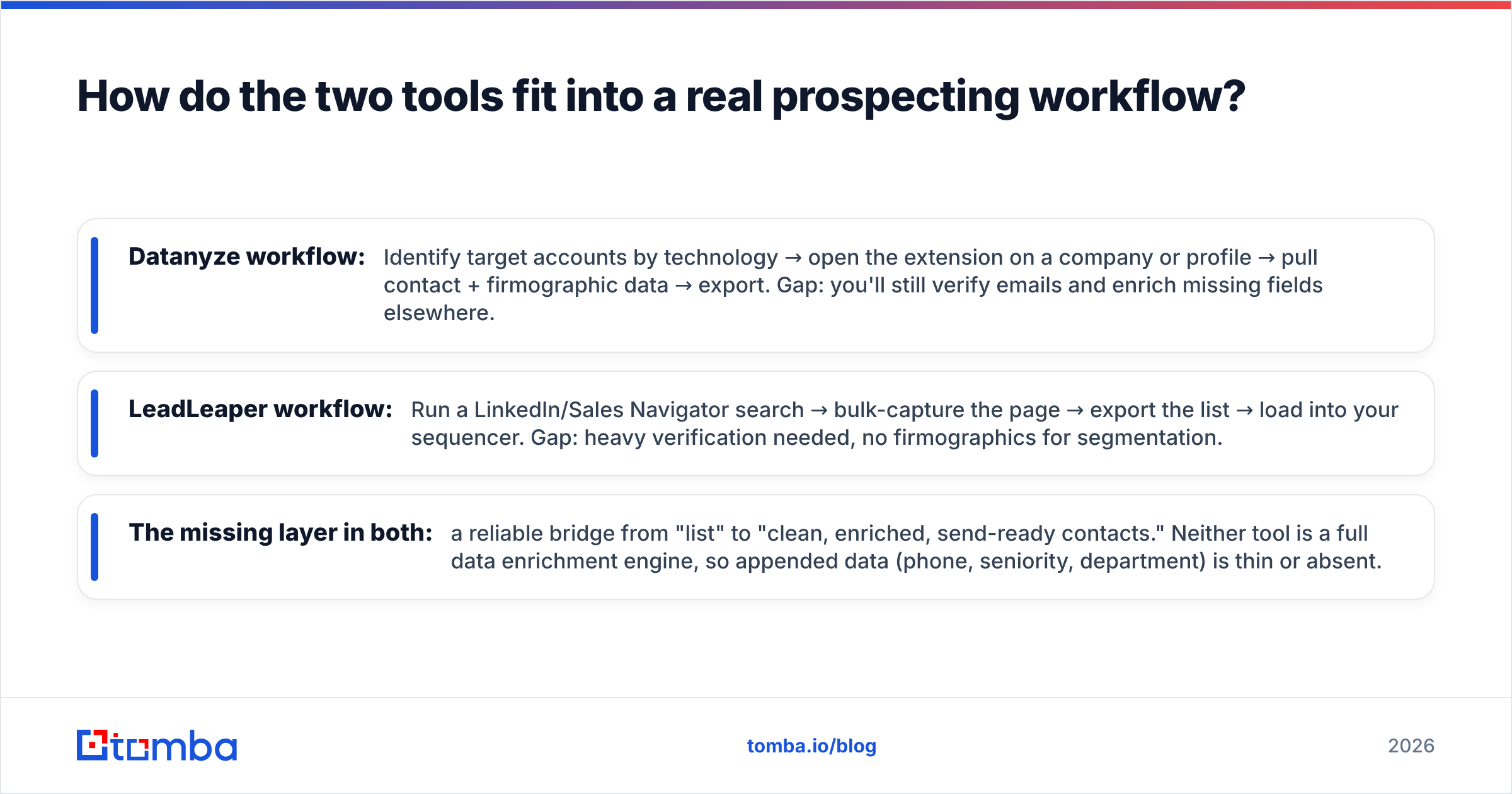
Tool choice only matters in the context of your motion. Here's how each fits — and where they leave gaps you'll have to plug.
- Datanyze workflow: Identify target accounts by technology → open the extension on a company or profile → pull contact + firmographic data → export. Gap: you'll still verify emails and enrich missing fields elsewhere.
- LeadLeaper workflow: Run a LinkedIn/Sales Navigator search → bulk-capture the page → export the list → load into your sequencer. Gap: heavy verification needed, no firmographics for segmentation.
- The missing layer in both: a reliable bridge from "list" to "clean, enriched, send-ready contacts." Neither tool is a full data enrichment engine, so appended data (phone, seniority, department) is thin or absent.
For teams that prospect at any real scale, that missing layer is the whole ballgame. You can stitch Datanyze or LeadLeaper together with a verifier and an enrichment step, but every hop adds cost, latency, and a place for data to rot. Consolidating discovery, verification, and enrichment into one pipeline — via a bulk email finder or the underlying email finder API — usually beats duct-taping point tools together.
What does each tool actually cost per valid email?#
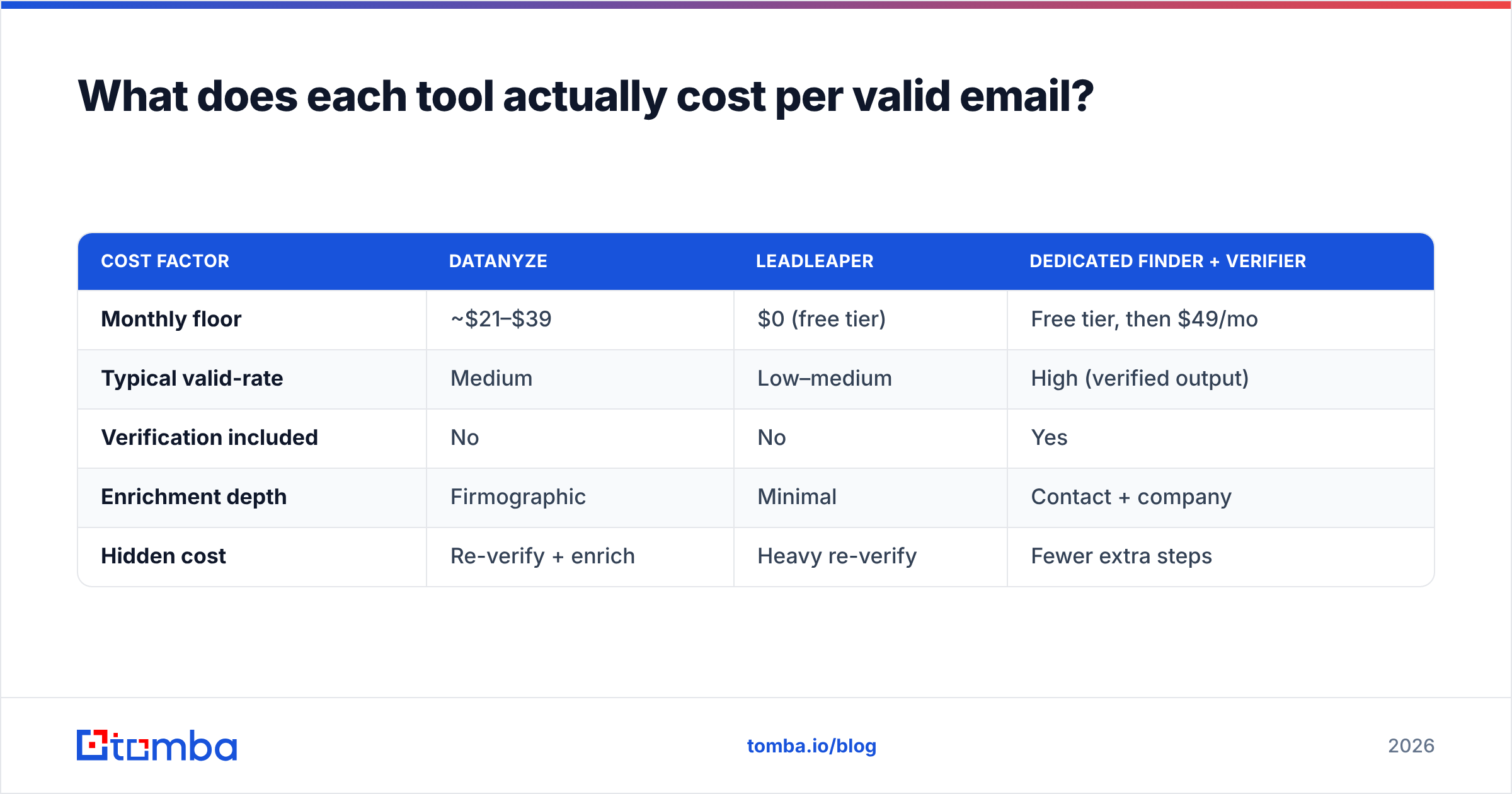
Sticker price and effective price are different animals. A free tool that returns 60% valid emails can cost more per usable contact than a paid tool at 95% validity, once you factor in bounced sends, hurt reputation, and rep time spent cleaning lists.
| Cost factor | Datanyze | LeadLeaper | Dedicated finder + verifier |
|---|---|---|---|
| Monthly floor | ~$21–$39 | $0 (free tier) | Free tier, then $49/mo |
| Typical valid-rate | Medium | Low–medium | High (verified output) |
| Verification included | No | No | Yes |
| Enrichment depth | Firmographic | Minimal | Contact + company |
| Hidden cost | Re-verify + enrich | Heavy re-verify | Fewer extra steps |
The lesson: LeadLeaper's "free" is real, but you pay it back in bounce cleanup and reputation risk. Datanyze's flat pricing is predictable, but you still bolt on verification. A finder that ships verified addresses out of the box — Tomba's Starter plan is $49/mo, with a free tier of 25 searches to test it — often lands cheaper per valid email even though the headline number is higher. You can compare the tiers on the Tomba pricing page and model your own volume.
When should you skip both and use an alternative?#
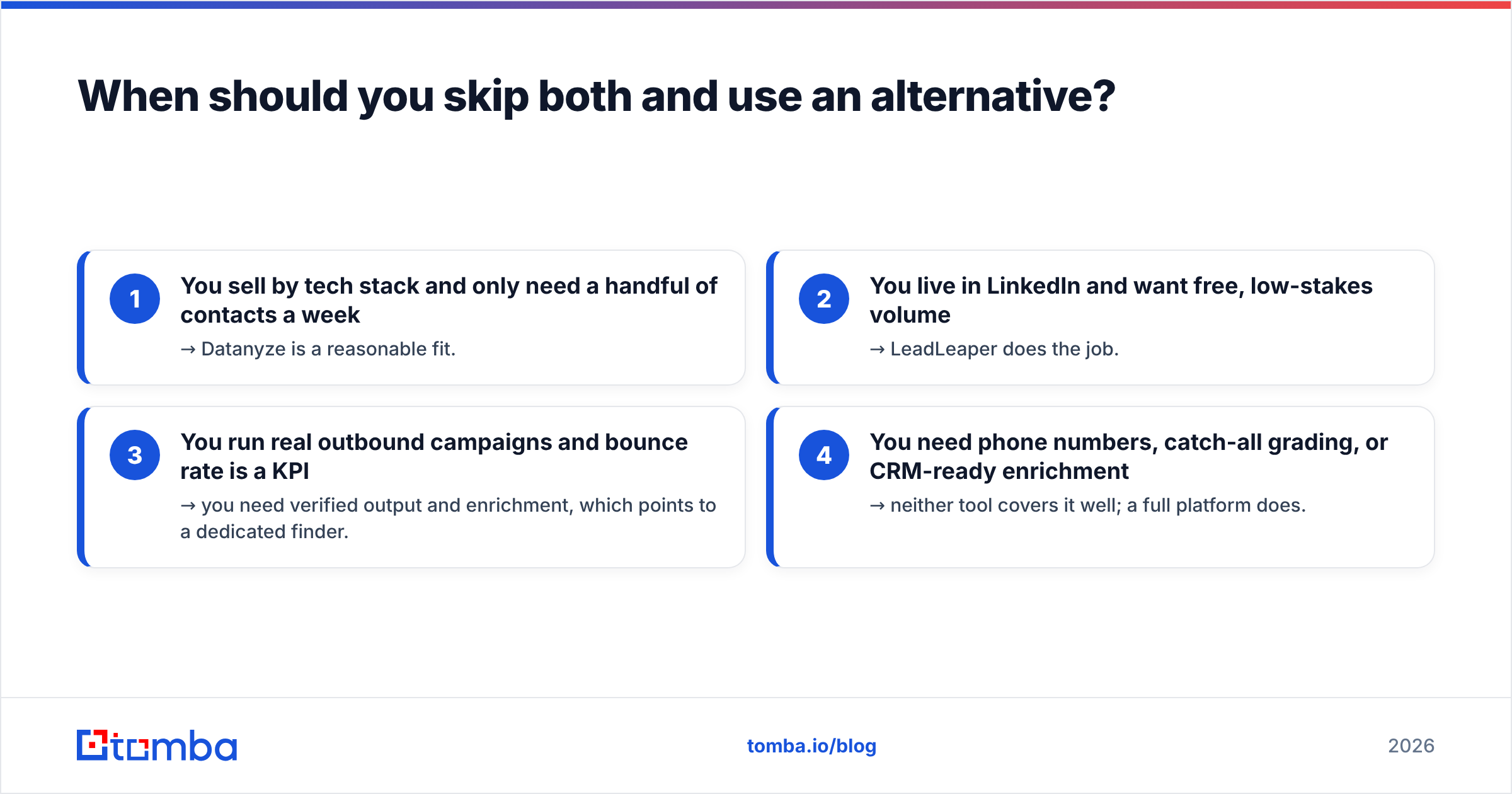
Pick a third option when your priority is clean, deliverable data at volume rather than a specific niche feature. Use this quick test:
- You sell by tech stack and only need a handful of contacts a week → Datanyze is a reasonable fit.
- You live in LinkedIn and want free, low-stakes volume → LeadLeaper does the job.
- You run real outbound campaigns and bounce rate is a KPI → you need verified output and enrichment, which points to a dedicated finder.
- You need phone numbers, catch-all grading, or CRM-ready enrichment → neither tool covers it well; a full platform does.
For cases 3 and 4 — which describe most growing sales teams — the calculus favors a tool built around accuracy first. Independent review sites like G2 are a good sanity check on any vendor's real-world valid-rate claims, and vendor docs from established players such as HubSpot or Salesforce show how tightly deliverability is now tied to list hygiene. The takeaway is the same across all of them: garbage in, bounces out.
Datanyze vs LeadLeaper: the verdict#
If we're forced to rank the two head to head:
- Choose Datanyze for technographic targeting and predictable, low-volume prospecting where knowing the tech stack drives the pitch.
- Choose LeadLeaper for free, fast, LinkedIn-native email capture when volume matters more than precision.
- Choose neither if deliverability is a real metric for your team — because both leave verification and enrichment as your problem, and that's where campaigns quietly die.
The honest conclusion is that this isn't really a two-horse race. Datanyze and LeadLeaper each win a narrow use case, but the job most sales teams actually have — turning a target list into verified, enriched, send-ready contacts without a bounce spike — is a job neither was built to finish.
Get accurate, verified B2B emails with Tomba#
If you're comparing Datanyze and LeadLeaper because you're tired of scrubbing guessed emails, that's the signal to try a finder built around accuracy. The Tomba Email Finder discovers professional emails by name, domain, or company, scores each result's confidence, and verifies deliverability before it ever reaches your sequencer — so the address you export is one you can actually send to. Start free with 25 searches, then scale on a plan that's priced per valid email rather than per guess. Spend your time selling, not cleaning lists.
Related guides#
Ready to find emails that actually work?
Join 150,000+ professionals who stopped guessing and started sending. Free credits on signup — no credit card required.
Get the Tomba newsletter
Practical outbound tactics and product updates — once every two weeks.
About the author