Datanyze vs Leadmine: Which Email Finder Wins in 2026?
Datanyze and Leadmine both promise clean B2B contact data, but they win on different fronts. Here's an honest breakdown of accuracy, pricing, and coverage — plus a cheaper pick.
You are choosing between two B2B contact-data tools that look similar on the surface and behave very differently in a real prospecting workflow. This is the honest, side-by-side breakdown of Datanyze vs Leadmine — where each one earns its price, where each one quietly costs you, and which one fits the way your team actually finds emails.
TL;DR — Datanyze vs Leadmine in 30 seconds#
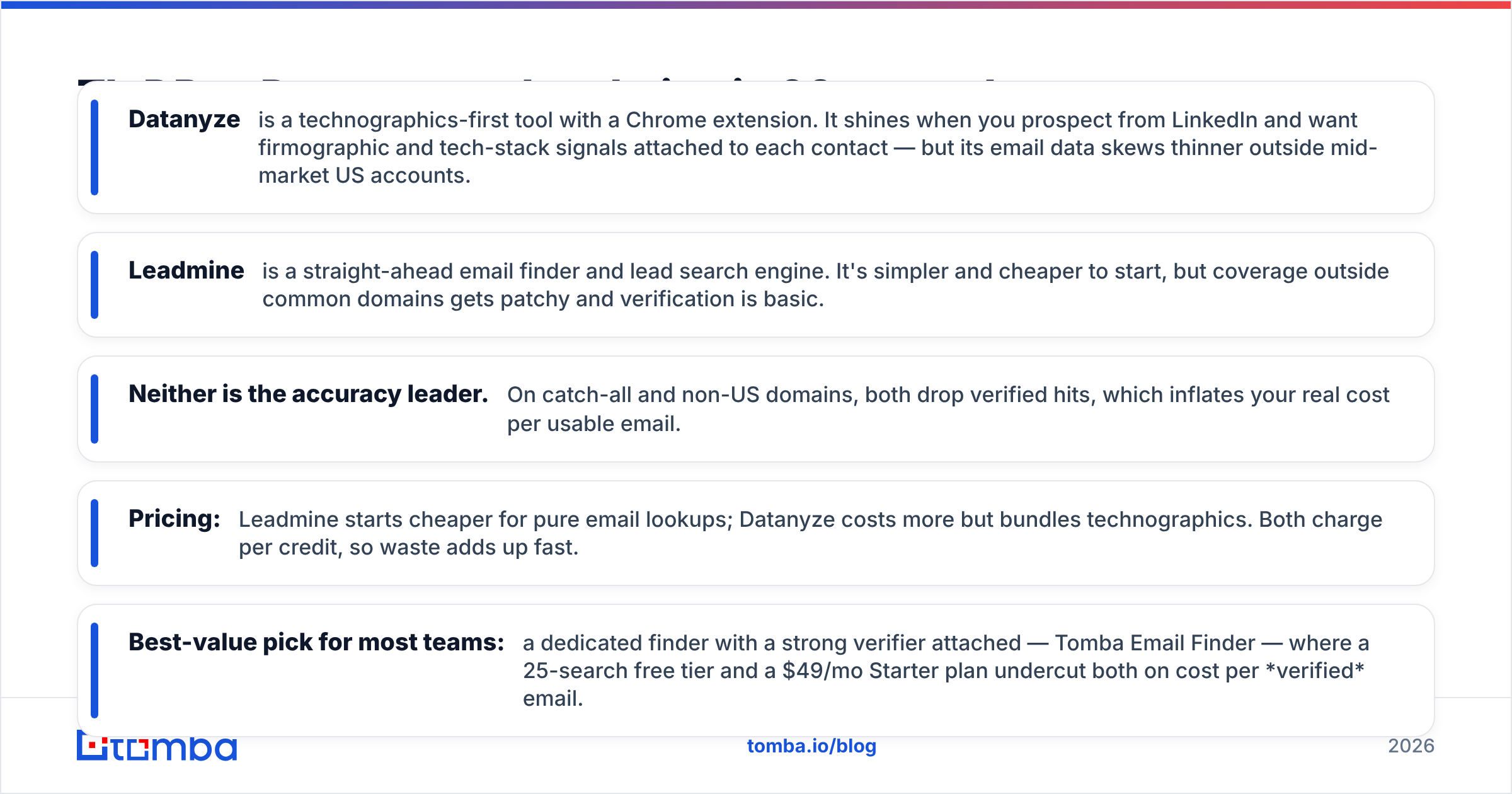
- Datanyze is a technographics-first tool with a Chrome extension. It shines when you prospect from LinkedIn and want firmographic and tech-stack signals attached to each contact — but its email data skews thinner outside mid-market US accounts.
- Leadmine is a straight-ahead email finder and lead search engine. It's simpler and cheaper to start, but coverage outside common domains gets patchy and verification is basic.
- Neither is the accuracy leader. On catch-all and non-US domains, both drop verified hits, which inflates your real cost per usable email.
- Pricing: Leadmine starts cheaper for pure email lookups; Datanyze costs more but bundles technographics. Both charge per credit, so waste adds up fast.
- Best-value pick for most teams: a dedicated finder with a strong verifier attached — Tomba Email Finder — where a 25-search free tier and a $49/mo Starter plan undercut both on cost per verified email.
What is Datanyze and who is it for?#
Datanyze started life as a technographics company — its original claim to fame was telling you what software a website runs (CRM, analytics, e-commerce platform, chat widget). It was acquired by ZoomInfo and repositioned as a lightweight prospecting tool, and today it's best known for its free-to-cheap Chrome extension that surfaces contact details and company data while you browse LinkedIn or a company site.
Datanyze fits a specific persona: an SDR or founder who prospects account-by-account and wants context, not just an email. If you care that a target uses Shopify, HubSpot, or Salesforce before you write the first line of your pitch, the technographic layer is genuinely useful. You can read more about how technographic signals feed sales prospecting workflows, but the short version is: Datanyze is a research tool that happens to return emails, not an email engine that happens to return research.
The trade-off is depth. Because Datanyze leans on browsing context, it's strongest when you're already on the right profile and weakest when you need to pull hundreds of contacts across a domain in one shot.
What is Leadmine and who is it for?#
Leadmine is the more literal of the two: a B2B lead search engine plus an email finder and email verifier. You search by role, industry, location, and company, get a list of matching people, and reveal their business emails. There's a Chrome extension too, but the center of gravity is the web app and the search database.
Leadmine fits a persona that wants volume with minimal fuss: build a list, find emails, export to a sequencer. It doesn't try to be a research suite. That focus keeps the learning curve low and the entry price friendly, which is why smaller teams and solo founders often start there.
The catch is that a search-database model is only as good as the database. When your ICP sits outside Leadmine's densest coverage — think non-US SMBs, technical niche roles, or newer companies — result counts thin out and the emails you do get lean more heavily on pattern guessing than on verified sources.
Datanyze vs Leadmine: the head-to-head comparison#
Here's the core comparison most buyers actually need. Prices and limits shift, so treat these as directional and confirm on each vendor's own site before you buy.
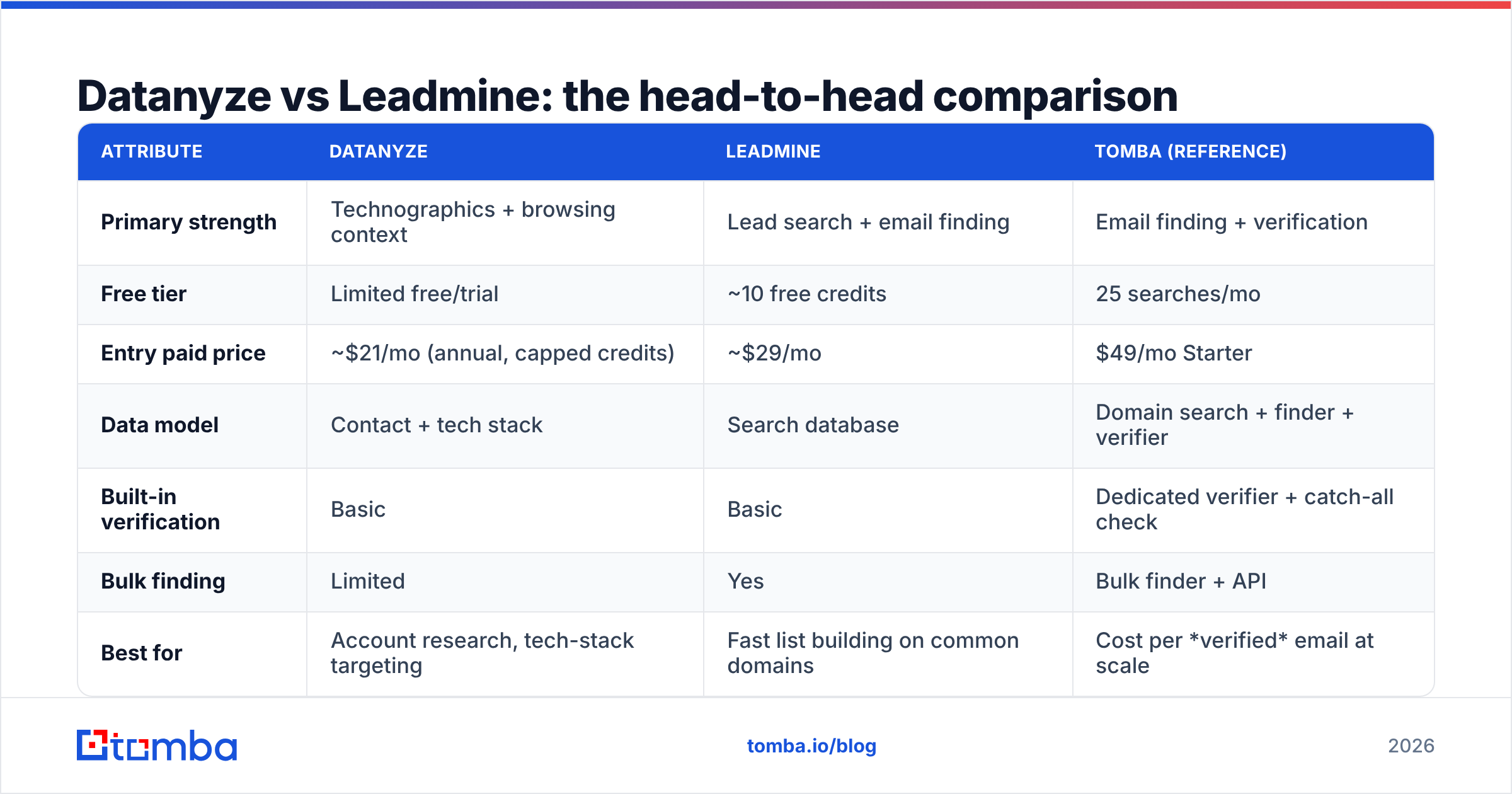
| Attribute | Datanyze | Leadmine | Tomba (reference) |
|---|---|---|---|
| Primary strength | Technographics + browsing context | Lead search + email finding | Email finding + verification |
| Free tier | Limited free/trial | ~10 free credits | 25 searches/mo |
| Entry paid price | ~$21/mo (annual, capped credits) | ~$29/mo | $49/mo Starter |
| Data model | Contact + tech stack | Search database | Domain search + finder + verifier |
| Built-in verification | Basic | Basic | Dedicated verifier + catch-all check |
| Bulk finding | Limited | Yes | Bulk finder + API |
| Best for | Account research, tech-stack targeting | Fast list building on common domains | Cost per verified email at scale |
The table exposes the real decision. Datanyze and Leadmine are not competing on the same axis: Datanyze sells context, Leadmine sells reach. If you only measure them on "did I get an email," you'll under-value Datanyze's technographics and over-value Leadmine's raw count — which is exactly the mistake that leads to bounced sends.
Is Datanyze or Leadmine more accurate?#
Accuracy is where marketing copy and reality diverge, so be specific about what "accurate" means. There are two failure modes that matter:
- Coverage gaps — the tool has no email for a contact who exists.
- False positives — the tool returns an email that looks valid but bounces (common with catch-all domains that accept everything at the SMTP layer).

In practice, Datanyze tends to have solid coverage on mid-market US accounts because of its ZoomInfo lineage, but it degrades on smaller and international companies. Leadmine can surface more raw results on common domains, but a chunk of those are pattern-derived guesses that haven't been SMTP-checked, so the bounce risk is higher if you send without a second verification pass.
Neither tool ships a strong catch-all handling story, and that's the quiet killer. A catch-all domain accepts every address at the gateway, so a naive verifier marks guessed emails as "valid" when they may route nowhere. If a meaningful share of your list is catch-all, you need a catch-all verifier or you're gambling with your sender reputation. That's why serious teams treat finding and verifying as two separate, non-negotiable steps — and why a standalone email verifier belongs in the stack regardless of which finder you pick.
The honest verdict: on pure verified-email accuracy, both Datanyze and Leadmine are acceptable on easy domains and unreliable on hard ones. If your ICP is US mid-market, either can work. If it's global or SMB-heavy, budget for extra verification.
How do Datanyze and Leadmine price out in the real world?#
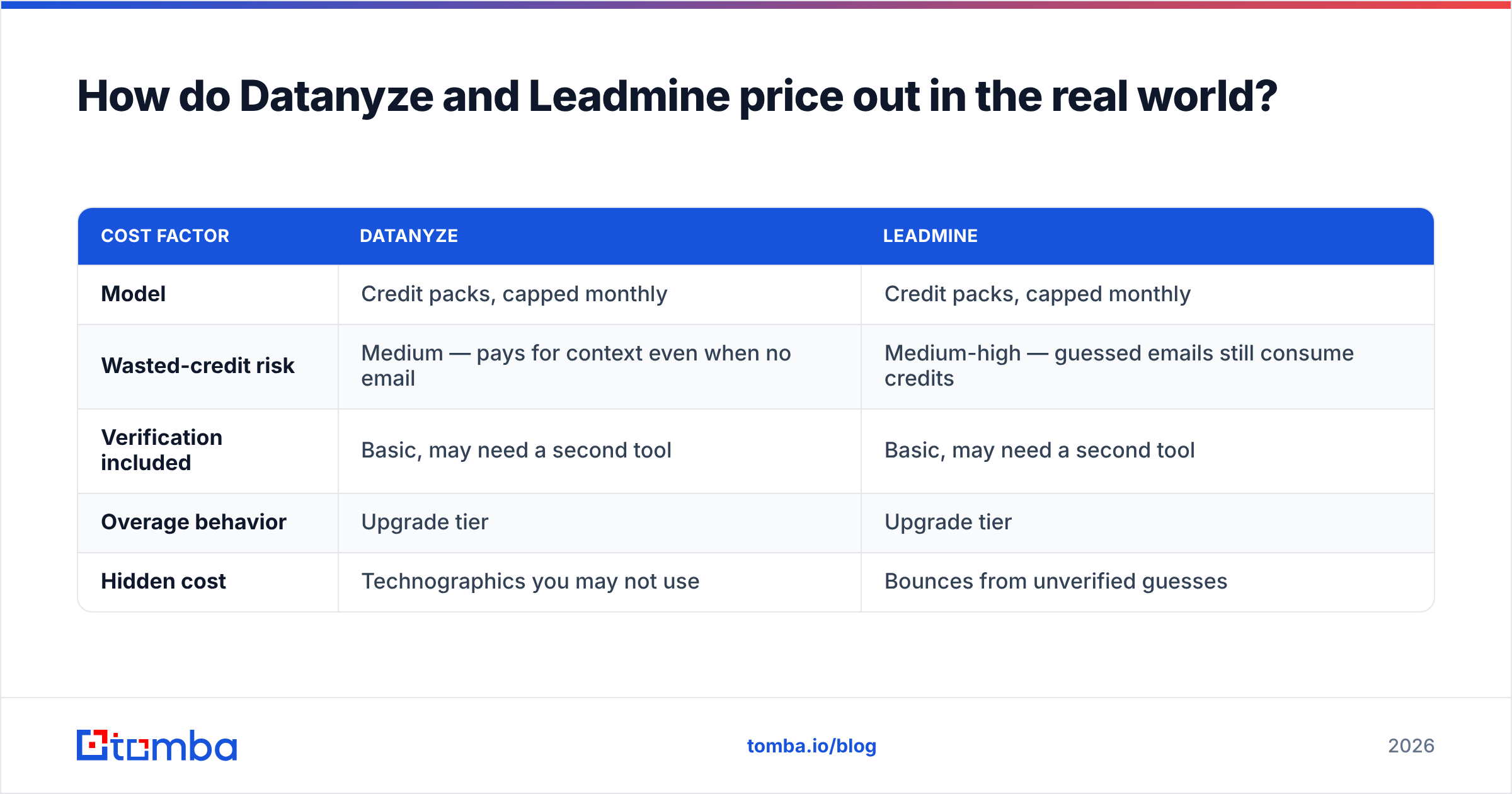
Sticker price is misleading because both tools charge per credit, and a credit spent on a contact with no email — or a bad email — is money burned. The metric that matters is cost per verified, deliverable email, not cost per lookup.
| Cost factor | Datanyze | Leadmine |
|---|---|---|
| Model | Credit packs, capped monthly | Credit packs, capped monthly |
| Wasted-credit risk | Medium — pays for context even when no email | Medium-high — guessed emails still consume credits |
| Verification included | Basic, may need a second tool | Basic, may need a second tool |
| Overage behavior | Upgrade tier | Upgrade tier |
| Hidden cost | Technographics you may not use | Bounces from unverified guesses |
Two patterns show up repeatedly. First, Datanyze buyers overpay for technographics they don't operationalize — if you never actually filter by tech stack, you're subsidizing a feature you ignore. Second, Leadmine buyers underpay upfront and overpay later in bounce cleanup, deliverability damage, and re-verification through a third tool.
When you normalize both to cost-per-verified-email, the gap between them narrows and a finder-plus-verifier bundle often wins outright. You can sanity-check that math against transparent Tomba pricing: a Free tier with 25 searches, Starter at $49/mo, Growth at $99/mo, and Pro at $249/mo, with verification built alongside the finder rather than sold as a bolt-on.

Which one fits your workflow?#
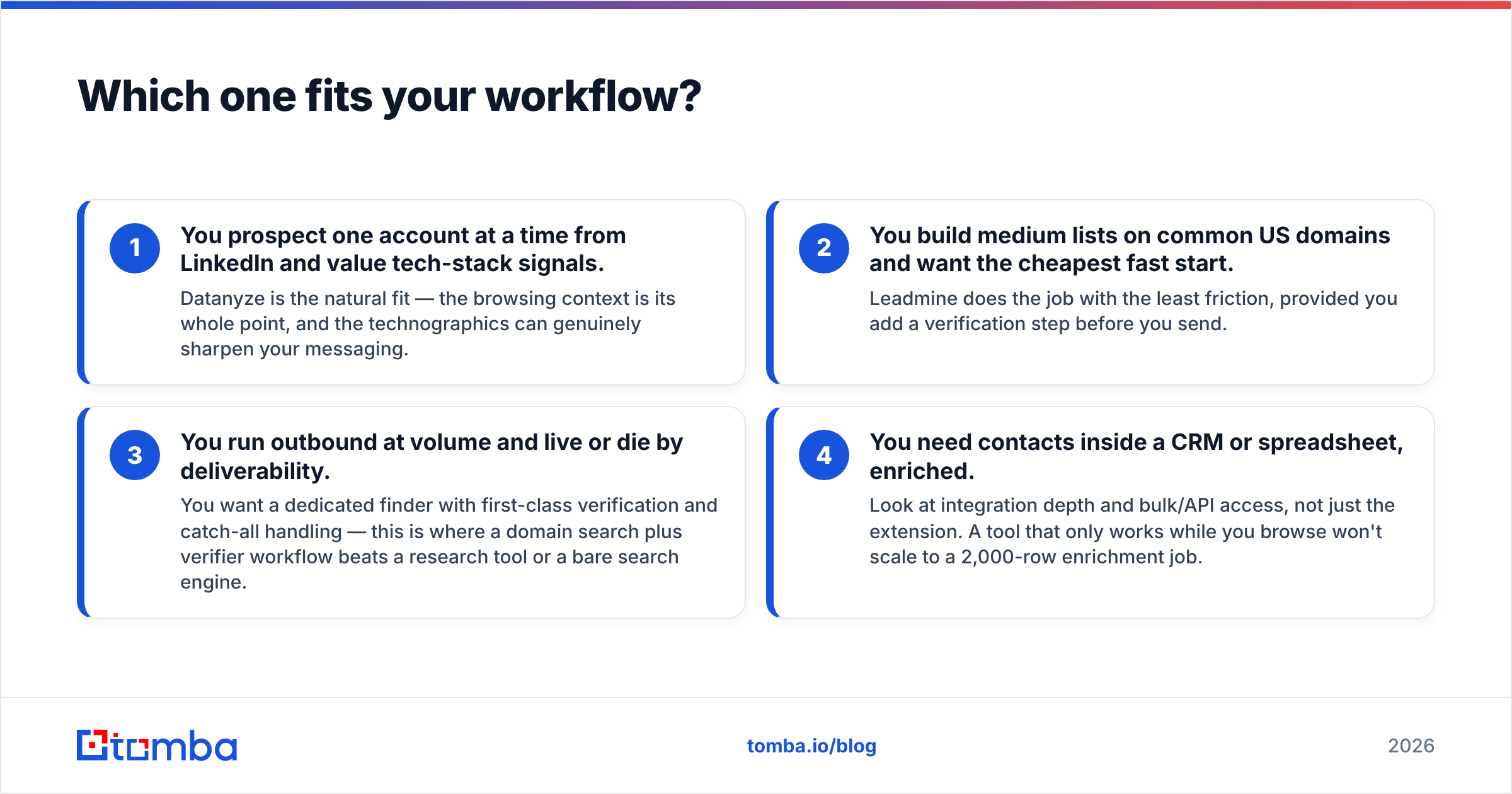
Tool choice should follow your motion, not the other way around. Map yourself to one of these:
- You prospect one account at a time from LinkedIn and value tech-stack signals. Datanyze is the natural fit — the browsing context is its whole point, and the technographics can genuinely sharpen your messaging.
- You build medium lists on common US domains and want the cheapest fast start. Leadmine does the job with the least friction, provided you add a verification step before you send.
- You run outbound at volume and live or die by deliverability. You want a dedicated finder with first-class verification and catch-all handling — this is where a domain search plus verifier workflow beats a research tool or a bare search engine.
- You need contacts inside a CRM or spreadsheet, enriched. Look at integration depth and bulk/API access, not just the extension. A tool that only works while you browse won't scale to a 2,000-row enrichment job.
Be honest about which row you're in. Most teams think they're row 1 or 2 and are actually row 3 — they're sending enough volume that a 15% bounce rate quietly throttles their whole domain. If that's you, optimize for verified deliverability, not lowest sticker price.
What do third-party reviews say?#
Don't take any single vendor's word — including the framing here. Cross-check on independent review sites where real users log the rough edges. Datanyze and Leadmine both have public listings on G2 and Capterra, and the recurring themes in user reviews line up with the analysis above: Datanyze users praise the tech-stack data and flag coverage gaps on smaller companies; Leadmine users like the price and simplicity and mention accuracy variance on harder domains.
For a neutral primer on the category itself, the sales intelligence overview is a useful grounding read before you commit budget to any one vendor.
Datanyze vs Leadmine: the verdict#
Neither Datanyze nor Leadmine is a bad tool — they're just narrow tools sold as broad ones.
- Pick Datanyze if technographics and account-level research context are core to how you sell, and your ICP is mostly US mid-market. You're buying intelligence, and you'll accept softer email coverage as the trade.
- Pick Leadmine if you want the cheapest, simplest way to turn a search into a list, you sell into common domains, and you're disciplined about verifying before you send.
- Pick neither if your real problem is cost per verified email at scale — because that's a finder-plus-verifier problem, and a research suite or a bare search engine will leak money on wasted credits and bounces.
The decision isn't really "Datanyze vs Leadmine." It's "which failure mode can I least afford?" Answer that, and the tool picks itself.
The cost-per-verified-email pick#
If you got here because your outbound depends on emails that actually land, put a dedicated finder at the center of your stack. Tomba Email Finder is built for exactly that job: find professional emails by domain, name, or company; verify them — including catch-all domains — in the same workflow; and scale through bulk and API instead of a browse-only extension. Start on the free tier with 25 searches, and if the numbers work, Starter is $49/mo — with verification treated as part of the product, not a separate invoice. Test it against your own list before you renew anything else, and let cost-per-verified-email make the call.
Related guides#
Ready to find emails that actually work?
Join 150,000+ professionals who stopped guessing and started sending. Free credits on signup — no credit card required.
Get the Tomba newsletter
Practical outbound tactics and product updates — once every two weeks.
About the author