Datanyze vs LeadRocks (2026): Which B2B Data Tool Wins?
Datanyze and LeadRocks both promise clean B2B contact data on a budget, but they solve different problems. Here's an honest breakdown of accuracy, pricing, and the best fit for your outbound.
Choosing between Datanyze and LeadRocks usually comes down to one question: do you want technographic-flavored contact lookups inside your browser, or a bulk LinkedIn-sourced contact database you can export by the thousand? They look similar on a feature grid, but they were built for different jobs, and picking the wrong one quietly taxes every campaign you run afterward.
This is a neutral, hands-on comparison. Both tools are legitimate, both have real fans, and both have real gaps. Below you'll get the pricing reality, the data-accuracy tradeoffs, and a clear recommendation for each type of team, plus where a dedicated email tool beats either one.
TL;DR: Datanyze vs LeadRocks at a glance#
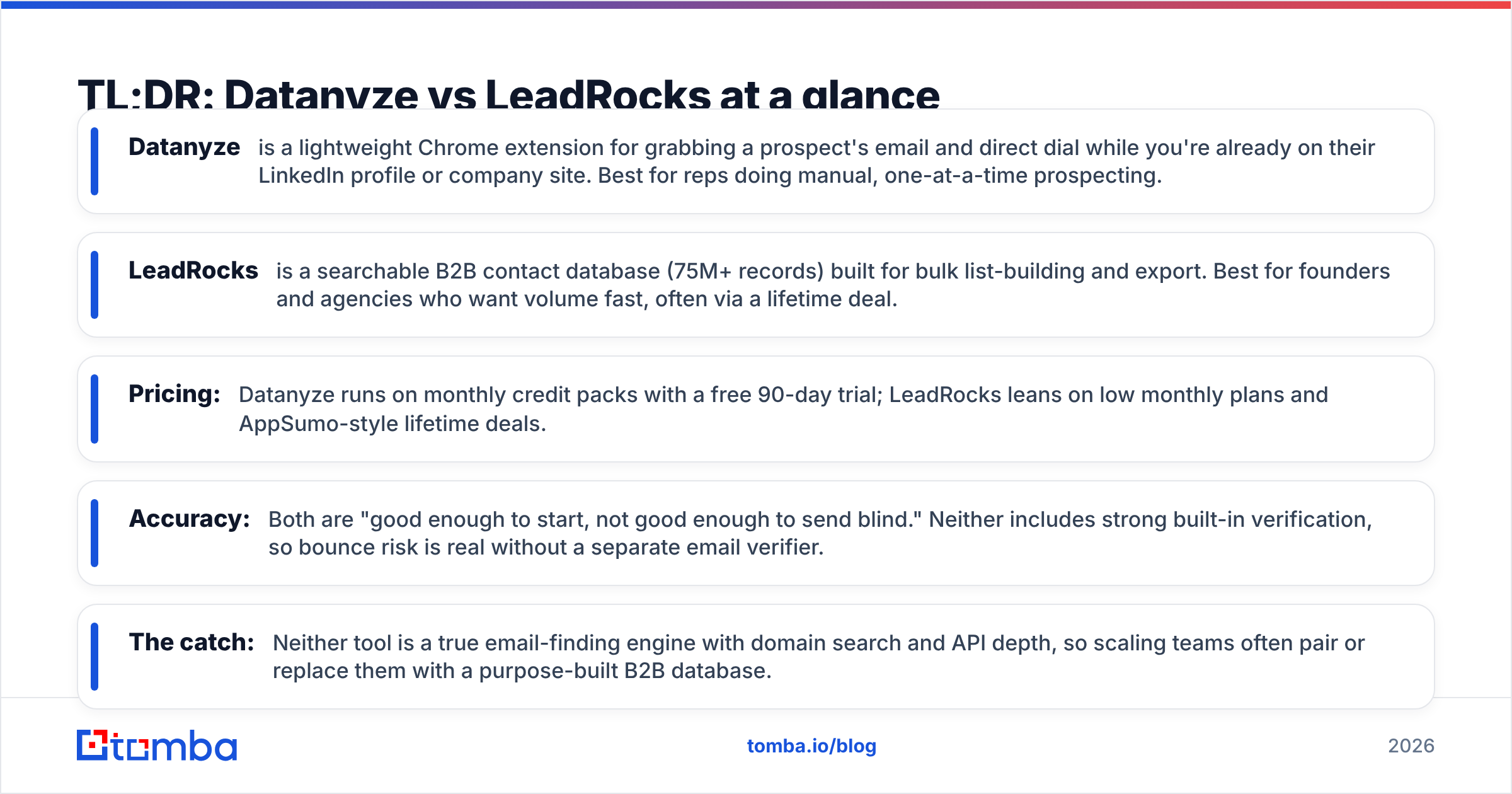
- Datanyze is a lightweight Chrome extension for grabbing a prospect's email and direct dial while you're already on their LinkedIn profile or company site. Best for reps doing manual, one-at-a-time prospecting.
- LeadRocks is a searchable B2B contact database (75M+ records) built for bulk list-building and export. Best for founders and agencies who want volume fast, often via a lifetime deal.
- Pricing: Datanyze runs on monthly credit packs with a free 90-day trial; LeadRocks leans on low monthly plans and AppSumo-style lifetime deals.
- Accuracy: Both are "good enough to start, not good enough to send blind." Neither includes strong built-in verification, so bounce risk is real without a separate email verifier.
- The catch: Neither tool is a true email-finding engine with domain search and API depth, so scaling teams often pair or replace them with a purpose-built B2B database.
What is Datanyze and who is it for?#
Datanyze is a prospecting tool that lives in your browser. You install the Chrome extension, open a LinkedIn profile or a company website, and Datanyze surfaces the contact's business email, mobile number, and basic company data in a side panel. Historically it was known for technographics, tracking what software a company uses, but today most people reach for it as a quick contact-grabber.
The workflow is the appeal. There's no separate app to babysit, no CSV round-trip. You're researching a prospect anyway, so you pull their details in the same motion. For a rep who works accounts one by one and values context over raw volume, that's a natural fit.
The tradeoff is throughput. Datanyze is designed for single-record lookups, not for building a 5,000-line list overnight. Its credit model rewards precision, not sweeping exports. If your motion is "find the exact right 40 people this week and reach out thoughtfully," Datanyze fits. If it's "give me everyone with this title in this industry," you'll fight the tool.

What is LeadRocks and who is it for?#
LeadRocks is a B2B contact database with an emphasis on volume and price. It advertises 75M+ contacts and 35M+ companies, sourced heavily from LinkedIn, and its core promise is that you can search by title, industry, location, or company and export matching leads in bulk, complete with emails and, on many records, phone numbers.
LeadRocks became popular through lifetime deals, which is a big part of its identity. Instead of paying every month, many users bought a one-time plan and treat LeadRocks as their standing list-building tool. For a bootstrapped founder or a lead-gen agency running high-volume outbound, that pricing model is hard to ignore.
The tradeoff is the flip side of Datanyze's. LeadRocks is built for the list, not the moment. It's less about enriching the single profile in front of you and more about pulling a segment you can drop into a sequencer. Data freshness varies by segment, and because so much is LinkedIn-derived, coverage is strong for common corporate roles and thinner for niche, offline, or non-Western contacts.
Datanyze vs LeadRocks: the core comparison table#
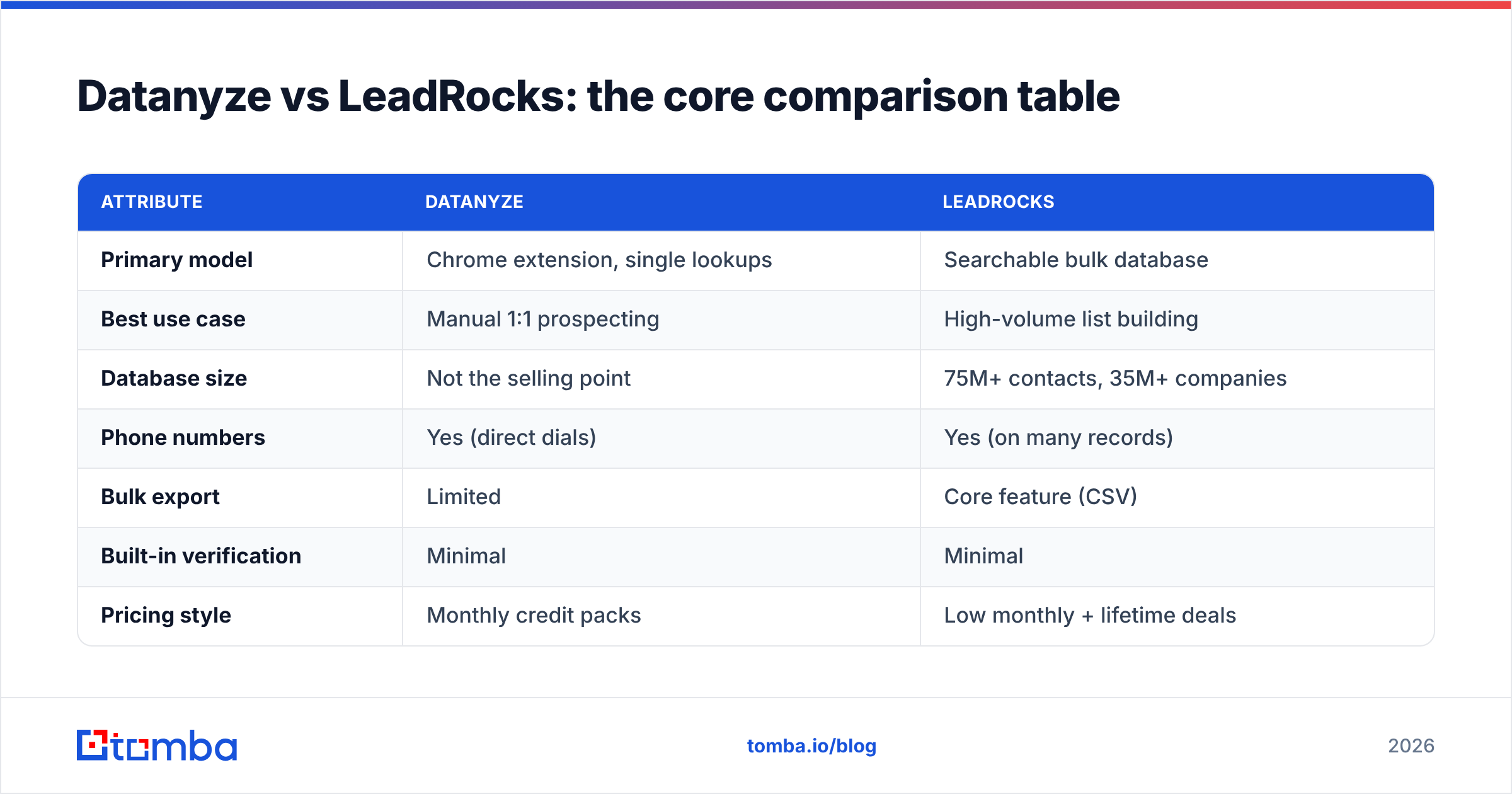
Here's the head-to-head on the attributes that actually change your results:
| Attribute | Datanyze | LeadRocks |
|---|---|---|
| Primary model | Chrome extension, single lookups | Searchable bulk database |
| Best use case | Manual 1:1 prospecting | High-volume list building |
| Database size | Not the selling point | 75M+ contacts, 35M+ companies |
| Phone numbers | Yes (direct dials) | Yes (on many records) |
| Bulk export | Limited | Core feature (CSV) |
| Built-in verification | Minimal | Minimal |
| Pricing style | Monthly credit packs | Low monthly + lifetime deals |
| Free option | 90-day free trial | Small free credits to test |
| Ideal buyer | Individual reps | Founders, agencies |
The pattern is clear: these tools don't really compete on the same axis. Datanyze optimizes for contextual, in-the-moment capture; LeadRocks optimizes for cheap, high-volume export. Your motion decides the winner more than any single feature does.

How accurate is the data in Datanyze vs LeadRocks?#
Neither tool is accurate enough to send to blind. That's the honest answer, and it's true of almost every database-first provider, not just these two.
Datanyze's per-profile lookups tend to feel reliable on well-known corporate contacts because you're pulling one record with context, and you can eyeball whether it makes sense. But it still returns guessed or outdated addresses on a meaningful share of lookups, especially for people who've changed jobs recently.
LeadRocks, being a bulk database, inherits the classic bulk-database problem: the moment you export 3,000 rows, you also export every stale, role-changed, and pattern-guessed record in that segment. LinkedIn-sourced data ages fast because people switch companies constantly, and a database refresh cycle can't keep up in real time.
The fix is the same for both: verify before you send. Run any export through a dedicated verification pass to strip catch-alls, invalids, and risky addresses. If you skip this step, your bounce rate climbs, your domain sender reputation suffers, and even your good emails start landing in spam. Independent reviews on G2 echo this for nearly every affordable data tool, treat the raw output as a starting point, not a send list.
This is exactly where pairing a data source with a real verification layer pays for itself. A fast email verification pass on top of either tool does more for your deliverability than switching between them ever will.
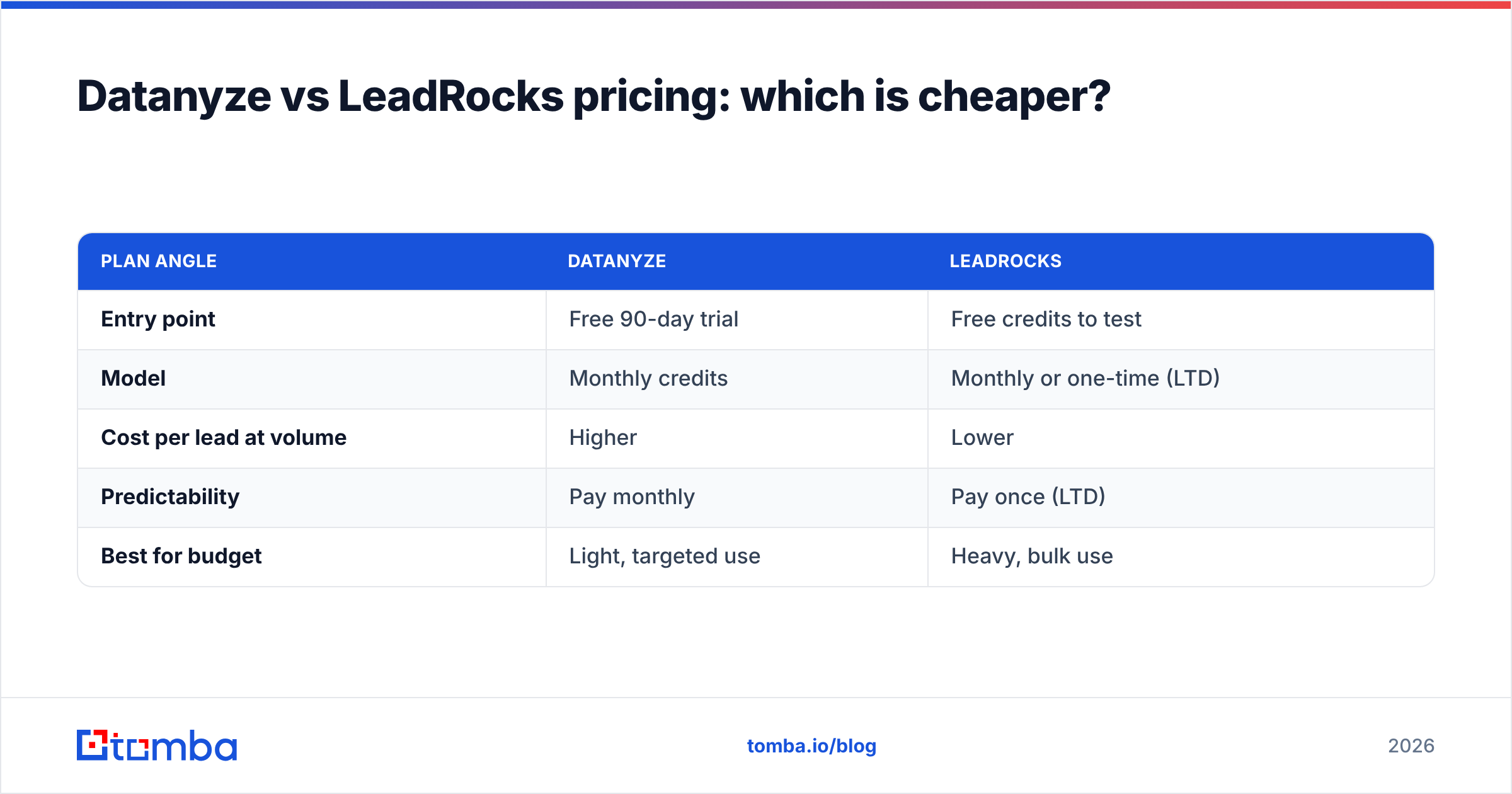
Datanyze vs LeadRocks pricing: which is cheaper?#
Pricing is where the two diverge most, and where LeadRocks tends to win on paper.
Datanyze uses monthly credit packs. There's a genuinely useful free trial (historically 90 days with a capped number of credits), and paid tiers unlock more monthly lookups. It's priced for individuals and small teams who need a steady, modest flow of high-intent contacts rather than massive dumps.
LeadRocks competes on cost per contact. Its monthly plans are low, and its lifetime deals (frequently promoted through AppSumo-style marketplaces) let you pay once and keep exporting. For high-volume users, the effective cost per lead can be dramatically lower than a credit-metered tool.
| Plan angle | Datanyze | LeadRocks |
|---|---|---|
| Entry point | Free 90-day trial | Free credits to test |
| Model | Monthly credits | Monthly or one-time (LTD) |
| Cost per lead at volume | Higher | Lower |
| Predictability | Pay monthly | Pay once (LTD) |
| Best for budget | Light, targeted use | Heavy, bulk use |
The caveat: cheap raw data isn't cheap if half of it bounces. A lifetime deal that floods your pipeline with unverifiable addresses can cost you more in burned domains than you saved. Always factor verification into your true cost per usable lead. Compare that math against transparent, usage-based Tomba pricing where verification is part of the same workflow, not a separate purchase.

When should you pick Datanyze over LeadRocks?#
Pick Datanyze when:
- You prospect one account at a time. Your value is research and personalization, not raw list size.
- You live on LinkedIn. You want contact details surfaced in-context while you evaluate a prospect.
- You need direct dials for calling. Datanyze's phone coverage supports a call-first motion well.
- Volume is modest. You're closing quality over quantity, and a credit-metered tool matches your pace.
Pick LeadRocks when:
- You build big lists fast. You need thousands of exportable contacts for a segment, now.
- Budget is the constraint. A lifetime deal fits a bootstrapped or agency cost structure.
- You run repeatable, high-volume outbound. You'd rather pay once and pull lists whenever.
- You already have a verification step. You know raw exports need cleaning before they ship.
Notice the recurring theme in both lists: verification and email-finding depth sit outside these tools' core strengths. That's the gap the next section addresses.
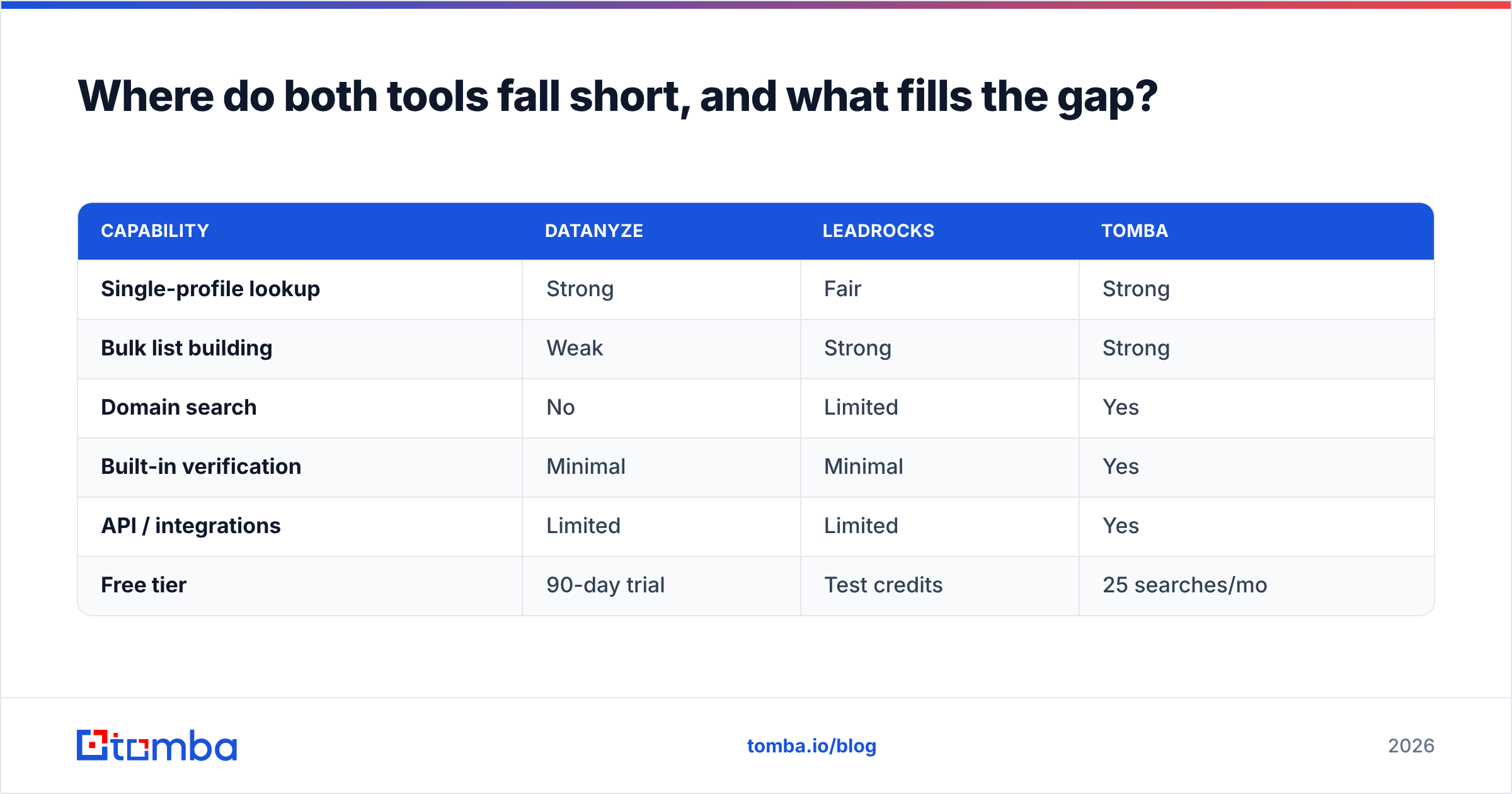
Where do both tools fall short, and what fills the gap?#
Both Datanyze and LeadRocks are contact sources. Neither is a complete email-finding and verification stack, and that shows up in three places.
Domain-level discovery. Sometimes you don't have a name, you have a company and a role. A true domain search returns every discoverable address at a company with its confidence score and pattern, which is a different capability than looking up one LinkedIn profile or filtering a static database.
Verification built into the flow. Because neither tool verifies aggressively, you inevitably bolt on a second product. That's fine, but it means two subscriptions, two workflows, and a manual export/import step between them.
API and scale. If you want to enrich records automatically inside your CRM or product, you need a real developer surface. That's where a documented email finder with a proper API and bulk endpoints outclasses a browser extension or a marketplace database.
This is why many teams that start on Datanyze or LeadRocks eventually consolidate. A platform like Tomba combines finding, verification, domain search, and data enrichment in one place, so the "find, then clean, then enrich" chain isn't three tools taped together. You can see how the data is compiled on Tomba's data sources page rather than guessing at provenance.
| Capability | Datanyze | LeadRocks | Tomba |
|---|---|---|---|
| Single-profile lookup | Strong | Fair | Strong |
| Bulk list building | Weak | Strong | Strong |
| Domain search | No | Limited | Yes |
| Built-in verification | Minimal | Minimal | Yes |
| API / integrations | Limited | Limited | Yes |
| Free tier | 90-day trial | Test credits | 25 searches/mo |
For reference, you can always evaluate the source tools directly at datanyze.com and leadrocks.io before committing.
Datanyze vs LeadRocks: the verdict#
If you force a single winner, it comes down to motion, not marketing:
- For manual, high-context, call-heavy prospecting: Datanyze is the better daily driver.
- For cheap, high-volume list building: LeadRocks wins on cost per contact, especially via lifetime deals.
- For a team that wants finding, verification, domain search, and API in one place: neither fully covers it, and that's the real gap.
The most expensive mistake isn't picking the "wrong" one of these two. It's treating either raw export as a send-ready list and torching your deliverability in the process. Whatever you choose, put a verification layer between the data and your sequencer.
Ready to find and verify emails in one workflow?#
Stop paying for one tool to find contacts and another to clean them. The Tomba Email Finder locates professional email addresses by name, company, or domain, and every result is scored and verifiable in the same platform, so what lands in your sequencer is already qualified. Start on the free tier (25 searches a month, no card), test it against your current list, and see how many "valid" contacts from your last export actually hold up. Your open rate, and your domain, will thank you.
Related guides#
Ready to find emails that actually work?
Join 150,000+ professionals who stopped guessing and started sending. Free credits on signup — no credit card required.
Get the Tomba newsletter
Practical outbound tactics and product updates — once every two weeks.
About the author