Datanyze vs ListKit (2026): Which B2B Data Tool Wins?
Datanyze and ListKit both promise clean B2B contact data, but they solve different problems. Here's an honest breakdown of accuracy, pricing, and fit—plus where a leaner tool beats both.
Choosing between Datanyze and ListKit usually comes down to one question: do you need a browser-based contact lookup tool, or a bulk lead-list builder for cold email? They get lumped together because both sell "B2B data," but they are built for different jobs, priced on different models, and fail in different ways.
This is a neutral, hands-on comparison. No vendor spin—just where each tool is strong, where it quietly costs you, and which one fits your workflow in 2026.
TL;DR: Datanyze vs ListKit at a glance#
- Datanyze is a Chrome-extension lookup tool (owned by ZoomInfo) built for one-off prospecting while you browse LinkedIn or company sites. Good for reps, weak for volume.
- ListKit is a bulk B2B list builder aimed at cold-email agencies—you filter, pull verified emails and phones by the thousand, and export to your sequencer.
- Accuracy is the real battleground. Both claim high match rates; both leak stale and catch-all addresses, so you still need independent verification before you send.
- Pricing models differ sharply: Datanyze sells monthly credit packs, ListKit sells larger credit bundles for outbound teams. Neither has a truly generous free tier.
- If your core need is finding and verifying emails cheaply, a focused tool like Tomba's email finder often beats both on cost-per-valid-contact.
What is Datanyze and who is it for?#
Datanyze is a sales-intelligence and technographics tool that lives mostly in your browser. You install the Chrome extension, land on a prospect's LinkedIn profile or company website, and Datanyze surfaces the person's business email, mobile number, and company data in a side panel.
Its original claim to fame was technographics—telling you what software a company runs (their CRM, ad tech, analytics stack) so you can time outreach around a tool they already use. After ZoomInfo acquired it, Datanyze became the lightweight, self-serve entry point into that ecosystem.
It fits a specific person: an individual SDR or founder doing manual, one-at-a-time prospecting. You're already researching an account, and you want the contact info without leaving the tab. That workflow is genuinely smooth. What Datanyze is not built for is pulling 5,000 contacts into a spreadsheet on Monday morning.

What is ListKit and who is it for?#
ListKit is a newer, cold-email-first data platform. Instead of browsing account by account, you open a filtered search—by title, industry, headcount, geography, technology—and ListKit returns a list of matching people with (claimed) verified work emails and mobile numbers. You then export straight into a sequencer like Instantly or Smartlead.
ListKit built its reputation inside the agency and "cold email as a service" crowd. The pitch is speed at volume: build a targeted list of a few thousand prospects, run it through your sending infrastructure, and book meetings. Triple-verification of emails is a headline feature, positioned to protect your sender reputation and keep bounce rates low.
Its natural user is a team running high-volume outbound—agencies, lead-gen shops, and founders scaling cold email who care more about clean bulk exports than about deep account research.
Datanyze vs ListKit: the core differences#
Before the feature table, here are the differences that actually change your day-to-day:
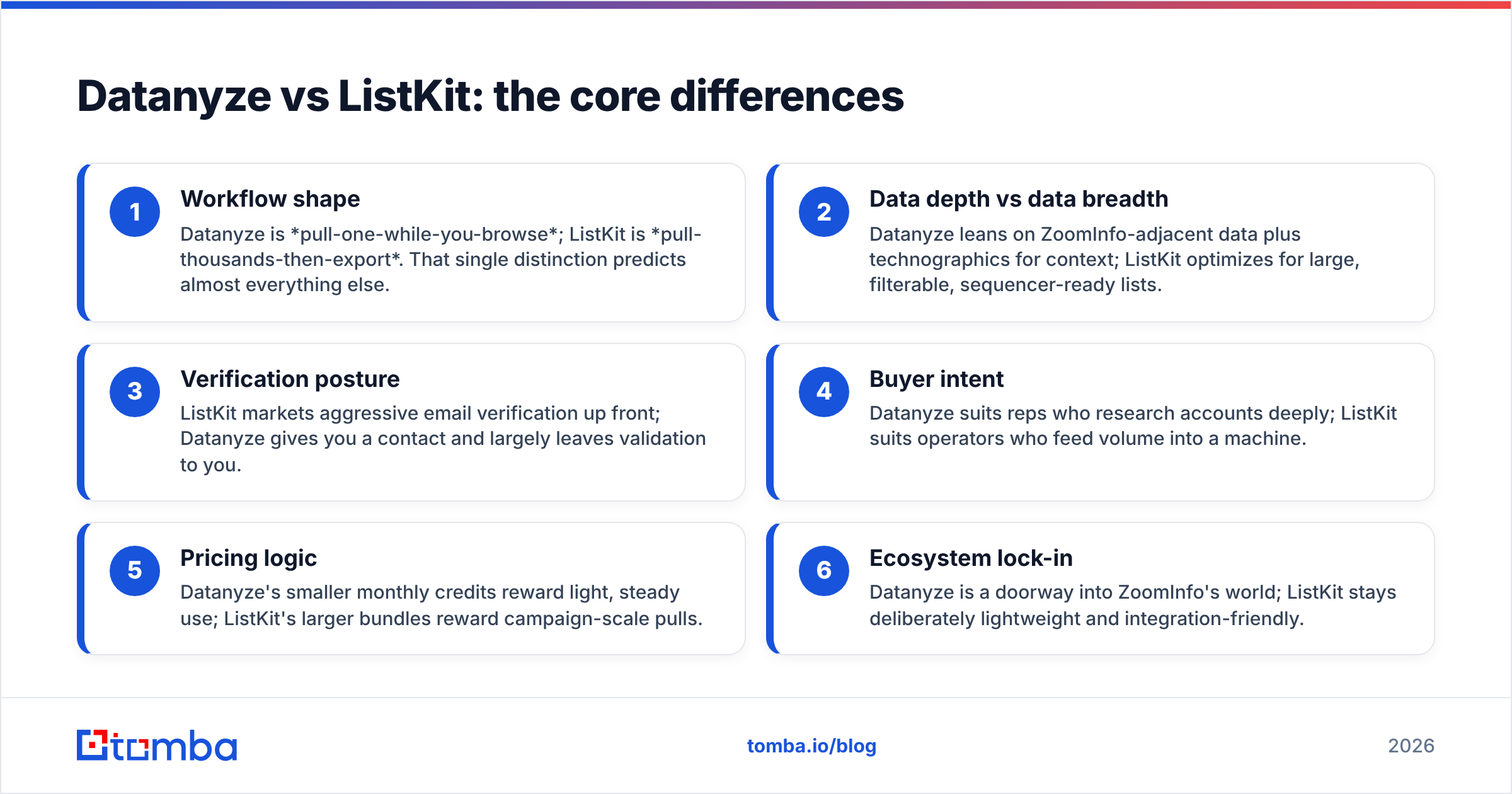
- Workflow shape — Datanyze is pull-one-while-you-browse; ListKit is pull-thousands-then-export. That single distinction predicts almost everything else.
- Data depth vs data breadth — Datanyze leans on ZoomInfo-adjacent data plus technographics for context; ListKit optimizes for large, filterable, sequencer-ready lists.
- Verification posture — ListKit markets aggressive email verification up front; Datanyze gives you a contact and largely leaves validation to you.
- Buyer intent — Datanyze suits reps who research accounts deeply; ListKit suits operators who feed volume into a machine.
- Pricing logic — Datanyze's smaller monthly credits reward light, steady use; ListKit's larger bundles reward campaign-scale pulls.
- Ecosystem lock-in — Datanyze is a doorway into ZoomInfo's world; ListKit stays deliberately lightweight and integration-friendly.
How do Datanyze and ListKit compare feature by feature?#
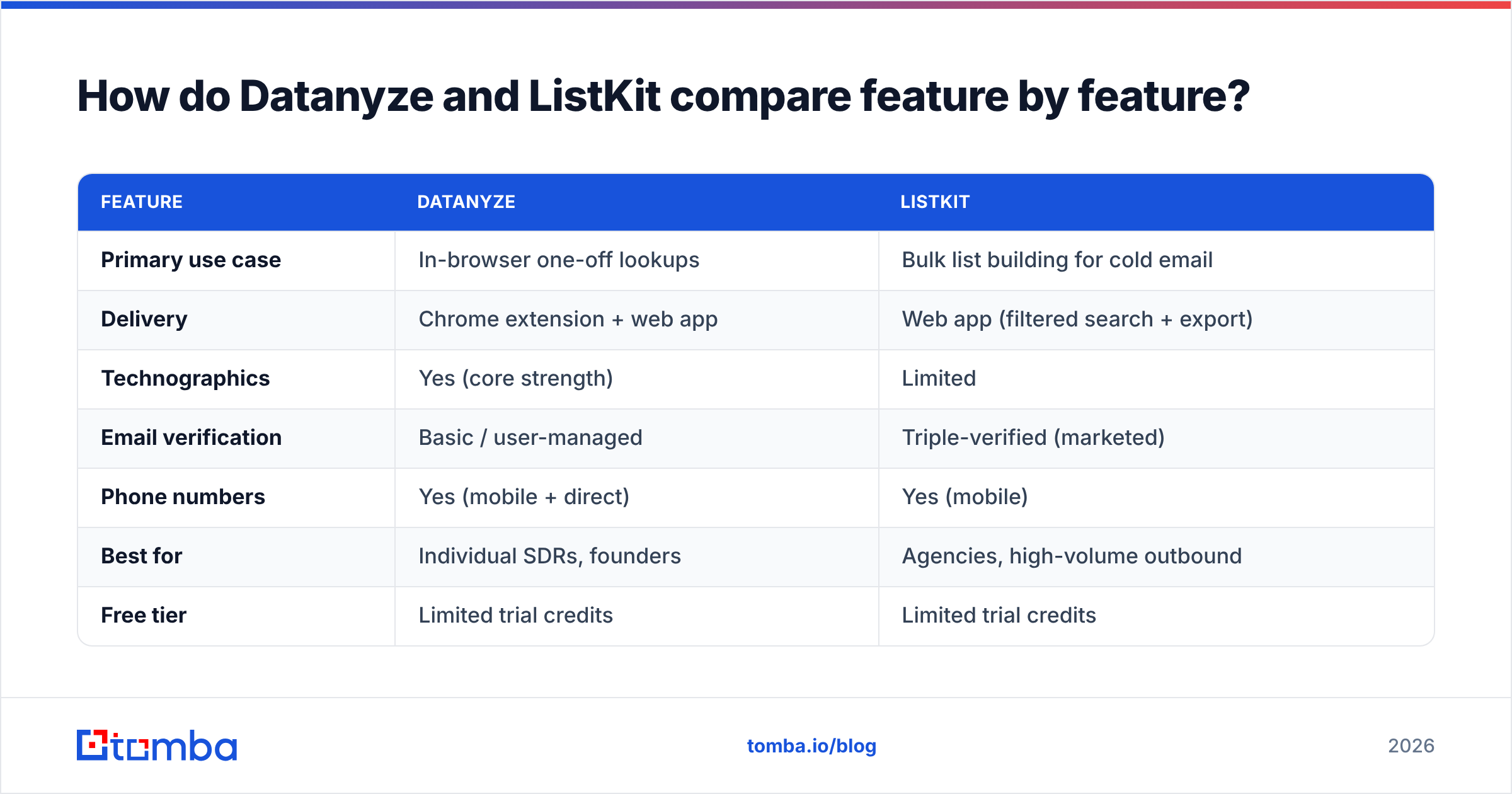
| Feature | Datanyze | ListKit |
|---|---|---|
| Primary use case | In-browser one-off lookups | Bulk list building for cold email |
| Delivery | Chrome extension + web app | Web app (filtered search + export) |
| Technographics | Yes (core strength) | Limited |
| Email verification | Basic / user-managed | Triple-verified (marketed) |
| Phone numbers | Yes (mobile + direct) | Yes (mobile) |
| Best for | Individual SDRs, founders | Agencies, high-volume outbound |
| Free tier | Limited trial credits | Limited trial credits |
| Bulk export | Weak | Strong (CSV + integrations) |
| Owned by | ZoomInfo | Independent |
The pattern is clear: Datanyze wins on context, ListKit wins on volume. If you overlay your actual workflow on that table, the right pick usually becomes obvious.
Which tool has better data accuracy?#
Neither tool is accurate enough to skip verification—and any vendor claiming 99% deliverability on cold lists is selling, not measuring.
Datanyze inherits data quality from the ZoomInfo ecosystem, which is strong on well-covered US mid-market and enterprise accounts but thinner on small companies, non-US regions, and fast-moving startups where people change jobs constantly. Because Datanyze mostly hands you a contact and moves on, you're responsible for catching stale or catch-all addresses yourself.
ListKit's triple-verification is a real advantage on paper, and in practice bounce rates on ListKit exports tend to be lower than raw scraped lists. But "verified" in the industry rarely means SMTP-confirmed for every record—catch-all domains, role accounts, and recently departed employees still slip through on any provider.
The honest takeaway: treat both tools' accuracy claims as a starting point, then run every export through an independent email verifier before you load your sequencer. A second verification layer is the cheapest insurance you can buy against a torched sending domain. Independent reviews on G2 reflect this too—users of nearly every data tool report a meaningful slice of invalid contacts.

How much do Datanyze and ListKit cost?#
Pricing is where buyers get surprised, because the two tools meter usage differently.
Datanyze sells credit-based monthly plans. Its entry tier gives you a modest bundle of credits (each contact reveal burns credits), with a limited free trial to start. It's affordable for a single rep doing steady, low-volume lookups, but the per-contact math gets expensive fast if you try to build large lists.
ListKit prices for volume. Plans bundle thousands of email and phone credits per month aimed at teams running campaigns, so the sticker price is higher but the effective cost-per-contact at scale is lower than paying Datanyze credit-by-credit.
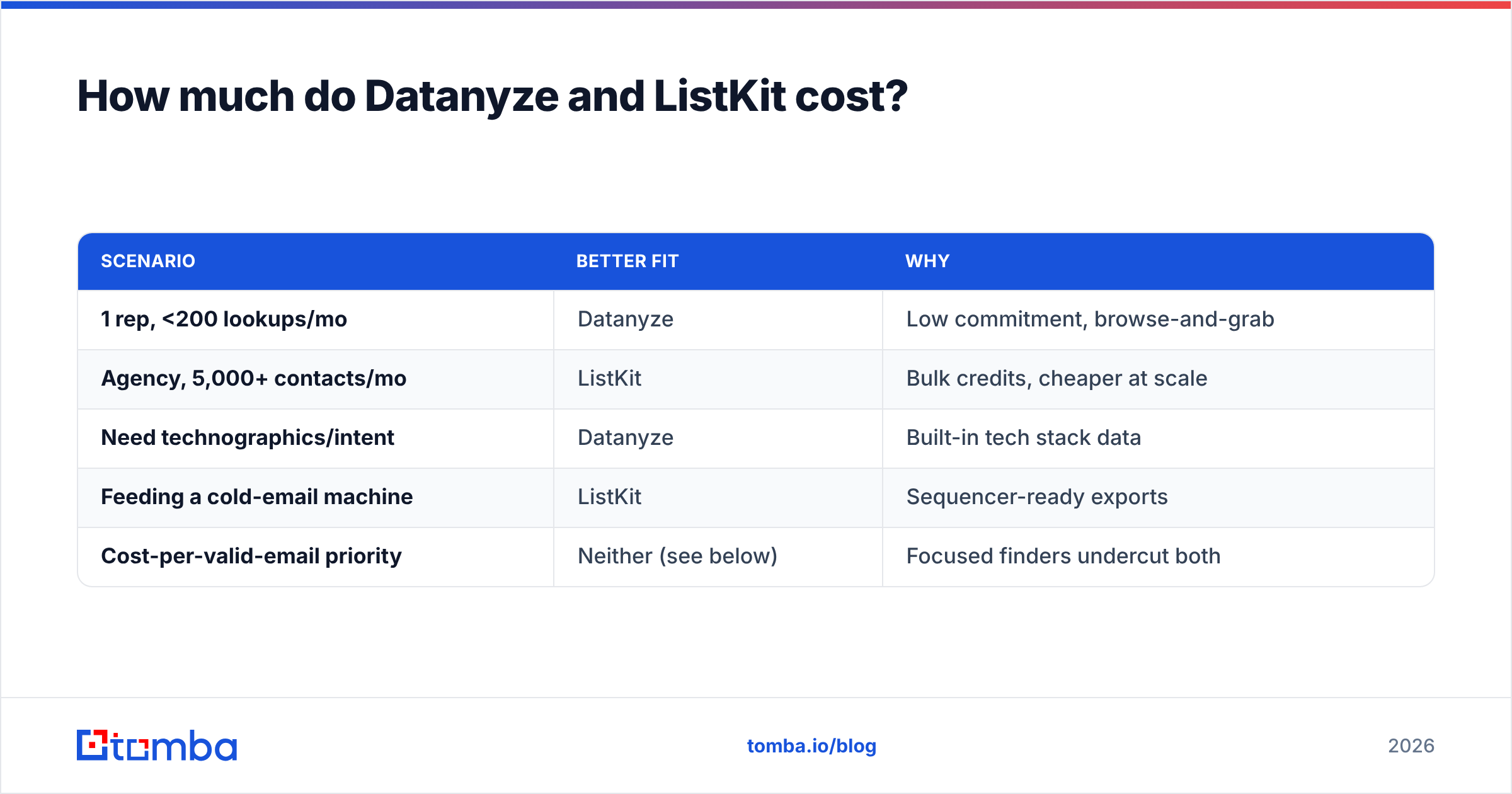
Here's a simplified way to think about fit by budget and volume:
| Scenario | Better fit | Why |
|---|---|---|
| 1 rep, <200 lookups/mo | Datanyze | Low commitment, browse-and-grab |
| Agency, 5,000+ contacts/mo | ListKit | Bulk credits, cheaper at scale |
| Need technographics/intent | Datanyze | Built-in tech stack data |
| Feeding a cold-email machine | ListKit | Sequencer-ready exports |
| Cost-per-valid-email priority | Neither (see below) | Focused finders undercut both |
For teams that mainly need clean, findable, verifiable emails rather than a full data suite, it's worth comparing both against transparent, usage-based Tomba pricing—which starts free (25 searches/mo) and moves to $49/mo, well under most bundled-data contracts.
Where do both tools fall short?#
Every tool has a soft underbelly. Here's where Datanyze and ListKit both leave gaps:
- Datanyze's volume ceiling — the browser-first model is a bottleneck the moment you need scale. Building a list of thousands manually is not a workflow, it's a punishment.
- Datanyze's ecosystem gravity — as a ZoomInfo on-ramp, its roadmap and pricing serve that funnel, not necessarily your standalone needs.
- ListKit's shallow research depth — great lists, but limited account context, technographics, or intent signals to personalize at the account level.
- Verification you still can't fully trust — neither eliminates catch-all and role-based risk, so a final validation pass remains mandatory.
- Coverage gaps outside core geos — both thin out on non-US SMBs and niche industries, where you'll want a finder that queries by domain to fill holes.
None of these are dealbreakers on their own. But they explain why so many teams end up running a dedicated email finder alongside—or instead of—these platforms.
Is there a better alternative to Datanyze and ListKit?#
For many outbound teams, yes—if your true bottleneck is finding and validating email addresses, not buying a broad data subscription.
Datanyze makes you research one account at a time. ListKit makes you buy volume you may not use. A focused email-finding stack lets you do both patterns—single lookups and bulk pulls—on transparent, usage-based pricing:
- Single or bulk — find one email by name and company, or run a bulk email finder job across a whole list.
- Built-in verification — every result is checked, and you can re-run addresses through a standalone verifier before sending.
- Developer-friendly — a documented email finder API drops the same data into your CRM, spreadsheets, or custom workflow.
- Honest free tier — start at 25 searches a month with no sales call.
This isn't a claim that Tomba replaces a full sales-intelligence platform like ZoomInfo's ecosystem for enterprise ABM. It's that for the specific job of "get me accurate, verified emails without a five-figure contract," a specialist tool usually wins on cost-per-valid-contact. Compare the official feature sets on Datanyze.com and ListKit.io against a focused finder before you commit budget.
Datanyze vs ListKit: the verdict#
Pick based on your actual motion, not the marketing:
- Choose Datanyze if you're an individual rep or founder who researches accounts deeply, values technographics and intent context, and prospects one company at a time inside your browser.
- Choose ListKit if you run high-volume cold email, need clean bulk exports piped straight into a sequencer, and care most about low bounce rates at scale.
- Choose a focused finder if your real problem is cost-effective email discovery and verification, and you don't want to pay for a broad data suite you'll only half-use.
Most teams are surprised to learn their bottleneck isn't "more data"—it's accurate, verified contact data at a sane price. That's the lane where a specialist tool earns its keep.
Start finding verified emails without the enterprise contract#
If your goal is clean, deliverable emails—by name, by company, or in bulk—skip the guesswork and the annual commitment. Tomba's Email Finder returns professional email addresses by domain, name, or company, verifies them on the spot, and scales from a single lookup to a full campaign list. Start free with 25 searches a month, then grow into a $49/mo plan only when you're ready. Test it against your Datanyze or ListKit results on the same 50 prospects and compare the valid-email rate yourself—that head-to-head is the only benchmark that matters.
Related guides#
Ready to find emails that actually work?
Join 150,000+ professionals who stopped guessing and started sending. Free credits on signup — no credit card required.
Get the Tomba newsletter
Practical outbound tactics and product updates — once every two weeks.
About the author