Datanyze vs Quickenrich (2026): Which B2B Data Tool Wins?
Datanyze and Quickenrich both promise clean B2B contact data — but they solve different problems. Here's an honest, side-by-side breakdown of pricing, accuracy, and fit so you pick the right one.
Datanyze vs Quickenrich (2026): Which B2B Data Tool Wins?
You have a prospect list, a quota, and a budget that won't stretch to three overlapping data subscriptions. Datanyze and Quickenrich both show up on the shortlist — but they are not the same kind of tool, and picking on brand recognition alone will cost you either accuracy or money.
This is a neutral, side-by-side look at both platforms: what each is actually built for, how their data holds up, what they cost in 2026, and where a leaner email-finder stack beats either one. No hype, no vendor spin.
TL;DR: Datanyze vs Quickenrich at a glance#
- Datanyze is a technographics-first tool. Its strength is telling you what software a company runs, with contact data (emails, direct dials) bolted on via a Chrome extension. Best for teams selling into specific tech stacks.
- Quickenrich is an enrichment-first platform. Its strength is taking a thin list (a domain, a name, a LinkedIn URL) and filling in the missing fields — email, phone, title, firmographics — in bulk.
- Neither is a bargain. Technographic and enrichment platforms price for enterprise; per-contact costs climb fast once you leave the trial.
- If your real job is "find and verify work emails at scale," a dedicated email finder like Tomba delivers the same core outcome for a fraction of the price.
- Our pick depends on the job: Datanyze for stack-based targeting, Quickenrich for bulk record cleanup, Tomba for accurate email discovery without the enterprise overhead.
What is Datanyze and who is it for?#
Datanyze made its name in technographics — data about the technologies a company uses. If you sell a Shopify app and only want to reach stores running Shopify Plus, or you sell a security tool and want accounts already on a competing SIEM, that signal is genuinely useful. Datanyze layers contact discovery on top: a browser extension surfaces emails and direct-dial numbers as you browse LinkedIn or company sites.
The tradeoff is focus. Datanyze is optimized for targeting first and contactability second. Its email coverage is real but narrower than a purpose-built finder, and the technographic data — while a differentiator — is only worth paying for if stack-based segmentation is core to your motion. You can read more about the company on its official site and cross-check user sentiment on G2.
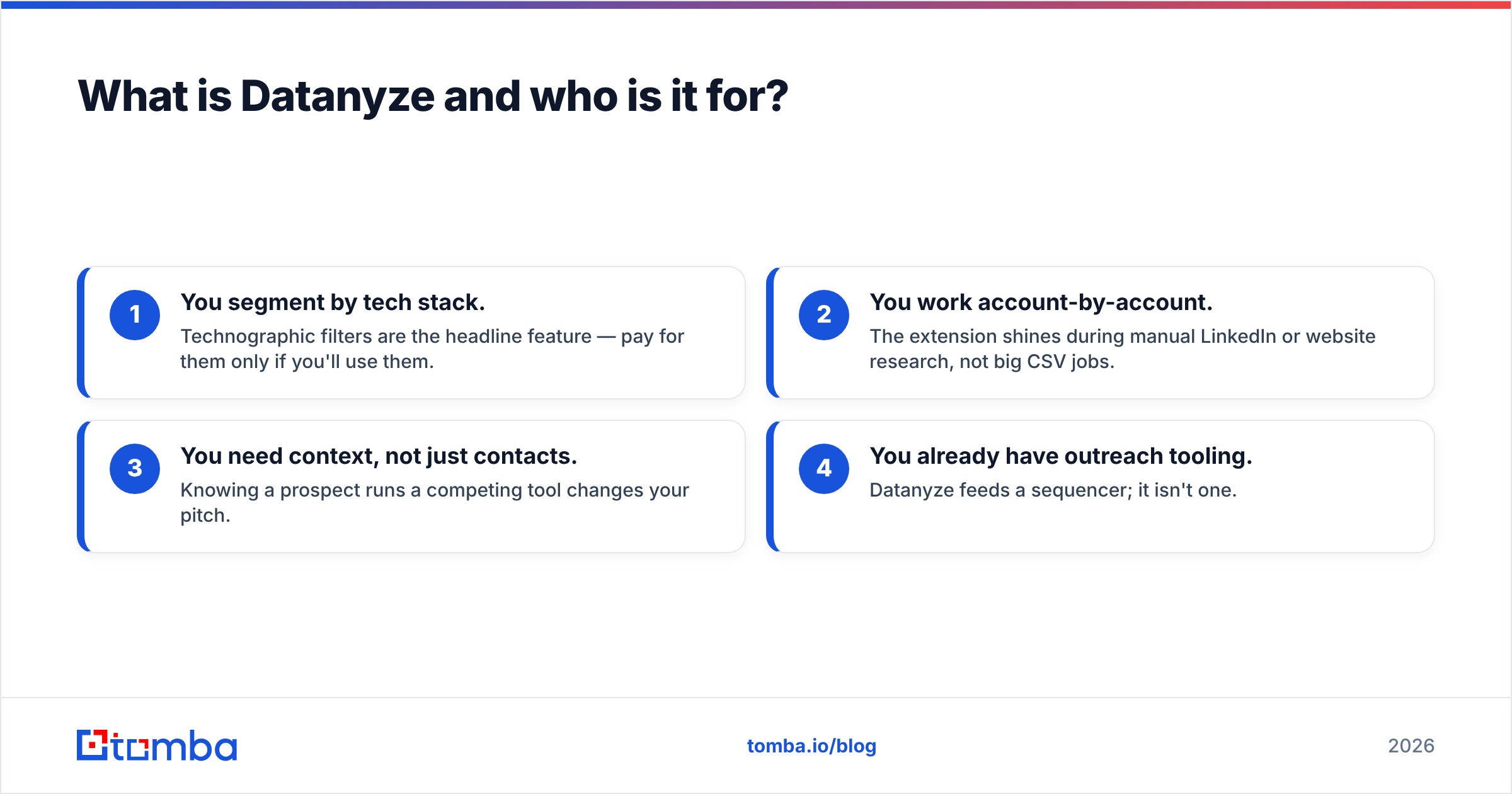
Datanyze fits you if:
- You segment by tech stack. Technographic filters are the headline feature — pay for them only if you'll use them.
- You work account-by-account. The extension shines during manual LinkedIn or website research, not big CSV jobs.
- You need context, not just contacts. Knowing a prospect runs a competing tool changes your pitch.
- You already have outreach tooling. Datanyze feeds a sequencer; it isn't one.
What is Quickenrich and who is it for?#
Quickenrich sits in the data enrichment category. You feed it partial records — a list of domains, names, or LinkedIn URLs — and it returns completed profiles: work email, phone, job title, seniority, company size, industry, and other firmographic fields. The value is breadth of fields and bulk throughput, not the narrow technographic lens Datanyze leans on.
Enrichment tools like this earn their keep when you already have volume but your data is thin or decaying. A CRM full of leads with names but no emails, an event list that's six months stale, an inbound form that only captured a company domain — those are enrichment problems. Quickenrich is built to run those records through an API or bulk upload and hand back usable fields.
The catch, as with every enrichment vendor, is match rate and freshness. Enrichment is only as good as the underlying database and how recently it was refreshed. A field that comes back "filled" isn't the same as a field that comes back correct — which is why verification matters (more below).
Datanyze vs Quickenrich: the head-to-head comparison#
Here's the core matchup on the attributes that actually drive a buying decision. Treat published enrichment/technographics pricing as directional — both categories lean heavily on custom quotes.
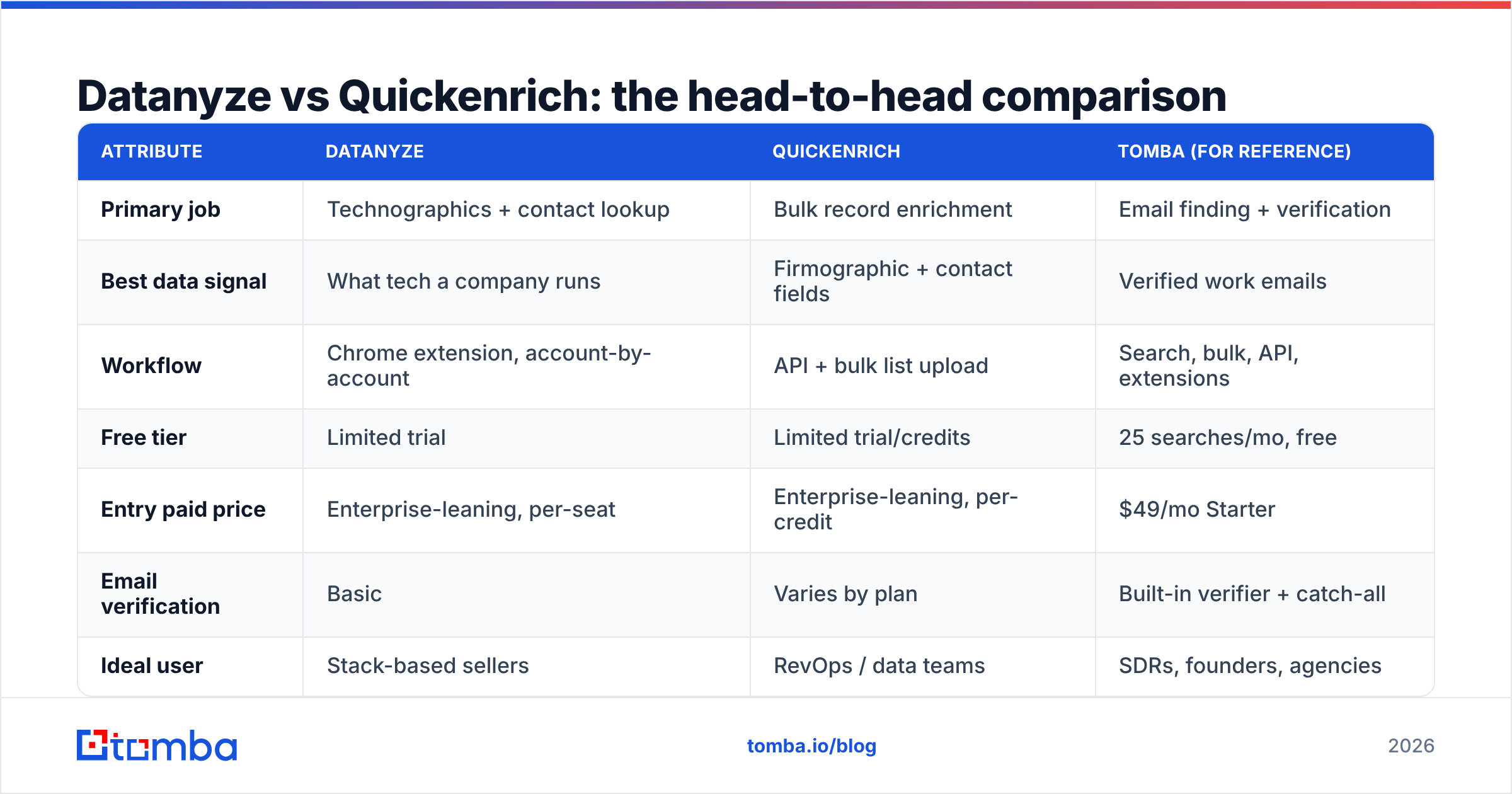
| Attribute | Datanyze | Quickenrich | Tomba (for reference) |
|---|---|---|---|
| Primary job | Technographics + contact lookup | Bulk record enrichment | Email finding + verification |
| Best data signal | What tech a company runs | Firmographic + contact fields | Verified work emails |
| Workflow | Chrome extension, account-by-account | API + bulk list upload | Search, bulk, API, extensions |
| Free tier | Limited trial | Limited trial/credits | 25 searches/mo, free |
| Entry paid price | Enterprise-leaning, per-seat | Enterprise-leaning, per-credit | $49/mo Starter |
| Email verification | Basic | Varies by plan | Built-in verifier + catch-all |
| Ideal user | Stack-based sellers | RevOps / data teams | SDRs, founders, agencies |
| Learning curve | Low (extension) | Medium (data pipeline) | Low |
The pattern is clear: Datanyze and Quickenrich are specialists that happen to overlap on contact data. Datanyze wins if the tech-stack signal changes how you sell. Quickenrich wins if your problem is volume-cleanup across many fields. But if you strip the decision down to "I need accurate emails I can actually send to," neither specialty is what you're paying for — you're paying for it incidentally, at specialist prices.
Is Datanyze or Quickenrich better for email accuracy?#
Accuracy is where general-purpose data platforms quietly lose to focused tools. Both Datanyze and Quickenrich source contact data as one output among many, so their emails carry the industry's usual risk: a real address that's since gone stale, a "guessed" pattern that was never verified, or a catch-all domain that accepts everything and confirms nothing.
The fix isn't a better guess — it's verification. Any email you pull from an enrichment or technographics tool should pass through an email verifier before it touches a sequence, because a 30% bounce rate does more damage to your sender reputation than a smaller, clean list ever would. If a platform can't tell you how it validated an address (SMTP check, catch-all detection, MX record), assume it didn't.
This is the single biggest reason teams end up bolting a dedicated finder-plus-verifier onto their stack: the enrichment came back "complete," the campaign still bounced, and reputation took the hit.

How much do Datanyze and Quickenrich cost in 2026?#
Both vendors follow the enterprise-data playbook: modest-looking trials, then quotes that scale with seats, credits, and data volume. Datanyze historically prices per-seat with contact credits attached; Quickenrich prices per enrichment credit with tiered volume. Neither publishes a simple, self-serve $X/month button the way a focused tool does, which makes true cost hard to compare until you're in a sales call.
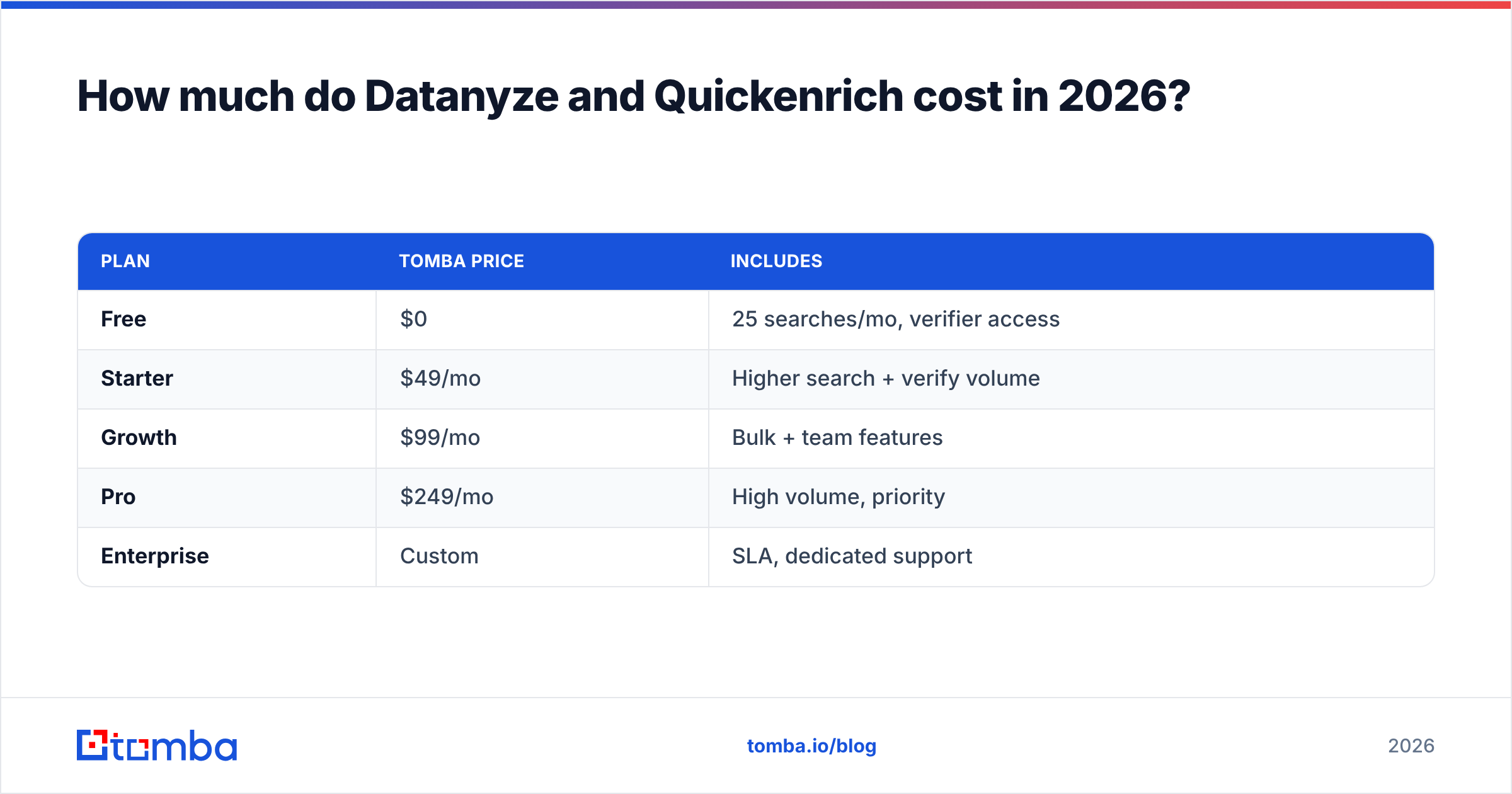
That opacity is the real story. When "find me a verified email" is 80% of your actual usage, paying enterprise technographic or full-enrichment rates for that one job is a poor trade. Here's how a purpose-built alternative stacks up on transparency:
| Plan | Tomba price | Includes |
|---|---|---|
| Free | $0 | 25 searches/mo, verifier access |
| Starter | $49/mo | Higher search + verify volume |
| Growth | $99/mo | Bulk + team features |
| Pro | $249/mo | High volume, priority |
| Enterprise | Custom | SLA, dedicated support |
You can see the full breakdown on the Tomba pricing page. The point isn't that Tomba is universally cheaper for every use case — it's that transparent, self-serve pricing lets you match spend to the job instead of buying an enterprise contract to solve one recurring task.
When should you skip both and use a dedicated email finder?#
Skip both when contact discovery is the main event, not a side feature. That's most outbound teams.
Ask yourself three questions:
- Do you actually use technographics? If you never filter by tech stack, you're paying for Datanyze's headline feature and ignoring it.
- Is your list already large, or are you building it? Enrichment tools like Quickenrich assume you have the records. If you're still sourcing contacts, a bulk email finder that starts from a domain or name is a better first step.
- How much of your usage is "get me the email"? If it's the majority, a focused finder-and-verifier covers it at a fraction of the cost.
A dedicated tool like the Tomba Email Finder is built around exactly that job: give it a name and a company (or a whole domain) and it returns verified professional emails, with the verifier and catch-all detection in the same workflow. No technographic tax, no per-field enrichment premium — just the contactable data most outbound motions actually run on.
The honest framing: these aren't strictly competing products. Datanyze and Quickenrich are complements to a good finder as often as replacements. Many teams use a finder for volume and selectively enrich or add tech signal on the accounts that warrant it — which keeps the expensive data spend tied to real intent instead of your whole list.
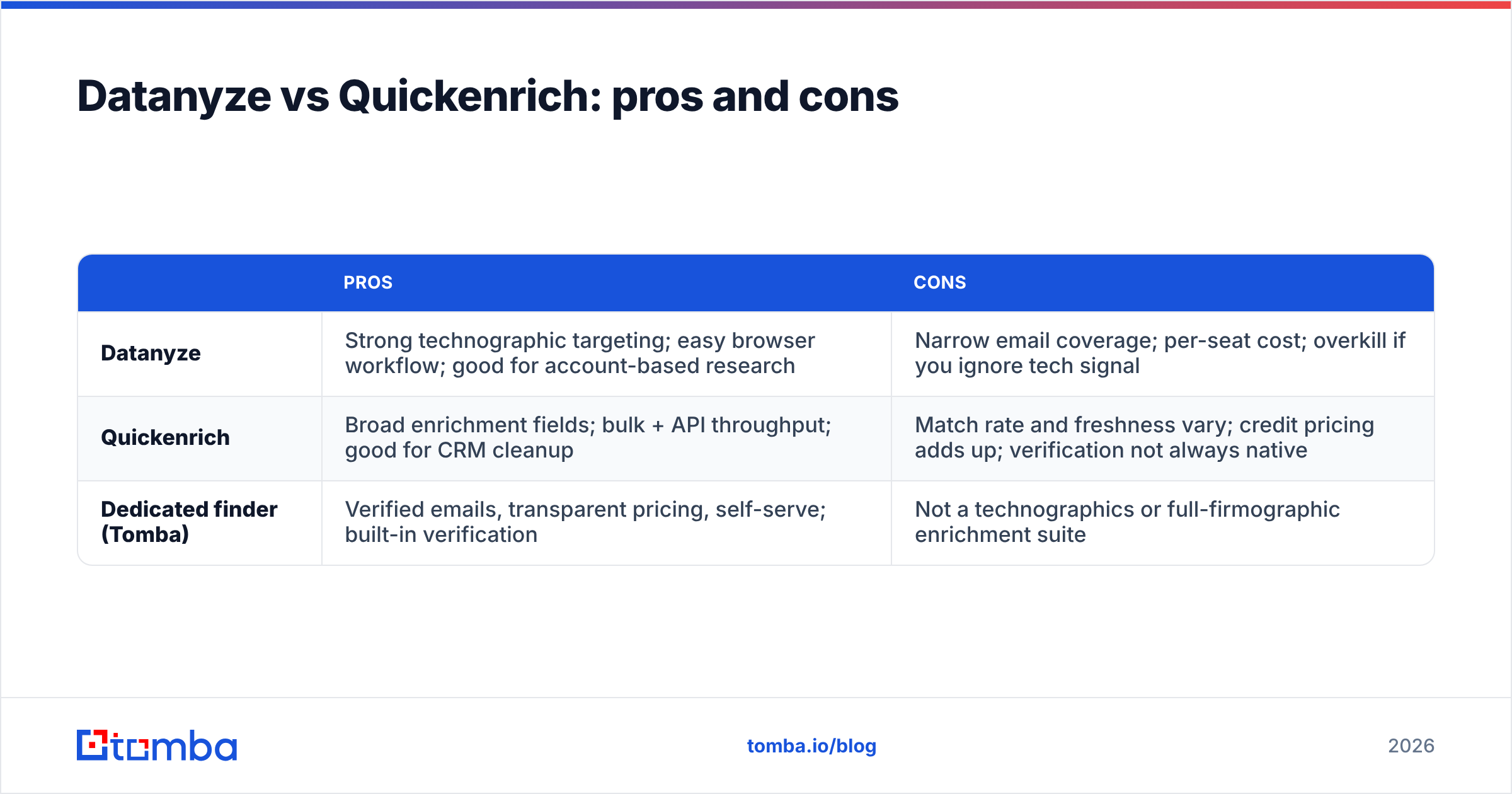
Datanyze vs Quickenrich: pros and cons#
| Pros | Cons | |
|---|---|---|
| Datanyze | Strong technographic targeting; easy browser workflow; good for account-based research | Narrow email coverage; per-seat cost; overkill if you ignore tech signal |
| Quickenrich | Broad enrichment fields; bulk + API throughput; good for CRM cleanup | Match rate and freshness vary; credit pricing adds up; verification not always native |
| Dedicated finder (Tomba) | Verified emails, transparent pricing, self-serve; built-in verification | Not a technographics or full-firmographic enrichment suite |
Which one should you choose?#
Choose Datanyze if stack-based targeting genuinely changes your pitch and you work accounts one at a time. Choose Quickenrich if you already sit on volume and need many fields filled in bulk through an API. Choose a dedicated email finder if your day-to-day job is discovering and verifying work emails — which, for most SDRs, founders, and agencies, is the whole ballgame.
The mistake to avoid is buying a specialist platform to do a generalist job. Enterprise technographic and enrichment contracts are worth it when you use the specialty. When you don't, you're funding features you'll never open.
Want the contactable data without the enterprise overhead? Start free with the Tomba Email Finder — 25 searches a month at no cost, verified emails in the same workflow, and self-serve plans from $49/mo when you're ready to scale. Test it against whatever list Datanyze or Quickenrich hands you, verify the results, and let bounce rate settle the argument.
Related guides#
Ready to find emails that actually work?
Join 150,000+ professionals who stopped guessing and started sending. Free credits on signup — no credit card required.
Get the Tomba newsletter
Practical outbound tactics and product updates — once every two weeks.
About the author