Deal Management Software in 2026: A Practical Buyer's Guide
Deal management software is sold as pipeline visibility and bought as forecast insurance. Here is what the category actually does, how the main platforms compare on price and depth, and the data problem no vendor puts on the pricing page.
TL;DR
- Deal management software is the layer that tracks an opportunity from qualified to closed: stages, values, owners, next steps, approvals, and forecast roll-up. Most of it now ships inside a CRM rather than as a standalone tool.
- The buying mistake is paying for forecasting AI on top of a pipeline nobody updates. Adoption beats features every time.
- Entry pricing runs roughly $14–$25 per user per month for lightweight tools and $80–$165 per user per month for enterprise revenue platforms with forecasting and CPQ.
- The failure mode is almost never the software. It's stale contact data — wrong emails, dead phone numbers, departed champions — which quietly makes every stage date and probability score wrong.
- Fix the input first: verified contacts and enriched company records feeding the pipeline. Then pick the cheapest tier that covers your stages, approvals, and reporting.
What is deal management software?#
Deal management software is the system of record for opportunities in flight. It stores each deal as a structured object — amount, stage, close date, owner, products, contacts, competitor, next step — and enforces rules about how that object moves.
The everyday analogy: it's a kitchen ticket rail. Every order has a ticket, every ticket has a position on the rail, and anyone walking past can see what's cooking, what's stalled, and what's about to go out the door. Without the rail, the kitchen still works — it just runs on shouting and memory, and it stops working the moment volume doubles.
Technically, deal management sits between two other layers. Above it is CRM, the broader database of accounts, contacts, and activity. Below it is execution tooling — sequencers, dialers, meeting schedulers. Deal management is the middle: the part that answers "where is this, what happens next, and will it close this quarter."
Standalone deal management products still exist, mostly for teams with unusual pipelines (real estate, M&A, project-based services, channel deals). For typical B2B SaaS and services teams, deal management is a module of the CRM you already own, or a revenue platform layered on top of it.
How is deal management different from CRM or pipeline management?#
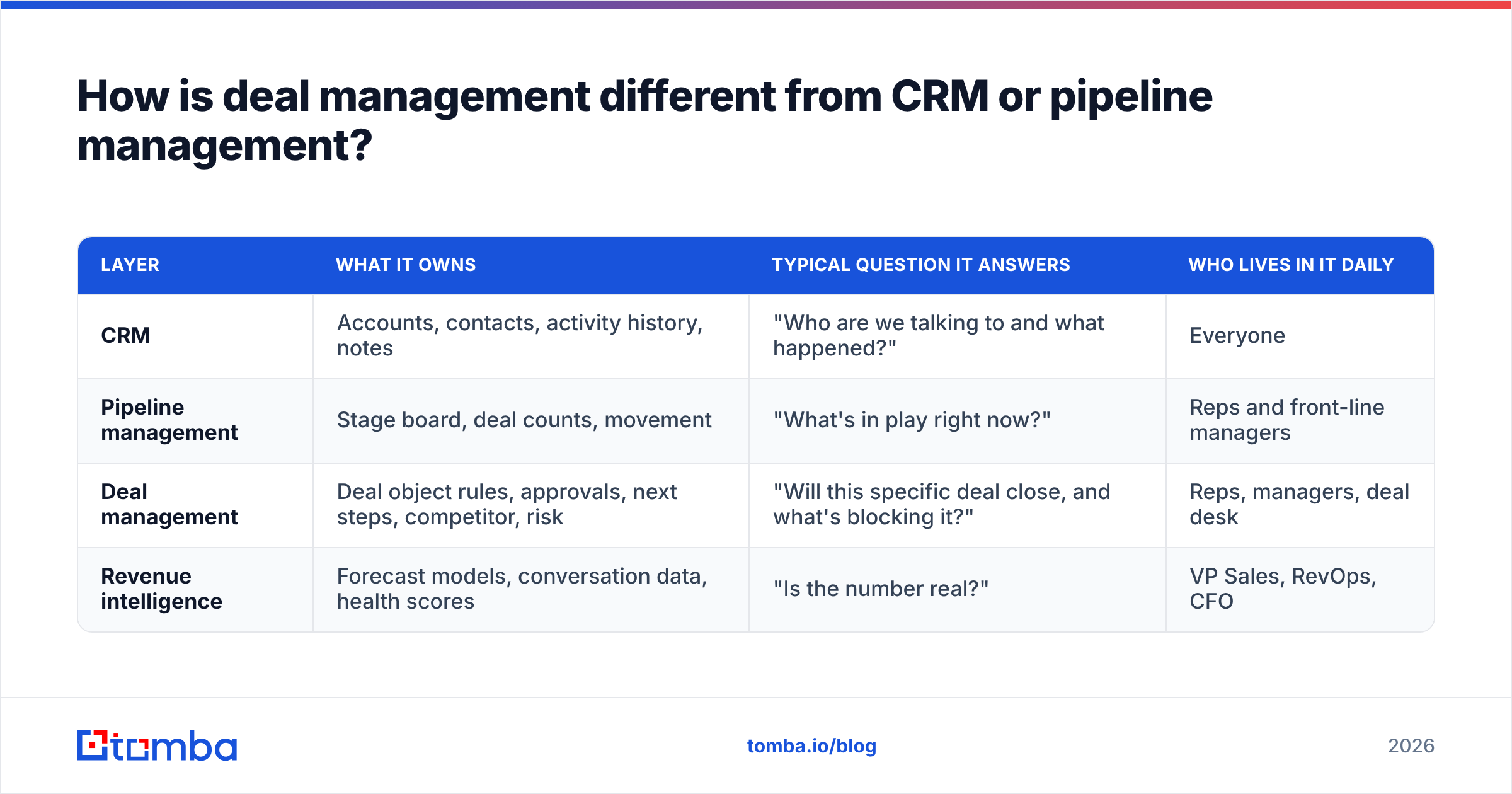
The terms get used interchangeably in vendor copy. They are not the same scope.
| Layer | What it owns | Typical question it answers | Who lives in it daily |
|---|---|---|---|
| CRM | Accounts, contacts, activity history, notes | "Who are we talking to and what happened?" | Everyone |
| Pipeline management | Stage board, deal counts, movement | "What's in play right now?" | Reps and front-line managers |
| Deal management | Deal object rules, approvals, next steps, competitor, risk | "Will this specific deal close, and what's blocking it?" | Reps, managers, deal desk |
| Revenue intelligence | Forecast models, conversation data, health scores | "Is the number real?" | VP Sales, RevOps, CFO |
Pipeline management is a view. Deal management is a process. Revenue intelligence is a prediction. You can buy all three from one vendor, and increasingly you do — but knowing which one you actually lack keeps you from over-buying.
If your reps can already see their board and update it, you don't have a pipeline visibility problem. You have a deal hygiene problem, a forecast accuracy problem, or a data problem. Those need different fixes.
What does deal management software actually do?#
Strip the marketing and the category reduces to six jobs. Grade any tool against these before you look at the pricing page.
- Stage enforcement. Define entry and exit criteria per stage, and block advancement until they're met. A deal can't reach "Proposal" without a documented economic buyer. This is the single highest-leverage feature and the one teams configure worst — usually by adding too many stages.
- Next-step discipline. Every open deal carries a dated next action with an owner. Deals without one surface in a dedicated view. Most forecast misses trace back to a deal that sat for 21 days with nobody assigned to move it.
- Value and product modelling. Line items, discounts, multi-year terms, ramp schedules, and currency. If you sell anything other than one flat subscription, this determines whether your pipeline number means anything.
- Approval and deal desk routing. Discount thresholds, non-standard terms, and legal review routed automatically. This is where mid-market tools stop and enterprise tools start earning their price.
- Forecast roll-up. Weighted pipeline, commit/best-case/pipeline categories, and manager overrides with an audit trail. The override history is more useful than the model — it shows you which managers sandbag and which ones dream.
- Risk signals. Single-threaded deals, no activity in N days, close date pushed more than twice, champion gone quiet. Good tools compute these from activity data; weak ones ask reps to self-report, which is the same as not having them.
Notice that four of the six depend on accurate contact and account data underneath. That dependency is the theme of the rest of this guide.
Which deal management platforms lead in 2026?#
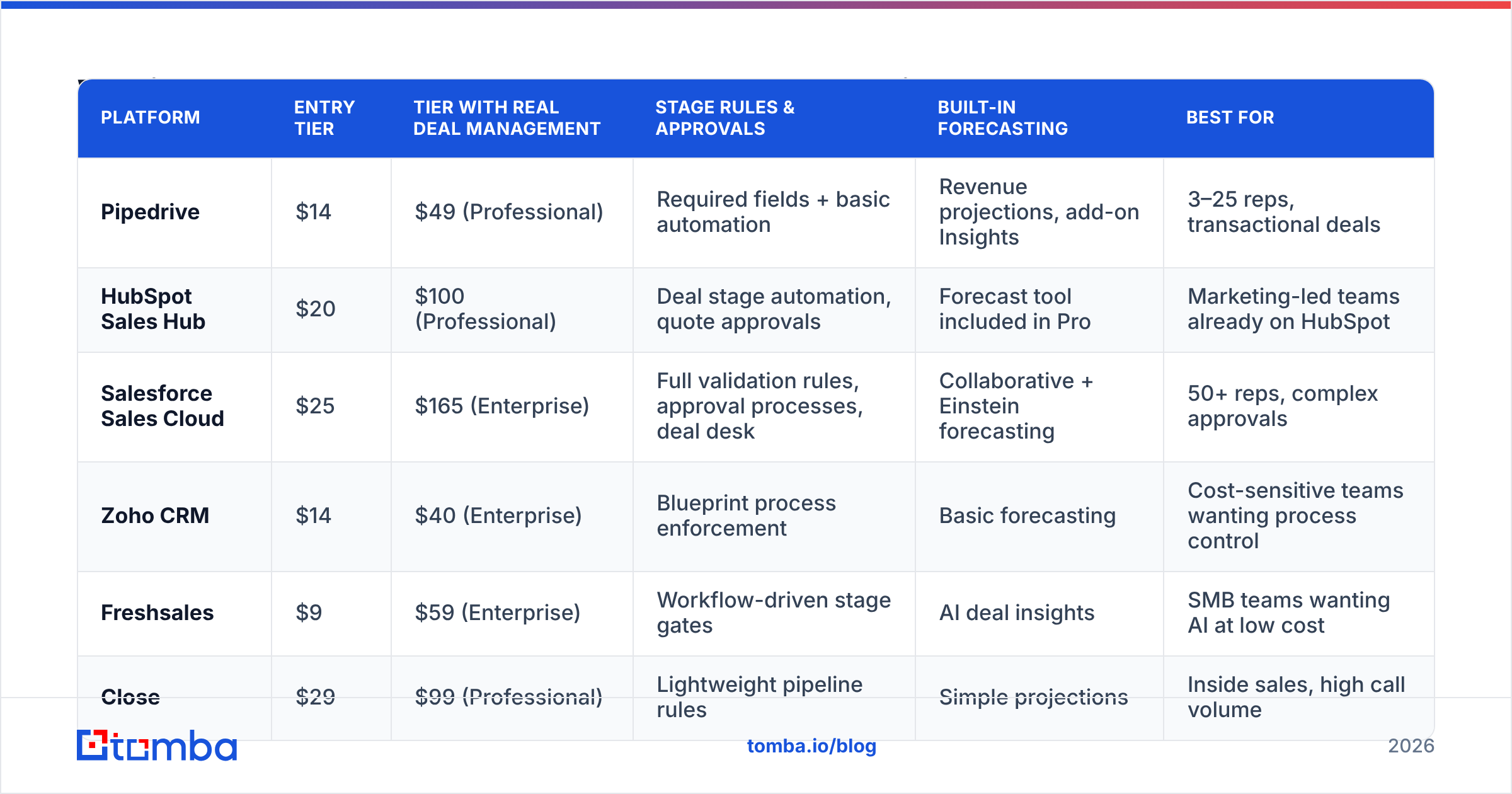
The market splits into three price bands. Below is a like-for-like comparison of the platforms most B2B teams shortlist. Prices are list, per user per month, billed annually, and change frequently — treat them as a shape, not a quote.
| Platform | Entry tier | Tier with real deal management | Stage rules & approvals | Built-in forecasting | Best for |
|---|---|---|---|---|---|
| Pipedrive | $14 | $49 (Professional) | Required fields + basic automation | Revenue projections, add-on Insights | 3–25 reps, transactional deals |
| HubSpot Sales Hub | $20 | $100 (Professional) | Deal stage automation, quote approvals | Forecast tool included in Pro | Marketing-led teams already on HubSpot |
| Salesforce Sales Cloud | $25 | $165 (Enterprise) | Full validation rules, approval processes, deal desk | Collaborative + Einstein forecasting | 50+ reps, complex approvals |
| Zoho CRM | $14 | $40 (Enterprise) | Blueprint process enforcement | Basic forecasting | Cost-sensitive teams wanting process control |
| Freshsales | $9 | $59 (Enterprise) | Workflow-driven stage gates | AI deal insights | SMB teams wanting AI at low cost |
| Close | $29 | $99 (Professional) | Lightweight pipeline rules | Simple projections | Inside sales, high call volume |
Two patterns worth naming.
First, the useful tier is rarely the advertised tier. Every vendor markets a $14–$29 entry price; deal management that enforces anything lives one or two tiers up. Budget against the Professional/Enterprise row, not the headline.
Second, approval depth is the real dividing line. Below roughly $60 per user, you get stage boards and required fields. Above it, you get conditional approval chains, quote-level controls, and deal desk workflows. If your average contract needs legal review or non-standard discounting, the cheap tiers will cost you more in Slack threads than you saved on licenses.
Cross-check any shortlist against current reviews on G2 — pay attention to the "time to go live" and "ease of admin" scores rather than the overall rating, since those predict whether your configuration survives contact with reps.
Why do most deal management rollouts fail?#
Because the pipeline is only as truthful as the contact data feeding it.
Here's the chain. A rep creates a deal against a company record. The primary contact left the company four months ago. Emails bounce silently into a catch-all domain, so the rep assumes "no reply yet" instead of "no recipient." Activity data shows outbound but no inbound. The deal's close date gets pushed twice, then it stays in Stage 3 as an open opportunity because nobody wants to mark it lost. Your weighted pipeline now includes a deal with no human on the other end.
Multiply by a hundred and the forecast model is regressing on noise. No amount of AI scoring fixes an input problem — it just produces confident wrong numbers faster.
The measurable symptoms:
- Bounce rate above 3% on deal-stage outreach means your contact records are decaying faster than you're refreshing them.
- Deals with a single known contact are the most common source of slipped close dates. If you can't name a second stakeholder, the deal is one job change away from dead.
- Close date pushed 3+ times with no new activity is not a deal, it's a wish.
- Stage age exceeding 2× the historical median for that stage should trigger an automatic review, not a manager's memory.
Fixing this is unglamorous and cheap relative to the license spend. You verify the contacts already in your CRM, enrich the thin records, and add a second and third stakeholder to every open deal above a threshold value. Running your deal contacts through an email verifier before a quarter-end push routinely removes 5–15% of records that were quietly poisoning activity metrics, and data enrichment fills in the job titles and company attributes that your stage criteria depend on.
How much should you actually spend?#
Work backwards from deal economics, not from seat count.
Take your average contract value and your current win rate. If you close 20% of a $30,000 ACV pipeline, each additional point of win rate is worth $1,500 per deal in the funnel. A platform costing $100 per rep per month needs to add roughly one point of win rate per rep per year to break even at modest volume — which is achievable, but only if reps use it.
A practical budgeting frame:
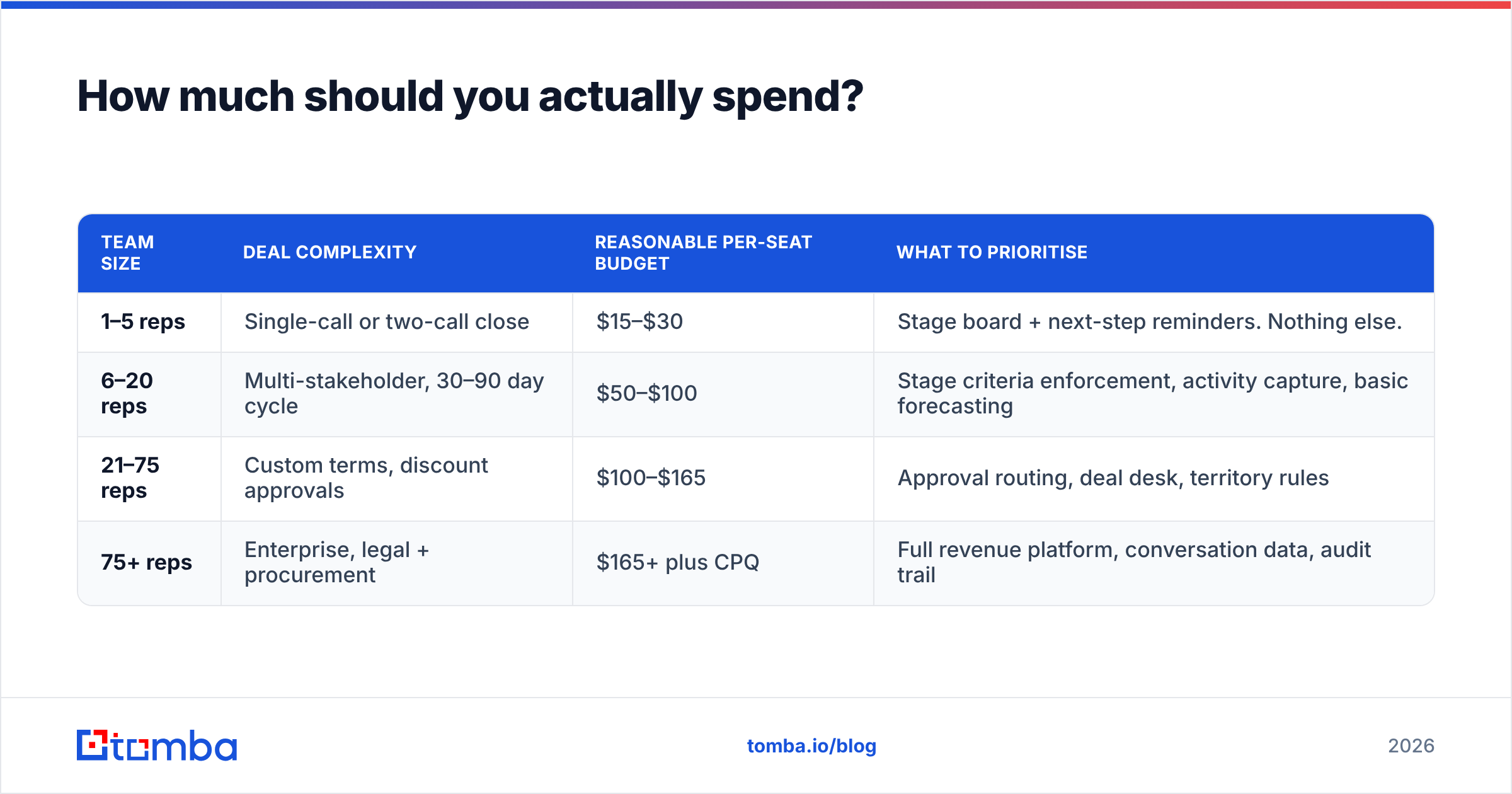
| Team size | Deal complexity | Reasonable per-seat budget | What to prioritise |
|---|---|---|---|
| 1–5 reps | Single-call or two-call close | $15–$30 | Stage board + next-step reminders. Nothing else. |
| 6–20 reps | Multi-stakeholder, 30–90 day cycle | $50–$100 | Stage criteria enforcement, activity capture, basic forecasting |
| 21–75 reps | Custom terms, discount approvals | $100–$165 | Approval routing, deal desk, territory rules |
| 75+ reps | Enterprise, legal + procurement | $165+ plus CPQ | Full revenue platform, conversation data, audit trail |
The two most common budget errors run in opposite directions. Small teams buy an enterprise platform because a board member used it at a larger company, then use 8% of it. Larger teams stay on a $20 tool two years past the point where deal desk chaos is costing them a headcount's worth of hours a month.
What does a good implementation look like?#
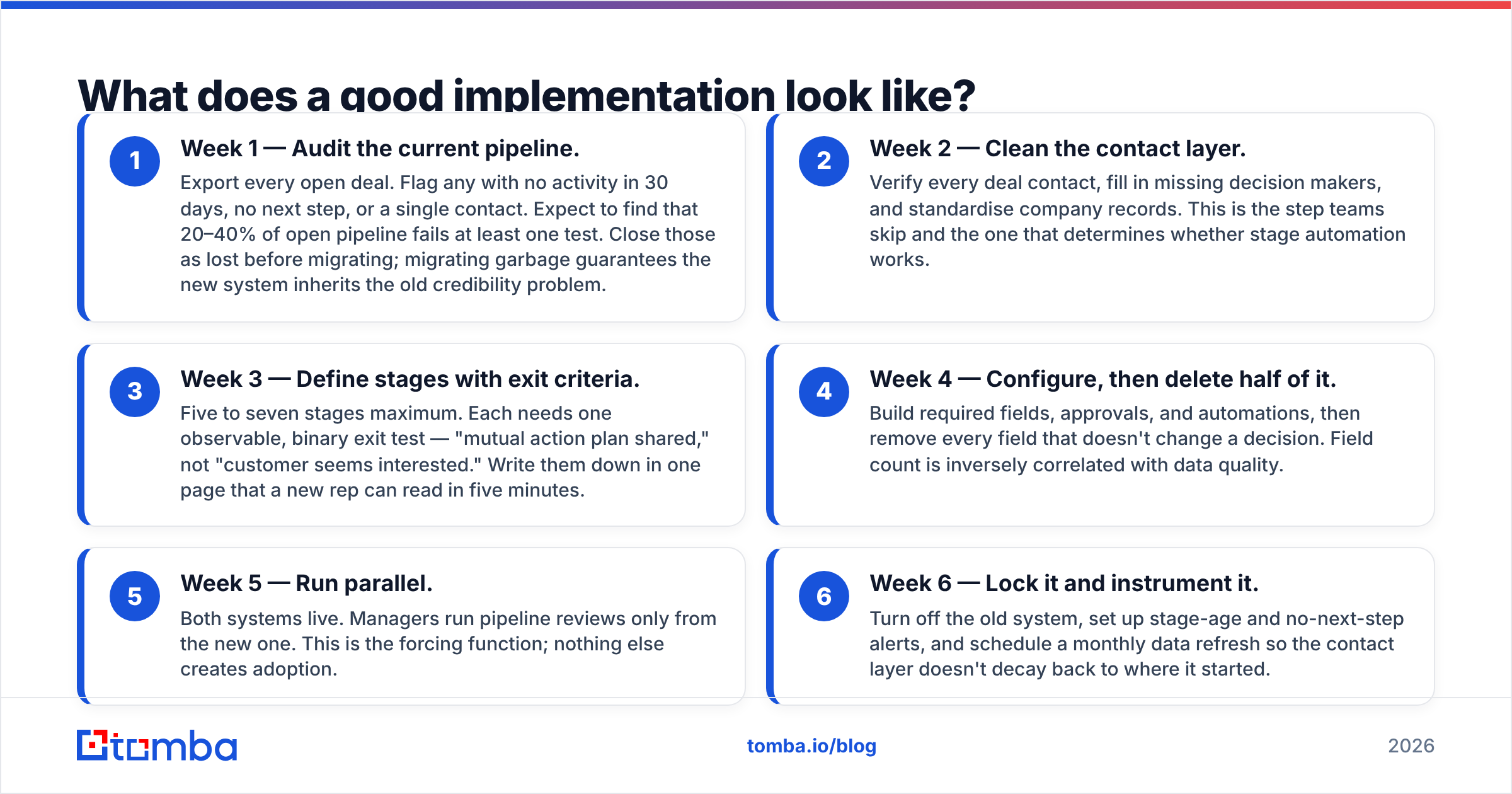
Give yourself six weeks and resist the urge to model your entire business in week one.
- Week 1 — Audit the current pipeline. Export every open deal. Flag any with no activity in 30 days, no next step, or a single contact. Expect to find that 20–40% of open pipeline fails at least one test. Close those as lost before migrating; migrating garbage guarantees the new system inherits the old credibility problem.
- Week 2 — Clean the contact layer. Verify every deal contact, fill in missing decision makers, and standardise company records. This is the step teams skip and the one that determines whether stage automation works.
- Week 3 — Define stages with exit criteria. Five to seven stages maximum. Each needs one observable, binary exit test — "mutual action plan shared," not "customer seems interested." Write them down in one page that a new rep can read in five minutes.
- Week 4 — Configure, then delete half of it. Build required fields, approvals, and automations, then remove every field that doesn't change a decision. Field count is inversely correlated with data quality.
- Week 5 — Run parallel. Both systems live. Managers run pipeline reviews only from the new one. This is the forcing function; nothing else creates adoption.
- Week 6 — Lock it and instrument it. Turn off the old system, set up stage-age and no-next-step alerts, and schedule a monthly data refresh so the contact layer doesn't decay back to where it started.
Treat the monthly refresh as non-negotiable. B2B contact data decays roughly 2–3% per month through job changes alone; a pipeline you cleaned in January is meaningfully stale by June. Teams with a mature revenue operations function automate this via API rather than a quarterly CSV ritual.
What questions should you ask on the demo call?#
Vendors demo the happy path. Push on the edges:
- Show me a deal that fails stage criteria — what does the rep see, exactly?
- How does a manager override a forecast category, and where is that logged?
- What happens to deal history when a contact's email changes or they leave?
- Can I enforce a second stakeholder on deals above a value threshold?
- What's in the API rate limit on the tier I'd actually buy?
- What does migrating out look like — can I export deal history with stage timestamps?
That last one matters more than it sounds. Stage timestamp history is what lets you compute realistic conversion and velocity benchmarks. Tools that export deals but not stage transitions lock your analytics in.
The honest verdict#
Deal management software is worth buying when your pipeline has outgrown a spreadsheet's ability to enforce process — usually somewhere between five and ten reps, or earlier if your deals need approvals. It is not worth upgrading tiers to solve a problem that is actually a data problem, and that's the diagnosis most teams get wrong.
Run this test before you sign anything: pull ten open deals at random and try to name the economic buyer, the champion, and one other stakeholder for each, with a verified work email for all three. If you can do it for eight of ten, buy the software — it will amplify a working process. If you can do it for three, spend the money on your contact layer first. The forecast will improve more, and cost less.
Ready to fix the input side? Start with the Tomba Email Finder — find and verify the decision makers behind every open opportunity, add the second and third stakeholders your deals are missing, and push clean records straight into your CRM. The free tier covers 25 searches a month, and paid plans start at $49/mo; see full Tomba pricing for team and API volumes.
Related guides#
Ready to find emails that actually work?
Join 150,000+ professionals who stopped guessing and started sending. Free credits on signup — no credit card required.
Get the Tomba newsletter
Practical outbound tactics and product updates — once every two weeks.
About the author