Deal Rooms in 2026: How Digital Sales Rooms Close Deals
Deal rooms promise shorter cycles and less follow-up chaos. Here's what a digital sales room actually does, which tools are worth paying for, and when a shared link beats another attachment.
TL;DR
- A deal room (or digital sales room) is one shared, persistent link where a buying committee gets every document, recording, price, and next step for a single opportunity — instead of hunting through 40 emails.
- The reason they exploded is structural: B2B purchases now involve 6–10 stakeholders, most of whom never talk to you. A deal room is the asset your champion forwards internally.
- Pricing lands roughly between $29 and $150 per seat per month. The gap between vendors is less about features and more about CRM sync depth and analytics granularity.
- Deal rooms compress mid-funnel time — mutual action plans and buyer engagement signals — but they do nothing for a pipeline built on bad contact data.
- Build one template first, use it on five live deals, and only then buy the expensive tier.
What is a deal room?#
A deal room is a single web page, unique per opportunity, that holds everything a buyer needs to make a decision: proposal, pricing, security docs, call recordings, reference material, and a shared timeline of who does what by when.
Think of it like a wedding website. Instead of texting 40 guests separate details about the venue, the dress code, and the registry, you send one link that stays current. When the venue changes, you update one page — not 40 threads. A deal room does the same thing for a buying committee.
Technically, it's a hosted micro-site with access control, content embedding, and engagement tracking. The seller sees who opened it, which section they scrolled, how long they spent on the pricing tab, and who they forwarded it to. That last signal — forwarding — is the one most reps underuse. It tells you the CFO just entered the deal three weeks before you'd otherwise have known.
The category has several names depending on which vendor is pitching you: digital sales room, buyer enablement portal, client portal, mutual action plan tool. They're the same thing with different marketing budgets.
Why did deal rooms become standard in 2026?#
Because the buying process stopped being linear and the follow-up email stopped working.
Gartner's research on the B2B buying journey has been consistent for years: buyers spend a small fraction of the total purchase cycle with any individual vendor's sales rep, and most of the decision happens in internal conversations you're not invited to. When six to ten people need to agree, your carefully written email to one champion becomes a game of telephone.
Three shifts pushed deal rooms from nice-to-have to default:
- Committee size grew, rep access shrank. Your champion is now an internal salesperson with no training and no materials. A deal room is the deck they present when you're not in the room.
- Async replaced the demo-heavy cycle. Post-2020 buying runs on recordings and self-serve review. A room that hosts a 4-minute Loom outperforms a 45-minute call nobody can attend.
- Attachment fatigue and security policy. Enterprise mail gateways strip attachments and flag links. A branded, permissioned room survives that filter better than
Proposal_v7_FINAL_final.pdf. - Forecast pressure. Engagement data from a deal room is the closest thing to a real intent signal inside a live opportunity, and RevOps teams want it in the CRM next to the stage field.
What actually goes inside a good deal room?#
Most bad deal rooms are a file dump with a logo. The ones that move deals share a consistent structure:
- A one-screen summary — the problem in the buyer's own words, the proposed scope, and the price. If the CFO opens the link and has to scroll to find a number, you've lost them.
- A mutual action plan — dated, owner-assigned steps from today to go-live. This is the single highest-value component and the one most teams skip. It converts "we'll circle back" into a visible missed date.
- Proof assets, ranked — one case study from the buyer's industry, one reference contact, one ROI model they can edit. Not eleven PDFs.
- Security and procurement pack — SOC 2 report, DPA, sub-processor list, insurance certificate. Pre-loading this shaves one to three weeks off enterprise legal review.
- A short async video — 3–5 minutes, recorded for the stakeholder who missed the demo, named after them.
- One clear next action — a booking link or an e-signature block. One. Multiple CTAs read as indecision.
Everything else is optional. If a section doesn't get opened across ten deals, delete it.
Which deal room tools should you compare?#
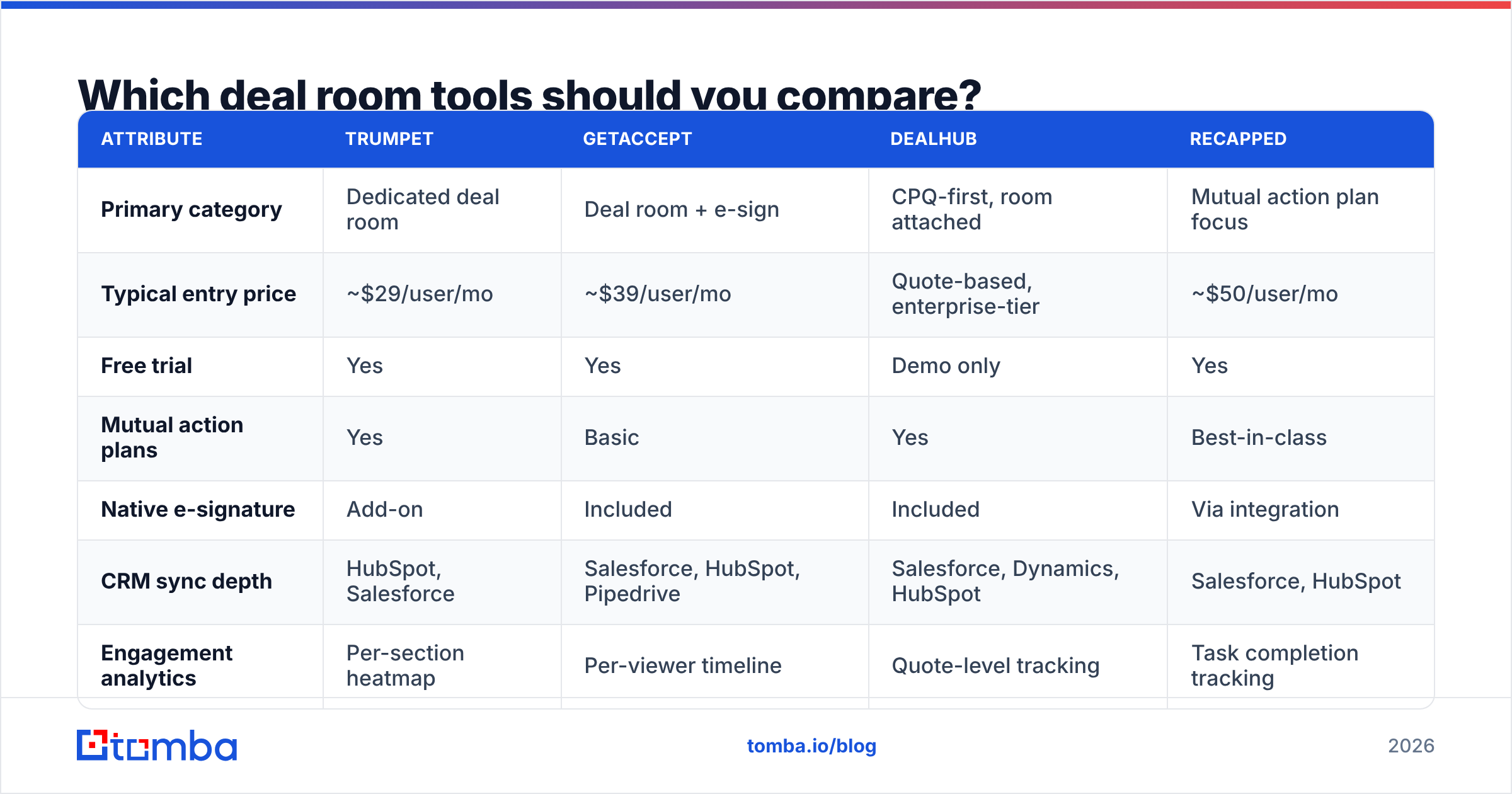
The market splits into three groups: dedicated digital sales rooms, CPQ platforms that bolted on a room, and sales engagement suites that added one to reduce churn. Pricing below reflects publicly listed rates and common configurations — always confirm on the vendor's own site, since seat minimums move the real number a lot.
| Attribute | Trumpet | GetAccept | DealHub | Recapped |
|---|---|---|---|---|
| Primary category | Dedicated deal room | Deal room + e-sign | CPQ-first, room attached | Mutual action plan focus |
| Typical entry price | ~$29/user/mo | ~$39/user/mo | Quote-based, enterprise-tier | ~$50/user/mo |
| Free trial | Yes | Yes | Demo only | Yes |
| Mutual action plans | Yes | Basic | Yes | Best-in-class |
| Native e-signature | Add-on | Included | Included | Via integration |
| CRM sync depth | HubSpot, Salesforce | Salesforce, HubSpot, Pipedrive | Salesforce, Dynamics, HubSpot | Salesforce, HubSpot |
| Engagement analytics | Per-section heatmap | Per-viewer timeline | Quote-level tracking | Task completion tracking |
| Best fit | SMB/mid-market outbound teams | Teams that want sign + room in one | Complex pricing, enterprise | Long, multi-threaded cycles |
Sources worth checking before you commit: the vendors' own sites (trumpet, GetAccept, DealHub) and the review volume on G2's sales enablement category, which is more honest about onboarding pain than any vendor page.
A note on the "just use a shared drive" argument: it's not wrong for teams under five reps. A well-structured Notion or Google Drive folder gets you 60% of the value for $0. What you lose is engagement analytics and forwarding visibility — which is exactly the part that changes your forecast. Buy the tool when that data would actually change a decision you make.
Do deal rooms actually shorten sales cycles?#
Partly — and the honest answer matters more than the vendor stat.
Deal rooms reliably improve three things:
- Internal forwarding. Your champion shares one link instead of re-explaining. Multi-threading happens without you asking for introductions.
- Procurement drag. Pre-loaded security and legal docs remove the two-week "can you send us your SOC 2" loop.
- Deal hygiene. A mutual action plan with dates makes stalled deals obvious in week two instead of week nine, which is a forecast improvement even when it's bad news.
They do not fix:
- Weak qualification. A deal room around an unqualified opportunity is a beautifully organised no.
- Top-of-funnel volume. No amount of buyer enablement helps if you're emailing the wrong 300 people.
- Bad discovery. If the summary page doesn't state the buyer's problem in the buyer's language, the room reads as a brochure.
The vendor-quoted "cuts sales cycles by 30%" figures come from self-selected customer cohorts — teams that adopt deal rooms are usually the same teams already running structured processes. Treat the number as directional, and measure your own before/after on cycle length and stage-two-to-three conversion.
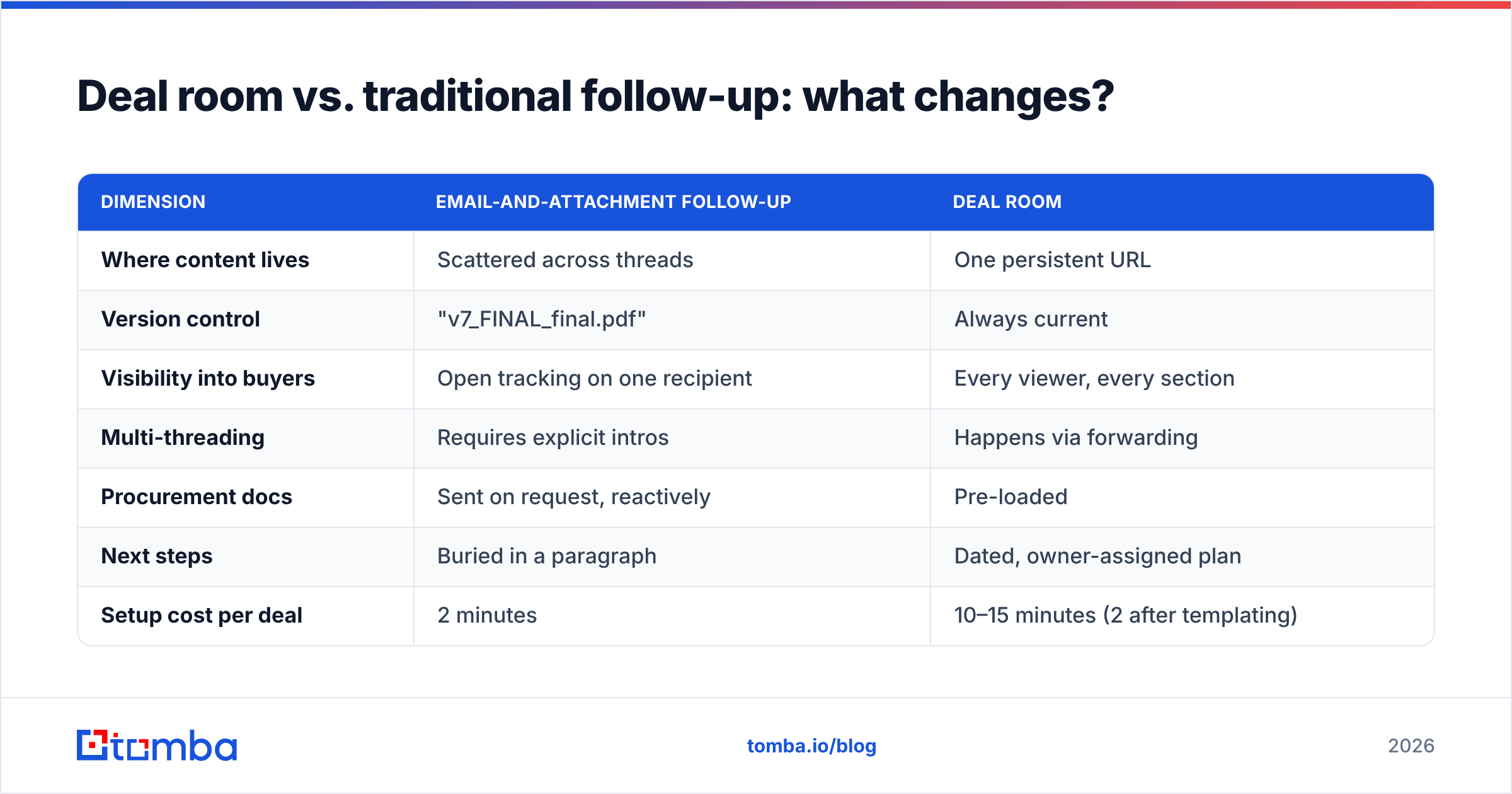
Deal room vs. traditional follow-up: what changes?#
| Dimension | Email-and-attachment follow-up | Deal room |
|---|---|---|
| Where content lives | Scattered across threads | One persistent URL |
| Version control | "v7_FINAL_final.pdf" | Always current |
| Visibility into buyers | Open tracking on one recipient | Every viewer, every section |
| Multi-threading | Requires explicit intros | Happens via forwarding |
| Procurement docs | Sent on request, reactively | Pre-loaded |
| Next steps | Buried in a paragraph | Dated, owner-assigned plan |
| Setup cost per deal | 2 minutes | 10–15 minutes (2 after templating) |
| Works with cold prospects | Yes | No — needs an active opportunity |
That last row is the one people miss. A deal room is a mid-funnel instrument. Sending one to someone who hasn't replied to you yet is the sales equivalent of proposing on a first date.
How do you build your first deal room in a week?#
Skip the six-week rollout plan. Do this instead:
- Day 1 — pick one motion. Choose your highest-volume deal type. Don't template for the edge case.
- Day 2 — write the summary block. One paragraph of the buyer's problem, one of scope, one price table. Get a customer to read it and tell you what's confusing.
- Day 3 — assemble the procurement pack. Security docs, DPA, insurance. This is a one-time cost that pays back on every enterprise deal.
- Day 4 — build the mutual action plan template. Work backwards from a target go-live date. Include buyer-owned tasks, not just yours.
- Day 5 — run it on five live deals. Not a pilot committee. Real opportunities.
- Week 2 — read the analytics and cut. Any section under 20% open rate gets deleted. Ruthlessly.
Then, and only then, evaluate whether you need the tier with the Salesforce sync and the custom domain.
Where do deal rooms fail?#
Four failure modes, in order of frequency:
The content graveyard. Reps create the room, load it once, and never update it. A stale room is worse than no room because the buyer sees a missed date sitting there. Fix: the mutual action plan gets updated on every call, in the call.
The internal-only artifact. Some teams build gorgeous rooms and never send them, using them as internal deal review pages. That's a legitimate use, but it's not buyer enablement — be honest about which one you're doing.
Analytics theatre. Watching a heatmap is not the same as advancing a deal. If nobody changes behaviour based on the data, you're paying for a dashboard.
Front-loading the funnel. The most expensive failure: teams buy a deal room to fix a pipeline problem. Deal rooms improve conversion on opportunities you already have. If you have twelve opportunities and need forty, the tool you need is upstream.
Do you still need a deal room if you're running outbound?#
Yes — but sequence it correctly, and don't confuse it with a pipeline fix.
Outbound produces meetings. Deal rooms convert meetings into signed contracts. The two live on opposite sides of the funnel, and buying the second one to solve a first-one problem is the most common budget mistake in sales tooling.
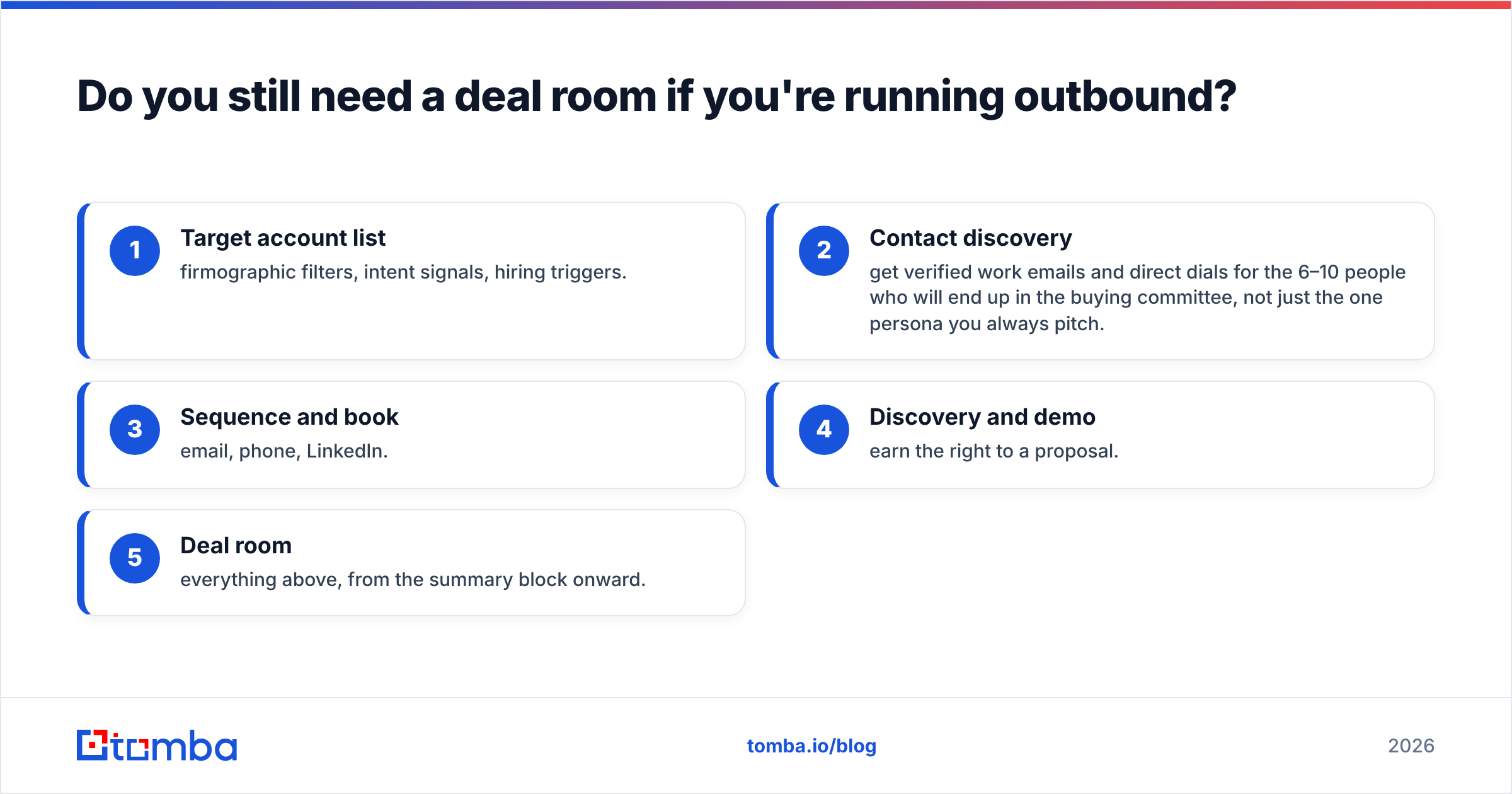
Concretely, the pipeline looks like this:
- Target account list — firmographic filters, intent signals, hiring triggers.
- Contact discovery — get verified work emails and direct dials for the 6–10 people who will end up in the buying committee, not just the one persona you always pitch.
- Sequence and book — email, phone, LinkedIn.
- Discovery and demo — earn the right to a proposal.
- Deal room — everything above, from the summary block onward.
Step 2 is where most outbound programs quietly leak. If 22% of your list bounces, your sender reputation degrades, your sequences underperform, and there's no deal room in existence that fixes that. Running your list through an email verifier before send, and enriching contacts with role and seniority so you can pre-map the buying committee, does more for your close rate than any mid-funnel tool.
It also makes the deal room better. When you already know the CFO's name, title, and direct line before the room goes live, you can address a section to them by name instead of waiting to discover they exist. Layer in direct phone numbers for the two stakeholders who never answer email, and multi-threading stops being luck.
What's the honest verdict on deal rooms in 2026?#
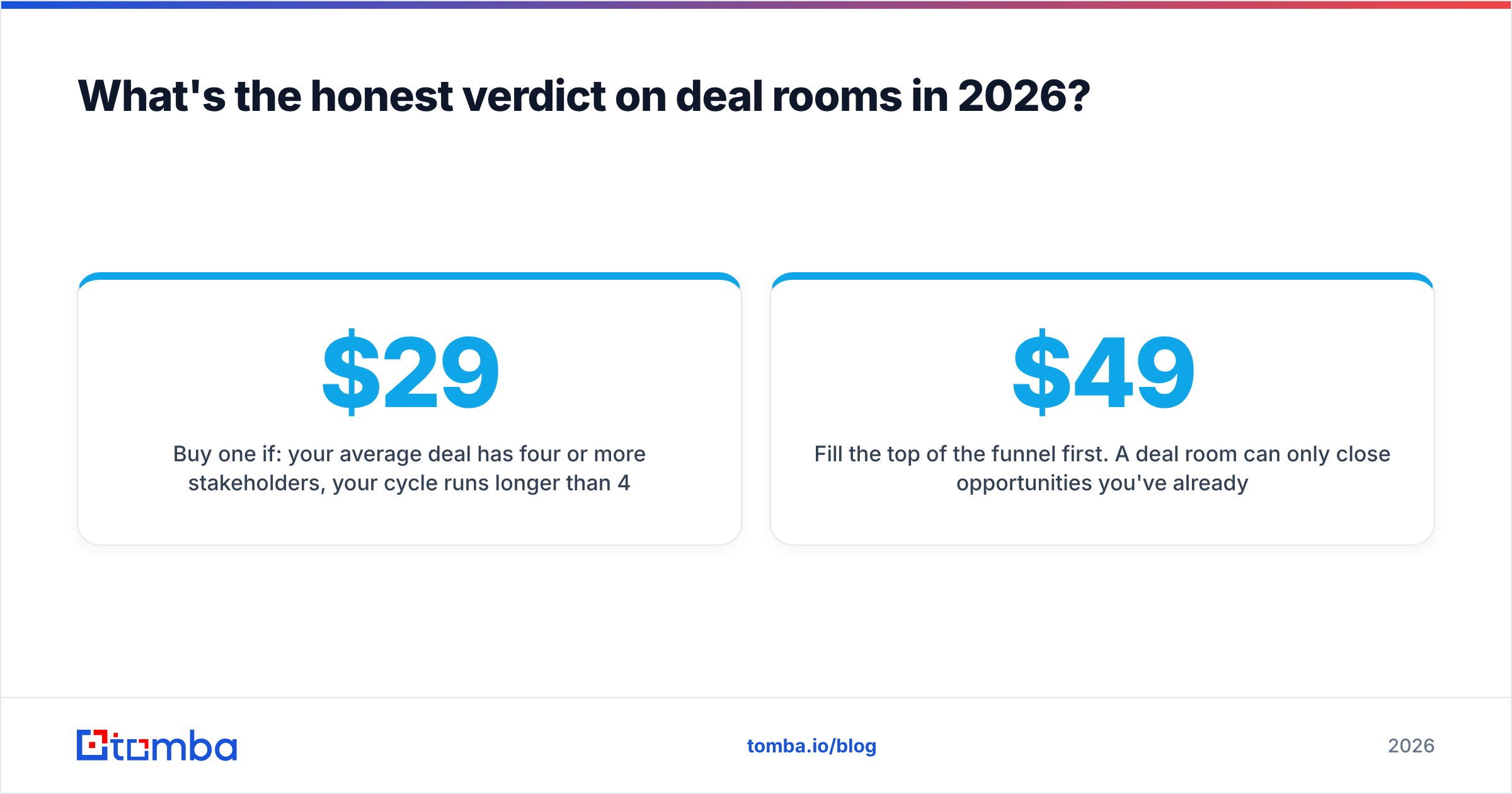
Buy one if: your average deal has four or more stakeholders, your cycle runs longer than 45 days, and you can name a specific decision you'd make differently with engagement data. Under those conditions, $29–$50 per rep is trivially worth it.
Skip it if: you're a two-person team, cycles are under three weeks, or your real constraint is opportunity count. Build a clean shared folder, spend the money on data and outbound capacity, and revisit in two quarters.
And whichever way you go, template the mutual action plan. It's free, it works in a Google Doc, and it's responsible for most of the benefit people attribute to the software.
Fill the top of the funnel first. A deal room can only close opportunities you've already created. Tomba's Email Finder locates verified professional emails by name, company, or domain so you can reach every member of a buying committee — not just the one contact who replied. Start free with 25 searches a month, or scale to Starter at $49/mo when your outbound volume justifies it; full Tomba pricing is public, no sales call required.
Related guides#
Ready to find emails that actually work?
Join 150,000+ professionals who stopped guessing and started sending. Free credits on signup — no credit card required.
Get the Tomba newsletter
Practical outbound tactics and product updates — once every two weeks.
About the author