DealSignal vs Ninjapear (2026): B2B Data Accuracy Compared
DealSignal and Ninjapear sit at opposite ends of the B2B data market: one is a managed enterprise dataset, the other a lean self-serve finder. Here is how they actually compare on accuracy, pricing, and workflow fit.
DealSignal vs Ninjapear is not really a feature fight. It is a budget question. One is a managed enterprise data vendor. The other is a cheap self-serve email finder. Here is how the two compare on accuracy, price, and workflow fit.
TL;DR
- DealSignal is a managed B2B contact and account database. It verifies records on demand and builds lists at CRM scale. It is priced for teams with a real data budget and an annual contract.
- Ninjapear is a much lighter self-serve email finder. It costs less and is faster to try. It has far less depth on firmographics, intent, and enrichment.
- The DealSignal vs Ninjapear choice is not about which tool is better. Ask this instead: do you need a data vendor or a lookup tool? Those are two different purchases.
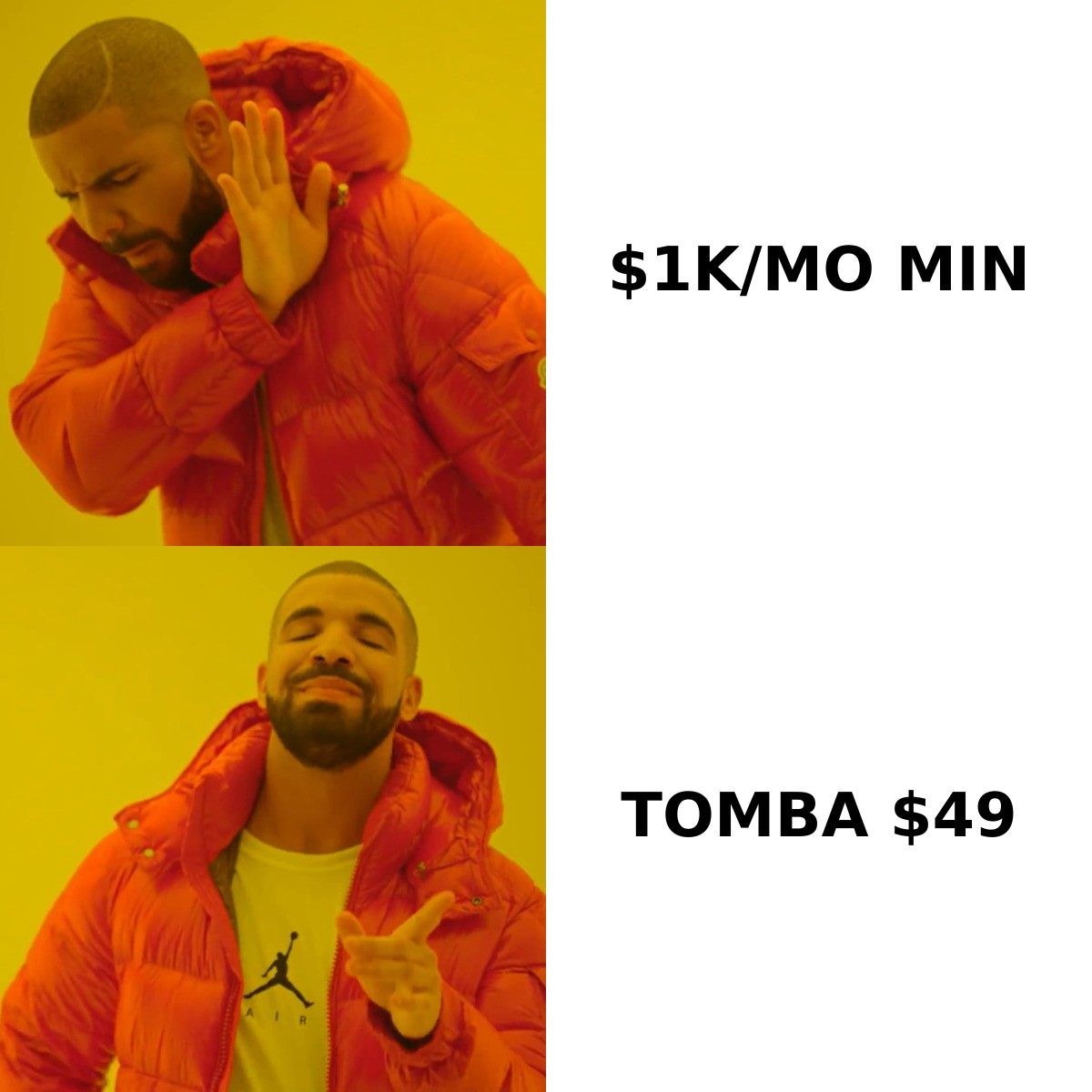
- Neither is the cheapest way to get verified work emails at volume. If your bottleneck is finding and checking addresses, a dedicated finder like Tomba does that job from $49/mo.
- Verify before you send, whatever you pick. Bought data decays 25–30% a year. A stale list is how you burn a sending domain.
What are DealSignal and Ninjapear?#
They solve the same problem from opposite ends.
DealSignal (dealsignal.com) is a B2B data platform for demand-gen and RevOps teams. The pitch is on-demand verification. It does not hand you a stale database snapshot. It re-checks records at the moment you ask for them, then pushes them into your CRM or MAP. It sells contact data, account data, firmographics, technographics, and list building. Most deals run through an annual contract and a sales-led setup.
Ninjapear is the opposite shape. It is a small self-serve prospecting tool for founders, freelancers, and one-to-three-person outbound teams. You sign up, search a domain or a name, and get email addresses back. There is no procurement cycle, no CSM, and no data council review. Coverage outside basic contact lookup is thin.
Put plainly: DealSignal is what a 40-person revenue team buys after a data audit. Ninjapear is what a solo founder opens on a Tuesday when they need 200 emails by Thursday.
That framing matters. Most DealSignal vs Ninjapear searches are a budget question in disguise.
DealSignal vs Ninjapear: how do they compare?#
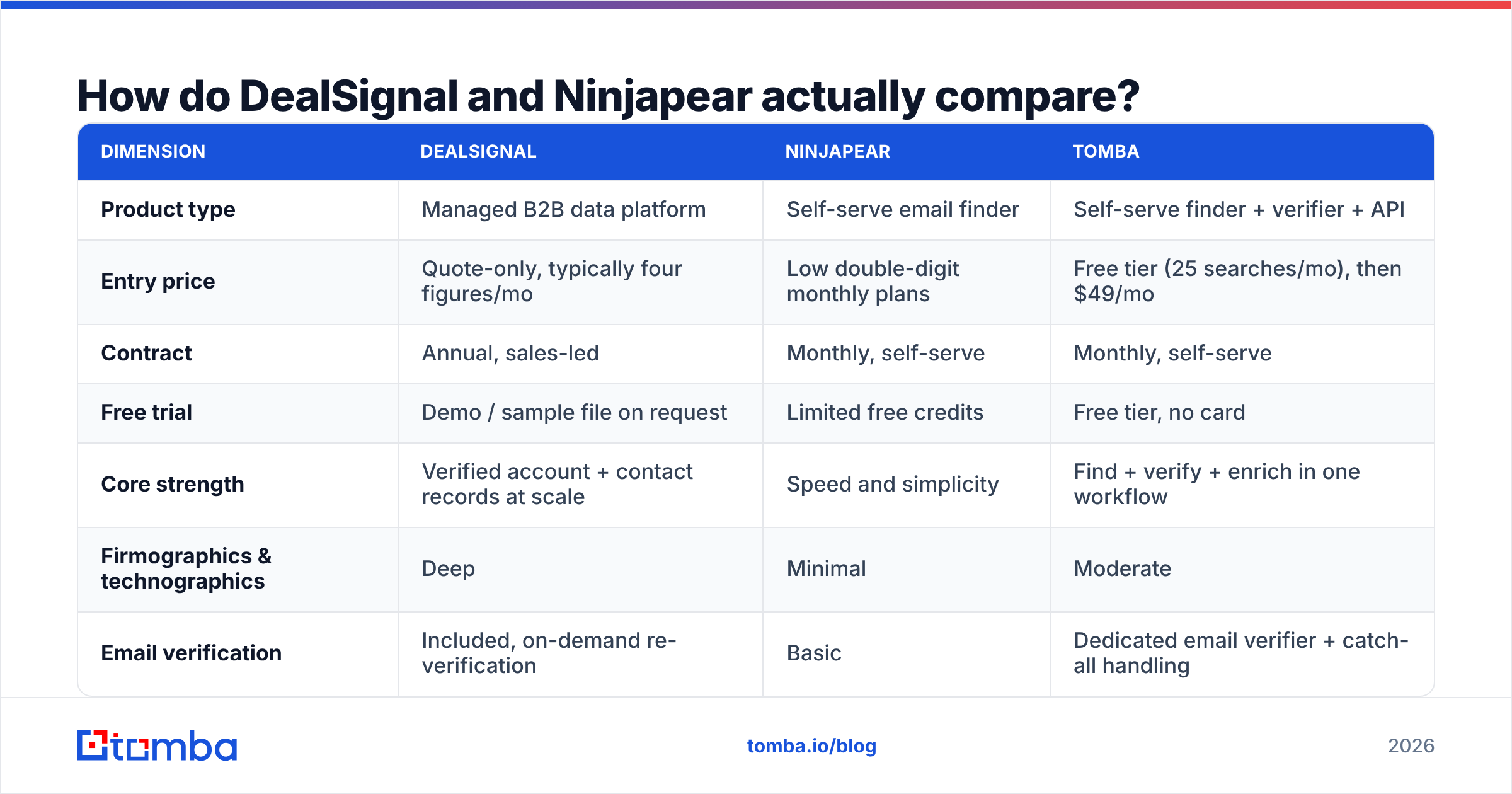
Here is the side by side. Prices for private data vendors move often and are usually quote-only. Treat the money rows as directional, and check the vendor's own page before you sign.
| Dimension | DealSignal | Ninjapear | Tomba |
|---|---|---|---|
| Product type | Managed B2B data platform | Self-serve email finder | Self-serve finder + verifier + API |
| Entry price | Quote-only, typically four figures/mo | Low double-digit monthly plans | Free tier (25 searches/mo), then $49/mo |
| Contract | Annual, sales-led | Monthly, self-serve | Monthly, self-serve |
| Free trial | Demo / sample file on request | Limited free credits | Free tier, no card |
| Core strength | Verified account + contact records at scale | Speed and simplicity | Find + verify + enrich in one workflow |
| Firmographics & technographics | Deep | Minimal | Moderate |
| Email verification | Included, on-demand re-verification | Basic | Dedicated email verifier + catch-all handling |
| Bulk processing | Managed list builds | Small batches | Bulk email finder with CSV in/out |
| API access | Yes, enterprise tier | Limited | Full Tomba API, CLI, MCP server |
| Best fit | RevOps at 50+ headcount | Solo founder, small agency | SDR teams and developers who need volume without a contract |
The table tells the whole story. DealSignal charges for breadth and managed service. Ninjapear charges almost nothing and gives you little beyond lookups. Mid-market teams end up needing something in between.
DealSignal vs Ninjapear: which has better data accuracy?#
DealSignal, on paper. That is the honest answer, because accuracy is the whole point of its design.
On-demand verification means a record gets checked when you pull it. It is not a crawl from six months ago. That does cut bounce rates versus static-database vendors. Ninjapear leans on pattern guessing plus a light validation pass, like most cheap finders. That works fine on common domains. It gets shaky on small companies, catch-all servers, and data outside the US.
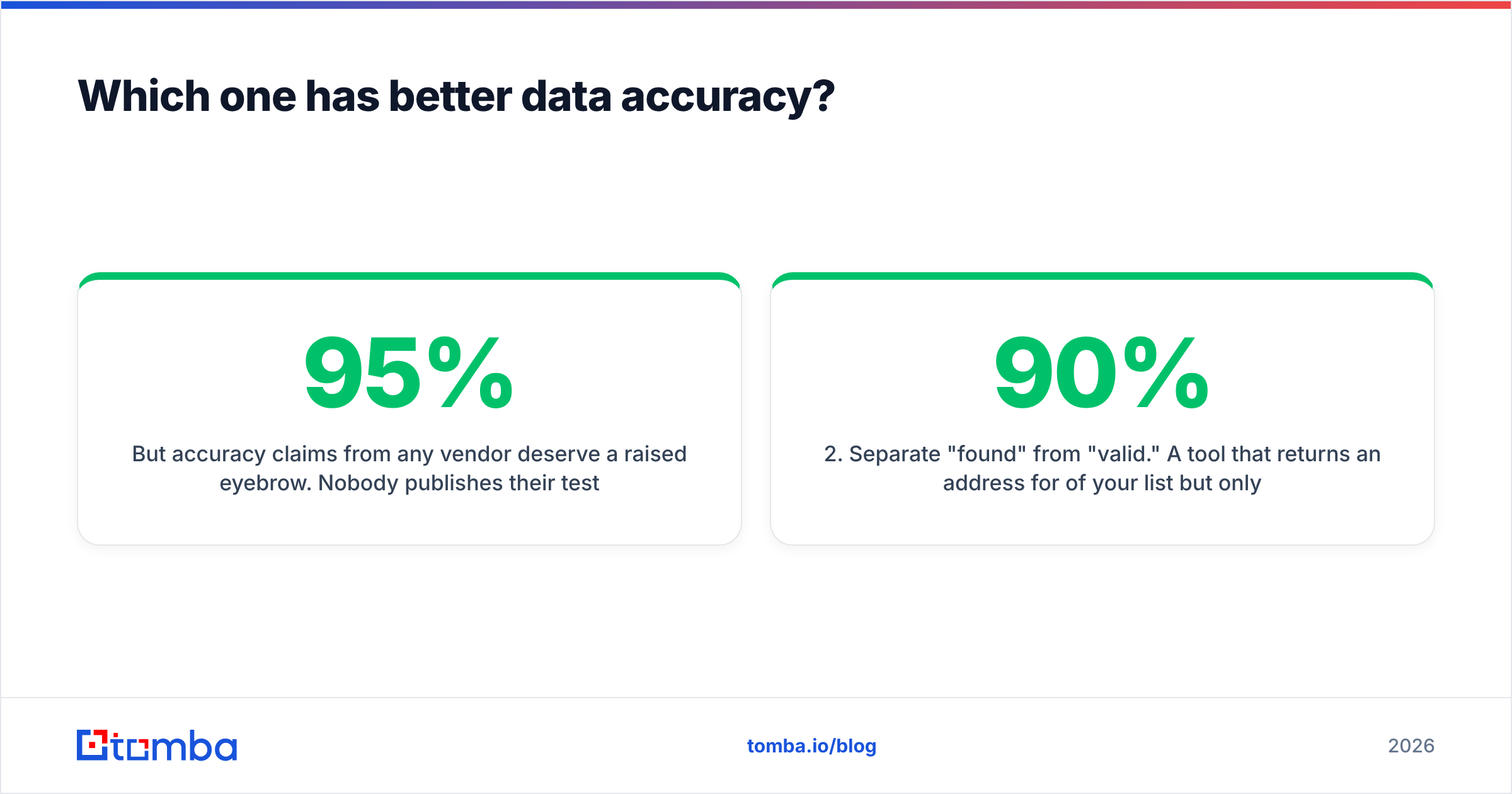
Still, treat every accuracy claim with suspicion. Nobody publishes a test method. Everybody quotes 95%+. The only number that counts is your bounce rate on your own ICP. Four rules keep you honest:
- Test on your own list, not theirs. Pull 200 records for accounts you already know. Check them against contacts you can confirm.
- Split "found" from "valid." Say a tool returns an address for 90% of your list, but only 60% deliver. That is worse than one that returns 65% with 95% deliverability. Coverage and accuracy are different metrics, and vendors love to blur them.
- Check catch-all behavior explicitly. About a fifth of B2B domains are catch-all. The server accepts every address. If a tool marks those "valid," it is guessing. A dedicated catch-all verifier is the only honest way to handle them.
- Re-test every quarter. People change jobs, so contact data decays fast. A vendor that was accurate at signup may not be at renewal.

User reviews on G2 are a better sanity check than either vendor's own claims. Filter to reviewers in your company-size bracket. Enterprise satisfaction with a data vendor tells you nothing about life on a 12-person team.
DealSignal vs Ninjapear pricing: what does each cost?#
Cost is where the two stop being comparable at all.
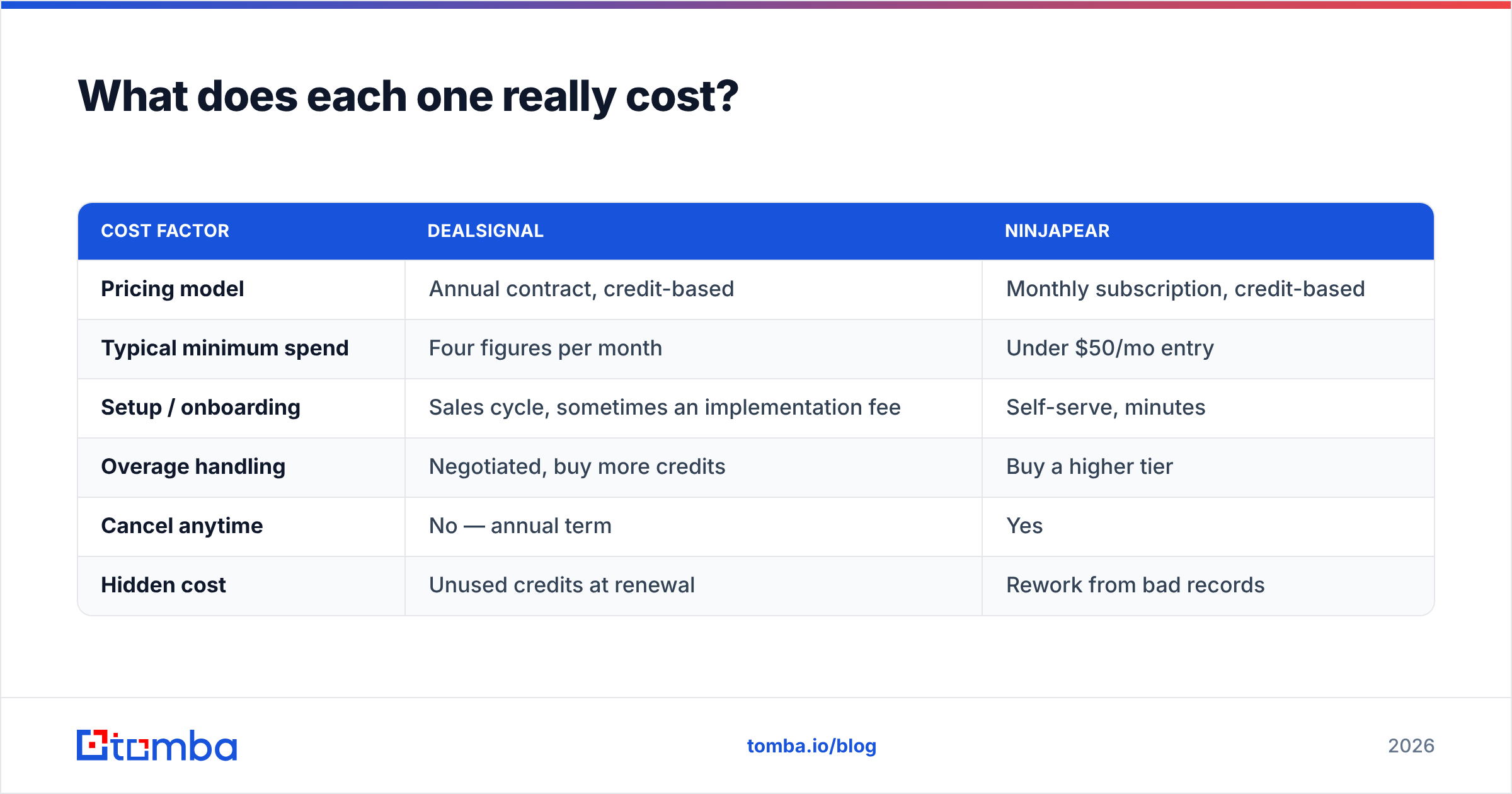
| Cost factor | DealSignal | Ninjapear |
|---|---|---|
| Pricing model | Annual contract, credit-based | Monthly subscription, credit-based |
| Typical minimum spend | Four figures per month | Under $50/mo entry |
| Setup / onboarding | Sales cycle, sometimes an implementation fee | Self-serve, minutes |
| Overage handling | Negotiated, buy more credits | Buy a higher tier |
| Cancel anytime | No — annual term | Yes |
| Hidden cost | Unused credits at renewal | Rework from bad records |
DealSignal's hidden cost is credit shelfware. Teams size the contract for the quarter they felt optimistic about, then use 40% of it. Ninjapear's hidden cost runs the other way. Cheap credits produce records your SDRs have to double-check by hand. That time never shows up on an invoice.
Want a reference point without an annual lock? Tomba pricing runs Free (25 searches/mo), Starter $49/mo, Growth $99/mo, Pro $249/mo, and custom Enterprise. Month to month, no procurement.
Who should choose DealSignal?#
Pick DealSignal when the data itself is the product you are buying, not the lookup.
It makes sense when:
- You run ABM at account scale. You need full org charts, firmographics, and technographics across thousands of target accounts. Email addresses alone will not cover it.
- You have a RevOps owner. Someone has to own field mapping, dedupe rules, and CRM hygiene. Without that, the dataset turns to noise inside two quarters.
- Compliance matters. Enterprise buyers need documented sourcing, a GDPR/CCPA posture, and a real DPA. Small tools often cannot provide those.
- Your CRM is the system of record. DealSignal pays off through steady enrichment of records you already have, not one-off exports.
- Your budget is annual anyway. If you already commit to a data line item, a managed vendor is easier to justify.
If three or more of those are true, the enterprise route is defensible. If only one is, you are buying an aircraft carrier to cross a pond.
Who should choose Ninjapear?#
Pick Ninjapear when you need addresses this week and your list runs to hundreds, not hundreds of thousands.
It fits a solo founder testing a market, a freelancer prospecting a niche, or an agency running one short campaign. The math works because you skip firmographic depth you would never query.
The honest limits: thin international coverage, weak catch-all handling, less clarity about where the data comes from, and no real enrichment layer. Push past a few thousand contacts a month, or need programmatic access, and you will outgrow it. Migrating later is painful once your workflows are wired in.

Is there a middle option in the DealSignal vs Ninjapear debate?#
Yes. For most teams reading this, it is the actual answer.
Most B2B outbound teams live in the gap between a $50/mo lookup tool and a $25k/yr managed dataset. They need verified emails at real volume, an API their engineers can call, bulk CSV processing, and enrichment. They do not need a procurement cycle.
That is the slot Tomba fills. The core product is the email finder, with domain search, verification, catch-all handling, phone lookup, and data enrichment beside it. You get the API and bulk tooling Ninjapear lacks, without the annual commitment DealSignal wants.

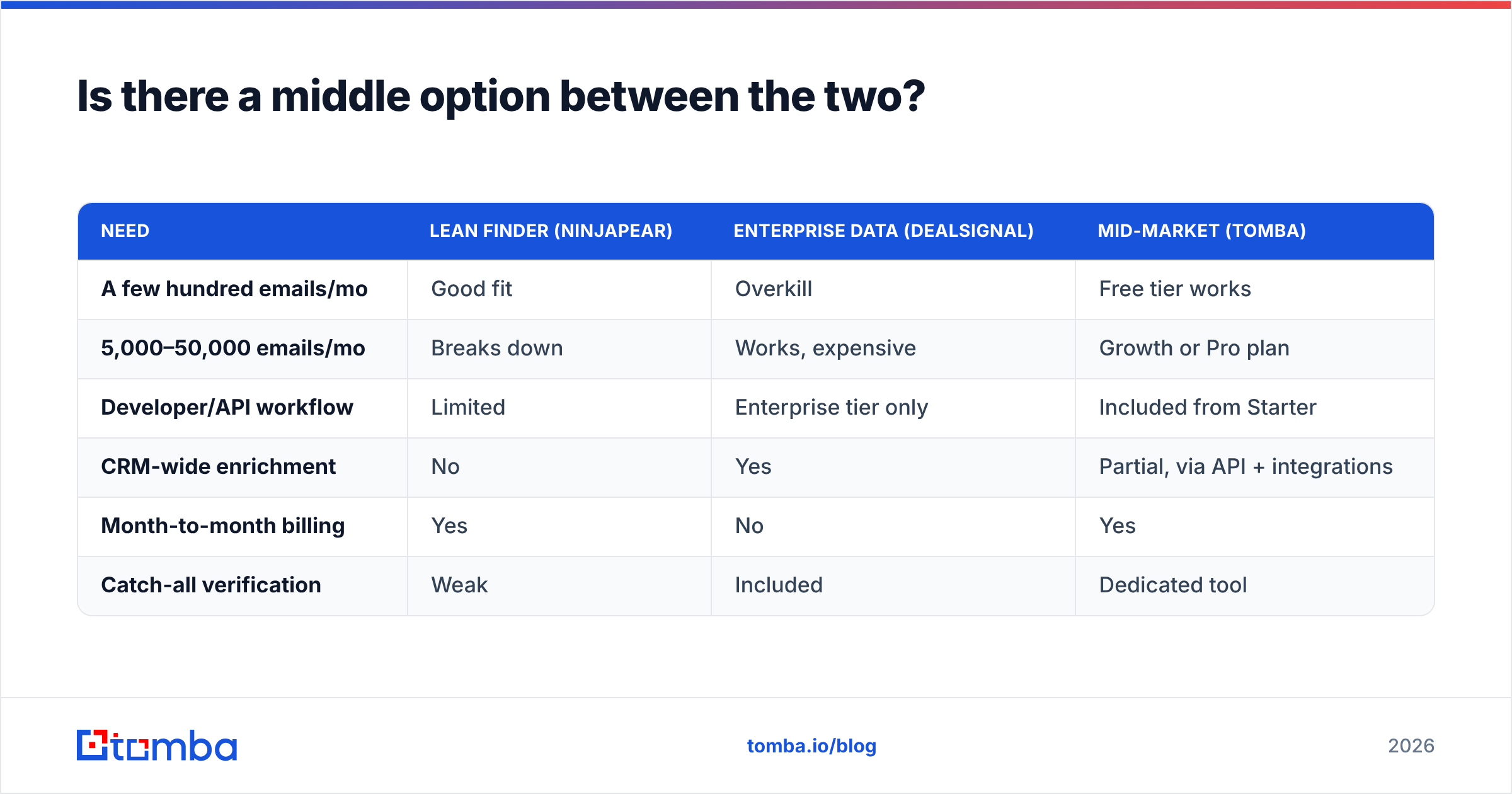
| Need | Lean finder (Ninjapear) | Enterprise data (DealSignal) | Mid-market (Tomba) |
|---|---|---|---|
| A few hundred emails/mo | Good fit | Overkill | Free tier works |
| 5,000–50,000 emails/mo | Breaks down | Works, expensive | Growth or Pro plan |
| Developer/API workflow | Limited | Enterprise tier only | Included from Starter |
| CRM-wide enrichment | No | Yes | Partial, via API + integrations |
| Month-to-month billing | Yes | No | Yes |
| Catch-all verification | Weak | Included | Dedicated tool |
Run the numbers on your own volume, not a vendor's. If your monthly contact volume times your credit cost beats an annual enterprise contract, enterprise is genuinely cheaper. The crossover point sits much higher than most teams expect.
How do you keep a bought list from wrecking deliverability?#
Both vendors under-sell this part. It also decides whether your campaign works.
Every purchased or discovered list carries risk. You get role addresses, spam traps, dead mailboxes, and people who left 18 months ago. Send to that raw and your sender reputation takes the hit. The vendor's does not.
A workable sequence:
- Dedupe first. Same person, three variants, three sends. That is a fast way to look like a spammer.
- Verify everything, every time. Even records a vendor just verified. Run them through an email verifier before the first send.
- Split catch-alls into their own track. Send those in smaller volumes. Watch engagement before you scale.
- Suppress role accounts. info@, sales@, and support@ pad your list size and drag down your reply rate.
- Warm up slowly. A new domain or a new volume level means ramping, not blasting. Ten thousand cold sends from a cold domain will end badly, however good the data is.
Sending advice from mainstream platforms like HubSpot is worth reading here. Deliverability rules apply everywhere, and they change faster than data-vendor feature lists.
DealSignal vs Ninjapear: so which one wins?#
Neither, across the board. Any post that names a flat winner between an enterprise data platform and a self-serve finder is selling something.
- Choose DealSignal if you are an enterprise or upper-mid-market team with a RevOps owner, an annual data budget, and account-level enrichment needs. At that scale, the managed service earns its price.
- Choose Ninjapear if you are one person with a short list and a small budget. It does the narrow job it advertises.
- Choose a mid-market finder if you sit between those poles, which most outbound teams do. You need volume, an API, verification, and bulk processing without a twelve-month signature.
Whatever you decide, test on your own ICP before you commit. Pull the same 200 target contacts through each option. Measure found-rate and bounce-rate separately, then let the numbers pick.
Ready to test the middle path? Start with the Tomba Email Finder free tier. That is 25 searches a month, no card required. Run it against the same account list you would hand a DealSignal rep on a demo call. Compare found-rate, verified-rate, and real bounces after a send. If it holds up, Starter is $49/mo, and you can scale to bulk and API access on the same account without a contract. If it does not, you lost an afternoon and gained real numbers for your next vendor call.
Related guides#
Ready to find emails that actually work?
Join 150,000+ professionals who stopped guessing and started sending. Free credits on signup — no credit card required.
Get the Tomba newsletter
Practical outbound tactics and product updates — once every two weeks.
About the author