How to Deanonymize Website Traffic and Anonymous Leads in 2026
Ninety-eight percent of your site visitors leave without filling out a form. Here's how deanonymization actually works, what it can and can't legally tell you, and which method fits your funnel.
Most people who visit your site never fill out a form. To deanonymize that traffic means putting a name to it. Sometimes that name is a company. Rarely, it is a person. This guide covers what you can deanonymize today, how well each method works, and where the legal line sits.
TL;DR
- To deanonymize traffic means turning an unknown visitor, IP, or record into a known company or person. The usual routes are reverse IP lookup, cookie graphs, and email enrichment.
- Company-level work is mature and legal in most markets. Person-level work is legally risky and much less accurate than vendors imply.
- Real match rates: 25-45% of B2B traffic resolves to a company. Only 2-8% resolves to a person with a verified contact. Anyone quoting 70% is counting something else.
- Remote work broke the IP-to-company link. Home IPs do not map to employers.
- The pattern that works in 2026: deanonymize the account first, then use a domain-to-contact layer to find the humans worth emailing.
What does it mean to deanonymize a visitor?#
To deanonymize is to turn an anonymous signal into a named entity. The signal can be an IP address, a hashed cookie, a device fingerprint, a bare email, or a LinkedIn URL with no contact data. The output is a name. That name is either a company or a person plus a way to reach them.
Think of it like a license plate. A car parks outside your shop every day. The plate does not tell you who is driving. It does tell you which company owns the car. That is company-level work: reliable, dull, useful. Guessing which employee was at the wheel is person-level work. That is where accuracy and legality both fall apart.
In B2B, three jobs hide under one word:
- Visitor deanonymization — you deanonymize anonymous web traffic into a company via reverse IP or an identity graph.
- Record deanonymization — you hold a partial record, such as a name plus a company, and you need a working email or phone number.
- Reverse deanonymization — you hold an email address and need the owner, the employer, and the role.
Each job uses different data. Each has a different accuracy ceiling. Each carries different compliance risk. Teams buy the wrong tool because they blur the three together.

How does each deanonymization method actually work?#
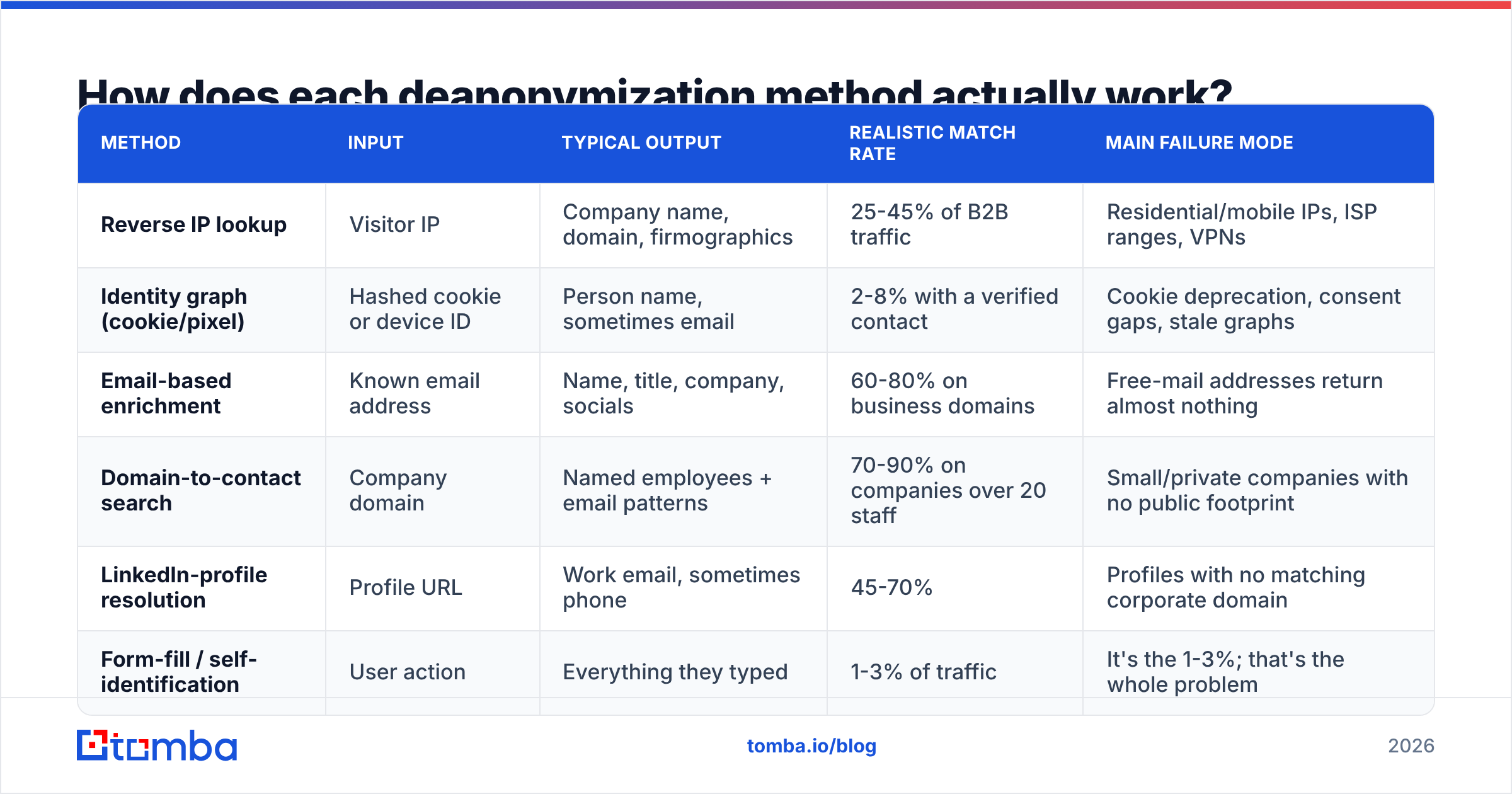
| Method | Input | Typical output | Realistic match rate | Main failure mode |
|---|---|---|---|---|
| Reverse IP lookup | Visitor IP | Company name, domain, firmographics | 25-45% of B2B traffic | Residential/mobile IPs, ISP ranges, VPNs |
| Identity graph (cookie/pixel) | Hashed cookie or device ID | Person name, sometimes email | 2-8% with a verified contact | Cookie deprecation, consent gaps, stale graphs |
| Email-based enrichment | Known email address | Name, title, company, socials | 60-80% on business domains | Free-mail addresses return almost nothing |
| Domain-to-contact search | Company domain | Named employees + email patterns | 70-90% on companies over 20 staff | Small/private companies with no public footprint |
| LinkedIn-profile resolution | Profile URL | Work email, sometimes phone | 45-70% | Profiles with no matching corporate domain |
| Form-fill / self-identification | User action | Everything they typed | 1-3% of traffic | It's the 1-3%; that's the whole problem |
Reverse IP is the workhorse. It is also the cheapest way to deanonymize traffic at scale. A vendor maps IP ranges to registered organizations. The sources are regional internet registries, ISP allocation data, and observed traffic. A visitor hits your site from 203.0.113.x. The vendor checks whether that range belongs to a business ASN. If it does, you get a company. If it belongs to Comcast or Vodafone, you get nothing you can use. That "nothing" bucket got much bigger after 2020.
Identity graphs work in a different way. A network of publisher sites drops a shared pixel. It builds hashed profiles across those sites and sells the match. When it works, it is truly person-level. Most of the time in B2B, it does not work. Buyers browse from managed work laptops with tracking protection on, so you get silence. Read any "70% resolution" claim as a number from consumer traffic, not from your enterprise SaaS site.
Email methods are the least glamorous and the most dependable. If you already have an email address, reverse email lookup returns the person's name, employer, and role with high confidence. Work email addresses are tied to a domain, and that domain is public.
Why do deanonymization match rates disappoint?#
Four structural reasons. None of them get fixed by switching vendors.
Remote work broke IP-to-company mapping. A sales director works from her flat. She shows up as a home IP owned by her ISP. No ethical data source ties that IP to her employer. Depending on your ICP, 30-50% of your real buyer traffic now arrives this way.
Corporate networks sit behind proxies. Zscaler, Cloudflare WARP, and similar zero-trust tools route staff traffic through shared exit ranges. You deanonymize the security vendor, not the customer.
Consent rules cut both ways. GDPR and the growing set of US state privacy laws make person-level identification hard to defend without consent. Vendors that promise it in the EU usually lean on a legitimate-interest argument. That argument has not been tested in court. The EU's own guidance treats IP addresses as personal data in most cases.
Data goes stale fast. B2B contact records decay by roughly 22-30% a year from job changes alone. A visitor you name in March may work somewhere else by August. Skip the verification step and you get bounce rates that wreck your sender reputation.
That last point is the one teams underrate. Getting a name is step one. Getting a deliverable name is a separate job. Run every resolved contact through an email verifier before it touches a sequence.
Is company-level or person-level deanonymization better for B2B?#
Company-level, for almost every B2B team. Here is the honest comparison.
- Legal exposure — Company data is not personal data. It is an organization name from a public registry. Person-level data triggers consent, disclosure, and deletion duties in the EU, the UK, California, and a growing list of others.
- Accuracy — You deanonymize roughly 6-10x more traffic at the company level. The company-level answer is also far less likely to be wrong.
- Actionability — "Someone at Acme Corp read your pricing page three times" is enough to trigger an account play. You do not need to know it was Dave in procurement.
- Cost per record — Company-level resolution runs about $0.02-$0.10 per identified visit. Person-level graph resolution runs $0.50-$3.00, and it hits far less often.
- Buying-committee reality — A B2B committee has 6-11 people. Naming one browser tells you less than naming the account and mapping the whole committee.
The workflow that converts is simple. Deanonymize the account, then build the contact list yourself. Website visitor reveal gets you the company. A domain search gets you named people at that company with their email patterns. You choose who enters the sequence. You are not chasing whichever intern tripped the pixel.
What should you look for in a deanonymization tool?#
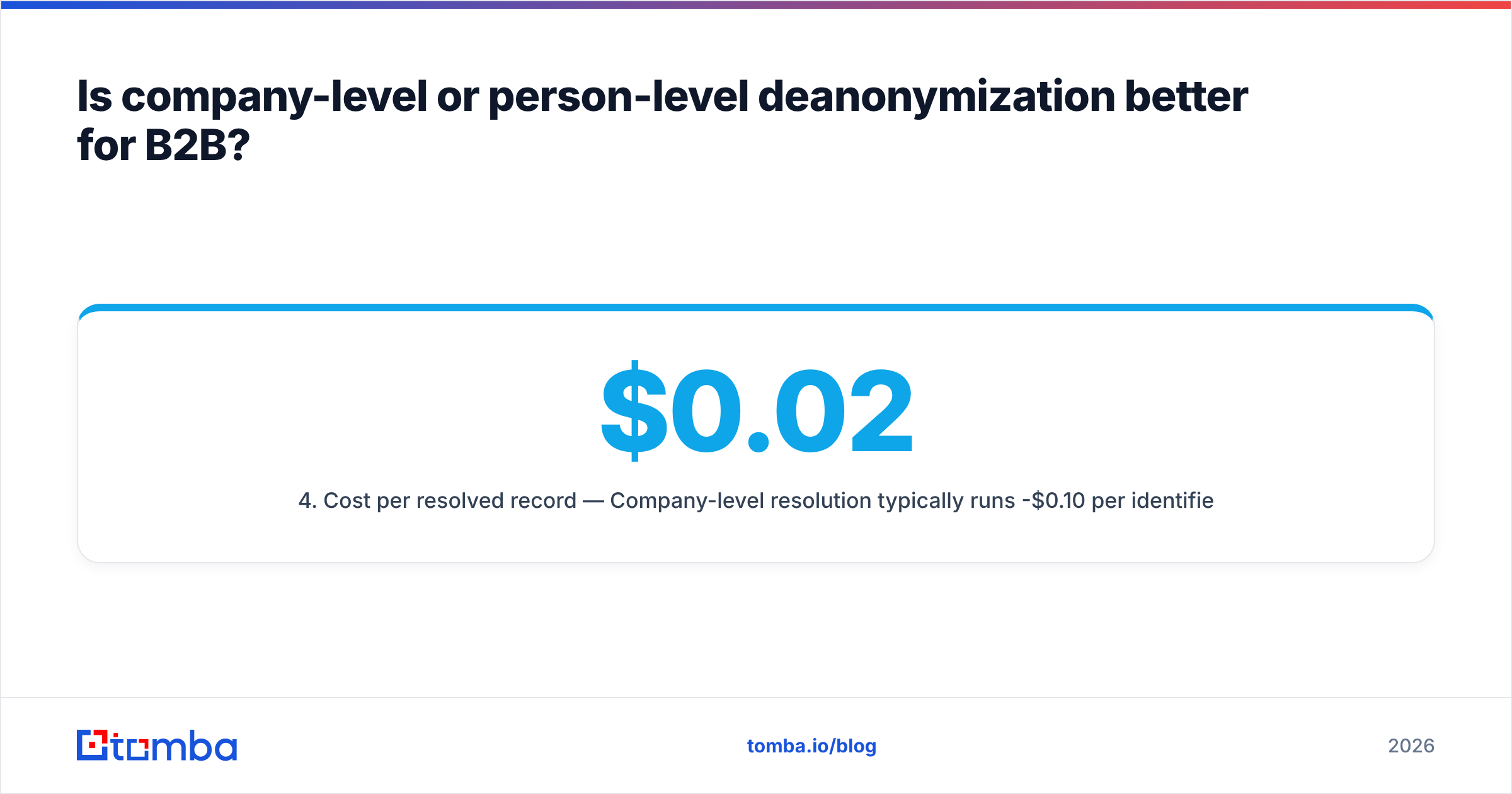
| Criterion | What to demand | Red flag |
|---|---|---|
| Match-rate proof | A trial on your traffic, with a raw export | A case study from a different industry |
| ISP filtering | Explicit exclusion of residential/mobile ranges | Reporting "Comcast" as a company lead |
| Data provenance | Documented sources and refresh cadence | "Proprietary AI-powered graph" |
| Verification layer | Built-in or clean handoff to a verifier | Raw contacts pushed straight to CRM |
| Compliance posture | DPA, sub-processor list, region controls | "GDPR compliant" with no documentation |
| Contact depth | Full buying committee, not just one contact | Single "best match" per company |
| Pricing model | Charged per identified record | Charged per page view or per lookup attempt |
Two things separate a usable vendor from one that inflates lead counts. First, do they filter consumer ISPs by default? A dashboard full of telecom giants and universities means you are paying for noise. Second, do they charge for misses? Per-lookup pricing on a 30% match rate means 70% of your spend buys nothing.
On the contact side, the market splits in two. Database vendors sell pre-built, human-verified lists that you filter and export. BookYourData is one of the more transparent ones. That model is fast when your ICP is well-defined and stable. Search vendors resolve on demand against live sources. That fits better when you chase specific accounts surfaced by visitor data. Most mature teams run both: a database for cold list-building, a search API for account-triggered lookups.

How do you build a deanonymization workflow that survives contact with reality?#
Five steps to deanonymize traffic without wrecking your sender reputation. Skip one and you get a CRM full of bounces.
- Instrument first, buy second. Check how much of your traffic comes from business ASNs. Your analytics ISP report gives you a rough ceiling. If 80% is residential, no vendor fixes that.
- Deanonymize at the account level. Resolve visits to companies. Then filter hard: drop ISPs, your own team, bots, and anything outside your ICP. A clean 200-account list beats a noisy 2,000-account one.
- Score by behavior. One homepage visit is not intent. Three pricing-page visits in five days from one account is. Weight by page depth, repeat visits, and recency before anything enters a sequence.
- Map the buying committee on purpose. For each good account, find the roles you sell to. A bulk email finder earns its keep here. You resolve 5-8 named roles per account instead of hoping the pixel caught the right one.
- Verify, then send. Check every address before you use it. Route catch-all domains through a catch-all verifier instead of trusting or dumping them. Keep hard bounces under 2%.
Here is a useful sanity check. If your workflow produces more contacts than your reps can personalize, the bottleneck is not the tooling. It is capacity. More names will not help.
What are the legal limits on deanonymizing visitors?#
Short version: companies are safe to deanonymize, people are not. And "the vendor said it was compliant" is not a defense.
Under GDPR, an IP address is personal data when you can link it to a person. Resolving it to a company name identifies no individual, so the claim on personal data is much weaker. That is why company-level tools operate freely in the EU while person-level tools tend to geofence. US state laws vary. California's CPRA gives people deletion and opt-out rights that cover B2B contacts too, and many outbound teams still miss that.
Practical guardrails that keep you out of trouble:
- Disclose visitor identification in your privacy policy by name. Do not bury it in a generic analytics clause.
- Honor opt-outs and deletion requests across the whole stack, not just your ESP.
- Get a DPA and a sub-processor list from every vendor. If they cannot produce one, that is your answer.
- Do not buy person-level EU data from cookie graphs unless the vendor shows you the consent chain.
- Keep source attribution on every record, so you can say where it came from. Vendors that publish their data sources make that easy.
Analysts have been consistent here. Gartner's guidance on B2B data governance favors provenance and a documented lawful basis over raw record volume. Regulators reward the team that can explain its data supply chain.
What does a realistic deanonymization stack cost?#
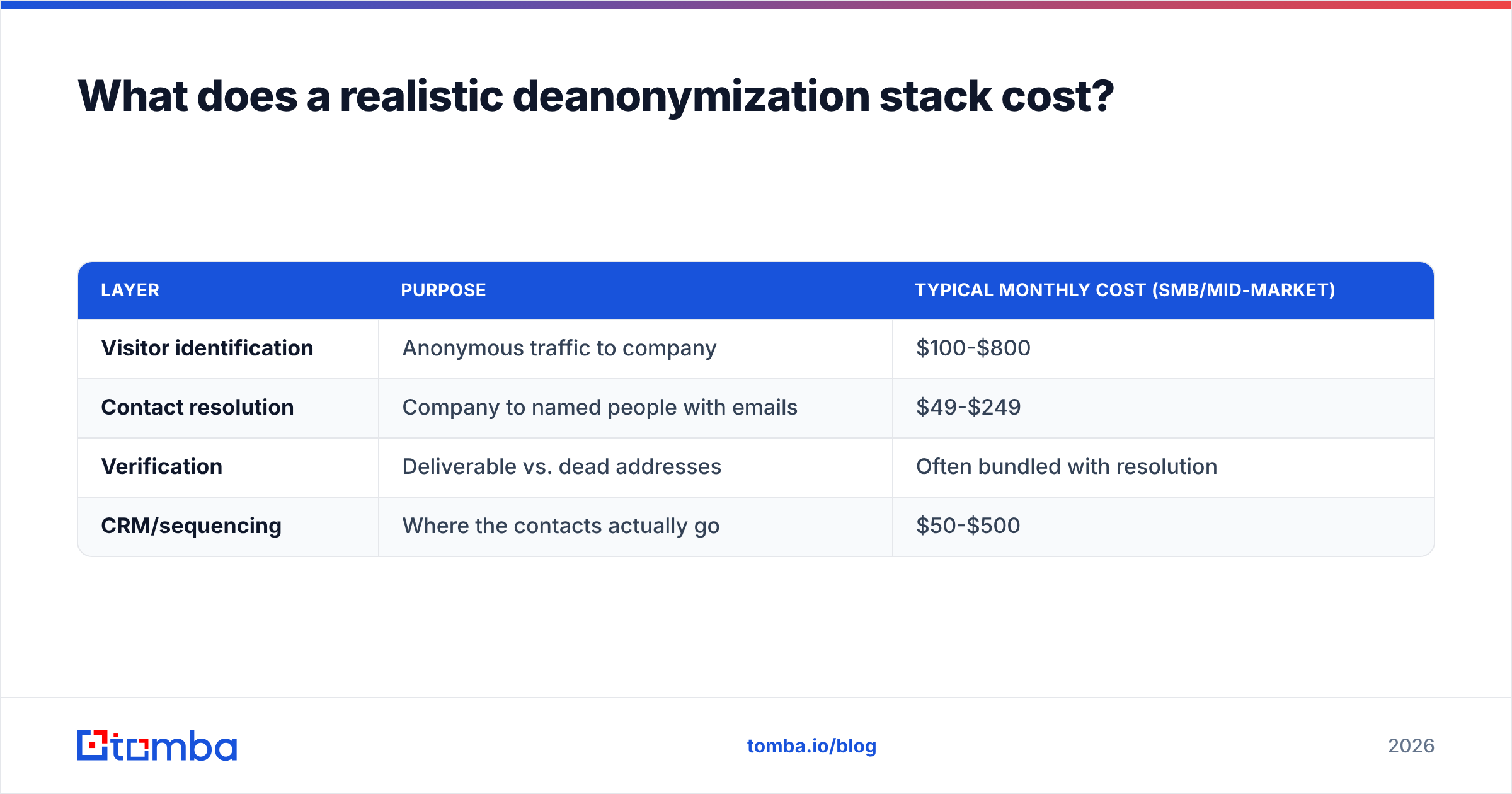
Budget in layers, not in one line. The table shows what it costs to deanonymize traffic end to end.
| Layer | Purpose | Typical monthly cost (SMB/mid-market) |
|---|---|---|
| Visitor identification | Anonymous traffic to company | $100-$800 |
| Contact resolution | Company to named people with emails | $49-$249 |
| Verification | Deliverable vs. dead addresses | Often bundled with resolution |
| CRM/sequencing | Where the contacts actually go | $50-$500 |
Contact resolution is the cheapest layer, and the one teams overspend on. They buy a bloated all-in-one when they need a focused finder plus an API. Tomba pricing starts free at 25 searches a month. Starter is $49/mo, Growth is $99/mo, and Pro is $249/mo. That is enough headroom for most mid-market ABM programs. Per-seat platforms often put the same volume in a five-figure annual contract.
One cost never appears on a price list: the deliverability hit from unverified sends. A 12% bounce rate on a new domain can throttle you for months. Verification is not an upsell. It is insurance on everything else you bought. Run your current list through a free email checker before your next campaign and see the damage.
Where should you start?#
Deanonymize the account, then the person. That order has the highest hit rate and the lowest legal risk. It also gives you a match rate you can plan around and a list your reps will actually work.
Maybe your funnel already tells you which companies show up, whether from visitor identification, intent data, ad clicks, or a target account list. Then the missing piece is the people. Tomba Email Finder turns a company domain and a name into a verified, deliverable email address. The free tier is 25 searches a month, so you can test it against your own account list first. Run twenty accounts through it, check the bounce rate, and let the numbers decide.
Related guides#
Ready to find emails that actually work?
Join 150,000+ professionals who stopped guessing and started sending. Free credits on signup — no credit card required.
Get the Tomba newsletter
Practical outbound tactics and product updates — once every two weeks.
About the author