How to Deanonymize Website Traffic in 2026 (Full Guide)
Visitor identification vendors advertise match rates most sites never see. Here is how deanonymizing website traffic actually works in 2026, what it costs, where it breaks, and how to turn resolved accounts into contacts you can email.
You can deanonymize website traffic. You just cannot do it as well as the ads promise. Here is what these tools really match, what they cost, and where they break.
TL;DR
- To deanonymize website traffic means to tie an unknown visit to a company, or less often to a person. Those are two different products. They differ in accuracy and in legal risk.
- Real company match rates in 2026 run 15–35% of all traffic. Vendor pages claim 60–70%. Person-level match in the US lands at 8–20%.
- Home ISPs, phone networks, VPNs, and Gmail users are close to impossible to match. If half your traffic is remote staff on Comcast, no vendor fixes that.
- A matched company is worth nothing on its own. You still need a name, a checked email, and a reason to write. Most programs die right there.
- Budget $150–$800 a month. That covers the ID tool, enrichment, and email checks.
What does it mean to deanonymize website traffic?#
To deanonymize website traffic is to take a visit with no form fill, no login, and no cookie record, and attach a business name to it.
Think of a doorman at an office tower. He spots the delivery van by its logo, but he has no idea who sits inside, and he cannot log the cars with no badge. He can still note that Acme Logistics came by three times this week. That is company-level matching, and it is what most visitor ID tools sell.
Two products hide behind one phrase:
- Company match. The vendor maps the visitor IP to a known firm. It uses ownership records, reverse DNS, and its own IP graph. Output: "Someone at Acme Corp saw /pricing twice."
- Person match. The vendor links a cookie or device ID to a person record with a name and email. The link comes from a data co-op. Output: "Dana Chen, VP Ops at Acme, saw /pricing."
- Self-declared match. A visitor clicks a link in your own email, or fills a form. The session ties to a record you own. Best accuracy. Lowest volume. No legal risk.
- Account intent, no PII. You name nobody. You group visits by IP range, referrer, and page path. Then you score accounts already in your CRM. Dull, cheap, and it works.
Most teams who want to deanonymize website traffic want #1 plus a clean path into #3. Person match is the flashy one. It also draws the privacy heat.
How does website visitor ID actually work?#
The parts are dull. A script fires on page load, grabs a small payload, and sends it to the vendor.
- IP capture. The script or server logs the IP. Per how IP addresses are allocated, this works only when the block belongs to a firm, not a home ISP.
- Reverse DNS and WHOIS. The IP gets checked against ownership records.
mail.acme.comis a strong signal.dyn-cust-441.chicago.comcast.netis not. - Private IP-to-company graphs. Vendors build these from ad bid streams, VPN lists, office network prints, and email-open IPs. Match rates split hard here.
- Cookie and device sync. Person-level tools check the cookie against a co-op graph. A partner site may have seen that device with a known email hash.
Every tool that claims to deanonymize website traffic starts with those four steps. Two more steps make the visit useful.
- Enrichment. Once you have a company, you append size, industry, tech stack, and place. Now you can score it.
- Contact discovery. Find the real people at that firm. Check their emails. Then, and only then, write.
Steps one to five tell you who showed up. Step six earns money.
Company match or person match: which do you need?#
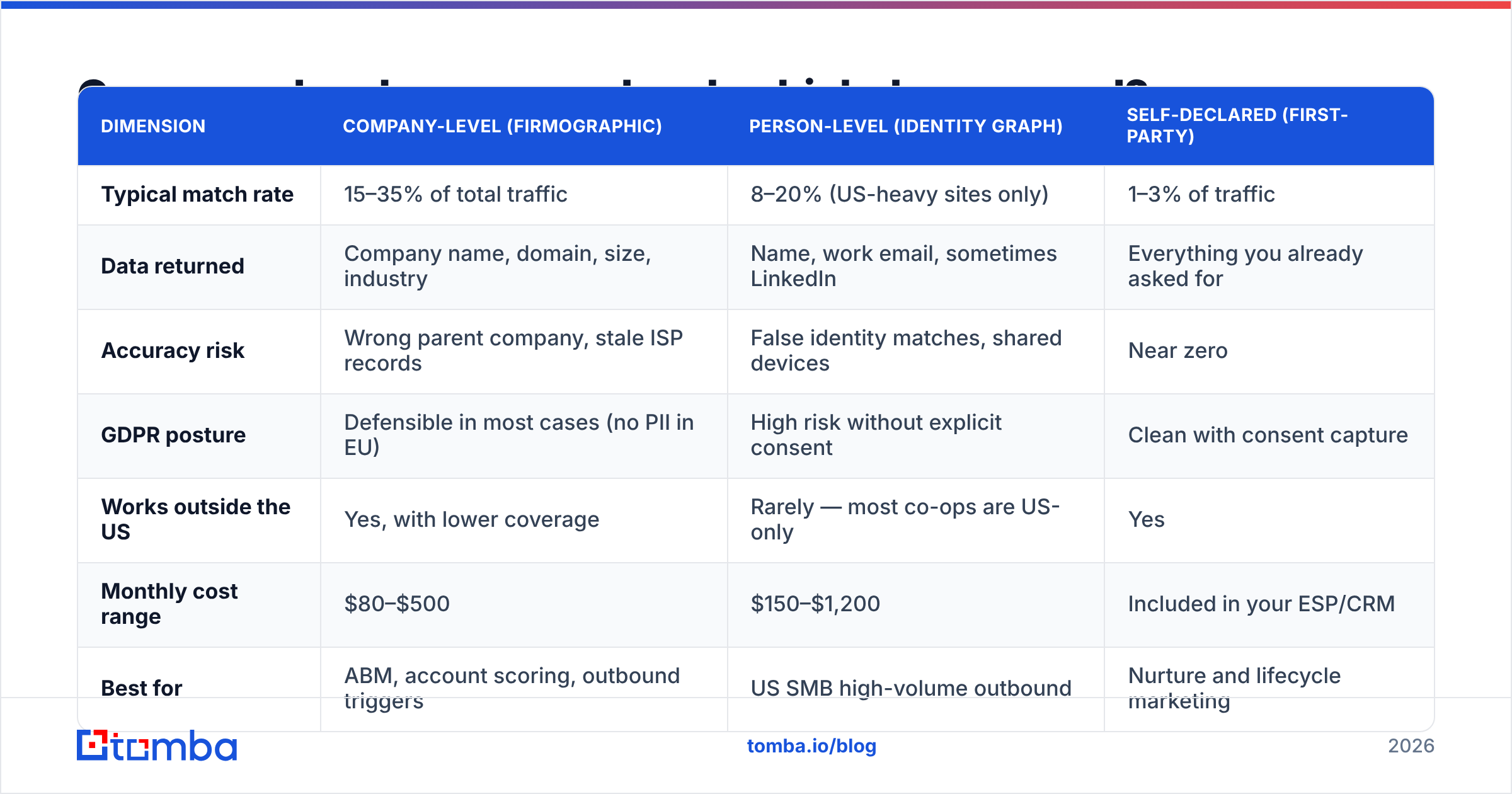
| Dimension | Company match | Person match | Self-declared |
|---|---|---|---|
| Match rate | 15–35% of traffic. | 8–20%, US sites only. | 1–3% of traffic. |
| You get | Company, domain, size, industry. | Name, work email, sometimes LinkedIn. | All you asked for. |
| Risk | Wrong parent firm. Stale ISP records. | False matches. Shared devices. | Close to zero. |
| GDPR | Fine in most cases. | High risk with no consent. | Clean, if you ask first. |
| Outside the US | Yes, but thinner. | Rarely. Co-ops are US-only. | Yes. |
| Cost per month | $80–$500. | $150–$1,200. | Part of your CRM. |
| Best for | ABM and outbound triggers. | US SMB outbound at volume. | Nurture and lifecycle. |
Do you sell into Europe? Then person match is close to a dead end. Build on company signals and your own consented data instead.
What match rates should you expect?#
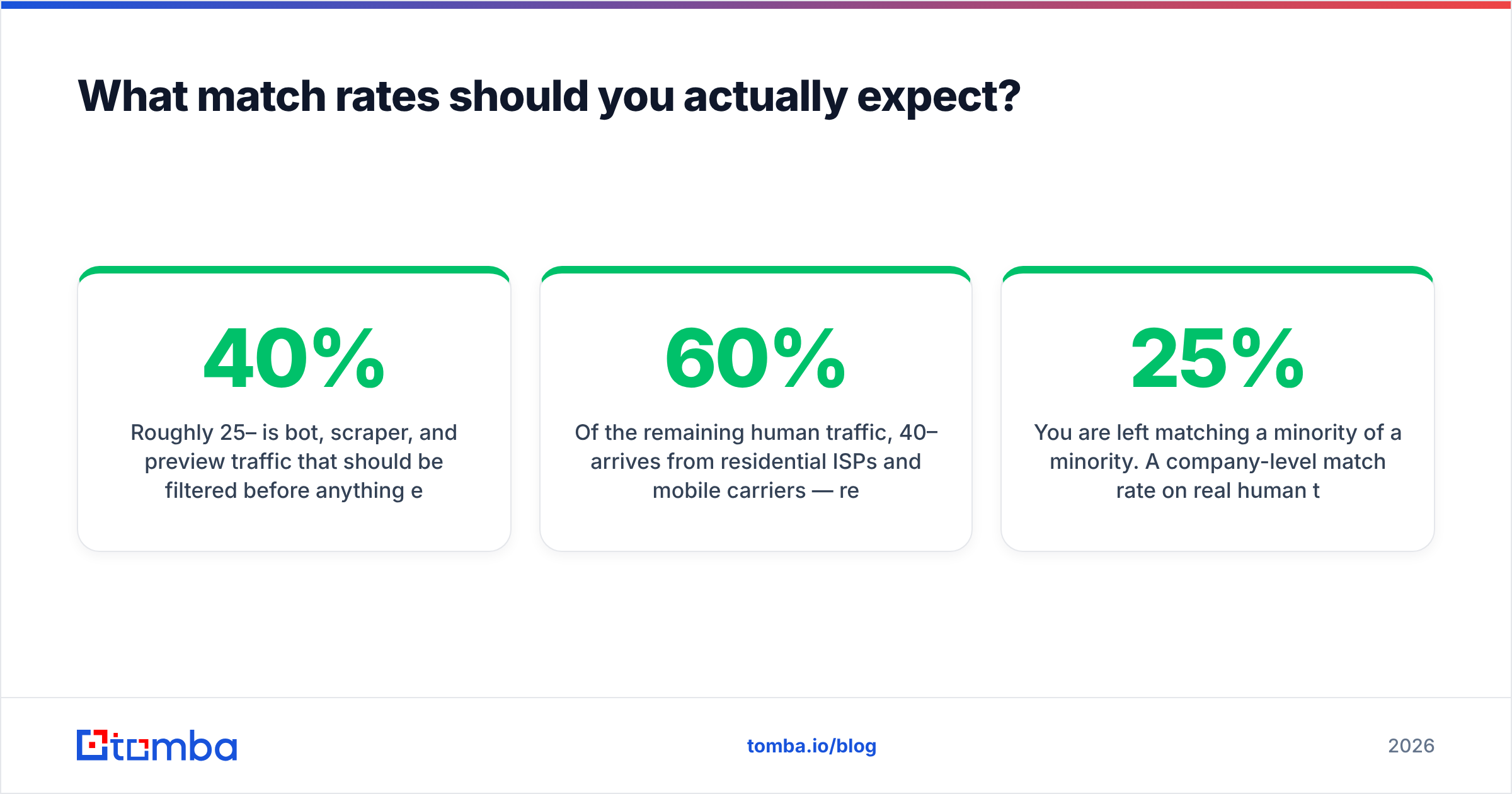
Treat the vendor number as a ceiling. It was measured on their best-fit client, not on you.
Here is the math they skip. Start with 100,000 sessions a month on a normal B2B site.
- Bots, scrapers, and preview hits eat 25–40%. Filter them first.
- Of the humans left, 40–60% come from home ISPs and phone networks. Remote staff. Evening browsing. Phones on LTE. None of it matches at company level.
- VPNs and office proxies hide more. Privacy browsers strip what person-level tools need.
So you match a slice of a slice, which is why a 25% company match on real human traffic is a good result in 2026, not a failure. Vendors who quote 70% measure against "identifiable traffic". They pick that base themselves.

The fix is not a higher match rate. The fix is to make each match worth more, by enriching it well and routing it to a human fast. A named account that sits in a dashboard for nine days is worth as much as an unnamed one.
Which tools deanonymize website traffic in 2026?#
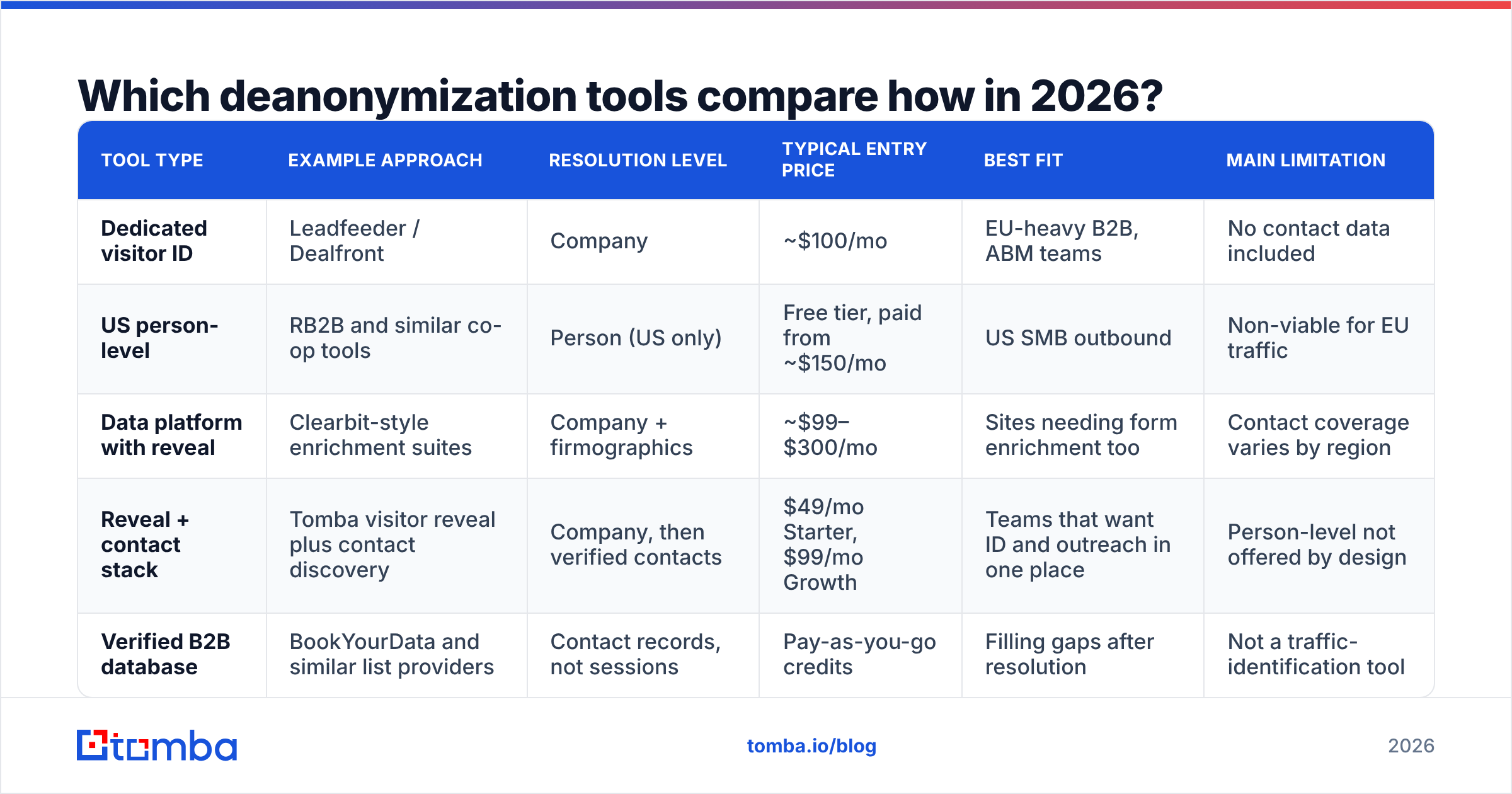
The market splits three ways: pure visitor ID tools, data platforms that bundle a reveal, and contact data firms you bolt on. Prices move often, so check the vendor page before you buy.
| Tool type | Example | Match level | Entry price | Best fit | Main limit |
|---|---|---|---|---|---|
| Pure visitor ID | Leadfeeder / Dealfront | Company. | ~$100/mo. | EU-heavy B2B. ABM teams. | No contact data. |
| US person-level | RB2B and co-op tools | Person. US only. | Free tier. Paid from ~$150/mo. | US SMB outbound. | Not viable for EU traffic. |
| Data platform | Clearbit-style suites | Company plus firm data. | ~$99–$300/mo. | Sites that also enrich forms. | Contact coverage varies. |
| Reveal plus contacts | Tomba visitor reveal with contact search | Company, then checked people. | $49/mo Starter. $99/mo Growth. | Teams that want ID and outreach in one place. | No person match, by design. |
| Contact database | BookYourData and peers | Contacts, not sessions. | Pay as you go. | Filling gaps after a match. | Not a traffic tool. |
BookYourData is a different animal, because it is a checked contact database rather than a session tool. It fits when your ID layer names a firm you have no contacts for. Pairing a reveal tool with a strong contact source beats asking one vendor to do both jobs badly.
For a wider list, G2's visitor identification category is the least biased public source. Reviews there are tied to verified purchases.
Is it legal to deanonymize website traffic under GDPR and CCPA?#
Short answer: a company match is usually fine. A person match with no consent is usually not.
Under GDPR, an IP is personal data when you can tie it to a person. Resolve an IP to a company and store only the company name, and most lawyers treat that as B2B data use under legitimate interest. You still name it in your privacy notice. You still log it in your records. Now resolve a session to a named human with an email and no consent, and you are handling personal data with no clear lawful basis. Several EU regulators have frowned on that exact move.
CCPA and CPRA set a lower bar, but not a zero bar. You owe notice at collection. You owe an opt-out for sale or sharing. You must honor Global Privacy Control signals. Gartner's work on privacy and data protection trends is a fair way to track where enforcement is headed.
Three guardrails:
- Geo-fence the person layer. Run it on US traffic only. Turn it off for EU, UK, and Swiss IPs in the script, not just in reports.
- Say what you do. One plain line in your privacy policy should state that you deanonymize website traffic, name the vendor, and give the reason. It costs nothing and removes the worst surprise.
- Keep the match out of the copy. "I saw you on our pricing page at 9:42pm" reads as spying. Use the signal for timing, not for the words.
How do you turn matched accounts into contacts you can email?#
A match hands you a domain. Outbound needs a person and a working address. That gap is the real work.
- Filter to intent. Skip one-page bounces. A real visit is two pages or more, and one of them should be commercial. Pricing, docs, integrations, case studies. A repeat visit within 14 days counts too.
- Check the CRM first. If a rep owns the account, this is routing, not prospecting. Send it to the rep, not to a sequence.
- Find the right roles. Use a domain search to pull the roster at that firm. Match roles to the pages they read. API docs mean engineering. The pricing page means finance, or a champion building a case.
The last three steps are the ones teams skip.
- Check before you send. Never mail an address you have not tested. Run each one through an email verifier and drop the risky ones. These lists skew to big firms, where email formats change often.
- Add context. Append headcount, funding, and tech stack with data enrichment. Your first line should be about their world, not their clicks.
- Route inside 24 hours. Intent decays fast. A two-day-old page view is a cold lead with extra steps.
Automate the chain with the Tomba API if you have dev time. Use your workflow tool if you do not. Either way, no human should copy domains between tabs.
What does a real stack cost?#
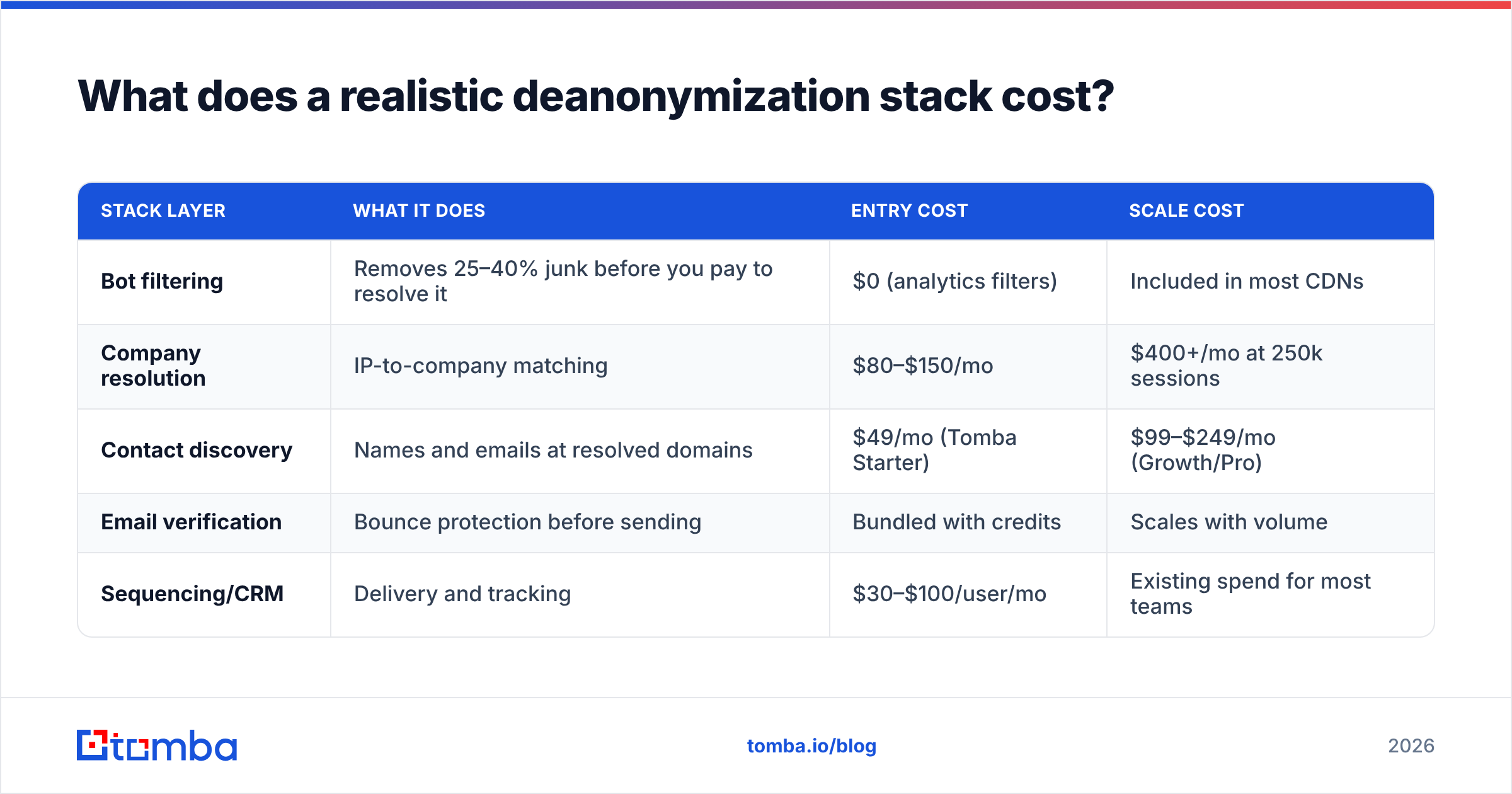
A setup that can deanonymize website traffic end to end has five layers.
| Layer | What it does | Entry cost | At scale |
|---|---|---|---|
| Bot filtering | Cuts 25–40% junk before you pay to match it. | $0. Analytics filters. | Bundled in most CDNs. |
| Company match | Maps IPs to firms. | $80–$150/mo. | $400+/mo at 250k sessions. |
| Contact search | Names and emails at matched domains. | $49/mo. Tomba Starter. | $99–$249/mo. |
| Email checks | Stops bounces before you send. | Bundled with credits. | Scales with volume. |
| Sequencer or CRM | Sends and tracks. | $30–$100 per user/mo. | Already in your budget. |
The classic mistake is to spend 80% on the match and nothing on contacts. Then you wonder why a dashboard full of company names booked no meetings. Split it closer to half and half. Tomba pricing starts free at 25 searches a month if you want to test the contact half first.
What kills visitor ID programs?#
Most teams who deanonymize website traffic hit at least three of these.
- Treating every match as a lead. Your own staff, current clients, rivals, and agencies all show up. Suppress those domains on day one.
- Trusting the parent firm. IP records often point at a global parent when the visitor sits in a small local unit. Check the country before you assume budget.
- Sending to unchecked addresses. These pipelines make volume fast, so bounces climb fast. Verify every address.
- Being creepy. Naming pages and timestamps kills replies and invites complaints. Use the signal quietly.
- Tracking match rate, not meetings. Match rate is an input. Meetings are the outcome.
- Running person tools worldwide. One EU complaint costs more than the tool ever earned. Geo-fence it.
Where should you start?#
Start from zero in this order. Filter bots. Add a company match. Suppress your own and your clients' domains. Set a two-page intent bar. Then build the contact step. Build the dashboard last. Most teams do it backwards. They end up with pretty reports on accounts nobody ever called.
The ID layer turns into a commodity about six months after you buy it. The edge is what happens next. How fast you find the right person. How well you check the address. How relevant your note is while the visit is still fresh.
That second half is where the Tomba Email Finder fits. Point it at a domain your reveal tool surfaced, and it returns the work emails behind that domain, with checks built into the same flow. It starts free at 25 searches a month, then $49/mo on Starter. So deanonymize website traffic with whichever ID tool suits your region, then let Tomba turn that domain into a person you can reach.
Related guides#
Ready to find emails that actually work?
Join 150,000+ professionals who stopped guessing and started sending. Free credits on signup — no credit card required.
Get the Tomba newsletter
Practical outbound tactics and product updates — once every two weeks.
About the author