Debounce Pricing Reviews Pros and Cons: 2026 Analysis
Debounce pricing reviews pros and cons, with real numbers: pay-as-you-go from $0.0035 per email, credits that never expire, and the gaps that cost you later.
Debounce pricing reviews pros and cons come down to one trade-off. You get very cheap verification, but a narrow tool. Below are the real per-list costs, the places accuracy holds, and the places it slips. Short version: it is a strong buy if you already have your email addresses.
TL;DR
- Debounce is a pure email verification tool. Pricing is pay-as-you-go, from about $0.0035 per email, and under $0.002 at 100K+. Credits never expire.
- Pros: cheapest entry point in the category, no subscription lock-in, a free 100-email trial, and a simple API.
- Cons: it verifies emails, it does not find them. Catch-all domains often come back "unknown," and the UI feels dated.
- Cost math beats list price. A 50K list verified monthly runs about $600–$700 a year, and you still need a finder and enrichment tool.
- Need finding and verifying? A bundled platform like Tomba at $49/mo often costs less. Only cleaning lists? Debounce is hard to beat.
What is Debounce and who actually buys it?#
Debounce is a standalone email verification service. You upload a list, it runs syntax validation, MX record lookups, disposable-domain detection, role-account flagging, and an SMTP handshake, then returns each address as deliverable, invalid, risky, catch-all, or unknown.
That is the whole product. There is no prospecting database, no email finder, no sequencer, no CRM sync beyond integrations. It does one job.
The typical Debounce buyer falls into one of three groups:
- Agencies cleaning client lists — irregular volume, no appetite for a monthly subscription, need a per-list receipt.
- Ecommerce and newsletter operators — one big historical list to scrub before migrating ESPs, then quarterly maintenance.
- Outbound teams with an existing data source — they already scrape or buy contacts and need a cheap validation layer before it hits their sending infrastructure.
If you fall outside those three, the pricing math usually stops working, and that is where most of the cons in this analysis come from.

How does Debounce pricing actually work in 2026?#
Debounce is pay-as-you-go. You buy a credit bundle, one credit equals one verification, and unused credits never expire. There is no forced monthly plan, though subscription pricing exists at a small discount if you want scheduled top-ups.
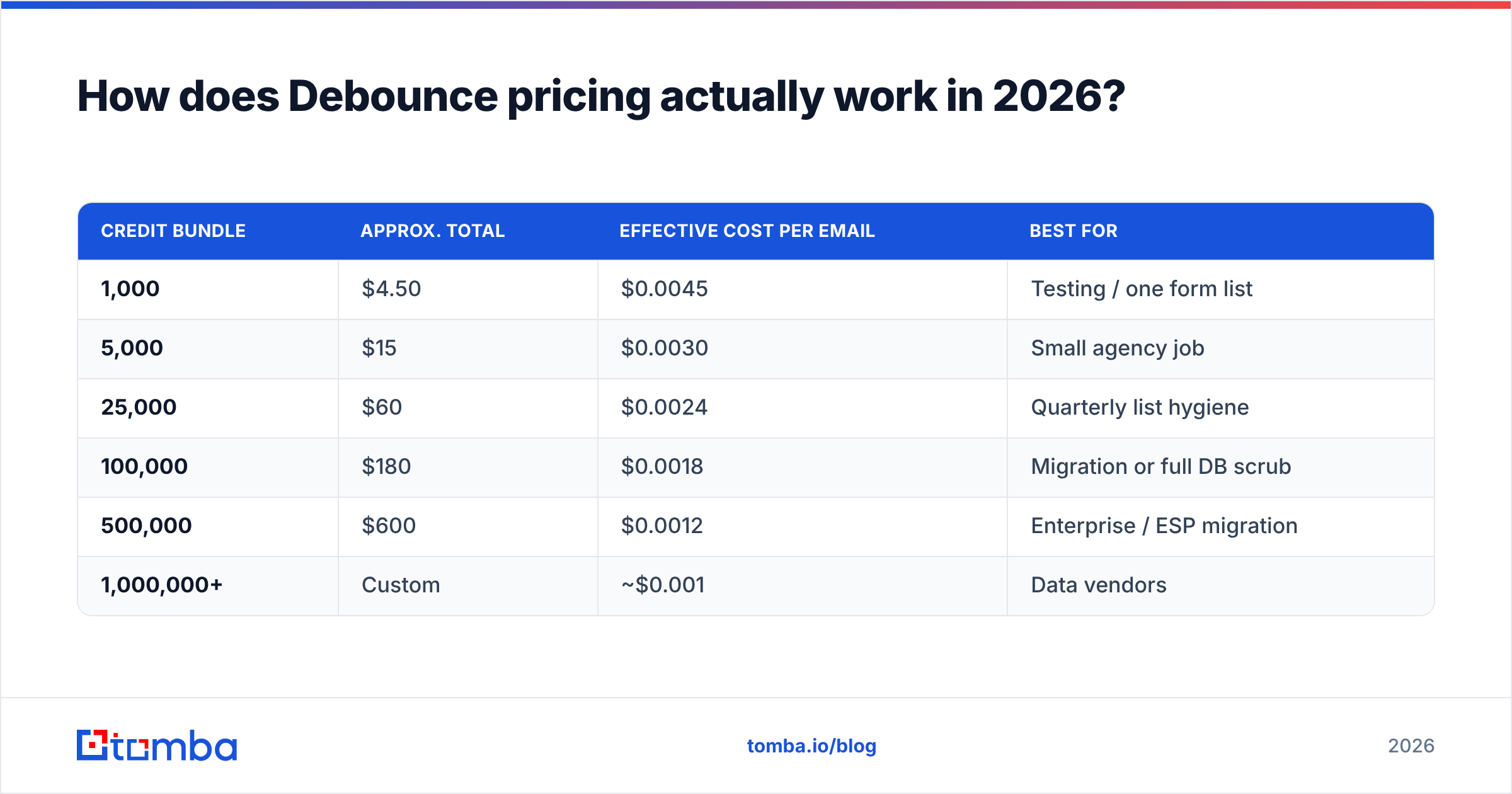
Published bundle pricing sits roughly like this:
| Credit bundle | Approx. total | Effective cost per email | Best for |
|---|---|---|---|
| 1,000 | $4.50 | $0.0045 | Testing / one form list |
| 5,000 | $15 | $0.0030 | Small agency job |
| 25,000 | $60 | $0.0024 | Quarterly list hygiene |
| 100,000 | $180 | $0.0018 | Migration or full DB scrub |
| 500,000 | $600 | $0.0012 | Enterprise / ESP migration |
| 1,000,000+ | Custom | ~$0.001 | Data vendors |
Two things to note before you treat those numbers as your budget.
First, the tier you land in is set by a single purchase, not by annual volume. Buying 5 × 20,000 credits over a year costs meaningfully more than one 100,000 purchase. Because credits don't expire, buying bigger up front is almost always the right call — that non-expiry is what makes the model genuinely good.
Second, unknown results still consume credits on most verification services, and Debounce is no exception in practice. If 12% of your list is catch-all or unknown, you paid full price for a result you cannot act on. Price your list at 100% of volume, not at your deliverable percentage.
Is Debounce cheap compared to other verification tools?#
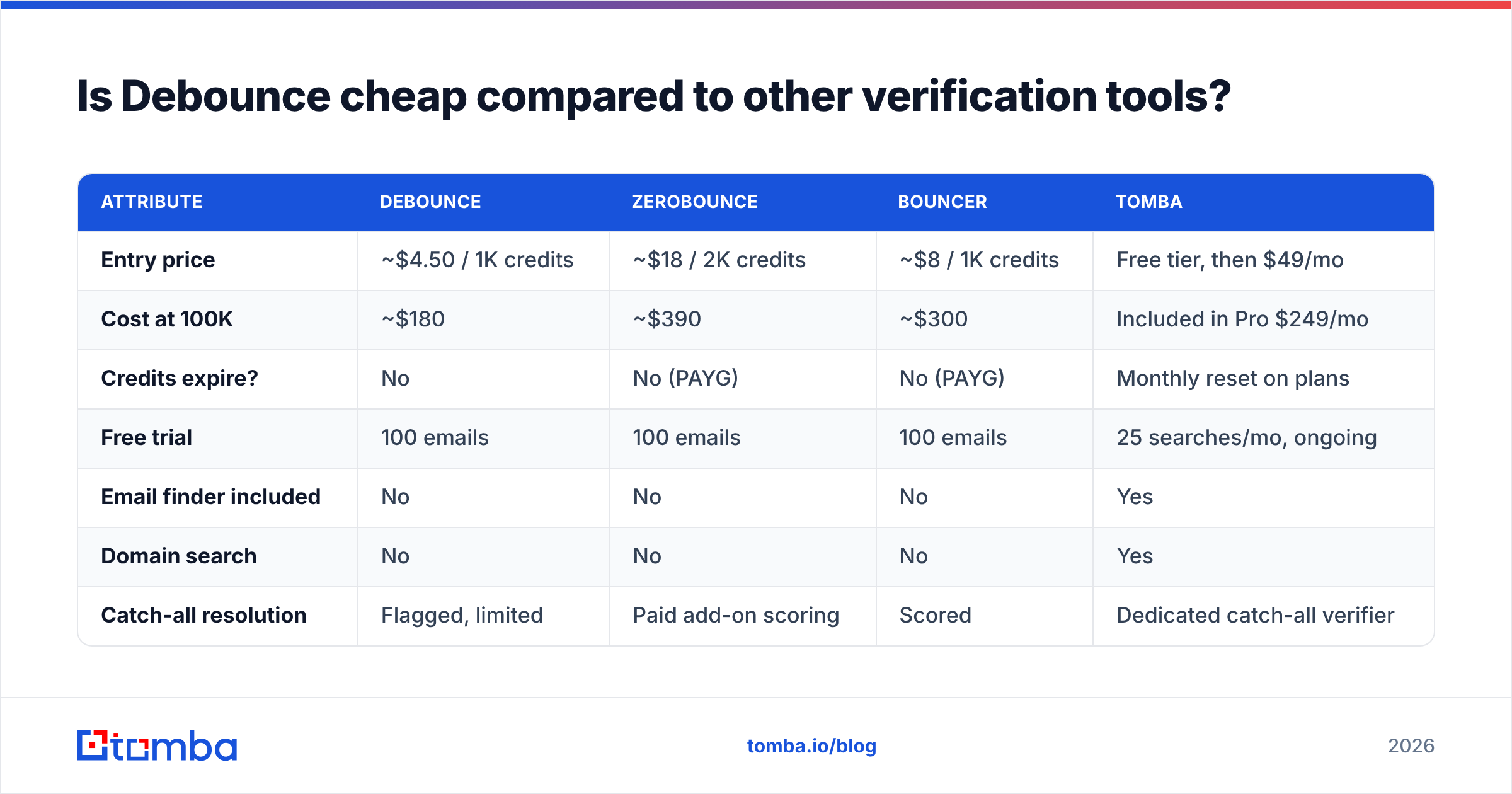
On raw per-email cost, yes — Debounce sits at the low end. But raw per-email cost is the wrong number if you need anything besides verification.
| Attribute | Debounce | ZeroBounce | Bouncer | Tomba |
|---|---|---|---|---|
| Entry price | ~$4.50 / 1K credits | ~$18 / 2K credits | ~$8 / 1K credits | Free tier, then $49/mo |
| Cost at 100K | ~$180 | ~$390 | ~$300 | Included in Pro $249/mo |
| Credits expire? | No | No (PAYG) | No (PAYG) | Monthly reset on plans |
| Free trial | 100 emails | 100 emails | 100 emails | 25 searches/mo, ongoing |
| Email finder included | No | No | No | Yes |
| Domain search | No | No | No | Yes |
| Catch-all resolution | Flagged, limited | Paid add-on scoring | Scored | Dedicated catch-all verifier |
| Phone / enrichment | No | Partial | No | Yes |
| API | Yes, simple REST | Yes | Yes | Yes, full suite |
Read that table twice, because the honest verdict lives in the last four rows. Debounce wins the price column outright at pure verification volume. It loses every row that asks the tool to do a second job.
If your stack is "buy list → verify → send," Debounce at $180 per 100K is excellent value and you should probably stop reading and go buy credits. If your stack is "find prospects → verify → enrich → send," you are about to pay for three vendors, and the combined bill usually exceeds a single bundled platform. Compare against Tomba pricing before you commit — the Growth plan at $99/mo covers finding and verification, which is two line items collapsed into one.
Debounce pricing reviews pros and cons: the real pros#
Credits that never expire. This is not a marketing footnote — it changes how you buy. Agencies with lumpy workloads can buy at a deep tier once and draw down over eighteen months. Almost every subscription verifier punishes you for a slow quarter. Debounce does not.
No subscription pressure. You are never paying for a month you didn't use. For seasonal businesses and consultancies, that alone justifies the choice.
A genuinely simple API. The REST endpoint takes an email, returns a result code, and doesn't require a three-day integration. If you want to validate at form-submit time, it's a twenty-minute build. That's comparable to what you get from a dedicated email verification API, just narrower in scope.
Reasonable core accuracy on standard domains. For Gmail, Outlook, and properly configured corporate MX records, Debounce's deliverable/invalid split holds up. Independent user reviews on G2 consistently place it in the same accuracy band as more expensive competitors for these mainstream cases.
Bulk upload that doesn't fall over. Multi-hundred-thousand-row CSVs process without the timeouts that plague cheaper tools. Deduplication happens before billing, which is a small but real saving on messy lists.
What are the real cons of Debounce?#
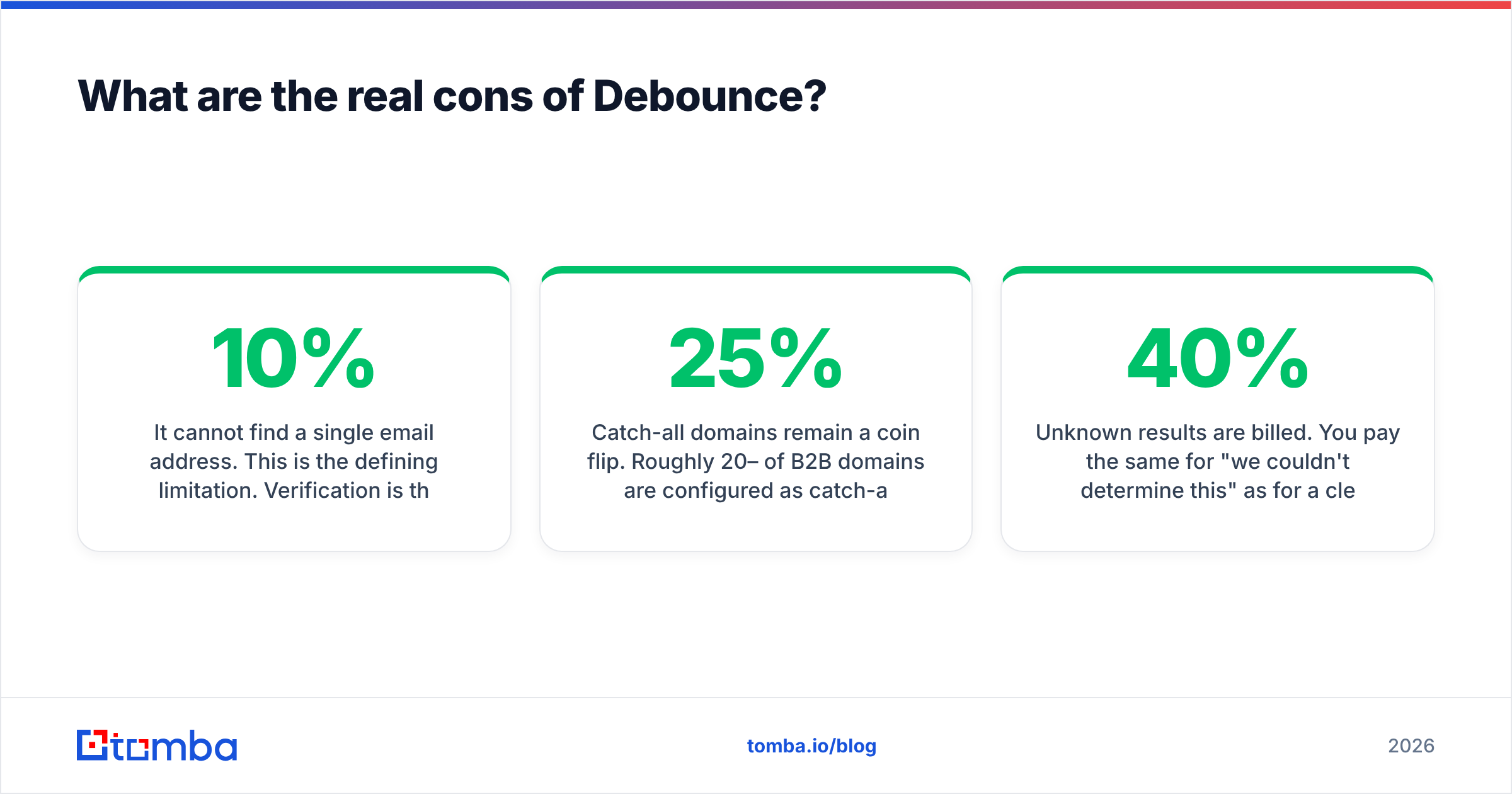
It cannot find a single email address. This is the defining limitation. Verification is the last 10% of the data workflow; the first 90% is discovery. If you don't already have addresses, Debounce does nothing for you. You will need a separate email finder or domain search tool, and that vendor's bill is the real cost of choosing a standalone verifier.
Catch-all domains remain a coin flip. Roughly 20–25% of B2B domains are configured as catch-all, meaning the mail server accepts everything at the SMTP layer. Debounce flags these honestly rather than guessing — which is defensible — but you burned a credit and learned nothing actionable. Tools with a dedicated catch-all verifier apply pattern analysis and historical engagement signals to resolve a meaningful share of those. If your ICP skews enterprise, this gap is expensive.
Unknown results are billed. You pay the same for "we couldn't determine this" as for a clean verdict. On a list heavy with catch-alls and greylisting servers, your effective cost per usable result can be 30–40% higher than the headline rate.
The interface shows its age. Functional, not pleasant. Reporting is thin — you get result counts, not the deliverability trend analysis that helps you diagnose why a list decayed.
No enrichment. A verified email with no name, title, company size, or phone number is a limited asset. You'll bolt on a data enrichment layer, which is another vendor and another integration.
Support is email-only in practice. Response times are acceptable but there's no phone escalation path when a large migration is blocked.

Is Debounce worth it for cold outbound specifically?#
Partly. Verification is necessary but not sufficient for outbound success.
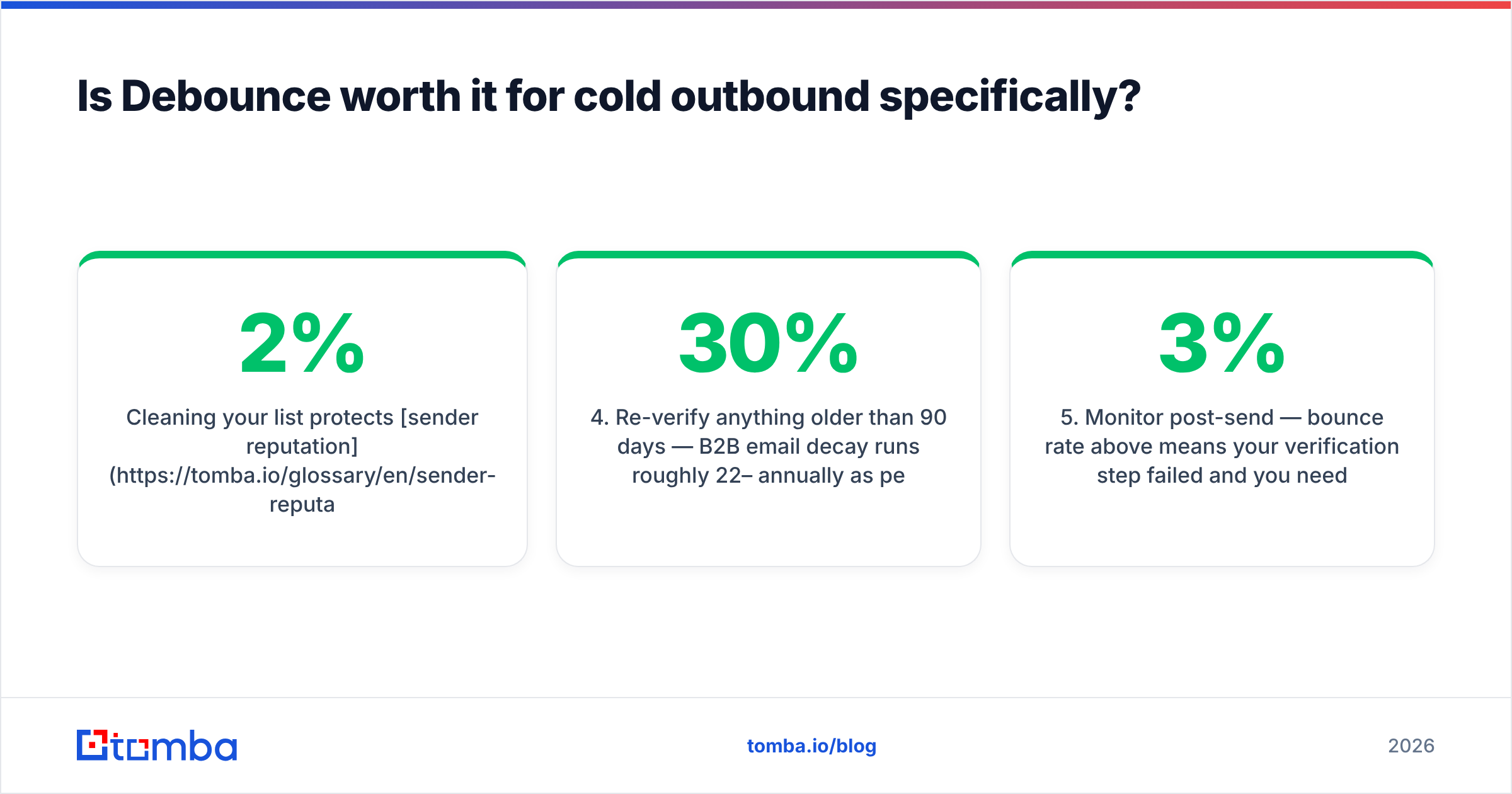
Cleaning your list protects sender reputation by keeping hard bounces under the 2% threshold that Google and Microsoft treat as a spam signal. Google's own bulk sender guidelines make the bounce and complaint thresholds explicit, and no verifier — Debounce included — can save you if you're sending to a bought list of unengaged contacts.
Here's the practical sequencing for an outbound team:
- Source contacts from a finder or database — Debounce cannot do this step.
- Verify before import — this is where Debounce earns its money. Never import unverified data into your sending tool.
- Segment catch-alls separately — send to them from a secondary domain so unresolved risk doesn't touch your primary.
- Re-verify anything older than 90 days — B2B email decay runs roughly 22–30% annually as people change jobs.
- Monitor post-send — bounce rate above 3% means your verification step failed and you need a different provider or a different data source.
Step 4 is where the non-expiring credit model actually shines. Quarterly re-verification is unpredictable in volume, and Debounce's model absorbs that unpredictability better than a fixed monthly plan.
What are the best Debounce alternatives in 2026?#
BookYourData — a strong option if your bottleneck is data rather than cleaning. It sells verified B2B contacts directly with an accuracy guarantee, which sidesteps the find-then-verify two-step entirely. Different purchase model, genuinely useful for teams who'd rather buy a clean list than build one.
ZeroBounce — more expensive per credit but adds activity scoring and abuse detection. Worth the premium if you're an ESP or high-volume sender with compliance requirements. See the ZeroBounce alternative comparison for a feature-level breakdown.
Bouncer — cleaner UI, strong GDPR positioning, EU data residency. Middle of the market on price.
Tomba — the bundled play. Finding, verification, catch-all resolution, domain search, and enrichment on one plan. At $49/mo Starter or $99/mo Growth, it replaces two or three point tools. The tradeoff is honest: at pure verification volume above 500K/month, a dedicated PAYG verifier is still cheaper per email. Below that, bundling usually wins on total cost.
Do nothing / free tools — for a list under a few hundred addresses, a free email checker handles spot checks without any purchase. Don't buy credits for a job that small.
How should you decide?#
Answer three questions honestly.
Do you already have the email addresses? If yes, Debounce is a strong, cheap choice. If no, you are shopping in the wrong category — you need a finder first, and the finder you pick may include verification anyway.
Is your volume lumpy or steady? Lumpy favors Debounce's non-expiring credits. Steady monthly volume favors a subscription platform where verification is bundled and you stop thinking about credit balances.
How enterprise is your ICP? Heavy catch-all exposure erodes Debounce's value because you pay full price for unresolved results. Teams selling to large companies get more usable output from a tool with dedicated catch-all handling.
The pattern we see most: teams start with Debounce because the entry cost is trivially low, run it for two quarters, then consolidate when the second and third vendor invoices arrive. That's not a knock on Debounce — it's a signal that the standalone verifier category serves a narrower job than most buyers initially assume.
The bottom line#
Debounce's pricing is genuinely good at what it does. Non-expiring credits, no subscription, sub-$0.002 at scale, and accuracy that holds on mainstream domains. If list cleaning is your only job, buy the largest bundle you can justify and you'll get real value.
The cons are all about scope, not quality. It doesn't find emails, it doesn't resolve catch-alls, it doesn't enrich, and it bills you for unknowns. Those gaps are filled by other vendors, and the sum of those vendors is where the "cheap" story falls apart. That is the honest summary of Debounce pricing reviews pros and cons.
If you'd rather collapse the stack: Tomba Email Finder finds professional email addresses by domain, name, or company — and verifies them in the same workflow, with catch-all handling built in. Start on the free tier at 25 searches a month, or move to Starter at $49/mo when your pipeline outgrows spot checks. One vendor, one invoice, and no separate credit balance to babysit.
Related guides#
Ready to find emails that actually work?
Join 150,000+ professionals who stopped guessing and started sending. Free credits on signup — no credit card required.
Get the Tomba newsletter
Practical outbound tactics and product updates — once every two weeks.
About the author