Debounce vs Leadsforge in 2026: Which One Should You Buy?
Debounce cleans the list you already have. Leadsforge builds a list you don't. Comparing them properly means understanding which half of the data problem you're actually trying to solve — and what each one costs you when it's wrong.
TL;DR
- These tools are not substitutes. Debounce is an email verification and list-cleaning service. Leadsforge is an AI-assisted lead list builder. Comparing them like-for-like is comparing a dishwasher to a grocery delivery service.
- Pick Debounce if you already have contact data — from a CRM export, a webinar list, a scraped database — and your bounce rate is embarrassing.
- Pick Leadsforge if you have no list at all and want a conversational way to describe an ICP and get contacts back.
- Pick neither alone if you need both discovery and verification in one billing relationship — that's where a combined finder-plus-verifier platform is cheaper than stitching two vendors together.
- The real cost driver isn't the sticker price. It's how many credits you burn on records that were never deliverable in the first place.
What are Debounce and Leadsforge, exactly?#
Debounce is a bulk email verification service. You upload a CSV, it runs syntax checks, MX record lookups, SMTP handshakes, role-account detection, disposable-domain filtering, and spam-trap screening, then hands you back a scored file. Deliverable, undeliverable, risky, unknown. That's the whole job, and it does it without pretending to do anything else.
Leadsforge is a newer AI lead generation tool. Instead of a filter panel with 40 dropdowns, you describe the prospect you want in plain language — "heads of RevOps at Series B SaaS companies in the Nordics" — and it assembles a contact list. The pitch is speed of list assembly and lower learning curve versus traditional database UIs.
So the honest framing of debounce vs leadsforge is this: one tool operates on data you already have, the other produces data you don't. If you're evaluating them side by side, you're probably at a decision point about where the bottleneck is — sourcing or hygiene — and you may not have named it yet.
Name it first. That single question decides the whole purchase.

How do Debounce and Leadsforge compare head-to-head?#
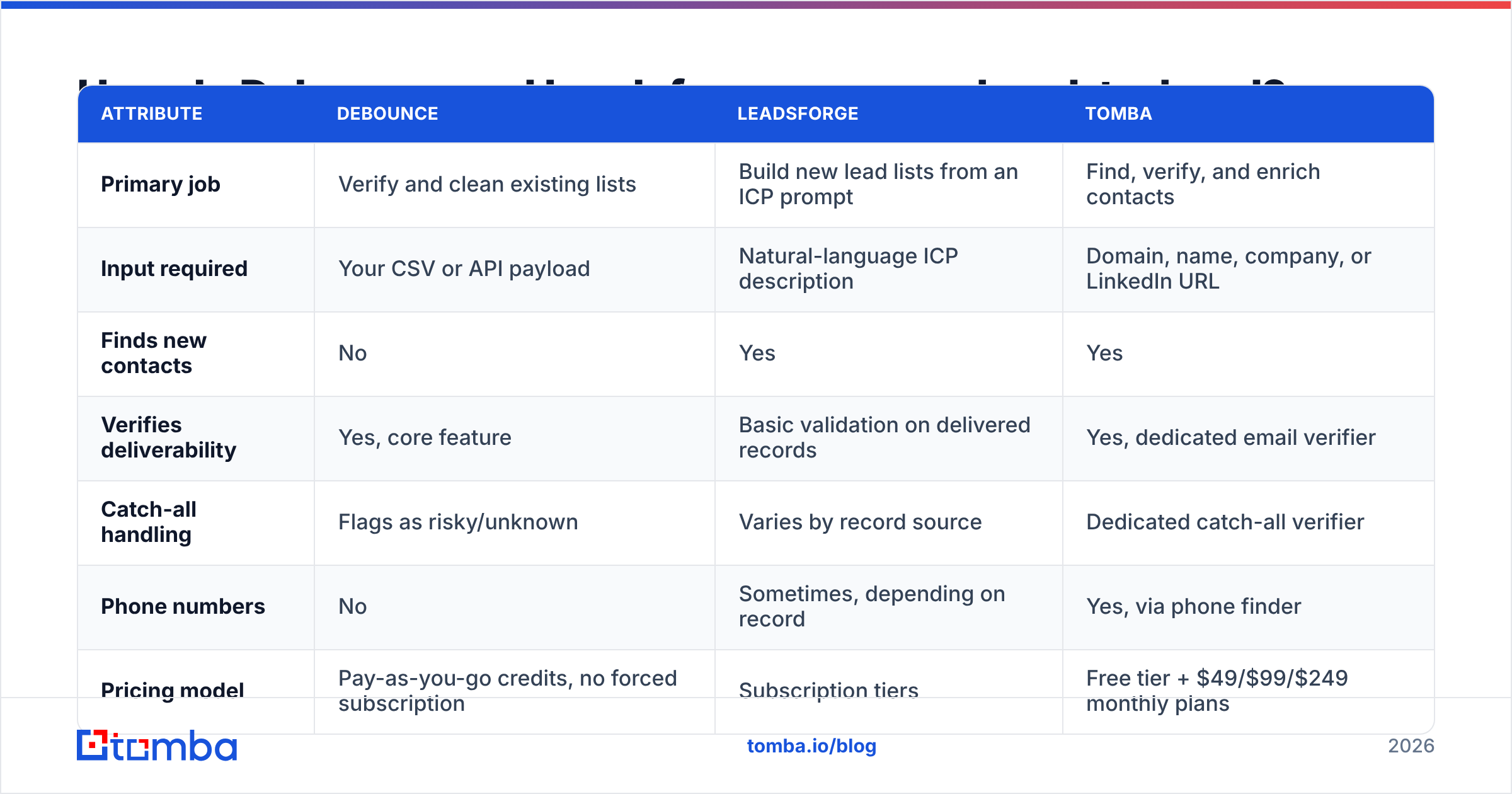
Here's the structural comparison, with a combined-platform column so you can see what a single-vendor path looks like.
| Attribute | Debounce | Leadsforge | Tomba |
|---|---|---|---|
| Primary job | Verify and clean existing lists | Build new lead lists from an ICP prompt | Find, verify, and enrich contacts |
| Input required | Your CSV or API payload | Natural-language ICP description | Domain, name, company, or LinkedIn URL |
| Finds new contacts | No | Yes | Yes |
| Verifies deliverability | Yes, core feature | Basic validation on delivered records | Yes, dedicated email verifier |
| Catch-all handling | Flags as risky/unknown | Varies by record source | Dedicated catch-all verifier |
| Phone numbers | No | Sometimes, depending on record | Yes, via phone finder |
| Pricing model | Pay-as-you-go credits, no forced subscription | Subscription tiers | Free tier + $49/$99/$249 monthly plans |
| Free entry point | Free trial credits | Trial | 25 searches/mo, free forever |
| Best for | Teams with a data source already | Teams starting from zero | Teams that want sourcing and hygiene in one bill |
| API depth | Verification endpoints | Limited public API surface | Full email finder API, CLI, MCP server |

Two things jump out. First, there is exactly one row where Debounce and Leadsforge genuinely overlap — validation — and Debounce is materially deeper there. Second, if you buy both, you are paying two vendors for a workflow most teams run as one motion: find contact, confirm contact, send.
What does Debounce actually do well?#
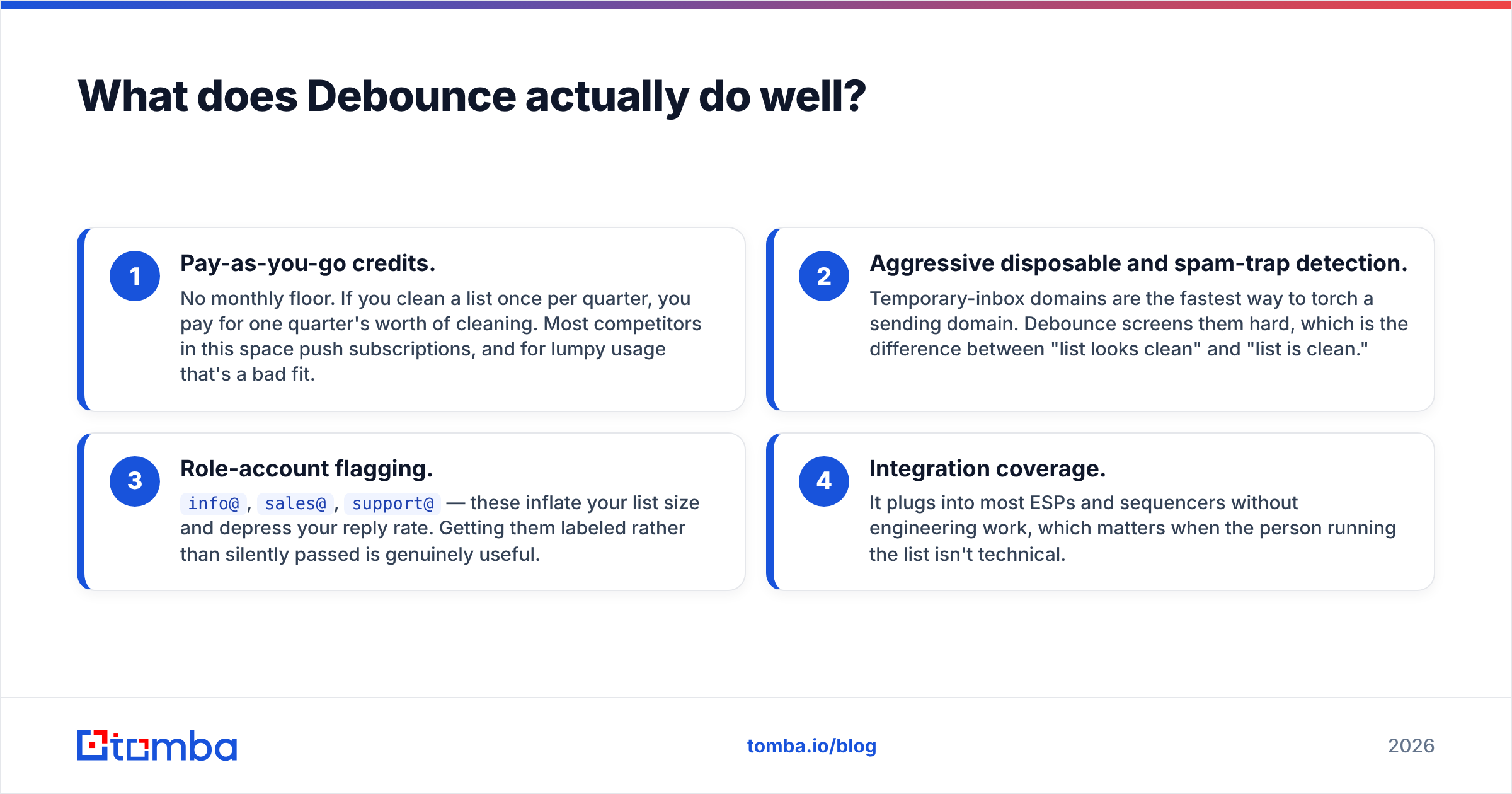
Verification is a boring category, which is precisely why the good tools in it are good. Debounce's strengths are specific:
- Pay-as-you-go credits. No monthly floor. If you clean a list once per quarter, you pay for one quarter's worth of cleaning. Most competitors in this space push subscriptions, and for lumpy usage that's a bad fit.
- Aggressive disposable and spam-trap detection. Temporary-inbox domains are the fastest way to torch a sending domain. Debounce screens them hard, which is the difference between "list looks clean" and "list is clean."
- Role-account flagging.
info@,sales@,support@— these inflate your list size and depress your reply rate. Getting them labeled rather than silently passed is genuinely useful. - Integration coverage. It plugs into most ESPs and sequencers without engineering work, which matters when the person running the list isn't technical.
Where it stops: Debounce has no opinion about who you should be emailing. It will happily verify 10,000 addresses belonging to people who will never buy from you, charge you for it, and report a 94% deliverable rate. That's not a criticism of the product — it's a scoping fact you need to price into your stack.
Where does Leadsforge fit in an outbound stack?#
Leadsforge is solving the opposite half. The conversational interface is the differentiator: for a founder or a first sales hire who has never built a filter query in a legacy B2B database, describing an ICP in a sentence is dramatically faster than learning a taxonomy.
That works well for:
- Early-stage teams with no data infrastructure and no RevOps hire.
- Exploratory market sizing, where you want a rough count of "how many of these even exist" before committing.
- One-off campaign lists for an event, a launch, or a regional push.
It works less well when you need auditability. AI-assembled lists are harder to trace back to a source, and when a prospect asks where you got their details — which under GDPR they are entitled to do — "the model surfaced it" is not a defensible answer. If you sell into the EU, ask any AI-first data vendor for their sourcing documentation before signing. Tomba publishes its data sources for exactly this reason, and you should demand the equivalent from anyone you buy from.
The second caution: list-building tools have a structural incentive to return volume. A tool that gives you 40 contacts feels worse than one that gives you 400, even when 40 is the honest answer for a narrow ICP. Volume that isn't deliverable is a bounce liability, not an asset.
How accurate is each tool's data?#
This is where the comparison gets uncomfortable, because the two tools measure accuracy in incompatible units.
Debounce measures deliverability confidence — will this SMTP server accept mail for this address today. That's a testable, reproducible claim. You can spot-check it.
Leadsforge measures match quality — is this the right person at the right company for the ICP you described. Also valuable, also much harder to falsify. There's no SMTP handshake for "is this actually the VP of Engineering."

The practical implication: a list-building tool's headline accuracy number and a verifier's headline accuracy number are not comparable, and any vendor that invites you to compare them directly is doing marketing, not measurement.
Run your own test instead. Take 200 records from any source, run them through a verifier, and send a low-volume sequence. Three numbers tell you everything:
- Hard bounce rate. Above 2% and your sender reputation is degrading. Keep it under 1%.
- Catch-all percentage. Catch-all domains accept everything at the gateway and bounce later, or silently drop. A high share means your verifier's "valid" number is optimistic.
- Reply-to-contact ratio. If deliverability is fine but nobody replies, your problem is targeting, not hygiene — and no verifier will fix it.
That third metric is the one teams skip, and it's the one that tells you whether you needed Leadsforge or Debounce in the first place.
How do pricing models compare?#
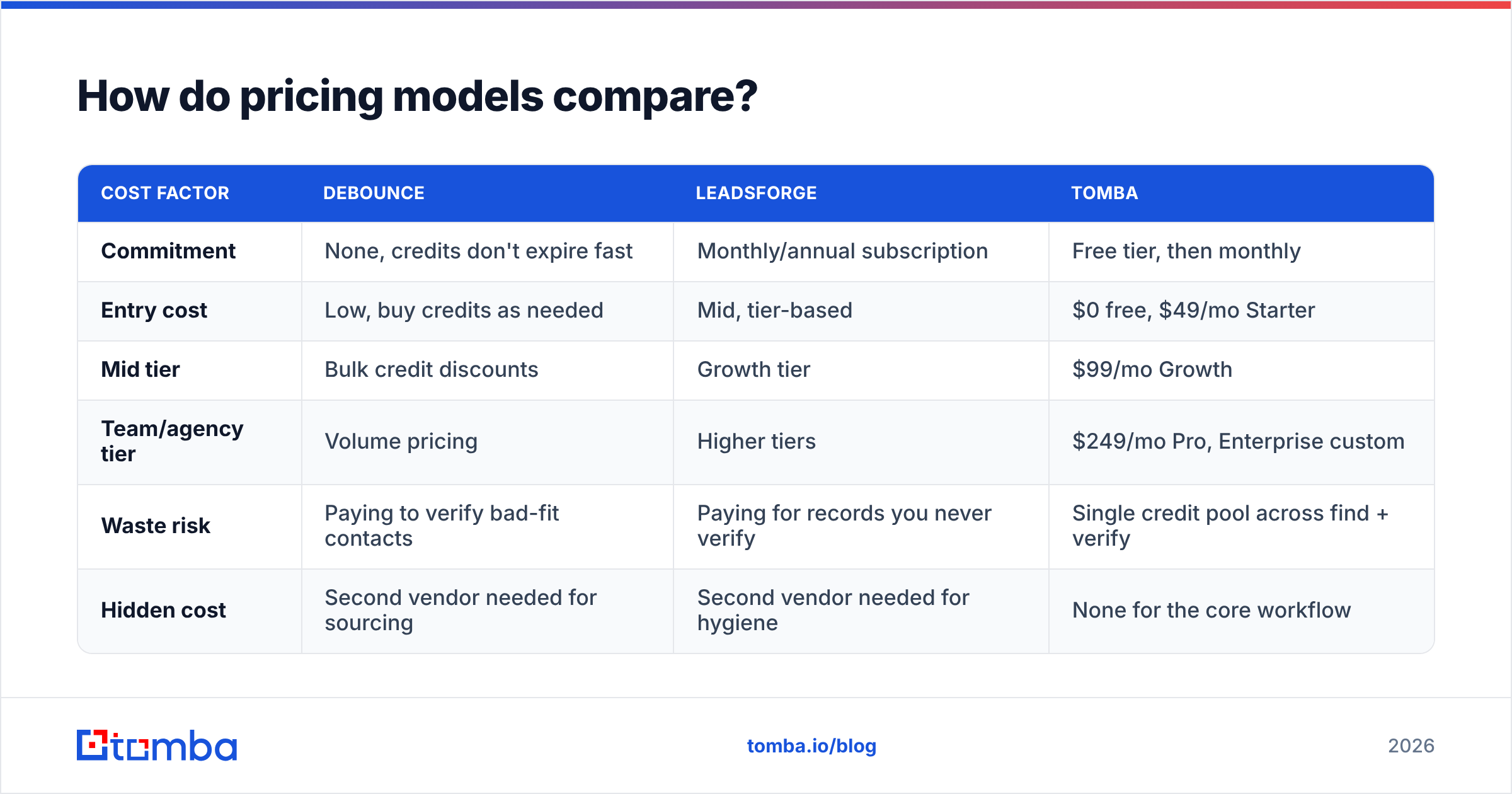
| Cost factor | Debounce | Leadsforge | Tomba |
|---|---|---|---|
| Commitment | None, credits don't expire fast | Monthly/annual subscription | Free tier, then monthly |
| Entry cost | Low, buy credits as needed | Mid, tier-based | $0 free, $49/mo Starter |
| Mid tier | Bulk credit discounts | Growth tier | $99/mo Growth |
| Team/agency tier | Volume pricing | Higher tiers | $249/mo Pro, Enterprise custom |
| Waste risk | Paying to verify bad-fit contacts | Paying for records you never verify | Single credit pool across find + verify |
| Hidden cost | Second vendor needed for sourcing | Second vendor needed for hygiene | None for the core workflow |
Always confirm current numbers on the vendor's own pricing page before you buy — verification and AI-data pricing both move frequently. Tomba's numbers above are current and published at Tomba pricing.
The row that matters is "hidden cost." Running Debounce plus Leadsforge means two contracts, two credit balances, two support queues, and a CSV shuttle between them. For a two-person sales team that's an hour a week of pure logistics. Price that hour.

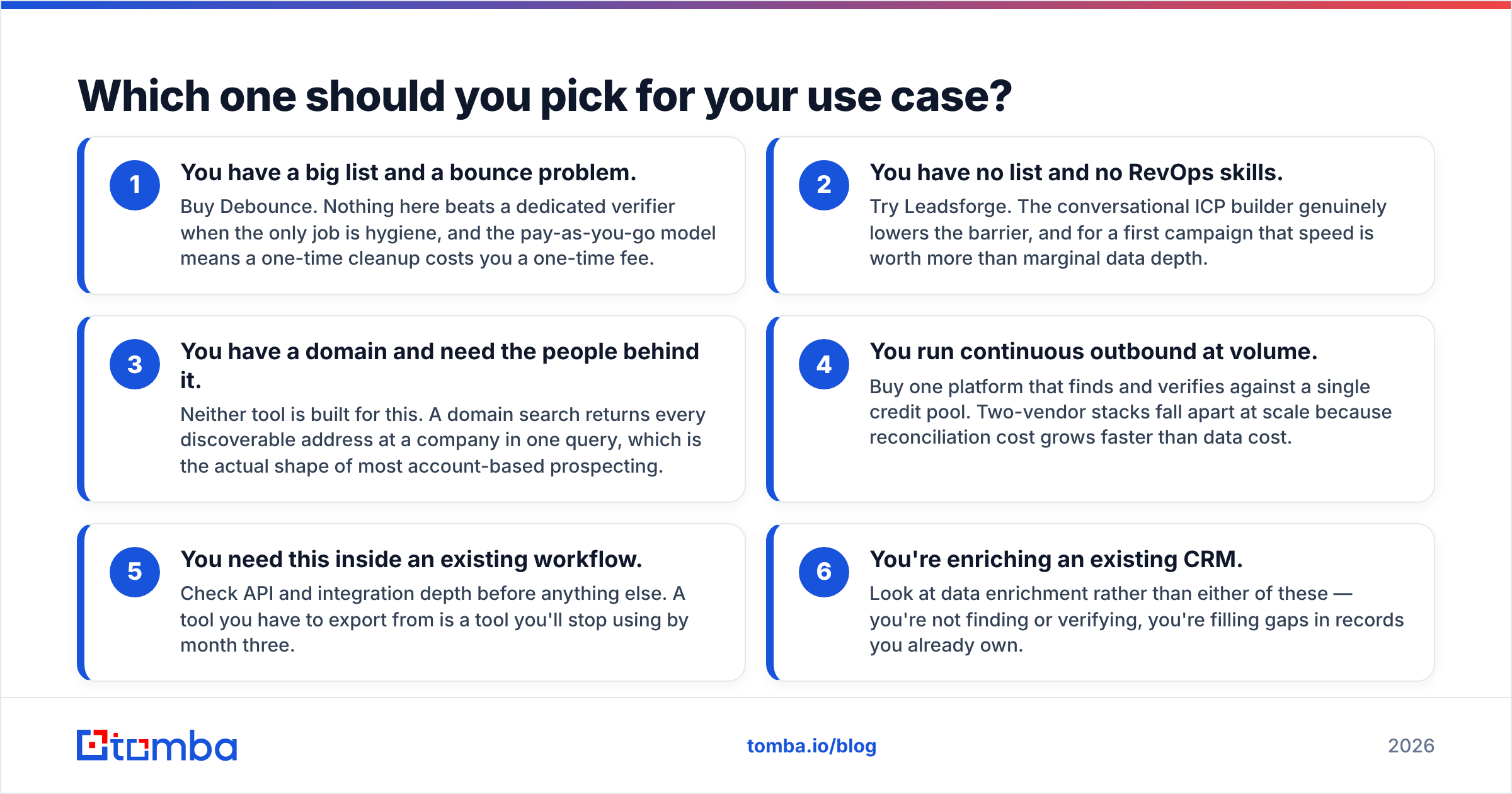
Which one should you pick for your use case?#
Match the tool to the bottleneck, not to the review score.
- You have a big list and a bounce problem. Buy Debounce. Nothing here beats a dedicated verifier when the only job is hygiene, and the pay-as-you-go model means a one-time cleanup costs you a one-time fee.
- You have no list and no RevOps skills. Try Leadsforge. The conversational ICP builder genuinely lowers the barrier, and for a first campaign that speed is worth more than marginal data depth.
- You have a domain and need the people behind it. Neither tool is built for this. A domain search returns every discoverable address at a company in one query, which is the actual shape of most account-based prospecting.
- You run continuous outbound at volume. Buy one platform that finds and verifies against a single credit pool. Two-vendor stacks fall apart at scale because reconciliation cost grows faster than data cost.
- You need this inside an existing workflow. Check API and integration depth before anything else. A tool you have to export from is a tool you'll stop using by month three.
- You're enriching an existing CRM. Look at data enrichment rather than either of these — you're not finding or verifying, you're filling gaps in records you already own.
Do you need a third tool at all?#
Sometimes the honest answer is no. If your outbound is 50 emails a month to accounts you already know, a free checker and careful manual research will outperform any platform.
But once you're past roughly 500 contacts a month, the manual approach breaks. At that point the question shifts from "which vendor" to "how many vendors," and every additional vendor adds reconciliation overhead that doesn't show up in any pricing table.
The case for a combined platform is arithmetic, not ideology. One credit pool means an address you find is already verified when you find it — you never pay to verify a contact that doesn't exist, and you never pay for a verified contact you can't reach. Tomba's Free tier gives you 25 searches a month to test that claim against your own target accounts before spending anything, and independent user reviews on G2 are worth reading alongside any vendor's own case studies.
One more practical note: whatever you choose, build verification into the send step, not as a quarterly cleanup ritual. Data decays at roughly 2-3% per month as people change jobs. A list verified in January is measurably worse in April, and the tool that catches that automatically saves you more than the one with the lower per-credit price.
What's the verdict?#
Debounce wins on verification depth and pricing flexibility. Leadsforge wins on getting a first list out of nothing without learning a database UI. Neither wins the comparison outright, because they were never in the same race.
If your workflow is find the right person, confirm the address, send — which is most B2B outbound — you're better served by one platform that covers the whole chain than by two that each cover a third of it.
Start with the Tomba Email Finder. Search by domain, name, or company, get verified addresses back in the same call, and run the first 25 on the free plan against accounts you already know so you can grade the results yourself. If the accuracy holds up on names you can verify by hand, it'll hold up on the ones you can't.
Related guides#
Ready to find emails that actually work?
Join 150,000+ professionals who stopped guessing and started sending. Free credits on signup — no credit card required.
Get the Tomba newsletter
Practical outbound tactics and product updates — once every two weeks.
About the author