Debounce vs ListKit: Which B2B Email Tool Wins in 2026?
Debounce cleans lists. ListKit builds them. They are not really competitors — and picking the wrong one costs you either bounces or budget. Here is the honest breakdown, with pricing, accuracy, and a cheaper third path.
TL;DR
- They solve different problems. DeBounce is an email verification service — it cleans a list you already have. ListKit is a B2B data platform — it builds the list in the first place. Comparing them head-to-head only makes sense because teams keep buying both.
- DeBounce is the cheapest line item in your stack. Credit packs start around $10 for 5,000 verifications, with no monthly commitment. It has no contact database at all.
- ListKit is the expensive line item. Entry plans sit in the ~$97/month range for a few thousand credits, bundling emails, phone numbers, and intent signals into one seat.
- Buying both costs more than one consolidated tool. A verifier plus a data platform routinely lands north of $110/month before you've sent an email. Platforms that bundle finding and verification — Tomba's Starter plan is $49/month — remove one subscription entirely.
- Pick by bottleneck: no list = ListKit or a data platform. Dirty list = DeBounce or any verifier. Both problems = don't buy two tools.
What are DeBounce and ListKit?#
DeBounce is a bulk email validation service. You upload a CSV or push records through its API, and it returns a status per address: valid, invalid, disposable, role-based, accept-all, or unknown. It also flags syntax errors, spam traps where it can detect them, and domains sitting on blacklists. That's the whole product surface, and DeBounce doesn't pretend otherwise — it has been a single-purpose verifier since launch.
ListKit is a newer B2B contact database aimed squarely at cold email agencies and outbound teams. You filter by job title, headcount, industry, tech stack, and buying-intent signals, then export a list of contacts with work emails and — on higher tiers — mobile numbers. Its pitch is speed: go from ICP definition to a ready-to-send list inside one session.
So the real question behind "debounce vs listkit" isn't which tool is better. It's which half of the list-building problem you actually have.

What does each tool actually do?#
Here's the functional split, stated plainly:
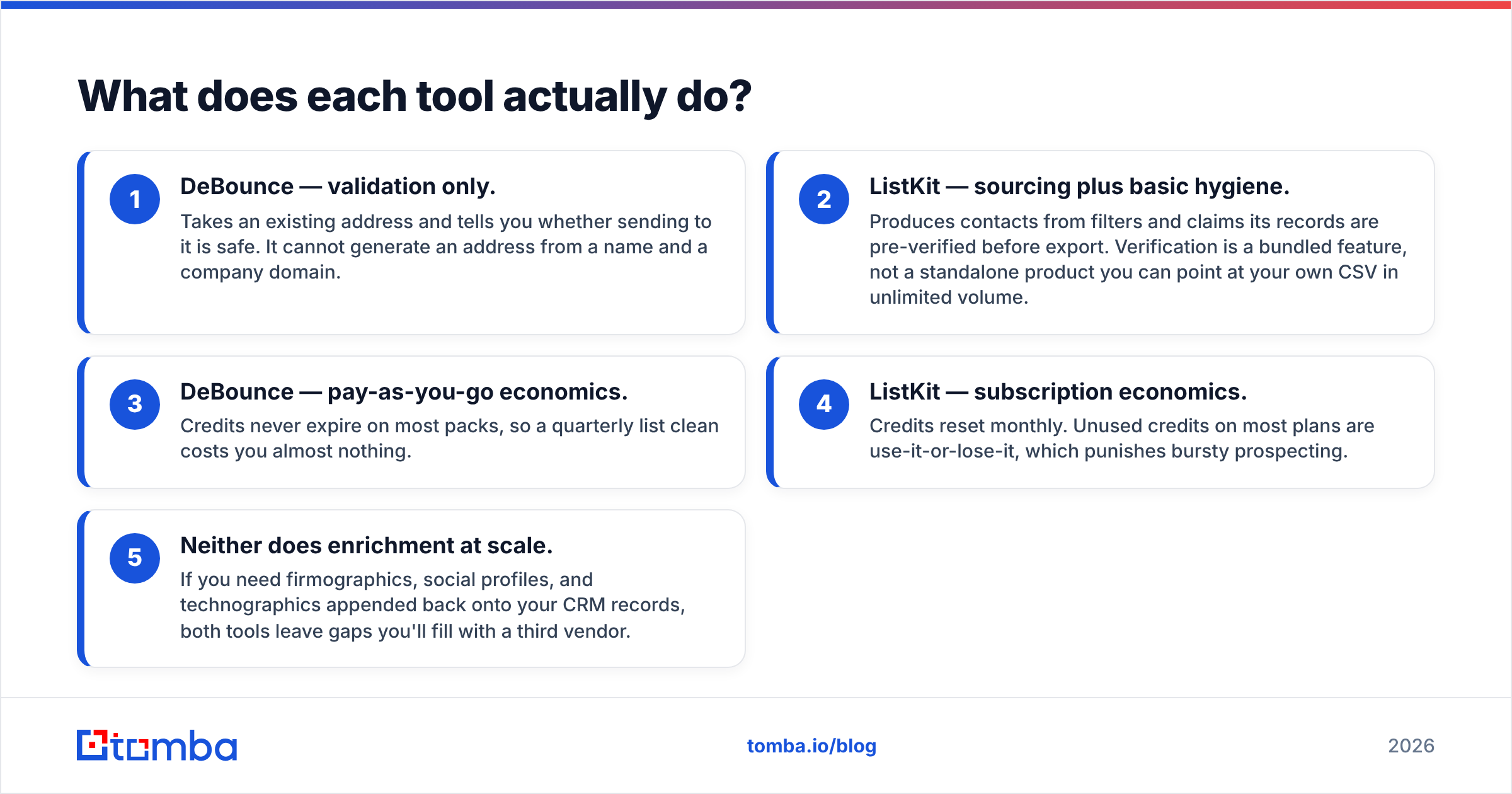
- DeBounce — validation only. Takes an existing address and tells you whether sending to it is safe. It cannot generate an address from a name and a company domain.
- ListKit — sourcing plus basic hygiene. Produces contacts from filters and claims its records are pre-verified before export. Verification is a bundled feature, not a standalone product you can point at your own CSV in unlimited volume.
- DeBounce — pay-as-you-go economics. Credits never expire on most packs, so a quarterly list clean costs you almost nothing.
- ListKit — subscription economics. Credits reset monthly. Unused credits on most plans are use-it-or-lose-it, which punishes bursty prospecting.
- Neither does enrichment at scale. If you need firmographics, social profiles, and technographics appended back onto your CRM records, both tools leave gaps you'll fill with a third vendor.
That third-vendor problem is where budgets quietly double. A typical agency stack ends up as: data platform + verifier + enrichment API + sending tool. Two of those four are consolidatable.
Is ListKit better than DeBounce?#
Only in the sense that a hammer is better than a screwdriver. Ask the question differently — what breaks in my outbound today? — and the answer resolves itself.
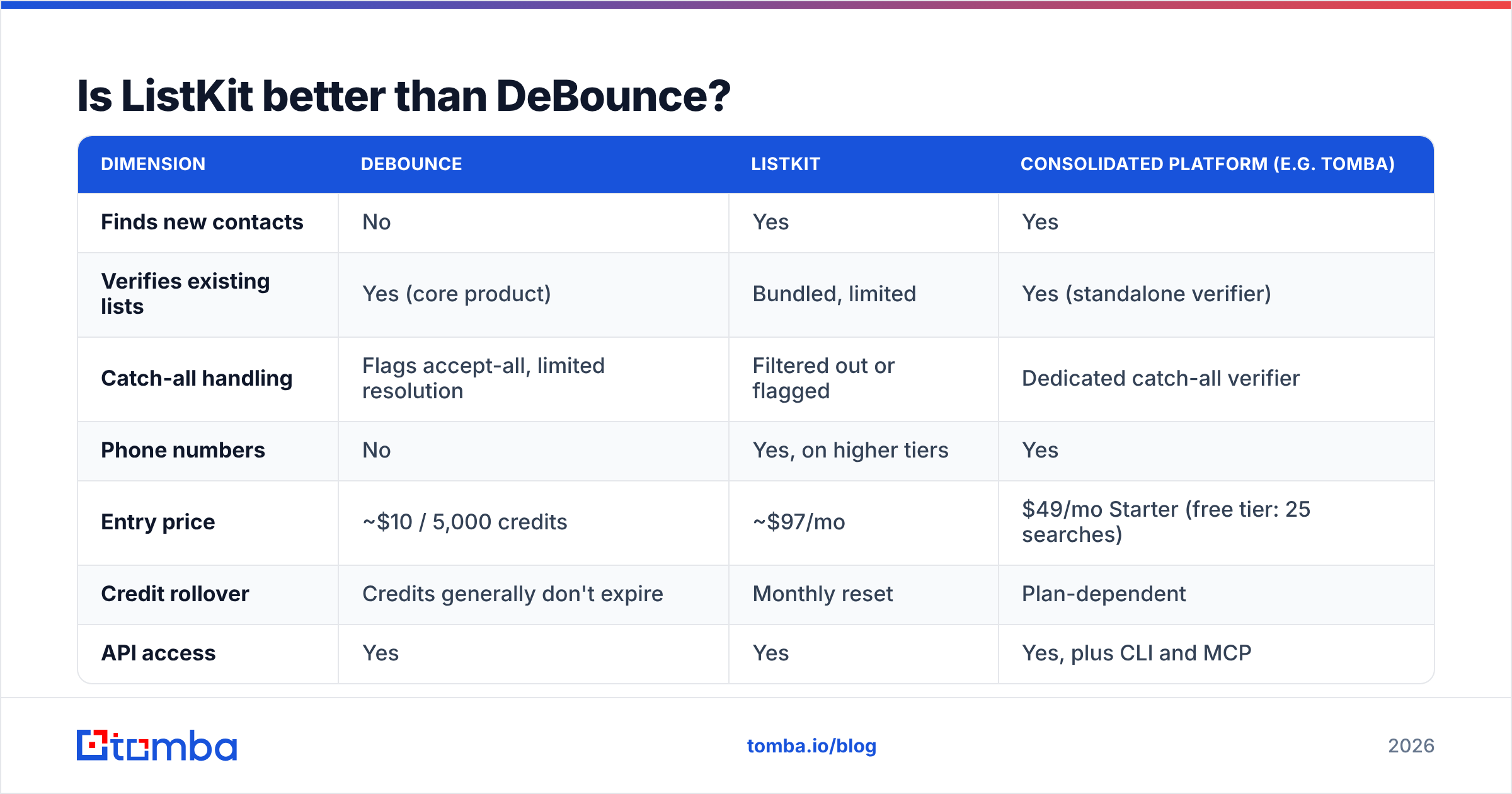
| Dimension | DeBounce | ListKit | Consolidated platform (e.g. Tomba) |
|---|---|---|---|
| Finds new contacts | No | Yes | Yes |
| Verifies existing lists | Yes (core product) | Bundled, limited | Yes (standalone verifier) |
| Catch-all handling | Flags accept-all, limited resolution | Filtered out or flagged | Dedicated catch-all verifier |
| Phone numbers | No | Yes, on higher tiers | Yes |
| Entry price | ~$10 / 5,000 credits | ~$97/mo | $49/mo Starter (free tier: 25 searches) |
| Credit rollover | Credits generally don't expire | Monthly reset | Plan-dependent |
| API access | Yes | Yes | Yes, plus CLI and MCP |
| Best for | Cleaning purchased or scraped lists | Building lists fast from filters | Teams that need both without two bills |
The table exposes the real trade. DeBounce wins on cost and on being genuinely excellent at one job. ListKit wins on time-to-first-list. Neither wins on total cost of ownership if you need both capabilities — and most outbound teams do.
How accurate is each tool in practice?#
Accuracy claims in this category are marketing numbers until you test them on your own ICP. Vendors quote 97–99% across every provider, but those figures come from different denominators: some exclude unknowns, some exclude catch-alls, some measure only on domains where they had high confidence to begin with.

Three things determine whether the number you see holds up on your list:
- Catch-all density. If a meaningful share of your target domains are accept-all (very common in enterprise and in Microsoft 365 tenants), a pure SMTP verifier can't give you a binary answer. DeBounce marks these honestly as "accept-all" rather than guessing. That's the correct behavior — but it means a chunk of your list stays in limbo unless you run a dedicated catch-all verifier on top.
- Data recency. ListKit's accuracy depends on when its underlying records were last refreshed. Job-change churn in B2B runs roughly 20–25% annually, so a contact sourced from a stale snapshot bounces regardless of how good the verification step was at export time.
- Verification at time of send, not time of purchase. A list verified in January and sent in April is not a verified list. This is the single most common cause of "but I bought verified data and still bounced" complaints on G2 reviews across every vendor in the category.
The practical rule: whatever you buy, re-verify inside 30 days of sending. If your data source and your verifier are the same platform, that re-check is one API call instead of an export-import-export loop.

What do DeBounce and ListKit cost in 2026?#
Pricing on both sides moves, so treat these as directional and check the vendor pages before you commit. The shape of each model matters more than the exact digit.
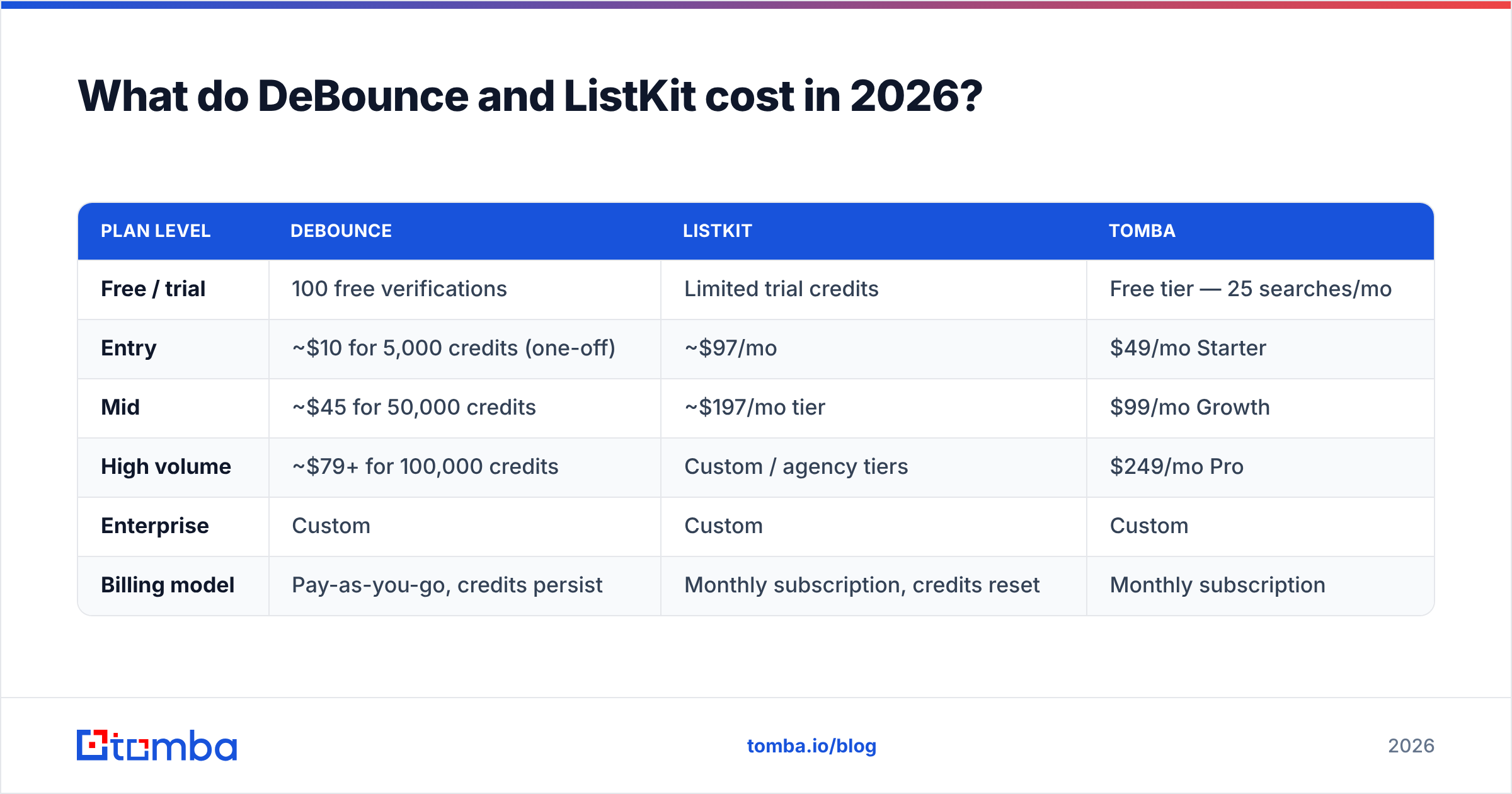
| Plan level | DeBounce | ListKit | Tomba |
|---|---|---|---|
| Free / trial | 100 free verifications | Limited trial credits | Free tier — 25 searches/mo |
| Entry | ~$10 for 5,000 credits (one-off) | ~$97/mo | $49/mo Starter |
| Mid | ~$45 for 50,000 credits | ~$197/mo tier | $99/mo Growth |
| High volume | ~$79+ for 100,000 credits | Custom / agency tiers | $249/mo Pro |
| Enterprise | Custom | Custom | Custom |
| Billing model | Pay-as-you-go, credits persist | Monthly subscription, credits reset | Monthly subscription |
Two observations that don't show up in a feature matrix:
DeBounce is almost free at small volumes. If your only problem is that a 12,000-row list from a conference badge scan is full of typos and role addresses, you will spend about $15 and be done. There is no argument for buying a $97/month platform to solve that.
ListKit's price is really a bundle price. You're paying for sourcing, phone numbers, and intent signals together. If you only need the emails, you're funding capabilities you won't touch — and you still need a sending tool and, realistically, an independent verification pass. Compare that against Tomba pricing, where finding and verification live under one plan.
Which one should you choose?#
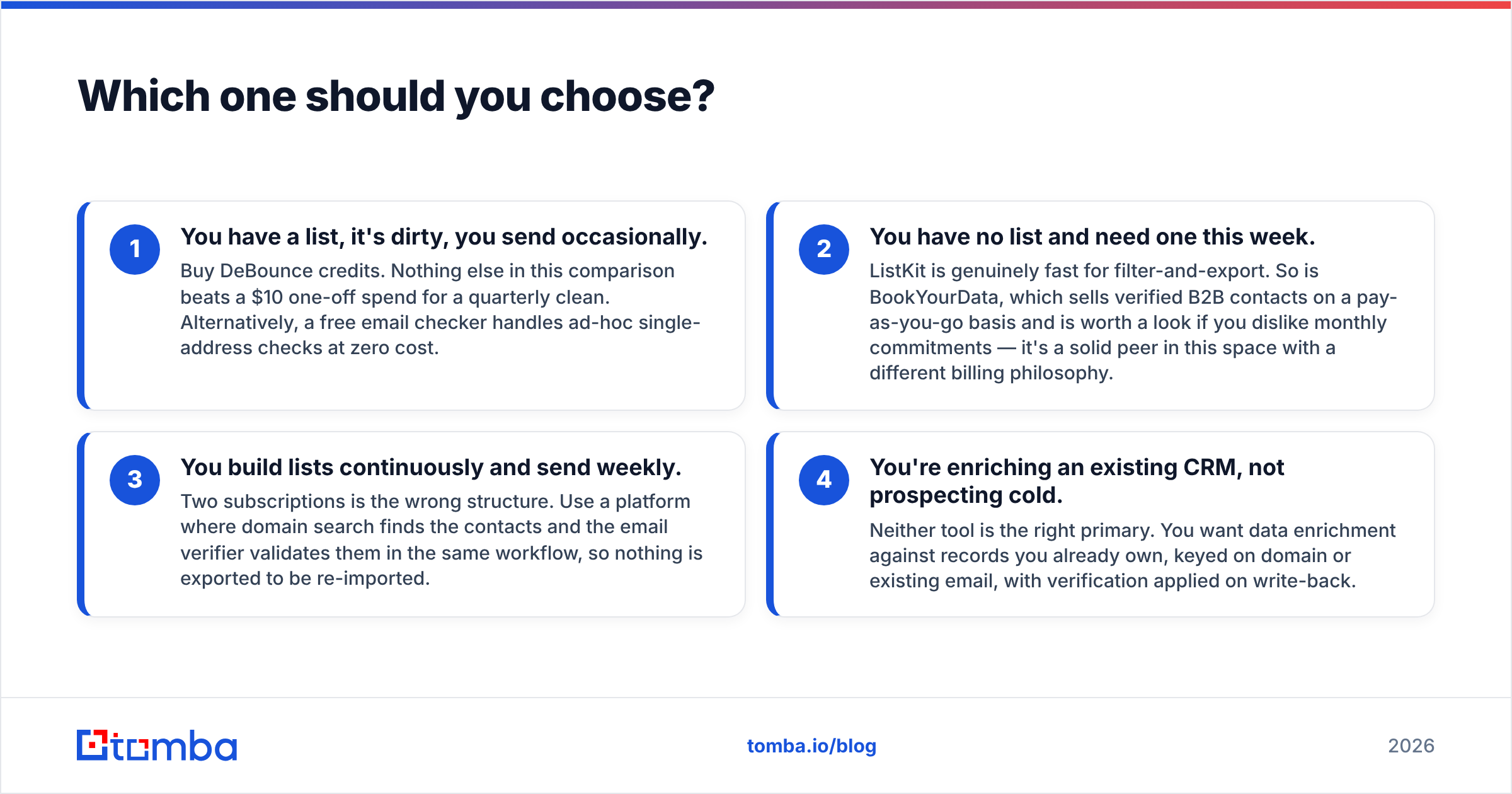
Match the tool to the bottleneck. Here's the decision in four cases:
- You have a list, it's dirty, you send occasionally. Buy DeBounce credits. Nothing else in this comparison beats a $10 one-off spend for a quarterly clean. Alternatively, a free email checker handles ad-hoc single-address checks at zero cost.
- You have no list and need one this week. ListKit is genuinely fast for filter-and-export. So is BookYourData, which sells verified B2B contacts on a pay-as-you-go basis and is worth a look if you dislike monthly commitments — it's a solid peer in this space with a different billing philosophy.
- You build lists continuously and send weekly. Two subscriptions is the wrong structure. Use a platform where domain search finds the contacts and the email verifier validates them in the same workflow, so nothing is exported to be re-imported.
- You're enriching an existing CRM, not prospecting cold. Neither tool is the right primary. You want data enrichment against records you already own, keyed on domain or existing email, with verification applied on write-back.
Where does a combined finder-and-verifier fit?#
The consolidation argument is arithmetic, not ideology. DeBounce at even modest volume plus ListKit at entry tier puts you near $110–120/month with two vendors, two credit systems, and two support queues. A single platform at $49/month that does both removes an entire integration seam.
What you get by consolidating:
- One credit pool. Searches and verifications draw from the same balance, so you're not stranded with 40,000 unused verification credits and zero search credits mid-campaign.
- Verification at discovery time. Every address returned by the email finder arrives with a confidence score already attached, instead of being verified in a separate batch job days later.
- One API surface. The Tomba API handles find, verify, enrich, and catch-all checks through the same auth and the same rate limits — meaningful if you're wiring this into an internal tool or a workflow in HubSpot.
- Bulk operations in one pass. A bulk email finder run that outputs verified rows saves the export-verify-reimport cycle that eats an afternoon per campaign.
What you give up: ListKit's intent data and its curated filter UX are genuinely differentiated. If buying-intent signals drive your targeting, that's a real reason to keep it. Just don't also pay separately for verification you already have.
What about deliverability — does verification actually help?#
Yes, and it's the highest-leverage thing on this list. Mailbox providers score senders partly on bounce rate. Sustained hard bounces above roughly 2–3% will suppress your inbox placement long after you've cleaned the list, because sender reputation recovers slowly.
That's why the DeBounce use case survives even when you consolidate elsewhere: verification is cheap insurance against an expensive, slow-to-fix problem. What changes with consolidation is where the verification step happens — inline at discovery rather than as a separate purchase.
A few habits that matter more than which vendor you picked:
- Never send to "unknown" or unresolved catch-all addresses in your first campaign on a new domain. Segment them out, warm up on the clean segment, then test catch-alls in small batches.
- Suppress role addresses (info@, sales@, support@) unless your offer is genuinely aimed at a shared inbox. Both tools flag these.
- Re-verify anything older than 30 days. Non-negotiable.
- Check your own domain setup first. A perfect list still lands in spam if your SPF record or DMARC alignment is broken. Run an SPF checker before you blame the data.
Frequently asked questions#
Can DeBounce find email addresses? No. It validates addresses you supply. If you need to generate an address from a first name, last name, and company domain, you need a finder — that's a different product category.
Does ListKit replace a verifier? Partially. Its exports are verified at export time, which covers the immediate send. It does not give you a general-purpose verification endpoint to point at lists from other sources, and it does not help with the 30-day re-verification rule.
Is ListKit's data unique? Most B2B contact platforms draw from overlapping public sources, partner feeds, and contributed data. Differentiation comes from refresh cadence and filtering, not from an exclusive dataset. Ask any vendor about their data sources before you assume uniqueness.
Which is cheaper for an agency running 10 client campaigns? Neither, alone. At that volume the per-client credit math favors a consolidated platform with a single high-volume plan over two subscriptions plus overage fees.
The bottom line#
DeBounce and ListKit aren't rivals — they're two halves of a job most teams try to solve with two invoices. DeBounce is the better buy if your list already exists and just needs cleaning; it's inexpensive and excellent at exactly that. ListKit is the better buy if speed from ICP to exported list is your constraint and intent signals genuinely change your targeting.
If you're doing both — sourcing contacts and keeping them clean — the two-tool structure is the thing to fix, not the choice between them.
Start with the finding problem, since it's the harder one. Tomba's Email Finder returns verified professional addresses by name, company, or domain, with confidence scoring built into every result and catch-all resolution included rather than sold separately. The free tier gives you 25 searches a month to test against contacts you already know are correct — the only accuracy benchmark that matters. If it holds up on your ICP, Starter is $49/month and replaces two line items with one.
Related guides#
Ready to find emails that actually work?
Join 150,000+ professionals who stopped guessing and started sending. Free credits on signup — no credit card required.
Get the Tomba newsletter
Practical outbound tactics and product updates — once every two weeks.
About the author