DeBounce vs SignalHire (2026): Which Tool Should You Buy?
DeBounce cleans lists you already have. SignalHire builds lists you don't. Here's the honest 2026 breakdown of pricing, accuracy, and which one your outbound motion actually needs — plus what happens when you need both.
TL;DR
- DeBounce and SignalHire are not really competitors. DeBounce is a bulk email verifier; SignalHire is a contact finder with a recruiting bias. Comparing them head-to-head only makes sense if you're deciding where your next $50 goes.
- If you already have a list (scraped, exported from a CRM, bought from a vendor) and bounces are killing you, DeBounce is the cheaper, simpler purchase — pay-as-you-go credits that don't expire.
- If you have zero contacts and need emails plus phone numbers for specific people, SignalHire is the one that actually produces data — but you pay per credit whether or not the email is deliverable.
- Buying both means two subscriptions, two dashboards, two CSV round-trips, and two sets of credits you'll under-use. Most teams under 20 seats are better served by one platform that finds and verifies.
- Budget reality check: DeBounce for a 50k-record clean runs roughly $50–$60. SignalHire's entry plan sits around $49/mo for a few hundred credits. Neither number is the whole cost — read the credit rules before you commit.
What are DeBounce and SignalHire, actually?#
They solve two different halves of the same problem.
DeBounce is an email validation service. You upload a list, it runs syntax checks, MX record lookups, SMTP handshakes, disposable-domain detection, role-account flagging, and catch-all identification, then hands you back a scored file. It does not know who works at Stripe. It only knows whether jane@stripe.com will bounce.
SignalHire is a contact discovery platform, heavily used by recruiters. You search a person or a company, or use the browser extension on a LinkedIn profile, and it returns work emails, personal emails, and — its real differentiator — phone numbers. It also bundles a lightweight ATS/CRM layer for candidate pipelines.
So the honest framing of debounce vs signalhire is: do I have a data quality problem or a data acquisition problem? If you can't answer that in one sentence, you're about to buy the wrong tool.
One more distinction that matters for compliance-minded teams: SignalHire surfaces personal contact details sourced from public profiles, which puts it squarely in GDPR/CCPA territory for European and Californian prospecting. DeBounce processes data you already hold, which is a materially smaller legal surface.
How do DeBounce and SignalHire compare feature by feature?#
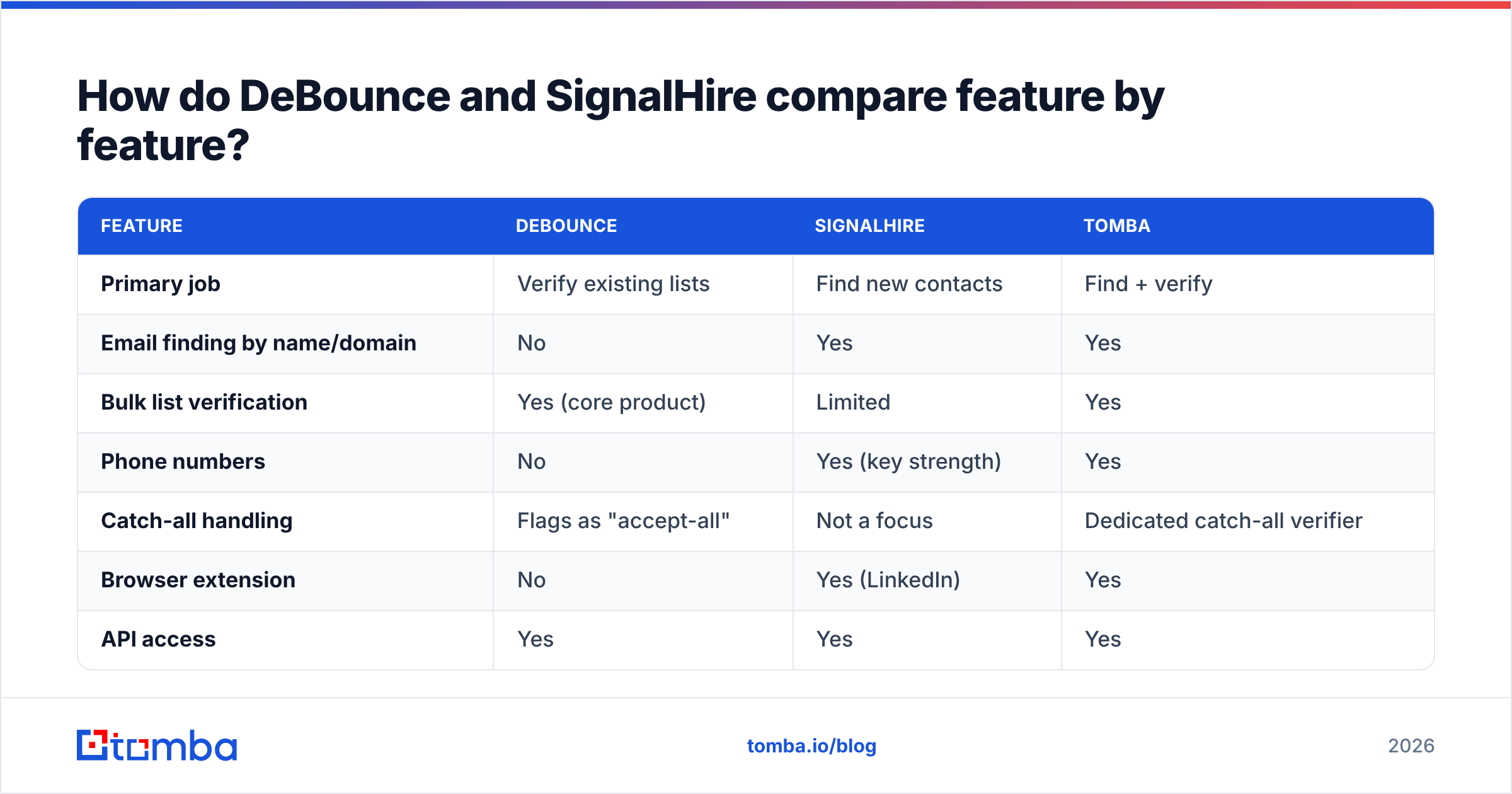
| Feature | DeBounce | SignalHire | Tomba |
|---|---|---|---|
| Primary job | Verify existing lists | Find new contacts | Find + verify |
| Email finding by name/domain | No | Yes | Yes |
| Bulk list verification | Yes (core product) | Limited | Yes |
| Phone numbers | No | Yes (key strength) | Yes |
| Catch-all handling | Flags as "accept-all" | Not a focus | Dedicated catch-all verifier |
| Browser extension | No | Yes (LinkedIn) | Yes |
| API access | Yes | Yes | Yes |
| Free tier | 100 verifications | ~5 credits/mo | 25 searches/mo |
| Credit expiry | Credits don't expire | Monthly reset on most plans | Monthly on subscription |
| Best fit | Deliverability cleanup | Recruiting + phone outreach | Full outbound stack |
The table exposes the real asymmetry. DeBounce is deep in one column and empty in five. SignalHire is broad but shallow on verification — it will hand you an email marked "valid" based on its own database confidence, not necessarily a fresh SMTP check at the moment you export.
That gap is where money leaks. A contact finder's "verified" label and a verifier's "deliverable" verdict are not the same claim, and treating them as interchangeable is how a 4% bounce rate becomes an 11% bounce rate three weeks into a campaign.
Which one is more accurate — and accurate at what?#
Accuracy means two different things here, so measure them separately.
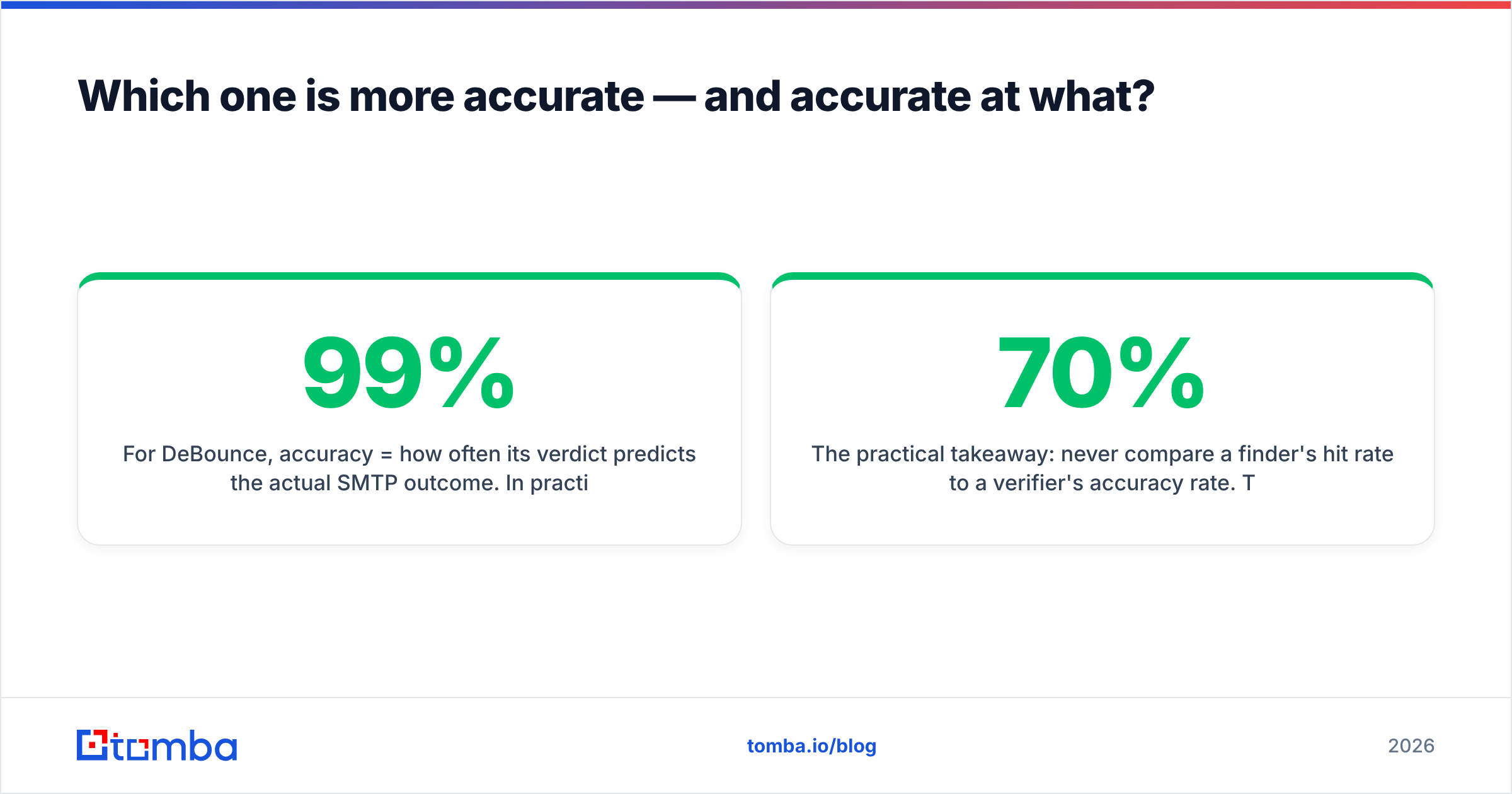
For DeBounce, accuracy = how often its verdict predicts the actual SMTP outcome. In practice, good verifiers land in the 96–99% range on standard domains and get noticeably shakier on catch-all domains, where no verifier can be certain by definition. DeBounce is honest about this — it returns "accept-all" rather than pretending. That's the correct behavior, but it also means a chunk of your list comes back as a shrug, and you still have to decide whether to mail those addresses.
For SignalHire, accuracy = hit rate (what percentage of searched people return a contact) multiplied by validity (what percentage of those contacts still work). Recruiters report solid hit rates on LinkedIn-visible profiles in the US and Western Europe, and thinner coverage in smaller markets or for non-technical mid-market roles. Phone number accuracy is the reason most people buy it, and it's genuinely better than most email-first tools.

The practical takeaway: never compare a finder's hit rate to a verifier's accuracy rate. They're different denominators. A tool that finds 70% of your targets at 98% validity beats a tool that finds 95% at 70% validity, every time, because the second one burns sender reputation.
If you want to sanity-check any vendor's claim yourself, take 200 known-good addresses from replies you've already received, mix in 50 addresses you know are dead, and run the blind set. Any tool that can't separate those two piles cleanly is not worth its credit price. Tomba's own email verifier and catch-all verifier exist precisely because that catch-all bucket is where most "verified" lists quietly rot.

What does each one cost in 2026?#
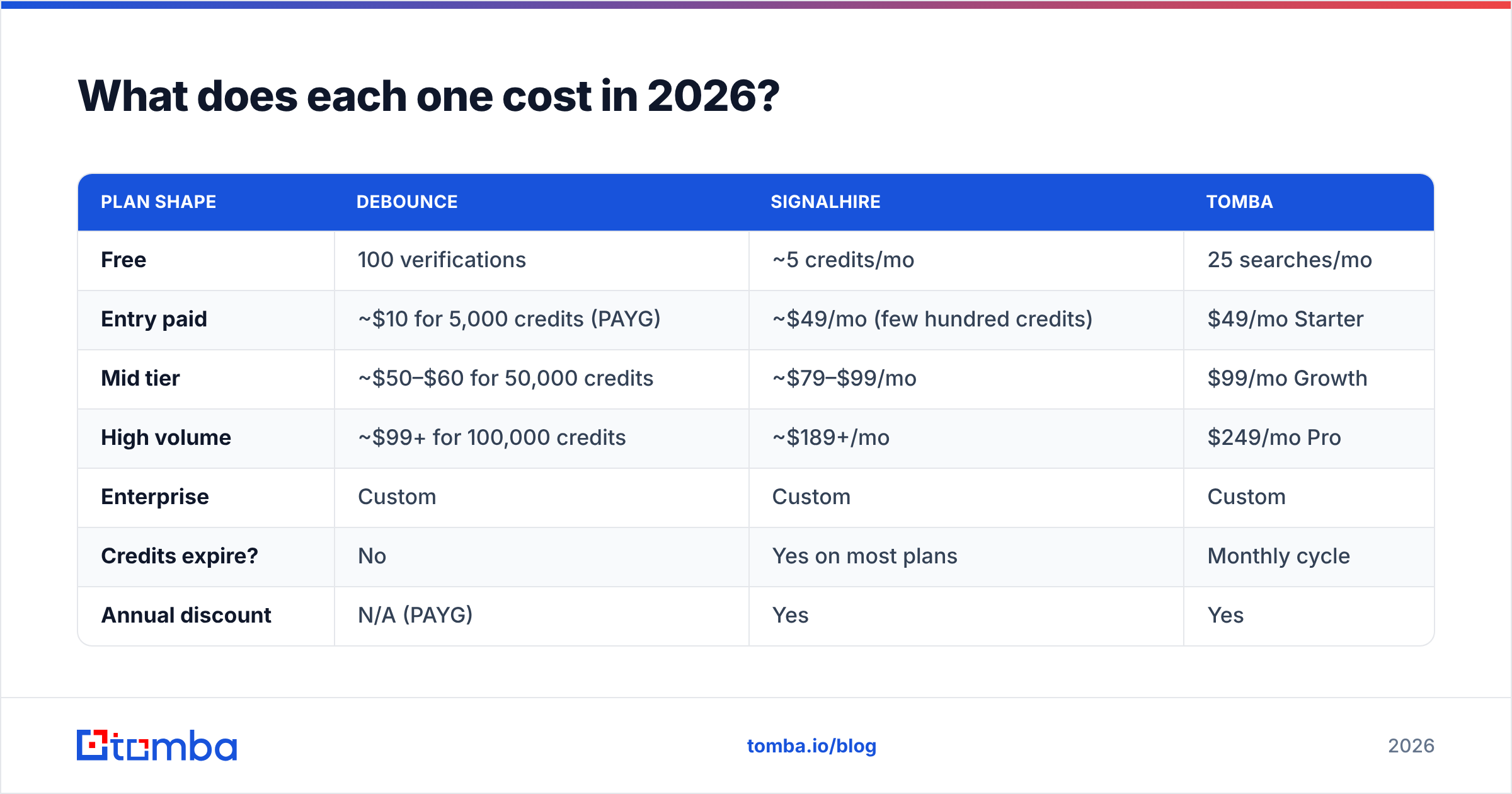
Pricing models differ enough that a per-month comparison is misleading. DeBounce sells credits that don't expire. SignalHire sells monthly credits that mostly do.
| Plan shape | DeBounce | SignalHire | Tomba |
|---|---|---|---|
| Free | 100 verifications | ~5 credits/mo | 25 searches/mo |
| Entry paid | ~$10 for 5,000 credits (PAYG) | ~$49/mo (few hundred credits) | $49/mo Starter |
| Mid tier | ~$50–$60 for 50,000 credits | ~$79–$99/mo | $99/mo Growth |
| High volume | ~$99+ for 100,000 credits | ~$189+/mo | $249/mo Pro |
| Enterprise | Custom | Custom | Custom |
| Credits expire? | No | Yes on most plans | Monthly cycle |
| Annual discount | N/A (PAYG) | Yes | Yes |
Vendor pricing moves; treat these as directional and confirm on each vendor's page before you buy. Tomba's numbers are exact — you can see the full breakdown on the Tomba pricing page.
The interesting math: if you verify 50,000 records once a quarter, DeBounce's non-expiring credits are outstanding value — you'll spend under $250/year. If you verify 5,000 records every week, the PAYG model stops looking cheap and a subscription with bundled finding starts winning.
Meanwhile, SignalHire's per-credit cost only makes sense if phone numbers are load-bearing for your motion. If you're running email-only outbound, you're paying a phone-data premium on every single lookup and never using it.
Who should actually use DeBounce?#
Buy DeBounce if three or more of these describe you:
- You inherited a list. A CRM with 80,000 stale contacts, a trade-show export, a spreadsheet from the founder's old laptop. Clean it before you touch it.
- Your bounce rate crossed 3%. That's the informal danger line where mailbox providers start throttling. A one-time clean is the fastest fix available.
- You already have a finder you like. If Apollo, Clay, or a scraper is producing your contacts, you need a verifier, not a second finder.
- Your volume is spiky. Non-expiring credits are perfect for the team that cleans 100k records in January and nothing until June.
- You need it in the pipeline, not the UI. DeBounce's API drops into a signup flow to reject junk emails at the point of entry, which is worth more than any batch clean.
What DeBounce won't do: give you a single new prospect. If your problem is "I don't know who to email," this is the wrong purchase.
Who should actually use SignalHire?#
SignalHire earns its keep in a narrower band, and that band is real:
- Recruiting and talent sourcing. The candidate pipeline features, profile-centric search, and phone coverage are built for this use case, not retrofitted to it.
- Multi-channel outbound where calls matter. If your sequence is email → call → LinkedIn, a tool without phone numbers forces a second vendor anyway.
- Person-first search. You know the name; you need the contact. That's SignalHire's natural query shape.
- Small, high-value target lists. At per-credit pricing, 200 carefully chosen contacts is a smart spend. 20,000 speculative ones is not.
Where it struggles: domain-wide sweeps. If you want every marketing decision-maker at 500 companies, a domain search workflow is a fundamentally better fit than profile-by-profile lookups, and far cheaper per usable contact.
Is there a tool that does both without two subscriptions?#
Yes, and this is the part most debounce vs signalhire comparisons skip because they're written by one of the two vendors.
The awkward truth is that finding and verifying are sequential steps in one workflow. Splitting them across two vendors means: export a CSV, re-import it, reconcile columns, discover that 18% of your found emails failed verification, and now you've paid finding credits for contacts you'll never mail. You paid twice for one usable record.

Consolidated platforms fix the double-spend by verifying at the moment of discovery. Tomba's email finder returns a confidence score with the address, so unverifiable results never enter your list in the first place. For batch work, bulk email finder handles find-and-verify in one pass. Peers worth evaluating in the same bracket include Hunter, Findymail, and BookYourData — the last is particularly strong if you want a curated, pre-verified B2B database rather than an on-demand lookup engine, and it's a legitimate alternative depending on whether you prefer buying lists or building them.
Check third-party review sites like G2 for current user sentiment before committing to any of them. Vendor-published accuracy claims are marketing; user reviews at least have a denominator.
How do you build a stack that doesn't waste credits?#
Regardless of which tools you pick, this sequence protects your budget and your sender reputation:
- Define the target before you search. Job title, company size, geography, and trigger. Vague ICPs are the single largest cause of wasted credits — you can't cost-control a search you can't describe.
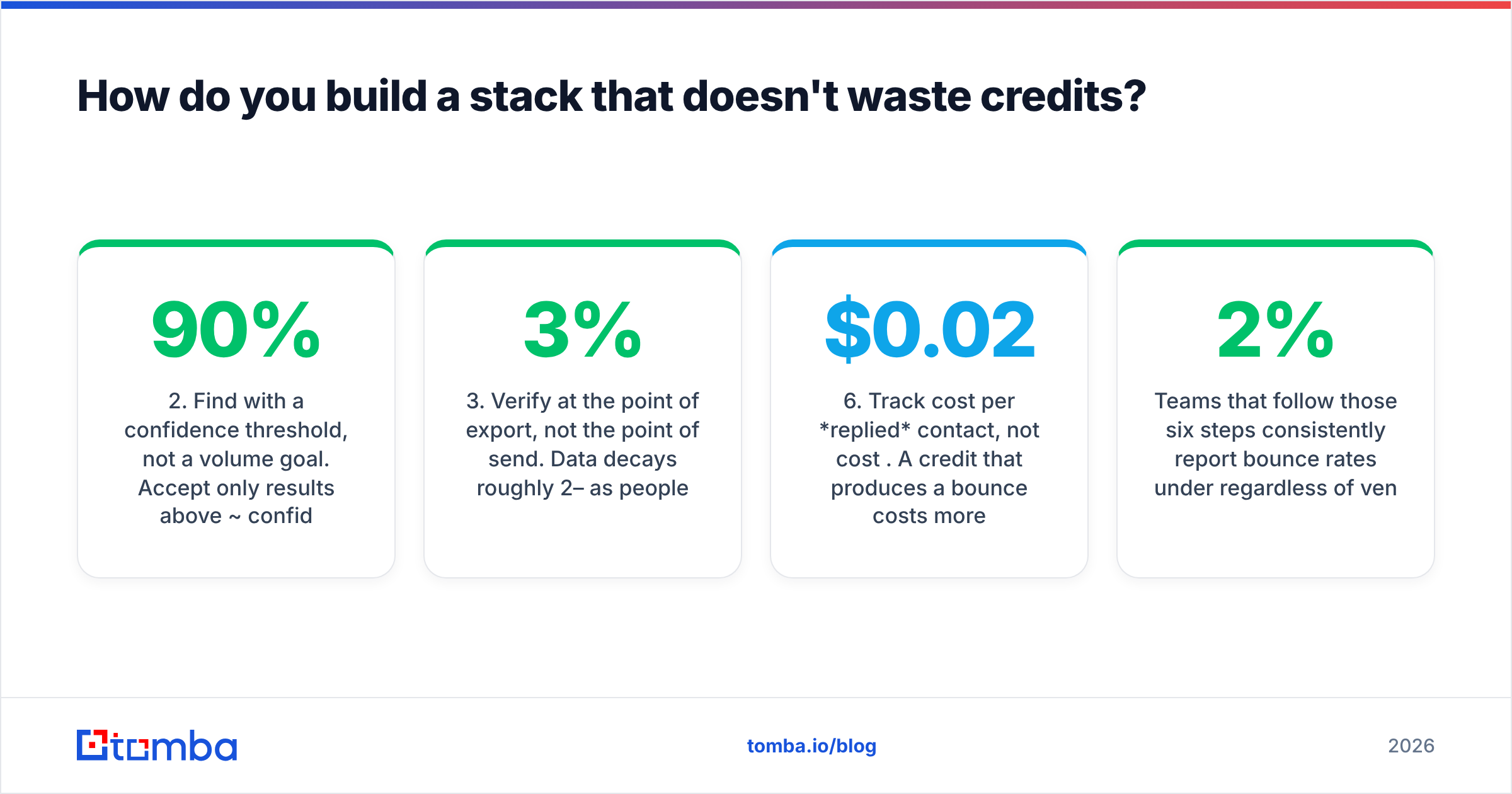
- Find with a confidence threshold, not a volume goal. Accept only results above ~90% confidence. Discard the rest instead of "trying them anyway." Trying them anyway is how domains get burned.
- Verify at the point of export, not the point of send. Data decays roughly 2–3% per month as people change jobs. A list verified in March and mailed in July is not a verified list.
- Segment catch-all domains separately. Don't mix them into your main send. Run them at low volume from a secondary domain and measure bounces empirically.
- Re-verify anything older than 60 days. Especially in high-churn sectors like tech and agencies.
- Track cost per replied contact, not cost per credit. A $0.02 credit that produces a bounce costs more than a $0.10 credit that produces a meeting. This is the only metric that settles tool arguments.
Teams that follow those six steps consistently report bounce rates under 2% regardless of vendor. Teams that skip step 3 report the opposite, also regardless of vendor.
So which one wins?#
Neither, because they're not in the same race — and that's the actual answer.
- List already exists, bounces are the problem → DeBounce. Cheap, non-expiring, does one job well.
- No list, phone numbers required, recruiting motion → SignalHire. It's the specialist, and specialists earn their premium in their specialty.
- You need contacts and clean data on a normal budget → a consolidated platform, because two subscriptions for one workflow is a tax you're paying for no reason.
Be suspicious of any comparison that declares a clean winner between a verifier and a finder. The only wrong answer is buying the tool that solves the problem you don't have.
Ready to stop paying twice for one contact? Tomba's Email Finder finds work emails by name, domain, or company and returns a verification confidence score with every result — so bad addresses never make it into your sequence. Start free with 25 searches a month, no card required, and scale to Starter at $49/mo when the pipeline justifies it.
Related guides#
Ready to find emails that actually work?
Join 150,000+ professionals who stopped guessing and started sending. Free credits on signup — no credit card required.
Get the Tomba newsletter
Practical outbound tactics and product updates — once every two weeks.
About the author