Debounce vs Wiza 2026: Which Tool Actually Fits Your Stack?
Debounce verifies email lists. Wiza scrapes LinkedIn for contacts. They solve opposite halves of the same problem — here is which one you actually need, and what each really costs.
TL;DR
- Debounce and Wiza are not competitors. Debounce is an email verification service that cleans lists you already have. Wiza is a LinkedIn-based contact extractor that builds lists from Sales Navigator searches.
- Pick Debounce if your problem is bounce rate — you have 50k contacts from a CRM export, a form, or a purchased list, and inbox providers are punishing you.
- Pick Wiza if your problem is empty pipeline — you have ICP filters in Sales Navigator and no emails attached to them.
- Pricing shape differs completely: Debounce sells one-time credits from roughly $0.0004/email at volume; Wiza sells monthly seats starting around $39/mo with credit caps that reset.
- Most teams end up buying two tools. A combined finder-plus-verifier like Tomba covers both jobs from one credit pool at $49/mo, which is why this comparison usually ends in a third answer.
What are Debounce and Wiza, exactly?#
Debounce is a bulk email verifier. You upload a CSV, it runs syntax checks, DNS and MX lookups, SMTP handshakes, disposable-domain detection, and role-account flagging, then hands you back a scored list. It does not find a single new contact. Its entire job is subtraction — removing addresses that will bounce, complain, or trap you.
Wiza does the opposite. You run a Sales Navigator or LinkedIn search, hit the Wiza extension or upload the search URL, and Wiza returns a spreadsheet of names, titles, companies, work emails, personal emails, and sometimes phone numbers. Its job is addition — turning a filtered LinkedIn audience into a contactable list.
Think of it like a kitchen. Wiza is the grocery run; Debounce is washing the vegetables. Asking which one is "better" is the wrong question until you know whether your fridge is empty or your produce is dirty.
That distinction matters more in 2026 than it did three years ago. Google and Microsoft both tightened bulk-sender enforcement, and email deliverability now hinges on complaint rates and bounce thresholds that a dirty list blows through in a single send. Meanwhile LinkedIn has kept squeezing scraping tolerance, which affects how tools like Wiza source data.

How do Debounce and Wiza compare head to head?#
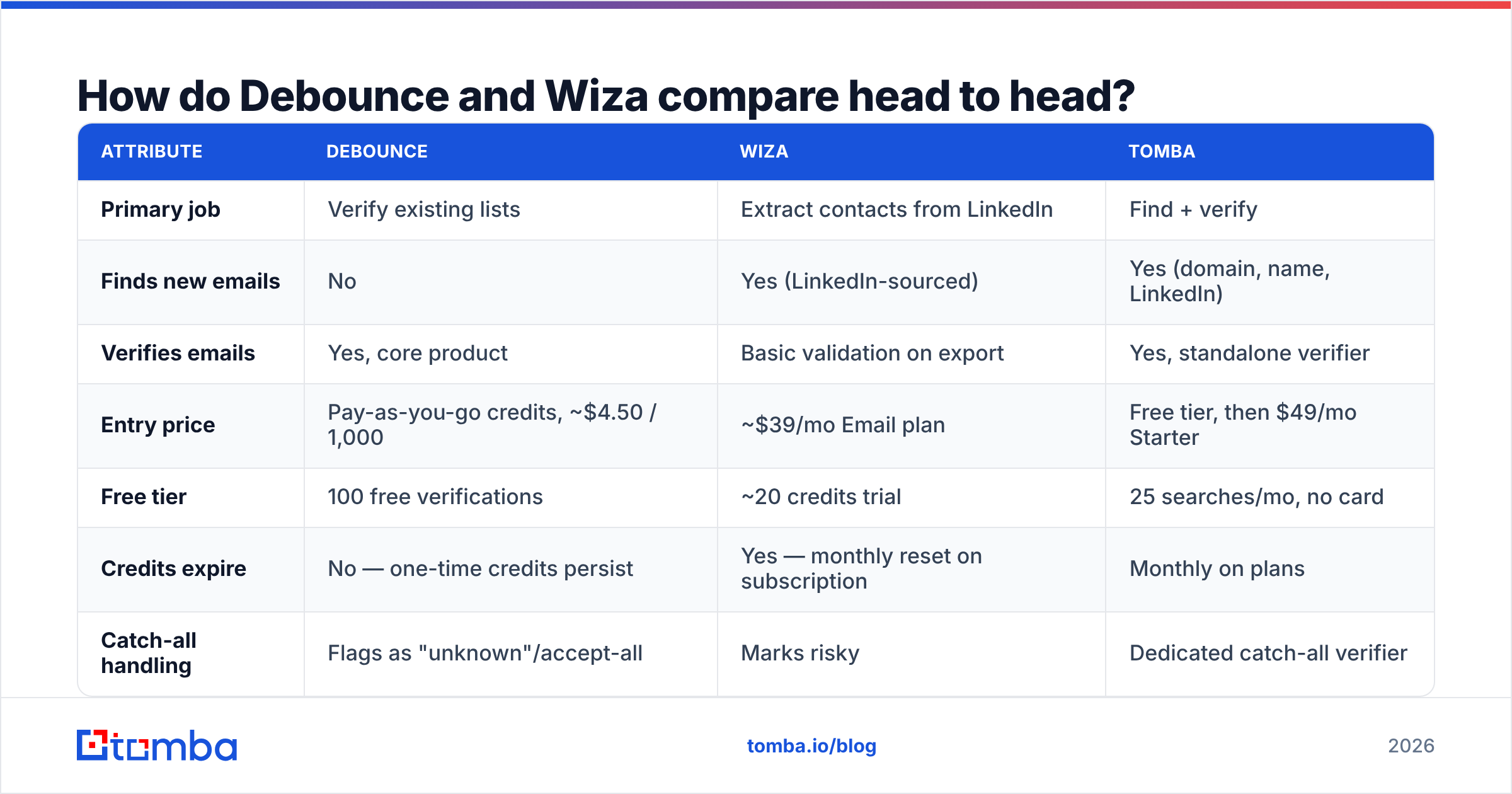
Here is the practical breakdown. Prices reflect publicly listed plans as of mid-2026 — always confirm on the vendor's own page before you buy, since both change tiers regularly.
| Attribute | Debounce | Wiza | Tomba |
|---|---|---|---|
| Primary job | Verify existing lists | Extract contacts from LinkedIn | Find + verify |
| Finds new emails | No | Yes (LinkedIn-sourced) | Yes (domain, name, LinkedIn) |
| Verifies emails | Yes, core product | Basic validation on export | Yes, standalone verifier |
| Entry price | Pay-as-you-go credits, ~$4.50 / 1,000 | ~$39/mo Email plan | Free tier, then $49/mo Starter |
| Free tier | 100 free verifications | ~20 credits trial | 25 searches/mo, no card |
| Credits expire | No — one-time credits persist | Yes — monthly reset on subscription | Monthly on plans |
| Catch-all handling | Flags as "unknown"/accept-all | Marks risky | Dedicated catch-all verifier |
| Phone numbers | No | Yes, on higher tiers | Yes, phone finder |
| API | Yes | Yes | Yes, full REST API |
| Best for | Agencies cleaning big lists | LinkedIn-first SDR teams | Teams wanting one stack |
Two things jump out of that table.
First, Debounce's non-expiring credits are genuinely rare. Most verifiers push you onto a subscription where unused credits evaporate at the end of the month. If your verification need is spiky — a big list once a quarter, nothing in between — that pricing model saves real money.
Second, Wiza's value is entirely tied to LinkedIn. If your ICP lives on LinkedIn with well-maintained profiles (SaaS, agencies, tech, professional services), Wiza's coverage is strong. If your ICP is plumbing contractors, regional manufacturers, or anyone whose LinkedIn presence is a 2014 profile photo and nothing else, coverage collapses and you are paying for misses.
Which one has better data accuracy?#
They are measuring different things, so compare them on the metric that matches their job.
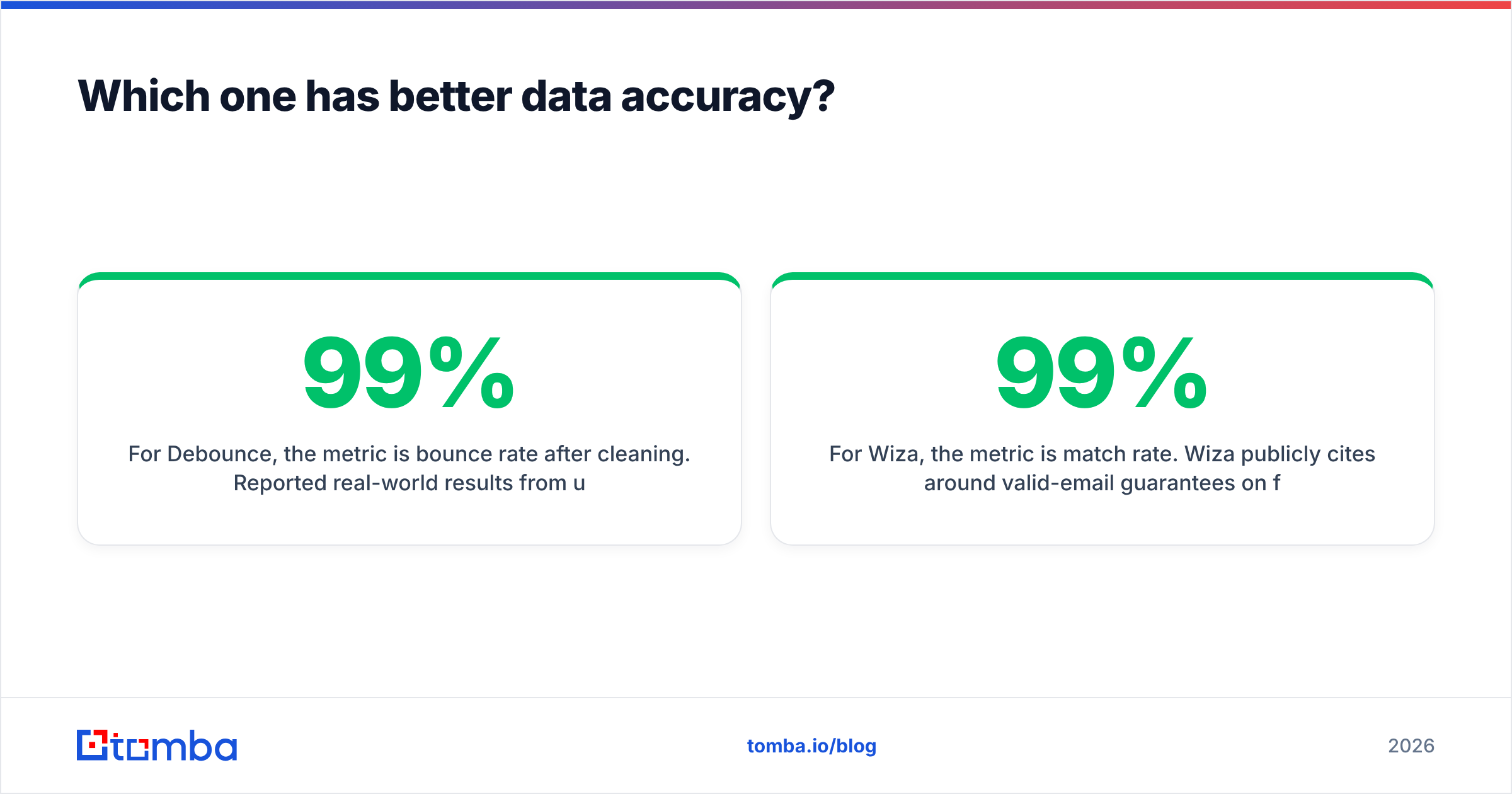
For Debounce, the metric is bounce rate after cleaning. Reported real-world results from users typically land in the 97-99% accuracy range on standard domains — meaning if you send to a list Debounce marked "deliverable," you should see bounce rates under 2%. That is competitive with the rest of the verification market. The honest caveat is catch-all domains: Debounce, like nearly every verifier, returns "accept-all" or "unknown" rather than a verdict, because the receiving server accepts everything at the SMTP layer. Those rows land in a gray bucket you have to decide about yourself.
For Wiza, the metric is match rate. Wiza publicly cites around 99% valid-email guarantees on found addresses, but the number you should actually watch is what percentage of your LinkedIn list gets any email at all. That figure varies wildly — strong on North American tech, weaker on European mid-market, weak on non-LinkedIn-native industries. A 99% valid rate on a 45% match rate means you paid for 100 profiles and can email 45 of them.

This is where the "two tools" problem bites. Wiza's validation on export is a light check, not a full verification pass. Many teams run Wiza exports back through a verifier before loading them into a sequencer — which means the Wiza subscription and the Debounce credits are both line items on the same card.
If you want to test any of this yourself without a purchase, run a sample of 50 known-good addresses through a free email checker and compare verdicts. Vendor-published accuracy numbers are marketing; your own domain sample is data.
What does each one actually cost at real volume?#
Sticker prices mislead here because the two products bill on different axes. Model it against a scenario.
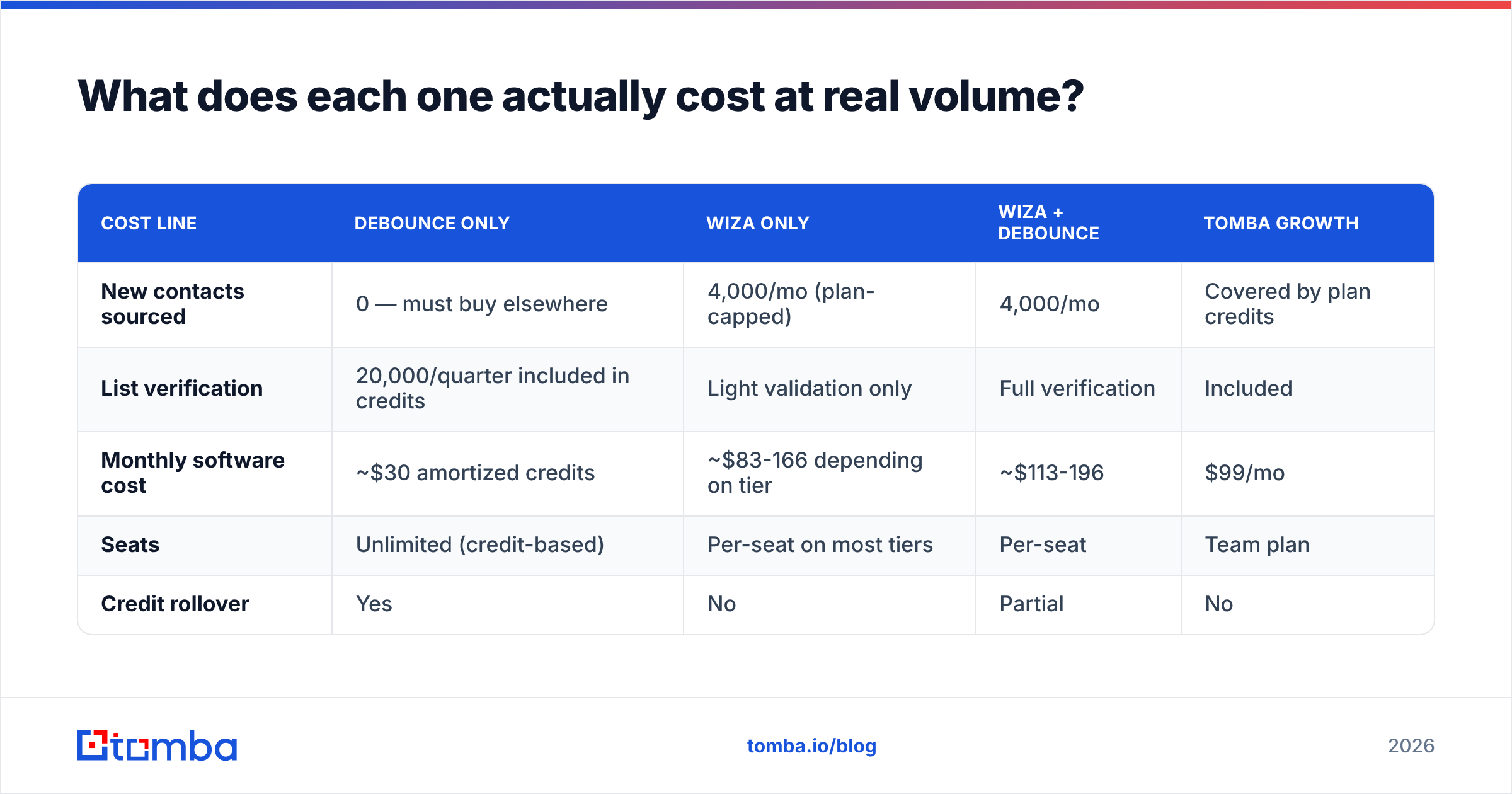
Scenario: a 3-person SDR team building 4,000 new contacts per month and cleaning a 20,000-row CRM export once per quarter.
| Cost line | Debounce only | Wiza only | Wiza + Debounce | Tomba Growth |
|---|---|---|---|---|
| New contacts sourced | 0 — must buy elsewhere | 4,000/mo (plan-capped) | 4,000/mo | Covered by plan credits |
| List verification | 20,000/quarter included in credits | Light validation only | Full verification | Included |
| Monthly software cost | ~$30 amortized credits | ~$83-166 depending on tier | ~$113-196 | $99/mo |
| Seats | Unlimited (credit-based) | Per-seat on most tiers | Per-seat | Team plan |
| Credit rollover | Yes | No | Partial | No |
The pattern most teams hit: Wiza alone leaves you sending to unverified data, Debounce alone leaves you with nothing to send to, and stacking both costs more than a single tool that does both jobs on one credit pool. That is not a knock on either product — it is a consequence of them being built for one half of the workflow each.
Compare that against Tomba pricing, where finding and verifying draw from the same balance: Free (25 searches/mo), Starter $49/mo, Growth $99/mo, Pro $249/mo, Enterprise custom.
Is there a better option than either one?#
Depends on what you are optimizing for. Three honest paths:
Optimize for verification depth and nothing else — stay with Debounce. If you already have a data source you trust (an enrichment vendor, a partner list, an inbound form firehose) and your only job is cutting bounces, a dedicated verifier with non-expiring credits is a clean, cheap fit. You do not need to consolidate.
Optimize for LinkedIn-native prospecting — stay with Wiza, and budget for a verifier alongside it. If your entire GTM motion starts in Sales Navigator and your reps live in the extension, ripping that out to save $40/mo is a bad trade. Wiza is genuinely good at the specific job of turning a saved search into a CSV.
Optimize for a single stack and predictable cost — consolidate. This is where a combined platform wins. Tools like Tomba, Findymail, or Prospeo run finding and verification from one account. You lose some of Debounce's verification specialization and some of Wiza's LinkedIn depth, and you gain one bill, one API, and one credit balance.
A fourth path worth naming: buy a curated database instead of scraping one. BookYourData, for example, sells pre-verified B2B contact lists with a bounce guarantee, which sidesteps the find-then-verify cycle entirely. For teams that want a clean list today rather than a sourcing workflow, that is a legitimately different — and often faster — answer than either Debounce or Wiza.

How do you actually choose between them?#
Run this decision sequence. It takes five minutes and beats reading another feature matrix.
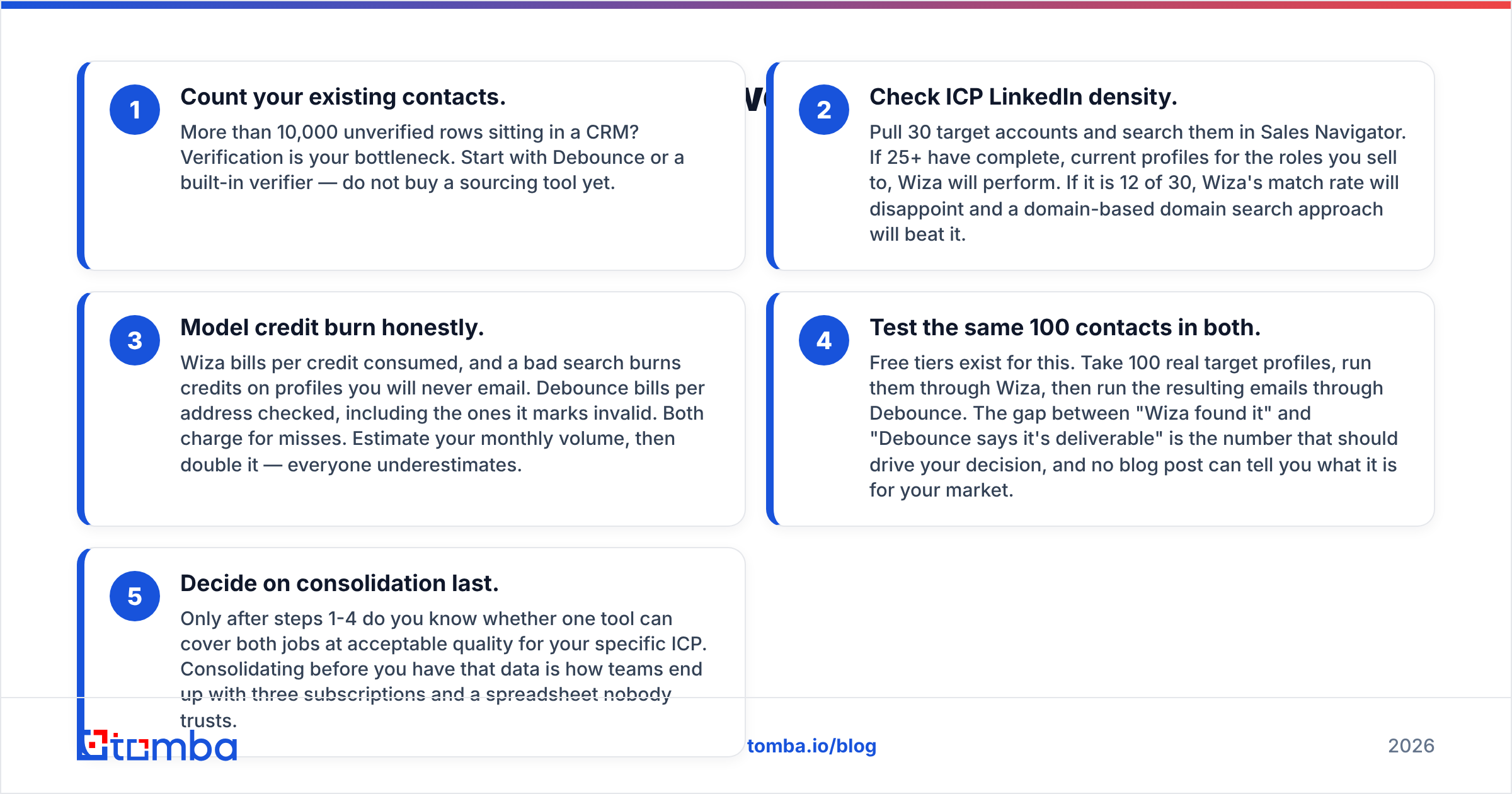
Count your existing contacts. More than 10,000 unverified rows sitting in a CRM? Verification is your bottleneck. Start with Debounce or a built-in verifier — do not buy a sourcing tool yet.
Check ICP LinkedIn density. Pull 30 target accounts and search them in Sales Navigator. If 25+ have complete, current profiles for the roles you sell to, Wiza will perform. If it is 12 of 30, Wiza's match rate will disappoint and a domain-based domain search approach will beat it.
Model credit burn honestly. Wiza bills per credit consumed, and a bad search burns credits on profiles you will never email. Debounce bills per address checked, including the ones it marks invalid. Both charge for misses. Estimate your monthly volume, then double it — everyone underestimates.
Test the same 100 contacts in both. Free tiers exist for this. Take 100 real target profiles, run them through Wiza, then run the resulting emails through Debounce. The gap between "Wiza found it" and "Debounce says it's deliverable" is the number that should drive your decision, and no blog post can tell you what it is for your market.
Decide on consolidation last. Only after steps 1-4 do you know whether one tool can cover both jobs at acceptable quality for your specific ICP. Consolidating before you have that data is how teams end up with three subscriptions and a spreadsheet nobody trusts.
What about deliverability after you pick?#
Neither tool protects you from yourself. Verification lowers hard bounces; it does not fix a cold domain, missing authentication, or a spammy sequence.
Before your first send from any list either tool produces, confirm three things. Your SPF record, DKIM, and DMARC must be published and aligned — Google's bulk sender guidelines have made this non-optional for anyone sending meaningful volume. Your sending domain should be warmed, not cold-started at 500/day. And your complaint rate needs to stay under 0.3%, which is a copy problem, not a data problem.
A clean list is necessary and insufficient. Teams that blame their verifier for poor reply rates are usually looking at a sender reputation issue or a targeting issue wearing a data costume.
For an independent read on how buyers rate either tool day to day, G2's category listings are more useful than vendor case studies — reviews there surface support responsiveness and billing friction that no feature table captures. You can also check each vendor directly at debounce.io and wiza.co for current plan details.
Final verdict: Debounce or Wiza?#
If you must pick one and only one: pick based on which half of the funnel is broken.
- Empty list, LinkedIn-heavy ICP → Wiza
- Full list, high bounce rate → Debounce
- Both problems, one budget → neither alone is enough
That third case is the majority. And it is why the comparison keeps ending the same way: teams that start with Wiza add a verifier within two quarters, and teams that start with Debounce add a finder within one. The consolidation happens either way; the only question is whether you pay for the detour first.
If you would rather skip the detour, start with a tool that does both from one balance. The Tomba Email Finder finds professional email addresses by domain, name, company, or LinkedIn profile, verifies them against SMTP before they hit your export, and handles catch-all domains with a dedicated check instead of an "unknown" shrug. The free tier gives you 25 searches a month with no card, which is enough to run the 100-contact test in step 4 above and see the numbers for your own market. If it holds up, Starter is $49/mo and Growth is $99/mo — one credit pool, one API key, no second subscription to reconcile.
Related guides#
Ready to find emails that actually work?
Join 150,000+ professionals who stopped guessing and started sending. Free credits on signup — no credit card required.
Get the Tomba newsletter
Practical outbound tactics and product updates — once every two weeks.
About the author