Demo Automation in 2026: A Practical Guide for B2B Teams
Demo automation promises fewer wasted live calls and faster buying cycles. Here's what it actually replaces, where it breaks, and how to build a working stack in 2026 without gutting your pipeline.
TL;DR
- Demo automation replaces the repetitive parts of a product demo — the standard click-through, the "here's the dashboard" tour — with interactive or recorded experiences buyers run on their own time.
- It works best on high-volume, low-ACV motions and on the top of enterprise deals (the first-look demo). It fails when the deal needs discovery, configuration, or negotiation.
- The real ROI isn't "fewer demos." It's reclaiming AE hours currently spent showing the same five screens to unqualified prospects.
- Tooling splits into three buckets: interactive demo platforms (Navattic, Storylane, Reprise), async video (Loom, Vidyard), and demo environments/sandboxes (Saleo, Demostack).
- Automation without accurate contact data just automates a bounce. Fix the list before you fix the demo.
What Is Demo Automation?#
Demo automation is the practice of turning a live, human-delivered product demonstration into a repeatable asset a buyer can consume without a rep on the call. That asset can be an interactive click-through replica of your product, a recorded video walkthrough, a guided sandbox, or a personalized micro-demo assembled on the fly from reusable modules.
Think of it like a restaurant moving from a chef explaining every dish tableside to a well-designed menu with photos. The chef still exists — you still want them for the tasting menu — but 80% of diners just want to see the food and decide. The chef's time goes to the people who actually need it.
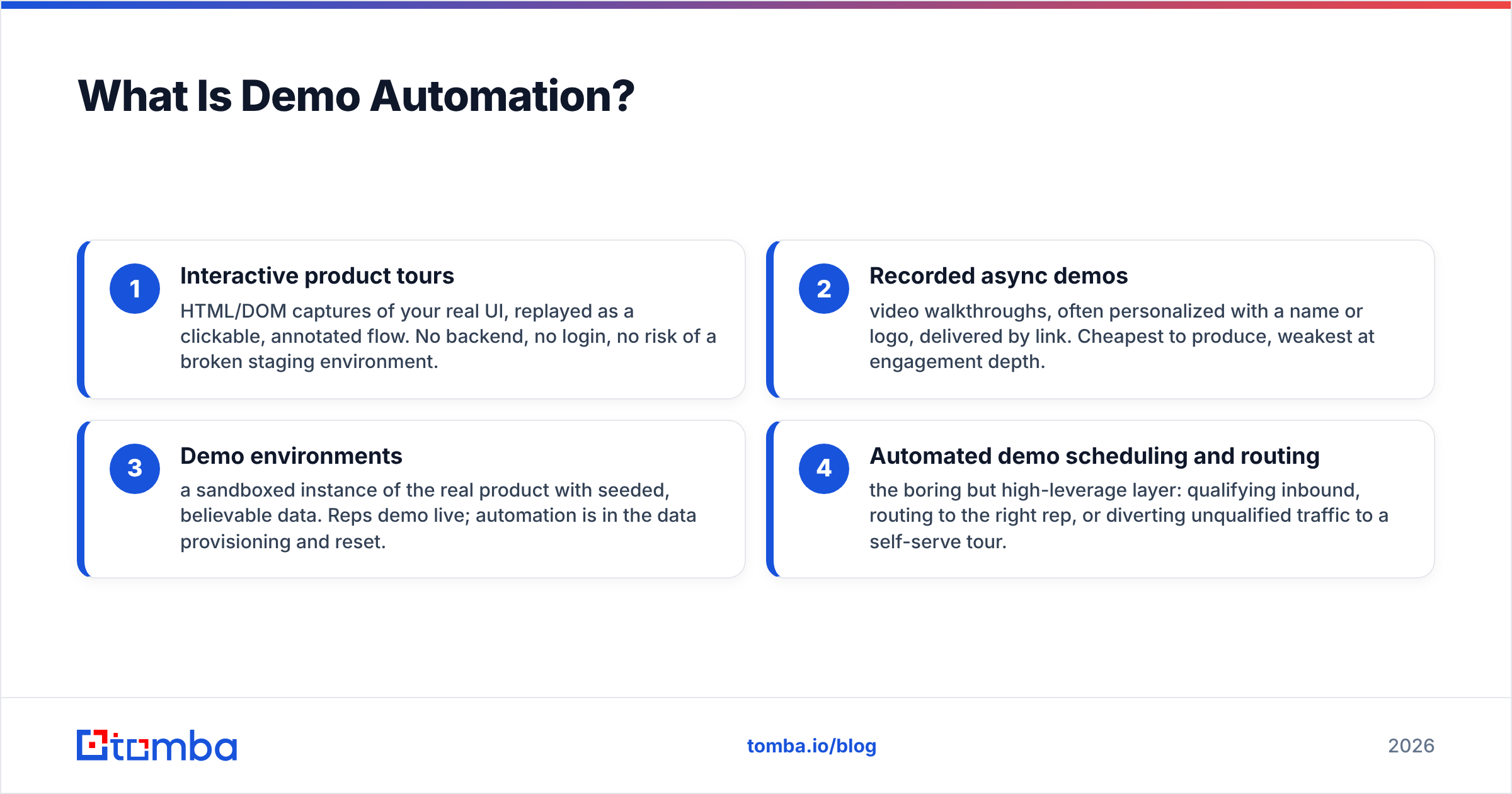
Technically, the category covers four distinct things people lump together:
- Interactive product tours — HTML/DOM captures of your real UI, replayed as a clickable, annotated flow. No backend, no login, no risk of a broken staging environment.
- Recorded async demos — video walkthroughs, often personalized with a name or logo, delivered by link. Cheapest to produce, weakest at engagement depth.
- Demo environments — a sandboxed instance of the real product with seeded, believable data. Reps demo live; automation is in the data provisioning and reset.
- Automated demo scheduling and routing — the boring but high-leverage layer: qualifying inbound, routing to the right rep, or diverting unqualified traffic to a self-serve tour.
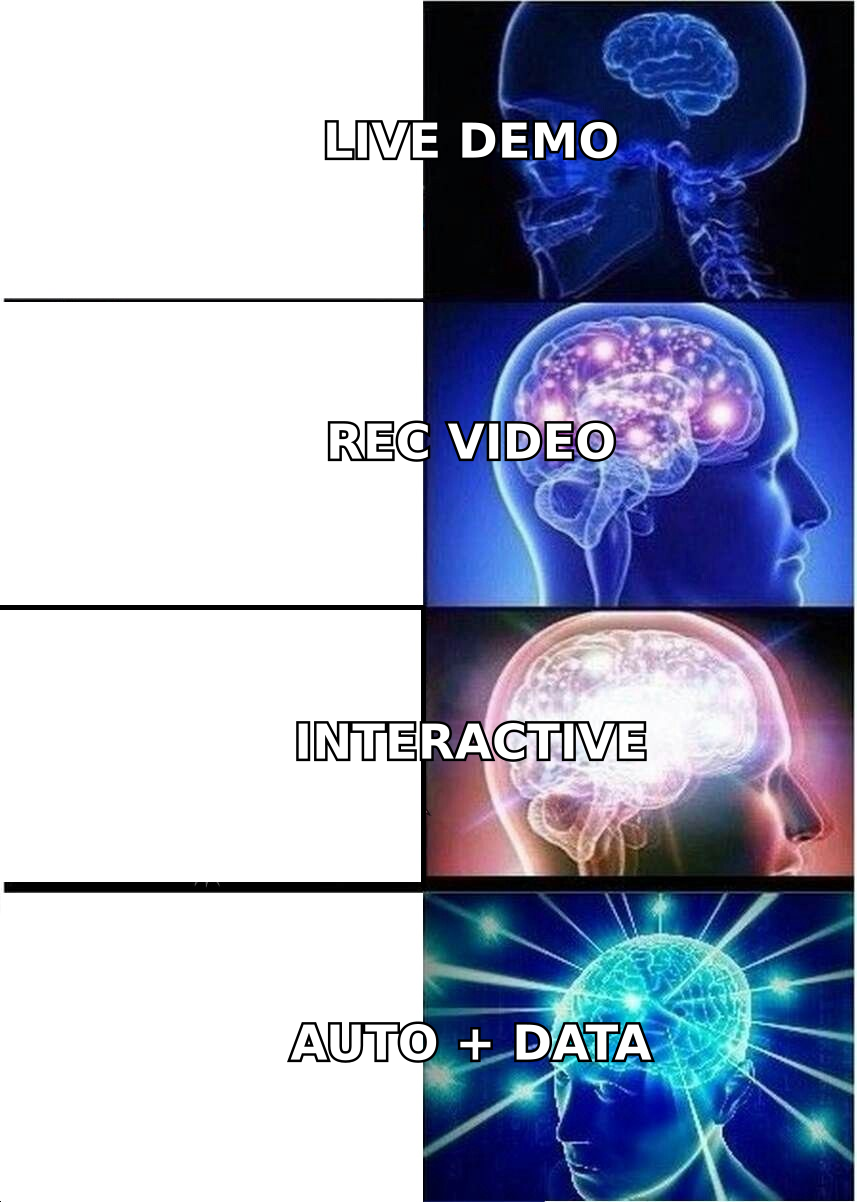
Most teams that say "we're doing demo automation" mean #1 or #2. The teams getting real numbers out of it are running #4 in front of #1.
Why Are B2B Teams Automating Demos in 2026?#
Three pressures converged.
Buyers stopped wanting the call. Gartner's B2B buying research has consistently found that buyers spend the minority of their purchase journey with any sales rep, and a majority of B2B buyers now say they prefer a rep-free experience for at least part of the evaluation. Forcing a 45-minute Zoom before someone can see the product is friction you're charging the buyer for.
AE capacity got expensive. A loaded AE costs real money per hour. If 40% of booked demos are unqualified — a normal number for inbound-heavy teams — you're paying senior salary to run a slideshow for tire-kickers.
The tooling got good. Interactive demo platforms in 2022 produced obvious fakes with broken hover states. By 2026 the captures are close enough to the real UI that buyers can't tell, and the analytics layer tells you exactly which screen someone abandoned.
There's a fourth, less-discussed reason: demo automation is a hedge against pipeline volatility. When outbound response rates dip, a self-serve demo on your pricing page captures intent you'd otherwise lose entirely.
What Does Demo Automation Actually Replace?#
Be specific here, because vague answers produce vague ROI.
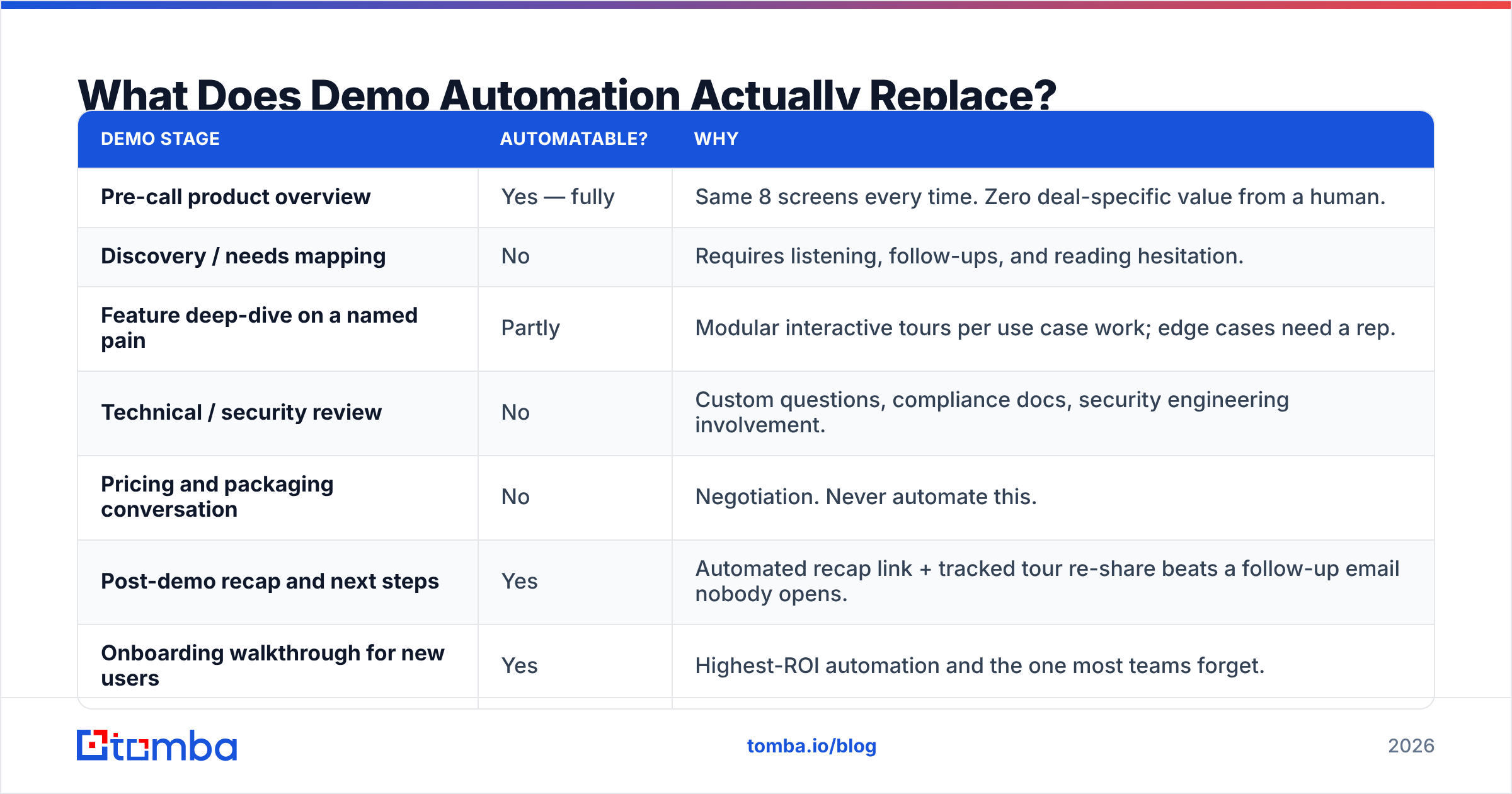
| Demo stage | Automatable? | Why |
|---|---|---|
| Pre-call product overview | Yes — fully | Same 8 screens every time. Zero deal-specific value from a human. |
| Discovery / needs mapping | No | Requires listening, follow-ups, and reading hesitation. |
| Feature deep-dive on a named pain | Partly | Modular interactive tours per use case work; edge cases need a rep. |
| Technical / security review | No | Custom questions, compliance docs, security engineering involvement. |
| Pricing and packaging conversation | No | Negotiation. Never automate this. |
| Post-demo recap and next steps | Yes | Automated recap link + tracked tour re-share beats a follow-up email nobody opens. |
| Onboarding walkthrough for new users | Yes | Highest-ROI automation and the one most teams forget. |
The pattern: automate anything where the content is identical across prospects, keep a human anywhere the content is generated by the conversation.
Which Demo Automation Tools Should You Compare?#
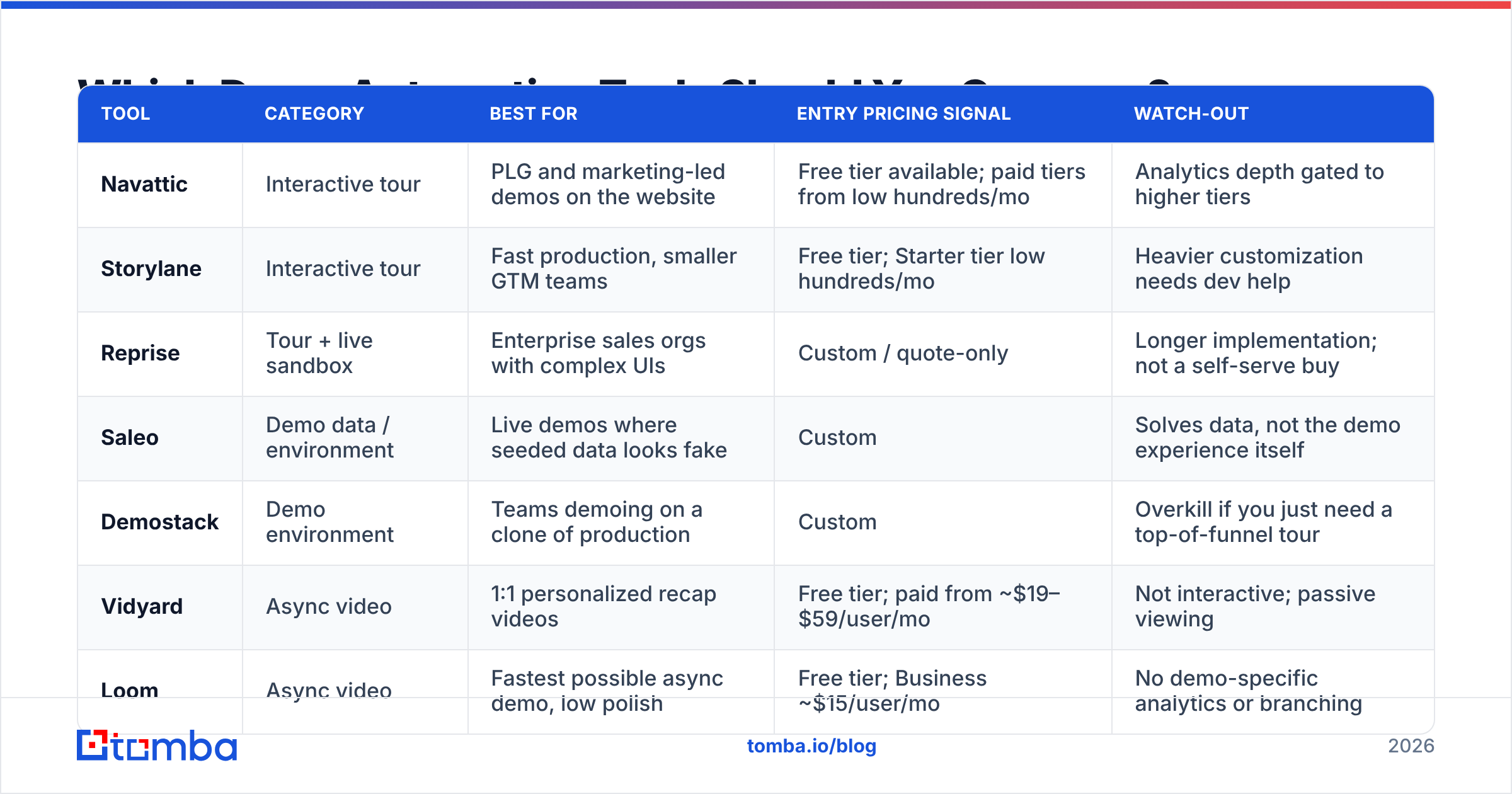
The market has consolidated into recognizable tiers. Here's an honest read on where each fits — pricing is list/public-signal as of mid-2026 and moves often, so treat it as directional and confirm on the vendor's own page.
| Tool | Category | Best for | Entry pricing signal | Watch-out |
|---|---|---|---|---|
| Navattic | Interactive tour | PLG and marketing-led demos on the website | Free tier available; paid tiers from low hundreds/mo | Analytics depth gated to higher tiers |
| Storylane | Interactive tour | Fast production, smaller GTM teams | Free tier; Starter tier low hundreds/mo | Heavier customization needs dev help |
| Reprise | Tour + live sandbox | Enterprise sales orgs with complex UIs | Custom / quote-only | Longer implementation; not a self-serve buy |
| Saleo | Demo data / environment | Live demos where seeded data looks fake | Custom | Solves data, not the demo experience itself |
| Demostack | Demo environment | Teams demoing on a clone of production | Custom | Overkill if you just need a top-of-funnel tour |
| Vidyard | Async video | 1:1 personalized recap videos | Free tier; paid from ~$19–$59/user/mo | Not interactive; passive viewing |
| Loom | Async video | Fastest possible async demo, low polish | Free tier; Business ~$15/user/mo | No demo-specific analytics or branching |
Two selection rules that save money:
- If your product's value is visible in under 90 seconds of clicking, buy an interactive tour tool. If it takes configured data to be believable, you need a demo environment first — a beautiful tour of empty tables sells nothing.
- Don't buy the enterprise tier to solve a top-of-funnel problem. Most teams' first win is a single public interactive tour on the pricing page, which the free or entry tier covers.
How Do You Roll Out Demo Automation Without Killing Pipeline?#
The failure mode is predictable: a team replaces "Book a demo" with "Watch a demo," conversion to opportunity drops 30%, and demo automation gets blamed. What actually happened is they removed the CTA that captured intent.
Run it as an additive layer, in this order:
- Instrument the current demo. Record 20 live demos. Timestamp what's identical every time. That's your automation scope — not a guess.
- Build one tour, for one use case, for one persona. Not a product tour. A "how a RevOps lead deduplicates a list" tour. Specificity converts.
- Place it beside, not instead of, the booking CTA. "Book a demo" and "See it first (2 min)" side by side. Measure the split.
- Gate on the second step, not the first. Let people into the tour ungated; ask for an email at the point they've clicked into the third screen and shown real intent.
- Route by behavior. Someone who completes a tour and revisits pricing is a hot inbound signal. Push it to a rep the same day.
- Kill the automated path for accounts above your ACV threshold. Enterprise buyers reading a tour is fine; enterprise buyers being denied a rep is not.
Step 4 is where most of the data quality problems start, and it's worth dwelling on.
Why Does Contact Data Quality Decide Whether This Works?#
Because demo automation shifts your funnel from "rep collects and validates the contact on the call" to "form field collects a string." That's a real downgrade in data hygiene, and it compounds fast.
When a rep runs a live demo, they hear the prospect's real title, learn who else needs to be in the room, and catch the "actually email me at my work address" correction in real time. Automate the demo and all of that goes away unless you replace it deliberately.
Three things to put in place before you scale automated demos:
- Verify every captured email at the point of capture. A tour-gated email that bounces is worse than no email — it inflates your MQL count and poisons your sender reputation when the nurture sequence fires. Run addresses through an email verifier inline via API so bad addresses never reach the CRM.
- Enrich the record immediately. You captured
jane@acme.com. You need title, seniority, company size, and tech stack to route her correctly. Automated data enrichment at form submit is what turns a raw email into a routable lead. Without it, your "hot tour completer" sits in a generic nurture forever. - Fill the gaps around the person who watched. One viewer is rarely the buying committee. If a director at Acme finished your tour, you want the VP and the ops lead too. A domain search across the account gives you the rest of the committee to multi-thread into, and Tomba's data sources page documents where those records come from if procurement asks.
Skipping this step is the single most common reason demo automation shows a great engagement dashboard and flat revenue. You get more views, more "demo completions," and no more pipeline — because half the emails were fake, and the real ones were never enriched enough to route intelligently.
What Metrics Prove Demo Automation Is Working?#
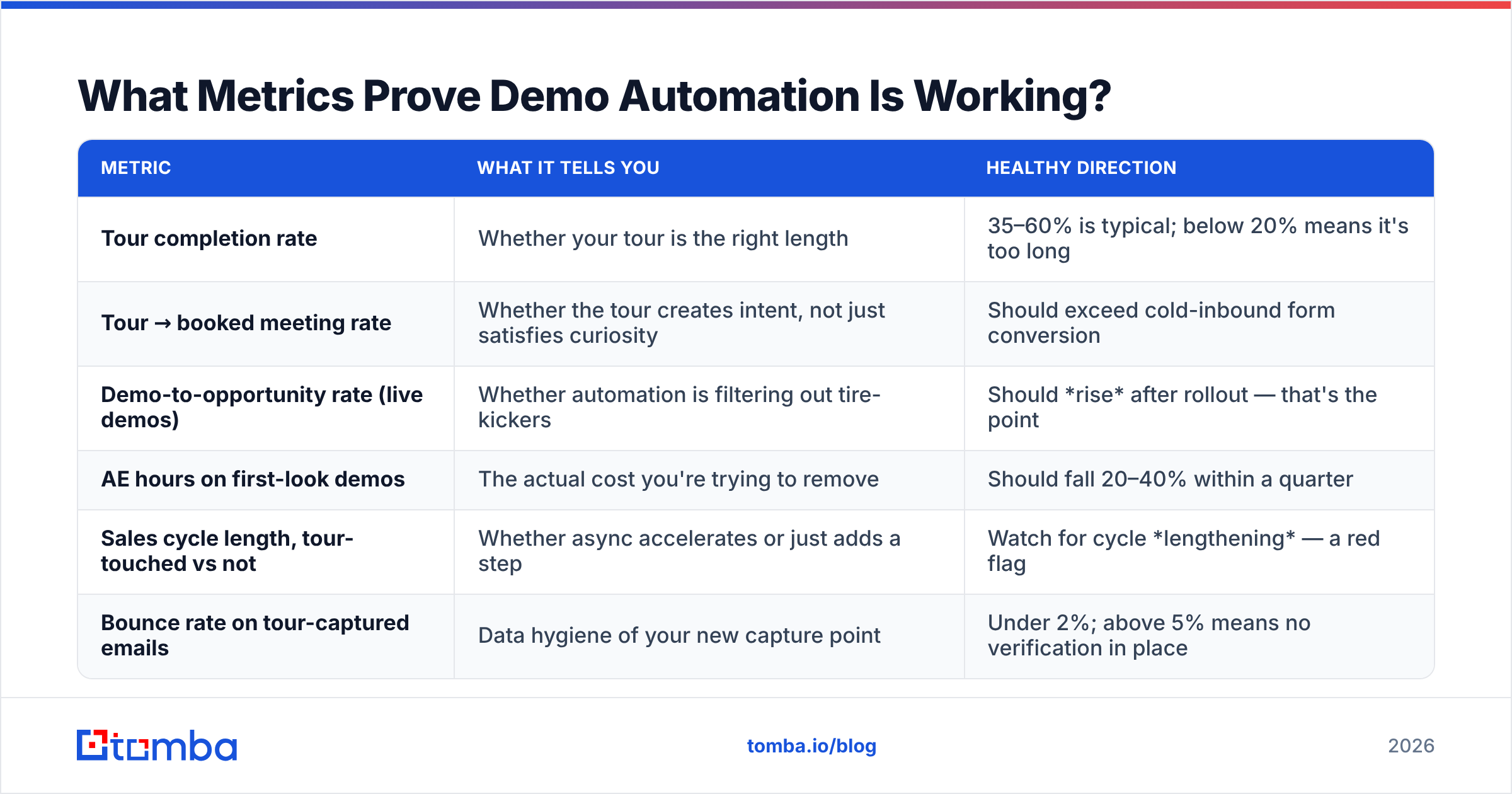
Vanity metrics in this category are seductive. Tour views go up and to the right forever because you're putting the tour on more pages. Measure these instead:
| Metric | What it tells you | Healthy direction |
|---|---|---|
| Tour completion rate | Whether your tour is the right length | 35–60% is typical; below 20% means it's too long |
| Tour → booked meeting rate | Whether the tour creates intent, not just satisfies curiosity | Should exceed cold-inbound form conversion |
| Demo-to-opportunity rate (live demos) | Whether automation is filtering out tire-kickers | Should rise after rollout — that's the point |
| AE hours on first-look demos | The actual cost you're trying to remove | Should fall 20–40% within a quarter |
| Sales cycle length, tour-touched vs not | Whether async accelerates or just adds a step | Watch for cycle lengthening — a red flag |
| Bounce rate on tour-captured emails | Data hygiene of your new capture point | Under 2%; above 5% means no verification in place |
That third row is the one to lead with in a board deck. If your live demo-to-opportunity rate improves after rollout, automation is doing its job as a filter, even if total live demos fall.
Is Demo Automation Right for Your Motion?#
A blunt fit test:
- Strong fit: self-serve or low-touch SaaS, ACV under roughly $25K, visually demonstrable product, high inbound volume, long "just looking" browsing phase.
- Moderate fit: mid-market with a 3–6 month cycle. Automate the first-look demo only; keep humans on everything after.
- Weak fit: complex enterprise implementations, heavily configured products, regulated industries where the demo is the compliance conversation, and anything where the buyer expects a named rep from first contact.
If you're in the weak-fit column, the automation that actually pays off for you isn't the demo — it's everything around it. Automated scheduling, automated recap, automated committee mapping. That's less exciting and considerably more profitable.
For teams evaluating the broader stack around this, it's worth reading up on sales automation as a category before buying a point solution. Demo automation sits inside a larger workflow, and a tour with no routing behind it is a brochure.
What Are the Common Mistakes?#
- Building a product tour instead of a use-case tour. Nobody wants to see your settings page. They want to see their problem solved.
- Making it too long. Seven to twelve steps. Past that, completion craters.
- Hiding it behind a form. The whole value proposition is friction removal. Gate at step three, not step zero.
- Never updating it. Your UI shipped a redesign; your tour still shows the 2024 nav. Buyers notice, and it reads as a dead product.
- No path to a human. Every tour needs a persistent "talk to someone" exit. The buyer who wants a rep at step four is your best lead in the funnel.
- Treating captured emails as clean. Covered above, and it's the expensive one.
One more that's specific to outbound teams: don't send an automated demo link as your first touch to a cold contact. You've asked for a click before earning attention, and the click-through on an unbranded tour link from an unknown sender is dismal. Earn the reply first, then send the tour as the value-add in touch two or three. If cold outbound is where your volume comes from, the leverage is upstream — accurate targeting and reliable email verification do more for reply rates than a slicker demo ever will.
How Do You Build the Stack End to End?#
A working 2026 setup for a mid-market team, in order of dependency:
- Data layer — verified, enriched contact records. Everything downstream inherits the quality of this step.
- Capture layer — interactive tour on the site, ungated at entry, email-gated mid-flow, verified inline.
- Routing layer — behavioral scoring on tour depth and revisit patterns, with same-day handoff to a rep on high-intent signals.
- Human layer — AEs running only discovery-forward, deal-specific demos.
- Measurement layer — cohort your pipeline by tour-touched vs not and compare cycle length and win rate, not just volume.
The order matters. Teams that start at step 2 build a beautiful capture mechanism that feeds garbage into a CRM nobody trusts. Teams that start at step 1 usually find their demo booking rate improves before they've automated anything at all — because they were emailing the wrong people.
The Bottom Line#
Demo automation is a filtering technology, not a replacement technology. It buys back AE hours at the top of the funnel and gives self-directed buyers a way to evaluate you at 11pm on a Tuesday. It does not close deals, handle objections, or navigate a buying committee — and vendors that imply otherwise are selling you a dashboard, not revenue.
Start narrow: one persona, one use case, one tour, placed next to your existing booking CTA. Measure live demo-to-opportunity rate as your primary signal. And fix your contact data before you scale any of it, because automating outreach to addresses that don't exist just gets you to the wrong answer faster.
If the data layer is where you're weakest — and for most teams running automated demos, it is — start there. Tomba's Email Finder locates verified professional email addresses by name, domain, or company so the contacts entering your automated demo funnel are real, routable, and complete. The free tier covers 25 searches a month to test the accuracy against your own list; paid plans start at $49/mo, with full Tomba pricing available if you need bulk or API volume. Get the data right, and every automation you layer on top of it starts compounding instead of amplifying noise.
Related guides#
Ready to find emails that actually work?
Join 150,000+ professionals who stopped guessing and started sending. Free credits on signup — no credit card required.
Get the Tomba newsletter
Practical outbound tactics and product updates — once every two weeks.
About the author