Demodesk Pricing Reviews Pros and Cons: 2026 Buyer Guide
A neutral breakdown of Demodesk pricing, real user reviews, and the honest pros and cons — plus how to make sure the meetings you book actually have the right people in them.
Demodesk Pricing Reviews Pros and Cons: 2026 Buyer Guide
Do you sell software over video? Then you have probably heard of Demodesk. It promises fewer no-shows. It gives you a no-download meeting room, AI-generated notes, and coaching that tells reps what they did wrong on a call. But the marketing page skips the part that decides your budget. It never says what each plan really costs, where the limits bite, or whether the reviews match the demo. This Demodesk pricing reviews pros and cons guide fills that gap.
This is a neutral walkthrough for 2026. It is written for revenue teams deciding where their tooling dollars go — not for Demodesk's marketing team.
TL;DR#
- Demodesk is a sales meeting platform, not a prospecting tool. It handles scheduling, the live demo room, AI note-taking, and call coaching. It does not find or verify the people you invite.
- Pricing is per user and tier-gated. Expect a lower "scheduling" tier and a higher "AI/coaching" tier. The most useful automation and integrations sit on the top plans and custom Enterprise quotes.
- Reviews are genuinely positive on ease of use and fewer no-shows. The common gripes are price-for-value, the odd call-quality issue, and integration depth.
- The biggest hidden cost isn't Demodesk. It is booking polished meetings with the wrong or unreachable people. Clean contact data upstream is what makes any meeting tool pay off.
- Best-fit buyer: demo-heavy SaaS teams that want scheduling, recording, and coaching in one place — and can justify a per-seat AI tool.
What is Demodesk and who is it for?#
Think of Demodesk as the "meeting operating system" for a sales team. It is like a well-run conference room where the calendar, the projector, the note-taker, and the coach are all built in. In plain terms, it is a browser-based platform that does four things. It handles scheduling and routing. It runs a screen-sharing room that needs no downloads. It uses an AI assistant to transcribe and summarize calls. And it adds a coaching layer that scores calls against your playbook.
It is built for demo-driven B2B software teams. Think account executives, sales engineers, and customer success reps. These people run a high volume of scheduled video calls and want the admin work automated. Is your motion mostly cold outbound, phone, or field sales? Then a meeting platform solves the wrong half of the problem.
Here is the distinction that trips up buyers. Demodesk optimizes the meeting. It assumes you already have a qualified person on the other end of the link. Getting that person there is a different job. You still have to source the contact, confirm the email, and enrich the account. All of that happens before Demodesk ever loads.
How much does Demodesk cost? (Pricing breakdown)#
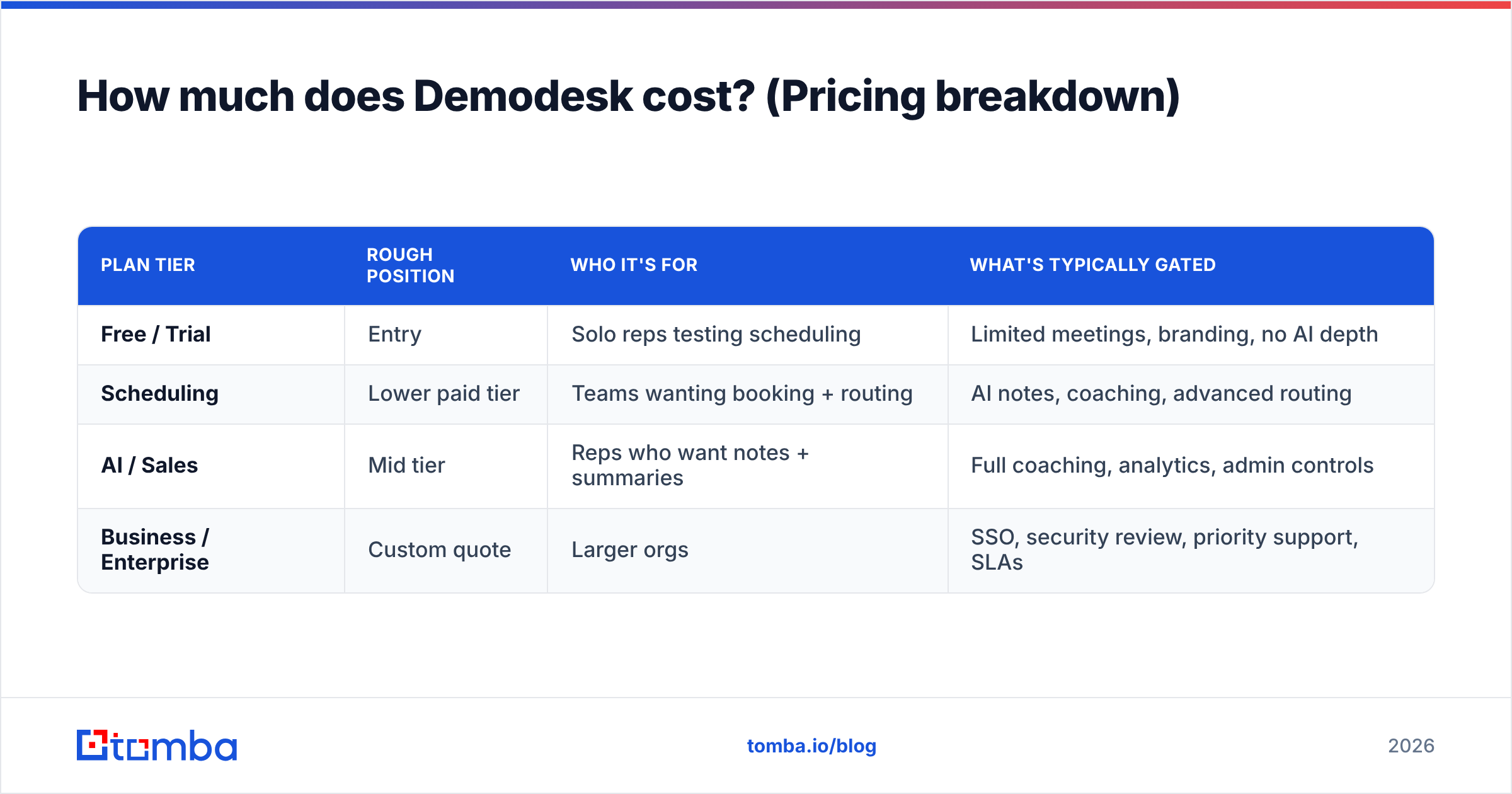
Demodesk uses per-user, per-month pricing split across tiers. Like most modern sales tools, it gates the interesting features behind the higher plans. That means advanced automation, deeper coaching, admin controls, and integrations. Pricing has shifted over the years as the product leaned harder into AI. So always confirm current numbers on the vendor's own page before you commit a budget.
The table below shows the typical shape of Demodesk's public plans. Treat the dollar figures as rough tiers, not a signed quote.
| Plan tier | Rough position | Who it's for | What's typically gated |
|---|---|---|---|
| Free / Trial | Entry | Solo reps testing scheduling | Limited meetings, branding, no AI depth |
| Scheduling | Lower paid tier | Teams wanting booking + routing | AI notes, coaching, advanced routing |
| AI / Sales | Mid tier | Reps who want notes + summaries | Full coaching, analytics, admin controls |
| Business / Enterprise | Custom quote | Larger orgs | SSO, security review, priority support, SLAs |
A few pricing realities are worth saying out loud:
- It is priced per seat. A 10-rep team on a mid tier is a real line item. The "AI" value only shows up on the pricier plans. The cheap tier is basically a scheduler.
- Annual billing is where the discounts live. Month-to-month is handy, but you pay for it. Enterprise is quote-only, so budget for a sales call, not a checkout page.
- The coaching and analytics layer is the upsell. The features most people watch the demo for tend to sit near the top of the ladder.
- Add-ons and overage add up. Extra meeting minutes, storage, or integrations can push the real cost above the sticker price.
When you weigh any per-seat tool, it helps to anchor against clear, published pricing. Tomba, for example, lists everything openly. There is a free tier, then Starter at $49/mo, Growth at $99/mo, and Pro at $249/mo. So you can model cost before you talk to anyone. You can see the full Tomba pricing breakdown without a sales call. Demodesk's Enterprise tier, by contrast, stays hidden.
Is Demodesk worth it? (Reviews summary)#
Short answer: yes for demo-heavy SaaS teams. For everyone else, it is overkill. Across public review sites, the mood is broadly positive. But the praise and the complaints are both specific and consistent.
Reviewers on sites like G2 and Capterra tend to say the following.
Common praise
- Meetings "just work" in the browser. Prospects install nothing, which cuts friction and no-shows.
- The AI note-taking and summaries save reps real time after each call.
- Scheduling and routing are clean. The branded booking page looks professional.
- Coaching gives managers a view into calls they would never review otherwise.
Recurring complaints
- Price-for-value is the most common worry, especially for small teams that mostly use the scheduler.
- Call quality can wobble now and then on the live room.
- Integration depth with some CRMs or dialers does not go as far as teams expect.
- The coaching and analytics side has a learning curve before it pays off.
The pattern is familiar. The product delivers on its core promise. The friction is about cost and edge-case reliability, not a broken tool.
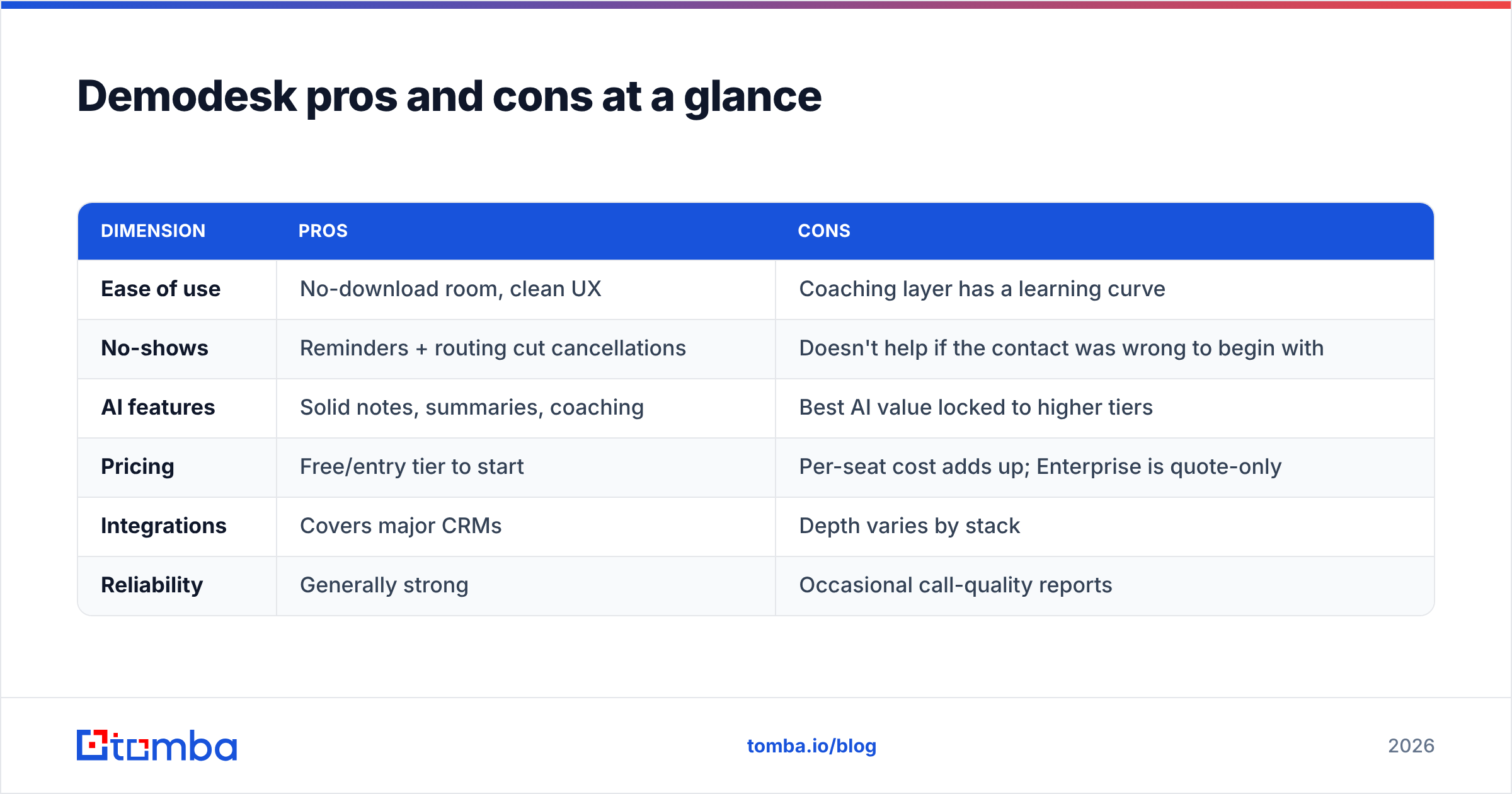
Demodesk pricing reviews pros and cons at a glance#
| Dimension | Pros | Cons |
|---|---|---|
| Ease of use | No-download room, clean UX | Coaching layer has a learning curve |
| No-shows | Reminders + routing cut cancellations | Doesn't help if the contact was wrong to begin with |
| AI features | Solid notes, summaries, coaching | Best AI value locked to higher tiers |
| Pricing | Free/entry tier to start | Per-seat cost adds up; Enterprise is quote-only |
| Integrations | Covers major CRMs | Depth varies by stack |
| Reliability | Generally strong | Occasional call-quality reports |
The honest read: Demodesk is a strong specialist. It is excellent at the meeting itself and the workflow around it. It is not your data source, your prospecting engine, or your outbound sequencer. Do not buy it expecting those.
How does Demodesk compare to the alternatives?#
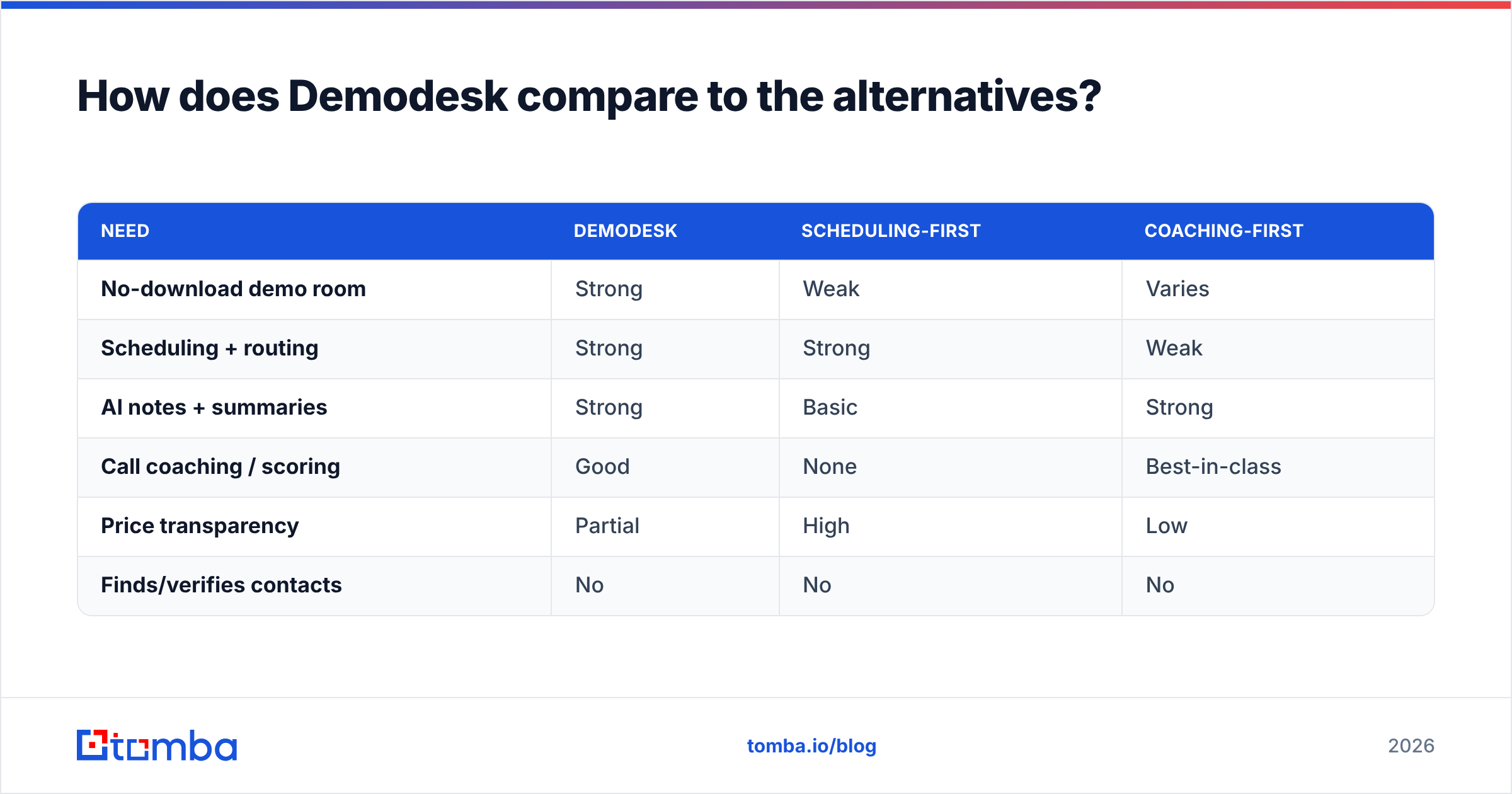
Demodesk sits in a crowded space. Which rival is "closest" depends on which of its four jobs you care about most. Want mainly scheduling? Tools like Calendly overlap. Want conversation intelligence and coaching? Gong is the heavyweight. Want the demo room and recording? General video plus a recorder can get close.
| Need | Demodesk | Scheduling-first | Coaching-first |
|---|---|---|---|
| No-download demo room | Strong | Weak | Varies |
| Scheduling + routing | Strong | Strong | Weak |
| AI notes + summaries | Strong | Basic | Strong |
| Call coaching / scoring | Good | None | Best-in-class |
| Price transparency | Partial | High | Low |
| Finds/verifies contacts | No | No | No |
Notice the last row. Every tool here shares the same blind spot. None of them source or validate the people you invite. That is by design — they are meeting tools, not data tools. And that leads to the part of the decision most teams underestimate.
What Demodesk won't fix: the data problem behind your meetings#
The most expensive line item in your pipeline isn't the meeting software. It is the meeting that should never have been booked. A flawless demo room does nothing if the invite goes to the wrong role, an inbox that bounces, or a title that left the company six months ago.
Demodesk cuts no-shows caused by friction and forgetfulness. It cannot cut no-shows caused by bad contact data. It never sees your data until the calendar link is already sent. Finding the right person, confirming their email, and enriching the account is a different job. It belongs to a different tool category.

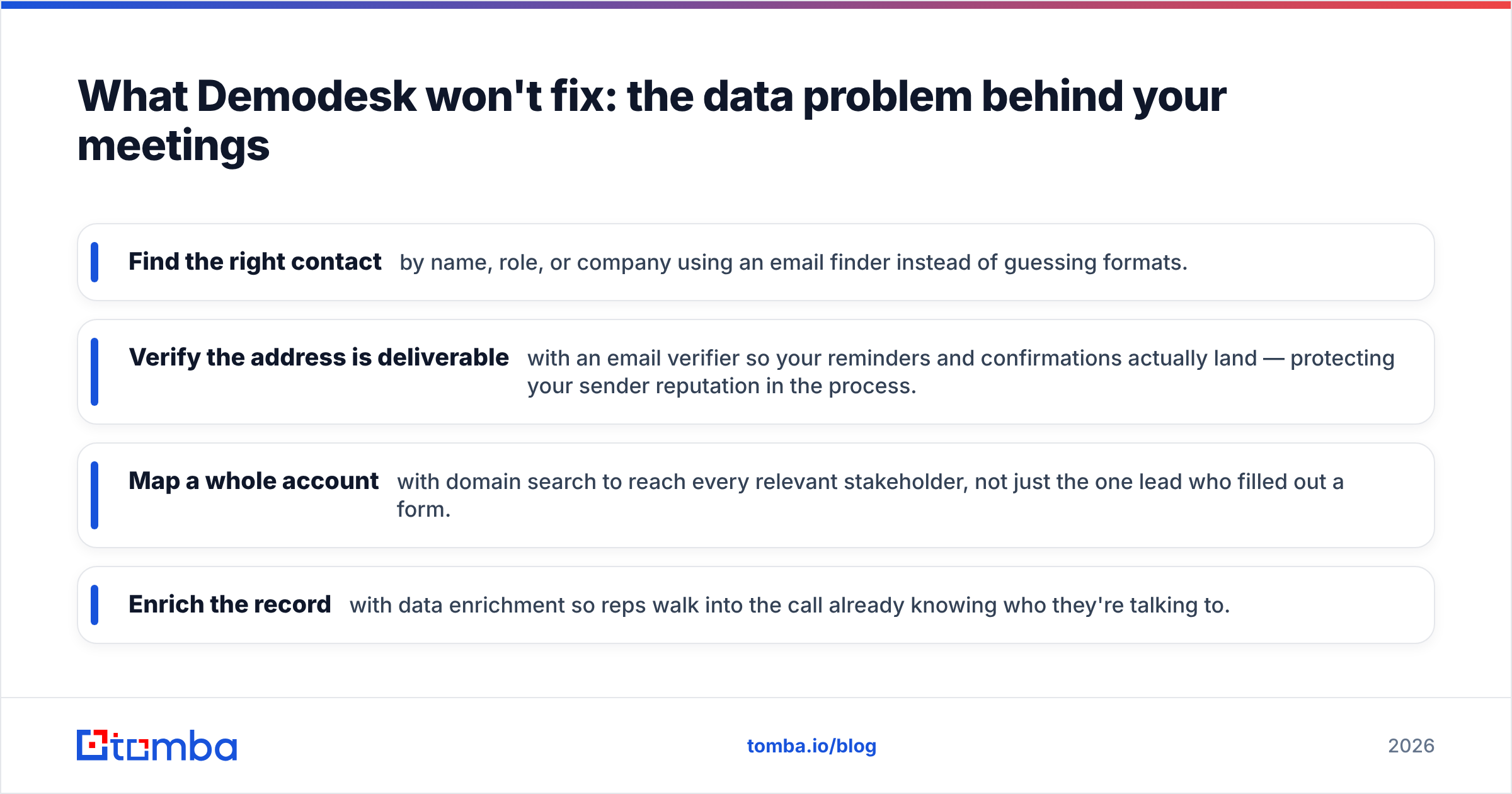
This is where a data platform sits in front of your meeting stack. Before a booking link goes out, you want to:
- Find the right contact by name, role, or company with an email finder, instead of guessing formats.
- Verify the address is deliverable with an email verifier, so your reminders and confirmations land — and your sender reputation stays safe.
- Map a whole account with domain search, so you reach every stakeholder, not just the one lead who filled out a form.
- Enrich the record with data enrichment, so reps walk in already knowing who they are talking to.
Do that first, and every dollar you spend on Demodesk works harder. The meetings it polishes are now meetings with real, reachable, qualified people.
Who should buy Demodesk — and who shouldn't#
Buy Demodesk if:
- You run a high volume of scheduled software demos.
- You want scheduling, recording, notes, and coaching in one platform.
- You have enough seats and deal value to justify per-user AI pricing.
- Your managers actually want to review and coach calls.
Look elsewhere if:
- You are a small team that mostly needs a calendar link. A scheduler is cheaper.
- Your motion is cold outbound or phone-first. You need prospecting and dialing, not a demo room.
- Your real gap is finding and reaching prospects, not meeting them. That is a data problem, not a meeting problem.
Frequently asked questions#
Is Demodesk free? There is usually a free or trial entry point. But it is limited to basic scheduling and capped meetings. The AI notes and coaching that make the product shine live on paid tiers. The best of it sits on the higher plans.
Why is Demodesk pricing not fully public? The lower tiers are usually listed. Business and Enterprise are quote-only. That level bundles security review, SSO, SLAs, and volume seats. Budget for a sales call rather than a self-serve checkout.
Do the reviews justify the price? For demo-heavy SaaS teams, most reviewers say yes. The main critics are smaller teams. They only use the scheduler and feel they pay for AI features they never touch.
Does Demodesk find email addresses or phone numbers? No. It is a meeting platform. To source and verify contacts before you invite them, you need a dedicated data tool. That is a separate part of the stack.
The bottom line#
Demodesk is a well-reviewed, capable meeting platform. Its ideal buyer is clear: demo-heavy software teams that want scheduling, recording, notes, and coaching in one place and can absorb per-seat AI pricing. The honest cons are real but manageable if you fit that profile — value-for-cost at small scale, quote-only Enterprise, and the odd reliability report. That is the short version of this Demodesk pricing reviews pros and cons review.
Just remember what it does not do. A perfect meeting with the wrong person is still a wasted slot. Before you spend on polishing calls, make sure the people on your calendar are real, reachable, and worth the time. Start by finding and verifying every contact with the Tomba Email Finder — free for your first 25 searches — so the meetings Demodesk runs so well are meetings that actually convert.
Related guides#
Ready to find emails that actually work?
Join 150,000+ professionals who stopped guessing and started sending. Free credits on signup — no credit card required.
Get the Tomba newsletter
Practical outbound tactics and product updates — once every two weeks.
About the author