Dialerai Pricing, Reviews, Pros and Cons: A 2026 Guide
An honest, third-party breakdown of Dialerai pricing, real user reviews, and the pros and cons — plus how to feed it clean, verified phone data so every dial actually connects.
Dialerai promises to turn a rep's worst hour into live conversations. Instead of punching numbers and listening to dial tones, reps just talk. But the marketing page won't tell you what it really costs. It won't show you where it frustrates users. And it won't say whether an AI dialer fixes your biggest problem. This is a neutral, third-party look at Dialerai pricing, reviews, pros and cons.
TL;DR — Is Dialerai worth it?#
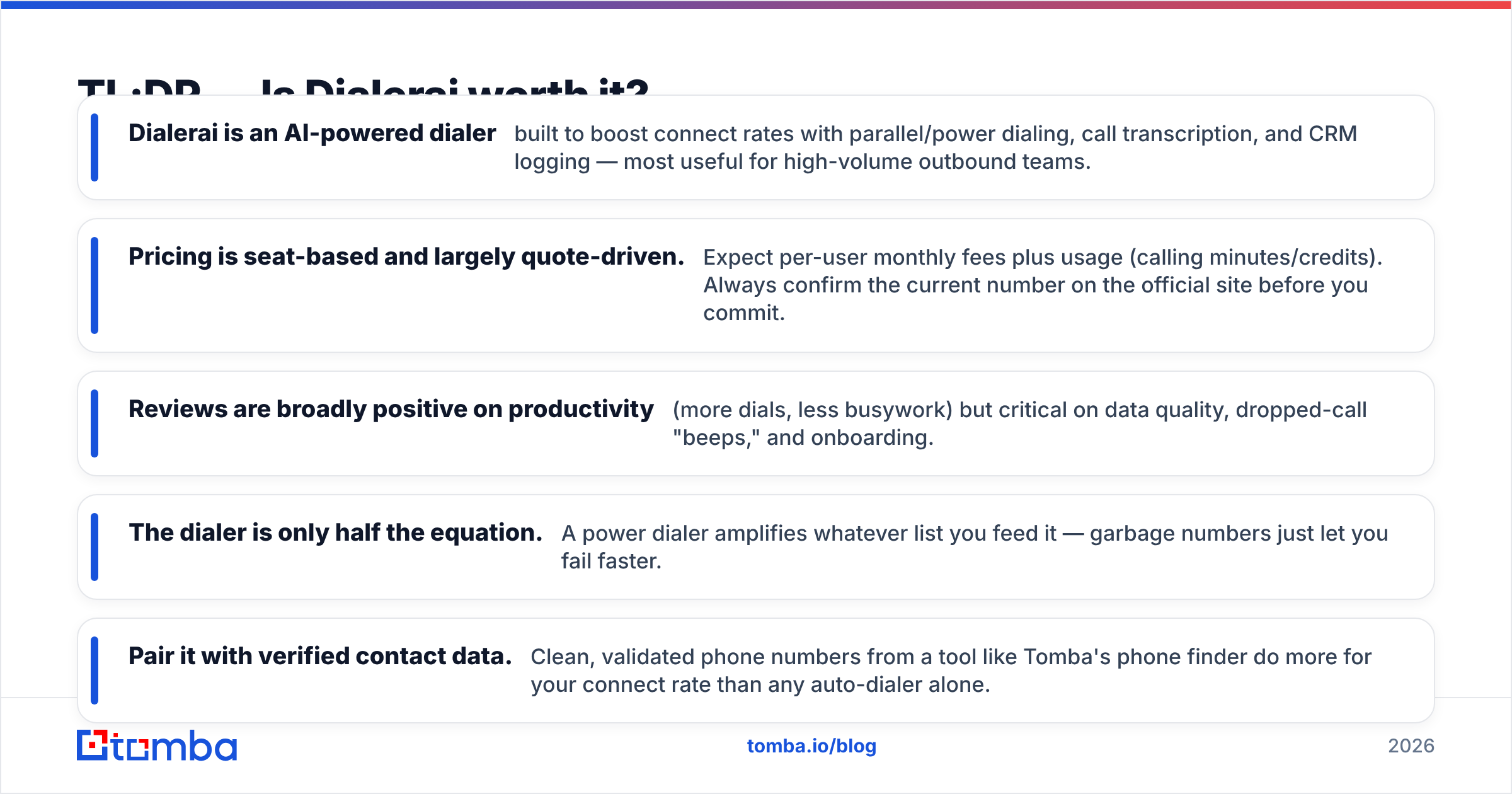
- Dialerai is an AI-powered dialer. It boosts connect rates with parallel dialing, call transcription, and CRM logging. It fits high-volume outbound teams best.
- Pricing is seat-based and mostly quote-driven. Expect a per-user monthly fee plus usage (calling minutes or credits). Confirm the current number on the official site before you commit.
- Reviews praise productivity — more dials, less busywork. They also flag data quality, dropped-call "beeps," and onboarding.
- The dialer is only half the job. A power dialer amplifies whatever list you feed it. Garbage numbers just let you fail faster.
- Pair it with verified contact data. Clean, validated phone numbers from a tool like Tomba's phone finder do more for your connect rate than any auto-dialer alone.
What is Dialerai and who is it for?#
Dialerai is a sales calling platform in the "AI dialer" category. The software automates the mechanical parts of outbound phone prospecting. Instead of dialing one number at a time, it dials several lines at once (parallel dialing). It drops a voicemail with one click. And it connects a rep the moment a human picks up. Around that core it adds AI features: call transcription, keyword tagging, and automatic logging back to your CRM.
The ideal buyer is a high-volume outbound team — SDRs, BDRs, and inside-sales reps who live on the phone. If your reps make 10 calls a day, you don't need this. If they make 100 or more, the math starts to matter. A power dialer can reclaim the 60–70% of "talk time" spent waiting, misdialing, and leaving voicemails.
Dialing technology is genuinely useful. But it sits downstream of a bigger question: are you calling the right people at the right numbers? For a primer on how automated dialing works, the Wikipedia entry on predictive dialers is a solid, vendor-neutral explainer.
How much does Dialerai cost in 2026?#
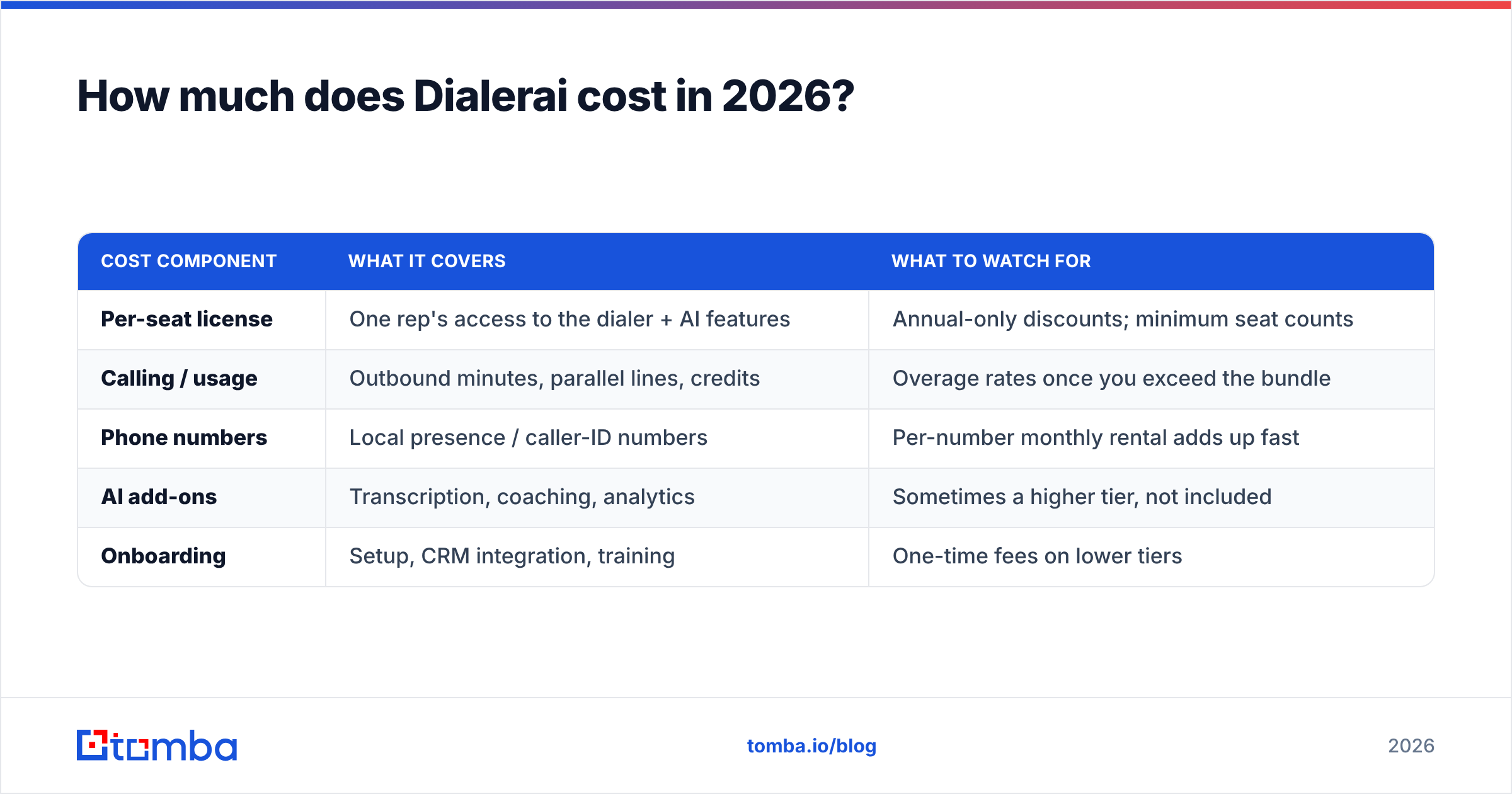
Short answer: Dialerai uses seat-based pricing, and most real quotes are custom. AI dialers in this segment usually bill on two axes at once. You pay a per-seat subscription. You also pay usage-based calling costs — minutes, credits, or phone-number rentals. That two-part structure is where buyers get surprised, so read any quote closely.
Published numbers change often. Vendors also gate their real pricing behind a demo. So treat the table below as a structure map, not a price sheet. Verify the live figure on Dialerai's official page before you sign.
| Cost component | What it covers | What to watch for |
|---|---|---|
| Per-seat license | One rep's access to the dialer + AI features | Annual-only discounts; minimum seat counts |
| Calling / usage | Outbound minutes, parallel lines, credits | Overage rates once you exceed the bundle |
| Phone numbers | Local presence / caller-ID numbers | Per-number monthly rental adds up fast |
| AI add-ons | Transcription, coaching, analytics | Sometimes a higher tier, not included |
| Onboarding | Setup, CRM integration, training | One-time fees on lower tiers |
The classic mistake is comparing only the headline seat price. A "$X per user" plan can double fast. Add parallel lines. Add local numbers for every area code you target. Add the AI tier that made you interested in the first place. When you request a quote, ask for the all-in monthly cost for your seat count and expected call volume — not the starting price.
How Dialerai pricing compares in spirit#
To sanity-check any dialer quote, weigh it against the options you already have or could combine:
- Manual dialing (free, slow): No software cost, but you pay in wasted rep hours. Fine at low volume, brutal at scale.
- Built-in CRM dialers (bundled): HubSpot, Salesforce, and Pipedrive include click-to-call. They cost less, but usually dial one line at a time with thinner AI.
- Standalone AI dialers like Dialerai (premium): Parallel lines plus AI coaching. The highest productivity ceiling, and the highest, most variable cost.
- Dialer plus a verified-data layer (recommended): Any dialer works better when the list is pre-validated. Fewer dead numbers means you pay for conversations, not disconnects.
Most teams underweight that fourth option. You can see how a data layer pairs with outbound tooling on the Tomba pricing page. The plans are public — Free (25 searches/mo), Starter $49/mo, Growth $99/mo, and Pro $249/mo. There's no "contact sales" wall to see the number.
What do Dialerai reviews say? Pros and cons#
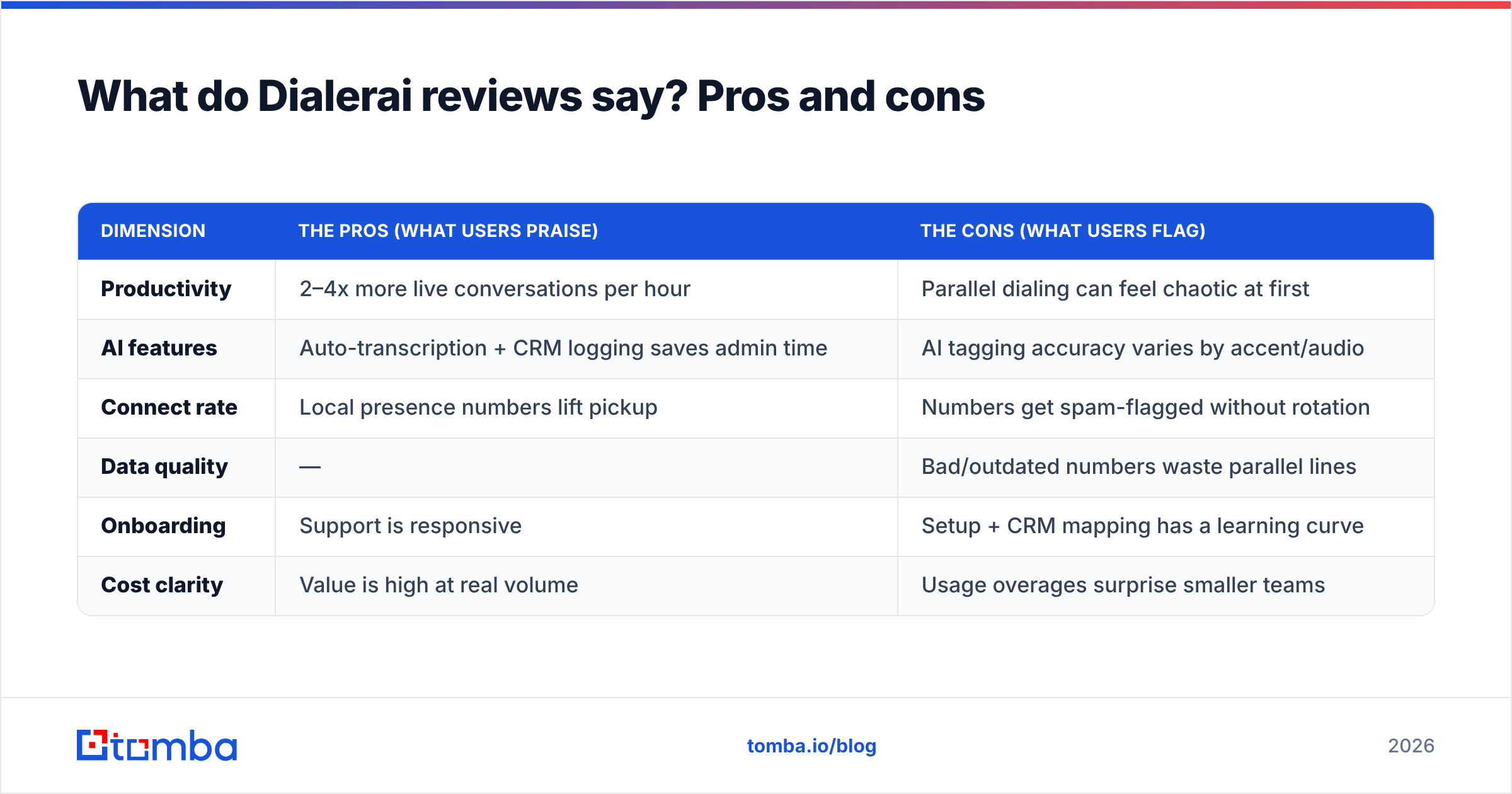
Reviews on directories like G2 and Capterra paint a consistent picture. The productivity gains are real. The friction is almost always about data, call deliverability (spam labeling), and setup.
| Dimension | The pros (what users praise) | The cons (what users flag) |
|---|---|---|
| Productivity | 2–4x more live conversations per hour | Parallel dialing can feel chaotic at first |
| AI features | Auto-transcription + CRM logging saves admin time | AI tagging accuracy varies by accent/audio |
| Connect rate | Local presence numbers lift pickup | Numbers get spam-flagged without rotation |
| Data quality | — | Bad/outdated numbers waste parallel lines |
| Onboarding | Support is responsive | Setup + CRM mapping has a learning curve |
| Cost clarity | Value is high at real volume | Usage overages surprise smaller teams |
The pros, in plain terms#
More conversations per hour. This is the headline benefit, and it holds up. The software eats the dial tones, voicemails, and misdials. So a rep spends their time talking instead of waiting.
Less administrative drag. Automatic call logging and transcription mean reps don't retype notes into the CRM after every call. Managers get searchable call records for coaching.
Better pickup with local presence. A local area code lifts answer rates. It beats an unknown toll-free number.
The cons, in plain terms#
It punishes bad lists. A parallel dialer calling five dead numbers at once just reaches five voicemails faster. Your data caps the tool's efficiency.
Spam-flagging is a real risk. Aggressive dialing from a small pool of numbers gets those numbers labeled "Spam Likely." That quietly destroys connect rates. Number rotation and volume discipline matter.
Setup isn't instant. CRM field mapping, number provisioning, and rep training take real time. You won't see the promised lift on day one.

Does an AI dialer fix your real problem?#
Usually the dialer isn't the bottleneck — the data is. Teams buy Dialerai expecting a connect-rate miracle. Then they discover the ceiling is set by list quality. If 30% of your numbers are wrong, no amount of parallel dialing saves you. You've just automated calling wrong numbers.
Think of it like a high-performance engine. Dialerai is a genuinely fast engine. But it still runs on the fuel you put in. Feed it stale, unverified numbers and it burns through them fast with nothing to show. Feed it clean, verified direct dials and every parallel line has a real shot at a real conversation.
That's why the highest-ROI setup is a two-layer stack:
- Layer 1 — Data: Find and verify direct-dial numbers, and the decision-maker behind them, before they hit the dialer. Tomba's phone finder surfaces B2B phone numbers. The phone validator confirms they're live and correctly formatted, so you don't waste parallel lines on disconnects.
- Layer 2 — Dialing: Let Dialerai (or any dialer) do what it's good at — dialing fast and logging everything.
Does your outbound also run on email? Enrich those same contacts with a verified work address via data enrichment. That gives reps a multi-channel play instead of a phone-only gamble. And running numbers through a proper phone number verification pass first is the cheapest way to raise the connect rate on any dialer.
Dialerai alternatives and how to choose#
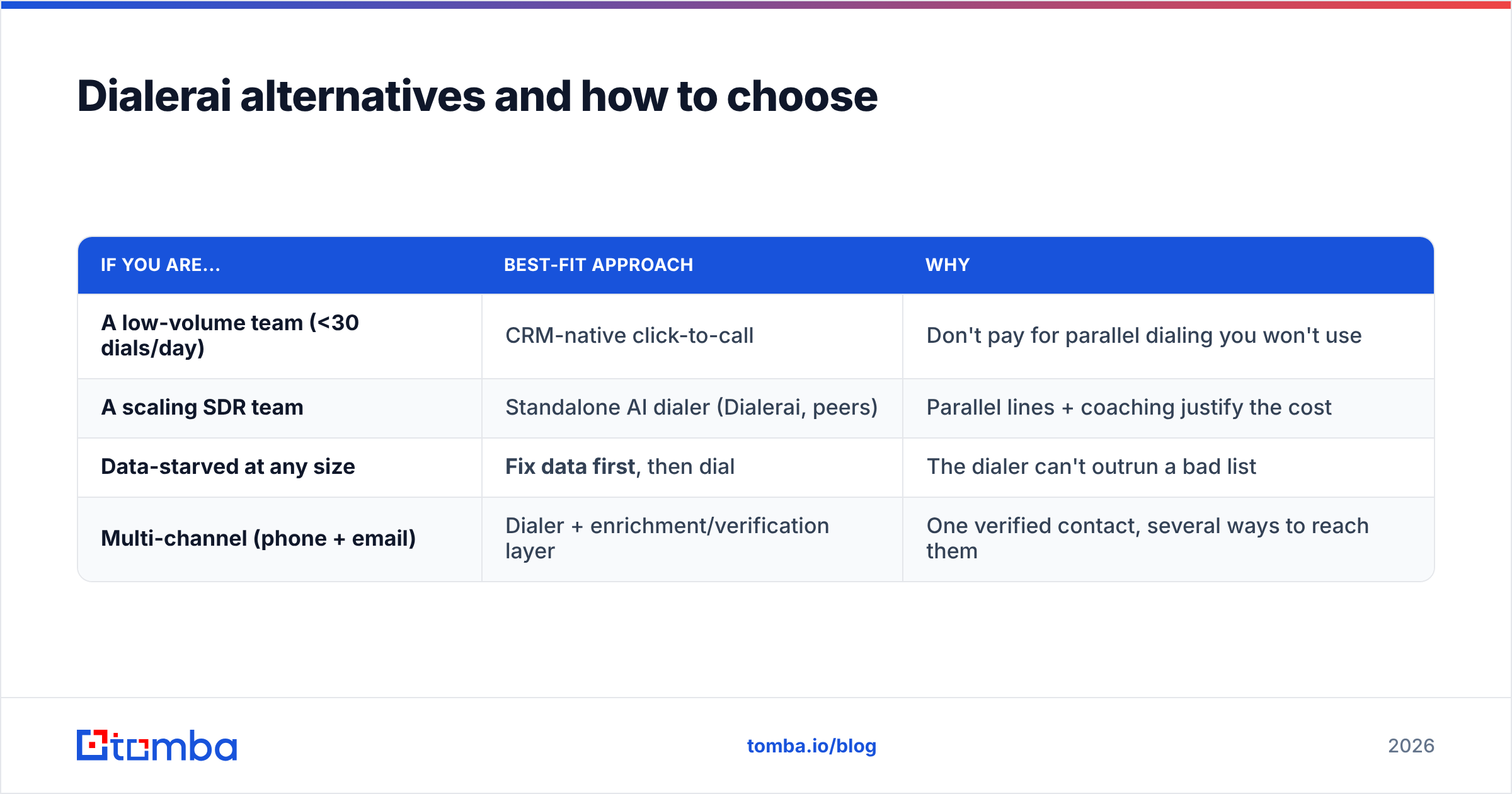
Dialerai competes in a crowded field — Orum, the power dialers inside Salesloft and Outreach, Nooks, and CRM-native dialers. The right pick depends on volume, budget, and how much AI coaching you actually need.
| If you are... | Best-fit approach | Why |
|---|---|---|
| A low-volume team (<30 dials/day) | CRM-native click-to-call | Don't pay for parallel dialing you won't use |
| A scaling SDR team | Standalone AI dialer (Dialerai, peers) | Parallel lines + coaching justify the cost |
| Data-starved at any size | Fix data first, then dial | The dialer can't outrun a bad list |
| Multi-channel (phone + email) | Dialer + enrichment/verification layer | One verified contact, several ways to reach them |
Here's a practical checklist before you buy any AI dialer:
- Get the all-in quote for your seat count and call volume, not the starting price.
- Ask about number rotation and spam-mitigation. It protects your connect rate.
- Test with a verified list so your trial measures the tool, not your data.
- Check CRM integration depth — one-way logging versus true two-way sync.
- Confirm overage rates so a busy month doesn't blow the budget.
For deeper comparisons, cross-reference independent reviews on G2 and Capterra. Don't rely on any single vendor's own case studies.
Frequently asked questions#
Is Dialerai worth the price? For genuinely high-volume outbound teams, the productivity lift can justify the cost — but only if your contact data is clean. At low call volume, or with an unverified list, you'll overpay for capacity you can't use.
How is Dialerai priced? Seat-based licensing plus usage — calling minutes, credits, and phone-number rentals. Most real numbers come by quote. Always confirm the live figure and overage rates with the vendor.
What's the biggest hidden cost? Usage overages and per-number rentals across many area codes. The headline seat price rarely reflects the all-in monthly total.
Do I need verified data if I have an AI dialer? Yes — more than ever. A parallel dialer amplifies list quality in both directions. Verified numbers mean more of your dials become conversations.
Dialerai pricing, reviews, pros and cons: the verdict#
Here's the honest take on Dialerai pricing, reviews, pros and cons. Dialerai is a capable AI dialer. The pros — more conversations, less admin, better pickup — are real for teams that make enough calls to justify it. The cons — variable usage costs, spam-flag risk, and a hard dependency on data quality — are just as real. The verdict: the dialer rarely fails on its own. The list underneath it does.
Before you commit a dollar to any dialer, fix the fuel. Use Tomba's Email Finder and phone finder to build a verified, decision-maker-level contact list. Run it through the phone validator. Then let Dialerai dial. That order — clean data first, fast dialing second — turns an expensive AI dialer into a real pipeline engine. Start free with 25 searches and see how much your connect rate improves when every number is one worth calling.
Related guides#
Ready to find emails that actually work?
Join 150,000+ professionals who stopped guessing and started sending. Free credits on signup — no credit card required.
Get the Tomba newsletter
Practical outbound tactics and product updates — once every two weeks.
About the author