DialIQ Pricing Reviews Pros and Cons: An Honest 2026 Breakdown
A neutral, numbers-first look at DialIQ pricing, real user reviews, and the pros and cons of Klenty's AI parallel dialer — plus how to make sure the numbers you dial are actually accurate.
Deciding whether DialIQ belongs in your sales stack comes down to two questions. What does it actually cost? And does the AI dialer earn back that spend in connected calls? This guide to DialIQ pricing reviews pros and cons is a neutral, third-party take — not a sales pitch. We look at the real cost, honest user reviews, and the plain pros and cons before you commit a team to it.
TL;DR#
- DialIQ is Klenty's AI-powered parallel dialer — it dials multiple numbers at once, drops voicemails, logs calls to your CRM, and transcribes conversations so reps spend more time talking and less time waiting.
- Pricing is seat-plus-usage based and bundled into Klenty's plans rather than sold as a flat public number, so your real cost depends on seats, dialing volume, and phone/telephony add-ons.
- The strongest pro is connect-rate efficiency: parallel dialing and local presence can multiply live conversations per hour for high-volume outbound teams.
- The biggest con is that a dialer only amplifies the list you feed it — dial bad numbers faster and you just burn your caller reputation faster.
- Best-fit buyer: SDR/BDR teams doing 100+ dials a day. If you dial occasionally, a lighter setup plus accurate contact data is the cheaper play.
What is DialIQ and who is it for?#
DialIQ is the sales dialer built by Klenty, a sales engagement platform. Think of it like a call center's autodialer, shrunk down for a modern SDR team. A rep no longer punches in numbers and waits through three dial tones. Instead, the software dials several prospects at once and connects the rep only when a real person answers.
That "parallel dialing" model is the core idea. A manual dialer is a single checkout lane at a grocery store; a parallel dialer is five lanes open at once feeding one cashier the moment a customer is ready. For teams whose entire job is volume outbound, that difference compounds fast across a day.
DialIQ sits in the same lane as tools like Orum, Nooks, PowerDialer by Salesloft, and Aircall's outbound features. It's aimed squarely at:
- SDR and BDR teams running high-volume cold calling
- Sales orgs already on Klenty who want dialing native to their sequences
- Managers who want call recording, transcription, and coaching analytics in one place
If your reps make a handful of warm calls a week, this is more tool than you need. If they live on the phone, it's the category worth evaluating.

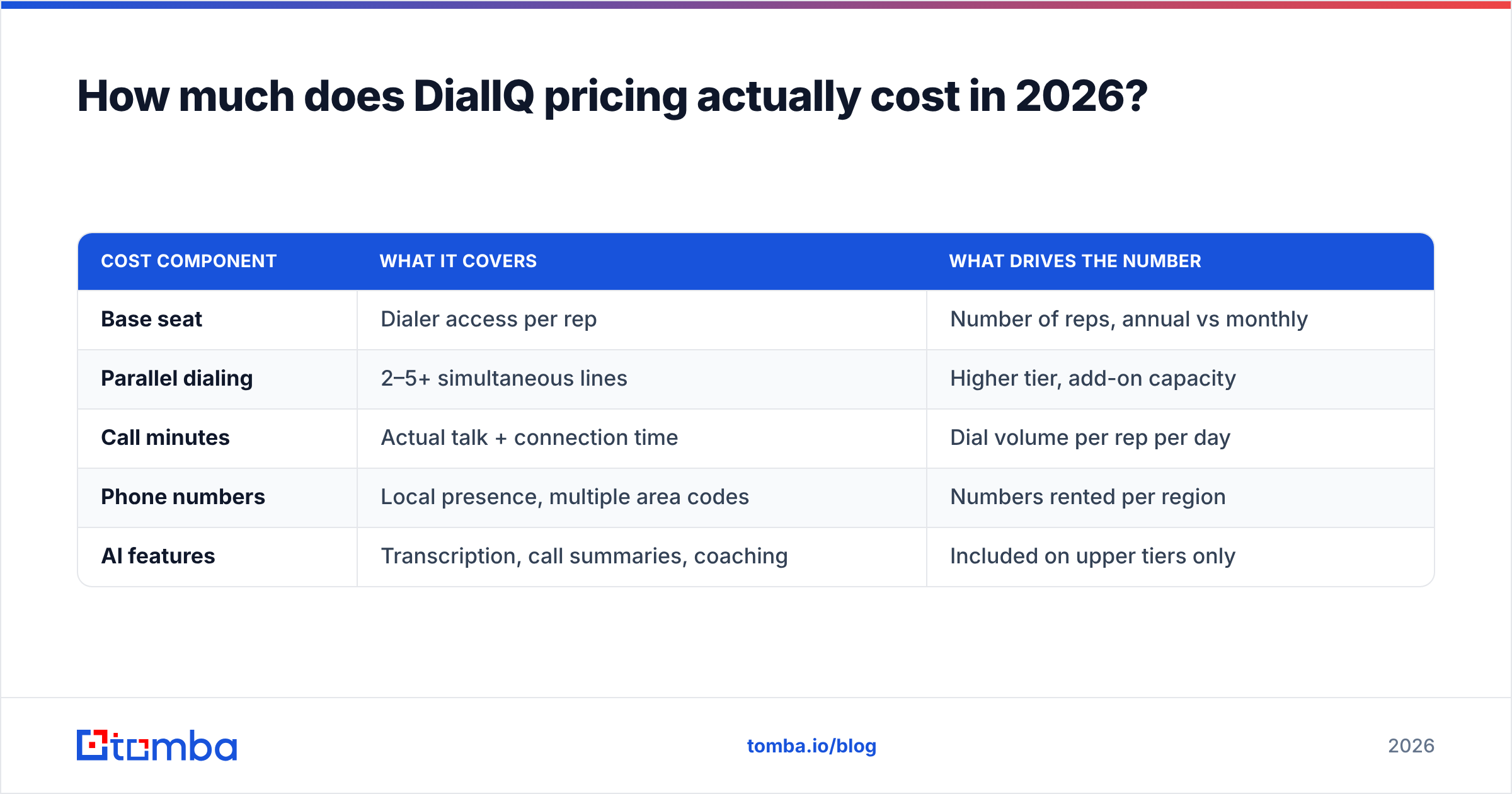
How much does DialIQ pricing actually cost in 2026?#
Here's the honest answer: DialIQ does not publish a single flat price, because it's packaged with Klenty's sales engagement plans and layered with usage-based telephony costs. That's normal for dialers — the call minutes, phone numbers, and local-presence features carry real carrier costs — but it makes side-by-side shopping harder.
Your total DialIQ cost is generally built from three layers:
- Seat/subscription cost — a per-user monthly fee, usually billed annually, that unlocks the dialer inside Klenty.
- Dialing/telephony usage — call minutes, phone number rentals, and parallel-dial capacity, often sold as credits or a metered add-on.
- Plan tier — higher Klenty tiers unlock parallel dialing, AI transcription, and coaching analytics that lower tiers gate off.
Because vendors adjust these regularly, treat any specific dollar figure you see in an old blog post with suspicion and confirm on the vendor's own pricing page or in a live quote. The table below shows the structure to price out, not fixed 2026 rates.
| Cost component | What it covers | What drives the number |
|---|---|---|
| Base seat | Dialer access per rep | Number of reps, annual vs monthly |
| Parallel dialing | 2–5+ simultaneous lines | Higher tier, add-on capacity |
| Call minutes | Actual talk + connection time | Dial volume per rep per day |
| Phone numbers | Local presence, multiple area codes | Numbers rented per region |
| AI features | Transcription, call summaries, coaching | Included on upper tiers only |
The practical takeaway: a dialer's sticker seat price is rarely the real cost. A team of 8 reps dialing all day will spend meaningfully more on minutes and numbers than the seat line suggests. Model the usage before you sign.
How to estimate your real monthly spend#
Multiply your reps by average daily dials, then by talk minutes, then by working days. A team of five SDRs at 150 dials/day with a 5% connect rate and 4-minute average calls is very different, cost-wise, from three AEs making 20 warm calls a day. Run your own numbers before you trust any headline price — including the "starting at" figure DialIQ or any competitor advertises.
What do DialIQ reviews say — the real pros and cons?#
Across public review sites like G2 and Capterra, the sentiment on Klenty's dialer clusters into a consistent set of themes. Here's the balanced read.
The pros users consistently praise#
- Connect efficiency. The most cited win. Parallel dialing plus local presence noticeably increases live conversations per hour for high-volume teams. Reps stop listening to dead air.
- Native to sequences. Because DialIQ lives inside Klenty, calls, emails, and LinkedIn steps sit in one cadence. No tab-switching between a dialer and a sequencer.
- Call recording and AI transcription. Managers get searchable transcripts and summaries for coaching, which shortens ramp time for new reps.
- CRM logging. Calls and dispositions sync to the CRM automatically, so activity data isn't lost to manual entry.
The cons reviewers flag#
- Learning curve and setup. Parallel dialing, number provisioning, and compliance settings take configuration. Small teams sometimes find it heavy.
- Cost creep from usage. As covered above, minutes and numbers push the real bill above the seat price.
- Connection quality complaints. Some reviewers report occasional call-drop or audio issues — common across the whole dialer category, not unique to DialIQ.
- You're buying into Klenty. DialIQ isn't a standalone dialer you bolt onto any stack; it's most valuable if you adopt (or already use) Klenty's platform.
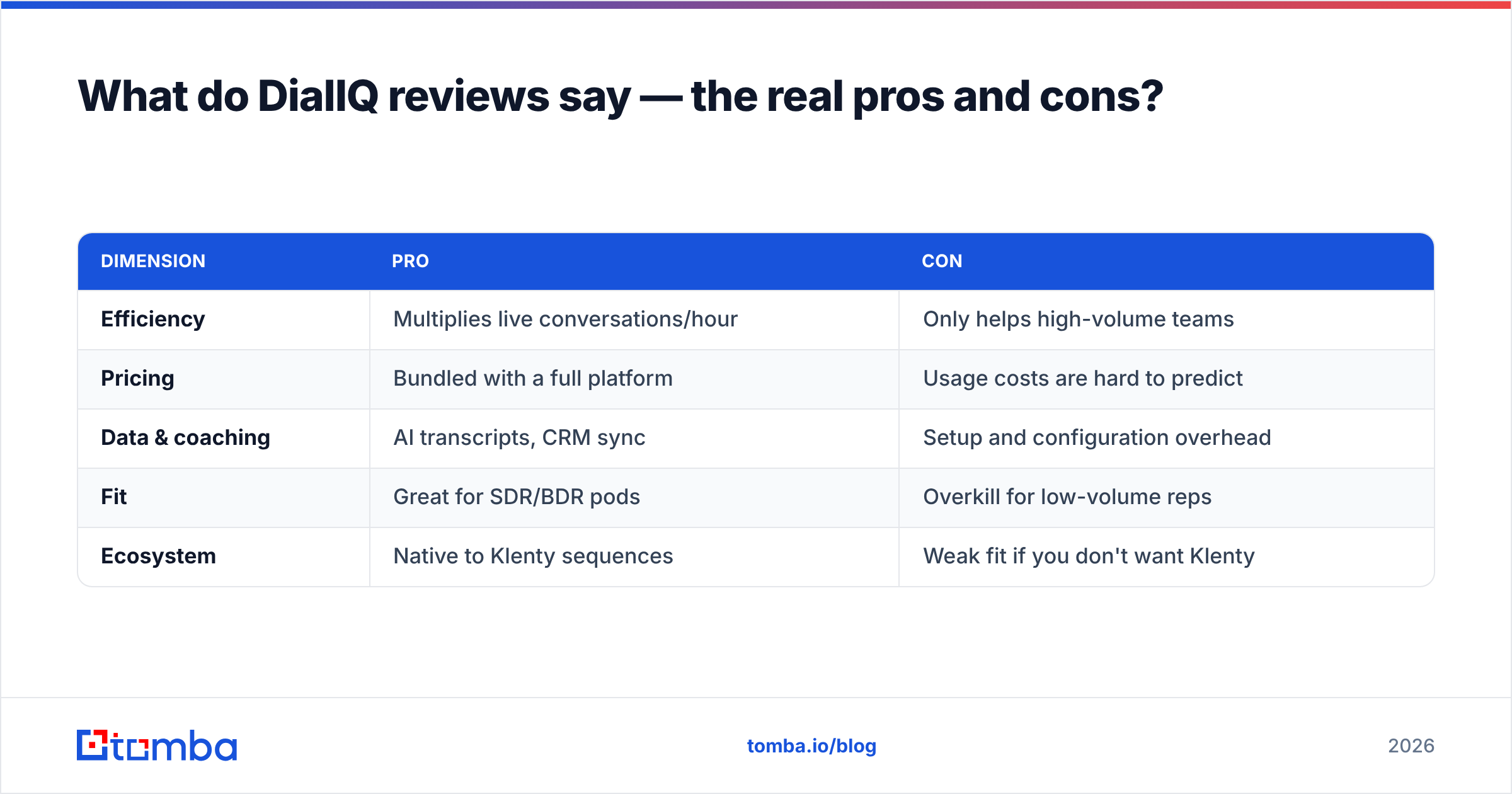
Pros and cons at a glance#
| Dimension | Pro | Con |
|---|---|---|
| Efficiency | Multiplies live conversations/hour | Only helps high-volume teams |
| Pricing | Bundled with a full platform | Usage costs are hard to predict |
| Data & coaching | AI transcripts, CRM sync | Setup and configuration overhead |
| Fit | Great for SDR/BDR pods | Overkill for low-volume reps |
| Ecosystem | Native to Klenty sequences | Weak fit if you don't want Klenty |
Is DialIQ worth it, or is your contact data the real bottleneck?#
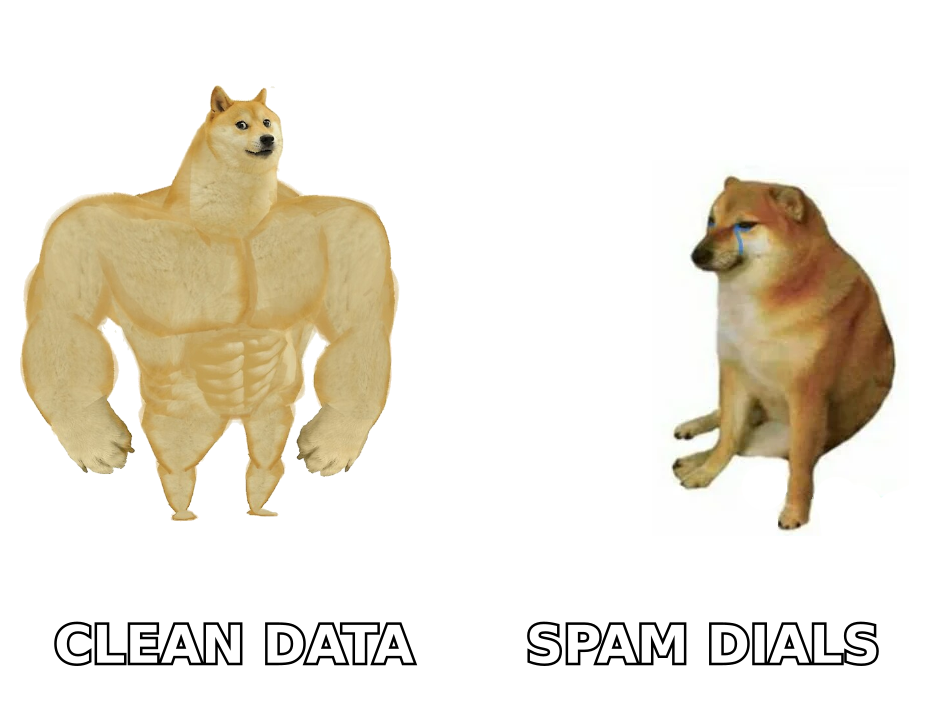
Here's the uncomfortable truth every dialer vendor glosses over: a faster dialer dialing bad numbers just wastes your reps' time faster. Parallel dialing amplifies whatever list you feed it. If 30% of your phone numbers are wrong, stale, or belong to the wrong person, you've paid a premium to hit dead ends at five times the speed — and torched your caller ID reputation doing it.
Connect rate is a function of two things: dialer efficiency (DialIQ's job) and data accuracy (your job). Most teams over-invest in the first and under-invest in the second. Before you upgrade to a parallel dialer, pressure-test your list quality.
That's where a data-first workflow pays off. Enriching and validating contacts before they hit the dialer means every simultaneous line is dialing a number that can actually connect:
- Use a phone finder to source direct-dial B2B phone numbers instead of switchboard lines that never reach the decision-maker.
- Run numbers through a phone validator to strip disconnected and invalid lines before they waste a dial.
- Pair calls with verified email using an email finder so multi-channel sequences reach the same person by phone and inbox.
Clean data doesn't replace a good dialer — it's what makes a good dialer worth paying for.
A simple pre-dial data checklist#
- Source direct dials, not main lines. Reaching a receptionist isn't a connect.
- Validate before importing. Remove dead numbers so your connect-rate math isn't lying to you.
- Match phone to a verified person. Confirm the number belongs to your target contact, not a former employee.
- Enrich for context. Title, company, and timezone data help reps call at the right hour with the right pitch.
- Re-verify quarterly. B2B data decays fast; last quarter's list is already stale.
DialIQ vs a data-first alternative: which spend comes first?#
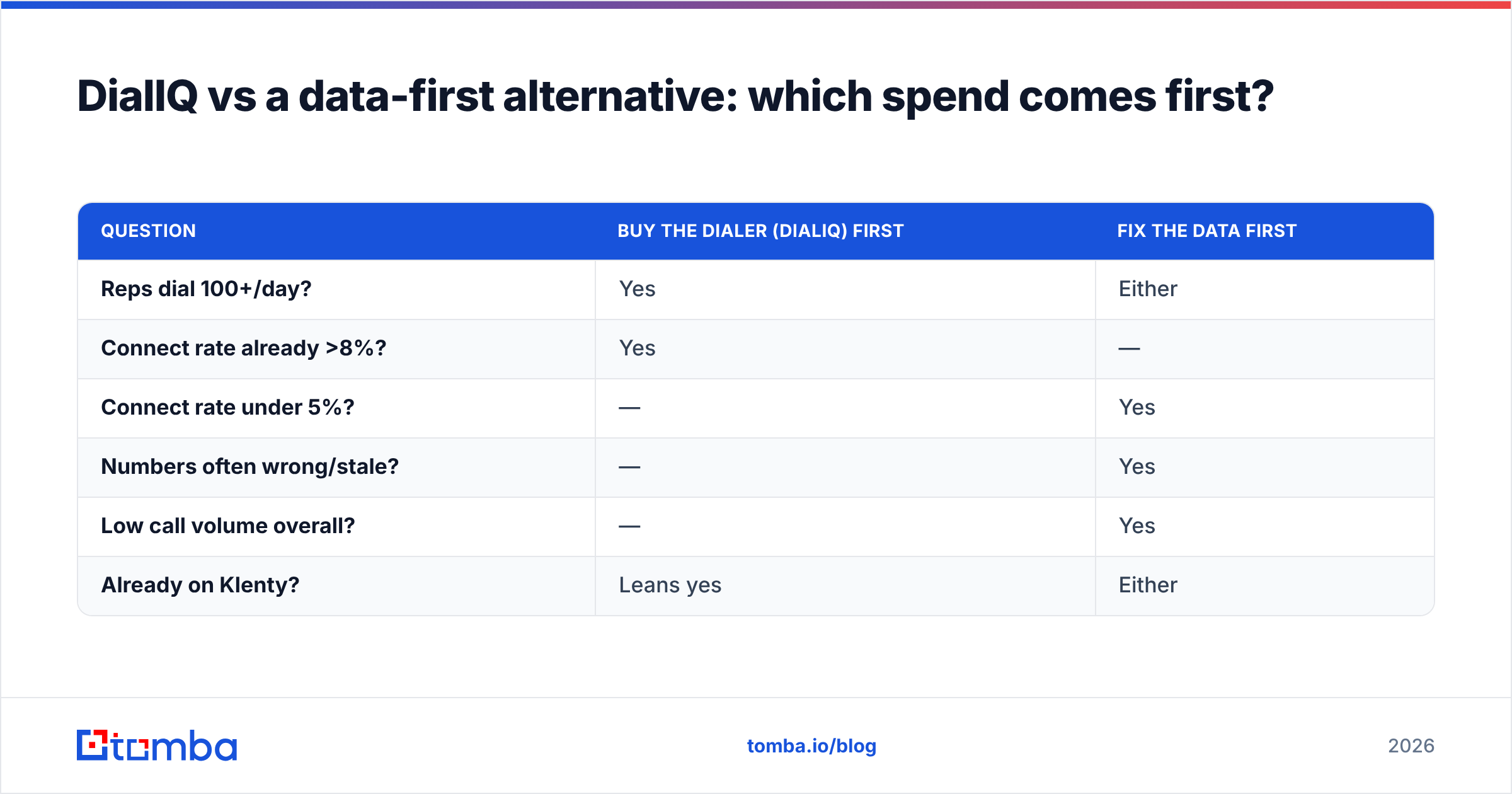
You don't have to choose one forever, but sequencing matters. If your connect rate is already healthy and volume is your ceiling, DialIQ solves the right problem. If your reps are dialing hard and still not connecting, the fix is upstream — in the data — not in a faster dialer.
| Question | Buy the dialer (DialIQ) first | Fix the data first |
|---|---|---|
| Reps dial 100+/day? | Yes | Either |
| Connect rate already >8%? | Yes | — |
| Connect rate under 5%? | — | Yes |
| Numbers often wrong/stale? | — | Yes |
| Low call volume overall? | — | Yes |
| Already on Klenty? | Leans yes | Either |
The math is straightforward: a dialer that doubles your dials but connects on garbage data returns less than accurate data that doubles your connect rate on the dials you already make. Many teams get the best ROI by tightening data quality first, then adding parallel dialing once the list is genuinely dial-ready.
You can pull direct dials and verified contacts in bulk with a B2B database and feed a clean, deduplicated list straight into whatever dialer you choose — DialIQ included.
How does DialIQ compare to other dialers?#
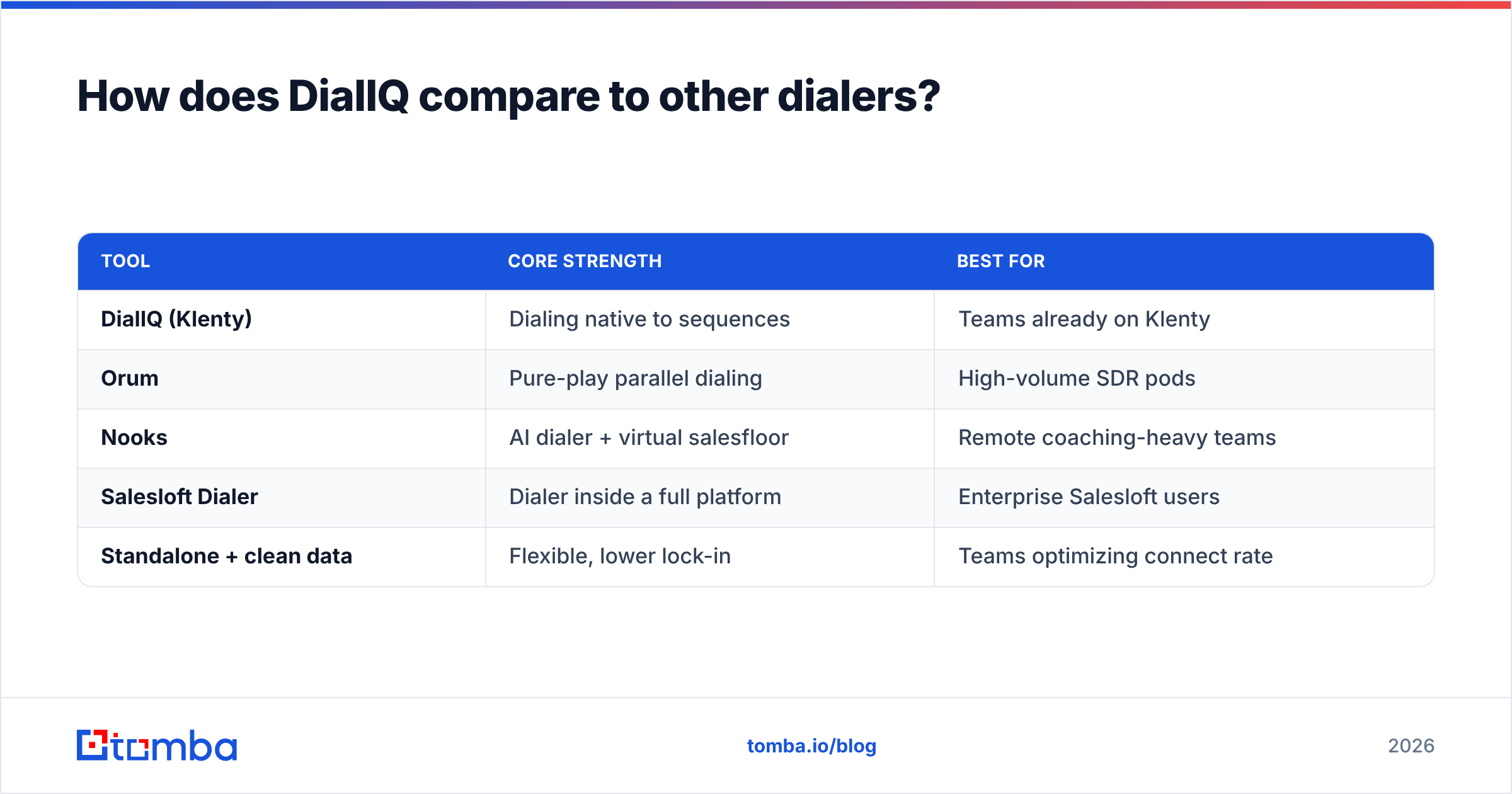
For context, DialIQ competes in a crowded field. Here's where it tends to land relative to the alternatives buyers shortlist.
| Tool | Core strength | Best for |
|---|---|---|
| DialIQ (Klenty) | Dialing native to sequences | Teams already on Klenty |
| Orum | Pure-play parallel dialing | High-volume SDR pods |
| Nooks | AI dialer + virtual salesfloor | Remote coaching-heavy teams |
| Salesloft Dialer | Dialer inside a full platform | Enterprise Salesloft users |
| Standalone + clean data | Flexible, lower lock-in | Teams optimizing connect rate |
The pattern: platform-native dialers like DialIQ win when you've already bought the platform. Pure-play dialers win on raw dialing features. And every option in this table performs better on accurate data than on a stale list — which is the one variable entirely in your control regardless of which vendor you pick.
The verdict on DialIQ pricing reviews pros and cons#
When you weigh the DialIQ pricing reviews pros and cons together, the honest summary is short: it's a capable AI parallel dialer that earns its keep for high-volume outbound teams — especially those already invested in Klenty. The pros (connect efficiency, native sequencing, AI transcription) are real. So are the cons (usage-driven cost creep, setup overhead, platform lock-in), and the seat price you see quoted is rarely the price you pay.
But the decision most teams get wrong isn't dialer-vs-dialer — it's dialer-vs-data. The fastest way to more meetings usually starts with a list that connects, then adds speed on top. Get the accuracy right and any dialer looks better; get it wrong and no dialer can save you.
Start with the data layer. Before you pay a premium for parallel dialing, make sure every number and email in your sequence is real, current, and tied to the right person. Tomba's Email Finder — alongside its phone finder, validator, and enrichment tools — helps you build a dial-ready list on a transparent plan that starts free (25 searches/month) and scales from $49/month, so your dialer spends its speed on connections that count.
Related guides#
Ready to find emails that actually work?
Join 150,000+ professionals who stopped guessing and started sending. Free credits on signup — no credit card required.
Get the Tomba newsletter
Practical outbound tactics and product updates — once every two weeks.
About the author