Digital Sales Room in 2026: The Complete B2B Buyer Guide
A digital sales room turns a messy, multi-thread B2B deal into one shared link buyers actually use. Here's how they work, what they cost, and when they win.
Digital Sales Room in 2026: The Complete B2B Buyer Guide
TL;DR
- A digital sales room (DSR) is a single, shareable, buyer-facing microsite where a rep and a buying committee run the whole deal: proposals, demos, pricing, mutual action plans, and chat live in one link.
- They exist because modern B2B deals involve 6–10 stakeholders and dozens of email threads. A DSR replaces the scavenger hunt with one source of truth.
- The measurable wins: shorter cycles, fewer "can you resend that PDF?" emails, and engagement analytics that tell you who is actually reading your proposal.
- DSRs are not a fit for transactional, single-threaded, low-ACV deals. The overhead only pays off when multiple people need to align.
- The room is only as good as the contacts you invite to it. Clean, verified stakeholder data is the unglamorous prerequisite most teams skip.
What is a digital sales room?#
A digital sales room is a persistent, personalized web space that a seller shares with a buyer to centralize everything a deal needs. Think of it like a shared Google Drive folder that grew a brain: instead of a static file dump, it tracks who opened what, when, and for how long, and it gives every stakeholder one place to ask questions.
Here is the everyday analogy. Buying enterprise software today is like planning a wedding by group text — the caterer, the venue, the in-laws, and your partner are all replying-all on different threads, and nobody can find the original quote. A digital sales room is the shared wedding-planning binder everyone opens instead. Technically, it's a buyer-facing microsite with access controls, embedded content, mutual action plans, and engagement analytics stitched to your CRM.
The concept sits inside the broader shift toward buyer enablement that analysts have tracked for years. Gartner's research on B2B buying found that buyers spend only about 17% of the purchase journey actually meeting with potential suppliers — and when three or more vendors are involved, that slice gets split further. A DSR is a way to stay useful during the 83% of the time you're not in the room.
Why do B2B teams use a digital sales room?#
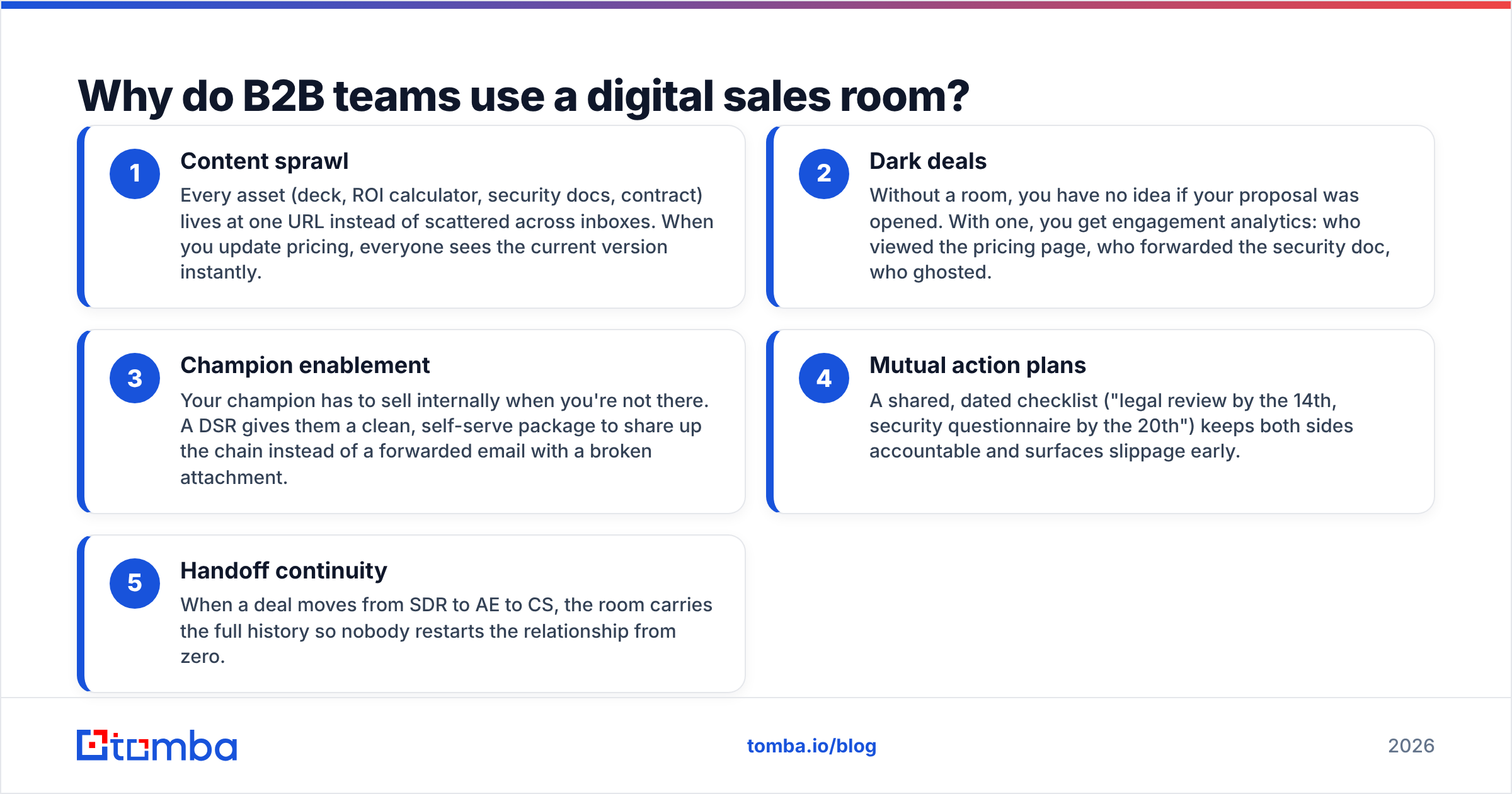
Because the modern buying committee has quietly become unmanageable over email. A typical mid-market deal now touches a champion, an economic buyer, a technical evaluator, a security reviewer, a procurement lead, and one or two skeptics who joined late. Each forward, each "looping in Dana," each re-attached deck is a chance for your message to decay.
A digital sales room fixes five specific failures:
- Content sprawl — Every asset (deck, ROI calculator, security docs, contract) lives at one URL instead of scattered across inboxes. When you update pricing, everyone sees the current version instantly.
- Dark deals — Without a room, you have no idea if your proposal was opened. With one, you get engagement analytics: who viewed the pricing page, who forwarded the security doc, who ghosted.
- Champion enablement — Your champion has to sell internally when you're not there. A DSR gives them a clean, self-serve package to share up the chain instead of a forwarded email with a broken attachment.
- Mutual action plans — A shared, dated checklist ("legal review by the 14th, security questionnaire by the 20th") keeps both sides accountable and surfaces slippage early.
- Handoff continuity — When a deal moves from SDR to AE to CS, the room carries the full history so nobody restarts the relationship from zero.
The through-line is trust and speed. You compress the sales cycle by removing friction, and you look organized doing it — which, in a competitive eval, is its own signal of how you'll behave as a vendor.
What features does a good digital sales room have?#
Not every "sales room" is equal. Some vendors slap the label on a glorified link-in-bio page. Use this checklist to separate a real DSR from a content locker with marketing copy.
- Personalization — The buyer's name, logo, and use case, not a generic template. Personalized rooms get opened; generic ones get ignored.
- Engagement analytics — Page-level and time-on-content tracking, with alerts when a new stakeholder views the room. This is the single most valuable feature.
- Mutual action plan — A collaborative, dated task list both parties can edit and check off.
- Native content embedding — Video, decks, PDFs, and calculators rendered in-room, no downloads required.
- CRM sync — Two-way sync so room activity writes back to the opportunity record automatically.
- Access control — Know exactly who has the link, and gate sensitive pricing or legal docs behind a light form.
- Live chat / async comments — A way for the buyer to ask a question without opening a new email thread.
If a tool is missing engagement analytics or a mutual action plan, it's a document-sharing app wearing a DSR costume.
How does a digital sales room compare to email and traditional methods?#
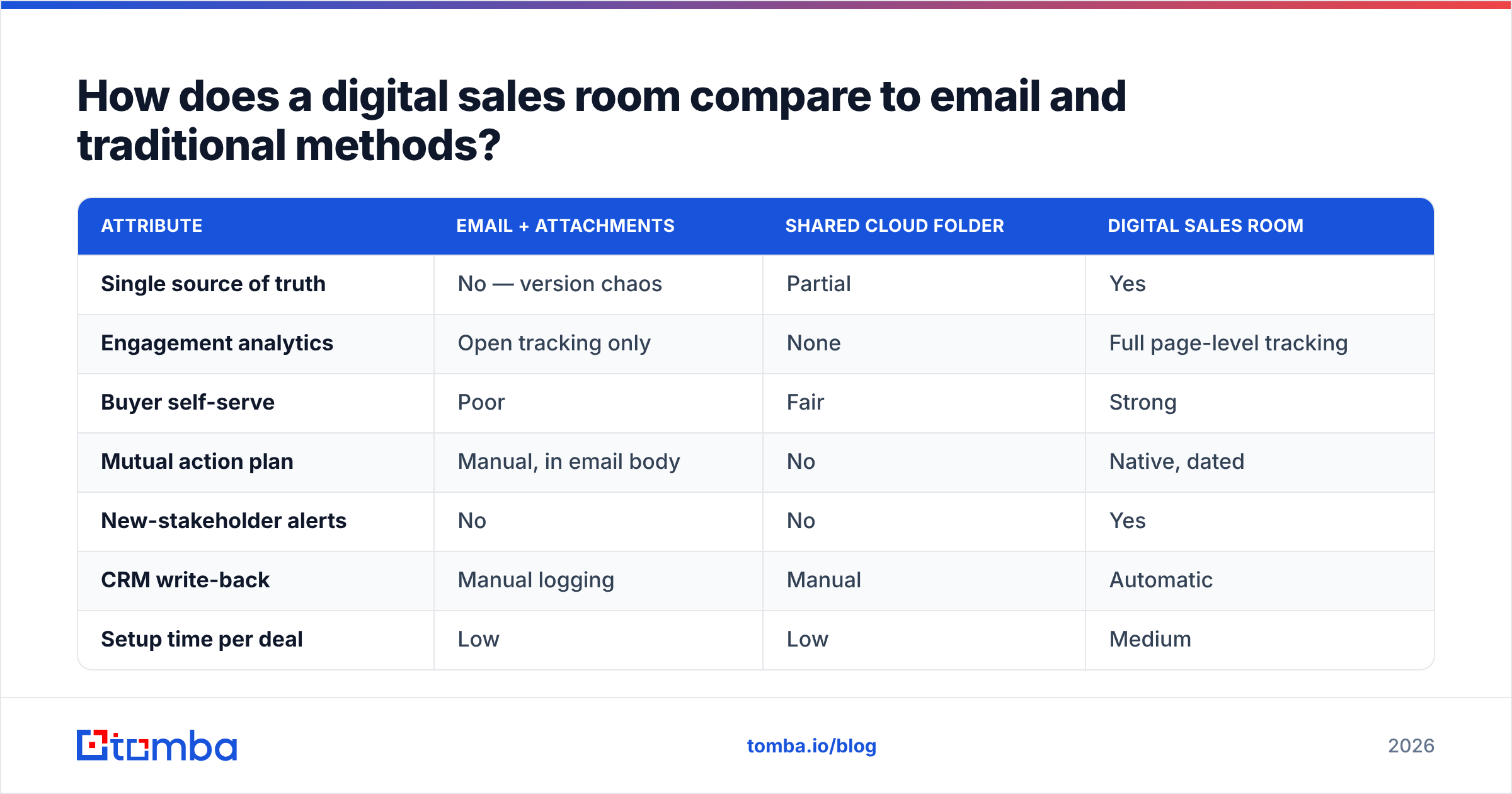
The honest answer: a DSR doesn't replace email, it replaces the worst parts of email. Here's how the three common approaches stack up on the things that actually move a deal.
| Attribute | Email + Attachments | Shared Cloud Folder | Digital Sales Room |
|---|---|---|---|
| Single source of truth | No — version chaos | Partial | Yes |
| Engagement analytics | Open tracking only | None | Full page-level tracking |
| Buyer self-serve | Poor | Fair | Strong |
| Mutual action plan | Manual, in email body | No | Native, dated |
| New-stakeholder alerts | No | No | Yes |
| CRM write-back | Manual logging | Manual | Automatic |
| Setup time per deal | Low | Low | Medium |
| Best for | Simple, 1:1 deals | Doc handoff | Multi-threaded deals |
The pattern is clear: email wins on speed-to-first-touch, but loses badly the moment a deal goes multi-threaded. A DSR carries setup overhead, so it earns its keep on complex, higher-value opportunities — not on a $200/year self-serve renewal.
What does a digital sales room cost in 2026?#
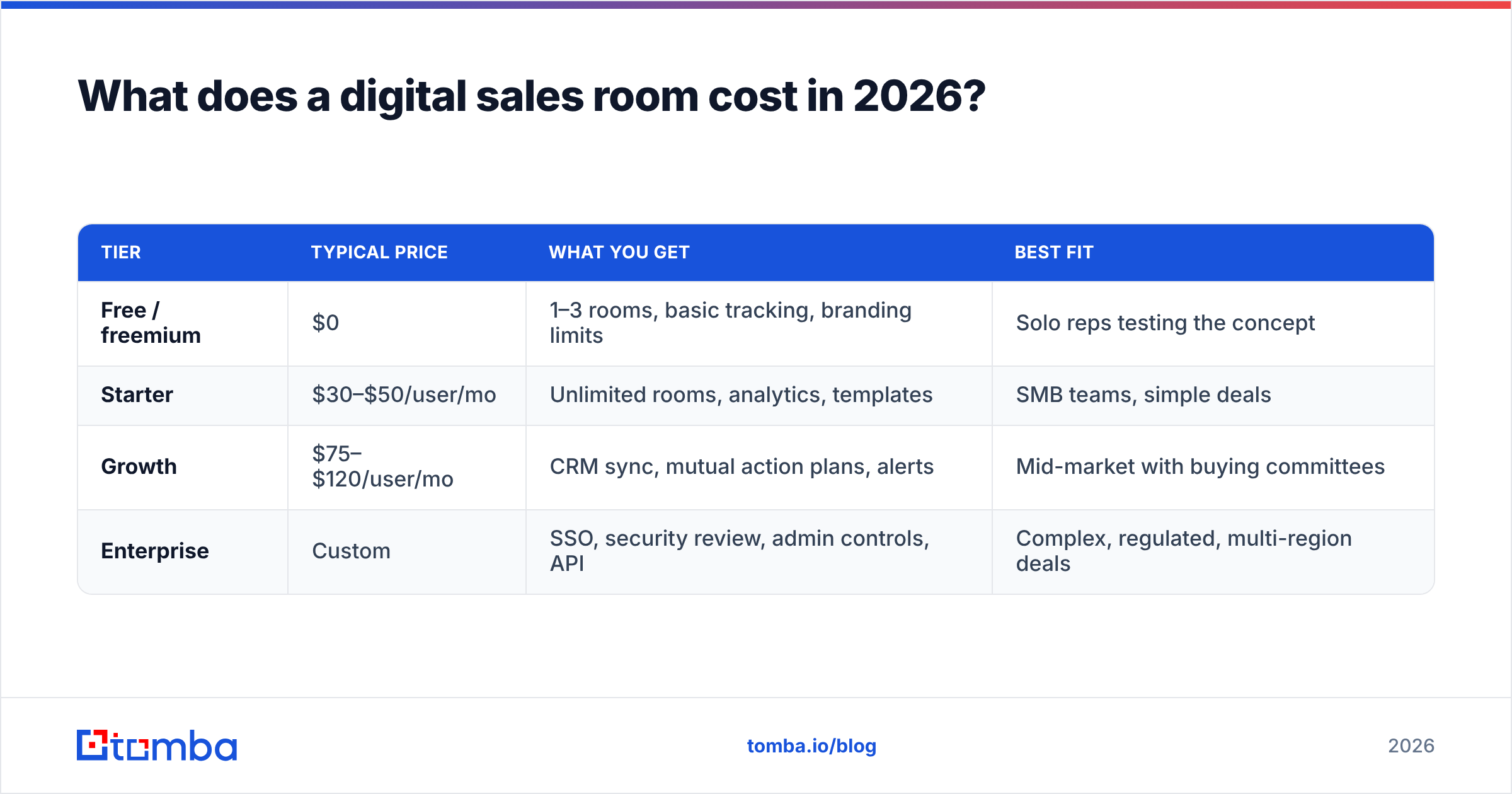
Pricing spans a wide range because "digital sales room" describes both lightweight link tools and full revenue-workspace platforms. Here's the honest landscape without naming a single "winner," because the right tier depends entirely on deal complexity.
| Tier | Typical price | What you get | Best fit |
|---|---|---|---|
| Free / freemium | $0 | 1–3 rooms, basic tracking, branding limits | Solo reps testing the concept |
| Starter | $30–$50/user/mo | Unlimited rooms, analytics, templates | SMB teams, simple deals |
| Growth | $75–$120/user/mo | CRM sync, mutual action plans, alerts | Mid-market with buying committees |
| Enterprise | Custom | SSO, security review, admin controls, API | Complex, regulated, multi-region deals |
A few honest caveats most vendor pages won't lead with:
- Per-seat pricing scales fast. A 12-rep team on a $99/seat plan is ~$14k/year before any add-ons. Model the full cost, not the sticker.
- The analytics are the product. If you buy a cheap tier that strips engagement tracking, you've bought a fancy link. Don't.
- Adoption is the hidden cost. A DSR nobody fills in is worse than email. Budget for enablement, templates, and a champion on your own team.
Compare that to a stack you assemble yourself. If your CRM already has HubSpot's native content tools or a Salesforce equivalent, you may get 70% of DSR value without a new line item. Read G2's digital sales room category before committing — the reviews are candid about which tools over-promise.
Who actually needs a digital sales room?#
Conclusion first: you need one if your average deal involves three or more buyer-side stakeholders and takes longer than 30 days. Below that, the overhead usually costs more than it saves.
Strong fit:
- Mid-market and enterprise B2B SaaS with real buying committees
- Deals with formal procurement, security, or legal review stages
- Long sales cycles where re-engagement and "did they read it?" signals matter
- Teams running structured outbound sales motions who need to prove pipeline hygiene
Weak fit:
- Transactional, self-serve, or PLG motions where a human rarely touches the deal
- Single-threaded deals under ~$5k ACV
- High-velocity SMB sales where speed beats polish and a DSR just adds a step
Be honest about which bucket you're in. Buying a DSR to look enterprise-grade when your motion is transactional is a classic case of tooling ahead of process.
How do you get the right people into the room?#
Here's the part every DSR guide skips: a sales room is empty until you invite the right buying committee, and you can't invite people you can't reach. The prettiest room in the world does nothing if you're missing the VP of Security's email or the procurement lead's direct line.
This is where prospecting data quality quietly decides whether your DSR strategy works. Before you can personalize a room for a stakeholder, you need to know they exist and how to contact them. A few practical moves:
- Map the committee early. Use domain search to pull the likely stakeholders at the account — not just your champion — so you can pre-build a room that speaks to each role.
- Verify before you invite. A room invitation that bounces is a wasted first impression. Run addresses through an email verifier so your carefully personalized link actually lands.
- Enrich the record. Titles, seniority, and department from data enrichment tell you which content each stakeholder should see when they open the room.
- Add a fallback channel. When email goes quiet, a phone finder gives you a second way to nudge a stalled deal back into the room.
The workflow is simple: find and verify the committee first, build the room second, and let the room's analytics tell you who to follow up with third. Tools like Tomba plug into this stage cleanly — including through the HubSpot integration, so verified contacts flow straight into the CRM that powers your rooms. You can see the full Tomba pricing if you want to scope the data layer separately from the DSR platform itself.
What are the common mistakes teams make with digital sales rooms?#
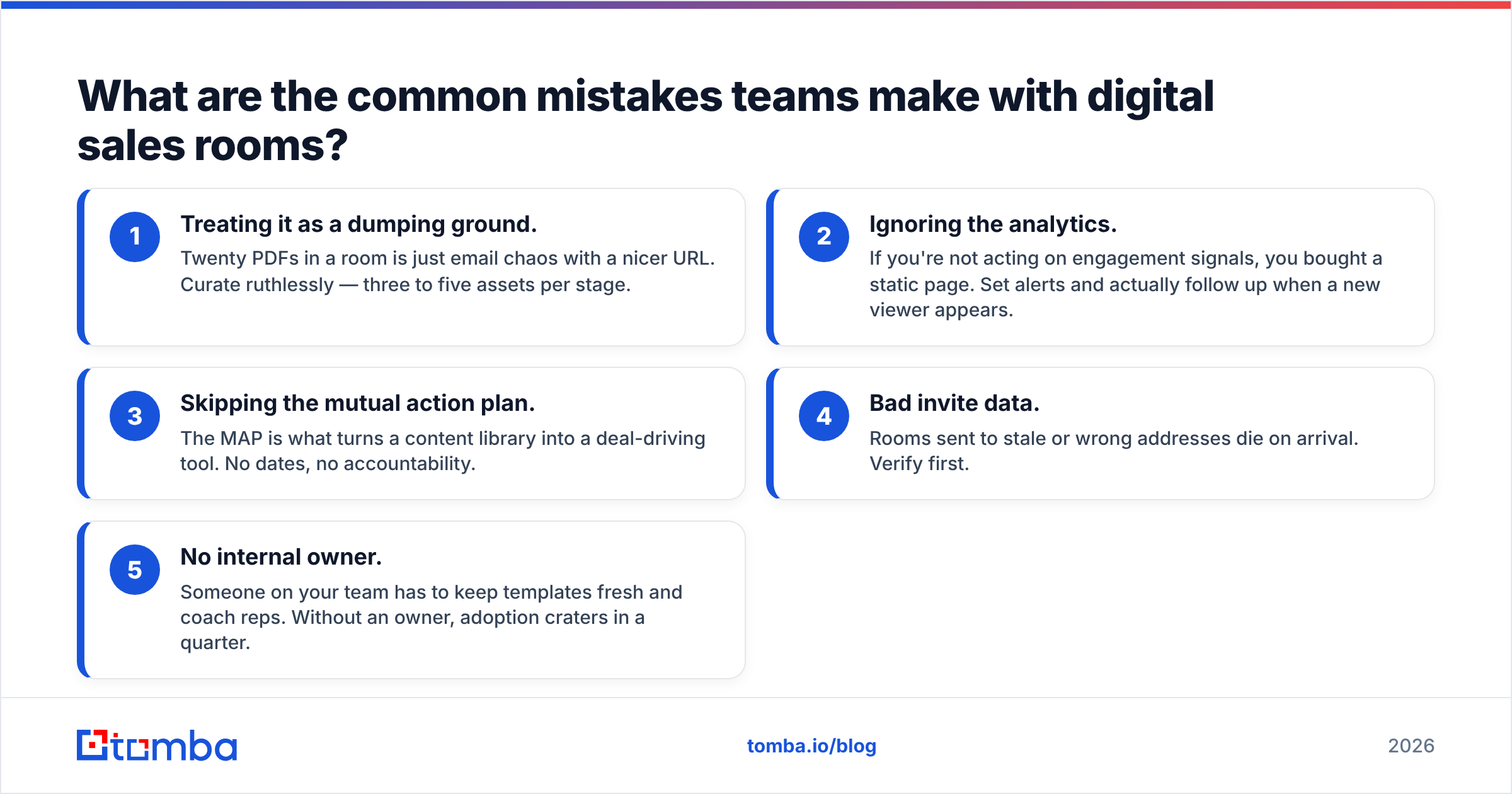
Even good tools get misused. Watch for these:
- Treating it as a dumping ground. Twenty PDFs in a room is just email chaos with a nicer URL. Curate ruthlessly — three to five assets per stage.
- Ignoring the analytics. If you're not acting on engagement signals, you bought a static page. Set alerts and actually follow up when a new viewer appears.
- Skipping the mutual action plan. The MAP is what turns a content library into a deal-driving tool. No dates, no accountability.
- Bad invite data. Rooms sent to stale or wrong addresses die on arrival. Verify first.
- No internal owner. Someone on your team has to keep templates fresh and coach reps. Without an owner, adoption craters in a quarter.
Avoid these five and a DSR earns its cost. Fall into them and you've added a tool your reps quietly stop using.
Is a digital sales room worth it in 2026?#
Yes — if your deals are complex enough to justify it, and if you feed it clean data. For multi-threaded, considered B2B purchases, a digital sales room is one of the highest-leverage changes you can make to your buying experience: shorter cycles, better forecasting, and a champion who can actually sell for you internally. For simple, fast, single-threaded deals, it's overhead you don't need — stick with a tight email and a good CRM.
The platform you choose matters less than the discipline around it: curated content, a real mutual action plan, analytics you act on, and — before any of that — the right stakeholders reached and verified.
That last piece is where Tomba fits your workflow. Before you build a single room, use the Tomba Email Finder to identify and reach every member of the buying committee, verify their addresses so your invitations land, and enrich each contact so the room you build actually speaks to them. A great digital sales room starts with knowing exactly who to invite — start there, and let the room do the rest.
Related guides#
Ready to find emails that actually work?
Join 150,000+ professionals who stopped guessing and started sending. Free credits on signup — no credit card required.
Get the Tomba newsletter
Practical outbound tactics and product updates — once every two weeks.
About the author