Direct Email Address: How to Find Anyone's in 2026
A direct email address reaches a real person, not a shared info@ inbox. Here's what it is, why it lifts reply rates, and how to find one fast.
TL;DR
- A direct email address reaches one specific person (
jane.doe@company.com), not a shared alias likeinfo@orsales@that a dozen people ignore. - Direct addresses win because they land in a real inbox, carry a named owner, and consistently pull higher reply rates than role-based catch-alls.
- You can find one three ways: guess the pattern and verify, use a data tool, or ask — each has a different speed/accuracy trade-off.
- Always verify before you send. An unverified direct address is a bounce risk that quietly damages your sender reputation.
- The fastest reliable route in 2026 is a purpose-built email finder plus a verification step, not manual guessing.
What is a direct email address?#
A direct email address is the personal work inbox of a single, named individual — think sarah.chen@acme.com rather than hello@acme.com. It maps to one human who reads it, replies from it, and owns it.
Here's the everyday analogy: a generic inbox is the front desk of a large office building. You walk in, hand your message to whoever is standing there, and hope it reaches the right floor. A direct email address is the key to a specific person's office door. Your message lands on their desk, with no receptionist deciding whether it's worth passing along.
Technically, the distinction is about the local part of the address (everything before the @). Direct addresses encode a real identity — a first name, last name, or initials. Role-based addresses (support@, billing@, careers@) encode a function and route to a shared mailbox or distribution list. According to email standards documented on Wikipedia, both are valid — but only one gets you to a decision-maker.
Direct vs. generic email addresses: what's the difference?#
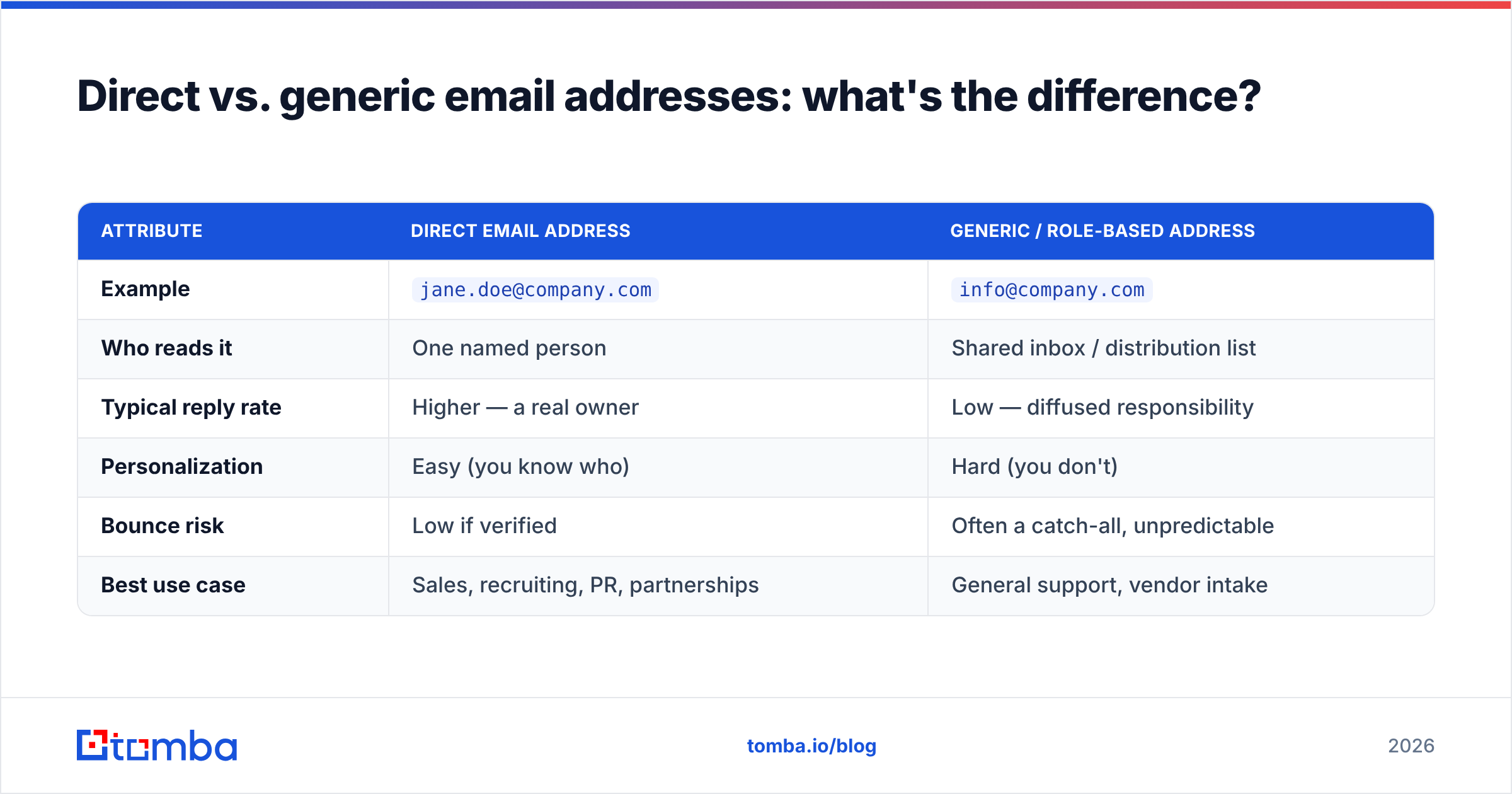
The gap matters more than most people expect. A generic alias is a black hole for cold outreach: nobody personally owns it, so nobody personally answers it. A direct address has an accountable reader.
| Attribute | Direct email address | Generic / role-based address |
|---|---|---|
| Example | jane.doe@company.com |
info@company.com |
| Who reads it | One named person | Shared inbox / distribution list |
| Typical reply rate | Higher — a real owner | Low — diffused responsibility |
| Personalization | Easy (you know who) | Hard (you don't) |
| Bounce risk | Low if verified | Often a catch-all, unpredictable |
| Best use case | Sales, recruiting, PR, partnerships | General support, vendor intake |
The practical takeaway: if your goal is a conversation with a specific person, a direct email address is the only asset that reliably delivers it. Generic inboxes are fine for "reset my invoice" but useless for "I'd like to talk to your VP of Marketing."
Why does a direct email address get more replies?#
Three reasons, and they compound.
- Accountability. A message to
jane.doe@sits in Jane's inbox with Jane's name on it. Ignoring it is a personal choice she has to make. A message toinfo@can be ignored by everyone because it's owned by no one. - Personalization. Once you know the person, you can reference their role, their recent post, or their team's initiative. HubSpot's research on email engagement has repeatedly shown that relevance drives response — and relevance requires knowing who you're writing to.
- Deliverability. Direct addresses at real, active users are less likely to be spam traps or dead aliases. That protects your sender reputation, which in turn keeps future emails landing in the inbox instead of the spam folder.
Put simply: the direct address isn't just a better destination, it unlocks the behaviors — personalization, follow-up, accountability — that make outreach work at all.
How do you find a direct email address?#
There are three honest methods. Most people use a blend.
1. Pattern-guess, then verify. Companies use predictable formats. If you know one employee's address, you often know them all. Common patterns:
{first}.{last}@company.com→jane.doe@company.com{first}@company.com→jane@company.com{f}{last}@company.com→jdoe@company.com{first}{last}@company.com→janedoe@company.com
You can generate candidates with an email permutator or infer the house style with a company email pattern checker, then test each guess. The catch: guessing without verifying is how you rack up bounces. Never send to a guess.
2. Use a data tool. An email finder takes a name plus a company domain and returns the most likely direct address, already scored for confidence. A domain search flips it around: give it a company and get back the direct addresses it has on file for that org, with roles attached. This is the fastest route at any real volume.
3. Ask or look. The low-tech options still work. Check the person's LinkedIn "contact info," their conference bio, a company team page, or an email signature in a thread you're already on. Slow, but occasionally the cleanest.
Which method should you actually use?#
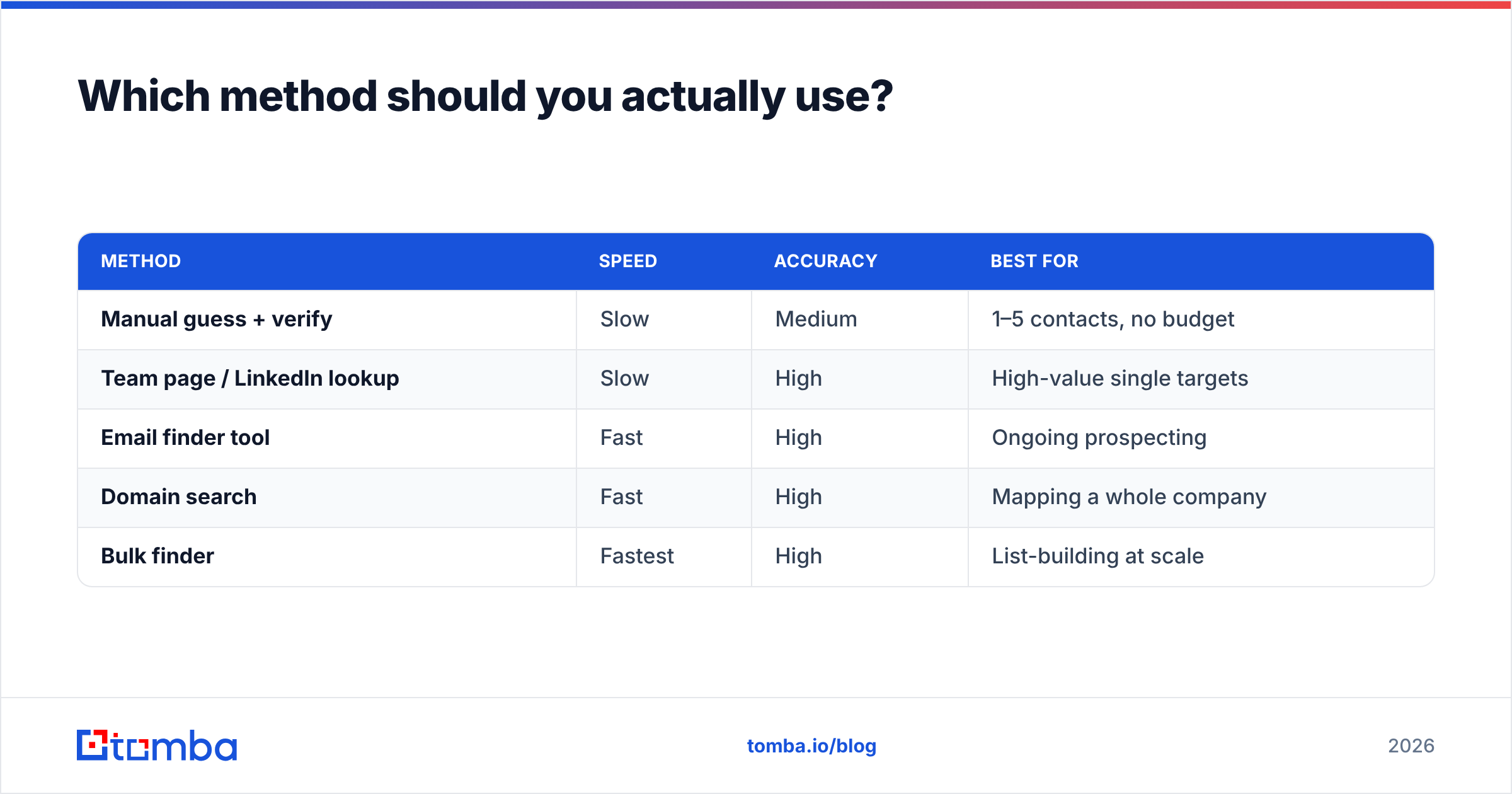
Match the method to your volume and your accuracy tolerance. Here's the trade-off laid out.
| Method | Speed | Accuracy | Best for |
|---|---|---|---|
| Manual guess + verify | Slow | Medium | 1–5 contacts, no budget |
| Team page / LinkedIn lookup | Slow | High | High-value single targets |
| Email finder tool | Fast | High | Ongoing prospecting |
| Domain search | Fast | High | Mapping a whole company |
| Bulk finder | Fastest | High | List-building at scale |
If you're chasing one strategic contact, do it by hand and get it right. If you're building a prospecting list, a tool pays for itself in the first hour. For a whole account, bulk email finder workflows turn a list of names and companies into verified direct addresses in one pass.
How do you verify a direct email address before sending?#
Verification is non-negotiable, and it's the step most people skip. Sending to unverified addresses drives bounces, and a high bounce rate tells inbox providers you're a careless — possibly spammy — sender.
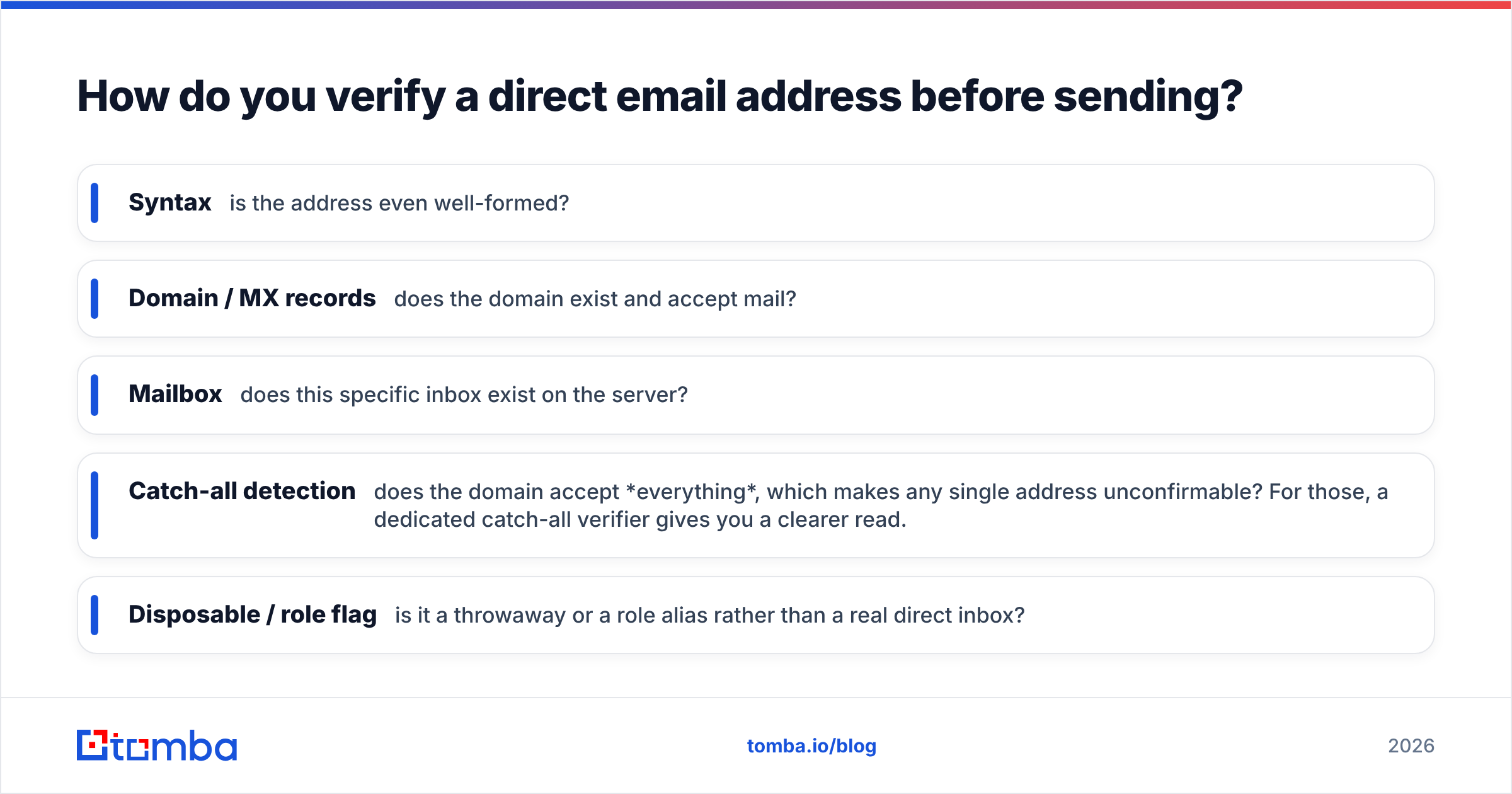
A proper email verifier runs several checks in sequence:
- Syntax — is the address even well-formed?
- Domain / MX records — does the domain exist and accept mail?
- Mailbox — does this specific inbox exist on the server?
- Catch-all detection — does the domain accept everything, which makes any single address unconfirmable? For those, a dedicated catch-all verifier gives you a clearer read.
- Disposable / role flag — is it a throwaway or a role alias rather than a real direct inbox?
Run every direct address you find through verification before it enters a campaign. Treat "found" and "verified" as two separate states, and only ever email the second one.
What about the legal and ethical side?#
Finding a direct email address is legal — the addresses are business contact data, and email finders assemble them from public and licensed sources. But using them carries obligations. Under regulations like GDPR and CAN-SPAM, you generally need a legitimate business reason to contact someone, a truthful subject line and sender identity, and a working way to opt out.
The clean rule of thumb: use direct addresses for relevant, professional, one-to-one outreach — not scraped mass blasts. If you'd be embarrassed to have the recipient read your process out loud, reconsider it. Reputable data providers publish their sourcing; it's worth reading a vendor's data policy, such as where Tomba gets its data, before you build a workflow on top of it.
What mistakes should you avoid?#
A few failure modes show up again and again:
- Emailing a guess. Pattern inference is a starting hypothesis, not a confirmed address. Verify first, every time.
- Defaulting to the generic inbox.
info@feels safe because it's easy to find. It's also where outreach goes to die. The extra ten minutes to find the direct address is the highest-ROI step in the whole process. - Ignoring catch-all domains. A catch-all accepts any address, so your verifier returns "valid" for guesses that don't actually exist. Flag catch-alls and handle them separately.
- Skipping personalization once you have the address. You did the work to reach a specific human — now write to them, not to a template that could go to anyone.
- Never cleaning your list. Addresses decay as people change jobs. Re-verify periodically so your reply rate reflects reality.
How does Tomba fit in?#
Tomba is built around exactly this problem: turning a name and a company into a verified direct email address, fast. The core email finder returns the most probable direct address with a confidence score; the domain search maps an entire company's contacts by role; and the built-in email verifier closes the loop so you never send to a guess.
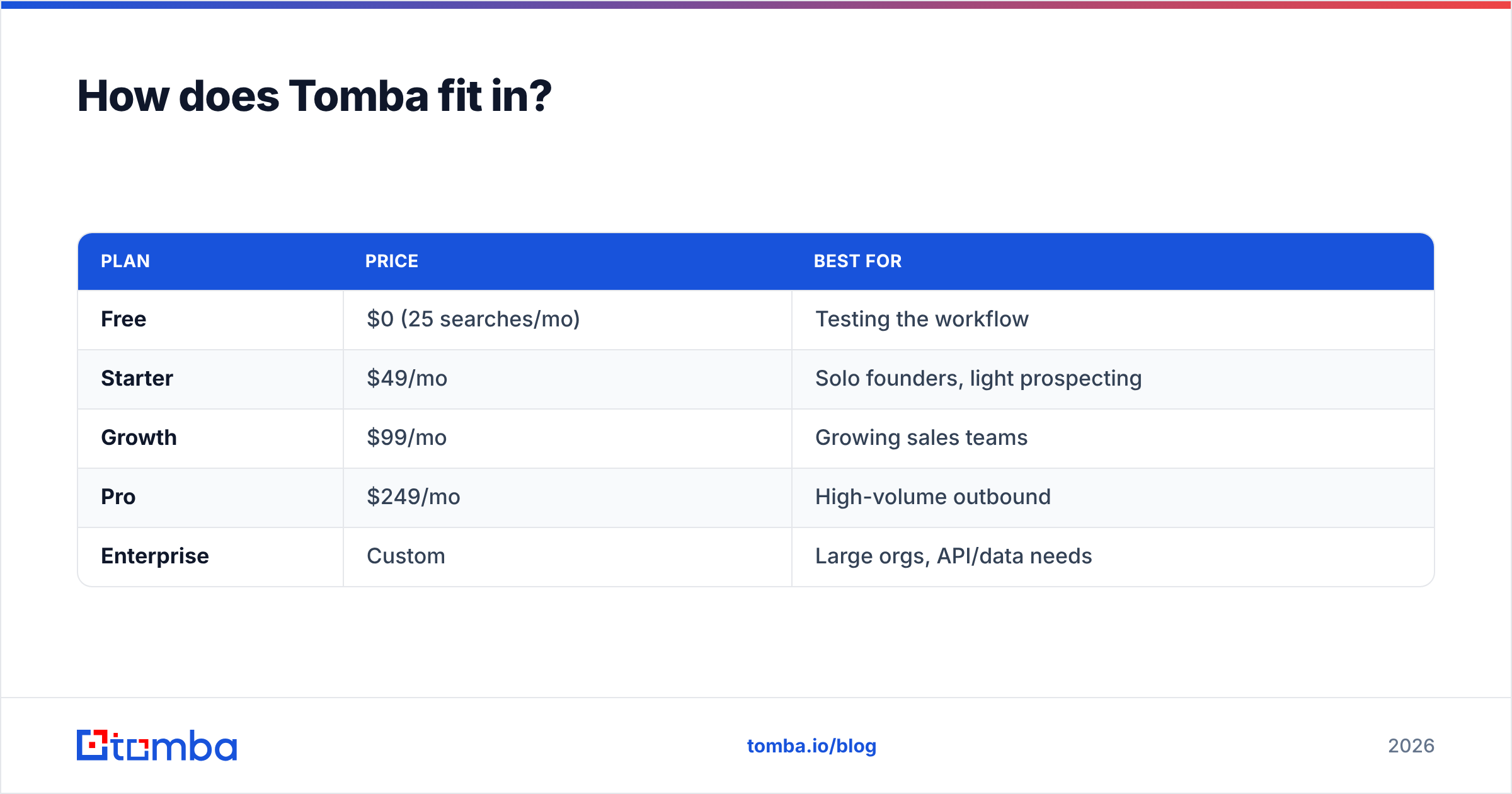
Pricing scales with how much you send: a free tier covers 25 searches a month to test the workflow, Starter runs $49/mo, Growth $99/mo, and Pro $249/mo, with Enterprise custom for large teams. Full Tomba pricing is public, and independent reviews on G2 can give you an outside read before you commit.
| Plan | Price | Best for |
|---|---|---|
| Free | $0 (25 searches/mo) | Testing the workflow |
| Starter | $49/mo | Solo founders, light prospecting |
| Growth | $99/mo | Growing sales teams |
| Pro | $249/mo | High-volume outbound |
| Enterprise | Custom | Large orgs, API/data needs |
Frequently asked questions#
Is a direct email address the same as a personal email?
No. A direct email address is a person's work inbox (jane.doe@company.com). A personal email is their private account (like a Gmail address). For B2B outreach you want the direct work address — it's professional context, and it's the one they check for business.
Can I find a direct email address for free? Yes, in small numbers. Team pages, LinkedIn contact info, and free tools like an email permutator plus a verifier will get you a handful. For volume, a paid finder is faster and more accurate.
Why do some direct addresses still bounce after I verify them? Usually a catch-all domain (which reports everything as valid) or a contact who recently changed jobs. Re-verify before big sends and flag catch-alls for manual review.
Is finding direct email addresses legal? Finding them from public and licensed business data is legal. How you use them is governed by GDPR, CAN-SPAM, and similar rules — keep outreach relevant, honest, and opt-out-friendly.
The bottom line#
A direct email address is the difference between talking to a person and shouting at a building. It reaches a real, accountable reader; it unlocks personalization; and — when it's verified — it protects the sender reputation that keeps you landing in the inbox.
The workflow is simple: find the direct address, verify it, then write something worth replying to. If you want the first two steps handled in seconds instead of an afternoon of guessing, start with the Tomba Email Finder — a name and a domain in, a verified direct email address out. Test it on the free tier, and only scale up once it's earned the spend.
Related guides#
Ready to find emails that actually work?
Join 150,000+ professionals who stopped guessing and started sending. Free credits on signup — no credit card required.
Get the Tomba newsletter
Practical outbound tactics and product updates — once every two weeks.
About the author