Direct Sales Software in 2026: The Complete Buyer's Guide
Direct sales software is six different product categories wearing one label. Here's what each layer does, what it costs in 2026, and where most stacks quietly break.
TL;DR
- "Direct sales software" describes two completely different markets: distributor-management platforms for direct selling companies (party plan, MLM, network marketing), and field/outside sales stacks for B2B reps who sell face to face.
- A working stack has six layers — contact data, CRM, outreach, territory/scheduling, commissions or quoting, and analytics. Most teams buy layers 2 and 3, skip layer 1, and wonder why nothing converts.
- Realistic 2026 pricing: $25–$165 per seat/month for CRM, $49–$249/month for contact data, $2,000–$15,000/month for full distributor-management platforms.
- Data quality is the hidden failure point. A 25% bad-email rate doesn't cost you 25% of results — it costs you your sending domain.
- Start with the cheapest complete loop you can run end to end, then buy depth. You can assemble a functional stack for under $400/month.
What is direct sales software?#
Direct sales software is any tool that helps you sell to a buyer without a retailer, distributor, or marketplace sitting in between. That's the honest definition, and it's why the category is so confusing — two very different businesses use the same phrase.
The first is direct selling in the classic sense: companies that recruit independent consultants who sell to friends, hosts, and social audiences. Their software problem is distributor management — genealogy trees, commission plans, replicated storefronts, party ordering, compliance.
The second is direct sales as a B2B go-to-market motion: your own reps selling your own product to companies, often in the field, without channel partners. Their software problem is pipeline — finding the right accounts, reaching the right contacts, tracking territory coverage, and closing.
If you buy a tool built for the first while running the second, you'll pay for genealogy features you never touch and get no prospecting engine at all. Sort out which business you're in before you look at a single demo.
What are the six layers of a direct sales stack?#
Every functional direct sales operation, regardless of which market it's in, has the same six jobs to do. Buy them in this order.
- Contact and account data — the names, verified work emails, direct dials, and firmographics that everything downstream consumes. This is layer one because a CRM full of guessed addresses is a very expensive spreadsheet. Tools: Tomba, BookYourData, ZoomInfo, Apollo.
- CRM / system of record — where deals, activities, and stages live. Non-negotiable past roughly three reps. Tools: HubSpot, Pipedrive, Salesforce, Zoho.
- Outreach and sequencing — multichannel cadences across email, phone, and LinkedIn, with reply detection and sending limits. Tools: Instantly, Salesloft, Outreach, Reply.io.
- Territory, routing, and scheduling — for field reps: who owns which zip codes, what the optimal driving route is, and how meetings get booked. Tools: Badger Maps, SPOTIO, Map My Customers.
- Quoting, ordering, or commissions — CPQ for B2B; party ordering and payout engines for direct selling. Tools: PandaDoc, DealHub, Exigo, ByDesign, Epixel.
- Analytics and attribution — conversion by source, rep, and territory. Usually starts as CRM reporting and graduates to a BI layer once you have more than a year of clean data.
Skip a layer and something else absorbs the work badly. Skip layer 1 and your reps become researchers. Skip layer 4 and your field team drives 40% more miles than it needs to.
Which direct sales software is best in 2026?#
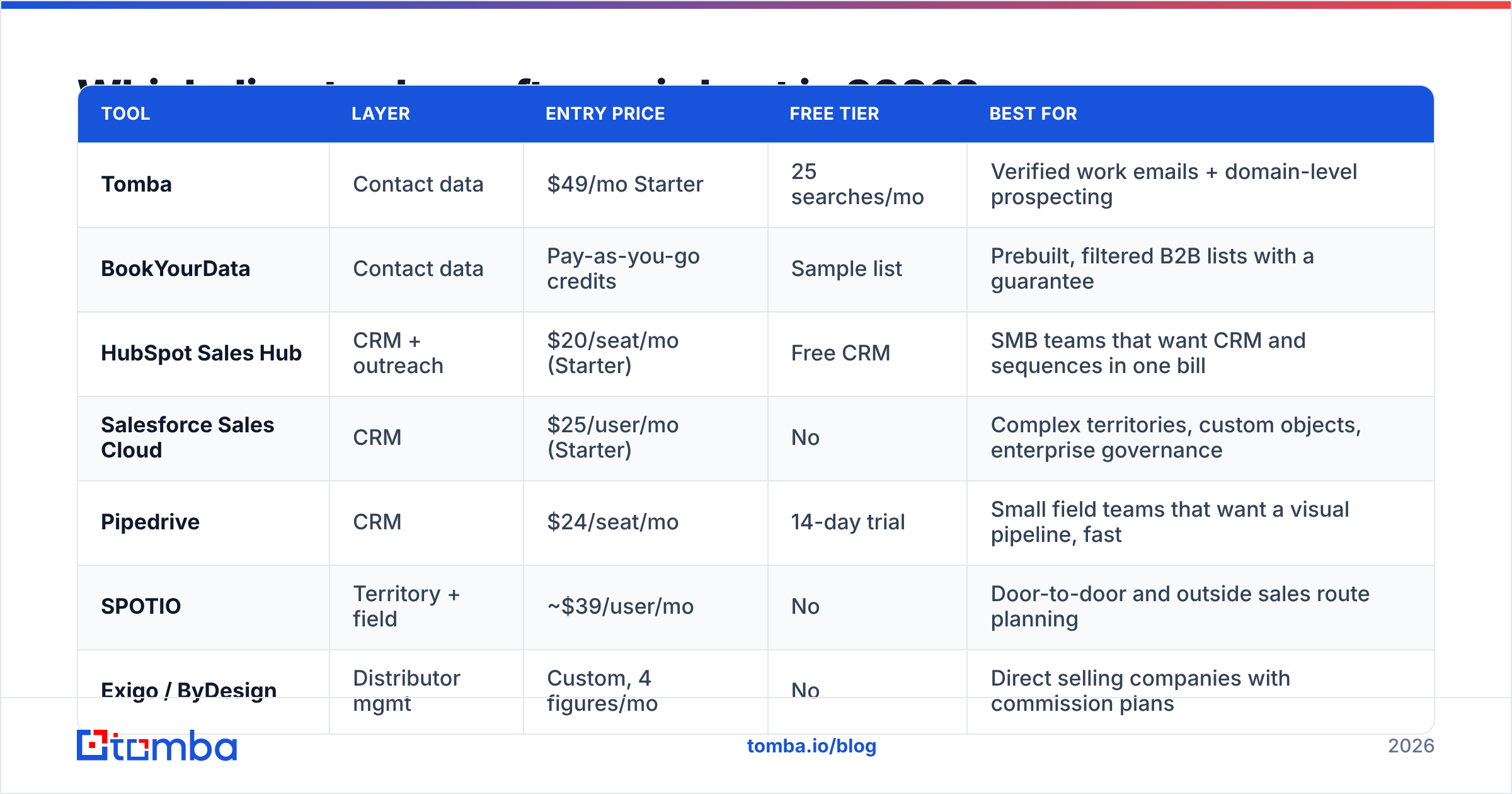
There's no single winner, because the six layers don't compete with each other. Here's how the most commonly shortlisted options actually compare on the things that decide renewals.
| Tool | Layer | Entry price | Free tier | Best for |
|---|---|---|---|---|
| Tomba | Contact data | $49/mo Starter | 25 searches/mo | Verified work emails + domain-level prospecting |
| BookYourData | Contact data | Pay-as-you-go credits | Sample list | Prebuilt, filtered B2B lists with a guarantee |
| HubSpot Sales Hub | CRM + outreach | $20/seat/mo (Starter) | Free CRM | SMB teams that want CRM and sequences in one bill |
| Salesforce Sales Cloud | CRM | $25/user/mo (Starter) | No | Complex territories, custom objects, enterprise governance |
| Pipedrive | CRM | $24/seat/mo | 14-day trial | Small field teams that want a visual pipeline, fast |
| SPOTIO | Territory + field | ~$39/user/mo | No | Door-to-door and outside sales route planning |
| Exigo / ByDesign | Distributor mgmt | Custom, 4 figures/mo | No | Direct selling companies with commission plans |
| PandaDoc | Quoting | $35/seat/mo | Free e-sign tier | Proposal and contract turnaround |
Two things stand out when you lay it out like this. First, the CRM layer is cheap and commoditized — the differences between HubSpot, Pipedrive, and Salesforce Starter matter far less than vendors want you to believe at fewer than 20 reps. Second, the two layers people underbudget for — data and territory — are the two that most directly move rep productivity.
If you want third-party sanity checks on any shortlist, G2's sales software category is the least-manipulated public source, because reviews are tied to verified seats.
Why does the data layer decide whether the rest works?#
Because everything downstream multiplies whatever quality you feed it.
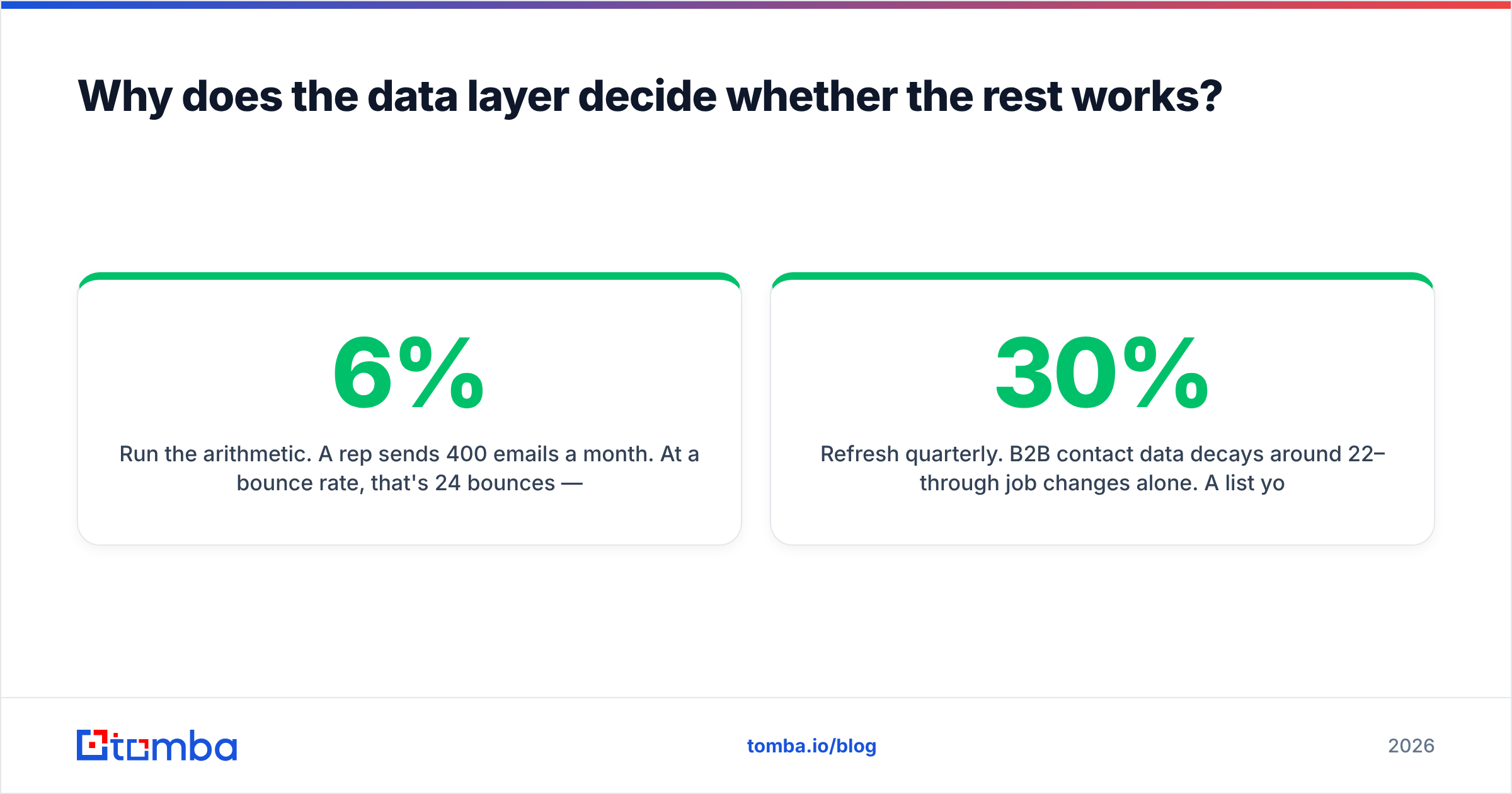
Run the arithmetic. A rep sends 400 emails a month. At a 6% bounce rate, that's 24 bounces — annoying but survivable. At a 25% bounce rate, which is roughly what a scraped or 18-month-old list produces, that's 100 hard bounces. Mailbox providers read that as a spam signal, your domain reputation drops, and the 300 good addresses stop landing in inboxes too. You didn't lose 25% of your output. You lost most of it, plus the domain.
This is why email deliverability belongs in a direct sales software conversation at all. The CRM doesn't cause bounces. The sequencer doesn't cause bounces. The data source does.
Practical rules for the data layer:
- Verify before send, not after bounce. Run every list through an email verifier and drop anything not marked deliverable. Catch-all domains need their own handling — a catch-all verifier tells you whether the domain accepts everything or genuinely resolves the mailbox.
- Refresh quarterly. B2B contact data decays around 22–30% per year through job changes alone. A list you bought in January is measurably worse by July.
- Prefer pattern-derived over scraped. A domain search that derives
first.last@company.comfrom confirmed company patterns beats a scraped address of unknown provenance, because you can validate the logic. - Enrich, don't just append. Job title, seniority, and headcount are what make territory rules and lead scoring possible later.
Vendors differ here more than they differ on features. Some sell volume — tens of millions of records with no freshness guarantee. Others, including Tomba and BookYourData, sell accuracy and are explicit about where the data comes from and how it's checked. For direct sales, where a rep's time per contact is high, accuracy wins on unit economics every time.
How much does direct sales software actually cost?#
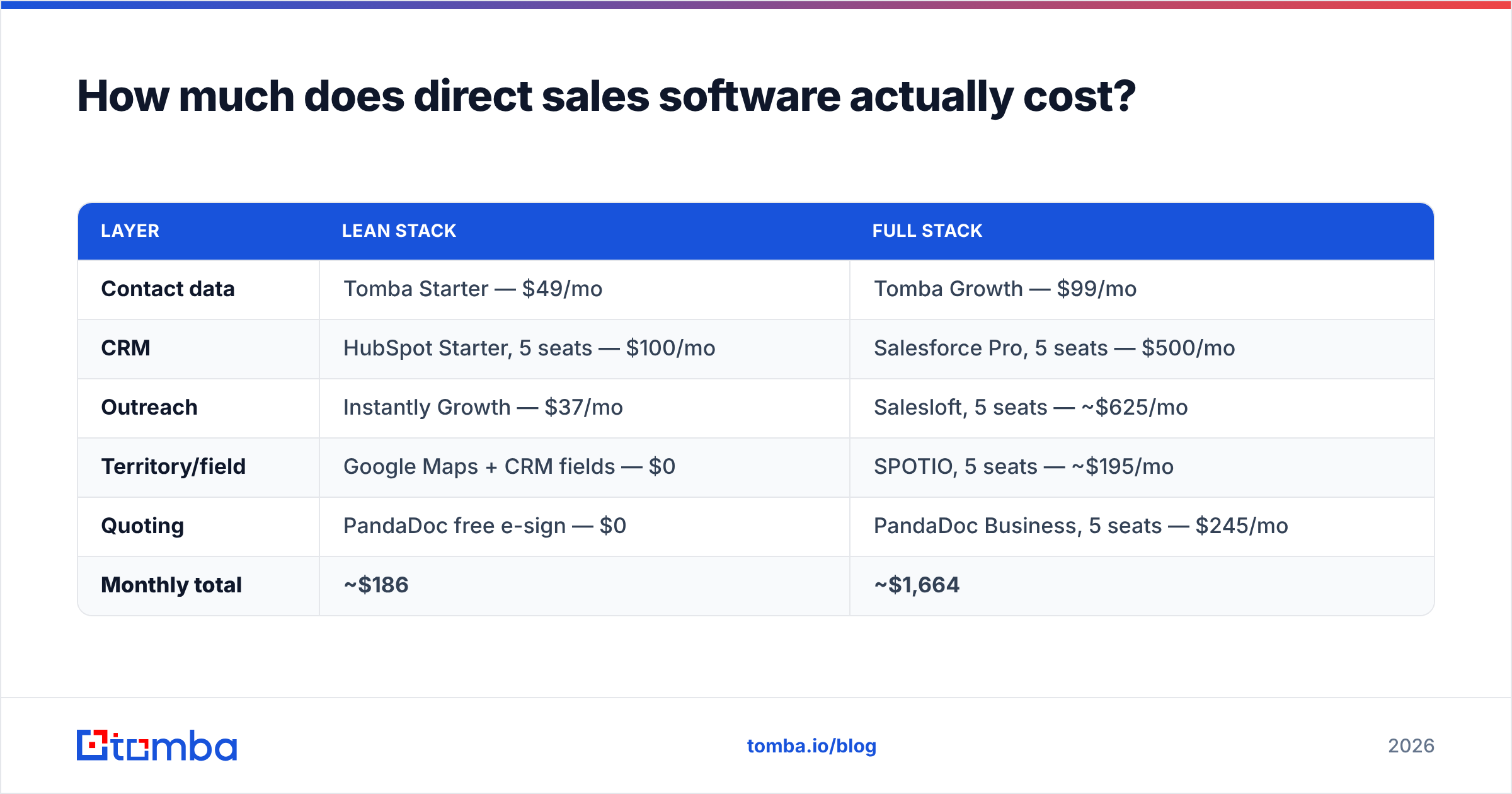
Sticker prices hide two things: seat minimums and credit consumption. Here's a realistic monthly bill for a five-rep direct sales team, built two ways.
| Layer | Lean stack | Full stack |
|---|---|---|
| Contact data | Tomba Starter — $49/mo | Tomba Growth — $99/mo |
| CRM | HubSpot Starter, 5 seats — $100/mo | Salesforce Pro, 5 seats — $500/mo |
| Outreach | Instantly Growth — $37/mo | Salesloft, 5 seats — ~$625/mo |
| Territory/field | Google Maps + CRM fields — $0 | SPOTIO, 5 seats — ~$195/mo |
| Quoting | PandaDoc free e-sign — $0 | PandaDoc Business, 5 seats — $245/mo |
| Monthly total | ~$186 | ~$1,664 |
The lean column is not a toy. Plenty of teams run $2M in annual bookings on something close to it. The full column buys governance, reporting depth, and admin control — worth it when you have a RevOps function to operate it, wasteful when you don't.
For direct selling companies, the math changes shape entirely. A distributor-management platform is typically a 4–5 figure monthly commitment plus a 5-figure implementation, because it's running payouts, tax documents, and compliance rules across thousands of independent consultants. That's not a stack you assemble; it's a platform you migrate to.
Tomba's own pricing sits deliberately at the lean end — Free (25 searches/mo), Starter $49/mo, Growth $99/mo, Pro $249/mo, and Enterprise on request — with the same data behind every tier rather than an accuracy penalty on lower plans.
Is direct selling software different from B2B direct sales software?#
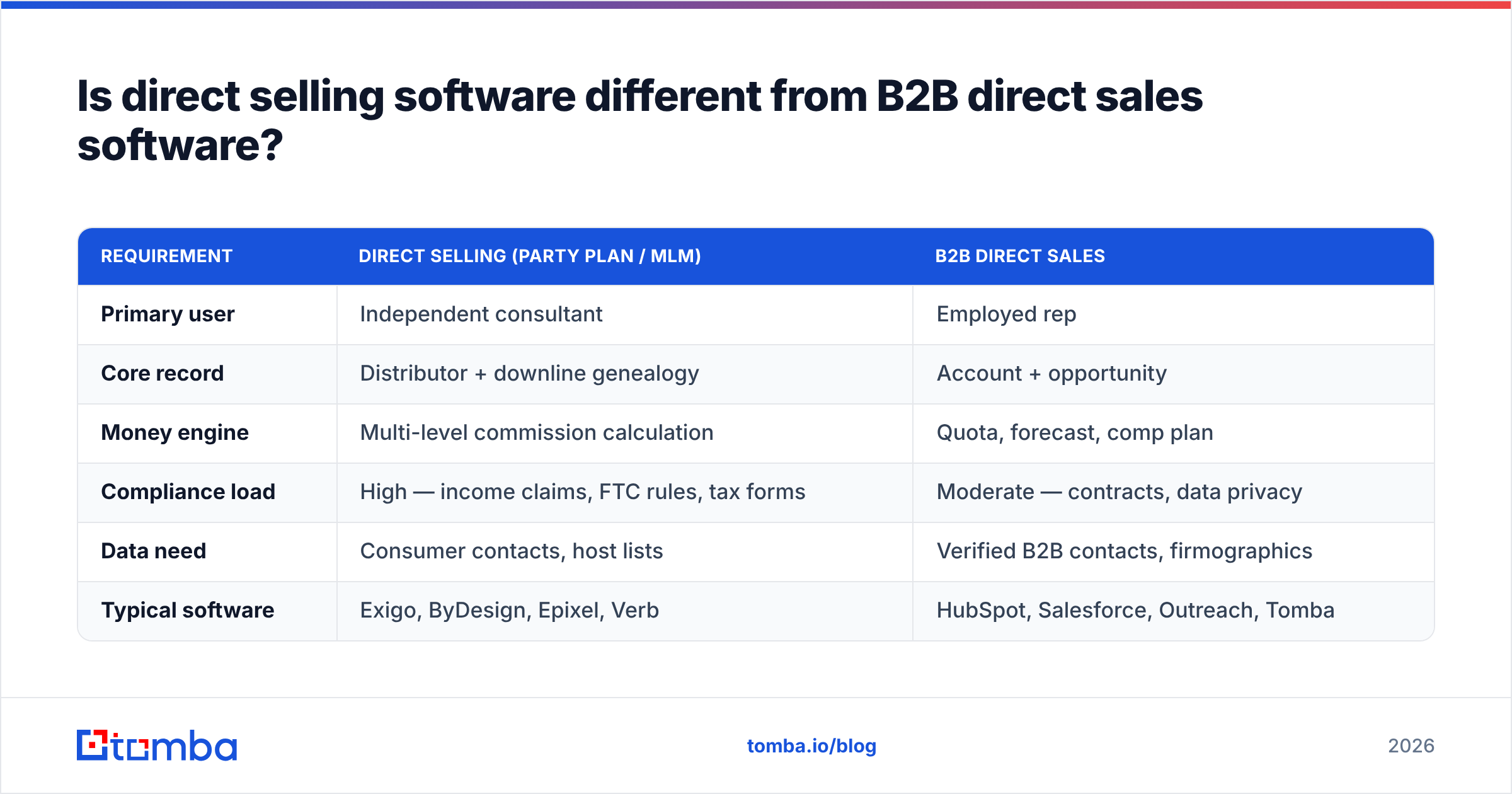
Yes, and the differences are structural, not cosmetic.
| Requirement | Direct selling (party plan / MLM) | B2B direct sales |
|---|---|---|
| Primary user | Independent consultant | Employed rep |
| Core record | Distributor + downline genealogy | Account + opportunity |
| Money engine | Multi-level commission calculation | Quota, forecast, comp plan |
| Compliance load | High — income claims, FTC rules, tax forms | Moderate — contracts, data privacy |
| Data need | Consumer contacts, host lists | Verified B2B contacts, firmographics |
| Typical software | Exigo, ByDesign, Epixel, Verb | HubSpot, Salesforce, Outreach, Tomba |
The overlap is thin. Where it exists — corporate teams inside direct selling companies doing B2B partnership outreach, or B2B teams running a referral program — you generally bolt a lightweight prospecting layer onto the platform rather than replacing it.
One caution specific to the direct selling side: any platform handling commissions touches money and tax reporting. Treat vendor selection there like an ERP decision, not a SaaS trial. Ask for reference calls with companies at your consultant count, and get the payout-calculation SLA in writing.
What should you check before you sign anything?#
Six questions that surface most of the regret, in order of how often they get skipped.
- What happens to credits at renewal? Unused search or enrichment credits usually expire monthly. Model your real usage, not your optimistic usage.
- Is the API included or an upsell? If you plan to enrich inside your CRM automatically, an email finder API on the base plan versus a $500/mo add-on changes the whole comparison.
- What's the actual bounce guarantee? "95% accuracy" means nothing without a definition. Ask what happens when it isn't met — credit refund, or an apology?
- How does it handle catch-all domains? Roughly a fifth of B2B domains accept all mail. Vendors that silently mark these "valid" are inflating their accuracy number.
- Can you export? Some platforms restrict CSV export on lower tiers. That's a lock-in mechanism, not a feature.
- Who administers it? If nobody owns the tool, it's shelfware in 90 days. This is the single best predictor of whether a purchase pays back.
Run a two-week bake-off before committing. Give two vendors the same 200 target accounts, have the same rep work both lists, and compare bounce rate, connect rate, and meetings booked. That test costs almost nothing and beats every feature matrix, including this one.
How do you roll out a new stack without stalling the team?#
Sequence it so reps never lose a working motion.
Week 1 — stand up the data layer only. Pull one clean, verified list for one segment. Nothing else changes. Reps see better contacts in the tool they already use, which buys you goodwill for the harder migration.
Weeks 2–3 — migrate the CRM. Import accounts and contacts, map stages, and freeze the old system as read-only rather than deleting it. Do not customize anything yet.
Week 4 — connect outreach. Start at 30 emails per mailbox per day and ramp slowly; new sending infrastructure needs sender reputation built before volume.
Weeks 5–8 — layer in territory rules, quoting, and reporting once real data is flowing. Customizing before you have three weeks of live activity means customizing against guesses.
The failure pattern is the reverse: teams spend six weeks in configuration, launch everything at once, and discover in week seven that the underlying contact data was never any good. Sequence data first and that never happens. HubSpot's own sales enablement research makes the same point from a different angle — adoption tracks time-to-first-value, and nothing produces first value faster than a rep opening the CRM and finding a contact they can actually reach.
Where to start#
Pick the layer that's currently costing you the most and fix only that. For most direct sales teams — field or inside, B2B or hybrid — it's the data layer, because it's the one nobody assigned an owner to.
If that's you, start with the Tomba Email Finder. Point it at your target domains, get verified work emails with the pattern logic exposed rather than hidden, and feed clean records into whatever CRM and sequencer you already run. The free tier gives you 25 searches a month to test against a list you can independently check, and Starter is $49/mo when you're ready to scale. Fix the input, and every layer above it starts performing the way the demo promised.
Related guides#
Ready to find emails that actually work?
Join 150,000+ professionals who stopped guessing and started sending. Free credits on signup — no credit card required.
Get the Tomba newsletter
Practical outbound tactics and product updates — once every two weeks.
About the author