DiscoverOrg vs Go4Database: B2B Data Compared for 2026
DiscoverOrg is now part of ZoomInfo and priced like enterprise software. Go4Database sells bulk lists for a flat fee. Here is which one actually fits your pipeline in 2026 — and when neither does.
TL;DR
- DiscoverOrg is gone as a standalone tool. It merged with ZoomInfo in 2019. If a rep sells you "DiscoverOrg" today, you are buying ZoomInfo.
- Go4Database is a list seller, not a platform. You buy a CSV for a flat fee. There is no live data layer and no API.
- So DiscoverOrg vs Go4Database is not a fair fight. One is a $15k–$40k per year platform. The other is a cheap file you clean yourself.
- Both miss the same job. Neither checks one person's email right before you hit send.
- Need a valid email for a named person? A pay-per-use finder plus a verify step is faster. It is also 10 to 100 times cheaper.
What are DiscoverOrg and Go4Database?#
Anyone weighing DiscoverOrg vs Go4Database should start with one fact. Only one of them still exists as sold.
DiscoverOrg was the premium end of B2B data for about ten years. It began in 2007. It sold org charts, direct dial numbers, and tech stack data to big sales teams. People built the data by hand. Researchers called firms to check job titles and phone lines. Then in February 2019 DiscoverOrg bought ZoomInfo. In an odd twist, it took the name of the firm it bought. Today ZoomInfo is the live product. The old discoverorg.com now points there.
That shapes your review. Any DiscoverOrg write-up from before 2019 covers a product you cannot buy. Any quote you get in 2026 is a ZoomInfo quote with old DiscoverOrg data inside it.
Go4Database sits at the other end of the market. It is a list broker. You name the trade, the place, the job title, and the firm size you want. It sends back a sheet of contacts. You pay per list or per record, not per seat. There is no app you open each morning. There is no CRM sync. There are no buying signals. You buy rows, you get a file.
So the honest way to frame DiscoverOrg vs Go4Database is simple. Ask what you need: a full platform, a bulk file, or neither.
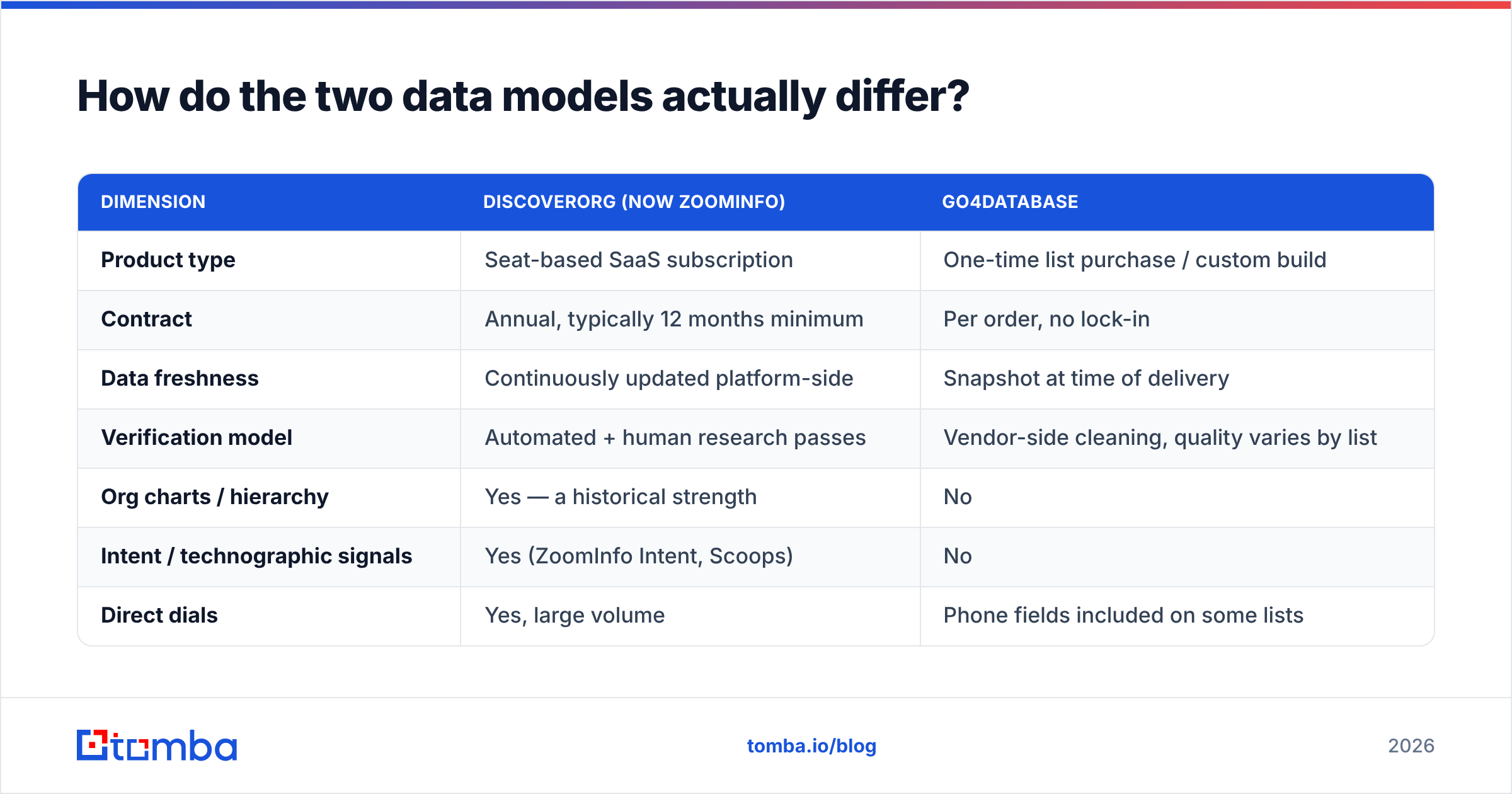
DiscoverOrg vs Go4Database: how the data models differ#
Here is the shape of each one, before we talk price.
| Dimension | DiscoverOrg (now ZoomInfo) | Go4Database |
|---|---|---|
| Product type | Seat-based SaaS subscription | One-time list purchase / custom build |
| Contract | Annual, typically 12 months minimum | Per order, no lock-in |
| Data freshness | Continuously updated platform-side | Snapshot at time of delivery |
| Verification model | Automated + human research passes | Vendor-side cleaning, quality varies by list |
| Org charts / hierarchy | Yes — a historical strength | No |
| Intent / technographic signals | Yes (ZoomInfo Intent, Scoops) | No |
| Direct dials | Yes, large volume | Phone fields included on some lists |
| API access | Yes, on higher tiers | Limited to none |
| CRM integrations | Salesforce, HubSpot, Outreach, Salesloft | Manual CSV import |
| Best fit | Enterprise ABM and outbound teams with budget | One-off campaigns, cheap volume tests |
| Typical buyer | VP Sales, RevOps at 50+ headcount | Solo founders, agencies, list resellers |
Note the split. ZoomInfo sells a workflow. Go4Database sells rows. Rows may be fine if your outreach already works and you just need fuel. Rows are useless if you need to know who reports to whom first.
Which one has better data?#
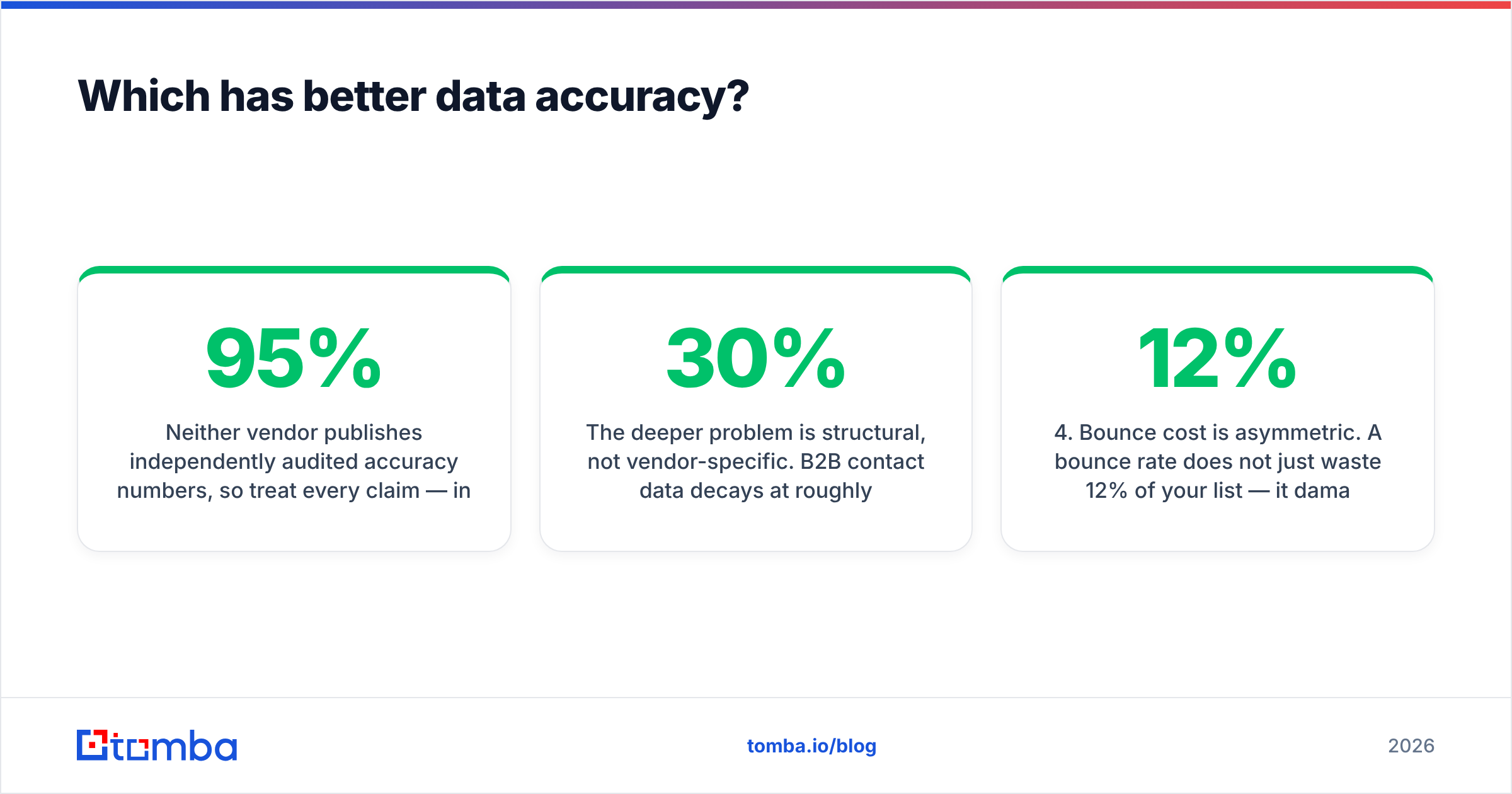
Neither side shares audited accuracy numbers. So treat every "95% accurate" badge as an ad. Test it on your own list instead.
Review sites still point one way. On G2, ZoomInfo scores well for reach and direct dials. It takes heat for two things: stale records at fast-growing startups, and credits that burn faster than planned. Bulk list sellers take more heat for bounces. A file built three months ago and sold to eleven buyers goes stale for all eleven.

The root problem is not the vendor. B2B contact data rots at 25% to 30% a year. People switch jobs. Firms rebrand. Mail servers change. A file is right on day one and drifts after that. So:
- Snapshot files age fast. A Go4Database file is at its best the hour it lands. Six months on, a big slice will bounce. Your only fix is to buy again.
- Live data ages too. ZoomInfo re-checks records all the time. It does not re-check every record every cycle. Small firm contacts drift the most.
- Catch-all domains beat both. Many company servers accept any address. So neither vendor can prove one mailbox is real. That is where a catch-all verifier pays off.
- Bounces cost more than they look. A 12% bounce rate does not just waste 12%. It hurts your sender reputation and buries the other 88%.
- Check at send time. The only number that counts is the one you measure right before you press send.
That last point splits the market in 2026. Files and yearly deals both bet that data checked once stays true. It does not.
DiscoverOrg vs Go4Database: what do they cost?#
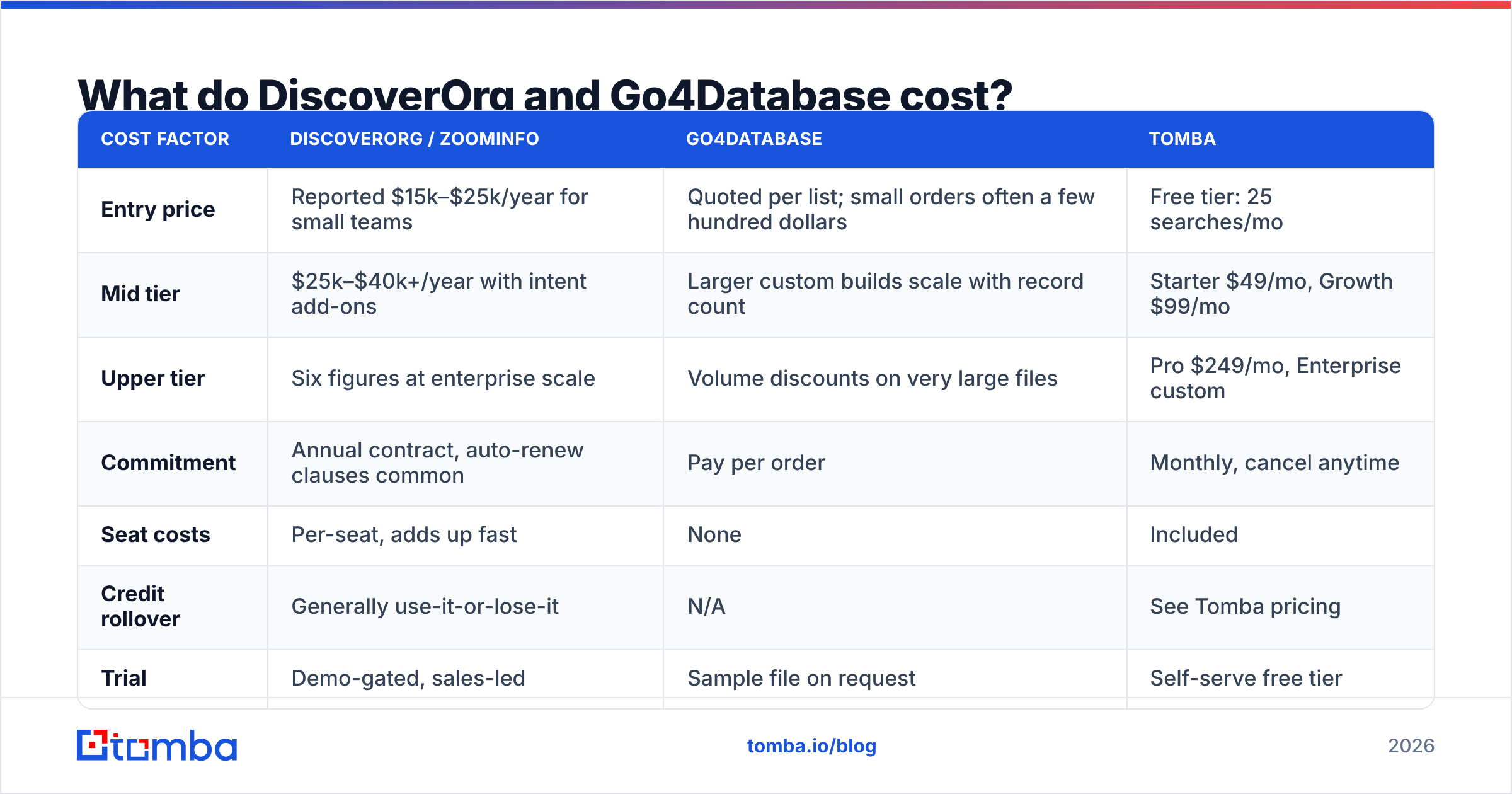
Neither one lists prices in public. That tells you something on its own. The ranges below come from buyers on review sites and buying forums. Get your own quote to be sure.
| Cost factor | DiscoverOrg / ZoomInfo | Go4Database | Tomba |
|---|---|---|---|
| Entry price | Reported $15k–$25k/year for small teams | Quoted per list; small orders often a few hundred dollars | Free tier: 25 searches/mo |
| Mid tier | $25k–$40k+/year with intent add-ons | Larger custom builds scale with record count | Starter $49/mo, Growth $99/mo |
| Upper tier | Six figures at enterprise scale | Volume discounts on very large files | Pro $249/mo, Enterprise custom |
| Commitment | Annual contract, auto-renew clauses common | Pay per order | Monthly, cancel anytime |
| Seat costs | Per-seat, adds up fast | None | Included |
| Credit rollover | Generally use-it-or-lose-it | N/A | See Tomba pricing |
| Trial | Demo-gated, sales-led | Sample file on request | Self-serve free tier |
Two cost traps are worth naming.
The first is the yearly deal. Buyers report the same three things. Credits expire unused. Seats bought for eight people get used by three. Renewal talks are harder than the first sale. If your volume swings or your team size may change, a 12-month floor is a costly bet.
The second is the clean-up cost on the list side. A $400 file of 10,000 contacts looks like 4 cents a record. Say 20% bounce and 15% more are the wrong job title. Your real cost per usable record triples. You also paid to run the check that told you. Budget for the clean-up, not just the file.
Who should buy which?#
Plain picks, no hedging.
- Buy ZoomInfo (the DiscoverOrg line) if you sell to large firms, need org charts and direct dials, run 10 or more reps, and can sign a five-figure deal. That workflow is hard to copy with small tools.
- Buy Go4Database if you want cheap volume for one campaign in a market ZoomInfo covers thinly. You must accept that you will check every record yourself. Agree on how fresh the data is before you pay.
- Buy neither if you work from a named list. You pick the accounts and the people first, then need their details. That is a lookup job, not a database job.
The third case flips the math. Send 500 well-picked emails a month and you need 500 good addresses. You do not need 40 million rows. An email finder turns a name plus a domain into a checked address. It costs a rounding error next to either option. You never pay for rows you skip.
Is there a middle ground?#
Yes. Three options now sit between a full platform and a raw file.
Pay-as-you-go finders. You give the person and the firm. The tool returns the address and checks it. Tomba's domain search also runs the other way. Give it a domain and get the team, with roles and scores. No yearly deal, and a free tier so you can test it first.
Checked list markets. Sellers like BookYourData sit in an odd spot. They sell lists like a broker. But they check each record and back it with a bounce promise. That fixes the weakest part of the broker model. If you truly want volume, this is the safer way to buy it.
API-first enrichment. With a dev on hand, an email finder API beats any screen. Enrich each new lead. Re-check before each send. You never sit on a stale row.

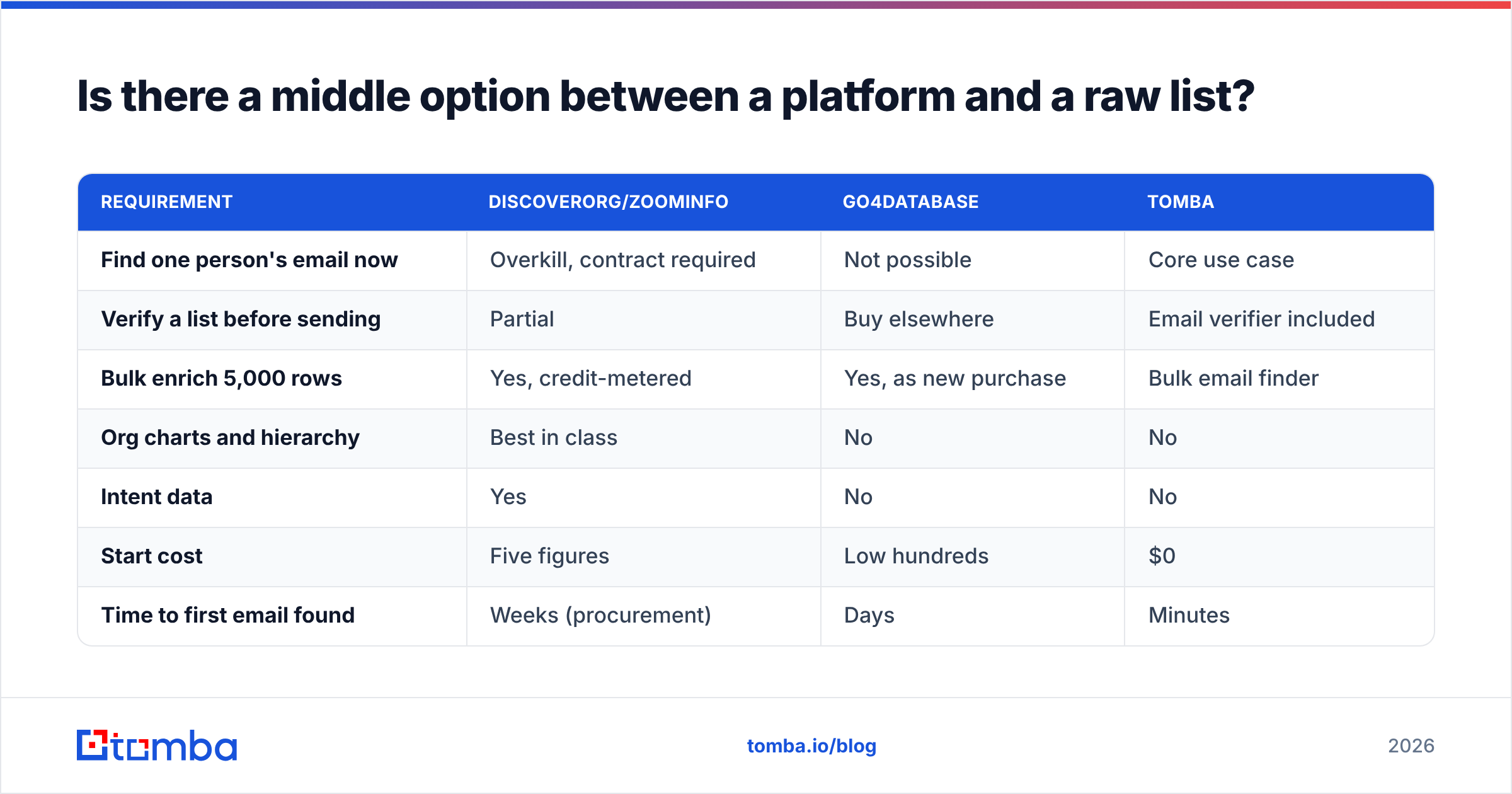
Here is the table that matters for most teams:
| Requirement | DiscoverOrg/ZoomInfo | Go4Database | Tomba |
|---|---|---|---|
| Find one person's email now | Overkill, contract required | Not possible | Core use case |
| Verify a list before sending | Partial | Buy elsewhere | Email verifier included |
| Bulk enrich 5,000 rows | Yes, credit-metered | Yes, as new purchase | Bulk email finder |
| Org charts and hierarchy | Best in class | No | No |
| Intent data | Yes | No | No |
| Start cost | Five figures | Low hundreds | $0 |
| Time to first email found | Weeks (procurement) | Days | Minutes |
Read it straight. ZoomInfo wins two rows, and those rows matter to big ABM teams. If you need buying signals and org charts, no finder replaces that. But most teams weighing DiscoverOrg vs Go4Database are not big ABM teams. They just need details for 300 people. And they are being quoted for a data warehouse.

What about the legal and inbox risk?#
This part gets skipped in most reviews. It shows up later as a problem.
Bought lists carry real email deliverability risk. A file sold to many buyers gets mailed by many senders. So the people on it hear from strangers again and again. Spam complaints run higher on resold data. And complaints are the fastest way to lose the inbox at Google and Microsoft. Both now set bulk sender rules: signed domains, one-click unsubscribe, and complaints under 0.3%. See Google's own guidance.
On the legal side, GDPR does not ban B2B outreach. It does ask for a lawful basis. You must also say where you got the data. "We bought a list" is a weak answer. "We saw you as a fit at a firm we sell to" is stronger. Ask any vendor for consent and source proof in writing. Tomba lists its data sources for that reason.
Basic hygiene, whichever vendor you pick:
- Check right before you send, not at purchase. Re-check anything older than 30 days.
- Drop role inboxes (info@, sales@, support@) unless they are your real target.
- Split out catch-all domains into a slower track.
- Warm new sending domains before you touch a bought file.
- Cap daily volume per inbox. Most inbox failures start as volume failures.
DiscoverOrg vs Go4Database: which one wins?#
Head to head, ZoomInfo wins. It has wider reach, live updates, real integrations, and a workflow layer. Go4Database wins on one thing: it is cheap and there is no contract. That is worth something, but it is a thin moat.
The better answer is that this is often the wrong question. Both sell you scale you may not need. The cost per usable record only looks good on a slide. If your list is hundreds of good prospects, not millions of rows, a find-and-check workflow beats both. It wins on cost, speed, and accuracy. And you can prove it before you pay.
Start with the Tomba Email Finder on the free tier. Take 25 real prospects from your target account list. Find and check their addresses. Then compare the bounce rate to any sample file a vendor hands you. Twenty minutes of that beats a quarter of sales calls.
Related guides#
Ready to find emails that actually work?
Join 150,000+ professionals who stopped guessing and started sending. Free credits on signup — no credit card required.
Get the Tomba newsletter
Practical outbound tactics and product updates — once every two weeks.
About the author