DiscoverOrg vs Infofree: Which B2B Data Tool Wins in 2026?
One is a five-figure enterprise contract that no longer exists under its own name. The other is under $100/month with unlimited leads. Here is the honest breakdown of which B2B data tool fits your team in 2026.
DiscoverOrg vs Infofree is an odd match-up. One is a five-figure yearly contract. The other costs less than $100 a month. This guide walks through the DiscoverOrg vs Infofree choice in plain words, so you can decide fast.
TL;DR
- DiscoverOrg is no longer a standalone product. It merged with ZoomInfo in 2019, and the brand was retired.
- Search for "DiscoverOrg pricing" today and you land in a ZoomInfo sales cycle. Annual deals often start in the five figures.
- Infofree.com is the other extreme. It is a flat monthly plan, around $99/mo for the unlimited-leads tier.
- Infofree aims at solo reps, insurance agents, and local SMB sellers. It sells compiled directory data, not intent-scored intelligence.
A few more points before the detail:
- The two are not real rivals. They serve different buyers, different deal sizes, and different ideas of "good data."
- Do you mainly need verified work emails and firmographics for outbound? Then both are the wrong shape. A per-credit email finder does that job for far less.
- Test both with the same 100-contact list before you sign. Vendor accuracy numbers are marketing. Your own sample is evidence.
Why are people still comparing DiscoverOrg vs Infofree?#
Because the search intent behind DiscoverOrg vs Infofree is rarely about those two brands. It is a proxy question. Do I need to spend enterprise money on B2B data, or will a cheap plan do?
DiscoverOrg built its name on human-checked org charts. It covered IT, marketing, finance, and HR teams. A rep learned who the VP of Infrastructure was, who reported to them, and which projects they owned. It sold to enterprise sales teams at enterprise prices.
Infofree came from the other side of the market. Vin Gupta, the founder of infoUSA, launched it. The promise was simple: unlimited business and consumer leads for a low flat fee, with a light CRM included.
So buyers put the two names side by side while staring at a budget line. They want to know if the costly option is worth 20x the cheap one. The honest answer: sometimes, for a narrow set of teams, and almost never for the reason people expect.

DiscoverOrg vs Infofree: what happened to DiscoverOrg?#
DiscoverOrg acquired ZoomInfo in 2019. It ran both brands for a while, then folded everything into the ZoomInfo name. The DiscoverOrg product, login, and pricing page are gone. If you are weighing "DiscoverOrg" in 2026, you are weighing ZoomInfo and its GTM platform tiers.
The philosophy survived: deep, research-backed contact and org data, sold as a platform rather than a lookup tool. The surface area changed. ZoomInfo now bundles intent data, website visitor ID, conversation intelligence, and sales engagement into one contract. That is why quotes have drifted up rather than down.
What this means for a buyer today:
- There is no self-serve checkout. You get a demo, a scoping call, and a quote. Plan for a multi-week cycle.
- Pricing is seat-based plus credit-based. Two dials means two ways the renewal can grow.
- Contracts are annual, often multi-year. Cutting seats mid-year is rarely an option.
- Credits expire. Unused enrichment credits do not roll over, so under-use is pure waste.
- The best data sits in upper tiers. Intent, visitor ID, and large exports are add-ons, not defaults.
What is Infofree, and who actually uses it?#
Infofree sells access to a compiled database of US businesses and consumers. It holds roughly 15 million business records and a much larger consumer file. You pay a flat monthly fee. The pitch is volume and simplicity: unlimited lead views, unlimited downloads on the top plan, a basic CRM called CRM101, and no per-record metering.
In a DiscoverOrg vs Infofree comparison, Infofree is the volume side. The typical customer is not an enterprise SDR team. It is:
- An insurance or financial-services agent building local prospect lists.
- A home-services or local B2B firm working a territory.
- A one-person consultancy that needs company names, addresses, and switchboard numbers by SIC code and area.
- A telemarketing team that lives on phone numbers, not email.
That framing matters. Infofree's roots are directory compilation: business listings, credit-file signals, public records. It does not run constant checks on individual work email addresses. You get breadth and geography. You do not reliably get "the current Director of Demand Gen at a 400-person SaaS company, plus her verified inbox."
DiscoverOrg vs Infofree: a feature-by-feature comparison#
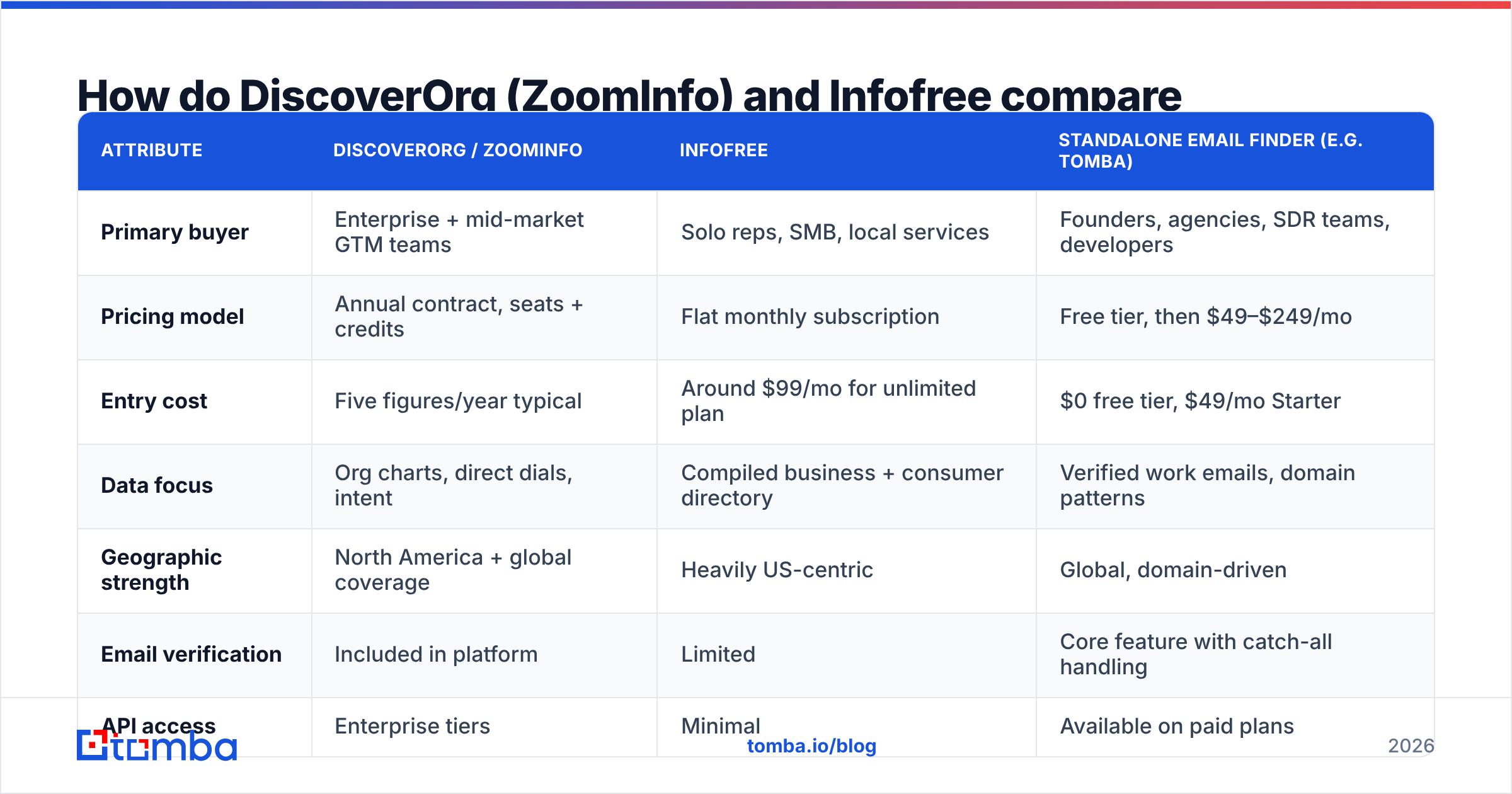
| Attribute | DiscoverOrg / ZoomInfo | Infofree | Standalone email finder (e.g. Tomba) |
|---|---|---|---|
| Primary buyer | Enterprise + mid-market GTM teams | Solo reps, SMB, local services | Founders, agencies, SDR teams, developers |
| Pricing model | Annual contract, seats + credits | Flat monthly subscription | Free tier, then $49–$249/mo |
| Entry cost | Five figures/year typical | Around $99/mo for unlimited plan | $0 free tier, $49/mo Starter |
| Data focus | Org charts, direct dials, intent | Compiled business + consumer directory | Verified work emails, domain patterns |
| Geographic strength | North America + global coverage | Heavily US-centric | Global, domain-driven |
| Email verification | Included in platform | Limited | Core feature with catch-all handling |
| API access | Enterprise tiers | Minimal | Available on paid plans |
| Contract flexibility | Annual, hard to downsize | Month-to-month | Month-to-month |
| Learning curve | Steep — full platform | Shallow | Minimal |
| Best for | Complex enterprise ABM motions | Local, volume-based prospecting | Precise outbound to known companies |
The table makes the split clear. ZoomInfo is a system of intelligence. You build a revenue org around it. Infofree is a list source. You dip into it when you need names.
Neither one is tuned for the most common job in modern outbound. That job is simple: take a list of target companies and people, then return deliverable email addresses.
DiscoverOrg vs Infofree: which one has better data accuracy?#

Accuracy is where this match-up stops being close. It is also where the marketing numbers deserve doubt.
ZoomInfo inherited DiscoverOrg's method and spends heavily on checks. It blends machine signals, community data from users who connect their inboxes, and human research on priority accounts. For tech and mid-to-large firms in North America, it is genuinely strong. Direct dial phone numbers are its stand-out, and that is where most cheap tools fall apart.
Infofree's accuracy differs in kind, not just in degree. Compiled directory data ages in a set pattern. Company names and addresses hold for years. People and email addresses churn fast. Reviewers tend to say the firmographics are usable and the person-level data is hit-or-miss. Check current G2 reviews for both before you commit. Sentiment shifts each quarter, and it beats any vendor datasheet.
Three things to hold onto when you read an accuracy claim:
- "95% accurate" means nothing without a definition. Accurate at what? Company match, job title, or email delivery? Ask.
- Bounce rate is the only metric that costs you money. A wrong job title is an awkward email. A dead inbox hurts your sender reputation.
- Catch-all domains skew the math. Some vendors count catch-alls as "valid" and inflate their numbers. Run suspect records through a catch-all verifier first.
Whichever vendor you pick, run the export through an independent email verifier before your first send. Treating any database export as send-ready is how teams burn a domain in week one.
DiscoverOrg vs Infofree: what does each one actually cost?#
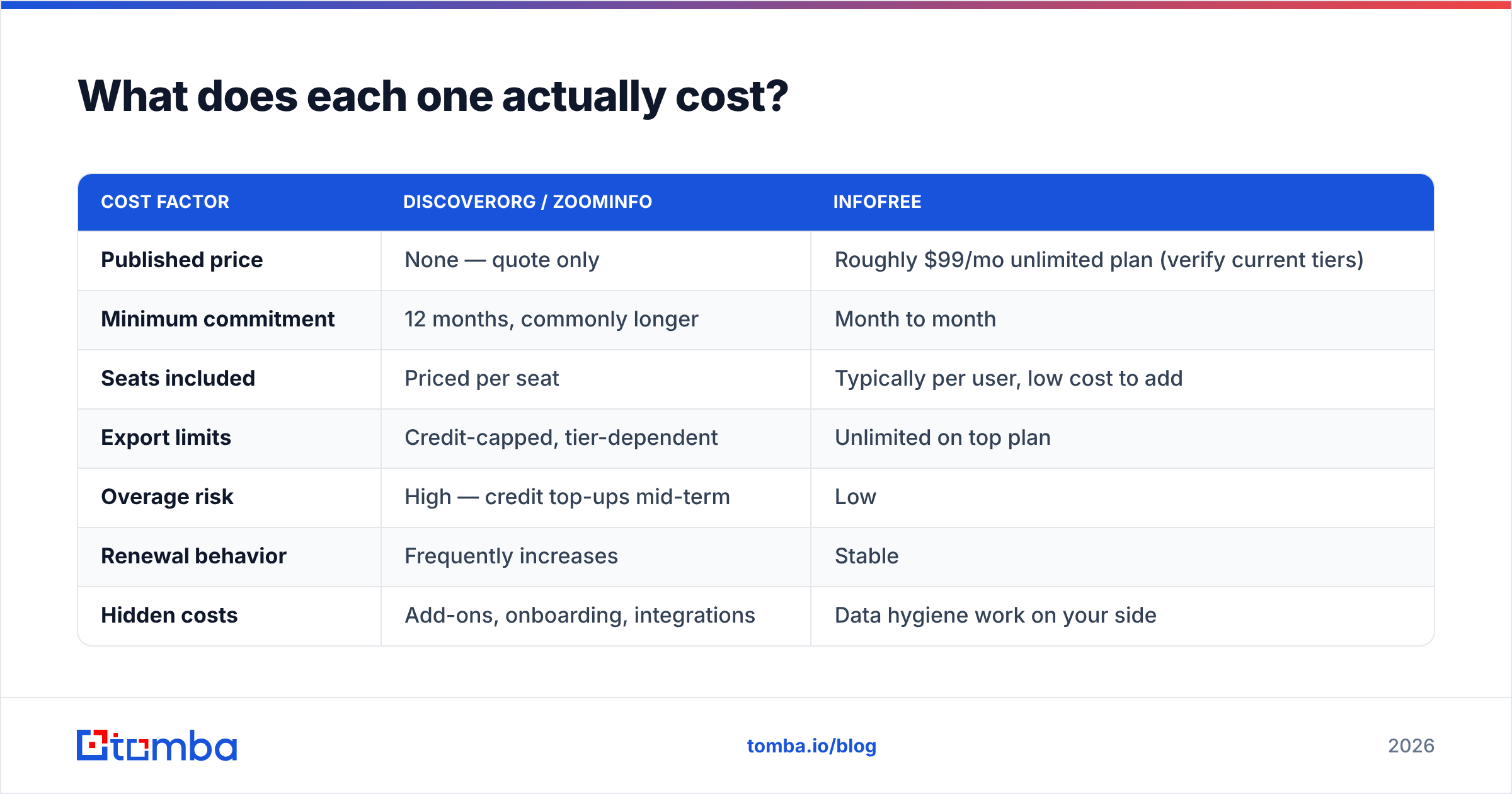
| Cost factor | DiscoverOrg / ZoomInfo | Infofree |
|---|---|---|
| Published price | None — quote only | Roughly $99/mo unlimited plan (verify current tiers) |
| Minimum commitment | 12 months, commonly longer | Month to month |
| Seats included | Priced per seat | Typically per user, low cost to add |
| Export limits | Credit-capped, tier-dependent | Unlimited on top plan |
| Overage risk | High — credit top-ups mid-term | Low |
| Renewal behavior | Frequently increases | Stable |
| Hidden costs | Add-ons, onboarding, integrations | Data hygiene work on your side |
The pattern is familiar to anyone who has bought B2B data. The enterprise tool costs money up front. The cheap tool costs time later.
Infofree's unlimited downloads only pay off if you have a process. You need dedup, verification, and enrichment to turn raw records into a sendable list. Without that, unlimited becomes unlimited garbage.
There is a third cost nobody quotes: the buying cycle itself. A quarter spent in procurement is a quarter your reps did not spend emailing. If your team is under ten people, that math rarely works.
DiscoverOrg vs Infofree: is there a middle option?#
Yes. It is where most teams in this comparison actually land.
The middle of the market has split into specialists. You no longer pick between one costly platform and one cheap directory. Instead you assemble two or three focused tools. Start with these two:
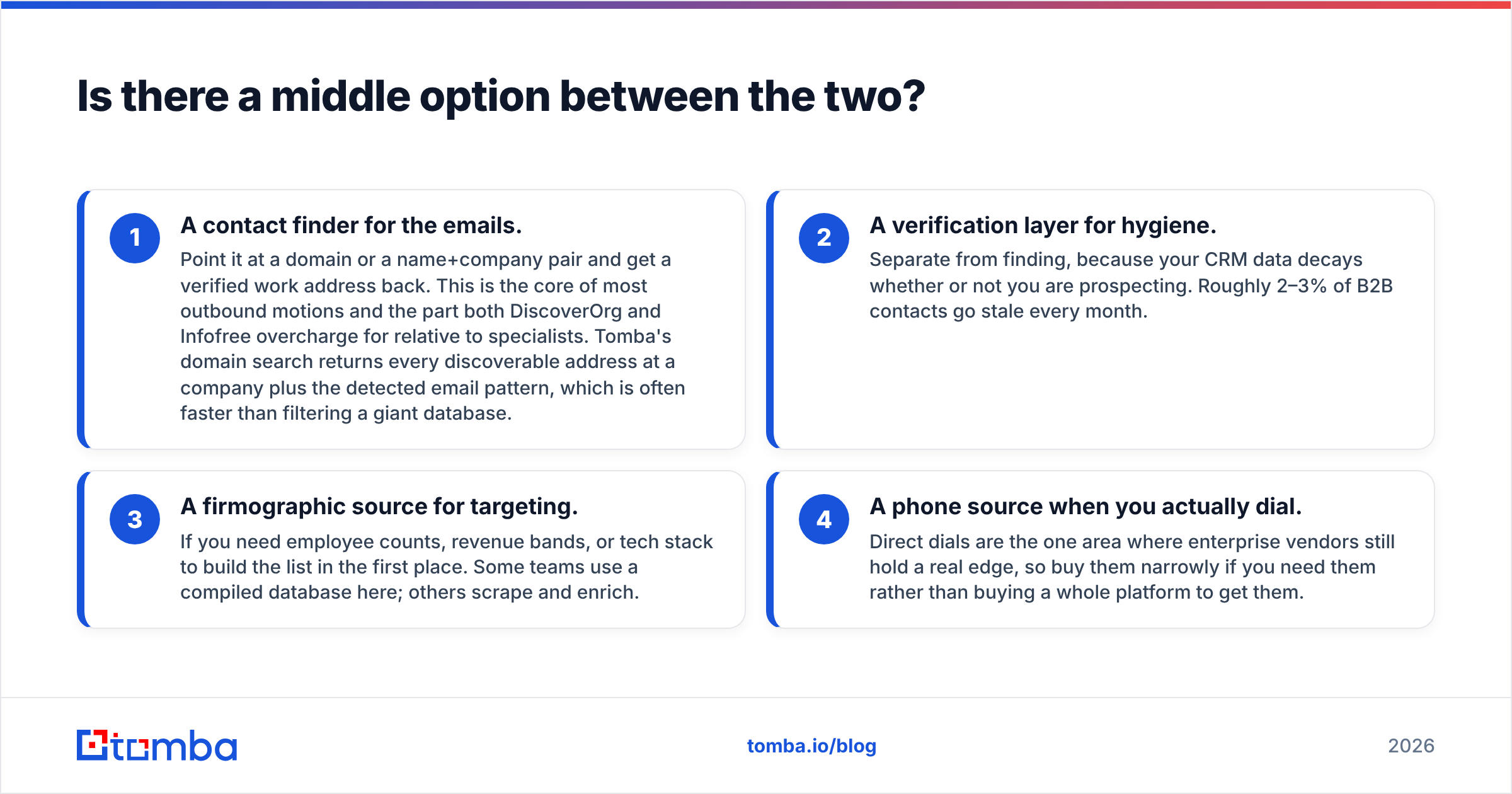
- A contact finder for the emails. Give it a domain, or a name plus company, and get a verified work address back. This is the core of most outbound motions. Tomba's domain search returns every address it can find at a company, plus the detected email pattern. That is often faster than filtering a giant database.
- A verification layer for hygiene. Keep it separate from finding. Your CRM decays whether or not you prospect. Roughly 2–3% of B2B contacts go stale every month.
Add these two only if your motion needs them:
- A firmographic source for targeting. Useful when you need employee counts, revenue bands, or tech stack to build the list. Some teams buy a compiled database here. Others scrape and enrich.
- A phone source for when you dial. Direct dials are the one area where enterprise vendors still lead. Buy them narrowly. Do not buy a whole platform just to get them.
One honest note. Maybe you truly need a large, pre-built US list with no per-credit metering. In that case BookYourData is a solid option in that lane, and a fair shortlist entry next to Infofree. Different vendors win at different jobs. Pretending one tool wins every category is how buyers end up unhappy.

How to test DiscoverOrg vs Infofree before you commit#
Run the same test on every vendor. Same list, same day, same scoring rules. Anything else is vibes. Start with the data itself:
- Build a 100-contact ICP sample. Use real target accounts and real named people. Spread them across the company sizes and industries you sell to. Never use a vendor-supplied sample.
- Request the same fields from each tool. Work email, direct dial, job title, employee count, and last-updated date. A missing "last updated" is itself a finding.
- Score match rate and accuracy apart. Match rate is how many rows came back filled. Accuracy is how many of those were right. A 90% match with 60% accuracy loses to 60/95.
Then move from the data to the inbox:
- Verify every returned email yourself. Push all results through a neutral verifier. Do not grade a vendor with its own answer key. Check the whole set in one pass with a bulk email finder workflow.
- Send a small, warmed test batch. Fifty emails per source, same copy, same sending domain. Compare hard bounce rate after 48 hours. This is the number that decides it.
- Price the result per usable contact. Divide total annual cost by contacts that were matched, accurate, and delivered. That figure is what you are really buying.
Most teams learn the same lesson from this test. The costly platform wins on direct dials and org structure. The cheap plan wins on raw volume of small local businesses. Neither wins on cost per deliverable email against a focused finder.
DiscoverOrg vs Infofree: which should you choose in 2026?#
Choose ZoomInfo (formerly DiscoverOrg) if you sell six-figure deals into mid-market or enterprise accounts. You need org charts and direct dials. You have a RevOps function to run the integration. The annual contract is a rounding error next to your pipeline target. The platform earns its price when sales, marketing, and ops all lean on it daily.
Choose Infofree if you are a solo operator or a small local business. Your prospecting runs on geography and SIC codes. You value flat, steady pricing over person-level precision. Phone or direct mail matters as much as email. It is honestly priced for what it is.
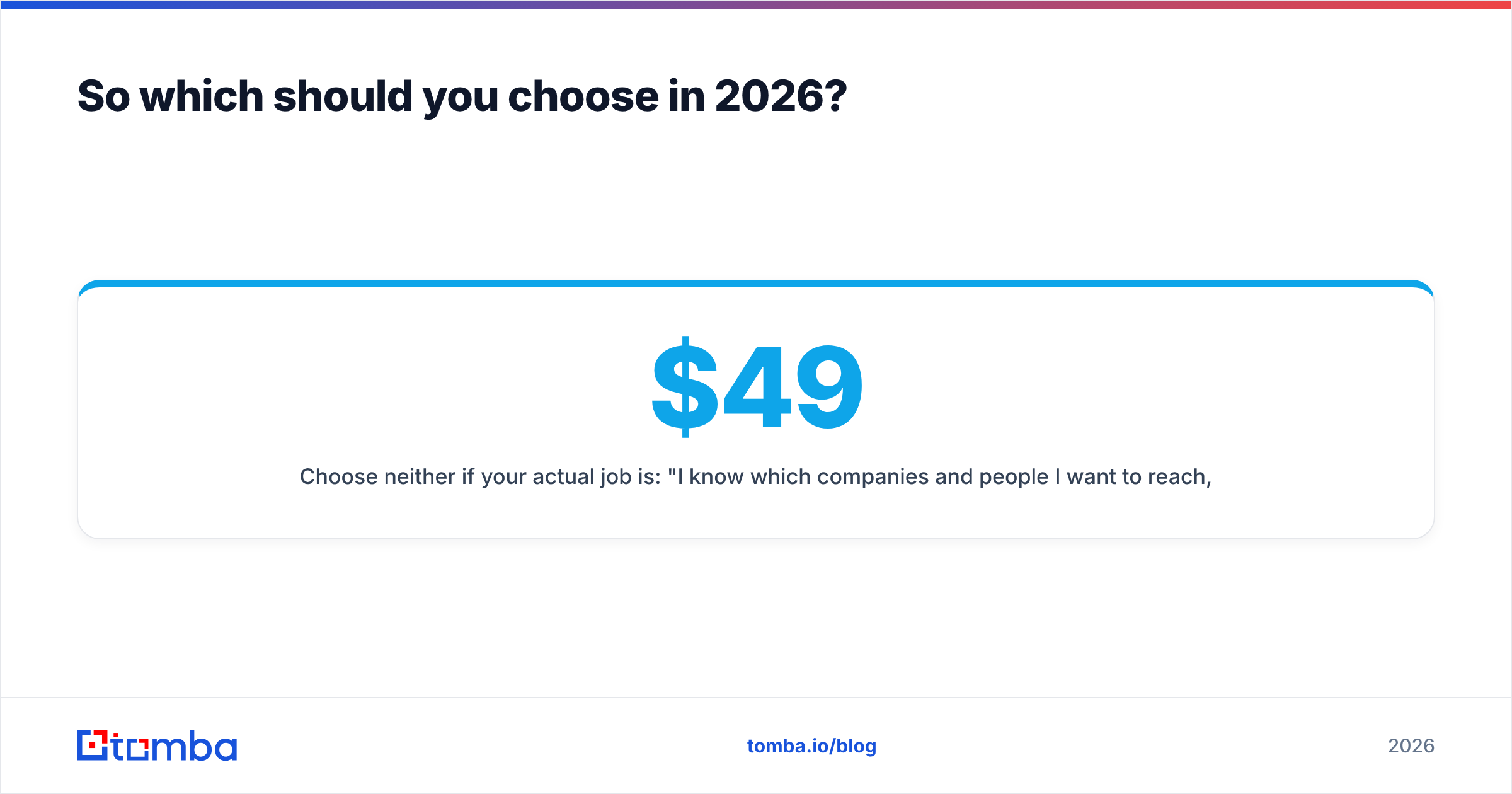
Choose neither if your real job is simpler. You know which companies and people you want to reach. You just need their verified work emails. That is the most common outbound case in 2026, and both of these tools are overbuilt for it. Compare cost per contact against Tomba pricing: a free tier at 25 searches a month, Starter at $49/mo, Growth at $99/mo, Pro at $249/mo. The gap is rarely subtle.

One last piece of advice. Whatever you choose, own your verification step. Vendors are paid to report optimistic validity rates. Your sending domain pays the price when they are wrong. Independent checks are cheap insurance on an asset that takes months to rebuild.
Ready to skip the enterprise contract?#
Maybe the honest version of your need is this: find verified work emails for the companies you already care about, with no 12-month commitment. Then start with the Tomba Email Finder. Search by domain, by name and company, or in bulk. Every result comes back with a confidence score and a verification status. The free tier gives you 25 searches a month, so you can run your own accuracy test before you pay. Build your 100-contact benchmark, run it against your shortlist, and let the bounce rate settle DiscoverOrg vs Infofree for you.
Related guides#
Ready to find emails that actually work?
Join 150,000+ professionals who stopped guessing and started sending. Free credits on signup — no credit card required.
Get the Tomba newsletter
Practical outbound tactics and product updates — once every two weeks.
About the author