DiscoverOrg vs MailsHunt: Which B2B Data Tool Wins in 2026?
DiscoverOrg (now ZoomInfo) and MailsHunt sit at opposite ends of the B2B data market — one costs five figures a year, the other costs less than lunch. Here's which one actually fits your pipeline.
TL;DR
- DiscoverOrg is now ZoomInfo. DiscoverOrg acquired ZoomInfo in 2019 and rebranded the combined company under the ZoomInfo name. If a vendor is still selling you "DiscoverOrg" in 2026, you're buying a ZoomInfo contract with legacy branding.
- MailsHunt is a low-cost email finder and verifier, not a data intelligence platform. It does lookups and list cleaning. It does not do org charts, intent signals, or technographics.
- These tools are not really competitors. They compete for the same line item in your budget, which is a different thing entirely.
- Price gap is roughly 100x. ZoomInfo/DiscoverOrg contracts typically land in the $15,000–$40,000+/year range for a small team. MailsHunt-tier tools run $20–$100/month.
- Most teams under 20 reps overpay for enterprise data. A focused email finder plus a verifier plus a CRM covers 80% of what mid-market outbound actually needs.
What is DiscoverOrg and does it still exist in 2026?#
DiscoverOrg was a B2B sales intelligence platform built on human-researched contact and company data. Its differentiator was never volume — it was verification depth. DiscoverOrg employed research teams that phoned companies to confirm reporting structures, budget ownership, and technology stacks, then refreshed those records on a fixed cadence.
In February 2019, DiscoverOrg acquired ZoomInfo. The combined entity kept the ZoomInfo name, went public in 2020, and the DiscoverOrg product line was folded into what is now ZoomInfo Sales. The "DiscoverOrg" datasets still exist inside that platform, but you no longer buy DiscoverOrg as a standalone product.
That matters for your evaluation. When you search "DiscoverOrg vs MailsHunt," you are effectively comparing an enterprise sales intelligence suite with per-seat licensing and annual contracts against a self-serve email lookup utility. The evaluation criteria barely overlap.
What DiscoverOrg-era data brings to ZoomInfo today:
- Org charts with reporting lines — who reports to whom, mapped visually, not just job titles scraped from LinkedIn.
- Technographics — which CRM, marketing automation, cloud provider, and security stack a company runs.
- Intent data — anonymized signals showing which accounts are researching your category this week.
- Direct dials and mobile numbers — a large chunk of the historic DiscoverOrg value was phone coverage, not email.
- Scoops — human-sourced notes on budget cycles, reorganizations, and planned purchases.
- Workflow automation — data pushed into Salesforce, HubSpot, and Outreach on a schedule.
Item 5 is the one nothing cheap replicates. It is also the one most teams never use because it requires a rep discipline that most orgs do not have.

What is MailsHunt and who is it for?#
MailsHunt is a budget-tier email finder and verification tool. The category it belongs to — alongside dozens of similar products — offers domain-based email lookup, single and bulk verification, and usually a Chrome extension. Many of these tools sell through lifetime-deal marketplaces, which is where a lot of their user base comes from.
The value proposition is straightforward: you have a list of companies or names, you need work email addresses, and you do not want to sign an annual contract to get them.
Where tools in this tier genuinely deliver:
- Cost per lookup is minimal. You can find and verify thousands of addresses for the price of one ZoomInfo seat-month.
- No sales cycle. Sign up, pay by card, start searching in five minutes.
- Good enough for known-target prospecting. If you already know which 300 companies you want, you mostly need contact details, not discovery.
Where they fall short:
- Coverage is uneven. Budget finders index public and semi-public sources. Coverage on European SMBs, non-English domains, and privately held mid-market companies drops sharply compared to enterprise providers.
- No account discovery. You cannot ask "show me every Series B fintech in Germany with 50–200 employees running Segment." You bring the list; the tool fills it in.
- Verification quality varies. Catch-all domains are the standard failure point. A lot of budget verifiers return "accept-all" and leave you to guess. That is why a dedicated catch-all verifier matters more than raw finder volume.
- Support and SLA are thin. Lifetime-deal economics do not fund enterprise support.
How do DiscoverOrg and MailsHunt compare on price and features?#
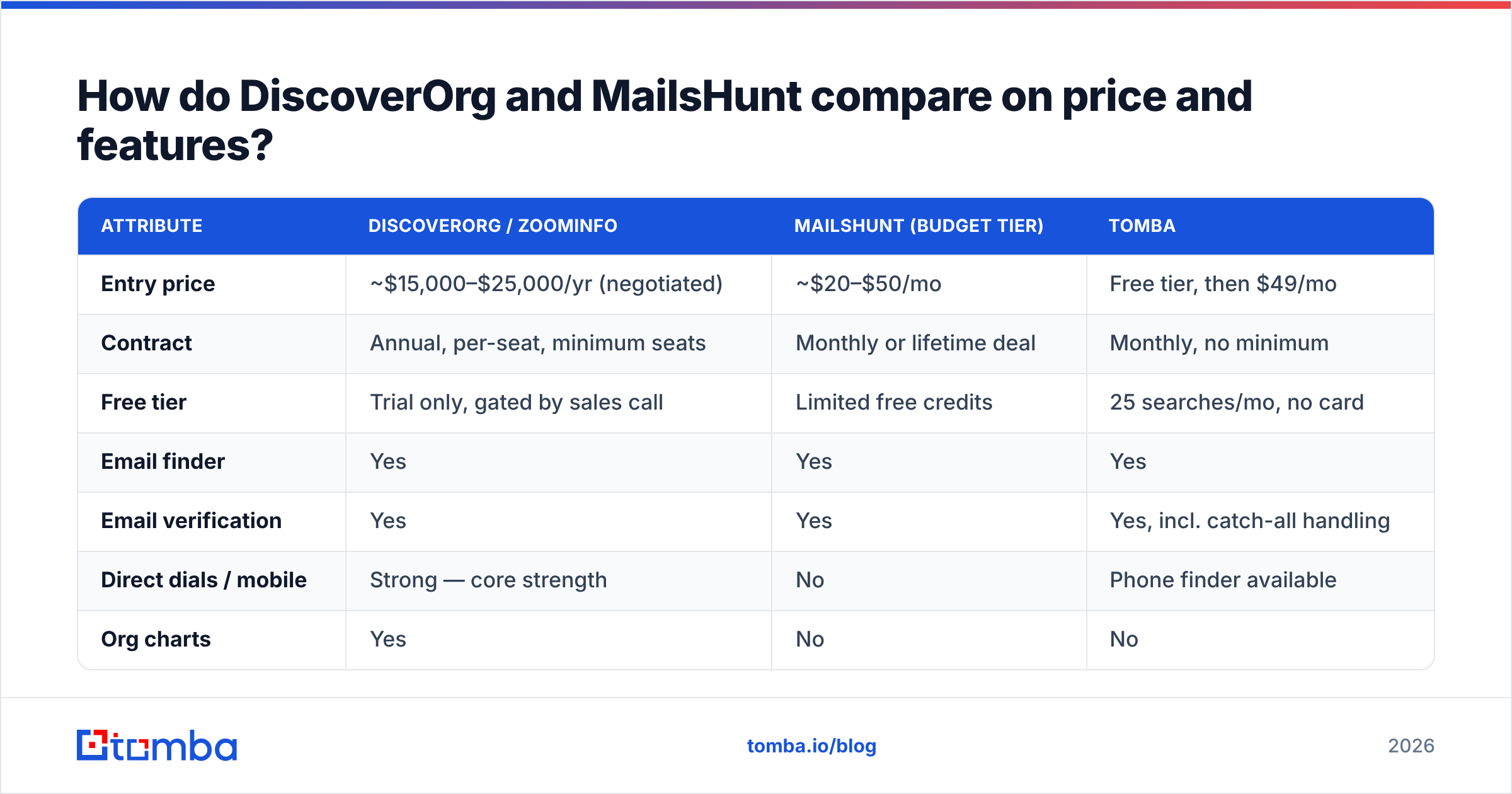
Here is the honest side-by-side. Note that ZoomInfo (DiscoverOrg) pricing is not published and varies heavily by seat count, data package, and negotiation; the figures below reflect commonly reported contract ranges rather than a rate card.
| Attribute | DiscoverOrg / ZoomInfo | MailsHunt (budget tier) | Tomba |
|---|---|---|---|
| Entry price | ~$15,000–$25,000/yr (negotiated) | ~$20–$50/mo | Free tier, then $49/mo |
| Contract | Annual, per-seat, minimum seats | Monthly or lifetime deal | Monthly, no minimum |
| Free tier | Trial only, gated by sales call | Limited free credits | 25 searches/mo, no card |
| Email finder | Yes | Yes | Yes |
| Email verification | Yes | Yes | Yes, incl. catch-all handling |
| Direct dials / mobile | Strong — core strength | No | Phone finder available |
| Org charts | Yes | No | No |
| Intent data | Yes | No | No |
| Technographics | Yes | No | Partial (tech checker) |
| Company/account search | Yes, filterable | No | Domain search |
| API access | Yes, priced separately | Limited | Included from Starter |
| Bulk processing | Yes | Yes, credit-capped | Yes |
| CRM sync | Native Salesforce, HubSpot, Outreach | CSV export | HubSpot, Salesforce, Pipedrive, Zapier |
| Time to first result | 2–6 weeks (procurement) | Same day | Same day |
| Best for | Enterprise ABM teams, 20+ reps | Solo founders, freelancers | SMB to mid-market outbound |
The table makes the real decision visible: you are not choosing between two email tools. You are choosing between buying a data platform and buying a data utility.
Which one is more accurate?#
Accuracy is the wrong single question. Ask instead: accurate at what, and for which segment.
DiscoverOrg-lineage data is strongest on North American enterprise — companies above roughly 500 employees, with formal org structures and public filings. Human verification cycles genuinely produce better direct-dial accuracy than anything scraped. Independent review aggregators like G2 consistently reflect this in ZoomInfo's data-quality scores.
Budget finders are strongest on companies with predictable email patterns — SaaS firms, agencies, and startups where first.last@domain.com or first@domain.com covers most of the org. Pattern inference plus SMTP validation gets you a long way when the domain plays nice.
Both degrade in the same three places:
- Catch-all domains — the server accepts everything, so SMTP validation tells you nothing. Only pattern confidence plus historical sighting data helps here.
- Role accounts —
info@,sales@,hello@. High deliverability, near-zero reply rate. Some tools count these toward "found" rates, which inflates the number. - Job churn — roughly a quarter of B2B contacts change roles annually. Any record older than six months is a coin flip regardless of who sold it to you.
The practical control is not picking the "most accurate" vendor. It is running every list through email verification immediately before send, regardless of source. A 92%-accurate list verified today beats a 97%-accurate list pulled eight months ago.
Is there a middle option between enterprise data and budget tools?#
Yes, and it is where most teams between 5 and 50 reps should be looking.
The gap in this comparison is obvious: DiscoverOrg/ZoomInfo sells you capabilities you will not fully deploy, at a price that forces a board conversation. Budget finders sell you a single function with variable coverage and no infrastructure around it. Neither describes a growing outbound team that needs reliable contact data, real verification, and something that plugs into a CRM without a CSV shuffle.
That middle tier includes several credible options. BookYourData takes a pay-as-you-go database approach with a strong accuracy guarantee, which suits teams that prefer buying pre-built lists over running lookups. Others in this band focus on real-time lookup with API access.
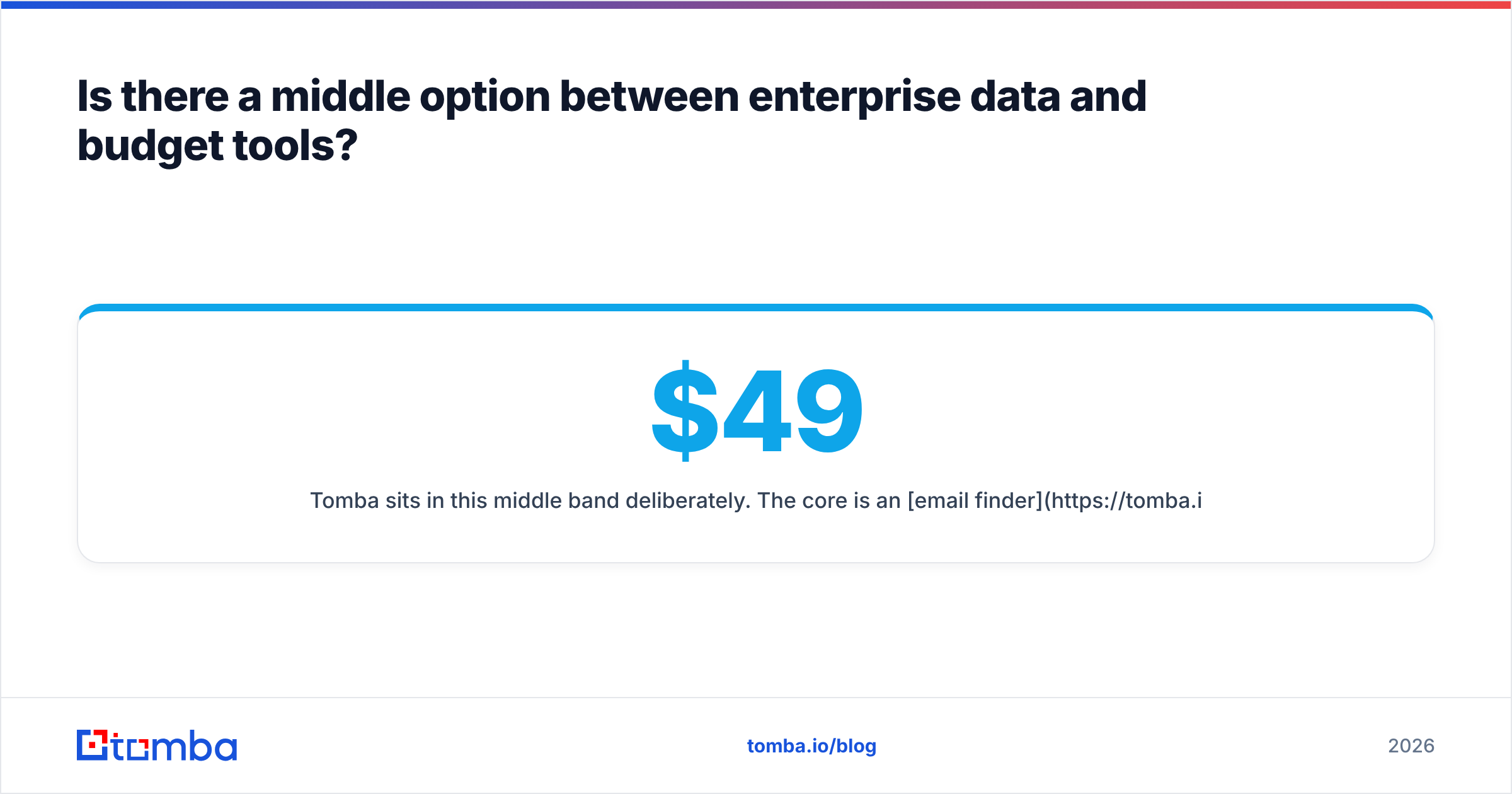
Tomba sits in this middle band deliberately. The core is an email finder backed by a verifier, a domain search for mapping a company's contacts, and enrichment for filling gaps in records you already have. Tomba pricing starts with a free tier at 25 searches per month, then $49/mo Starter, $99/mo Growth, and $249/mo Pro — with API access included rather than sold as a separate line.
The honest limitation: Tomba does not do intent data, org charts, or scoops. If your GTM motion genuinely runs on intent signals and account hierarchy mapping, ZoomInfo is the right purchase and no email finder replaces it.

How should you actually choose between them?#
Run this decision sequence rather than comparing feature lists.
1. Define what you're missing. Write down whether your bottleneck is finding accounts or reaching contacts at accounts you've already identified. If it's the former, budget finders are irrelevant to your problem. If it's the latter, enterprise intelligence is overbuilt for you.
2. Count your seats. ZoomInfo economics assume multiple seats and minimum commitments. Below roughly 10 active users, per-seat pricing rarely clears the ROI bar unless your ACV is high enough that two extra closed deals pay the contract.
3. Check your target segment. Pull 50 target companies you actually want. If most are under 200 employees, non-US, or privately held, run trials on both and measure hit rate yourself. Vendor-published coverage stats are aggregate and will not reflect your niche.
4. Test on your own list, not their demo. Every vendor demo uses accounts where their data is strong. Give both tools the same 100 real prospects and compare found-rate, verified-rate, and bounce-rate after send.
5. Price the total stack, not the tool. Enterprise platforms bundle sequencing and CRM sync. If you go budget, you will also pay for a sequencer, a verifier, and possibly enrichment. Add those before declaring a winner.
6. Check the exit. Annual contracts with auto-renewal and data-retention clauses are standard at the enterprise tier. Read what happens to exported records when you leave.

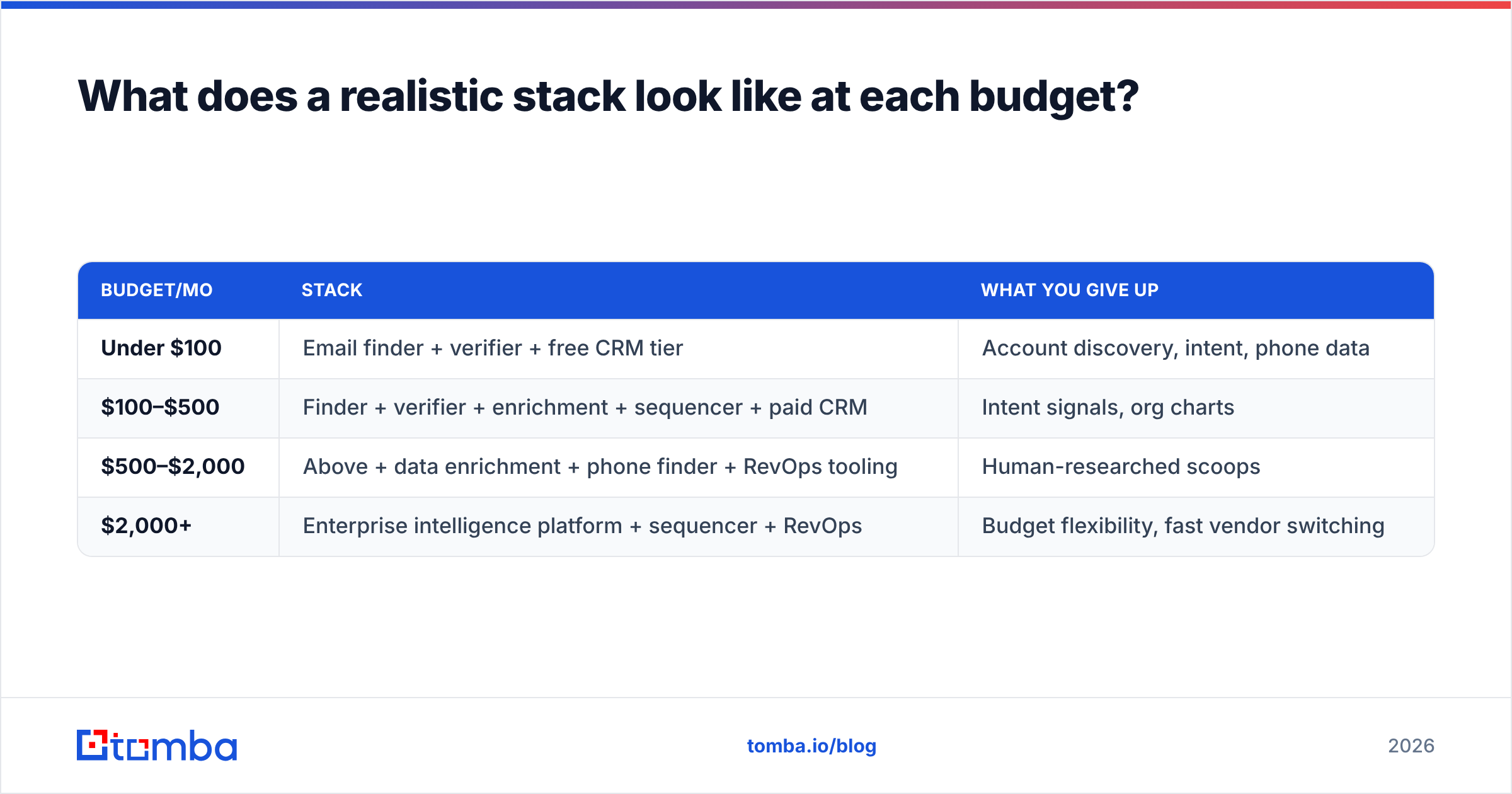
What does a realistic stack look like at each budget?#
| Budget/mo | Stack | What you give up |
|---|---|---|
| Under $100 | Email finder + verifier + free CRM tier | Account discovery, intent, phone data |
| $100–$500 | Finder + verifier + enrichment + sequencer + paid CRM | Intent signals, org charts |
| $500–$2,000 | Above + data enrichment + phone finder + RevOps tooling | Human-researched scoops |
| $2,000+ | Enterprise intelligence platform + sequencer + RevOps | Budget flexibility, fast vendor switching |
Most teams overshoot this table by one row. The failure mode is predictable: a company buys enterprise data because a competitor has it, uses 15% of the platform, and renews out of sunk-cost inertia.
The opposite failure exists too. Teams selling $200K deals into Fortune 1000 accounts should not be pattern-guessing emails to save $1,500/month. At that ACV, one extra meeting from an accurate direct dial pays for the year.
What about deliverability and list hygiene?#
This is the part both sides of the comparison undersell.
Neither an enterprise platform nor a budget finder protects your sending domain. Data source quality affects bounce rate, and bounce rate affects sender reputation, but the causal chain runs through your own sending behavior more than through your vendor.
Non-negotiables regardless of which tool you pick:
- Verify immediately before send, not at list-build time. Records decay between the two.
- Suppress catch-alls you cannot confirm or route them to a lower-volume, lower-risk sending domain.
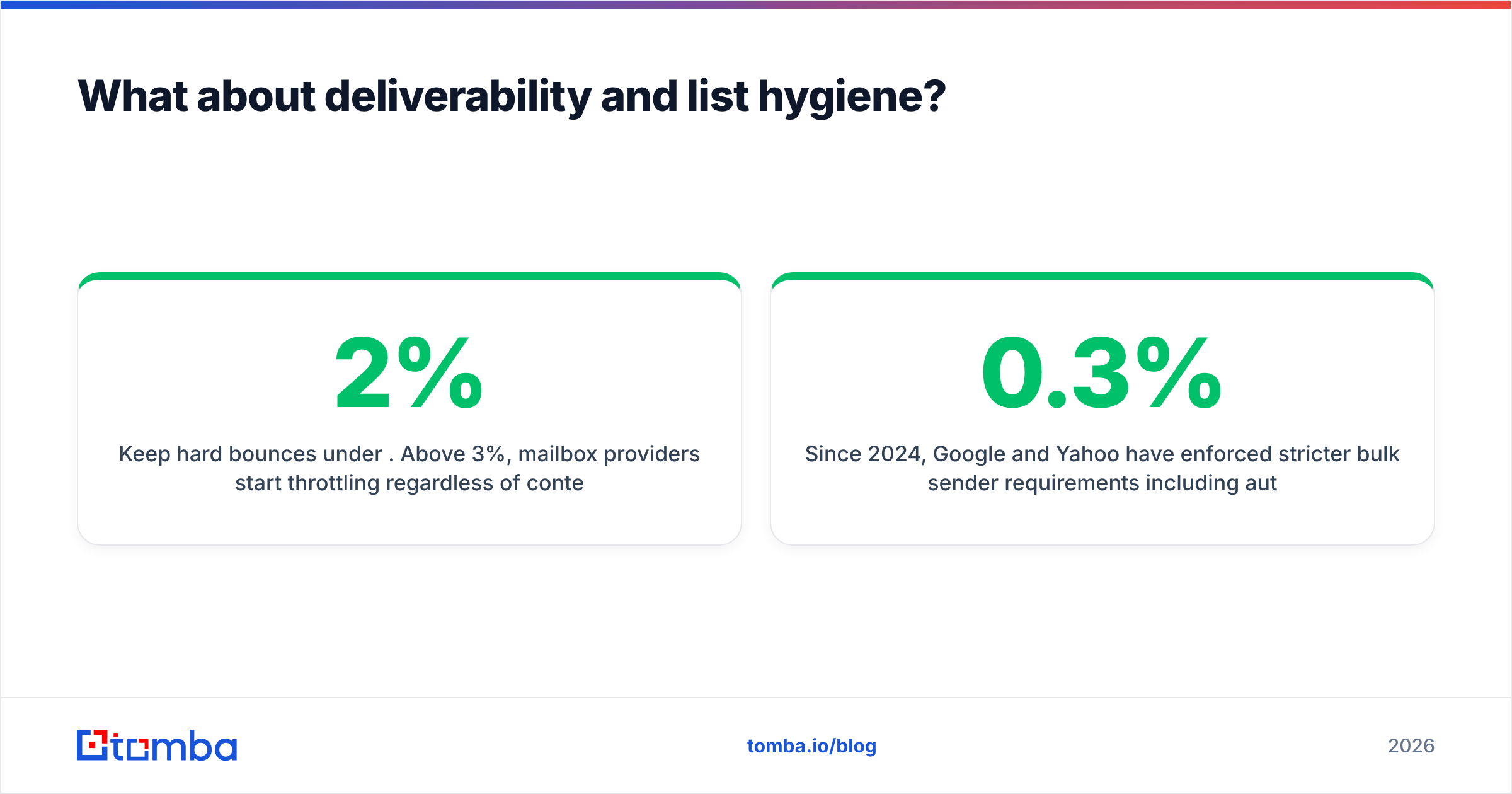
- Keep hard bounces under 2%. Above 3%, mailbox providers start throttling regardless of content quality.
- Deduplicate across sources. If you run two data vendors, you will double-contact people. That is worse than not contacting them.
Since 2024, Google and Yahoo have enforced stricter bulk sender requirements including authenticated domains and a 0.3% spam complaint threshold — see Google's bulk sender guidelines for the current rules. Neither DiscoverOrg nor MailsHunt handles any of that for you.
The verdict#
Choose DiscoverOrg/ZoomInfo if: you run account-based marketing at enterprise scale, need org charts and intent data as inputs to territory planning, sell into North American companies above 500 employees, have 15+ seats, and can absorb a five-figure annual commitment with a 2–6 week procurement cycle.
Choose MailsHunt-tier tools if: you are a solo founder or freelancer, you already know exactly which companies to target, your volume is under a few thousand lookups a month, and you need something working today with no contract.
Choose the middle tier if: you are a real sales team that needs dependable contact data, API access, verification you can trust on catch-all domains, and CRM sync — without paying for intelligence features you will not operationalize.
For that third case, start with the Tomba Email Finder. The free tier gives you 25 searches a month with no card required, which is enough to run the head-to-head test described above against whatever you are using now. Feed it 100 of your real target accounts, check the found and verified rates against your own bounce data, and let the numbers decide instead of the pricing page.
Related guides#
Ready to find emails that actually work?
Join 150,000+ professionals who stopped guessing and started sending. Free credits on signup — no credit card required.
Get the Tomba newsletter
Practical outbound tactics and product updates — once every two weeks.
About the author