DiscoverOrg vs Mailtester Ninja: Honest 2026 Comparison
One is an enterprise contact database that no longer exists under its own name. The other is a bare-bones verifier priced in fractions of a cent. Here's how DiscoverOrg and Mailtester Ninja actually compare in 2026 — and when neither is the right answer.
TL;DR
- DiscoverOrg no longer exists as a standalone product. It merged with ZoomInfo in 2019 and the brand was folded into the ZoomInfo platform — if a rep is pitching you "DiscoverOrg," you are buying a ZoomInfo contract.
- Mailtester Ninja is not a database at all. It is a low-cost SMTP verification service with a thin email-guessing layer on top. It cannot tell you who to email, only whether an address you already have is likely to bounce.
- Comparing them head-to-head is comparing a warehouse to a scale. One supplies contacts at enterprise prices (typically five figures a year, annual contract, no public pricing). The other checks addresses for fractions of a cent.
- The real question for most teams is not "which of these two" but "do I need an enterprise data contract at all?" A mid-tier finder plus verifier — Tomba's email finder at $49/mo, for example — covers the 80% case that DiscoverOrg used to own.
- Verify before you send regardless of source. Every database, including the expensive ones, decays roughly 2-3% per month as people change jobs.
What Happened to DiscoverOrg?#
DiscoverOrg was, for about a decade, the premium B2B contact database — human-researched org charts, direct dials, and IT install data sold mostly to enterprise sales and marketing teams. It was known for depth in tech buying committees and for aggressive pricing to match.
In February 2019, DiscoverOrg acquired ZoomInfo and then adopted the ZoomInfo name for the combined company. Since then, the DiscoverOrg product line has been absorbed into what is now sold as ZoomInfo Sales / Copilot. There is no separate DiscoverOrg login, no separate DiscoverOrg pricing page, and no separate DiscoverOrg roadmap.
That matters for anyone searching "DiscoverOrg vs Mailtester Ninja" in 2026. You are really asking: should I buy an enterprise data platform, or should I buy a cheap verification utility? Those are two different budget lines solving two different problems.
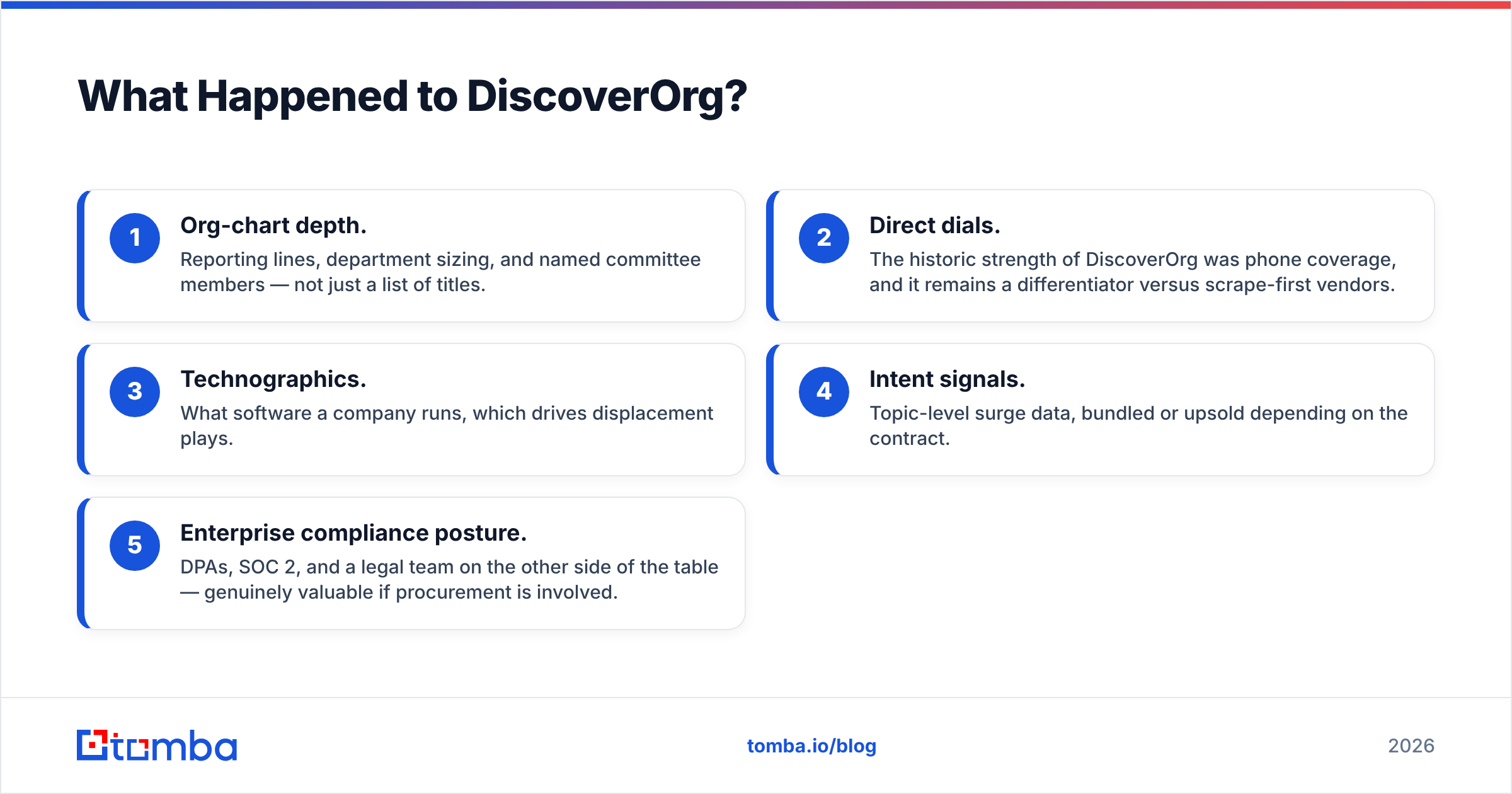
What the DiscoverOrg heritage still buys you inside ZoomInfo:
- Org-chart depth. Reporting lines, department sizing, and named committee members — not just a list of titles.
- Direct dials. The historic strength of DiscoverOrg was phone coverage, and it remains a differentiator versus scrape-first vendors.
- Technographics. What software a company runs, which drives displacement plays.
- Intent signals. Topic-level surge data, bundled or upsold depending on the contract.
- Enterprise compliance posture. DPAs, SOC 2, and a legal team on the other side of the table — genuinely valuable if procurement is involved.
What it does not buy you: flexibility. Contracts are annual, seat-based, credit-capped, and near-impossible to downsize mid-term.

What Is Mailtester Ninja and What Does It Actually Do?#
Mailtester Ninja sits at the opposite end of the market. It is a lightweight email verification API and web tool: you hand it an address, it runs syntax, DNS/MX, and SMTP-level checks, and returns a status — valid, invalid, catch-all/unknown, disposable, role-based.
It has a generous free allowance and paid credits priced low enough that verification cost stops being a line item you think about. That is its entire pitch, and it delivers on it. Developers like it because the API is trivial to integrate and there is no sales call.
Where the marketing gets fuzzy is the "finder" side. Mailtester Ninja can generate and test common permutations of a name against a domain — first.last@, f.last@, firstlast@ — and report which one passes SMTP. That is pattern guessing, not a sourced database. It works well on domains that give honest SMTP responses, and it degrades badly on:
- Catch-all domains, which accept every address at the gateway and tell you nothing. A large share of mid-market and enterprise domains are catch-all.
- Microsoft 365 and Google Workspace tenants with aggressive anti-enumeration, where SMTP probing returns deliberately unhelpful answers.
- Anyone whose email pattern is non-obvious — nicknames, middle initials, legacy patterns from an acquired company, or localized formats.
So Mailtester Ninja is excellent at answering "will this bounce?" and unreliable at answering "what is this person's address?" Treat those as separate jobs. If you need the second one solved properly, a sourced finder with a catch-all verifier behind it will beat pure permutation guessing every time.
How Do DiscoverOrg and Mailtester Ninja Compare Side by Side?#
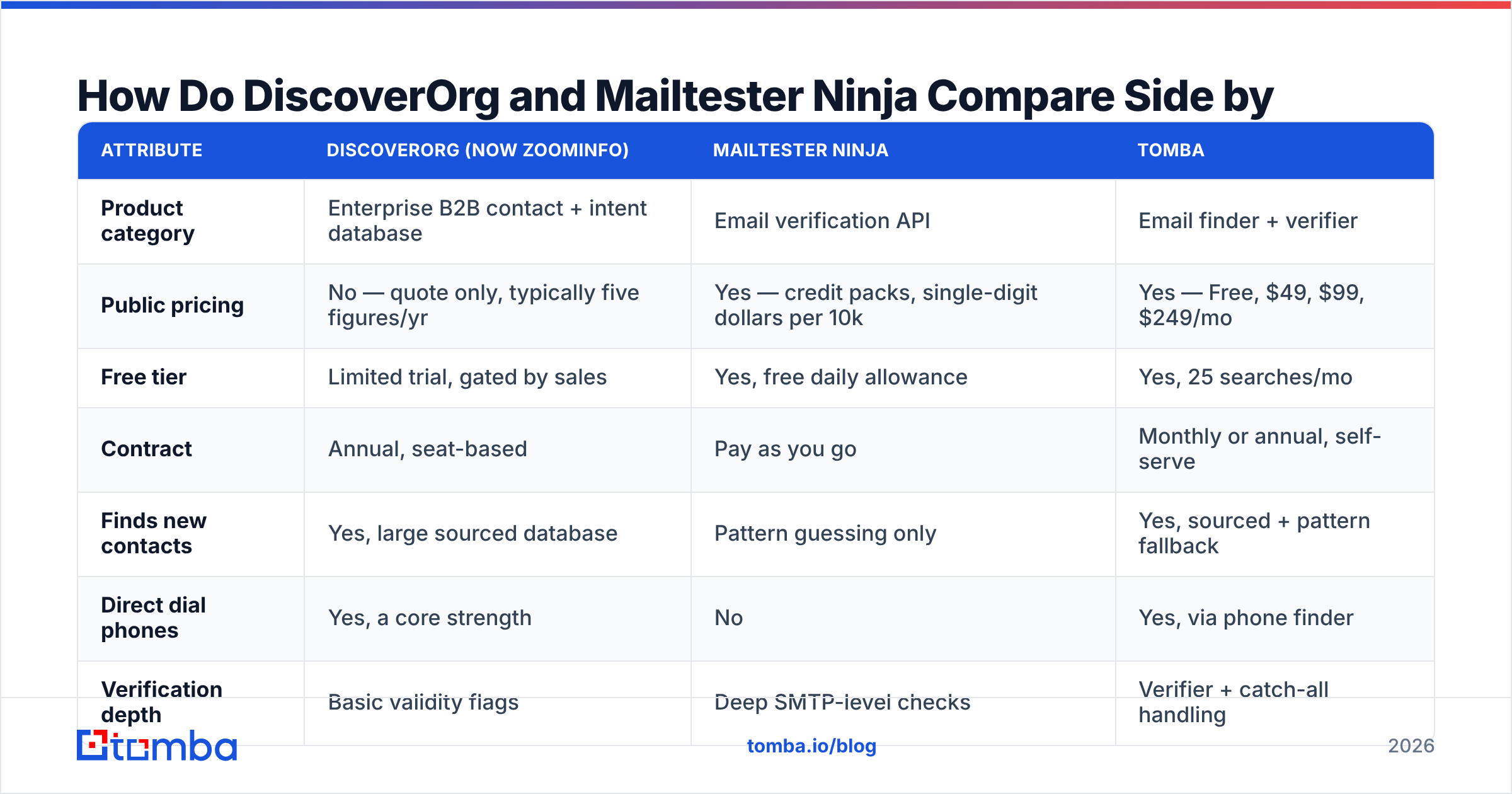
| Attribute | DiscoverOrg (now ZoomInfo) | Mailtester Ninja | Tomba |
|---|---|---|---|
| Product category | Enterprise B2B contact + intent database | Email verification API | Email finder + verifier |
| Public pricing | No — quote only, typically five figures/yr | Yes — credit packs, single-digit dollars per 10k | Yes — Free, $49, $99, $249/mo |
| Free tier | Limited trial, gated by sales | Yes, free daily allowance | Yes, 25 searches/mo |
| Contract | Annual, seat-based | Pay as you go | Monthly or annual, self-serve |
| Finds new contacts | Yes, large sourced database | Pattern guessing only | Yes, sourced + pattern fallback |
| Direct dial phones | Yes, a core strength | No | Yes, via phone finder |
| Verification depth | Basic validity flags | Deep SMTP-level checks | Verifier + catch-all handling |
| Org charts / intent | Yes | No | No |
| API access | Yes, enterprise tier | Yes, on all plans | Yes, all paid plans |
| Time to first result | Days to weeks (sales cycle) | Minutes | Minutes |
| Best for | Enterprise ABM teams with budget | Devs cleaning existing lists | SMB/mid-market outbound teams |
The table makes the mismatch obvious. These tools do not compete. They occupy opposite corners: maximum data depth at maximum cost versus minimum scope at minimum cost. Most teams sit in the middle and end up over-buying or under-buying because they only evaluated the two extremes.
Which One Is More Accurate?#
Accuracy means different things for each tool, so measure them on their own job.
For verification accuracy, Mailtester Ninja is competitive with paid verifiers on standard domains. Independent user reviews on G2 consistently rate low-cost verifiers within a few points of premium ones on clean, non-catch-all lists. The spread opens up on catch-all domains, disposable detection, and role-account classification — that's where cheap tools return "unknown" and expensive ones return a probabilistic answer with a confidence score.
For contact accuracy, DiscoverOrg's inherited dataset is genuinely strong on direct dials and org structure, especially in North American tech. But no database escapes decay. Contact data degrades roughly 2-3% per month as people change roles, companies rebrand, and domains consolidate. A record researched 14 months ago is a coin flip. That is true of every vendor at every price point — the expensive ones just have more researchers refreshing more rows.

The practical takeaway: never trust a database's freshness claim without verifying at send time. Pull the contact from wherever you pull it, then run it through an email verifier immediately before it enters a sequence. That one step does more for your bounce rate than any vendor switch.
Two failure modes to watch for:
- The false-valid on catch-all domains. Any tool that reports "valid" without disclosing catch-all status is guessing. You want the status surfaced, not smoothed over.
- The stale-but-syntactically-perfect record.
sarah.chen@acme.comverifies clean six months after Sarah left. Verification confirms the mailbox exists; it does not confirm the person still reads it. Cross-check job changes for high-value accounts.
What Does Each Actually Cost?#
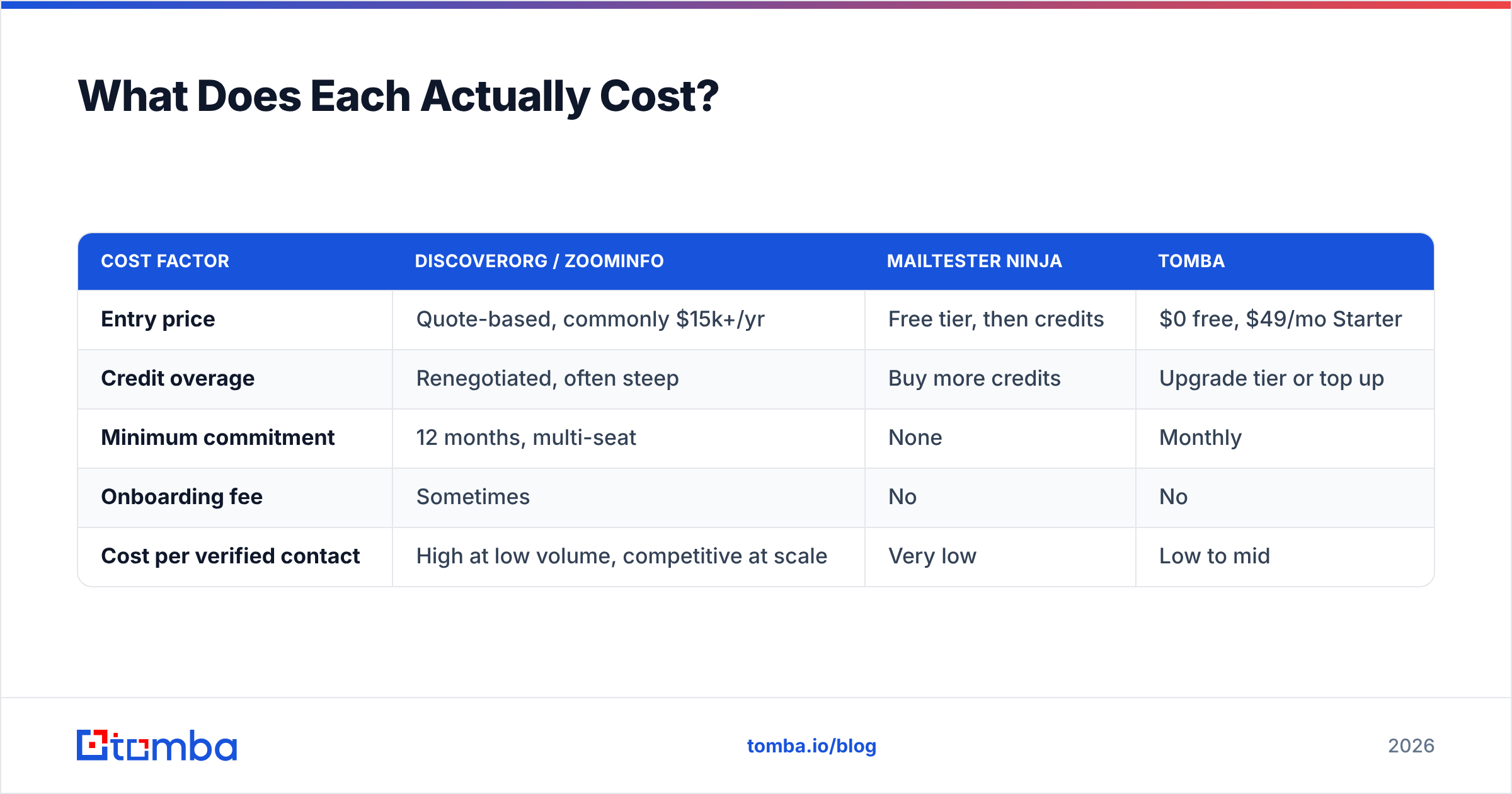
| Cost factor | DiscoverOrg / ZoomInfo | Mailtester Ninja | Tomba |
|---|---|---|---|
| Entry price | Quote-based, commonly $15k+/yr | Free tier, then credits | $0 free, $49/mo Starter |
| Credit overage | Renegotiated, often steep | Buy more credits | Upgrade tier or top up |
| Minimum commitment | 12 months, multi-seat | None | Monthly |
| Onboarding fee | Sometimes | No | No |
| Cost per verified contact | High at low volume, competitive at scale | Very low | Low to mid |
The honest read on cost: DiscoverOrg-era pricing only makes sense if you are running account-based motions across hundreds of target accounts with a team large enough to consume the seats. Below that threshold, you pay enterprise rates for a fraction of the value — and you cannot exit until renewal.
Mailtester Ninja is the opposite risk: it is so cheap that teams adopt it as their only data tool and quietly cap their pipeline, because pattern guessing on catch-all domains returns nothing usable and reps fall back to manual LinkedIn digging.
If your list-building volume is real but your budget is not enterprise, compare the middle of the market before you sign anything. Tomba pricing publishes every tier — Free at 25 searches/mo, Starter at $49/mo, Growth at $99/mo, Pro at $249/mo, Enterprise on request — which at minimum gives you a number to anchor against in a ZoomInfo negotiation.

Which Should You Pick for Your Use Case?#
Match the tool to the job rather than to the brand:
- You have a CRM full of aging contacts and a bounce problem. Mailtester Ninja, or any dedicated verifier. You do not need new contacts; you need the ones you have scored. Run the list, suppress invalid and risky, re-verify quarterly.
- You are prospecting into net-new accounts at SMB/mid-market scale. A finder with a real data source. Pull emails by company with domain search, enrich, then verify. Enterprise contracts are overkill here.
- You run committee-based ABM into the Fortune 1000 and need direct dials plus org charts. This is the case ZoomInfo (DiscoverOrg heritage) genuinely wins. Budget for it, negotiate hard on credits, and demand a data-accuracy SLA in writing.
- You are a developer embedding lookup into a product. Compare APIs, not dashboards. Check rate limits, response schema, catch-all handling, and whether pricing is per-request or per-result. The Tomba API and Mailtester Ninja both let you start without a sales call; ZoomInfo does not.
- You are running a one-off campaign under 5,000 contacts. Use a free tier plus a cheap verifier. Signing an annual contract for a quarter's campaign is how data budgets get burned.
- You need phone coverage as much as email. Only the enterprise platforms and a handful of mid-tier tools carry usable direct dials — check the phone finder style offering on any shortlist before assuming email-only is enough.
Where Does a Middle Option Fit?#
The gap between these two products is where most outbound teams actually live: you need to find addresses you do not already have, and you need them verified, and you do not have $15k a year or a procurement cycle.

A mid-market stack looks like this in practice:
- Source — pull contacts by domain or by name from a sourced index rather than guessing patterns. This is the step Mailtester Ninja cannot do reliably.
- Verify — run every address through SMTP-level checks with explicit catch-all reporting before it touches a sequencer.
- Enrich — attach company size, role, and technology context so your copy is not generic. This is the step where enterprise platforms genuinely add value, and where mid-tier tools have closed most of the gap.
- Refresh — re-verify anything older than 90 days. Decay does not care what you paid.
Tools like Tomba, Findymail, Hunter, and BookYourData all target this middle band with published pricing and self-serve onboarding. BookYourData in particular is worth a look if you prefer buying pre-built, filtered lists rather than searching contact by contact — a different workflow that suits some teams better than a per-lookup model.
The strategic point stands regardless of vendor: decouple sourcing from verification. Teams that buy one all-in-one contract lose the ability to swap either half when quality drops. Teams that keep them separate can change a verifier in an afternoon.
Frequently Asked Questions#
Is DiscoverOrg still available to buy? Not under that name. DiscoverOrg merged with ZoomInfo in 2019 and the product is now sold as ZoomInfo. Legacy customers were migrated; new customers buy ZoomInfo contracts.
Can Mailtester Ninja replace a contact database? No. It verifies addresses and guesses patterns. It has no sourced contact index, no org charts, no phone numbers, and no firmographic filters. Use it alongside a finder, not instead of one.
Does verification stop all bounces? No. It removes syntax errors, dead mailboxes, disposables, and most role accounts. It cannot detect a valid mailbox nobody reads, and it cannot resolve catch-all domains with certainty — the best any tool does there is a confidence score.
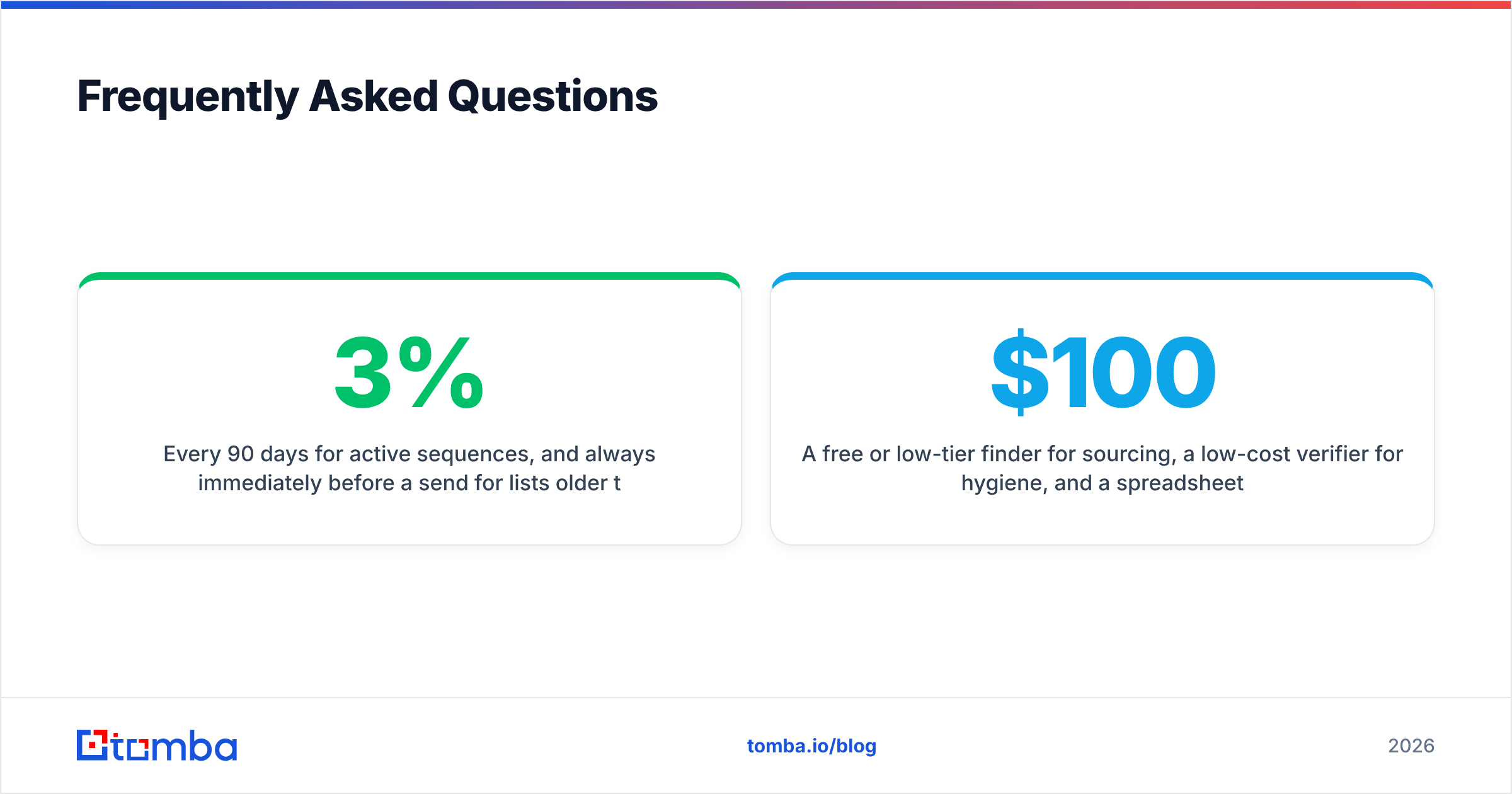
How often should I re-verify? Every 90 days for active sequences, and always immediately before a send for lists older than a month. Contact data decay of 2-3% per month compounds fast.
What is the cheapest credible setup for a two-person outbound team? A free or low-tier finder for sourcing, a low-cost verifier for hygiene, and a spreadsheet or lightweight CRM. That is well under $100/mo and covers the same job an enterprise seat does at 10x the cost — as long as your target list is measured in hundreds of accounts, not thousands.
Start With the Step That Actually Blocks You#
If your bottleneck is bad addresses, buy a verifier and move on — Mailtester Ninja is a reasonable, cheap choice. If your bottleneck is committee-level intelligence across enterprise accounts, ZoomInfo carries the DiscoverOrg legacy and there is no cheap substitute for it.
But if your real bottleneck is finding addresses you do not have yet, at a price that does not require a procurement cycle, start with the Tomba Email Finder. Search by domain, name, or company, verify in the same workflow, and pull it into your CRM through the API — with 25 free searches to test accuracy against your own target accounts before you spend anything. Test it on twenty contacts you already know the answer for. That single test tells you more than any vendor comparison, including this one.
Related guides#
Ready to find emails that actually work?
Join 150,000+ professionals who stopped guessing and started sending. Free credits on signup — no credit card required.
Get the Tomba newsletter
Practical outbound tactics and product updates — once every two weeks.
About the author