DiscoverOrg vs Ninjapear: Which B2B Data Tool Wins in 2026?
DiscoverOrg is now part of ZoomInfo and priced like enterprise software. Ninjapear is the lean, thinly-documented challenger. Here's how the two actually compare on data, pricing, and contract risk — plus the third option most teams end up picking.
DiscoverOrg vs Ninjapear is a choice between two very different bets. One is enterprise data on an annual contract. The other is a cheap tool you can drop next month.
TL;DR
- DiscoverOrg no longer exists on its own. It merged with ZoomInfo in 2019. The brand now lives inside ZoomInfo's platform.
- A DiscoverOrg quote is really a ZoomInfo quote. Expect five figures a year, annual terms, and seat minimums.
- Ninjapear has the opposite problem. It is small and lightly documented. Pricing, accuracy data, and review volume are all thin.
- The real DiscoverOrg vs Ninjapear question is not features. It is depth and org charts versus low commitment and speed.
- Most teams under 50 reps need neither. They need verified emails on demand, priced per result, with an API.
- Test before you sign. Run 100 real target contacts through every tool. Measure hit rate and bounce rate yourself.
If you are searching for DiscoverOrg vs Ninjapear, you are deciding where a year of contact-data budget goes. That deserves more than a feature grid. One product has been renamed and repriced. The other has a public footprint so small that basic diligence is hard.
Let's go through both honestly.
What is DiscoverOrg in 2026?#
DiscoverOrg spent about fifteen years as a top B2B data provider. Its edge was simple: human-verified org charts. Rivals scraped and guessed. DiscoverOrg paid researchers to call companies and map who reported to whom in IT and finance. Those records were refreshed on a cycle. If you sold enterprise software into the Fortune 1000, that data was hard to beat.
In February 2019, DiscoverOrg acquired ZoomInfo. In 2020 the combined company rebranded as ZoomInfo and went public. The DiscoverOrg name was retired as a product line.
That matters for any DiscoverOrg vs Ninjapear comparison. Three things follow:
- You cannot buy DiscoverOrg on its own today. You buy ZoomInfo Copilot, SalesOS, or whatever bundle the rep quotes. The old research method still shapes the data, but it is diluted across a much bigger database.
- The pricing model changed. ZoomInfo contracts are annual, seat-based, and credit-capped. Mid-sized sales teams commonly land in the $15,000–$40,000 per year range. Enterprise deals go higher.
- Contract terms tightened. Auto-renewal, multi-year commitments, and overage fees are standard complaints in G2 reviews. Read the paper carefully.
So for the rest of this DiscoverOrg vs Ninjapear guide, read DiscoverOrg as ZoomInfo's enterprise data offering, including the DiscoverOrg heritage records.

What is Ninjapear?#
Here honesty matters more than filling in a comparison grid.
Ninjapear sells itself as a light B2B prospecting and contact-finding tool. Dozens of similar products launched in the last few years. The pitch is always the same: fast signup, self-serve pricing, a Chrome extension, credit-based plans, no sales call.
Three things to know before you evaluate it:
- Public documentation is thin. There is no published accuracy method, no data-sourcing disclosure, and no outside audit to cite.
- Third-party reviews are scarce. On G2 and Capterra, established players have thousands of reviews. Tools at this scale often have a handful. Social proof cannot help you here.
- Compliance posture is unclear. If you sell into the EU, you need GDPR lawful-basis documentation and a data processing agreement. Ask for both in writing.
None of that makes Ninjapear a bad tool. Small tools often beat incumbents at one specific job, and they cost far less. But an unverifiable vendor claim is a real finding. Price that uncertainty in rather than assuming parity.
Practical rule: if you cannot reproduce a vendor's accuracy claim on your own list, treat it as unverified. That rule applies to ZoomInfo as much as to Ninjapear.
How do DiscoverOrg and Ninjapear compare head-to-head?#
Here is the DiscoverOrg vs Ninjapear structural comparison. The third column covers the pay-per-result category most mid-market teams end up in.
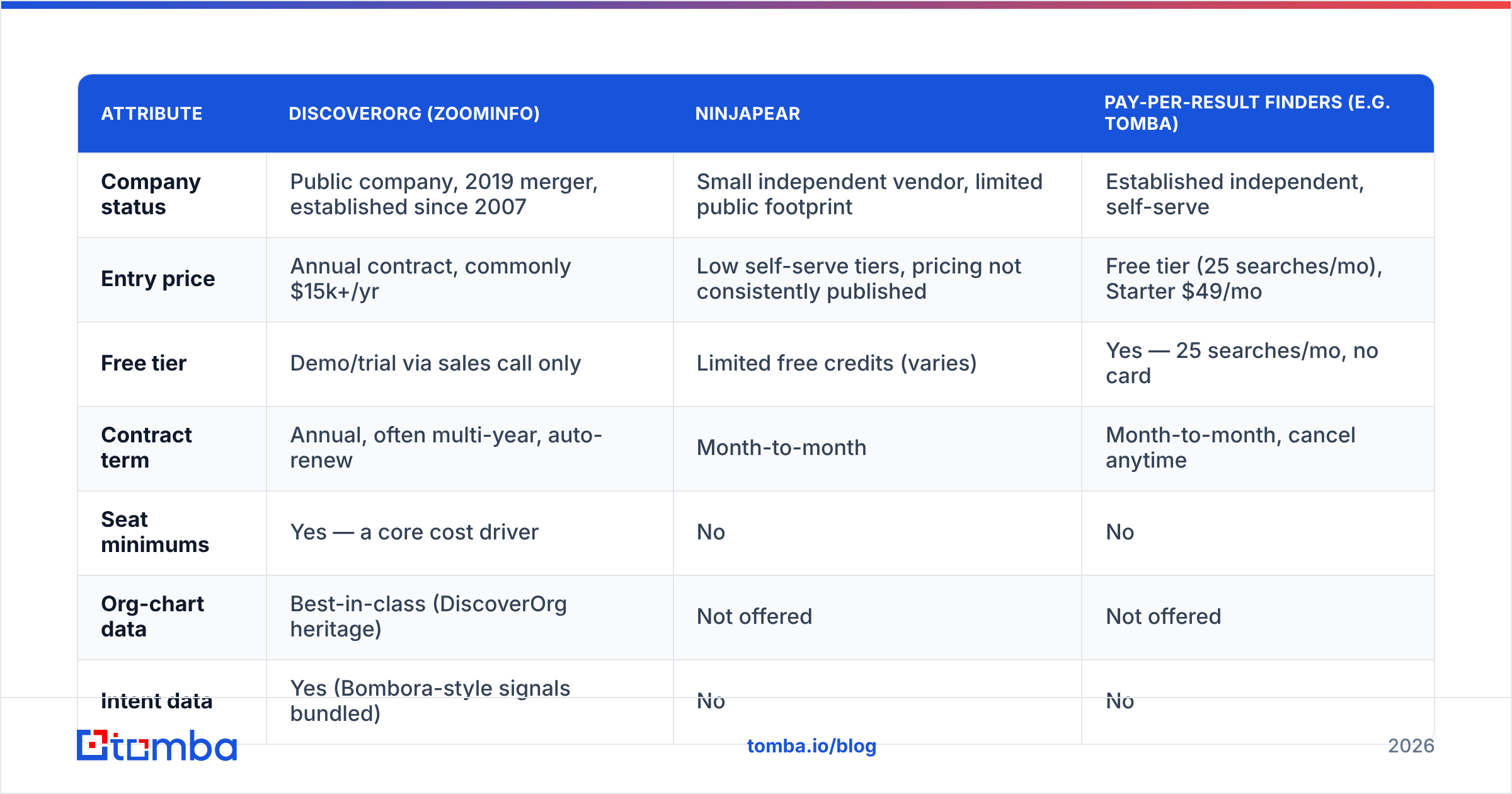
| Attribute | DiscoverOrg (ZoomInfo) | Ninjapear | Pay-per-result finders (e.g. Tomba) |
|---|---|---|---|
| Company status | Public company, 2019 merger, established since 2007 | Small independent vendor, limited public footprint | Established independent, self-serve |
| Entry price | Annual contract, commonly $15k+/yr | Low self-serve tiers, pricing not consistently published | Free tier (25 searches/mo), Starter $49/mo |
| Free tier | Demo/trial via sales call only | Limited free credits (varies) | Yes — 25 searches/mo, no card |
| Contract term | Annual, often multi-year, auto-renew | Month-to-month | Month-to-month, cancel anytime |
| Seat minimums | Yes — a core cost driver | No | No |
| Org-chart data | Best-in-class (DiscoverOrg heritage) | Not offered | Not offered |
| Intent data | Yes (Bombora-style signals bundled) | No | No |
| Direct dials | Yes, large verified phone dataset | Limited | Yes, via phone finder |
| Email verification | Included | Basic or third-party | Dedicated verifier with catch-all handling |
| API access | Yes, enterprise tier / add-on cost | Limited or absent | Yes, on all paid plans |
| CRM sync | Native Salesforce, HubSpot, Outreach | Limited, often Zapier-only | Native HubSpot, Salesforce, Pipedrive, Zapier, Make |
| Best fit | Enterprise ABM, 50+ reps, named-account motion | Solo founders, tight budget, low volume | SMB to mid-market outbound, dev teams, agencies |

The table shows the real trade-off. DiscoverOrg, as ZoomInfo, wins on depth: org charts, intent signals, technographics, direct dials, and a mature integration layer. Ninjapear wins on friction: you can be live in ten minutes for the price of lunch. Neither wins on the number most outbound teams track daily, which is cost per verified, deliverable contact.
Which one has better data accuracy?#
Accuracy is where vendor marketing is weakest and your own testing is strongest.

A few things hold true across the category:
DiscoverOrg heritage records are strong in their niche. IT, engineering, and finance org charts inside large North American enterprises were checked by people. That lineage still shows. If your ICP is a VP of Infrastructure at a 5,000-employee company, this data is hard to beat.
Coverage drops outside that niche. Small businesses, non-US markets, young startups, and fast-changing roles are all weaker. Reps often find that contacts have moved on. Any database that large refreshes on a cycle, not at query time.
Small tools rarely own their data. Most light finders resell or blend third-party sources. That is not disqualifying. But their accuracy is capped by the upstream provider, and it shifts when that provider shifts. Ask any small vendor straight: do you own your data pipeline, or resell it?
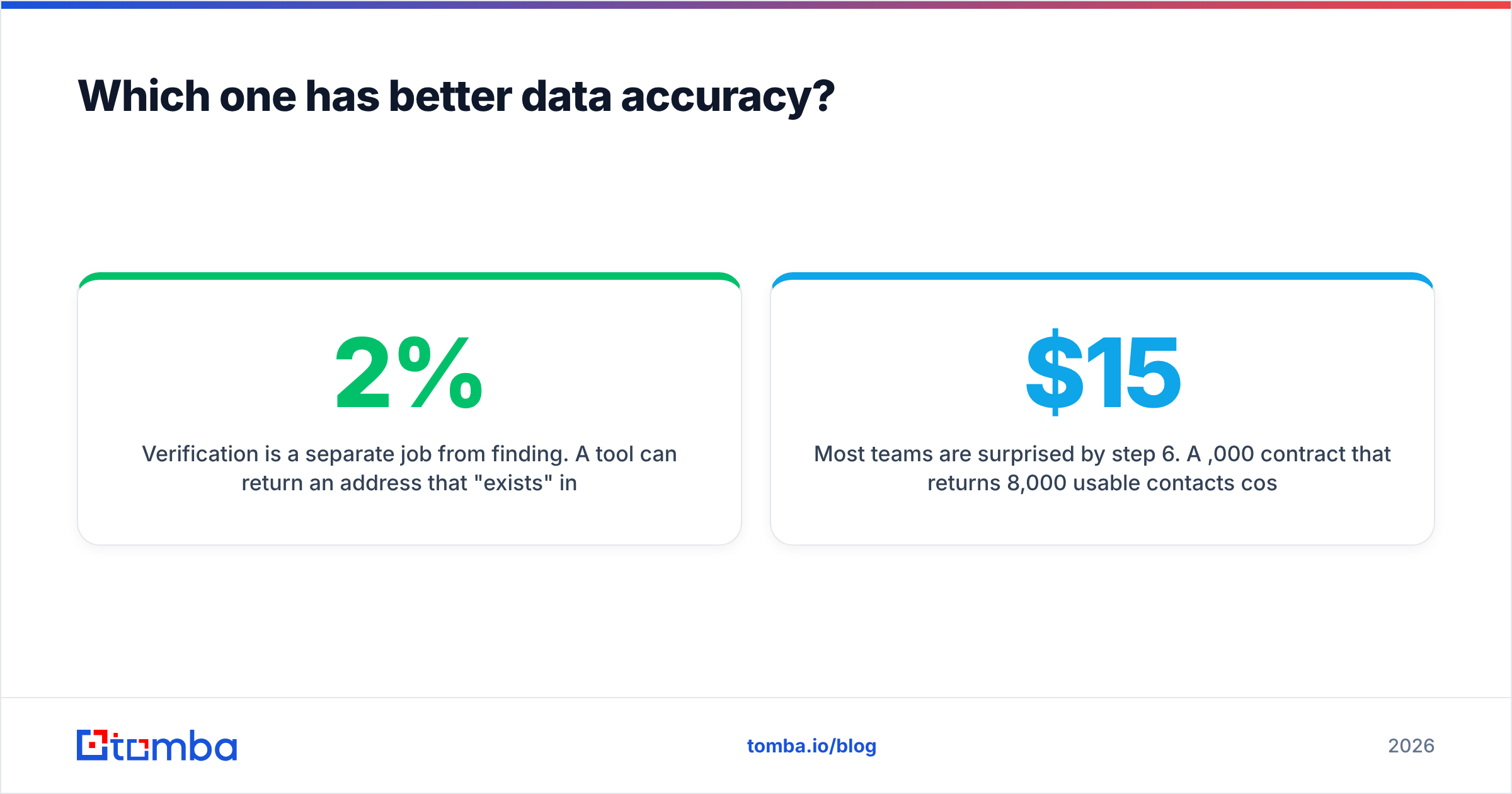
Verification is a separate job from finding. A tool can return an address that exists in a database and still bounce. So the useful metric is bounce rate, not database size. Run every candidate through an email verifier before it enters a sequence. Watch how each tool handles catch-all domains. A catch-all verifier is the gap between a 2% bounce rate and a 12% one.
Run this test protocol before you sign anything:
- Build a 100-contact control list from your real ICP. Verify them by hand on LinkedIn and company sites.
- Run the same list through every tool on your shortlist during the trial window.
- Measure hit rate. What share returned any result at all?
- Measure accuracy. Spot-check 20 of the returned results by hand.
- Measure deliverability. Send a small, warmed batch and record the true bounce rate.
- Divide total cost by verified, deliverable contacts. That number, not list price, is your real cost.
Step 6 surprises most teams. A $15,000 a year contract that returns 8,000 usable contacts costs $1.88 each. A $99 a month plan returning 1,000 usable contacts costs $0.099 each. The cheap tool can be twenty times more efficient for the same job. That holds as long as you do not need org charts and intent data.
What do they actually cost?#
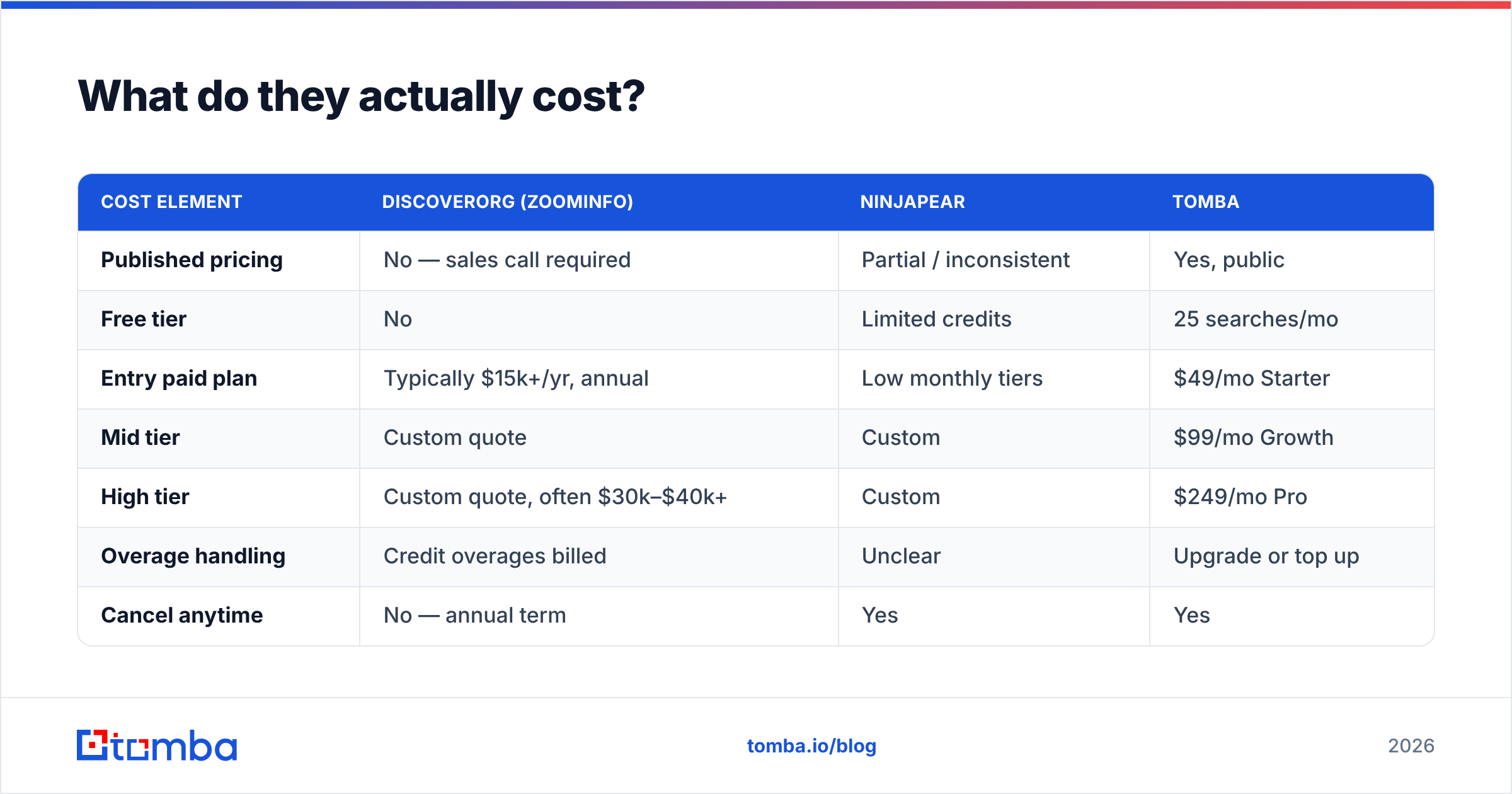
| Cost element | DiscoverOrg (ZoomInfo) | Ninjapear | Tomba |
|---|---|---|---|
| Published pricing | No — sales call required | Partial / inconsistent | Yes, public |
| Free tier | No | Limited credits | 25 searches/mo |
| Entry paid plan | Typically $15k+/yr, annual | Low monthly tiers | $49/mo Starter |
| Mid tier | Custom quote | Custom | $99/mo Growth |
| High tier | Custom quote, often $30k–$40k+ | Custom | $249/mo Pro |
| Overage handling | Credit overages billed | Unclear | Upgrade or top up |
| Cancel anytime | No — annual term | Yes | Yes |
| API included | Add-on / enterprise tier | Limited | All paid plans |
The first structural point: opaque pricing is itself a cost. When a vendor hides numbers, you spend weeks in a sales cycle. You get quoted on perceived budget rather than usage. Your renewal then starts from an anchor you did not set. Published Tomba pricing removes that friction.
The second point: seat minimums punish small teams. A five-person SDR pod paying an enterprise seat minimum is funding capacity it will never use.

Who should choose which?#
Choose ZoomInfo, the DiscoverOrg lineage, if you run named-account ABM into large North American enterprises. You need verified org charts and reporting lines. You want intent signals bundled. You have 50+ seats to justify the minimum, and a RevOps function to put the data to work inside Salesforce. That is a real use case, and the product is genuinely good at it.
Choose Ninjapear, or any lean self-serve finder, if you are a solo founder or a two-person team. Your volume is a few hundred lookups a month. Your ICP is well defined and easy to find. A bad month of data costs you a few hours, not a quarter. Do your diligence on the DPA first.
Choose a pay-per-result email finder if you run high-volume outbound to a broad market. You care more about cost per deliverable contact than firmographic depth. You have an engineer who will wire the Tomba API into your pipeline. And you would rather not sign an annual contract for a channel you are still tuning.
Choose a combination if you are mid-market and growing. A lean finder handles daily prospecting and list building. A small number of enterprise seats covers strategic named accounts. That is usually cheaper than buying enterprise seats for everyone.
Choose nothing yet if you have not validated your ICP. No data tool fixes a targeting problem. If your reply rate is under 1%, fix the message and the list definition first.
What should you check before signing anything?#
Whichever way you lean on DiscoverOrg vs Ninjapear, these questions prevent regret:
- What is the contract term, and is auto-renewal on by default? Get the cancellation notice window in writing. Thirty-day notice on an annual auto-renew is the top source of locked-in renewal complaints.
- What happens to unused credits? Do they roll over, or expire each month?
- Is the API included or an upcharge? An API behind an enterprise paywall changes the math for anyone automating enrichment.
A few more, on data and exit terms:
- What is the documented data source? Ask for the vendor's data sourcing explanation. A vendor who cannot say where the data comes from cannot say why it is accurate.
- What is the GDPR and CCPA position? Request the DPA and the stated lawful basis early, not at the worst possible moment.
- Can you export what you paid for? Some enterprise contracts restrict bulk export. If your contacts are hostage to the platform, your renewal is not a negotiation.
- Does it handle catch-all domains honestly? A tool that marks every catch-all address as valid is guessing, not verifying. Test it on a domain you know is catch-all.
For terms like email deliverability and sender reputation, the Tomba glossary is a useful reference during vendor calls.
What's the verdict on DiscoverOrg vs Ninjapear?#
They are not really competitors. DiscoverOrg, now ZoomInfo, is enterprise infrastructure sold on an annual contract. It fits teams with named-account motions and a budget line for data. Ninjapear is a low-commitment utility for small teams doing modest volume. So the DiscoverOrg vs Ninjapear decision is mostly about which end of the market you sit in.
Are you in the middle? Five to fifty reps, real outbound volume, no appetite for a five-figure annual commitment, and no need for org-chart intelligence? Then neither is a comfortable fit. That gap is where credit-based, API-first email finding lives. Most of the market's volume has moved there over the last three years.
Ready to test the third option?#
Before you book a ZoomInfo sales call or hand card details to a vendor you cannot research, run your own benchmark. Pull 25 real target contacts from your ICP. Put them through the Tomba Email Finder on the free tier. No card, no call, no annual commitment. Check the hit rate, spot-check the accuracy, then verify the results to see the true deliverable count.
If the numbers hold up, paid plans start at $49/mo for Starter, $99/mo for Growth, and $249/mo for Pro. The API is included at every paid tier, with no seat minimums. If they do not hold up, you have lost twenty minutes instead of a fiscal year. That asymmetry is the whole argument.
Related guides#
Ready to find emails that actually work?
Join 150,000+ professionals who stopped guessing and started sending. Free credits on signup — no credit card required.
Get the Tomba newsletter
Practical outbound tactics and product updates — once every two weeks.
About the author