DiscoverOrg vs Overloop AI: Which B2B Sales Tool Wins in 2026?
DiscoverOrg is now ZoomInfo, and Overloop AI is an autonomous outbound agent. They solve different halves of the same problem. Here's the honest comparison, with pricing, data quality, and a clear pick.
DiscoverOrg vs Overloop AI is a strange fight. One sells data. The other sends email. Here is what each tool does, what it really costs, and which one fits your team.
TL;DR
- DiscoverOrg is not a product you can buy today. It bought ZoomInfo in 2019 and took the ZoomInfo name. So "DiscoverOrg" in 2026 means ZoomInfo's sales data platform.
- Overloop AI is not a database. It is an outbound engine. An AI agent builds your list, writes the emails, and sends them across channels.
- The two tools do different jobs. One is where contacts come from. The other is what you do with them. Many teams buy both — or drop the pricey half.
- Cost is the sharpest split. ZoomInfo deals are annual, quote-only, and often five figures. Overloop lists per-seat prices on its site.
- If you only need good contact data, skip both. A focused email finder plus a sending tool does most of the job for far less.
What are DiscoverOrg and Overloop AI, exactly?#
Start here. Half the confusion in this comparison comes from the names.
DiscoverOrg was a B2B contact and org-chart database, founded in 2007. It was known for hand-researched IT data: who reports to whom, what tools they run, when they buy. In February 2019, DiscoverOrg bought ZoomInfo. In 2020 the merged company took the ZoomInfo name and went public. The DiscoverOrg product name was dropped. So if you are weighing "DiscoverOrg" today, you are really weighing ZoomInfo Sales, ZoomInfo Copilot, and the data under them.
Overloop AI (once Prospect.io, at overloop.com) went the other way. It began as a cold-email sequencer with a Chrome add-on. Then it rebuilt around an AI sales agent. You describe your ideal buyer in plain words. The agent finds prospects, drafts the copy, and runs email and LinkedIn steps. Its data comes from bundled credits and partners, not from its own research team.
So the real matchup is simple: a data warehouse with tools bolted on versus a sending engine with data bolted on.
Does DiscoverOrg still exist in 2026?#
No — not as a product you can buy. The brand lives on in old blog posts, old contracts, and search queries.
What survived the merger is the thing DiscoverOrg did best: depth on org structure and tech stacks. ZoomInfo kept the human-checked layer and the intent data. Then it added Copilot, an AI assistant that ranks accounts, plus workflow tools, call analysis (Chorus), and a marketing side.
That matters in two ways.
- Old DiscoverOrg reviews are stale. Price, coverage, and the UI have all moved. Read current G2 reviews for ZoomInfo instead of 2018-era write-ups.
- The pricing model changed. DiscoverOrg sold seats a mid-market team could afford. ZoomInfo sells enterprise contracts with credit caps, annual terms, and paid add-ons.

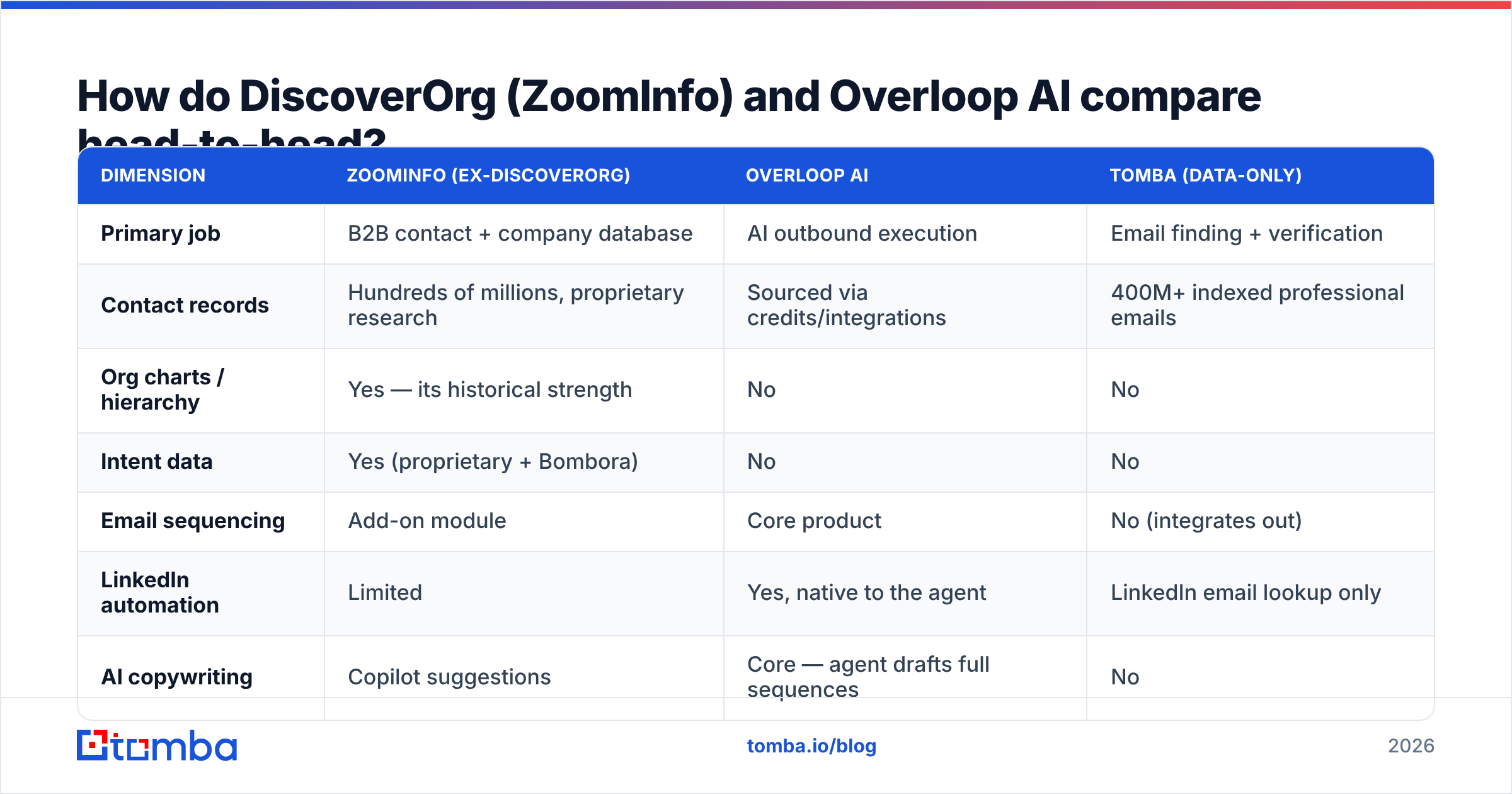
DiscoverOrg vs Overloop AI: how do they compare head-to-head?#
Here is the direct comparison. I added a lean third option — a data-only tool — so you can see where the money goes.
| Dimension | ZoomInfo (ex-DiscoverOrg) | Overloop AI | Tomba (data-only) |
|---|---|---|---|
| Primary job | B2B contact + company database | AI outbound execution | Email finding + verification |
| Contact records | Hundreds of millions, proprietary research | Sourced via credits/integrations | 400M+ indexed professional emails |
| Org charts / hierarchy | Yes — its historical strength | No | No |
| Intent data | Yes (proprietary + Bombora) | No | No |
| Email sequencing | Add-on module | Core product | No (integrates out) |
| LinkedIn automation | Limited | Yes, native to the agent | LinkedIn email lookup only |
| AI copywriting | Copilot suggestions | Core — agent drafts full sequences | No |
| Email verification | Bundled, opaque | Basic | Dedicated SMTP + catch-all engine |
| Published pricing | No — quote only | Yes, on-site | Yes — free to $249/mo |
| Contract term | Annual, typically multi-seat | Monthly or annual | Monthly, cancel anytime |
| Entry cost (reported) | Five figures per year | Low hundreds per month | $0 free tier, $49/mo Starter |
| API access | Enterprise tier | Limited | All paid plans |
| Best for | Enterprise ABM and RevOps teams | Small teams running lean outbound | Any team that just needs valid emails |
Two things jump out.
First, the middle of the table barely overlaps. Org charts and intent data are ZoomInfo only. Native LinkedIn steps and AI-written sequences are Overloop only. If one of those rows is your dealbreaker, the choice is already made.
Second, people decide on the price rows. So let's break those out.
What does each one really cost?#
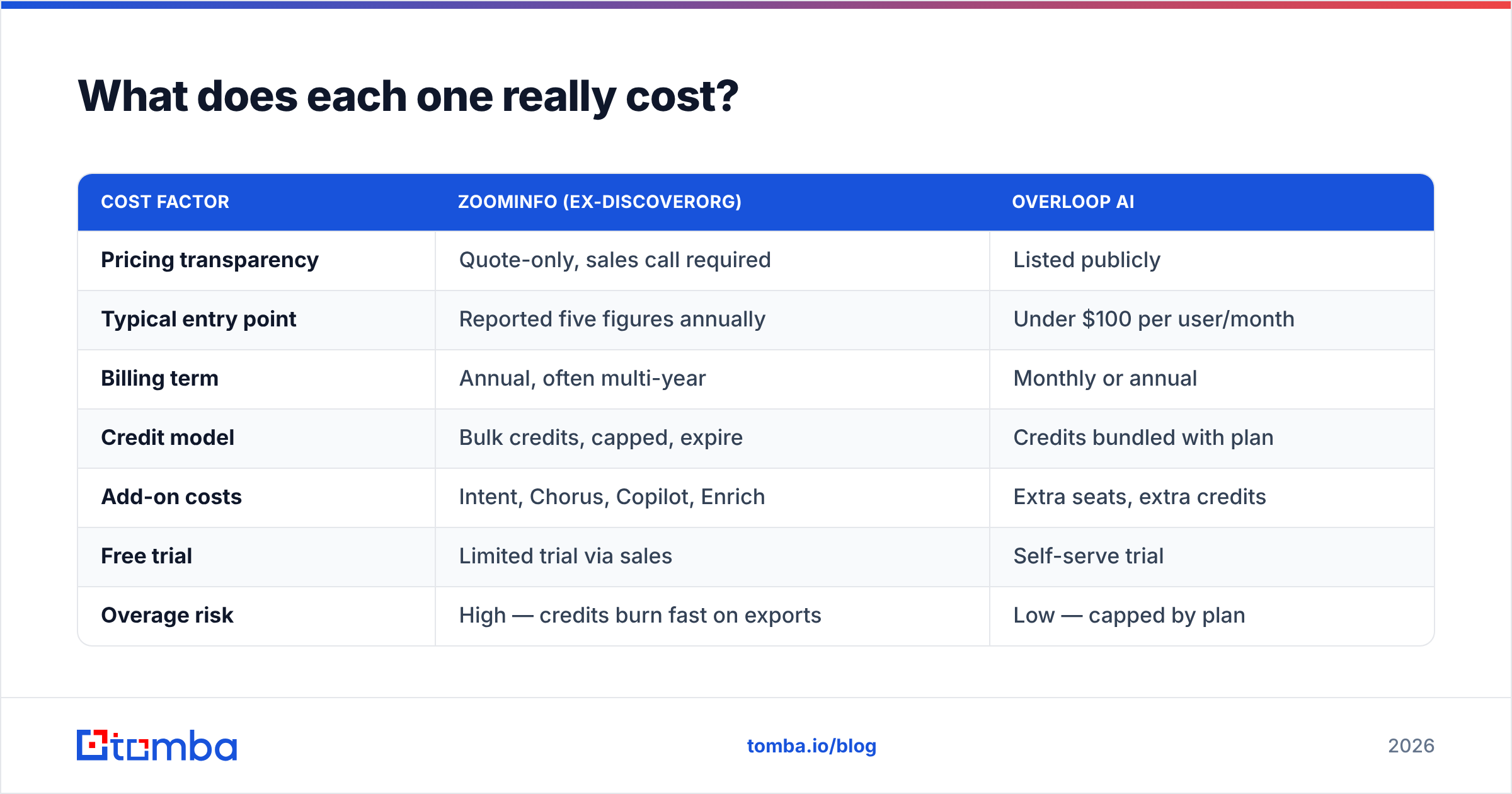
Be careful with any post that quotes ZoomInfo pricing as fact. ZoomInfo does not publish rates. Every number out there comes from buyers and leaked quotes. It shifts with seat count, credit volume, and modules. The shape is steady, though: annual commitment, per-seat license, a separate credit pool, and add-ons priced one by one.
| Cost factor | ZoomInfo (ex-DiscoverOrg) | Overloop AI |
|---|---|---|
| Pricing transparency | Quote-only, sales call required | Listed publicly |
| Typical entry point | Reported five figures annually | Under $100 per user/month |
| Billing term | Annual, often multi-year | Monthly or annual |
| Credit model | Bulk credits, capped, expire | Credits bundled with plan |
| Add-on costs | Intent, Chorus, Copilot, Enrich | Extra seats, extra credits |
| Free trial | Limited trial via sales | Self-serve trial |
| Overage risk | High — credits burn fast on exports | Low — capped by plan |
The pattern to remember: ZoomInfo prices like enterprise software. Overloop prices like SaaS. Neither is wrong. They aim at different buyers.
Teams get burned on the mismatch. A five-person startup signs a ZoomInfo deal for emails it could have sourced for a tenth of the price. Or an enterprise ABM team buys Overloop and finds no org-chart data under it. So price out the same coverage with a lean stack first. Our own pricing page starts free and tops out at $249/mo, which is a fair anchor for what raw contact data should cost.
Which one has better data?#
That question hides three smaller ones.
- Coverage — how many of your target accounts are in the database at all. ZoomInfo wins for US mid-market and enterprise, above all in IT, finance, and health. Overloop leans on its data partners, and it thins out beyond common tech niches.
- Depth — how much you know about each contact. ZoomInfo wins outright. Direct dials, reporting lines, tech stack, funding, and intent signals are the DiscoverOrg legacy. Overloop has nothing close.
- Freshness — whether the email lands. Users grade both tools harshly here. Every big database decays. B2B contact data goes stale at roughly 25–30% a year as people switch jobs. Neither vendor escapes that. Both show a confidence score, not a promise.
That third point is why so many teams verify on their own, whichever platform they buy. A record with a dead mailbox is worse than no record. It looks live, it gets sequenced, and it slowly hurts your sender reputation. Run exports through a dedicated email verifier before they hit a sequence. It is cheap, and it is the highest-payoff habit in outbound.

Which should you pick for your team?#
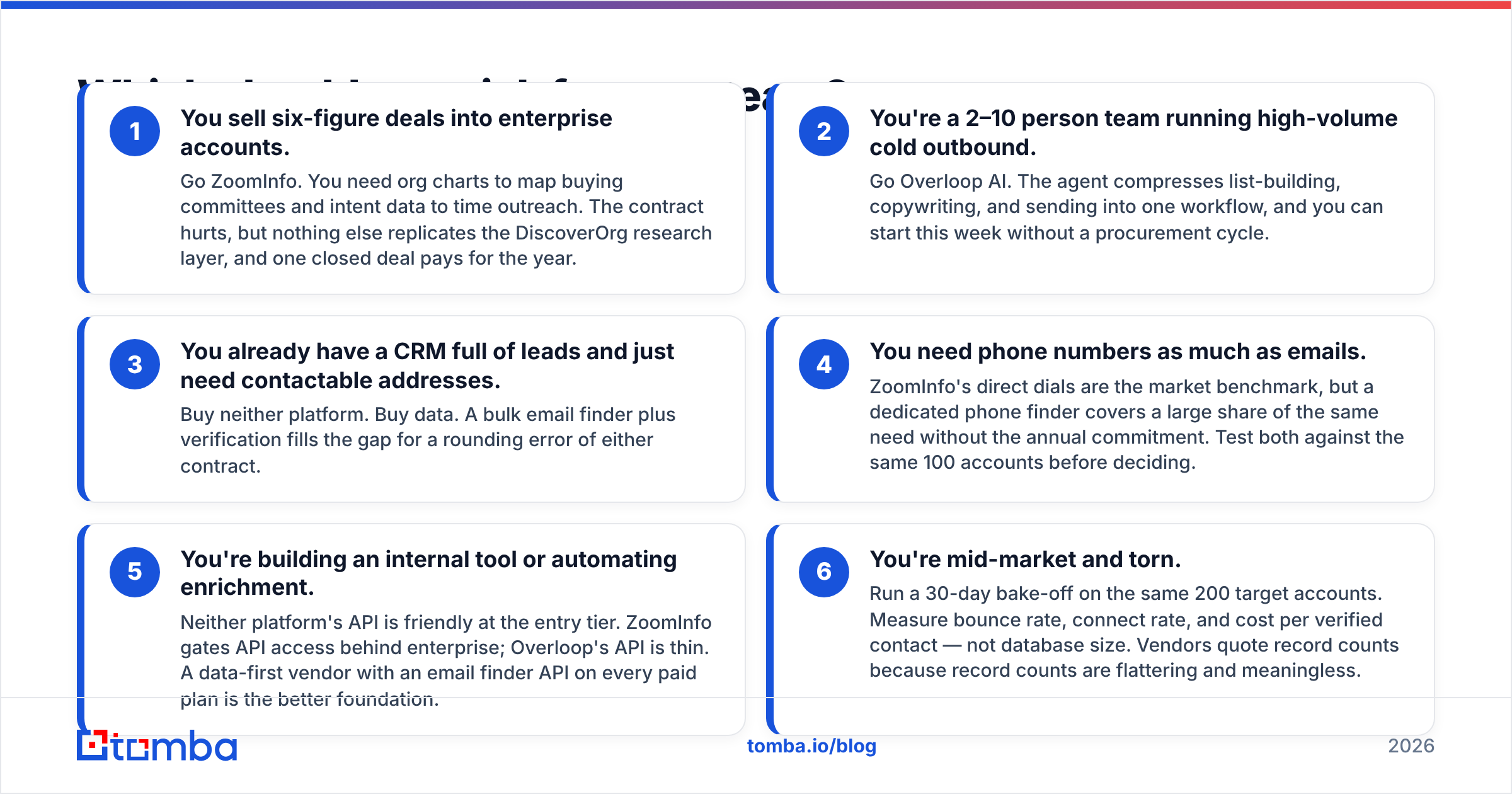
Pick by the limit that actually binds you, not by feature count.
- You sell six-figure deals to enterprise accounts. Go ZoomInfo. You need org charts to map the buying group and intent data to time your outreach. The contract stings. Still, nothing else copies the DiscoverOrg research layer, and one closed deal pays for the year.
- You are a 2–10 person team running high-volume cold outbound. Go Overloop AI. The agent folds list-building, copy, and sending into one flow. You can start this week, with no purchase committee.
- You have a CRM full of leads and just need addresses. Buy neither platform. Buy data. A bulk email finder plus verification fills the gap for pocket change.
The next three cases are the ones teams get wrong most often.
- You need phone numbers as much as emails. ZoomInfo's direct dials set the benchmark. Even so, a dedicated phone finder covers much of the same need with no annual lock-in. Test both on the same 100 accounts.
- You are building an internal tool or automating enrichment. Neither API is friendly at the entry tier. ZoomInfo gates API access behind enterprise. Overloop's API is thin. A data-first vendor with an email finder API on every paid plan is a better base.
- You are mid-market and torn. Run a 30-day bake-off on the same 200 accounts. Measure bounce rate, connect rate, and cost per verified contact — not database size. Vendors quote record counts because record counts flatter them.
Can you just use both — or replace both?#
Both is common, and costly. The usual enterprise stack is ZoomInfo for data, a sequencer for sending, and a verifier in between. Three line items. It works.
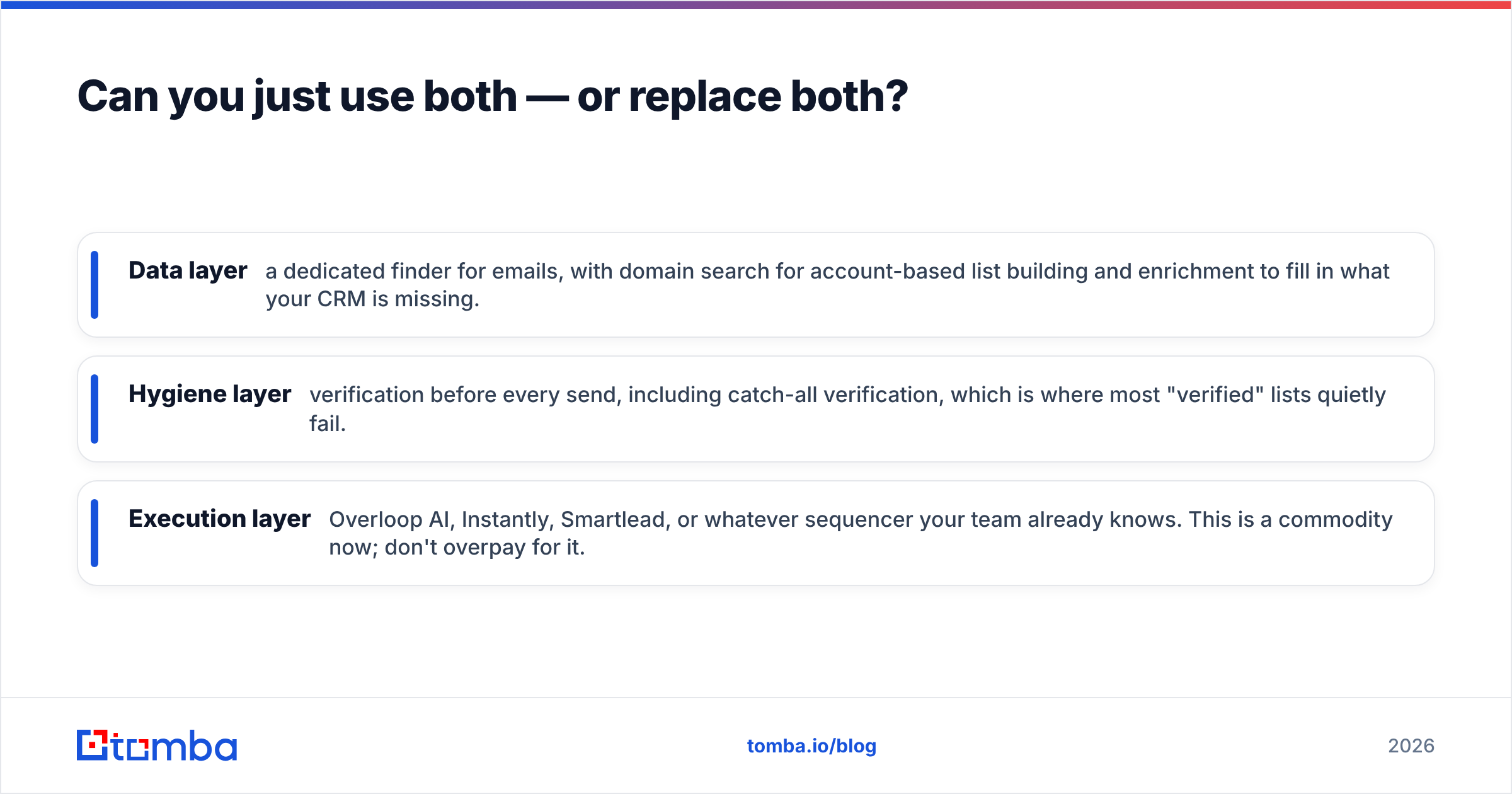
Most teams under 50 people can build leaner:
- Data layer — a dedicated finder for emails, plus domain search for account lists and enrichment to fill CRM gaps.
- Hygiene layer — verify before every send, including catch-all verification. That is where most "verified" lists quietly fail.
- Send layer — Overloop AI, Instantly, Smartlead, or whatever your team already knows. Sending is a commodity now. Do not overpay for it.
That stack costs a small slice of a ZoomInfo deal. It also buys the thing that drives results: a clean list. Overloop can sit inside it as the send layer. A cheap sequencer with good data usually beats a great sequencer with weak data.
One honest caveat. This build cannot replace ZoomInfo for account intelligence. Say your motion needs to know that a VP of Infrastructure reports to a CTO who just closed a Series C and is shopping your category this week. Then you need the full platform. The lean stack cannot fake that.
What do reviewers actually complain about?#
Know these patterns before a demo call. They show up again and again on G2 and Capterra.
- ZoomInfo: auto-renewal terms, credits that run out mid-quarter, hard upsells on add-on modules, and stale records that were never re-checked. Praise goes to coverage depth and direct dials.
- Overloop AI: thinner data outside core tech niches, AI copy that needs an edit before it ships, and fewer integrations than the incumbents. Praise goes to speed and clear pricing.
Neither list is a deal-killer. Both are predictable. Raise them on the call. A vendor that owns its weak spots is usually the one worth buying from.
The verdict#
Need intelligence? Buy ZoomInfo. Need execution? Buy Overloop AI. Just need contactable people? Buy neither — buy data.
The DiscoverOrg name once promised deep, researched account intelligence. That promise still lives inside ZoomInfo, priced to match. Overloop AI solves a newer problem: folding the whole outbound flow into one agent. It prices like a tool, not a platform. So DiscoverOrg vs Overloop AI is not really a duel. They are two answers to two different bottlenecks. The mistake is buying the one that does not match yours.
Start with the data layer. Before you sign a five-figure contract or a monthly agent plan, see how far good contact data alone gets you. The Tomba Email Finder finds work emails by name, domain, or company. It checks them with SMTP and catch-all tests, then exports to whatever sequencer you are testing. The free tier gives you 25 searches a month. Use it to benchmark against your ZoomInfo or Overloop trial: same accounts, same week, real bounce rates. Run that test first. Then decide what the rest of the stack has to do.
Related guides#
Ready to find emails that actually work?
Join 150,000+ professionals who stopped guessing and started sending. Free credits on signup — no credit card required.
Get the Tomba newsletter
Practical outbound tactics and product updates — once every two weeks.
About the author