DiscoverOrg vs Power Almanac: B2B Data Compared (2026)
DiscoverOrg (now ZoomInfo) sells corporate org charts at enterprise prices. Power Almanac sells US local government contacts by the record. Here is which one actually fits your list — and what to use when neither does.
DiscoverOrg vs Power Almanac is a common search. It is also the wrong fight. One tool sells corporate B2B data. The other sells contacts at US local governments. This guide covers what each one holds, what it costs, and when to skip both.
TL;DR#
- DiscoverOrg vs Power Almanac is not a real head-to-head. DiscoverOrg is now part of ZoomInfo. It sells company contacts, org charts, and intent data. Power Almanac sells one thing: verified contacts for US local government.
- Sell to companies? DiscoverOrg/ZoomInfo is the option. Expect an annual contract, seat-based pricing, and a five-figure spend.
- Sell to cities, counties, and townships? Power Almanac is the specialist. You pay per record. There is no seat licence.
- Neither one fits a small outbound team. Both sell lists. If you already have target companies and named people, a per-lookup email finder costs far less.
- Your ICP decides this, not the feature grid. Get it wrong and you pay enterprise money for records you cannot sell to.
What are DiscoverOrg and Power Almanac in 2026?#
DiscoverOrg no longer ships as its own product. DiscoverOrg bought ZoomInfo in 2019. The merged company kept the ZoomInfo name. By 2021 the DiscoverOrg app had been folded into ZoomInfo. So if a rep says they are "on DiscoverOrg" in 2026, they are on ZoomInfo.
The DiscoverOrg roots still matter. The deep org charts, reporting lines, and tech stack detail that ZoomInfo sells today came out of the DiscoverOrg research team.
Power Almanac is far smaller and far narrower. It tracks local government officials across roughly 19,000 US cities and counties. Think mayors, city managers, council members, clerks, police and fire chiefs, public works directors, IT directors, and finance officers.
You buy those records one at a time, not as a seat licence. That is the whole product. No intent data. No Fortune 500 org charts. No Chrome extension for LinkedIn.
So DiscoverOrg vs Power Almanac is not a "which tool is better" question. It is a "which market are you in" question. One is a broad B2B data platform. The other is a narrow GovTech list.

DiscoverOrg vs Power Almanac: head to head#
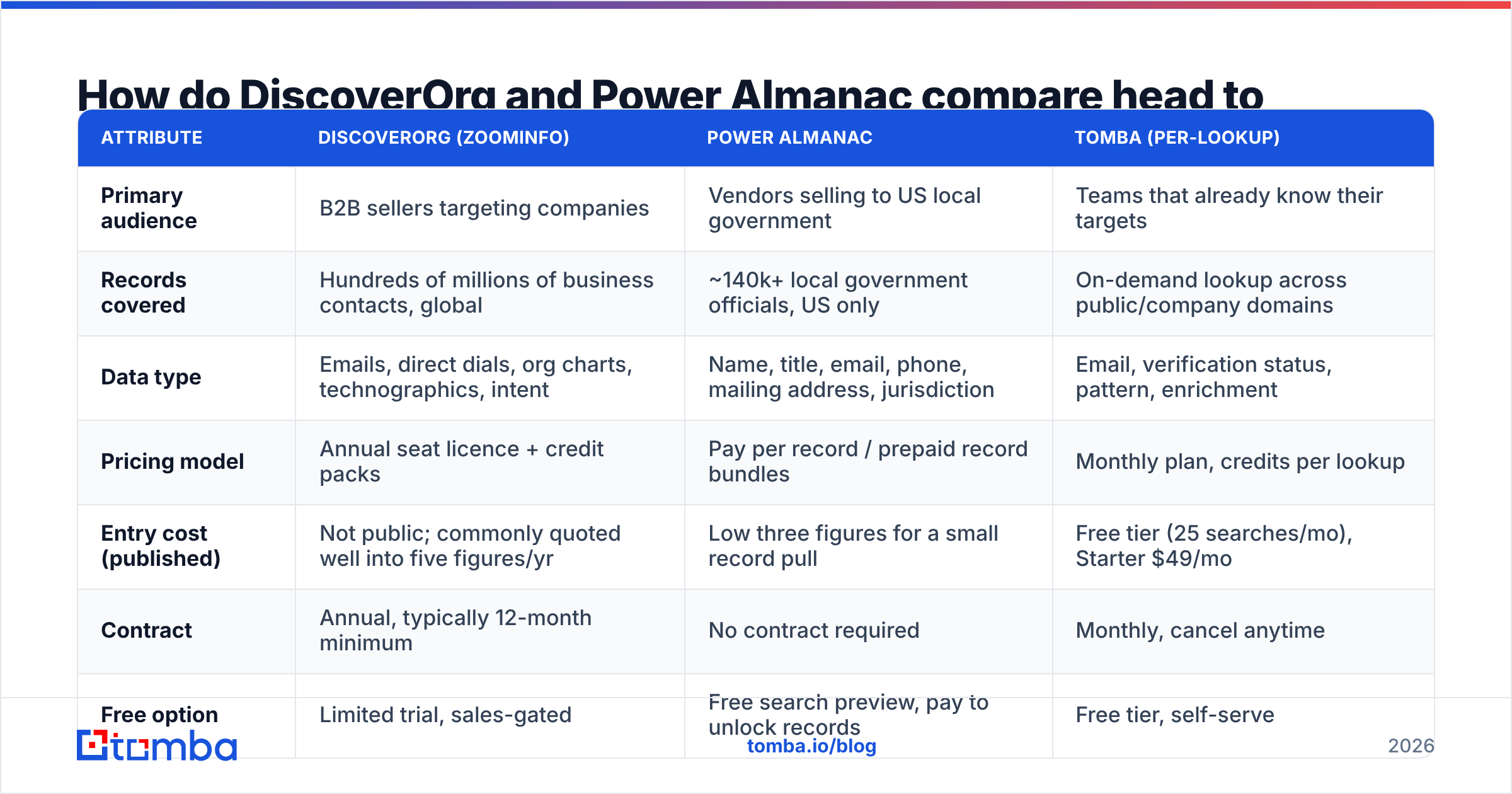
Here is the practical comparison. A per-lookup email finder sits in the third column, so you can see where each model lands on cost.
| Attribute | DiscoverOrg (ZoomInfo) | Power Almanac | Tomba (per-lookup) |
|---|---|---|---|
| Primary audience | B2B sellers targeting companies | Vendors selling to US local government | Teams that already know their targets |
| Records covered | Hundreds of millions of business contacts, global | ~140k+ local government officials, US only | On-demand lookup across public/company domains |
| Data type | Emails, direct dials, org charts, technographics, intent | Name, title, email, phone, mailing address, jurisdiction | Email, verification status, pattern, enrichment |
| Pricing model | Annual seat licence + credit packs | Pay per record / prepaid record bundles | Monthly plan, credits per lookup |
| Entry cost (published) | Not public; commonly quoted well into five figures/yr | Low three figures for a small record pull | Free tier (25 searches/mo), Starter $49/mo |
| Contract | Annual, typically 12-month minimum | No contract required | Monthly, cancel anytime |
| Free option | Limited trial, sales-gated | Free search preview, pay to unlock records | Free tier, self-serve |
| Best for | Enterprise SDR teams with an ops function | GovTech, public safety, municipal services vendors | SMB outbound, agencies, recruiters, founders |
Two things stand out. First, the buying process differs. ZoomInfo is a procurement event: demo, quote, legal review. Power Almanac is closer to buying a report.
Second, the risks differ. With ZoomInfo you may pay for seats nobody uses. With Power Almanac you may buy records for towns that will never buy what you sell.
What data does each one actually give you?#
Most comparison posts hand-wave here. Break it into what lands in your CRM.
What DiscoverOrg (ZoomInfo) gives you#
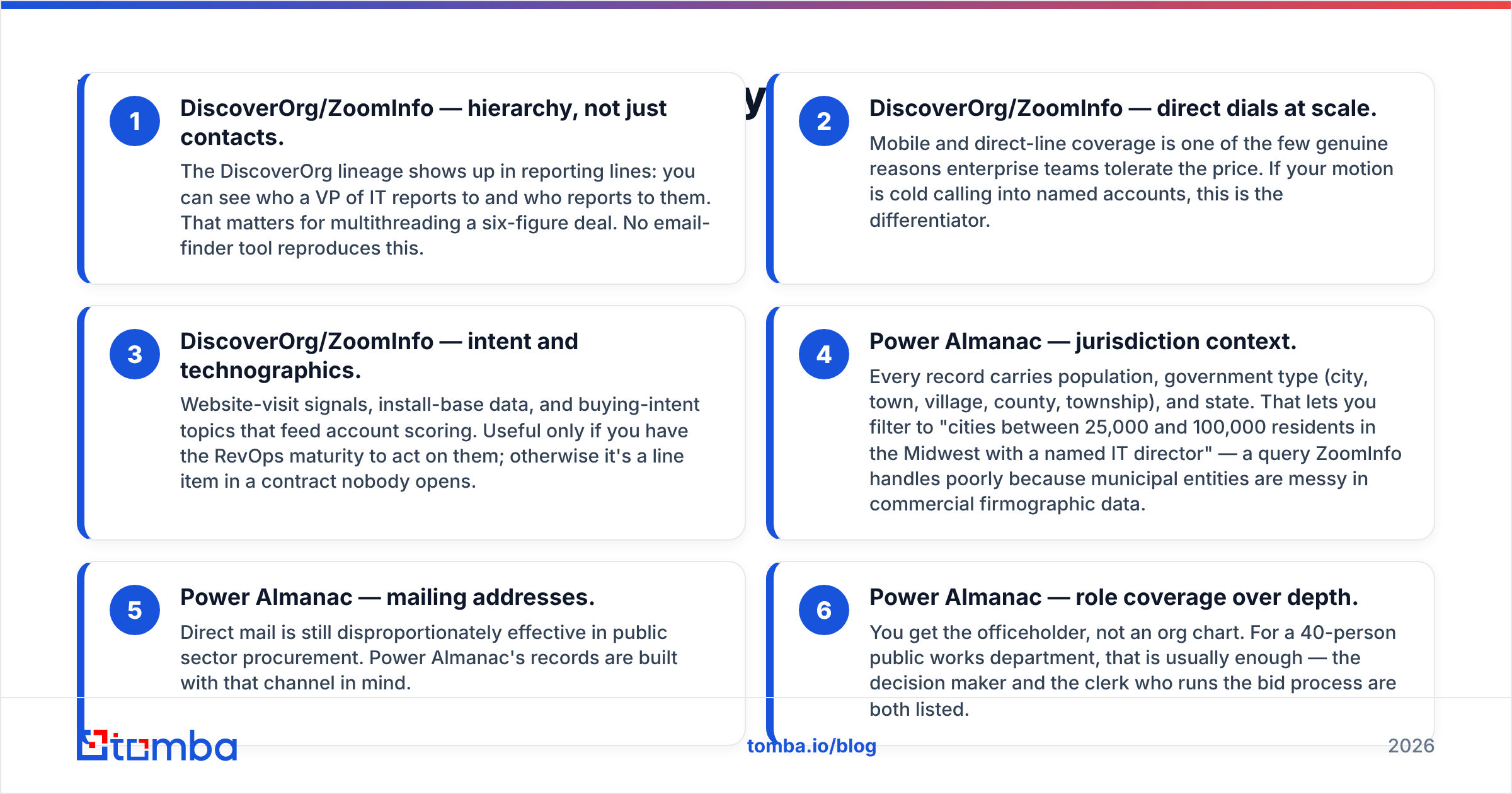
- Hierarchy, not just contacts. You can see who a VP of IT reports to, and who reports to them. That helps on big deals with many buyers. No email-finder tool does this.
- Direct dials at scale. Mobile and direct-line coverage is a real reason teams accept the price. If you cold call named accounts, this is the edge.
- Intent and tech stack data. Website visits, install-base data, and buying topics feed account scoring. This only pays off if someone acts on the signals. Otherwise it is a line item nobody opens.
What Power Almanac gives you#
- Local context. Each record carries population, government type, and state. So you can filter to "cities of 25,000 to 100,000 people in the Midwest with a named IT director." ZoomInfo handles that badly, because towns are messy in company data.
- Mailing addresses. Direct mail still works well in the public sector. Power Almanac builds records with that channel in mind.
- Role coverage, not depth. You get the officeholder, not an org chart. For a 40-person public works team, that is usually enough. The decision maker and the clerk who runs the bid are both listed.
Need corporate accounts and city accounts? Then you need both tools. Neither vendor covers the other's ground.
DiscoverOrg vs Power Almanac: how much does each cost?#
ZoomInfo does not publish pricing. Reported deals and buyer reviews on G2 point to seat-based annual contracts. They start in the low five figures and climb with add-ons. Credits are usually capped per seat per year, and overage is a separate talk. Renewal price hikes are a common gripe.
Power Almanac prices per record, with volume discounts. You can preview counts before you buy. Check the current rate card on poweralmanac.com, since the tiers change.
The shape is simple. A few hundred dollars buys a usable targeted list. A full national pull is still a small slice of a ZoomInfo contract. There is no seat licence, so a two-person team pays about what a twenty-person team pays.
That gap tells you something. You are not paying for records. You are paying for the business model. ZoomInfo's price covers the platform, integrations, intent, and support. Power Almanac's price covers a spreadsheet.
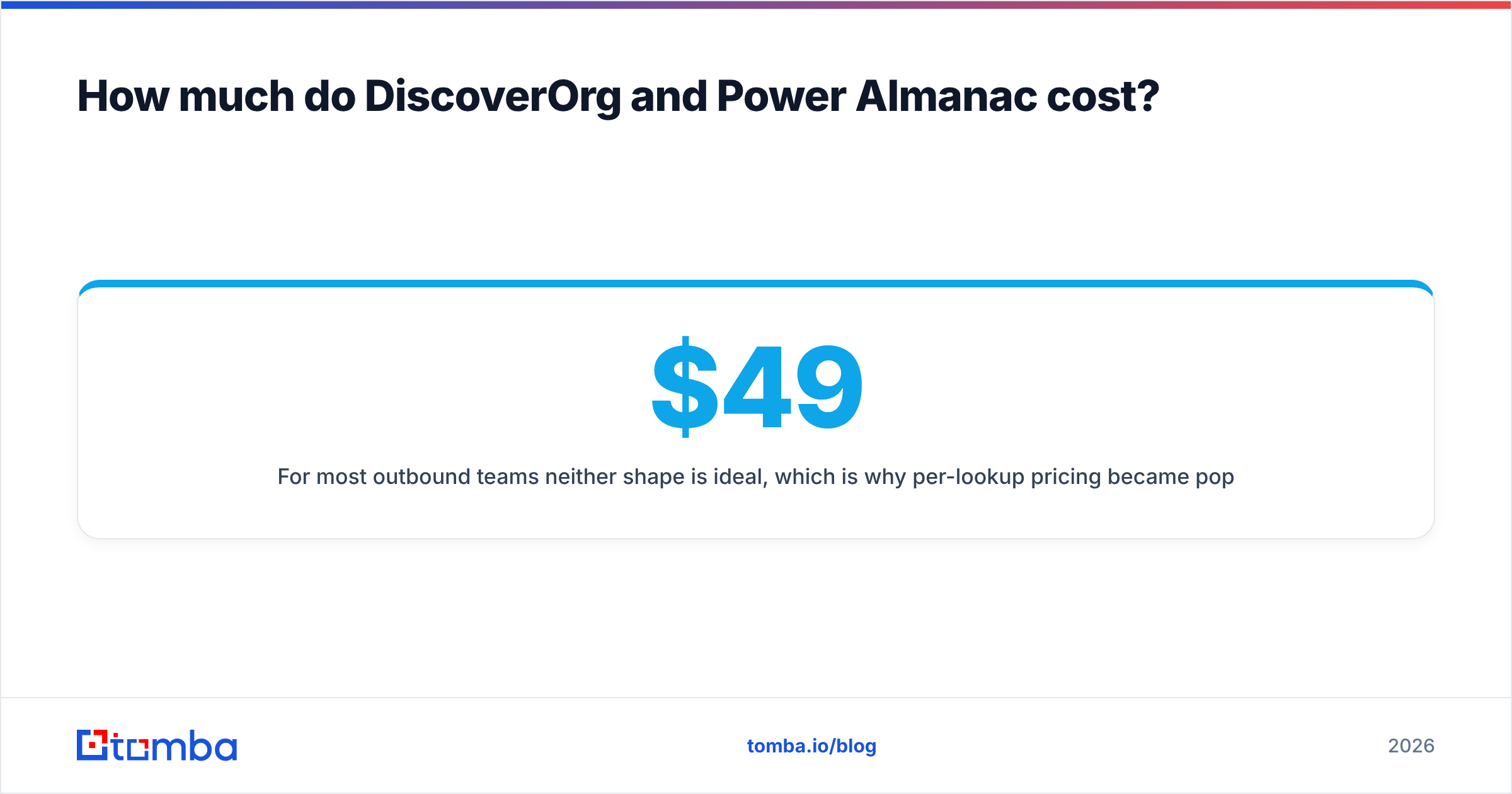
For most outbound teams, neither shape is ideal. That is why per-lookup pricing caught on. Tomba's pricing runs Free (25 searches/mo), Starter $49/mo, Growth $99/mo, and Pro $249/mo, with custom Enterprise plans. You pay for the lookups you run, not for a database you rent.
DiscoverOrg vs Power Almanac: which one is more accurate?#
Accuracy is not one number. Any vendor quoting "95% accurate" with no method is quoting marketing.
ZoomInfo's weak spot is the mid-market. The database is huge, and huge databases age. People at companies under 200 staff move jobs fast, and refresh cycles are uneven. Enterprise records tend to be better kept than the long tail. Pull 5,000 SMB contacts and blast them, and the bounce rate will hurt your sender reputation.
Power Almanac's weak spot is elections. Officeholders change on a set schedule. One November vote can void a chunk of a council list overnight. Power Almanac re-checks records on a rolling basis. Still, if you buy in September and mail in January, some names will be wrong.
The fix is the same for both. Run any bought list through an email verifier before you send. Catch-all domains are common in government, since many towns route mail through one gateway. So a catch-all verifier is worth the extra step. Checking a bought list is not an insult to the vendor. It is basic hygiene, and it costs less than one bounced campaign.
Who should buy DiscoverOrg (ZoomInfo)?#
Buy it if all three of these are true:
- You have several SDRs who prospect full time. Seat pricing only works at volume.
- Your deal size covers it. If your average deal is $8,000, a $30,000 data contract has to source a lot of pipeline first.
- Someone owns the data. A RevOps person sets enrichment rules, dedupes, and uses the intent signals. Without that role, you bought a costly search bar.
If any one is false, look at an Apollo alternative or a per-lookup tool first. Revisit ZoomInfo when the team is bigger.
Who should buy Power Almanac?#
Buy it if you sell to local government and your buyer is an officeholder or department head. Typical fits: public safety software, city ERP, water and waste services, road contractors, GIS platforms, civic tools, and grant consultants.
Buy it if you run direct mail or phone-first outreach. The mailing addresses and switchboard numbers are the part big databases get wrong.
Do not buy it for federal or state coverage, school district staff, or anything outside the United States. That is not what it is.
One caveat on public sector outreach. Many towns publish official contact details as public record. Some states limit commercial use of those records. Check the rules before you scale a sequence. The FOIA overview on Wikipedia explains why this data is so easy to get.
Is there a middle ground between the two?#
Yes. For many teams it is the right answer.
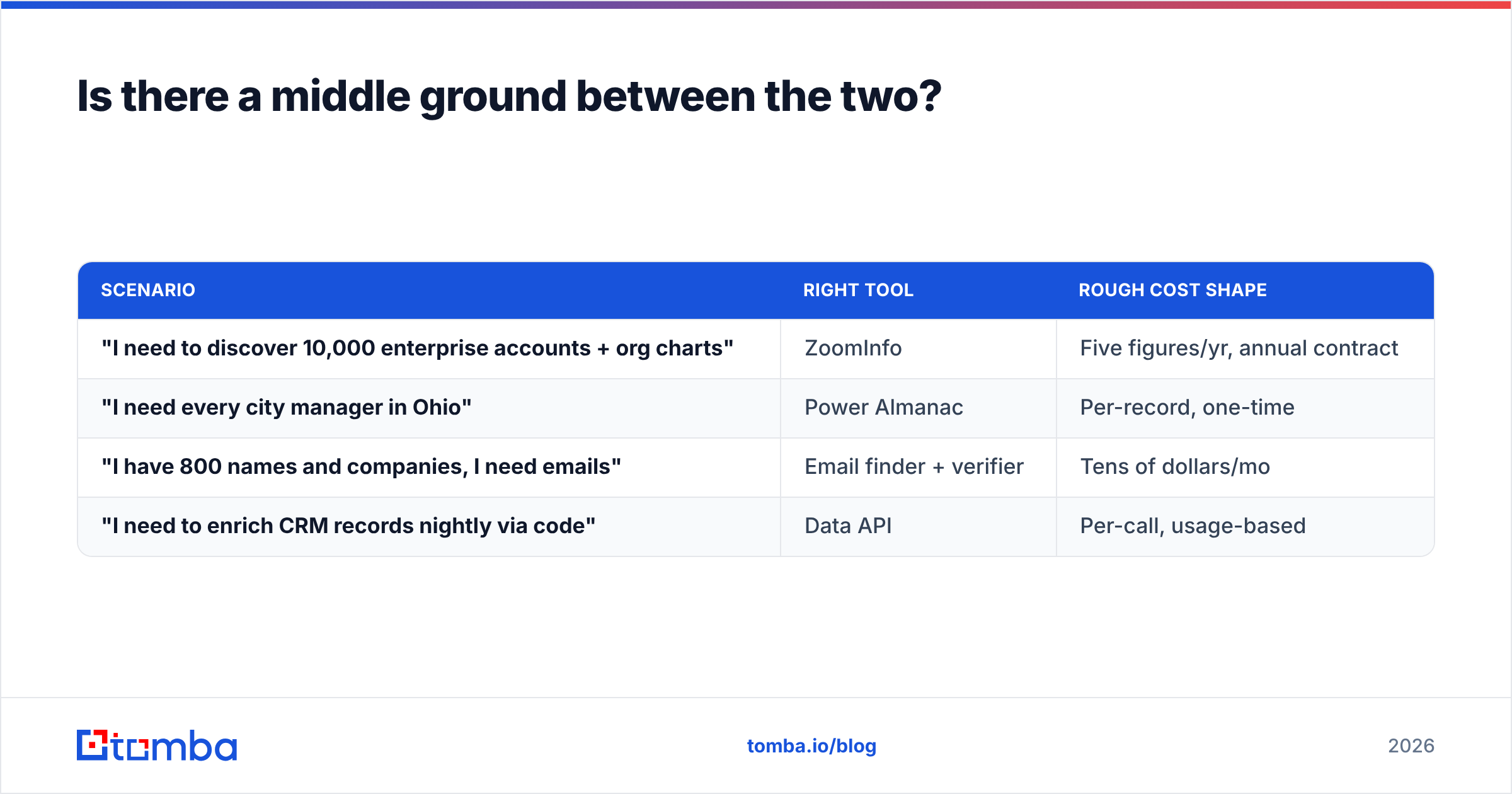
Both sides of the DiscoverOrg vs Power Almanac choice solve the discovery problem: who exists in this market? Plenty of teams do not have that problem. They already hold a target list, from a conference roster, an association directory, a LinkedIn search, a partner sheet, or a state portal. What they lack is a working email for each name.
That is a lookup problem, not a database problem. It prices very differently.
| Scenario | Right tool | Rough cost shape |
|---|---|---|
| "I need to discover 10,000 enterprise accounts + org charts" | ZoomInfo | Five figures/yr, annual contract |
| "I need every city manager in Ohio" | Power Almanac | Per-record, one-time |
| "I have 800 names and companies, I need emails" | Email finder + verifier | Tens of dollars/mo |
| "I need to enrich CRM records nightly via code" | Data API | Per-call, usage-based |
For the last two rows, Tomba fits. Domain search pulls every address it can find at a company domain. The bulk email finder runs a whole CSV of names in one pass. The Tomba API handles nightly enrichment with no seat licence. You can also work from a spreadsheet with the Google Sheets add-on.
What is the verdict on DiscoverOrg vs Power Almanac?#
They are not substitutes. Picking one means picking a market.
- Selling to companies, with a real SDR team and big deals? DiscoverOrg's data now lives inside ZoomInfo, and it is the stronger platform. That holds if you can absorb the contract.
- Selling to US cities, counties, and townships? Power Almanac is built for it, priced fairly for what it is, and will beat a general B2B database on local coverage.
- Doing outbound at small scale, or just filling in emails? Neither. Both sell lists, and both will overcharge you for a job a lookup tool does for under $100 a month.
Whichever way you go, verify before you send. Bought data arrives with decay baked in, and your domain pays for it.
Is your real bottleneck turning names into deliverable addresses? Then start with the Tomba Email Finder. The free tier gives you 25 searches a month, so you can test accuracy on your own list first. Starter is $49/mo. Every result comes back with a verification status, so you know what you are sending to. Test it on a sample of any list you plan to buy. That test will tell you more than any vendor demo.
Related guides#
Ready to find emails that actually work?
Join 150,000+ professionals who stopped guessing and started sending. Free credits on signup — no credit card required.
Get the Tomba newsletter
Practical outbound tactics and product updates — once every two weeks.
About the author