DiscoverOrg vs Salutary Data: 2026 B2B Data Comparison
DiscoverOrg (now ZoomInfo) and Salutary Data sell very different things at very different prices. Here's how coverage, contracts, and cost per usable contact actually compare in 2026.
DiscoverOrg vs Salutary Data is really a choice between two models. One sells a full platform. The other sells data you pour into tools you already own. Here is how the two compare in 2026 — and when a cheaper third option beats both.
TL;DR
- DiscoverOrg is no longer a standalone product. ZoomInfo absorbed it after the 2019 merger. Today "DiscoverOrg" means ZoomInfo's enterprise data platform, with org charts, intent, and workflow tools.
- Salutary Data is smaller and contact-data-first. It licenses B2B records as a flat-fee file or an API feed. It does not sell a full go-to-market system.
The rest of the DiscoverOrg vs Salutary Data call comes down to money and fit:
- The real question is platform vs. data supply. Need intent, org charts, and CRM workflow in one seat-based tool? ZoomInfo wins. Need clean records for systems you already own? Salutary Data is usually cheaper per usable contact.
- Both use annual contracts and sales-led pricing. Neither posts a price. Both start in the five figures for real volume.
- If your job is "find and verify work emails for a target list," a per-lookup tool like Tomba ($49/mo Starter) does it for a fraction of either contract.
What happened to DiscoverOrg, and why does the comparison still come up?#
DiscoverOrg was a human-verified B2B database. It was famous for org charts and IT department maps. In February 2019 it bought ZoomInfo. It then retired the DiscoverOrg brand and moved everything under ZoomInfo. So a DiscoverOrg vs Salutary Data search in 2026 really pits ZoomInfo's enterprise stack against an independent data licensor.
The two sit at opposite ends of the B2B data market:
- Platform vendors sell seats, workflows, and signals. You log in, build lists, push to CRM, and pay per user per year. ZoomInfo, Apollo, and Cognism sit here.
- Data suppliers sell records. You buy a file, an API feed, or an enrichment endpoint. You run it through your own stack. Salutary Data sits here, as do most reseller models.
- Point tools do one job well. Find an email, verify it, enrich a domain. Tomba and other email finder tools sit here.
- Hybrids bundle a database with sequencing or dialing. You usually pay for features you never switch on.
Most teams pick the wrong tier. The mistake is rarely about data quality. It is about which tier the workflow actually needs.

What is Salutary Data, and who buys it?#
Salutary Data is a US-focused B2B contact and company data provider. It sells direct-dial phones, verified business emails, and firmographic records. The pitch is careful, human-reviewed data at a lower cost per record than the big platforms. You pick the format: a one-time file, a recurring feed, or an API.
The typical buyer owns RevOps or data engineering. They already have a CRM, an outbound sequencer, and a warehouse. They do not want another login. They want records that fill the gaps, and they want to control the enrichment logic.
That is a very different purchase from a 25-seat ZoomInfo contract. It is also why "who has better data" arguments miss the point in DiscoverOrg vs Salutary Data. A file you can join to your warehouse beats an intent dashboard nobody opens.
DiscoverOrg vs Salutary Data: how do they compare head to head?#
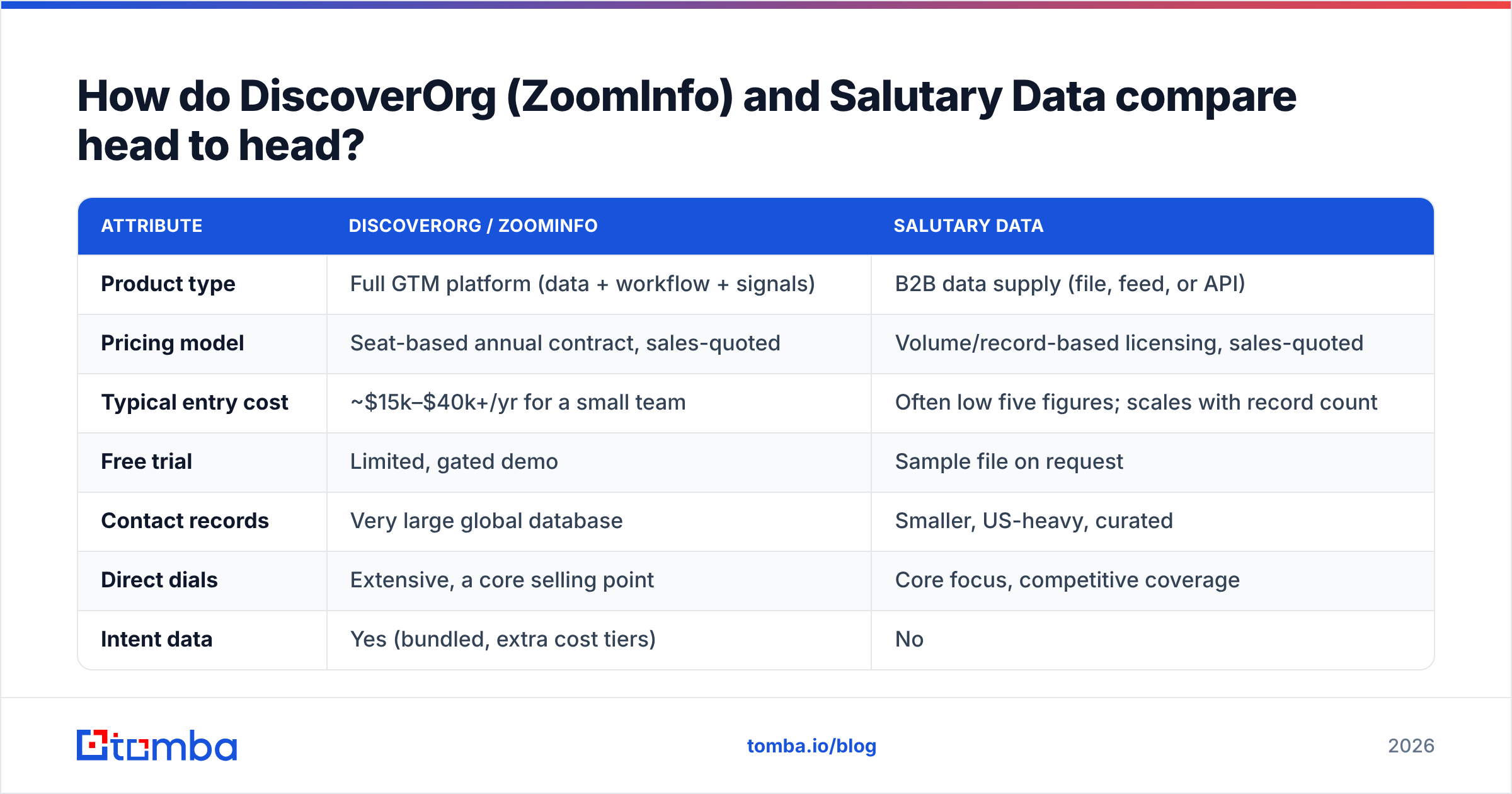
Start with product shape and price:
| Attribute | DiscoverOrg / ZoomInfo | Salutary Data |
|---|---|---|
| Product type | Full GTM platform (data + workflow + signals) | B2B data supply (file, feed, or API) |
| Pricing model | Seat-based annual contract, sales-quoted | Volume/record-based licensing, sales-quoted |
| Typical entry cost | ~$15k–$40k+/yr for a small team | Often low five figures; scales with record count |
| Free trial | Limited, gated demo | Sample file on request |
| Best for | Enterprise sales orgs needing one system | RevOps teams enriching an existing stack |
| Worst for | Small teams who only need emails | Teams with no in-house data ops capacity |
Now look at the data itself:
| Attribute | DiscoverOrg / ZoomInfo | Salutary Data |
|---|---|---|
| Contact records | Very large global database | Smaller, US-heavy, curated |
| Direct dials | Extensive, a core selling point | Core focus, competitive coverage |
| Intent data | Yes (bundled, extra cost tiers) | No |
| Org charts / hierarchy | Yes — the original DiscoverOrg strength | Limited firmographics only |
| CRM integrations | Native Salesforce, HubSpot, Outreach, more | Via your own pipeline or partner tooling |
| Data refresh | Continuous, platform-managed | Scheduled refresh per contract terms |
Both tables hide the number that matters: cost per usable contact. Say a $30,000 platform contract yields 4,000 contacts your reps actually email. That is $7.50 per usable record. Now say a $12,000 data license delivers 60,000 records. If 55% match your ICP and pass verification, you pay about $0.36. Both invoices say "B2B data." They are not the same purchase.
Which one has better data accuracy?#
Neither vendor will hand you a neutral accuracy number. Distrust any blog that claims one. Here is how to measure it yourself in a week.
- Build a 200-row truth set. Pull accounts you already sell to, where you know the current contact, title, and email. Add churned accounts, since stale records show up there first.
- Ask for identical samples. Send both vendors the same 200 companies. A vendor who refuses a matched sample has told you something.
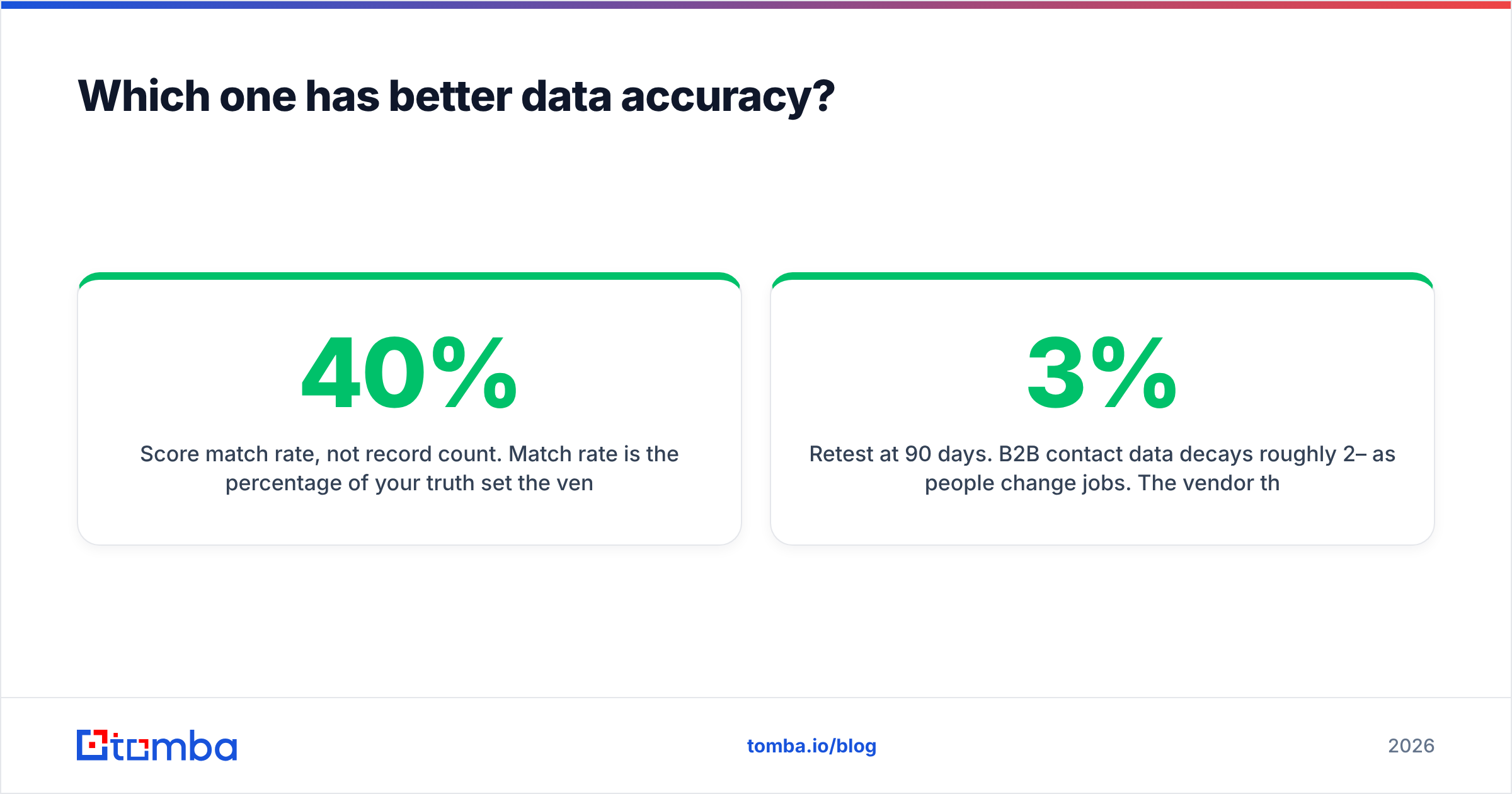
- Score match rate, not record count. Match rate is the share of your truth set the vendor returned anything for. A 200M-record database with a 40% match rate on your ICP loses to a 30M-record file at 80%.
Then score the fields and the shelf life:
- Score each field on its own. Is the email right? The title? Does the phone connect? Vendors often win on one field and lose on the rest. Averages hide that.
- Re-verify both samples yourself. Run them through a neutral email verifier before you compare. "Verified" means whatever the vendor decides it means.
- Retest at 90 days. B2B contact data decays about 2–3% per month as people change jobs. The winner on day one may not be the one still refreshing.
That last point is where the platform earns its premium in DiscoverOrg vs Salutary Data. ZoomInfo reprocesses its graph all the time. A one-time file is clean on delivery and ages from that day on. If you buy a static file, budget for a refresh cycle — or run your own verification pass on a schedule.
What do these tools actually cost in 2026?#
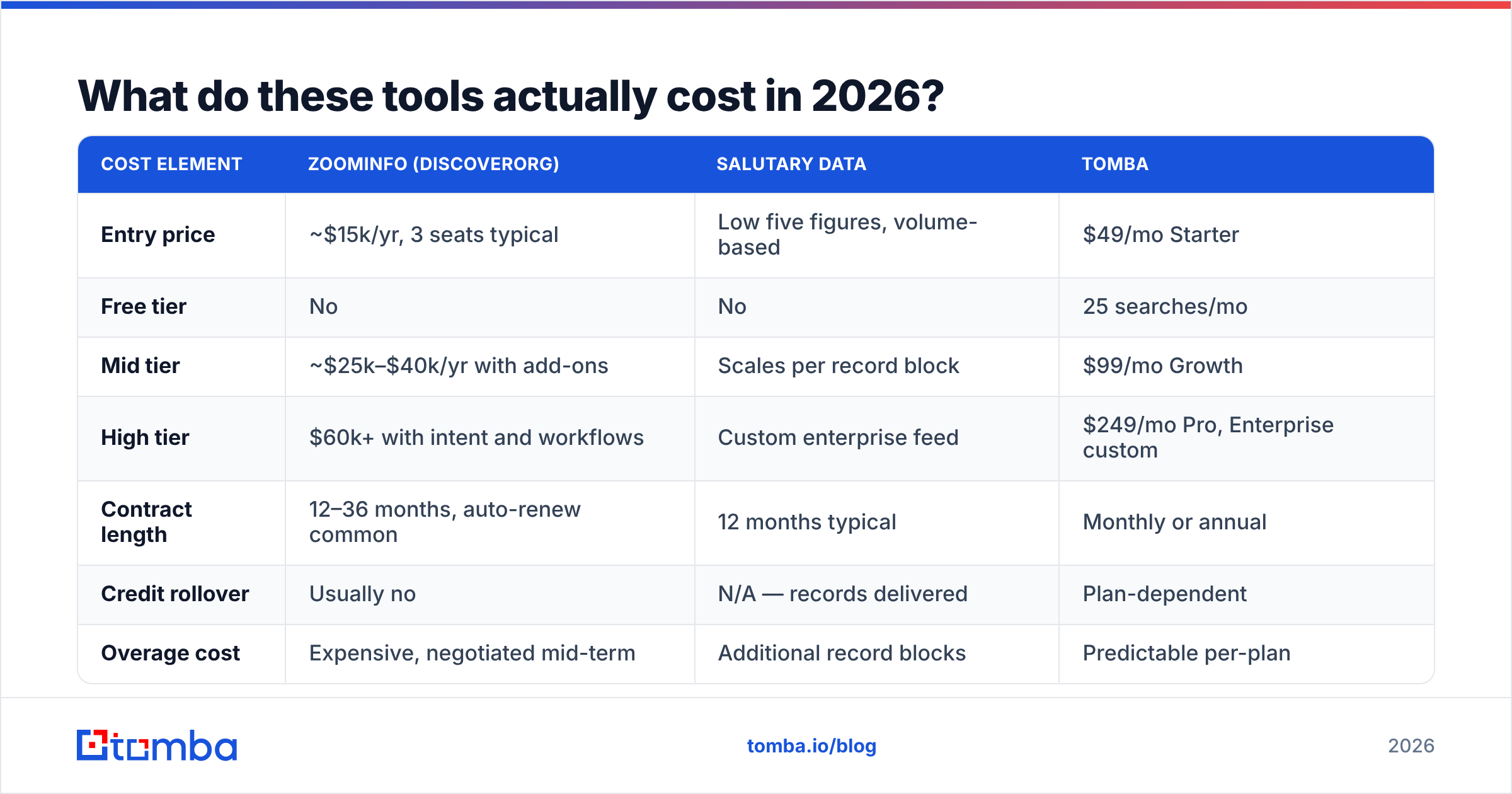
Both are sales-led, so published numbers are directional. Based on reported ranges and buyer reviews on G2, here is a realistic picture of the price tiers:
| Cost element | ZoomInfo (DiscoverOrg) | Salutary Data | Tomba |
|---|---|---|---|
| Entry price | ~$15k/yr, 3 seats typical | Low five figures, volume-based | $49/mo Starter |
| Free tier | No | No | 25 searches/mo |
| Mid tier | ~$25k–$40k/yr with add-ons | Scales per record block | $99/mo Growth |
| High tier | $60k+ with intent and workflows | Custom enterprise feed | $249/mo Pro, Enterprise custom |
The terms matter as much as the sticker price:
| Cost element | ZoomInfo (DiscoverOrg) | Salutary Data | Tomba |
|---|---|---|---|
| Contract length | 12–36 months, auto-renew common | 12 months typical | Monthly or annual |
| Credit rollover | Usually no | N/A — records delivered | Plan-dependent |
| Overage cost | Expensive, negotiated mid-term | Additional record blocks | Predictable per-plan |
| Onboarding fee | Sometimes | Rare | None |
Watch two contract traps on both sides. First, auto-renewal windows. Enterprise data contracts often need 60–90 days' written notice. Miss it and you owe another year. Second, credit expiry. Platform credits usually reset each year with no rollover, so an unused seat is money burned.

When should you pick ZoomInfo/DiscoverOrg?#
Buy the platform when at least three of these are true:
- You have 10+ reps who log in weekly, not quarterly.
- Org charts really change how you multi-thread. You sell to committees of six or more.
- You want intent signals to rank territories, and someone owns acting on them.
- Your CRM is messy enough that built-in, always-on enrichment is worth the premium.
- Procurement wants one big vendor instead of three small ones.
If fewer than three apply, you are buying features you will not use. The most common ZoomInfo regret in review sites is not data quality. It is seat count bought against a hiring plan that never happened.
When should you pick Salutary Data?#
Pick the data-supply side of DiscoverOrg vs Salutary Data when:
- You have someone who can ingest, dedupe, and match records. Without that person, a raw file is a liability.
- Your ICP is US-centric. That is where the coverage is strongest.
- You need direct dials at volume, and the per-dial platform math does not work.
- You already own sequencing, dialing, and CRM. You refuse to buy them again inside a data contract.
- You would rather haggle over record volume than seat count. It is often the friendlier lever.
The honest downside: the pipeline is yours. Dedupe logic, suppression lists, match keys, and refresh cadence all become your problem. Teams that skip data enrichment discipline end up with a warehouse full of records nobody trusts. That is worse than having fewer records.
Is there a cheaper third option for most teams?#
Yes. For many buyers it is the right answer. Before you sign either contract, ask what job you are hiring the tool to do.
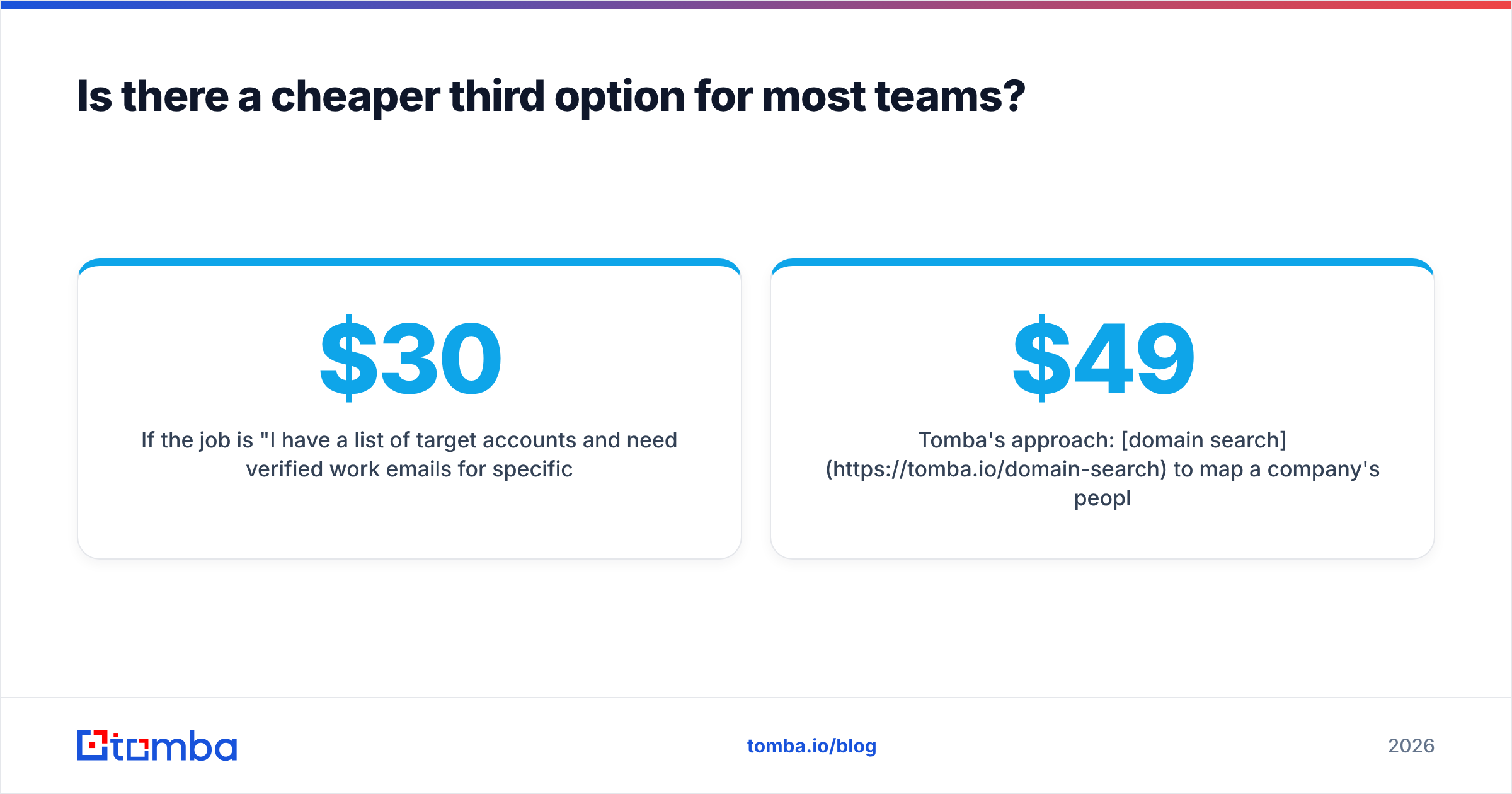
Say the job is this: "I have target accounts and need verified work emails for named people." You do not need a $30,000 platform. You do not need a data-engineering project either. You need a lookup tool with a good API and honest verification. Tomba, Hunter, and Findymail serve that segment, and the per-contact math is far better.
Tomba's approach is simple. Use domain search to map a company's people and email pattern. Use the email finder for named prospects. Then verify, including a catch-all verifier for domains that accept every address. Plans run free (25 searches/mo), $49/mo Starter, $99/mo Growth, and $249/mo Pro — see Tomba pricing for the current list. There is also a Tomba API if you would rather build the workflow yourself. That puts it close to the Salutary model in spirit, at a price one team can approve.
What you give up is real and worth naming. No intent data. No org charts. No bundled dialer. Thinner direct-dial coverage than either vendor here. If those matter to your motion, a lookup tool will not replace them.
The market has other credible middle options too. BookYourData sells pay-as-you-go verified B2B contacts with no annual commitment. That suits teams who want owned records without a licensing negotiation. Cognism competes with ZoomInfo on European coverage and phone-verified mobiles. Apollo bundles data with sequencing at a lower entry price. Your shortlist depends on your bottleneck: coverage, workflow, or budget. It does not depend on which brand has the loudest reviews.
How should you run the evaluation?#
A three-week process beats a demo-led decision every time. Start with the first two weeks:
- Week 1 — define the job. Write down the output you need. How many net-new contacts per month? Which geos? Which fields are required? Vague requirements produce oversized contracts.
- Week 1 — build the truth set. Use 200 known-good records, as described above. Do this before any sales call so vendors cannot shape the test.
- Week 2 — run matched samples. Same companies, same fields, same day. Verify everything through a neutral tool. Record match rate and field accuracy on their own.
- Week 2 — model total cost. Count the seats you will really use, overage risk, onboarding, and engineering hours for ingestion. The cheapest license is often not the cheapest project.
Week 3 is where you settle the DiscoverOrg vs Salutary Data decision:
- Negotiate on the right lever. Platforms flex on seats and term length. Data suppliers flex on record volume and refresh frequency. Ask for a 6-month first term. The 36-month discount rarely beats the lock-in.
- Test the exit. Ask what happens to records you already pulled if you do not renew. Some platform contracts restrict retained use. Get the answer in writing.
Vendor frameworks from Gartner say much the same thing in longer form. Measure fitness for your own use case, not vendor-reported database size.
The verdict#
Here is the short version of DiscoverOrg vs Salutary Data. DiscoverOrg — meaning ZoomInfo today — fits enterprise sales orgs. You need org charts, intent, and workflow in one system, plus the headcount to justify seat pricing. Salutary Data fits RevOps teams with in-house data skills. You want US contacts and phones delivered as supply, not software, at a better cost per record.
Neither fits a five-person team that mostly needs verified emails for a target list. That is an overspend by an order of magnitude. It is also the most common mistake in this category.
Start with the smallest tool that does your real job. If that job is finding and verifying work emails for named people at known companies, try the Tomba Email Finder. The free tier gives you 25 searches a month, so you can test match rate against your own truth set before you pay. Starter runs $49/mo with no annual lock-in. Run the same 200-company test you would run against a $30,000 contract. If it covers your use case, you just saved a year of budget. If it does not, you will walk into the enterprise negotiation knowing exactly which gaps you are paying to close.
Related guides#
Ready to find emails that actually work?
Join 150,000+ professionals who stopped guessing and started sending. Free credits on signup — no credit card required.
Get the Tomba newsletter
Practical outbound tactics and product updates — once every two weeks.
About the author