Discovery Call Email Template: 12 Proven Scripts for 2026
Most discovery call invites die because they ask for time before they've earned it. Here are 12 discovery call email templates, the structure behind them, and the benchmarks that tell you when yours is broken.
TL;DR
- A discovery call email template is not a script you paste — it's a structure: trigger, relevance line, one specific ask, and a low-friction close. Swap the variables, keep the skeleton.
- The single biggest lever isn't wording. It's whether the email reaches a real, verified inbox belonging to someone who actually owns the problem you named.
- Templates that ask for "30 minutes to learn about your business" convert 3-5x worse than ones that name a specific outcome the call will produce.
- Expect 4-9% reply rates on cold discovery invites, 25-45% on warm inbound follow-ups. If you're below that, the list is usually the problem, not the copy.
- Multi-touch beats single-touch by a wide margin — 3 to 5 touches over 12-14 days is the current sweet spot for B2B.
What Is a Discovery Call Email Template?#
A discovery call email template is a reusable message structure designed to book a first exploratory conversation with a prospect — the call where you diagnose their situation before pitching anything.
Think of it like a doctor's appointment reminder versus a pharmaceutical ad. The ad shouts about the drug. The appointment reminder just makes it easy to show up and get diagnosed. Discovery call emails that work behave like the reminder: they lower the cost of saying yes, and they make the agenda feel like it's about the prospect's situation, not your product demo.
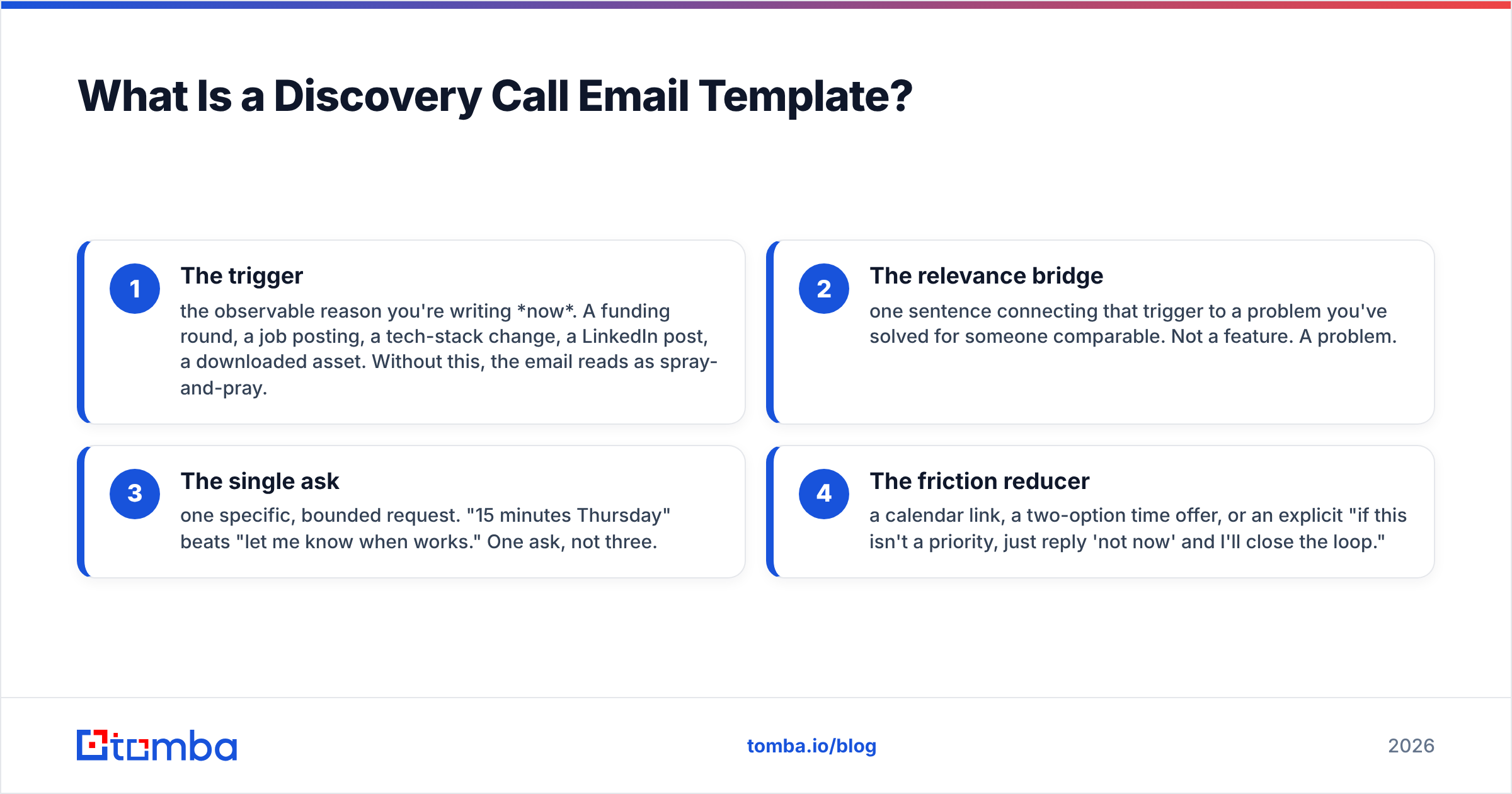
The template has four load-bearing parts:
- The trigger — the observable reason you're writing now. A funding round, a job posting, a tech-stack change, a LinkedIn post, a downloaded asset. Without this, the email reads as spray-and-pray.
- The relevance bridge — one sentence connecting that trigger to a problem you've solved for someone comparable. Not a feature. A problem.
- The single ask — one specific, bounded request. "15 minutes Thursday" beats "let me know when works." One ask, not three.
- The friction reducer — a calendar link, a two-option time offer, or an explicit "if this isn't a priority, just reply 'not now' and I'll close the loop."
Everything else — the greeting, the sign-off, the P.S. — is decoration. Get those four right and mediocre wording still books calls. Get them wrong and Shakespeare wouldn't save you.
Why Do Most Discovery Call Emails Get Ignored?#
Because they ask for the prospect's scarcest resource — time — before demonstrating that the sender knows anything specific about them.
Here's the failure pattern, in order of how often it shows up:
- Vague agenda. "I'd love to learn more about your business" tells the recipient the call will be an interrogation that benefits you. Name the deliverable: "I'll walk you through how three other Series B marketplaces handled the same routing problem."
- Sender-centric first line. If the first 12 words contain your company name, you've lost. Mobile previews show roughly 40-90 characters. Spend them on the prospect.
- Multiple asks. "Can we chat? Also, here's a case study. Also, are you the right person?" Three questions produce zero answers.
- Wrong recipient. A perfect email to the wrong title is a wasted send. Ops managers don't buy the same way VPs do.
- The email never arrives. Bounces, spam folders, and stale contact data quietly eat 15-30% of most cold campaigns before copy matters at all.
That last one deserves emphasis. You can A/B test subject lines for a quarter and never beat the gains you'd get from cleaning the list once. Run every address through an email verifier before the first send — a 3% bounce rate is the ceiling most inbox providers tolerate before your sender reputation starts sliding.
Which Discovery Call Email Template Should You Use?#
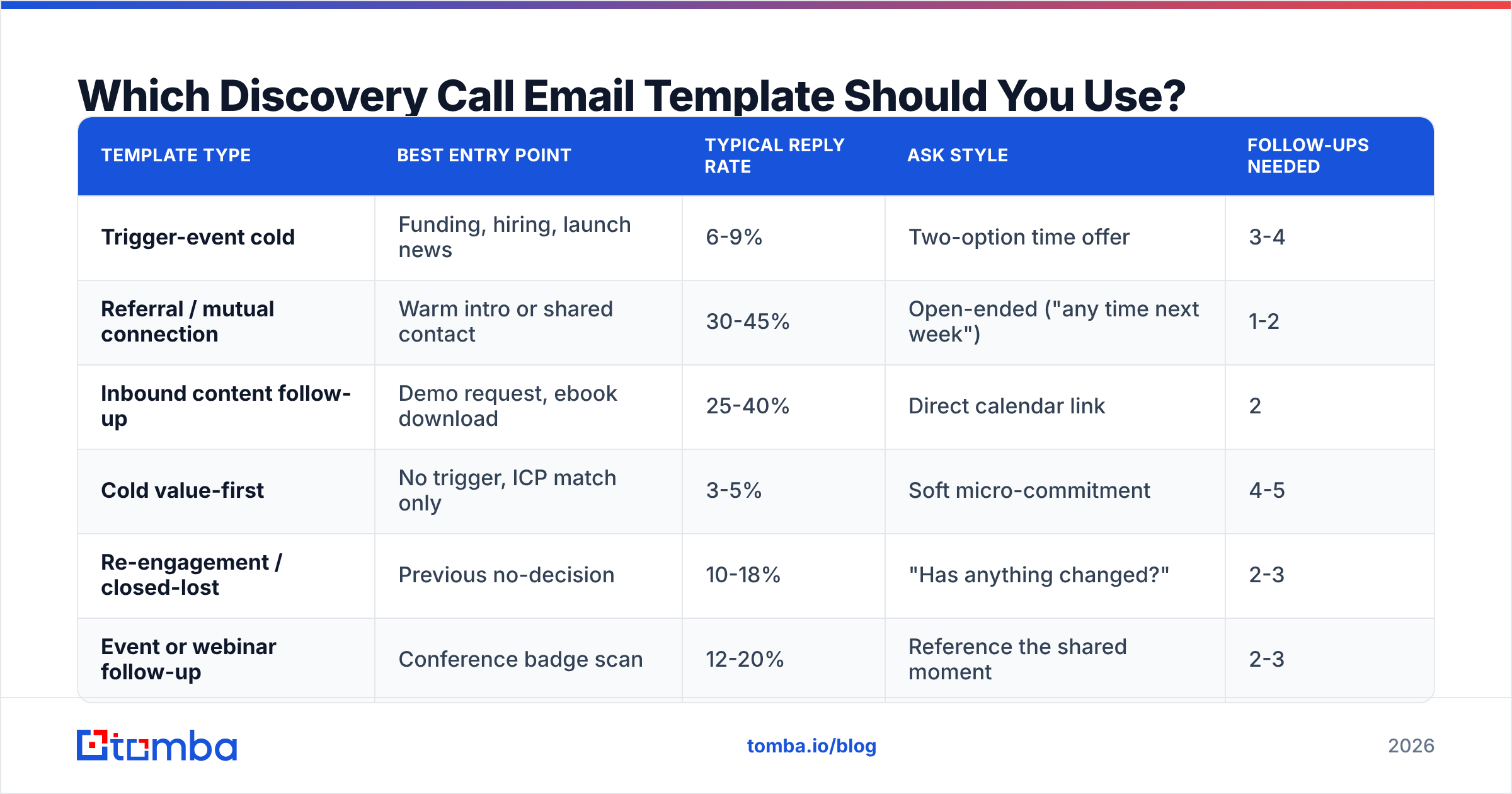
Different entry points require different structures. Here's how the main variants compare on the dimensions that actually matter:
| Template type | Best entry point | Typical reply rate | Ask style | Follow-ups needed |
|---|---|---|---|---|
| Trigger-event cold | Funding, hiring, launch news | 6-9% | Two-option time offer | 3-4 |
| Referral / mutual connection | Warm intro or shared contact | 30-45% | Open-ended ("any time next week") | 1-2 |
| Inbound content follow-up | Demo request, ebook download | 25-40% | Direct calendar link | 2 |
| Cold value-first | No trigger, ICP match only | 3-5% | Soft micro-commitment | 4-5 |
| Re-engagement / closed-lost | Previous no-decision | 10-18% | "Has anything changed?" | 2-3 |
| Event or webinar follow-up | Conference badge scan | 12-20% | Reference the shared moment | 2-3 |
Two things jump out. First, warm entry points outperform cold by roughly 5-8x — which means sourcing a reason to reach out is higher-leverage than optimizing copy. Second, cold sequences need more touches, not longer emails. Adding a fourth and fifth follow-up typically lifts total sequence reply rate by 30-50%, according to aggregated benchmark data published by vendors like HubSpot.
What Are the 12 Discovery Call Email Templates?#
Copy these, then replace every bracketed variable. If you can't fill a bracket with something specific, don't send the email.
1. Trigger-event cold outreach#
Subject: [Company]'s new [role] hires
Hi [First name],
Saw you're hiring three more SDRs this quarter. Usually when a team scales outbound that fast, contact data quality becomes the bottleneck within 60 days — reps burn ramp time on bounces instead of conversations.
We worked with [Comparable company] through the same scaling curve. Worth 15 minutes Thursday or Friday morning to walk you through what they changed?
[Your name]
2. The mutual-connection referral#
Subject: [Mutual name] suggested I reach out
Hi [First name],
[Mutual name] mentioned you're rebuilding the outbound motion at [Company] and thought our conversation about [specific topic] might be useful to you too.
No pitch — happy to just share what we saw work and didn't. Any 20-minute window next week?
[Your name]
3. The inbound speed-to-lead#
Send within five minutes of a form fill. Speed matters more than polish here — response odds drop sharply after the first hour.
Subject: Re: your [asset name] download
Hi [First name],
You grabbed the [asset] a few minutes ago — usually people download that when they're mid-way through [specific problem].
I blocked two slots tomorrow in case you want a second opinion on your setup: [calendar link]. If you'd rather just email, tell me where you're stuck and I'll reply with what I'd do.
[Your name]
4. The competitor-switch angle#
Subject: switching off [Competitor]?
Hi [First name],
Noticed [Company] is still running [Competitor] for [use case]. Most teams your size hit the same wall around [specific limitation] — the workaround usually costs 4-6 hours a week in manual cleanup.
Happy to show you how [Comparable company] restructured it. 15 minutes Tuesday?
[Your name]
5. The one-line micro-commitment#
The lowest-friction option in the set. Ask for a word, not a meeting.
Subject: worth a look?
Hi [First name] — is reducing [specific metric] on your roadmap for Q[N]? One word back is enough.
[Your name]
6. The problem-agitate-invite#
Subject: [specific metric] at [Company]
Hi [First name],
Teams running [motion] typically lose 20-30% of their addressable list to bad contact data — the reps never see it, they just see low reply rates and assume the copy is broken.
I can show you exactly what share of your current list is undeliverable in about 10 minutes. Want me to run it before we talk?
[Your name]
7. The post-webinar follow-up#
Subject: the question you asked about [topic]
Hi [First name],
You asked during Thursday's session about [specific question] — I gave the short answer, but the real one depends on how your [system] is set up.
Free Wednesday at 11 or Thursday at 2 to go through it properly?
[Your name]
8. The break-up email#
Subject: closing the file
Hi [First name],
I've reached out a few times about [topic] with no reply, which usually means one of three things: wrong timing, wrong person, or wrong problem.
If it's the second one, who should I be talking to? If it's the first or third, I'll stop here — no hard feelings.
[Your name]
9. The re-engagement after closed-lost#
Subject: revisiting [topic] — anything change?
Hi [First name],
We spoke last [month/quarter] and you flagged [specific objection] as the blocker. That's changed on our side — [specific change].
Worth 15 minutes to see whether it's changed on yours?
[Your name]
10. The executive one-liner#
For VP and C-level. Shorter is better; assume they read on a phone between meetings.
Subject: 15 min on [strategic outcome]
[First name] — three companies in [vertical] cut [metric] by [X]% last year using the same play. Worth 15 minutes to see if it maps to [Company]?
[Your name]
11. The champion-to-decision-maker handoff#
Subject: intro to [Decision maker]?
Hi [First name],
Thanks for the walkthrough last week — sounds like [specific finding] is the real constraint.
Getting [Decision maker] on a 20-minute call would let us scope this properly. Want me to send a two-paragraph brief you can forward, or would a direct intro be easier?
[Your name]
12. The LinkedIn-to-email bridge#
Subject: following up on your post about [topic]
Hi [First name],
Your post on [topic] last week — the part about [specific detail] matched something we ran into with [Comparable company]. Their fix was counterintuitive.
Happy to walk through it. 15 minutes Thursday?
[Your name]
Pair these with a subject line tester before launch. Subject lines rarely make a campaign, but a bad one reliably breaks it.
How Do You Personalize a Discovery Call Email at Scale?#
You stop personalizing sentences and start personalizing variables.
Manual personalization doesn't scale past roughly 30 emails a day. What does scale is defining three to five data points per prospect that plug into a fixed template, then sourcing those data points programmatically:
- Trigger data — funding announcements, job postings, product launches, leadership changes
- Firmographic data — headcount, vertical, geography, growth stage
- Technographic data — what's in their stack, which reveals both fit and switching cost
- Behavioral data — site visits, content consumed, email engagement
- Relationship data — mutual connections, shared communities, prior touchpoints
Two of those five will do most of the work. Pick the two that best predict fit for your product and build the template around them. Everything else is noise you're paying for.

For the sourcing layer, you need contact data that's both accurate and enriched enough to fill those variables. Tools like Tomba's data enrichment return role, seniority, company size, and verified email in a single call, which means your template variables get populated at list-build time instead of during a rep's morning coffee. If you're pulling from LinkedIn-sourced lists, a LinkedIn finder closes the gap between a profile and a deliverable address.
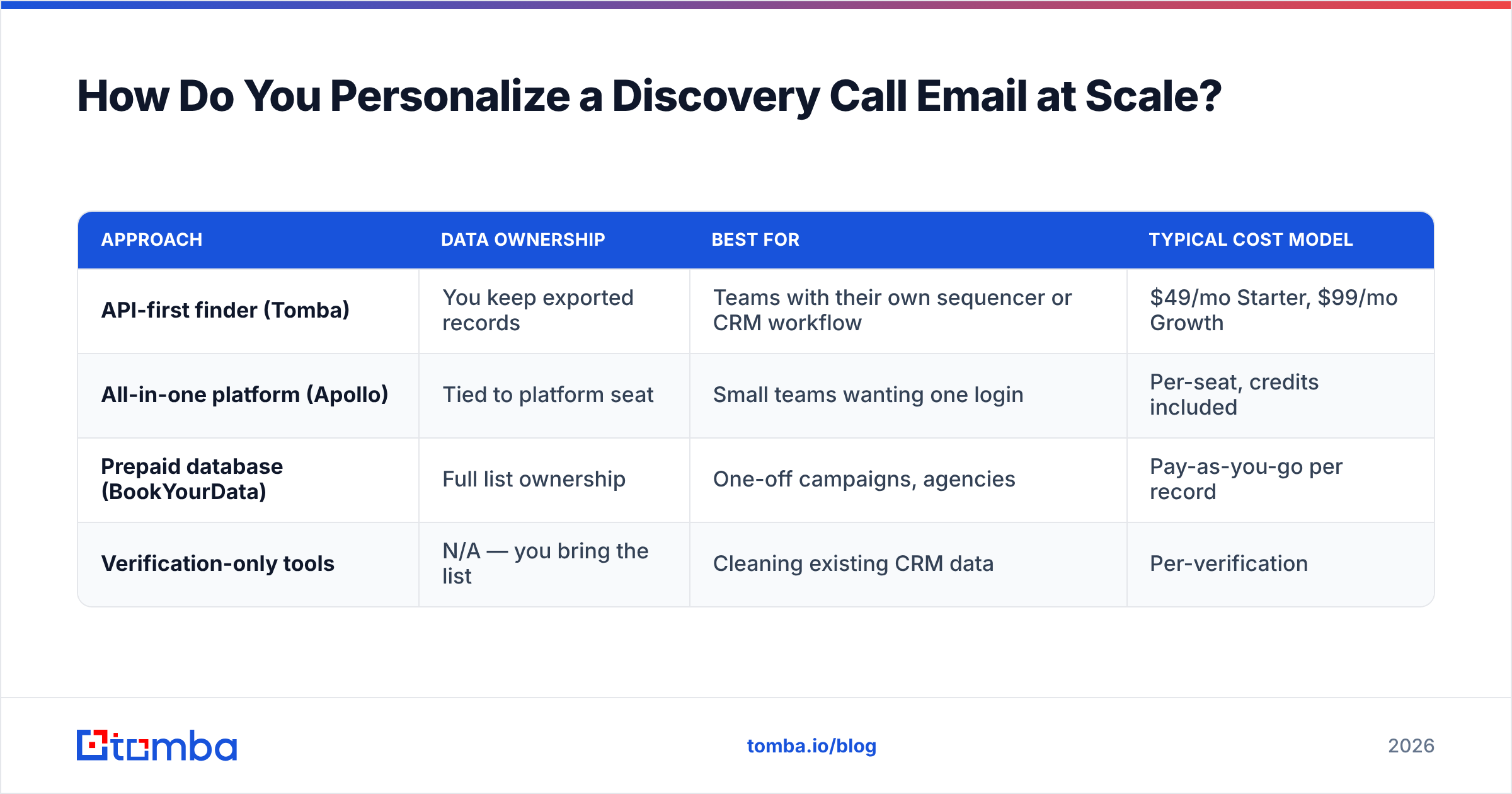
Competitors in the space handle this differently. Apollo bundles sequencing with data, which is convenient if you want one vendor but means you're locked into their sending infrastructure. BookYourData takes the pay-as-you-go database approach — strong for teams that want to own a list outright rather than rent access, and their verified-on-download model removes a step. Tomba sits closer to the API-first end: you pull exactly the records you need, verify them, and push them wherever your sequencer lives.
| Approach | Data ownership | Best for | Typical cost model |
|---|---|---|---|
| API-first finder (Tomba) | You keep exported records | Teams with their own sequencer or CRM workflow | $49/mo Starter, $99/mo Growth |
| All-in-one platform (Apollo) | Tied to platform seat | Small teams wanting one login | Per-seat, credits included |
| Prepaid database (BookYourData) | Full list ownership | One-off campaigns, agencies | Pay-as-you-go per record |
| Verification-only tools | N/A — you bring the list | Cleaning existing CRM data | Per-verification |
What Should Happen After You Send the Discovery Call Email?#
The send is maybe 20% of the outcome. The sequence around it is the rest.
Space touches 3-4 days apart, not daily. Daily follow-ups read as desperation and get marked as spam. Twelve to fourteen days across four touches is the current norm for B2B outbound.
Change the angle each time, not just the wording. Touch one is the trigger. Touch two is social proof. Touch three is a resource with no ask. Touch four is the break-up. Repeating the same argument louder doesn't work.
Switch channels by touch three. A LinkedIn view followed by a connection request, or a call, meaningfully lifts reply rate on the remaining email touches. This is why B2B phone numbers matter even for email-led motions — the channels compound rather than compete.
Track reply rate, not open rate. Apple Mail Privacy Protection has made open tracking close to meaningless since 2021. Replies and booked meetings are the only metrics worth reporting.
Set a hard stop. Four or five touches, then move the record to a nurture list. Contacts that don't respond to five well-constructed emails aren't going to respond to the ninth.
One operational note: check your technical setup before blaming copy. SPF, DKIM, and DMARC misconfigurations silently route good emails to spam. Google and Yahoo both tightened bulk-sender requirements in 2024, and enforcement has only gotten stricter since. Run an SPF checker and a spam checker on your sending domain before you scale volume. Google's own sender guidelines spell out the current thresholds.
How Do You Know If Your Template Is Working?#
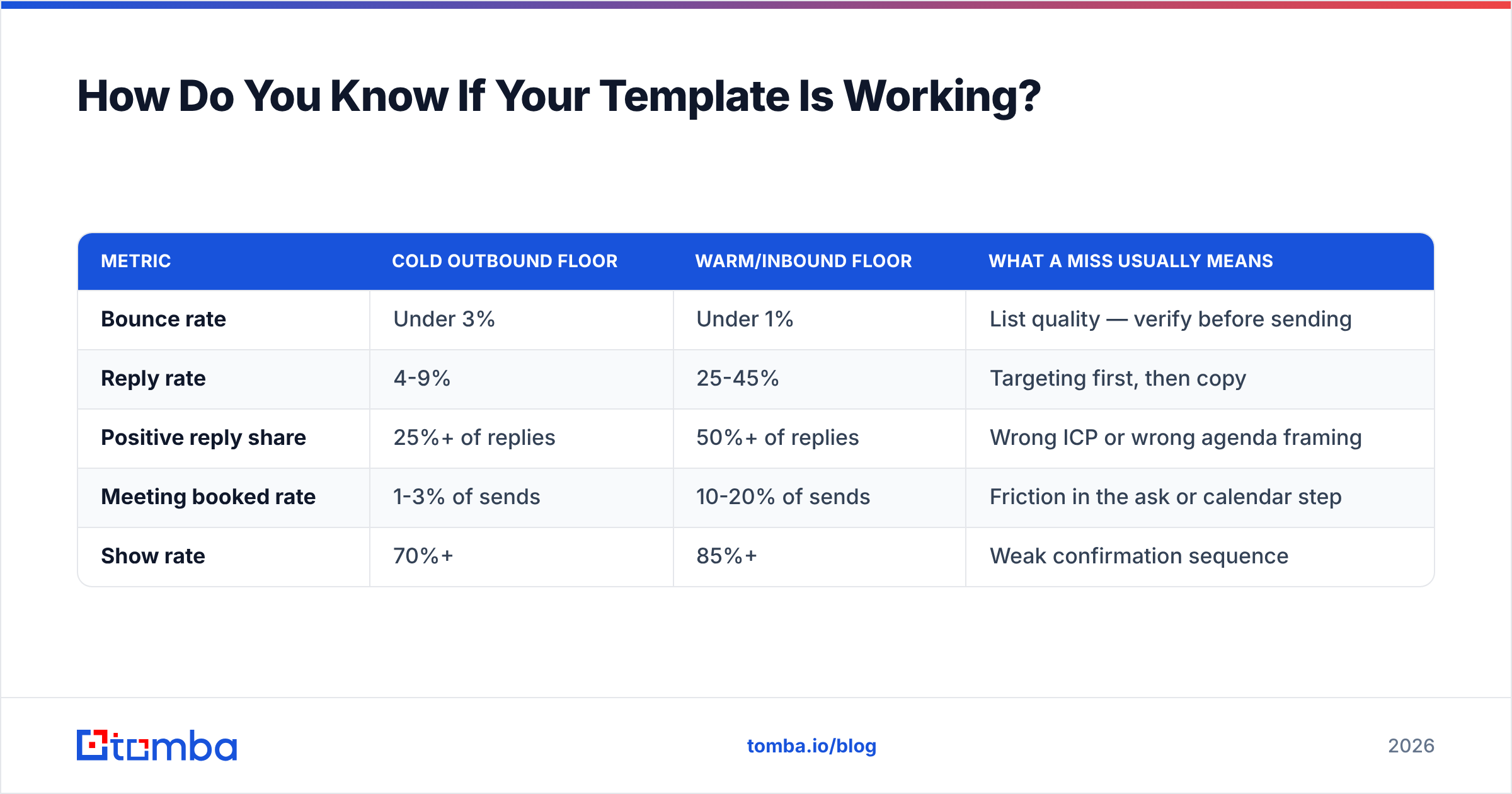
Set a floor, measure against it, and change one variable at a time.
| Metric | Cold outbound floor | Warm/inbound floor | What a miss usually means |
|---|---|---|---|
| Bounce rate | Under 3% | Under 1% | List quality — verify before sending |
| Reply rate | 4-9% | 25-45% | Targeting first, then copy |
| Positive reply share | 25%+ of replies | 50%+ of replies | Wrong ICP or wrong agenda framing |
| Meeting booked rate | 1-3% of sends | 10-20% of sends | Friction in the ask or calendar step |
| Show rate | 70%+ | 85%+ | Weak confirmation sequence |
Test in this order: list quality → targeting → offer/agenda → subject line → body copy. Most teams do it backwards, spending weeks on subject lines while a quarter of their list bounces.
Give each test enough volume to mean something. Two hundred sends per variant is a rough minimum before you should trust a difference. Below that you're reading noise. Analyst coverage from G2 and buyer reviews across the sales-engagement category consistently show the same thing: the teams with the best reply rates are the ones with the cleanest data, not the cleverest copy.
What's the Fastest Way to Build a Discovery Call List?#
Start from your ICP definition, not from a tool.
- Define the trigger you can act on. Hiring for a role, using a specific technology, recent funding, published content on a topic. Pick one you can detect reliably.
- Find companies matching that trigger. Job boards, funding databases, tech-detection tools, or a filtered B2B database.
- Identify the right title at each company. Not the most senior title — the one that owns the problem. For most B2B tools that's a director or manager, not a VP.
- Find and verify the email. Use a domain search to pull the pattern and the people, then verify every address before it enters the sequence.
- Enrich for template variables. Pull the two or three data points your template depends on so the merge fields are never empty.
- Segment into sequences of 50-150. Small enough to keep the trigger specific, large enough to read the results.
Six steps, and only step four is a "tool" step. The other five are thinking. That ratio is roughly right for outbound in general.
Ready to Build Lists Your Templates Deserve?#
The best discovery call email template in this post will underperform on a bad list, and the worst one on this page will book meetings on a great one. That's the whole game.
Tomba's Email Finder gives you verified professional emails by domain, name, or company — with enrichment data attached so your template variables fill themselves. The free tier includes 25 searches a month to test the workflow, and paid plans start at $49/mo when you're ready to scale. Build the list first. Then worry about the subject line.
Related guides#
Ready to find emails that actually work?
Join 150,000+ professionals who stopped guessing and started sending. Free credits on signup — no credit card required.
Get the Tomba newsletter
Practical outbound tactics and product updates — once every two weeks.
About the author