Discovery Call Slides: What to Show, Cut, and Send After
Most discovery decks talk when the rep should be listening. Here's the 7-slide structure that keeps a discovery call conversational, plus what to cut and what to send as follow-up.
TL;DR
- Discovery call slides exist to earn permission to ask questions — not to explain your product. If you present for more than 6 minutes of a 30-minute call, you have run a demo, not a discovery.
- Seven slides cover everything a first call needs: agenda, credibility snapshot, problem hypothesis, a "how others solve this" frame, one proof point, next-step options, and a parking-lot slide.
- Cut the founding-story timeline, the logo wall over 8 logos, the feature matrix, the pricing table, and any slide with a build animation. They convert curiosity into passivity.
- The highest-ROI slide is the one you build after the call: a one-page recap with their words, their metrics, and a dated next step.
- Slide quality follows research quality. If you don't know who else is on the call and what they own, no deck saves you — start with accurate contact data.
What are discovery call slides, actually?#
Discovery call slides are a short visual scaffold that keeps a first sales conversation on the rails while the buyer does most of the talking. Think of them like the menu at a good restaurant: they frame the choices and set expectations, but nobody comes for the menu.
The failure mode is treating them like a pitch deck with a different filename. A pitch deck's job is persuasion. A discovery deck's job is structure — it signals you prepared, it gives the buyer a map of the next 30 minutes, and it gives you a legitimate reason to pause and ask "does that match what you're seeing?"
Gartner's research on B2B buying consistently finds that buyers spend the majority of their purchase journey researching independently and only a small slice of it with any single vendor's sales team. That slice is your call. Spending it narrating slides they could have read on your website is the most expensive mistake in the funnel.
There is a second, quieter reason discovery decks matter in 2026: multi-threading. The average B2B buying group is 6 to 10 people, and your slides get forwarded. A deck built for forwarding — self-explanatory headlines, no orphaned context — extends your reach past the one person who took the call.
How many slides should a discovery call have?#
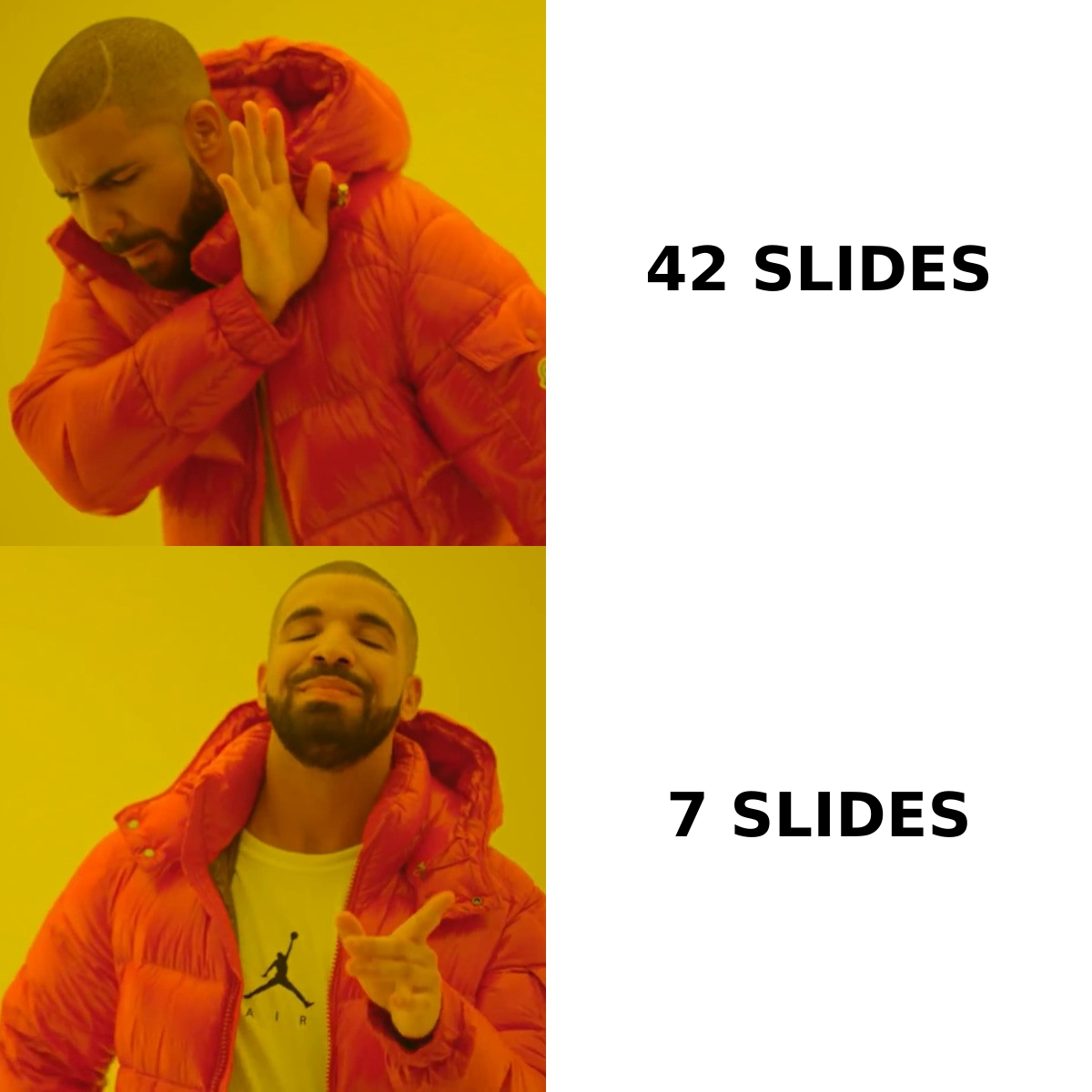
Seven. Here is the structure and what each one is actually for:
- Agenda slide — Three bullets, a time box, and one line: "Anything you want to add before we start?" This is the single highest-converting slide in the deck because it hands the buyer control in the first 45 seconds.
- Credibility snapshot — Who you are in 15 seconds. One sentence of positioning, three to six relevant logos (relevant to their segment, not your biggest names), one number. Then stop.
- Problem hypothesis — Three symptoms you believe they're experiencing, phrased as statements they can disagree with. "You're running outbound off a list that's about 18 months old." Disagreement is data.
- How teams usually solve this — A neutral, category-level view of the three or four common approaches, including the do-nothing option and your competitors' approach. This is where credibility is actually built, because you're describing a landscape rather than selling a spot in it.
- One proof point — A single customer story matched to their segment, structured as before-metric / what changed / after-metric. Not a case-study wall. One.
- Next-step options — Two or three concrete paths (technical deep dive, pilot scoping, security review) with what each requires from them. Buyers pick from options; they resist single asks.
- Parking lot — A blank-ish slide where you type their open questions live. It's the cheapest trust-building device in sales: they watch you write down their concern instead of deflecting it.
That's it. If a slide doesn't map to one of those seven jobs, it belongs in the follow-up deck.
What should you cut from your discovery deck?#
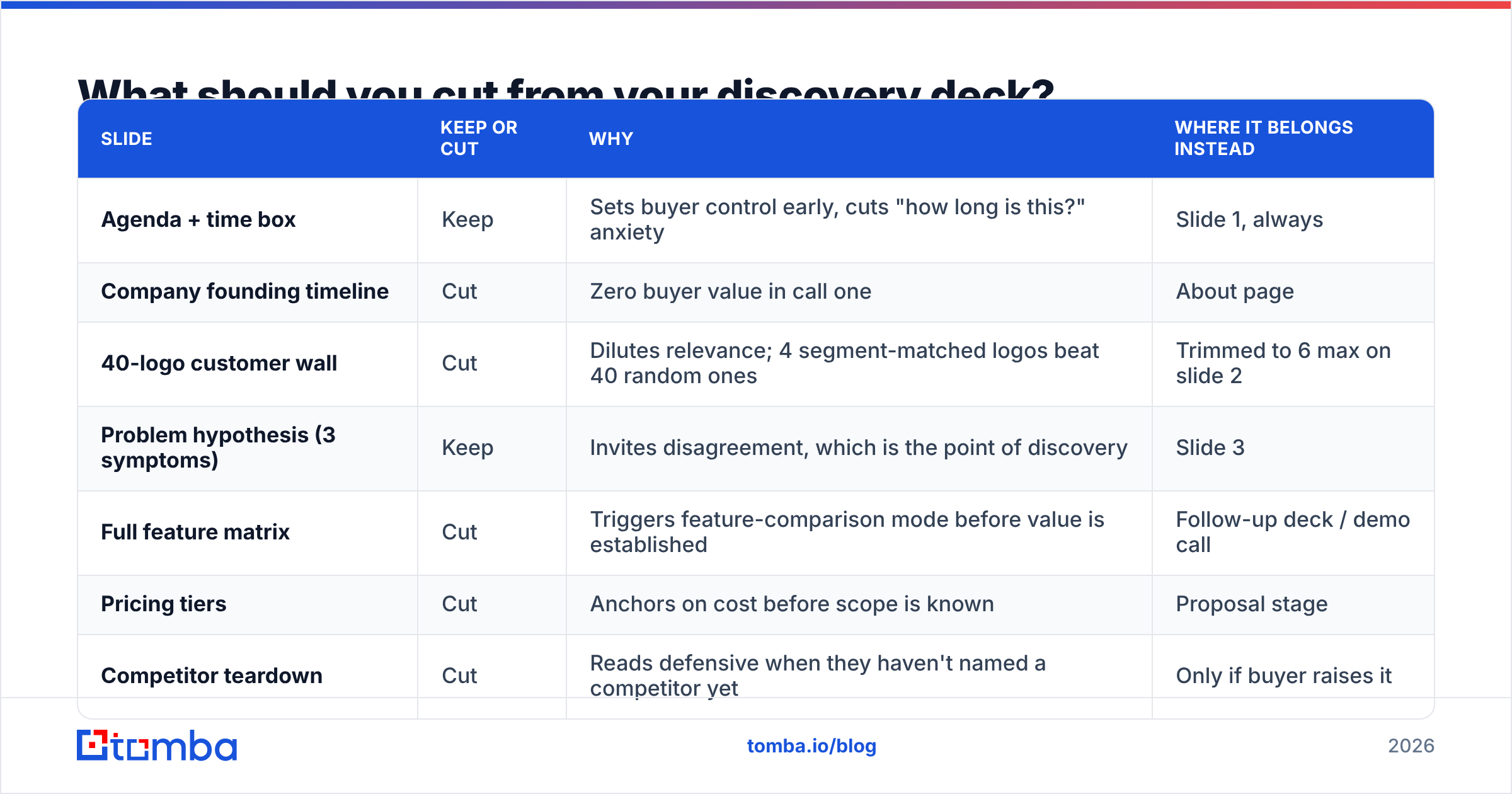
Most decks are 30-plus slides because nobody has been given permission to delete. Here's the audit table.
| Slide | Keep or cut | Why | Where it belongs instead |
|---|---|---|---|
| Agenda + time box | Keep | Sets buyer control early, cuts "how long is this?" anxiety | Slide 1, always |
| Company founding timeline | Cut | Zero buyer value in call one | About page |
| 40-logo customer wall | Cut | Dilutes relevance; 4 segment-matched logos beat 40 random ones | Trimmed to 6 max on slide 2 |
| Problem hypothesis (3 symptoms) | Keep | Invites disagreement, which is the point of discovery | Slide 3 |
| Full feature matrix | Cut | Triggers feature-comparison mode before value is established | Follow-up deck / demo call |
| Pricing tiers | Cut | Anchors on cost before scope is known | Proposal stage |
| Competitor teardown | Cut | Reads defensive when they haven't named a competitor yet | Only if buyer raises it |
| Single matched case study | Keep | One relevant story outperforms six generic ones | Slide 5 |
| Architecture diagram | Cut | Right content, wrong audience on call one | Technical deep dive |
| Next-step options (2-3) | Keep | Choice increases commitment vs. a single ask | Slide 6 |
| Parking lot | Keep | Visible proof you're listening | Slide 7 |
| Any build animation | Cut | Breaks on screen share, adds seconds, adds nothing | Nowhere |
The pattern: everything that answers "how does it work?" gets deferred. Everything that answers "do you understand my situation?" stays.
How do you use slides without turning discovery into a monologue?#
Use the 20/80 rule on screen time, not just talk time. Share your screen for the agenda, then stop sharing. Bring slides back only when the conversation asks for them.
Four mechanics that make this work:
- Ask before advancing. Never move a slide without a question attached. "Before I go further — which of those three sounds most like your quarter?" The slide is a prompt, not a script.
- Kill your own slide. If a buyer says something that contradicts your problem hypothesis, say so out loud and skip the slide. "That's not what I assumed — let me throw out slide three." This costs you nothing and buys enormous credibility.
- Type in the deck live. Editing the parking-lot slide while they talk beats nodding. It also produces your follow-up content for free.
- Screen-share half the time you think. Faces build rapport; slides don't. If you're on video, your camera is the higher-value pixel.
- Time-box to 6 minutes of slide time in a 30-minute call. Set a timer if you have to. HubSpot's sales research has long shown that the highest-converting discovery calls skew heavily toward buyer talk time, and the deck is the number-one thing that flips that ratio the wrong way.
What does a discovery call deck look like across sales motions?#
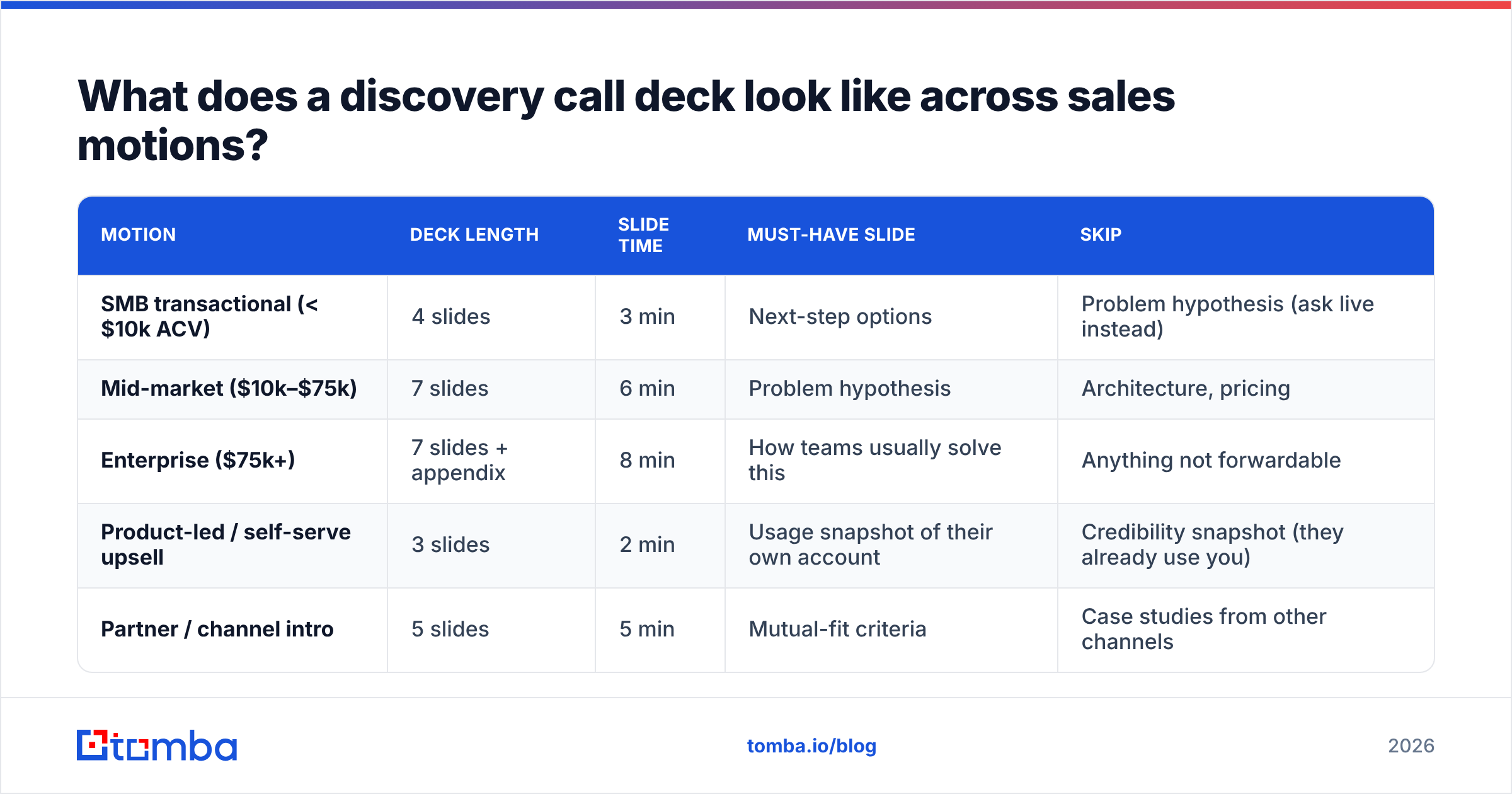
Not every motion needs the same deck. Here's how the seven-slide structure flexes.
| Motion | Deck length | Slide time | Must-have slide | Skip |
|---|---|---|---|---|
| SMB transactional (< $10k ACV) | 4 slides | 3 min | Next-step options | Problem hypothesis (ask live instead) |
| Mid-market ($10k–$75k) | 7 slides | 6 min | Problem hypothesis | Architecture, pricing |
| Enterprise ($75k+) | 7 slides + appendix | 8 min | How teams usually solve this | Anything not forwardable |
| Product-led / self-serve upsell | 3 slides | 2 min | Usage snapshot of their own account | Credibility snapshot (they already use you) |
| Partner / channel intro | 5 slides | 5 min | Mutual-fit criteria | Case studies from other channels |
Two notes on that table. Enterprise decks need an appendix because the deck will be forwarded to people who never met you, and orphaned slides create wrong assumptions. Product-led decks should open with the prospect's own usage data — nothing beats showing someone their own numbers.
What should the follow-up deck contain?#
The follow-up is where deals are actually won, and almost nobody builds it properly. Send it within 4 business hours, while the call is still the most recent thing in their inbox.
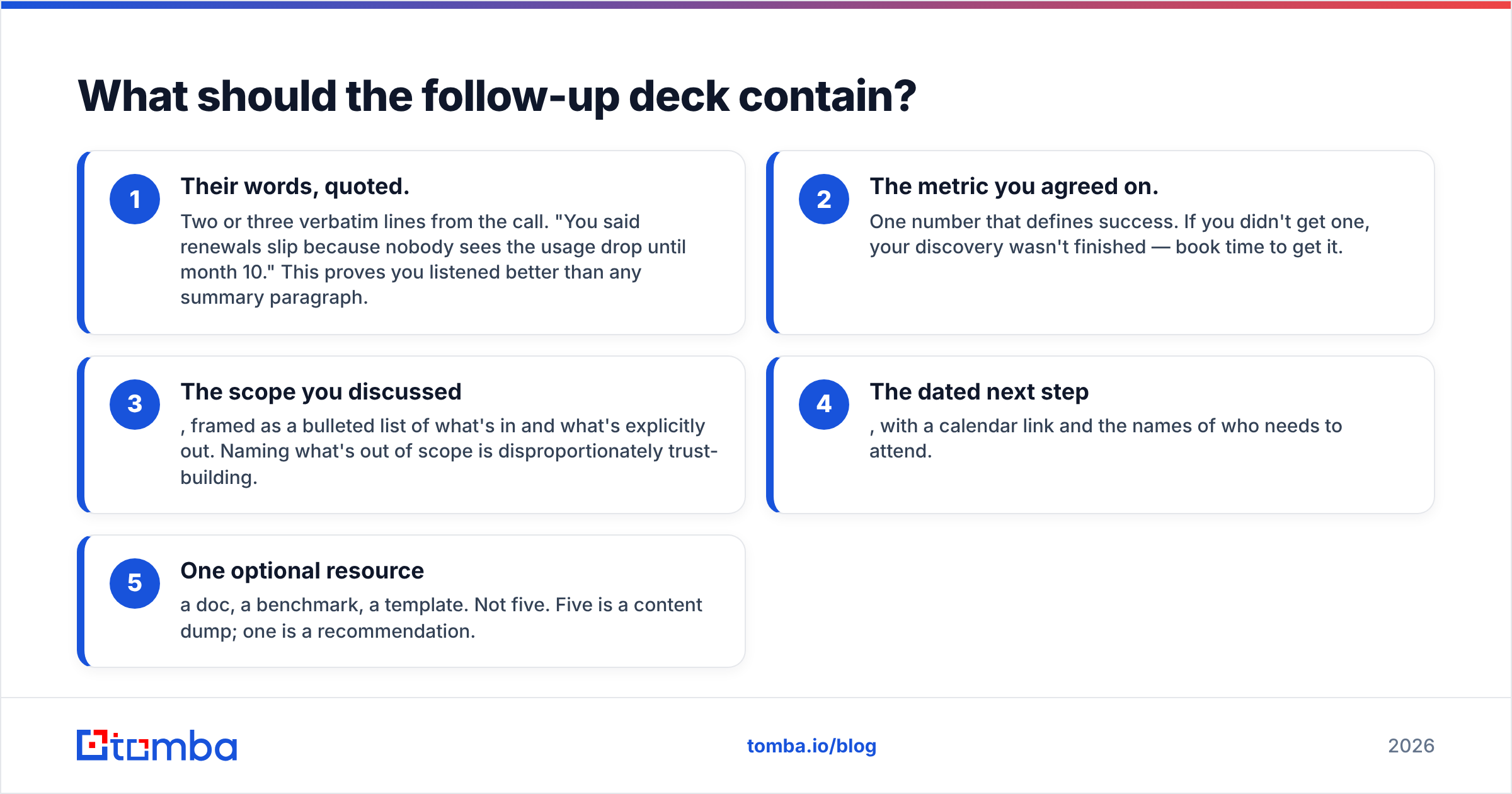
A working follow-up page has five parts:
- Their words, quoted. Two or three verbatim lines from the call. "You said renewals slip because nobody sees the usage drop until month 10." This proves you listened better than any summary paragraph.
- The metric you agreed on. One number that defines success. If you didn't get one, your discovery wasn't finished — book time to get it.
- The scope you discussed, framed as a bulleted list of what's in and what's explicitly out. Naming what's out of scope is disproportionately trust-building.
- The dated next step, with a calendar link and the names of who needs to attend.
- One optional resource — a doc, a benchmark, a template. Not five. Five is a content dump; one is a recommendation.
Keep it to a single page or a five-slide deck. If your recap needs a table of contents, it's not a recap.
What tooling should back the deck?#
The deck is downstream of research. A beautifully designed problem-hypothesis slide built on a wrong assumption about their tech stack is worse than no slide at all — it actively signals you didn't prepare.
Before you build the deck, you want four things confirmed:
- Who's on the call and what they own. Titles from a calendar invite are not enough. Pull the actual roles and reporting lines.
- What they run today. A quick stack check tells you whether your "how teams usually solve this" slide should include their incumbent by name.
- Recent triggers. Funding, a new VP, a product launch, a layoff. Any of these reshape slide 3.
- Reachable contacts beyond your champion. Multi-threading starts before the call, not after it stalls.
For the first and last of those, a reliable email finder plus domain search gets you the buying committee's contact map in minutes rather than an afternoon of LinkedIn scrolling. For the stack question, a website tech stack check answers it before you guess. And if you're pulling a list of accounts to prep in batch, bulk email finder runs the whole set at once.
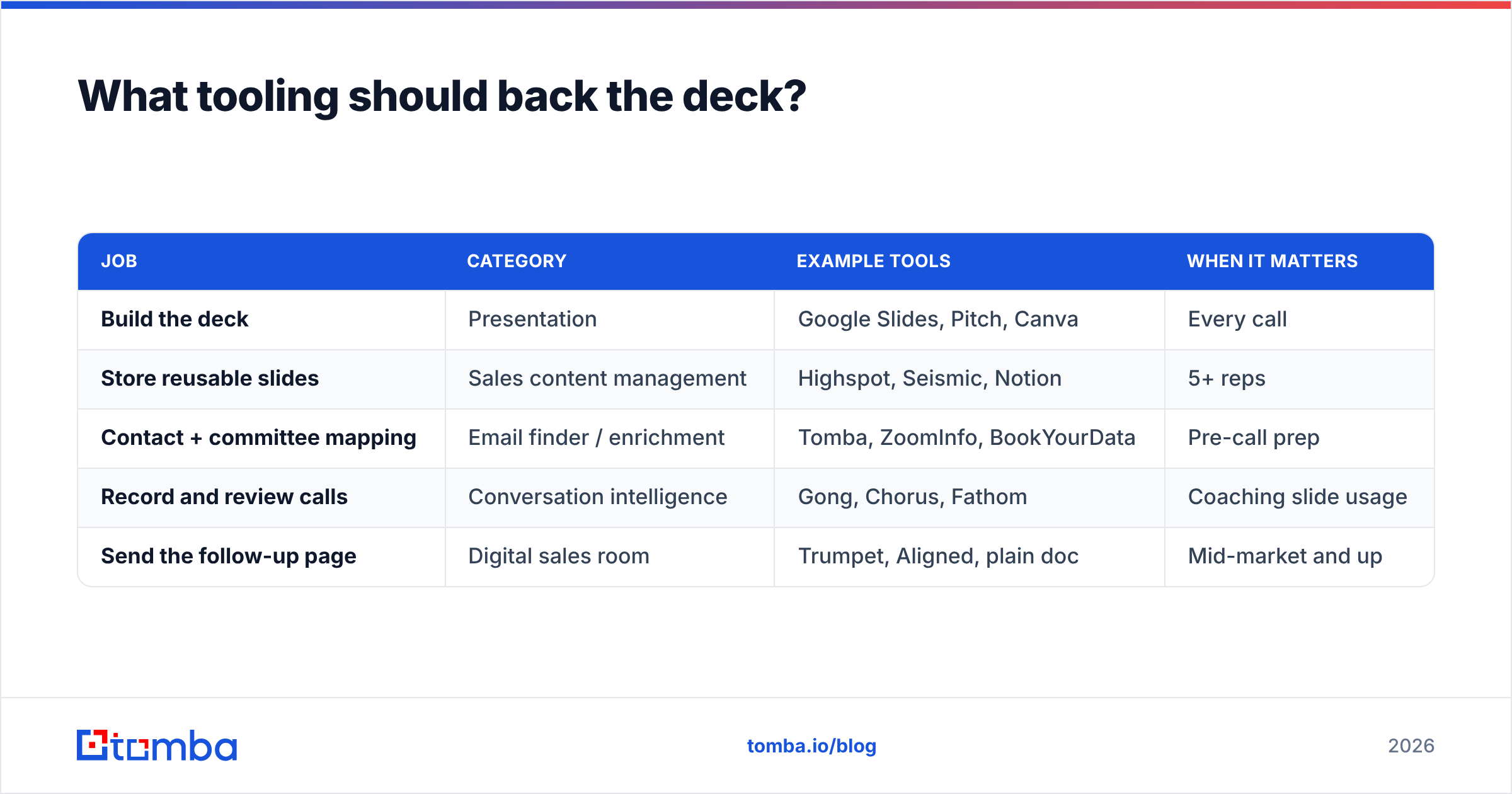
Tool categories, roughly, and where each fits:
| Job | Category | Example tools | When it matters |
|---|---|---|---|
| Build the deck | Presentation | Google Slides, Pitch, Canva | Every call |
| Store reusable slides | Sales content management | Highspot, Seismic, Notion | 5+ reps |
| Contact + committee mapping | Email finder / enrichment | Tomba, ZoomInfo, BookYourData | Pre-call prep |
| Record and review calls | Conversation intelligence | Gong, Chorus, Fathom | Coaching slide usage |
| Send the follow-up page | Digital sales room | Trumpet, Aligned, plain doc | Mid-market and up |
You don't need all five. A small team can run the entire motion on Google Slides, an email verifier so the follow-up actually lands, and a shared doc template. The categories only justify themselves at scale.
On the data side, verification matters more than most reps admit. A follow-up that bounces doesn't just fail to arrive — it damages your sender reputation for every other prospect on that domain. Verify before you send, not after your open rates drop.
How do you know your discovery slides are working?#
Four signals, in order of usefulness:
- Buyer talk time above 60%. Pull it from your call recorder. If your deck is well built, this number goes up when you use it, not down.
- Next-step booking rate on the call itself. Slide 6 exists for this. If under half your discovery calls end with a dated next step on the calendar, the options slide is either missing or too vague.
- Forward rate. Ask in the follow-up: "Is there anyone else who should see this?" Track how often something gets shared internally. Enterprise decks that never forward aren't built for the audience.
- Slide-level drop. If you have a digital sales room, look at which follow-up slide people stop reading. It's almost always the one where you started selling.
Review these monthly, not quarterly. Discovery decks rot fast because the market shifts under them — a problem hypothesis that landed in January reads as stale by June. G2's category pages and buyer reviews are a decent free pulse-check on how the language in your space is changing; skim the reviews for the words buyers actually use and steal them for slide 3.
What's the fastest way to build this from scratch?#
Ninety minutes, once, then 10 minutes per call:
- Build the shell (45 min). Seven slides, your brand, no content beyond headlines. Save as a template.
- Write three problem hypotheses (20 min), one per ICP segment. These are the only slides you swap per call.
- Pick one proof point per segment (15 min). Before-metric, change, after-metric. Three sentences each.
- Write your options slide once (10 min). It rarely changes.
- Per call (10 min): confirm attendees, swap in the right hypothesis and proof point, add one line referencing something specific about their company. Done.
The per-call 10 minutes is where the leverage is, and 6 of those minutes are research. That's the part worth automating — pulling the attendee list, confirming roles, checking recent news. Everything else is copy-paste.
If you're running this across a team, standardize the shell and let reps own only slides 3 and 5. Central control of structure, local control of relevance. Decks that give reps full freedom drift back to 30 slides within a quarter — that's not a discipline problem, it's a defaults problem.
Get the contact data your discovery deck depends on#
A discovery deck is only as sharp as the research behind it. Before you write a single problem hypothesis, you need to know who's in the room, what they own, and how to reach the two people your champion hasn't introduced you to yet.
That's what Tomba Email Finder is for — find verified professional emails by name, company, or domain so your pre-call prep takes minutes and your follow-up actually lands in the inbox. Start on the free tier (25 searches/month) to test it against accounts you already know, then move to Starter at $49/mo or Growth at $99/mo when you're prepping calls in volume. Full Tomba pricing is straightforward: no seat minimums, no annual lock-in to try it.
Build the seven slides once. Spend the saved time on the six minutes of research that make slide 3 land.
Sources and further reading: Gartner B2B buying research, HubSpot Sales Blog, G2 sales software categories
Related guides#
Ready to find emails that actually work?
Join 150,000+ professionals who stopped guessing and started sending. Free credits on signup — no credit card required.
Get the Tomba newsletter
Practical outbound tactics and product updates — once every two weeks.
About the author