Discovery Questions for Internet Sales: 2026 Field Guide
Internet leads die in 48 hours. These discovery questions — sequenced by channel, timing, and buying stage — turn a form fill into a qualified pipeline conversation.
TL;DR
- Internet leads are not inbound leads. They arrived with low intent, partial data, and three competing tabs open — your discovery has to earn every answer.
- Ask fewer questions on the form and more questions in the conversation. Every extra required field costs conversion; every extra asked question builds context.
- Sequence beats scripting: Situation → Timing → Constraint → Decision. Four buckets, roughly one question each on the first touch.
- Never ask something the data already tells you. Enrichment answers company size, tech stack, and role — spend your questions on motive and timing instead.
- The highest-yield question in internet sales is not "what's your budget?" It's "what made you start looking today?"
What Are Discovery Questions for Internet Sales?#
Discovery questions for internet sales are the qualifying questions you ask someone who came to you through a digital channel — a web form, a chat widget, a marketplace listing, a demo request, a pricing-page visit — rather than through a referral, an event, or your own outbound.
That origin matters more than most reps admit. A referral arrives pre-sold on you. An internet lead arrives pre-sold on the category, and is quietly comparing you against two or three other tabs. Your discovery has to do two jobs at once: qualify them, and earn the right to keep talking.
Think of it like a walk-in at a car dealership versus a scheduled appointment. The appointment already decided to see you. The walk-in is wandering, and if you open with "what's your budget?" they'll walk right back out. Internet leads are walk-ins with a keyboard.
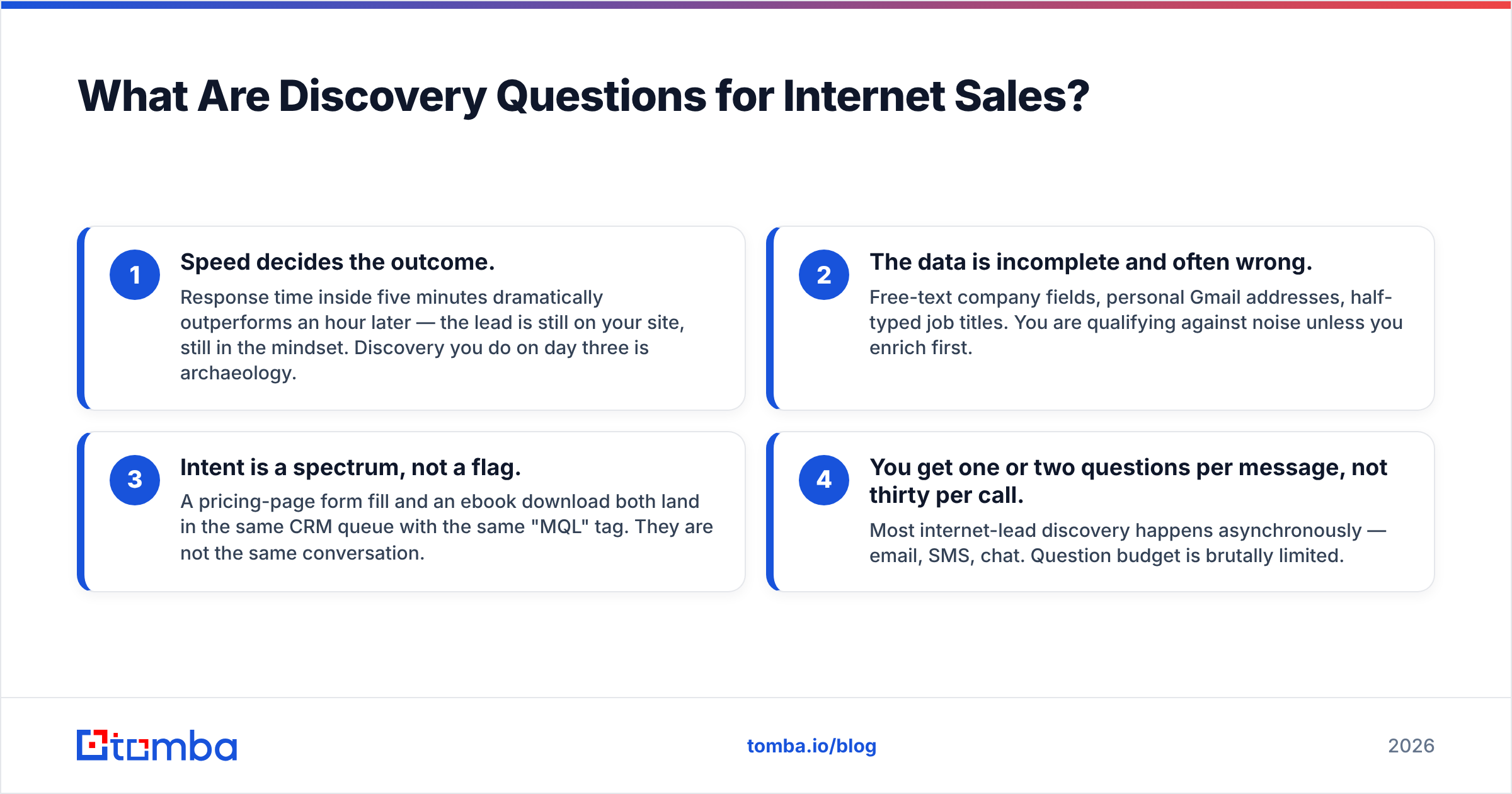
Four things make internet-lead discovery structurally different:
- Speed decides the outcome. Response time inside five minutes dramatically outperforms an hour later — the lead is still on your site, still in the mindset. Discovery you do on day three is archaeology.
- The data is incomplete and often wrong. Free-text company fields, personal Gmail addresses, half-typed job titles. You are qualifying against noise unless you enrich first.
- Intent is a spectrum, not a flag. A pricing-page form fill and an ebook download both land in the same CRM queue with the same "MQL" tag. They are not the same conversation.
- You get one or two questions per message, not thirty per call. Most internet-lead discovery happens asynchronously — email, SMS, chat. Question budget is brutally limited.
Why Do Most Internet-Lead Discovery Calls Fail?#
Because reps run their outbound discovery script on an inbound-shaped lead.
Outbound discovery assumes you interrupted someone and must create the problem. Internet-lead discovery assumes the problem already exists — they typed it into Google — and your job is to find its shape, urgency, and owner. Running a problem-creation script on someone who already has the problem reads as condescending, and they ghost.
The four failure patterns worth naming:
- The interrogation open. Seven qualifying questions before offering a single piece of value. Answer rate collapses after question three in an async channel.
- Asking what you could have looked up. "What does your company do?" tells the buyer you didn't spend 30 seconds on their site. Use data enrichment to fill in headcount, industry, and tech stack before the first message.
- Budget-first qualification. Budget is a lagging indicator on internet leads. Someone who wasn't going to spend a dollar on Monday will find $40k by Friday if the pain is sharp enough.
- Ignoring the channel of origin. A chat-widget lead and a webinar-replay lead have different heat. Same follow-up sequence for both wastes the hot one.

Which Discovery Questions Should You Ask First?#
Use four buckets, in this order. On a first async touch, ask one question — pick from Situation or Timing. On a live call, work through all four.
Bucket 1 — Situation (what's actually going on)#
- "What made you start looking today?" — the single best opener in internet sales. It surfaces the trigger event, which is the real qualifier.
- "How are you handling this right now?" — reveals the incumbent, which is usually a spreadsheet or a person, not a competitor.
- "Walk me through the last time this went wrong." — specific, story-shaped, easy to answer.
- "What did you have open in your other tabs?" — audacious, and it works on live chat. You get the competitive set for free.
Bucket 2 — Timing (is this a now-problem)#
- "Is there a date this needs to be working by?"
- "What happens if this is still unsolved in six months?" — the cost-of-inaction question, phrased so it doesn't feel like pressure.
- "Have you looked at this before and paused? What stopped it?" — recycled evaluations are extremely common on internet leads and tell you where the deal will die again.
Bucket 3 — Constraint (what will block this)#
- "Aside from price, what would make this a no?"
- "Does this have to plug into anything specific?" — surfaces integration blockers early, e.g. whether they need a HubSpot integration or a raw API.
- "Who else has an opinion on tools like this?" — a softer, more honest version of "who's the decision maker."
Bucket 4 — Decision (how a yes actually happens)#
- "If you liked what you saw, what would the next two weeks look like on your side?"
- "Has your team bought something like this before? How did that go?"
- "What would you need to see to feel confident recommending this internally?"
Notice what's missing: no BANT recital, no "on a scale of one to ten," no "what's keeping you up at night." Those phrases have been used enough that buyers pattern-match them to a script and disengage.
How Do Discovery Questions Change by Channel?#
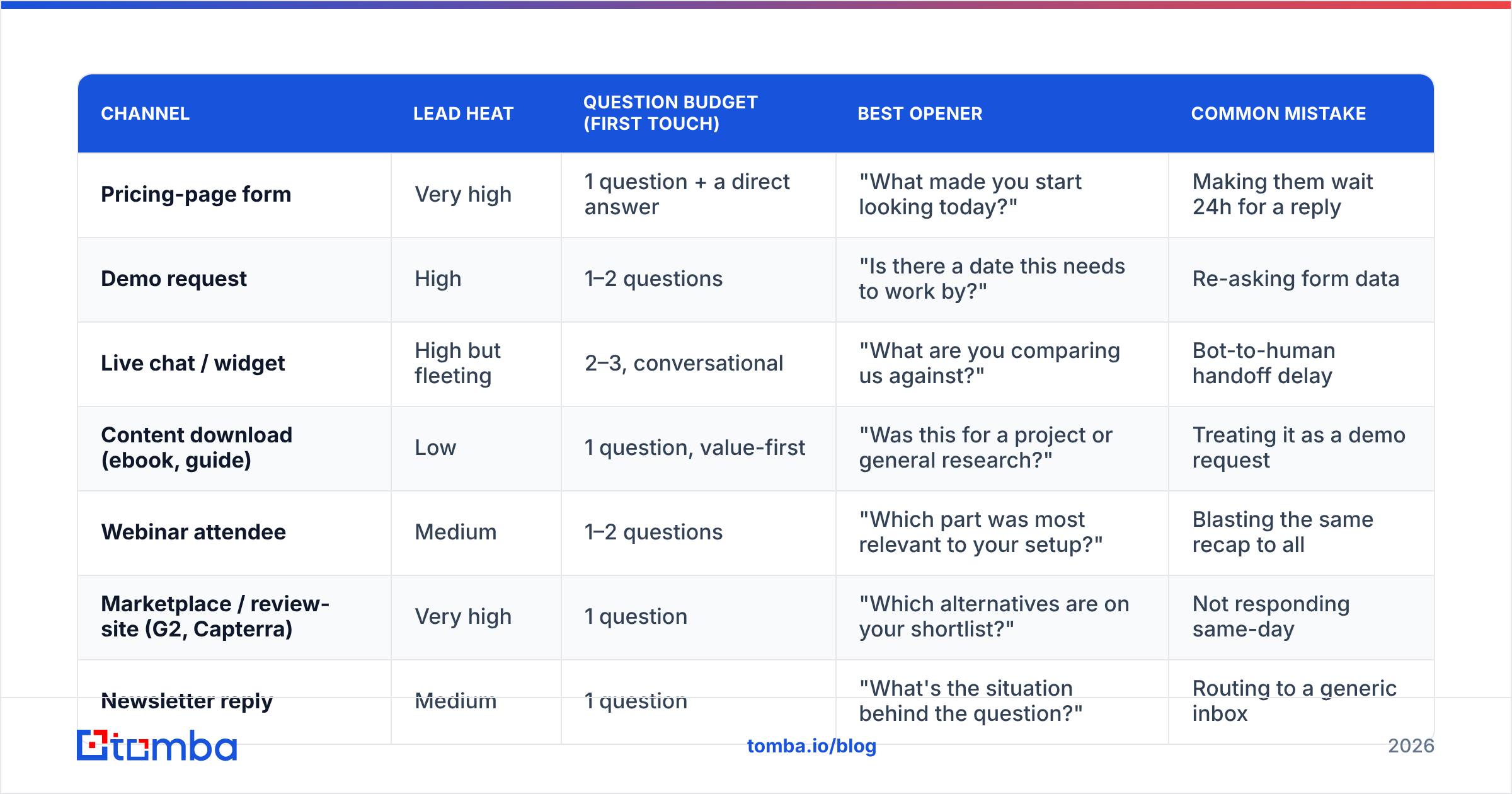
The channel tells you how much attention you've been loaned. Spend accordingly.
| Channel | Lead heat | Question budget (first touch) | Best opener | Common mistake |
|---|---|---|---|---|
| Pricing-page form | Very high | 1 question + a direct answer | "What made you start looking today?" | Making them wait 24h for a reply |
| Demo request | High | 1–2 questions | "Is there a date this needs to work by?" | Re-asking form data |
| Live chat / widget | High but fleeting | 2–3, conversational | "What are you comparing us against?" | Bot-to-human handoff delay |
| Content download (ebook, guide) | Low | 1 question, value-first | "Was this for a project or general research?" | Treating it as a demo request |
| Webinar attendee | Medium | 1–2 questions | "Which part was most relevant to your setup?" | Blasting the same recap to all |
| Marketplace / review-site (G2, Capterra) | Very high | 1 question | "Which alternatives are on your shortlist?" | Not responding same-day |
| Newsletter reply | Medium | 1 question | "What's the situation behind the question?" | Routing to a generic inbox |
The pattern: high-heat channels get fewer questions and faster answers. Low-heat channels get one soft question and something useful attached. Inverting that — long questionnaires to hot leads, hard pitches to cold ones — is the most common internet-sales own-goal.
How Many Questions Should You Ask Before the Call?#
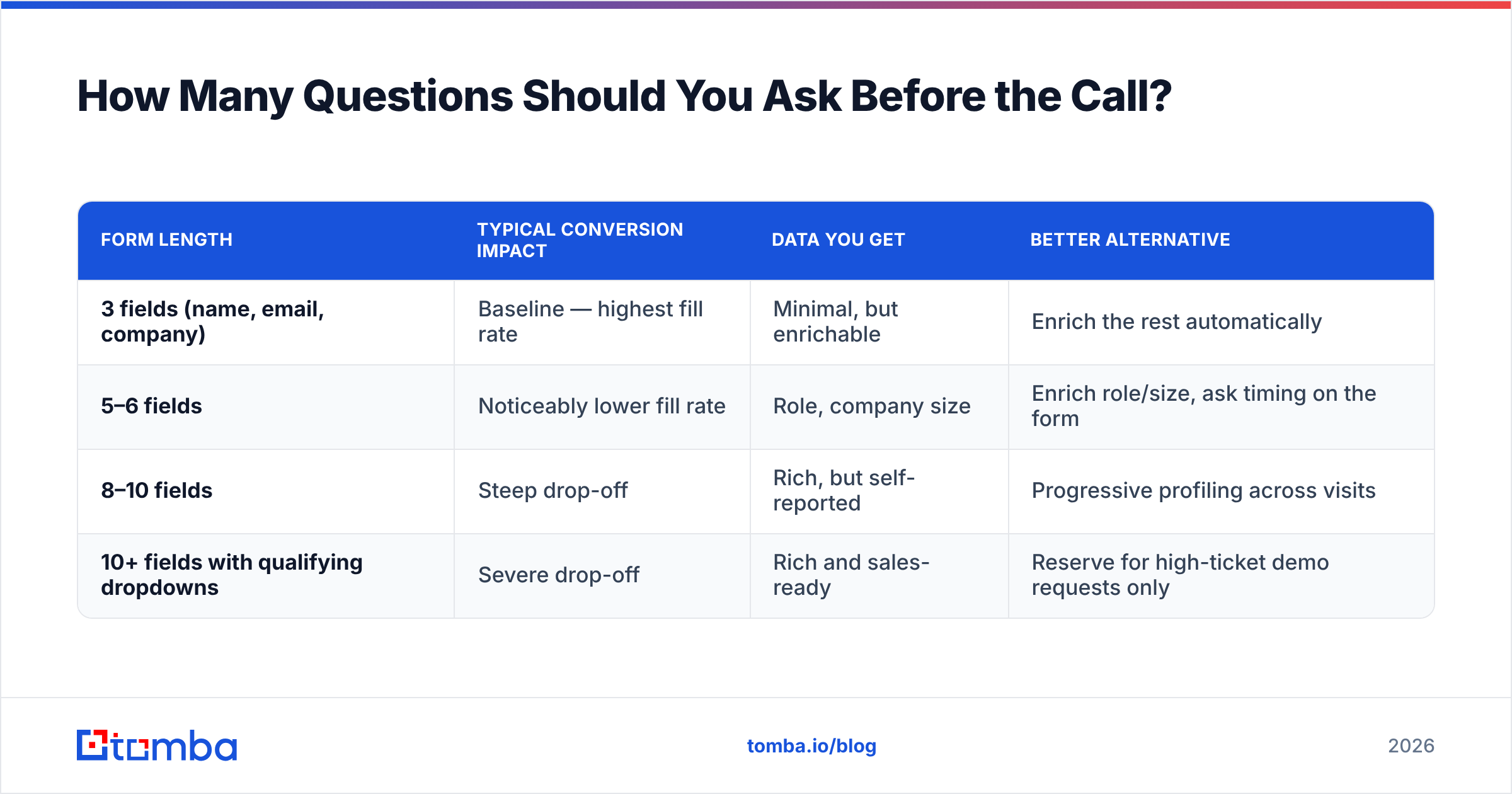
Fewer than you want to. Here's the trade-off in concrete terms.
| Form length | Typical conversion impact | Data you get | Better alternative |
|---|---|---|---|
| 3 fields (name, email, company) | Baseline — highest fill rate | Minimal, but enrichable | Enrich the rest automatically |
| 5–6 fields | Noticeably lower fill rate | Role, company size | Enrich role/size, ask timing on the form |
| 8–10 fields | Steep drop-off | Rich, but self-reported | Progressive profiling across visits |
| 10+ fields with qualifying dropdowns | Severe drop-off | Rich and sales-ready | Reserve for high-ticket demo requests only |
The resolution is not "ask more" or "ask less" — it's ask what you can't infer. Company headcount, industry, funding stage, tech stack, and LinkedIn profile can be resolved from a work email in milliseconds. Motive, timing, and internal politics cannot.
So build the form around the un-inferrable: keep it to email plus one open text field — "What are you trying to solve?" — and let enrichment handle the firmographics. When a lead arrives with a personal address instead of a work one, a reverse email lookup often resolves it back to the actual company, which saves you the embarrassing "what does your company do?" question. And when only a name and company come through, a domain search fills in the work address and the pattern behind it.

What Does a Good Internet-Lead Discovery Sequence Look Like?#
Here's a full sequence for a mid-heat inbound lead — someone who downloaded a comparison guide but hasn't requested a demo. Six touches over eleven days, one question each.
Touch 1 (within 5 minutes, email): No pitch. "Saw you grabbed the comparison guide — most people who download it are either replacing something or building this for the first time. Which one is you?" Binary question, near-zero effort to answer.
Touch 2 (day 2, email): If no reply, send something useful and ask a different bucket. "One thing that trips teams up here is [specific gotcha]. Is that on your list to solve, or are you further along than that?"
Touch 3 (day 4, LinkedIn or phone): Switch channels before you switch messages. A phone finder lookup on a lead who ignores email is often the whole difference between a dead record and a booked call.
Touch 4 (day 7, email): Timing bucket. "Is this a this-quarter thing or a next-year thing? Genuinely fine either way — it just changes what I'd send you."
Touch 5 (day 9, email): Constraint bucket, framed as help. "If you did move on this, what would have to be true technically? Happy to just tell you if we're a bad fit."
Touch 6 (day 11, email): The permission close. "I'll stop here unless you say otherwise — want me to check back in a quarter?"
Three rules make this work. One question per message. Never repeat a bucket you already asked. Always attach something worth opening, even when the answer is no.
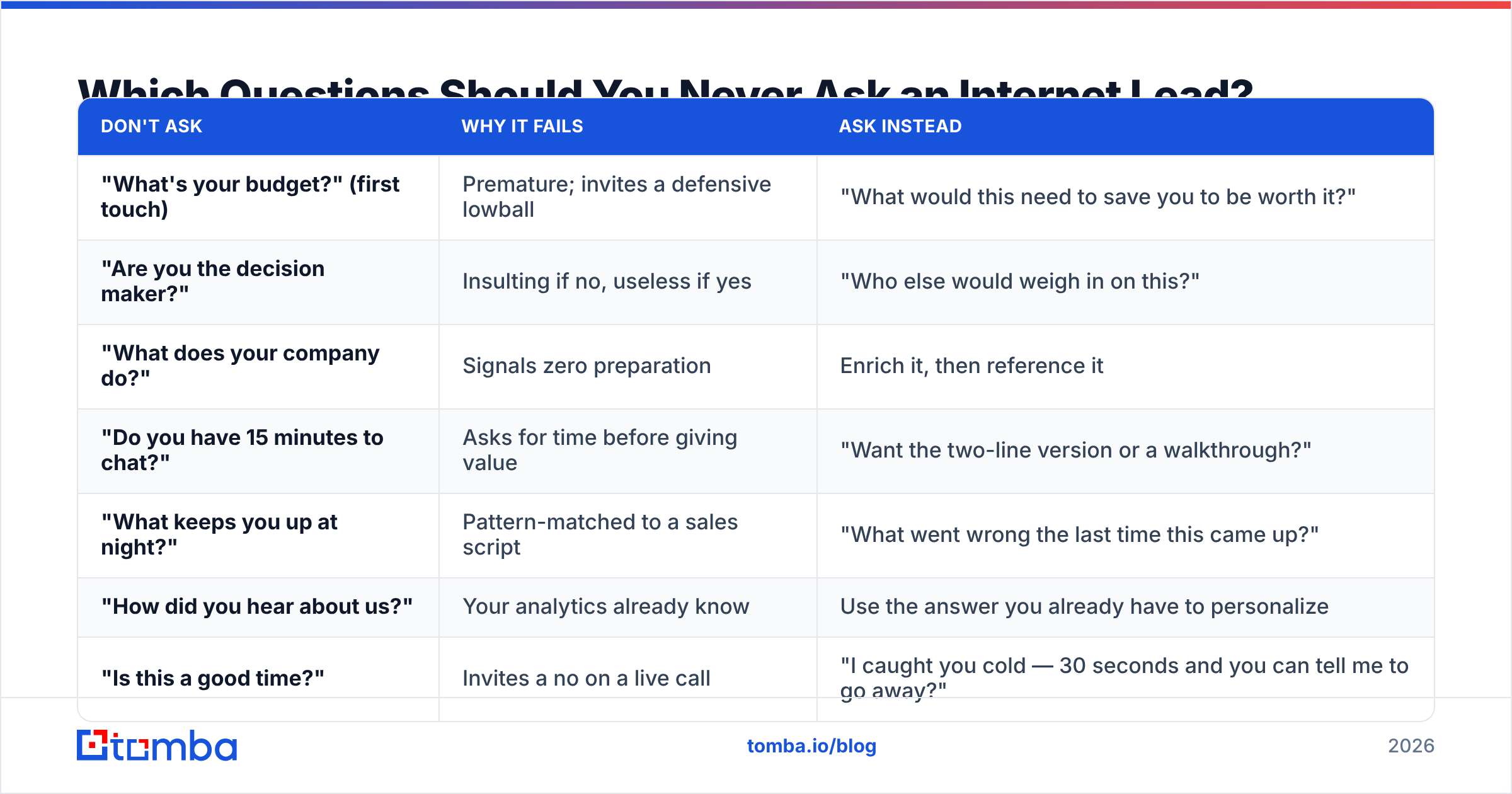
Which Questions Should You Never Ask an Internet Lead?#
Cut these. Each one has a better replacement.
| Don't ask | Why it fails | Ask instead |
|---|---|---|
| "What's your budget?" (first touch) | Premature; invites a defensive lowball | "What would this need to save you to be worth it?" |
| "Are you the decision maker?" | Insulting if no, useless if yes | "Who else would weigh in on this?" |
| "What does your company do?" | Signals zero preparation | Enrich it, then reference it |
| "Do you have 15 minutes to chat?" | Asks for time before giving value | "Want the two-line version or a walkthrough?" |
| "What keeps you up at night?" | Pattern-matched to a sales script | "What went wrong the last time this came up?" |
| "How did you hear about us?" | Your analytics already know | Use the answer you already have to personalize |
| "Is this a good time?" | Invites a no on a live call | "I caught you cold — 30 seconds and you can tell me to go away?" |
The generalizable rule: never spend a question on something a system can answer. Your question budget is the scarcest resource in internet sales. Firmographics come from enrichment. Behavior comes from your analytics. Questions are for motive and timing only.
How Do You Qualify Without Making It Feel Like Qualification?#
Reframe every qualifier as an offer to help them decide, not an offer to help you forecast.
- Instead of "What's your timeline?" → "What I send you depends on whether this is urgent — which is it?"
- Instead of "Who's involved in the decision?" → "If someone on your team is going to poke holes in this, tell me who and I'll get ahead of the objection."
- Instead of "What's your team size?" → "How many people would actually touch this day to day?"
Each version gives the buyer a reason to answer that serves them. That's the whole trick. Buyers answer questions that make their own evaluation easier and dodge questions that only fill your CRM fields.
The other half is disqualifying out loud. Saying "we're probably not a fit if X" early is the fastest trust-builder available in internet sales, and it makes every subsequent question feel like consulting rather than interrogation. Peers in the B2B data space — including list vendors like BookYourData — reach the same conclusion from the data side: leads that self-select out early cost far less than leads that stall in stage two for a quarter. Independent buyer reviews on G2 show the same pattern: what buyers praise most is being told quickly when a tool isn't for them.
How Do You Operationalize This Across a Team?#
Discovery quality collapses when it lives in individual reps' heads. Three things make it stick:
- A shared question bank organized by bucket, not by rep. Situation, Timing, Constraint, Decision — with three to five approved phrasings in each. Reps pick; they don't improvise from scratch.
- Required-field discipline in the CRM. If a stage advance requires a filled Timing field, the question gets asked. If it doesn't, it won't be. Wire this into your CRM stage gates.
- Enrichment before assignment, not after. Leads should hit the rep's queue already carrying company size, industry, verified email, and role. HubSpot's own inbound methodology documentation makes the same point: the rep's first message should read as if it were written by someone who already did the homework.
Then measure two things per rep: first-response time and reply rate to first question. Not calls made, not activities logged. Those two numbers predict internet-lead conversion better than any other pair of inputs, and both are directly coachable.
The Bottom Line#
Good discovery questions for internet sales are short, sequenced, and stingy. One question per message. Situation before timing, timing before constraint, constraint before decision. Never ask something a database can tell you, and never make a buyer answer three things before you've given them one useful thing.
The infrastructure half of this matters as much as the phrasing. If your leads land with a personal Gmail, a blank company field, and a job title typed as "mgr," no question sequence will save the conversation — you'll burn your first two touches gathering context you should have started with.
That's the gap Tomba Email Finder fills: resolve a name and domain into a verified work address, enrich the record with company and role data before it hits a rep's queue, and start the sequence already knowing who you're talking to. The free tier covers 25 searches a month if you want to test it against a sample of your own inbound; paid plans start at $49/mo on Starter, with Growth at $99/mo — full Tomba pricing is public. Get the data right, then spend every question you have left on the only two things a database can't tell you: why now, and what's in the way.
Related guides#
Ready to find emails that actually work?
Join 150,000+ professionals who stopped guessing and started sending. Free credits on signup — no credit card required.
Get the Tomba newsletter
Practical outbound tactics and product updates — once every two weeks.
About the author