Disposable Email Addresses: How to Detect and Block Them
Disposable emails inflate your list, wreck your bounce rate, and poison your funnel metrics. Here's how they work, how to detect them at signup, and which tools actually catch the new domains.
TL;DR
- A disposable email is a temporary, throwaway inbox — created in seconds, abandoned in minutes — used to grab a lead magnet, claim a free trial, or dodge a newsletter signup.
- They rarely hard-bounce right away, which is what makes them dangerous: they sit in your list looking healthy, then quietly tank engagement and inflate your CAC math.
- Detection is a moving target. New throwaway domains appear daily, so a static blocklist you downloaded in 2023 is already 30-40% behind.
- The fix is layered: block at the signup form, verify at import, and re-scan your list quarterly with a verifier that flags disposable and role-based addresses separately.
- Tools like Tomba's email verifier, ZeroBounce, and Kickbox all detect disposables — but they differ on catch-all handling, API latency, and price per check.
What is a disposable email address?#
A disposable email address is a temporary inbox that expires. Think of it like a hotel keycard: it works, it's real, it opens the door for a few days — and then it's deactivated and handed to someone else.
Services like Mailinator, Guerrilla Mail, 10MinuteMail, Temp-Mail, and Yopmail generate an address on demand, host a public or semi-private inbox, and destroy it after a fixed window (10 minutes to a few weeks). Some are public — anyone who guesses the address can read the inbox. Others are private but still ephemeral.
They're also called throwaway emails, temp mail, burner emails, or DEAs (disposable email addresses). Wikipedia's entry on disposable email addresses covers the privacy-side history if you want the full background.
Two things matter for your business:
- They accept mail. SMTP handshake succeeds. Syntax is valid. MX records resolve. So a naive "does this mailbox exist?" check passes them.
- Nobody reads them. The person behind the address never intended to hear from you again.
That combination is the entire problem. A disposable address looks like a deliverable contact and behaves like a dead one.
Why do people use disposable emails?#
Understanding motive tells you where in your funnel they'll show up.
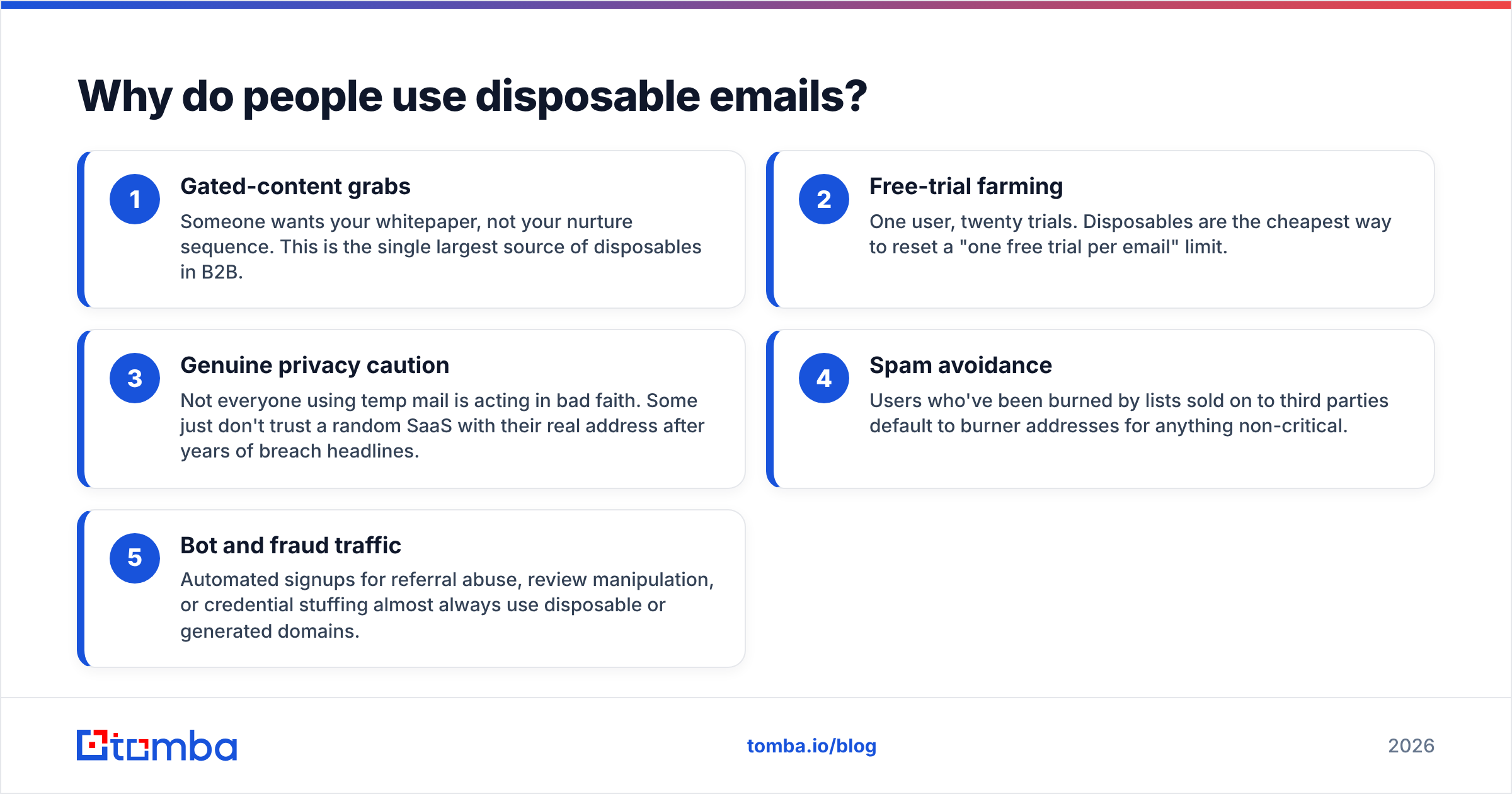
- Gated-content grabs — Someone wants your whitepaper, not your nurture sequence. This is the single largest source of disposables in B2B.
- Free-trial farming — One user, twenty trials. Disposables are the cheapest way to reset a "one free trial per email" limit.
- Genuine privacy caution — Not everyone using temp mail is acting in bad faith. Some just don't trust a random SaaS with their real address after years of breach headlines.
- Spam avoidance — Users who've been burned by lists sold on to third parties default to burner addresses for anything non-critical.
- Bot and fraud traffic — Automated signups for referral abuse, review manipulation, or credential stuffing almost always use disposable or generated domains.
Categories 1-3 are ordinary humans. Category 5 is not. Your policy should treat them differently — blanket-blocking every temp domain at signup will cost you some legitimate privacy-conscious users, and that trade-off is a business decision, not a technical one.

How much damage does a disposable email actually do?#
More than most teams model. Here's the chain reaction.
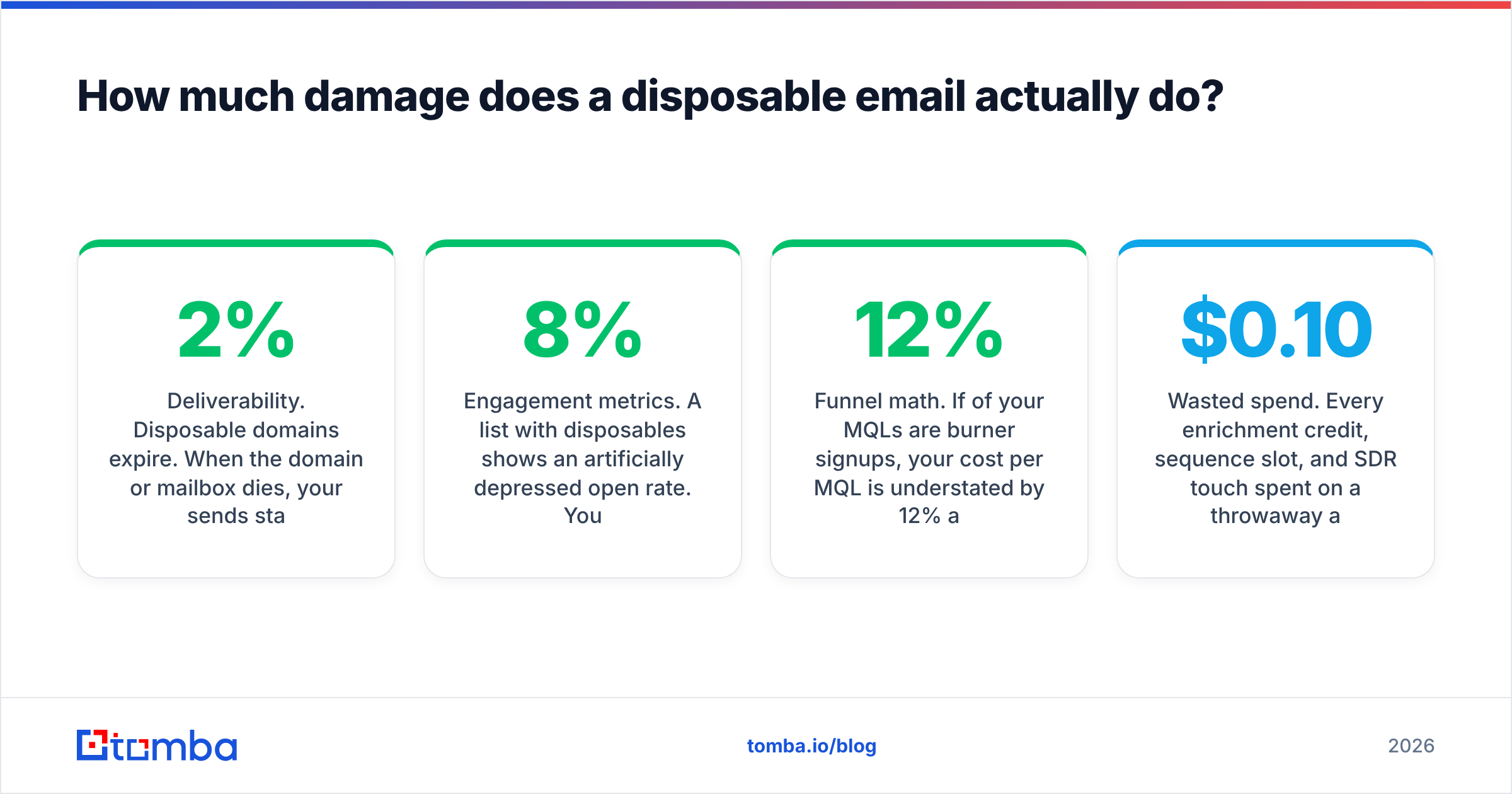
Deliverability. Disposable domains expire. When the domain or mailbox dies, your sends start hard-bouncing. Push your bounce rate past roughly 2% and mailbox providers begin throttling; past 5% and platforms like Mailchimp or Klaviyo may suspend the account. Google's own Postmaster guidance and every major ESP treat sustained bounces as a spam signal, and your sender reputation absorbs the hit.
Engagement metrics. A list with 8% disposables shows an artificially depressed open rate. You then "fix" a copy problem that never existed, rewrite subject lines, and change nothing — because the segment dragging the average is a set of inboxes no human opens.
Funnel math. If 12% of your MQLs are burner signups, your cost per MQL is understated by 12% and your MQL-to-SQL conversion rate is understated by roughly the same. Sales feels it as "marketing leads are garbage." Marketing sees the dashboards and disagrees. Both are looking at contaminated data.
Wasted spend. Every enrichment credit, sequence slot, and SDR touch spent on a throwaway address is money burned. At $0.10-$0.30 per enriched record, a 10,000-row list with 10% disposables wastes $100-$300 before anyone sends a single email.
Security and abuse. Trial farming and referral fraud both ride on disposables. If your product has a free tier, this is a direct revenue leak.
How do you detect a disposable email?#
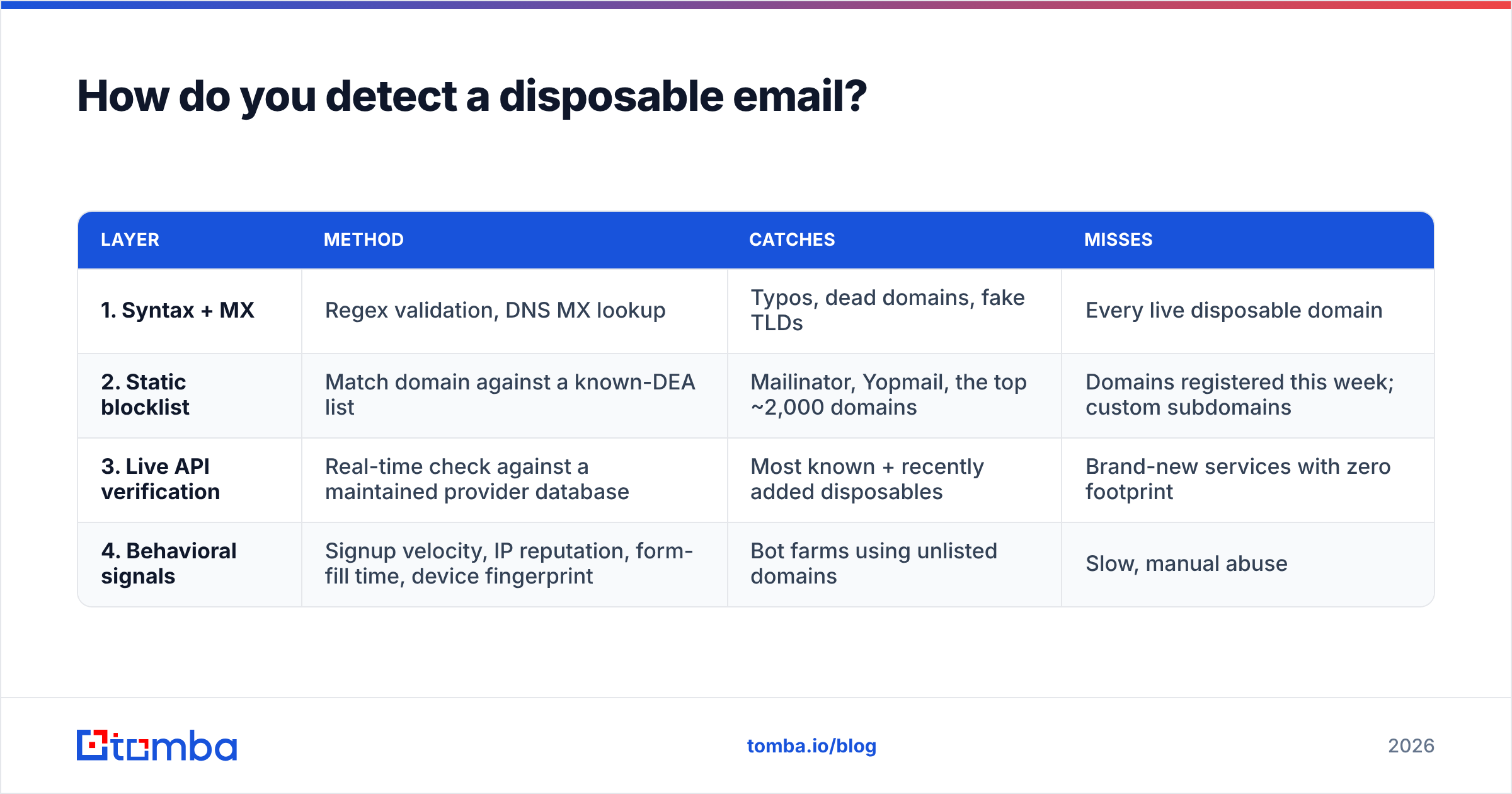
There are four detection layers, and serious teams run all four. No single one is sufficient.
| Layer | Method | Catches | Misses |
|---|---|---|---|
| 1. Syntax + MX | Regex validation, DNS MX lookup | Typos, dead domains, fake TLDs | Every live disposable domain |
| 2. Static blocklist | Match domain against a known-DEA list | Mailinator, Yopmail, the top ~2,000 domains | Domains registered this week; custom subdomains |
| 3. Live API verification | Real-time check against a maintained provider database | Most known + recently added disposables | Brand-new services with zero footprint |
| 4. Behavioral signals | Signup velocity, IP reputation, form-fill time, device fingerprint | Bot farms using unlisted domains | Slow, manual abuse |
Layer 2 is where most teams stop, and it's where most of them get caught out. Open-source blocklists on GitHub are genuinely useful, but they're community-maintained and lag reality. A temp-mail service that launched last month with 40 rotating domains won't be on your JSON file. Meanwhile, several older services deliberately rotate through hundreds of throwaway subdomains specifically to defeat static matching.
Layer 3 is what a commercial email verification API adds: a provider watching new domain registrations, MX-record patterns shared across known temp services, and signup behavior across thousands of customer sites. That aggregate view catches domains a solo blocklist never will.
One nuance that trips people up: disposable is not the same as catch-all. A catch-all domain accepts mail to any address at that domain, valid or not — which makes individual mailbox verification impossible via SMTP alone. Plenty of legitimate corporate domains are catch-all. A catch-all verifier scores those separately using pattern confidence and historical data. Don't let a tool lump the two categories together, because deleting every catch-all address will cost you real buyers.
Which tools detect disposable emails best?#
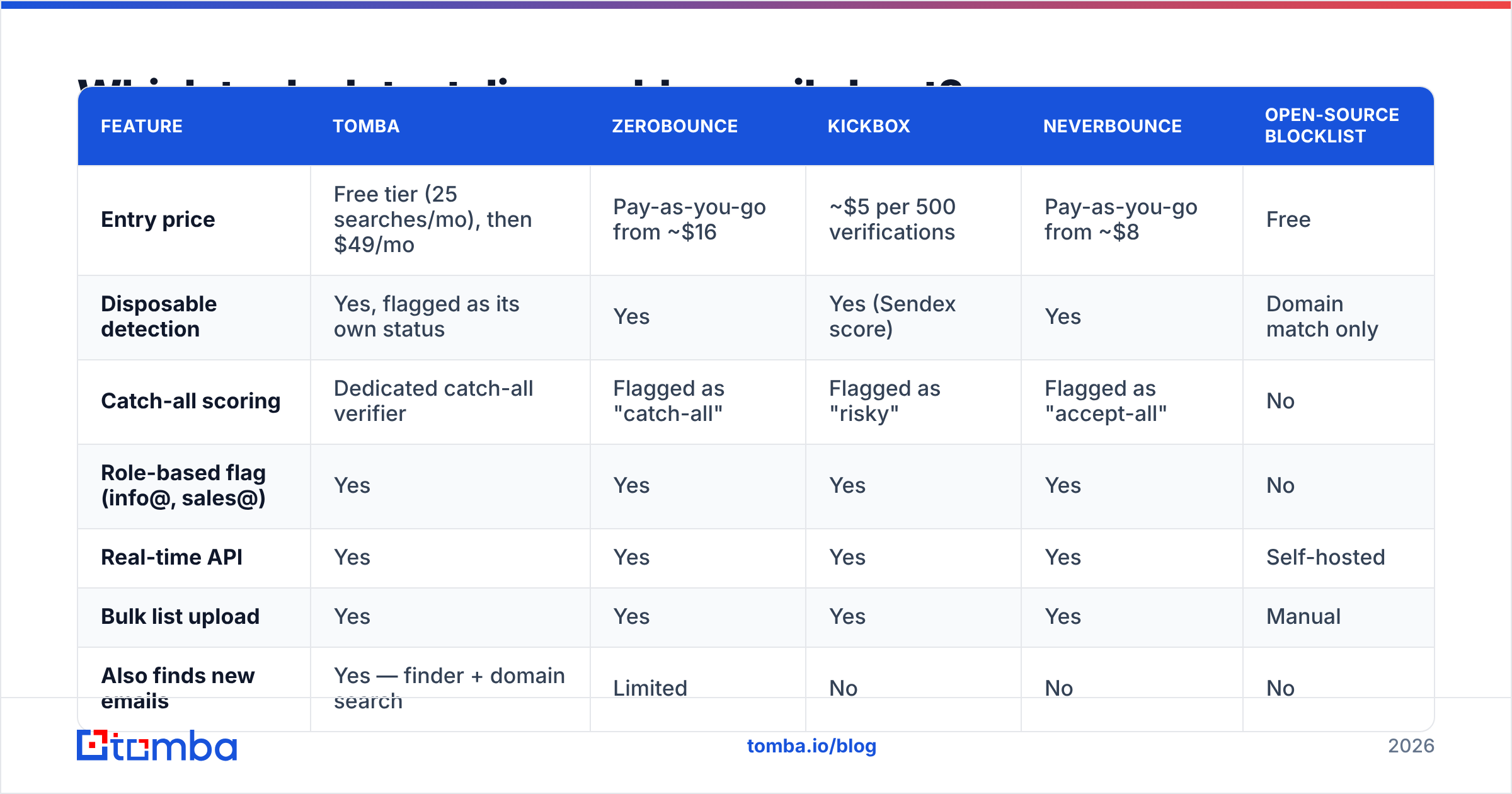
Here's how the main options compare on the attributes that matter for this specific job. Prices are per the vendors' public pages at time of writing — always confirm before you buy.
| Feature | Tomba | ZeroBounce | Kickbox | NeverBounce | Open-source blocklist |
|---|---|---|---|---|---|
| Entry price | Free tier (25 searches/mo), then $49/mo | Pay-as-you-go from ~$16 | ~$5 per 500 verifications | Pay-as-you-go from ~$8 | Free |
| Disposable detection | Yes, flagged as its own status | Yes | Yes (Sendex score) | Yes | Domain match only |
| Catch-all scoring | Dedicated catch-all verifier | Flagged as "catch-all" | Flagged as "risky" | Flagged as "accept-all" | No |
| Role-based flag (info@, sales@) | Yes | Yes | Yes | Yes | No |
| Real-time API | Yes | Yes | Yes | Yes | Self-hosted |
| Bulk list upload | Yes | Yes | Yes | Yes | Manual |
| Also finds new emails | Yes — finder + domain search | Limited | No | No | No |
| Blocklist freshness | Continuously updated | Continuously updated | Continuously updated | Continuously updated | Community PRs, variable lag |
| Best for | Teams who find and verify in one place | High-volume list cleaning | Developer-first integration | One-off list scrubs | Hobby projects, low volume |
The honest read: if your only job is scrubbing a purchased list once a quarter, a pay-as-you-go verifier is the cheapest correct answer. If you're building the list yourself — finding contacts, enriching them, then verifying — running discovery and verification through one vendor removes an integration and a reconciliation step. That's the case for Tomba's stack, where the email finder and verifier share the same data layer. Check Tomba pricing against your actual monthly volume rather than the headline number; per-check economics flip depending on whether you're doing 2,000 or 200,000 verifications.
If you want peer sentiment rather than vendor claims, the email verification category on G2 is the least-filtered source available.

How do you block disposable emails at signup?#
Detection is diagnosis. Blocking is treatment. Do it in this order.
1. Validate on the client, verify on the server. Client-side regex catches typos and gives instant feedback. It is not a security control — anyone can bypass it. The real check runs server-side before the record is written.
2. Call a verification API on form submit. One API call, 200-400ms typical. Return a clear message: "Please use a work email address." Don't say "your email is invalid" — it's not, and the user will retry the same address three times and then leave.
3. Decide your policy per surface. Not every form deserves the same rule:
- Free trial / product signup — Block hard. This is where trial farming lives.
- Demo request / contact sales — Block, and require a business domain. Anyone genuinely buying will use their work address.
- Newsletter / blog subscribe — Consider allowing. A privacy-cautious reader on a burner address is still a reader, and this list isn't billed to your CRM.
- Gated whitepaper — Judgment call. Blocking raises lead quality and lowers raw volume. Pick the metric you're actually accountable for.
4. Layer a free-domain rule where it fits. Gmail and Outlook addresses are not disposable, but for a B2B ICP they're often low-intent. That's a separate rule from the disposable check — keep them separate so you can tune each independently. A free email checker is enough for spot checks; use the API for anything at volume.
5. Log every block. Track what you rejected and how often. If you're blocking 25% of signups, either your traffic source is bad or your rule is too aggressive. You can't diagnose that without the log.
6. Re-verify the existing list. Everything above only protects new signups. Run a bulk pass over your current database — a bulk verify job on a 50,000-row list takes minutes and typically surfaces disposables you've been paying to store and email for years.
How often should you re-check your list?#
Quarterly for most teams. Monthly if you send high volume or buy data.
Two decay curves are running against you at once. First, ordinary B2B contact rot — people change jobs at roughly 25-30% annually, so a healthy list degrades on its own. Second, disposable domains expire on their own schedule, turning yesterday's soft-bounce into today's hard-bounce.
A practical cadence:
- At capture — real-time API check on every form.
- At import — verify any list you buy, scrape, or inherit from another team, before it touches your CRM.
- Before every large send — scrub anything above ~10,000 recipients.
- Quarterly full sweep — re-verify the entire database, suppress the dead, and log the delta.
- After any deliverability incident — if opens crater or a provider starts deferring, verification is the first diagnostic, not the last.
If you're rebuilding the list rather than just cleaning it, domain search gives you verified contacts at a target company directly, which sidesteps the disposable problem at the source — nobody at a real company gives you a Mailinator address on a verified corporate domain.
What about the flip side — should you use a disposable email?#
Sometimes, and it's worth being honest about it.
Signing up for a competitor's product to evaluate it, testing your own signup flow, or registering for a one-off download from a vendor you don't trust — those are all reasonable uses. Many privacy-focused teams use email aliasing services (Apple Hide My Email, SimpleLogin, Fastmail masked addresses) rather than true disposables, because aliases forward to a real inbox and can be revoked individually. That's the better pattern: you keep the mail, they lose the ability to spam you forever.
Where it goes wrong is testing your own cold outreach with a temp inbox. Deliverability testing needs real mailboxes at real providers, because that's the environment your prospects use. Use a seed list of genuine accounts across Gmail, Outlook, and a corporate Exchange domain instead. If deliverability is the actual concern, start with the underlying infrastructure — SPF record and DMARC alignment do far more for inbox placement than any list trick.
What's the fastest way to clean this up?#
Three steps, in order, this week:
- Audit. Export your contact database, run it through a bulk verifier, and count disposables and hard-bounce risks as separate buckets. You need the number before you can argue for the fix.
- Plug the leak. Add a server-side verification call to your highest-volume signup form. One form, one API call. Measure the block rate for two weeks.
- Set the cadence. Put a quarterly re-verification job on the calendar and assign it an owner. Unowned hygiene tasks don't happen.
The pattern is boring and it works. Most of the teams that get burned by disposable addresses didn't lack a tool — they lacked a schedule.
Ready to stop paying for inboxes nobody reads? Tomba's Email Finder finds verified professional addresses by domain, name, or company — so the contacts entering your CRM are real corporate mailboxes, not throwaways. Pair it with the built-in verifier to score disposable, catch-all, and role-based addresses in one pass. Start on the free tier with 25 searches a month, and scale to Starter at $49/mo when the pipeline justifies it.
Related guides#
Ready to find emails that actually work?
Join 150,000+ professionals who stopped guessing and started sending. Free credits on signup — no credit card required.
Get the Tomba newsletter
Practical outbound tactics and product updates — once every two weeks.
About the author