Disposable Email Detection: How to Block Temp Emails in 2026
Static blocklists catch a fraction of the throwaway domains created each week. Here's how disposable email detection actually works in 2026 — the signals, the trade-offs, and where blocking costs you real signups.
TL;DR
- Disposable email detection is the practice of identifying addresses on throwaway, temporary, or self-destructing mail domains before they enter your database, trial funnel, or send list.
- A static blocklist file is the weakest possible implementation. Thousands of new disposable domains appear every month, and many hide behind rotating custom domains that never make it onto a public list.
- The signals that actually work are layered: domain reputation, MX record fingerprinting, mailbox lifetime behavior, registration age, and SMTP response patterns.
- Blocking is not always the right response. Flagging and downgrading is usually better than hard-rejecting, because false positives on legitimate privacy relays (Apple Hide My Email, SimpleLogin) cost you real revenue.
- Run detection at three moments: signup, list import, and just before send. Each catches a different failure mode.
What is a disposable email address?#
A disposable email address is a mailbox designed to be abandoned. You get one in seconds, use it once, and it either expires on a timer or simply stops mattering to the person who created it. Wikipedia's entry on disposable email addresses covers the broad category, but in practice you'll meet four distinct flavors, and they behave very differently on your infrastructure.
Public inbox services. Mailinator and its clones. Anyone who knows the address can read the inbox. No password, no ownership. These are the easiest to detect and the least valuable to keep.
Timed self-destruct services. 10 Minute Mail, Temp-Mail, Guerrilla Mail. The mailbox exists long enough to click a confirmation link and then vanishes. The domain stays live, so an SMTP check often returns a clean 250 OK even after the mailbox is dead.
Private forwarding relays. Apple Hide My Email, Firefox Relay, SimpleLogin, DuckDuckGo Email Protection. These are not disposable in the abusive sense. A real person owns them, they forward to a real inbox, and the user may have been using that alias for two years. Treating them like Mailinator is a self-inflicted wound.
Custom-domain throwaways. Someone registers mail-inbox-service-42.xyz, points MX records at a temp-mail backend, and sells or gives away addresses on it. This is the category that breaks blocklists, because the domain is three days old and appears on no public list.
Any serious approach to disposable email detection has to separate category three from categories one, two, and four. Most cheap implementations do not.
Why does disposable email detection matter?#
Three costs, in order of how much they hurt.
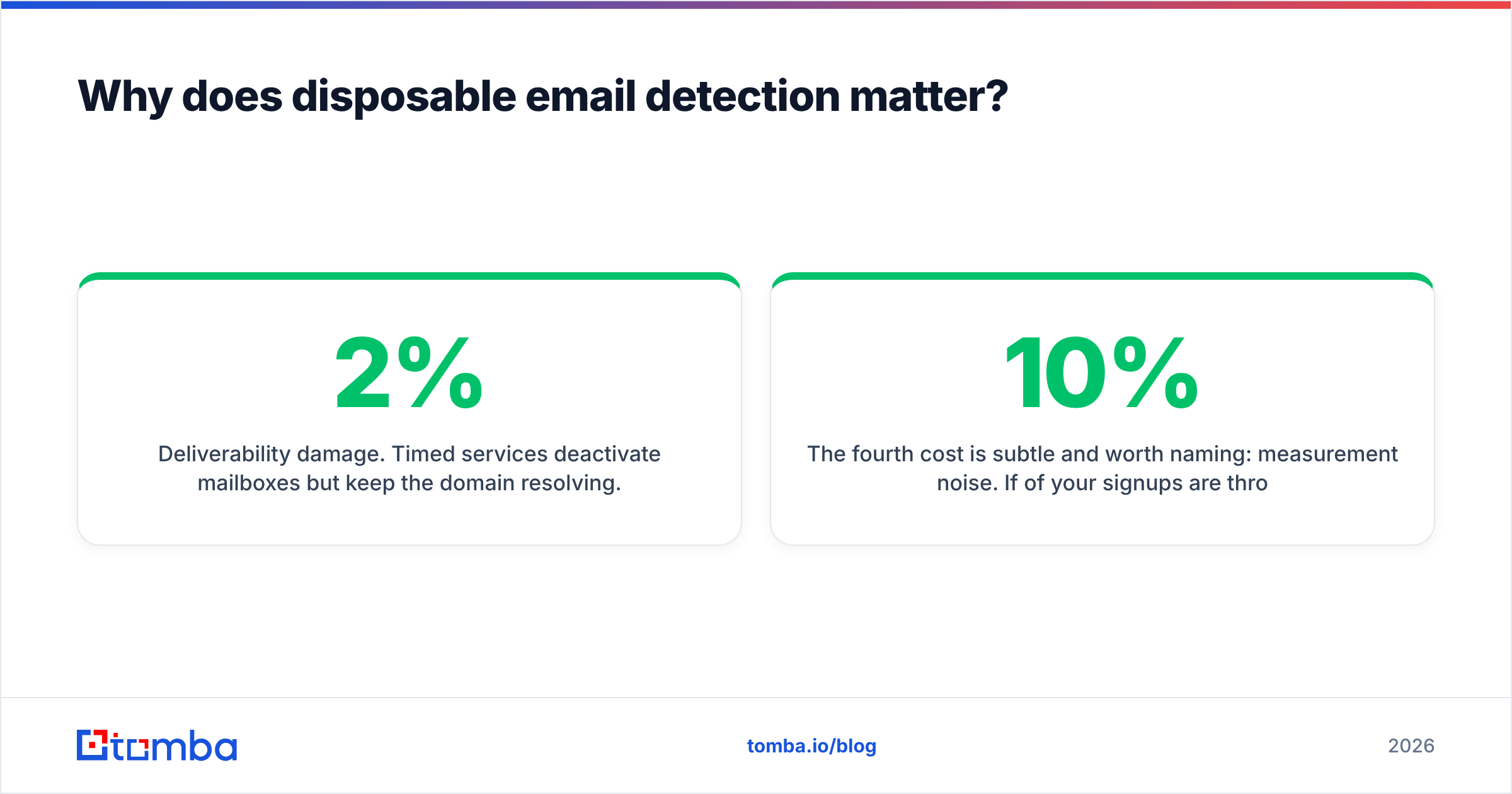
Deliverability damage. Timed services deactivate mailboxes but keep the domain resolving. Send to a dead 10-minute mailbox and you get a hard bounce. Stack enough hard bounces and mailbox providers start throttling you. Industry guidance from HubSpot on bounce rates puts the safe ceiling around 2%; a list with 8% disposable addresses will blow through that on the first send. Once your sender reputation drops, every campaign after it underperforms, including the ones sent to a perfectly clean segment.
Trial and credit abuse. If your product gives away credits, a disposable address is a free account generator. One person becomes forty accounts. Your CAC math, your activation rate, and your infrastructure bill all get corrupted at the same time.
Pipeline pollution. Disposable signups look like leads in your CRM. They fill dashboards, trigger routing rules, get assigned to reps, and waste the most expensive resource you have — human follow-up time. A rep who works twenty fake demo requests loses a day.

The fourth cost is subtle and worth naming: measurement noise. If 10% of your signups are throwaway, every conversion metric you report is wrong by an unknown amount, and you'll optimize the wrong things for a quarter.
How does disposable email detection actually work?#
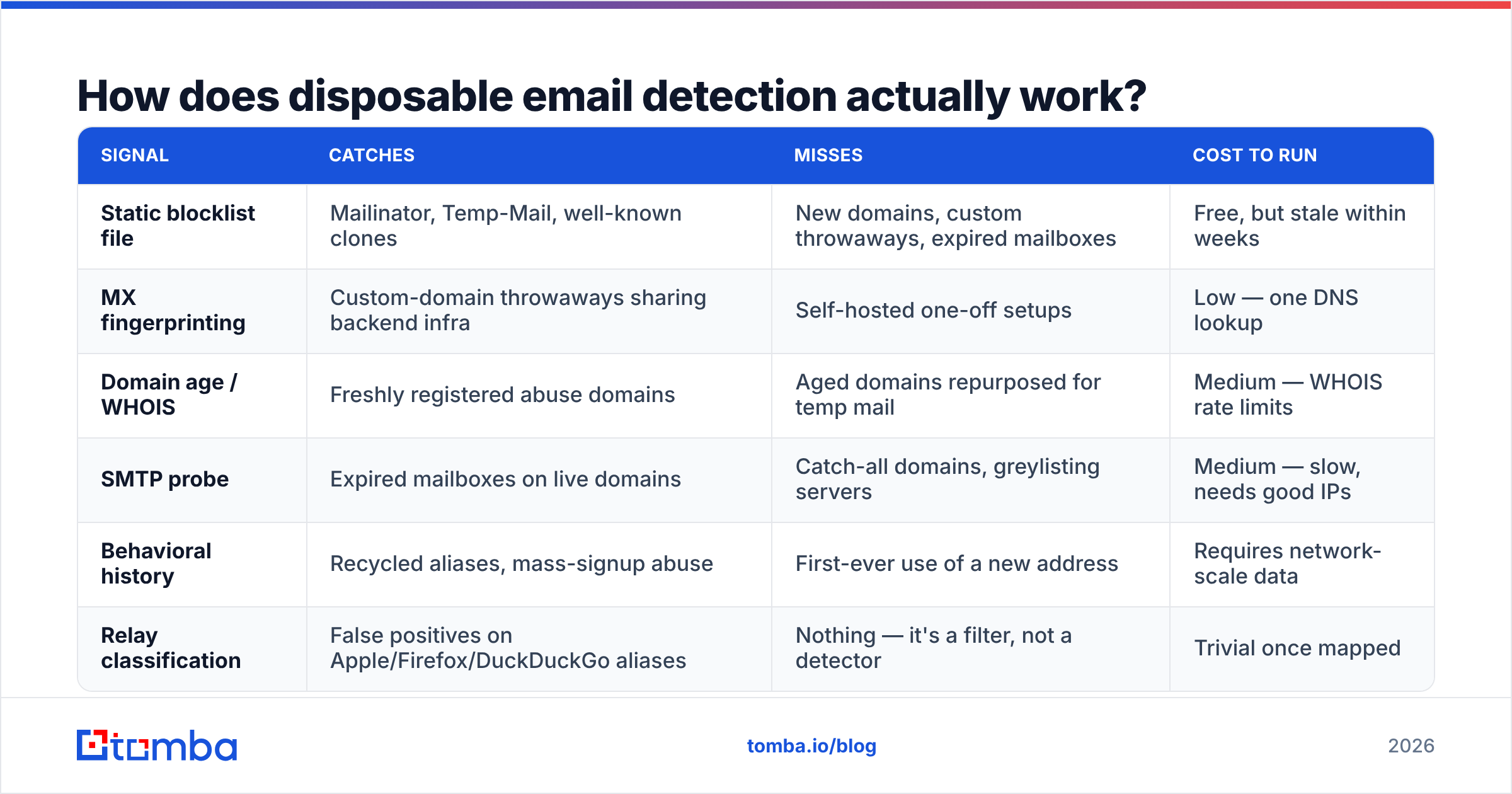
There is no single check. Working systems stack signals and score them. Here are the six that carry the most weight, roughly in order of signal strength:
- Curated domain intelligence. A maintained list of known disposable domains, updated continuously rather than pulled from a GitHub repo that was last committed to in 2023. This is table stakes and catches the obvious 60–70%.
- MX record fingerprinting. Temp-mail backends reuse infrastructure. A brand-new domain whose MX records point at the same servers as fifty known disposable domains is disposable, even though its name has never been seen before. This is the single highest-value signal for catching custom-domain throwaways.
- Domain age and registration pattern. A domain registered eleven days ago, with privacy-shielded WHOIS, no website, and a wildcard MX setup is not where your enterprise buyer keeps their inbox.
- SMTP mailbox probing. Connect to the mail server and ask whether the specific mailbox exists, without sending anything. Catches expired timed mailboxes that domain-level checks would wave through — though catch-all domains accept everything and need separate handling.
- Behavioral and usage history. Has this exact address appeared across many unrelated signups? Has it ever engaged with an email? Aggregated, anonymized usage signals separate the alias someone has used for two years from the one created ninety seconds ago.
- Relay classification. Explicitly identify privacy forwarders as their own class instead of dumping them into "disposable." Apple's relay domain deserves a different policy than Guerrilla Mail.
Score across all six, then act on the score. A binary block/allow flag throws away information you paid to collect.
| Signal | Catches | Misses | Cost to run |
|---|---|---|---|
| Static blocklist file | Mailinator, Temp-Mail, well-known clones | New domains, custom throwaways, expired mailboxes | Free, but stale within weeks |
| MX fingerprinting | Custom-domain throwaways sharing backend infra | Self-hosted one-off setups | Low — one DNS lookup |
| Domain age / WHOIS | Freshly registered abuse domains | Aged domains repurposed for temp mail | Medium — WHOIS rate limits |
| SMTP probe | Expired mailboxes on live domains | Catch-all domains, greylisting servers | Medium — slow, needs good IPs |
| Behavioral history | Recycled aliases, mass-signup abuse | First-ever use of a new address | Requires network-scale data |
| Relay classification | False positives on Apple/Firefox/DuckDuckGo aliases | Nothing — it's a filter, not a detector | Trivial once mapped |
Which detection approach should you choose?#
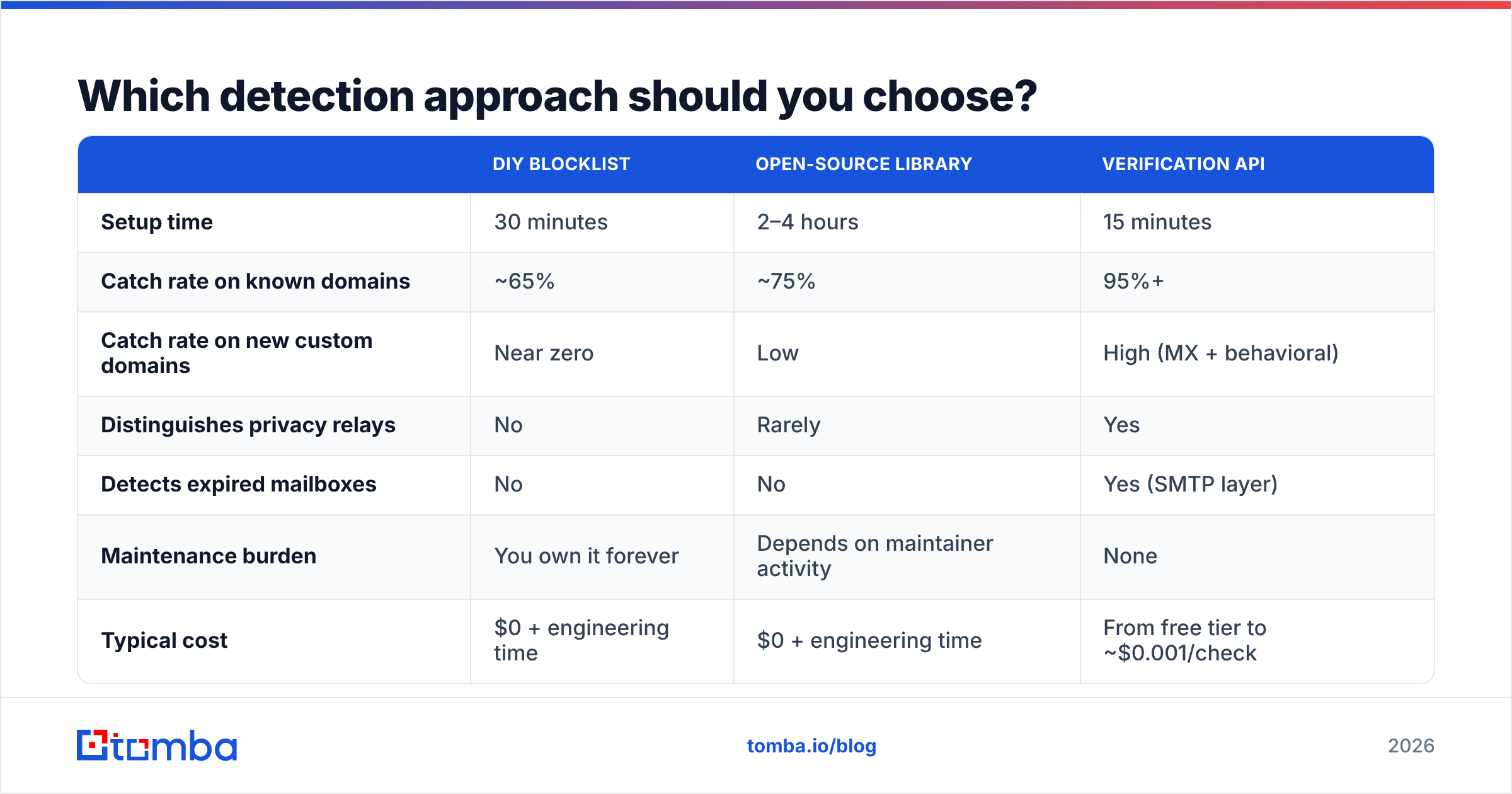
Three implementation paths exist, and the right one depends on volume and how expensive a false negative is for you.
| DIY blocklist | Open-source library | Verification API | |
|---|---|---|---|
| Setup time | 30 minutes | 2–4 hours | 15 minutes |
| Catch rate on known domains | ~65% | ~75% | 95%+ |
| Catch rate on new custom domains | Near zero | Low | High (MX + behavioral) |
| Distinguishes privacy relays | No | Rarely | Yes |
| Detects expired mailboxes | No | No | Yes (SMTP layer) |
| Maintenance burden | You own it forever | Depends on maintainer activity | None |
| Typical cost | $0 + engineering time | $0 + engineering time | From free tier to ~$0.001/check |
| Best for | Side projects, internal tools | Teams with spare eng capacity | Anyone with revenue attached to list quality |
The honest framing: a DIY list is fine if disposable signups cost you nothing but a row in a database. The moment those signups consume credits, trigger sales follow-up, or ride along on a campaign send, the math flips hard toward an API. One prevented bounce spike is worth more than a year of API fees.
If you want to spot-check the concept before wiring anything up, run a handful of suspect addresses through a free email checker and compare what a domain-only check says versus a full verification pass. The gap between those two answers is exactly the value an API adds.

Is blocking every disposable email the right call?#
No, and this is where most teams overcorrect.
Hard-blocking at signup produces three problems. First, false positives on privacy relays. A meaningful share of privacy-conscious buyers now sign up with Hide My Email. They are often your best-paying segment. Rejecting them at the form is a revenue decision disguised as a security decision.
Second, support load. Every false positive becomes a ticket that says "your site says my email is invalid." Those tickets are expensive and the user is already annoyed.
Third, adversarial adaptation. Block hard and abusers move to custom-domain throwaways, which are harder to detect than the public services you just blocked. You traded a visible problem for an invisible one.
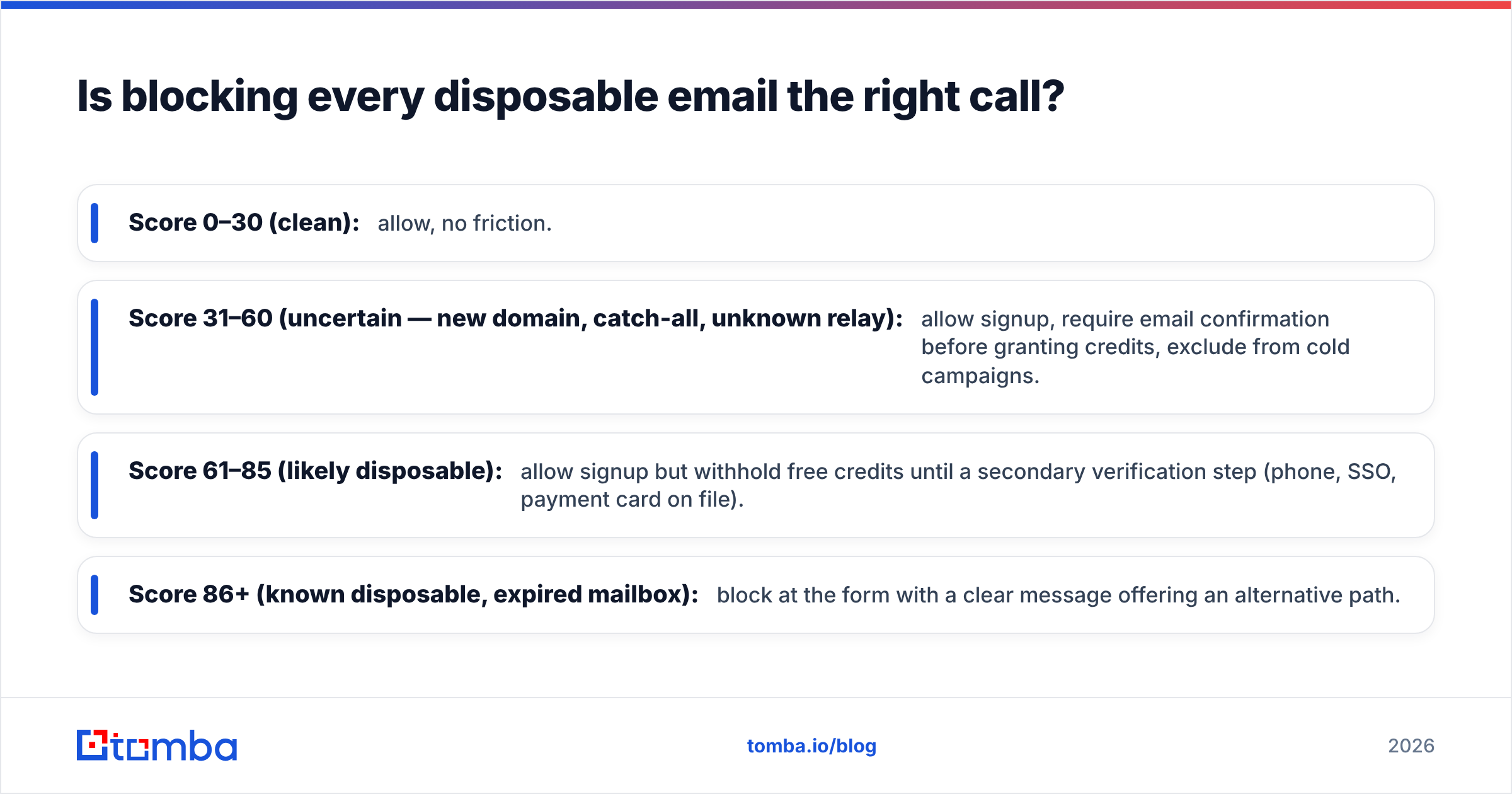
A tiered response works better:
- Score 0–30 (clean): allow, no friction.
- Score 31–60 (uncertain — new domain, catch-all, unknown relay): allow signup, require email confirmation before granting credits, exclude from cold campaigns.
- Score 61–85 (likely disposable): allow signup but withhold free credits until a secondary verification step (phone, SSO, payment card on file).
- Score 86+ (known disposable, expired mailbox): block at the form with a clear message offering an alternative path.
This keeps the honest privacy-relay user in your funnel and puts real friction only where the risk score justifies it.
How do you implement disposable email detection in practice?#
Run it at three checkpoints. Each one catches something the others cannot.
Checkpoint 1 — at the signup form (real time). Fire an async check on blur of the email field, before submit. Budget under 400ms so it never blocks the user. Store the score and the reason codes on the user record, not just a boolean — you will want to re-analyze later. Most teams wire this through a email verification API call from their backend rather than the browser, so the key stays server-side.
Checkpoint 2 — at list import (batch). Any CSV that arrives from an event, a partner, a scraped source, or a departing rep's spreadsheet gets a full pass before it touches your ESP. This is where the ugliest data lives. Batch verification is cheaper per address than real-time and there's no latency constraint, so you can afford the slow SMTP probes and WHOIS lookups here.
Checkpoint 3 — before each send (hygiene). Addresses rot. A mailbox valid in January can be dead by July, and disposable domains get seized, expire, or change hands. Re-verify anything older than 90 days before it goes into a campaign. Use an email verifier pass on the segment rather than the whole database — it's the same result for a fraction of the cost.
Two implementation details that people get wrong:
Log the reason, not just the verdict. "Rejected: disposable" is useless six months later. "Rejected: MX matches known temp-mail cluster, domain age 9 days" lets you audit false positives and tune thresholds.
Never do detection purely client-side. A regex in JavaScript is a suggestion, not a control. Anyone determined enough to use a throwaway address can open dev tools.
What about catch-all domains and role-based addresses?#
These get lumped in with disposable detection and they are genuinely different problems.
Catch-all domains accept mail to any address at the domain, so an SMTP probe always returns valid. That's not disposable — plenty of legitimate companies run catch-all. But it means your verification result is "unknown," not "valid," and you should treat it as a distinct bucket. Some verification providers quietly mark catch-all as valid to inflate their accuracy numbers; check how yours reports it.
Role-based addresses (info@, sales@, support@) are real mailboxes with real people behind them, but they're shared, often unmonitored, and more likely to be attached to spam-trap-adjacent filtering. Flag them separately and decide by campaign type. A support inquiry to info@ is fine. A personalized cold sequence to info@ is wasted.
Spam traps are the genuinely dangerous category, and no verification tool can identify them with certainty — that's the point of a trap. What good hygiene does is reduce your exposure by removing the dead and recycled addresses that traps are usually built from.
What does good look like?#
A team with disposable email detection working properly can answer these questions on demand:
- What percentage of last month's signups scored above 60? (If you don't know, you're not measuring.)
- What's your hard bounce rate on the last five campaigns, and is it trending? (Target: under 2%, stable.)
- How many privacy-relay addresses are in your paying customer base? (If it's zero, you're probably blocking them.)
- When was the oldest address in your active send segment last verified? (If the answer is "at import, 2024," that's your next fix.)
If you can't answer three of the four, start with a batch pass over your existing list. The results usually reset the conversation — most teams discover their list is 6–12% dead weight, and the fix is one afternoon of work rather than a quarter-long project.
Where should you start?#
Start with the data you already have, not the signup form. Export your active list, run a batch verification pass, and sort the results by reason code. You'll see immediately whether your problem is expired temp mailboxes, custom-domain abuse, or plain old list decay — and that determines which checkpoint to build first.
For teams doing this alongside prospecting, it's worth having detection and discovery in the same stack so a found address is verified before it's ever written to your CRM. Tomba's Email Finder returns confidence-scored addresses with disposable, catch-all, and role-based classification attached, and the verifier runs the same signal stack on lists you already own. The free tier covers 25 searches a month if you want to test the classification quality against a sample you already know the answers for; paid plans start at $49/mo, with full Tomba pricing published rather than quote-gated. Compare a few providers on your own data before committing — accuracy claims from any vendor, including this one, are worth exactly as much as your own test says they are.
Related guides#
Ready to find emails that actually work?
Join 150,000+ professionals who stopped guessing and started sending. Free credits on signup — no credit card required.
Get the Tomba newsletter
Practical outbound tactics and product updates — once every two weeks.
About the author