DKIM Key Rotation: How Often to Rotate Keys in 2026
DKIM keys are a credential, and most senders set one in 2019 and never touched it again. Here is how often to rotate, which key length to pick, and how to swap selectors without breaking a single signature.
TL;DR
- DKIM key rotation means generating a new key pair, publishing the new public key under a new selector, switching your signer to it, and retiring the old one after an overlap window. It is not "edit the TXT record in place."
- Rotate every 6 months for normal business mail, every 3 months for high-volume or regulated senders, and immediately after any suspected key exposure, staff departure with DNS access, or ESP migration.
- Use 2048-bit RSA. 1024-bit is still accepted by most receivers but is below current guidance and looks like neglect to reputation systems.
- The overlap period is the whole trick: keep the old public key in DNS for at least 7 days (or 2× your longest DNS TTL, whichever is longer) so in-flight and queued mail still verifies.
- Rotation protects the signature, not the reputation. If you rotate keys but keep blasting stale, unverified addresses, your bounce rate does the damage instead.
What is DKIM key rotation?#
DKIM key rotation is the scheduled replacement of the cryptographic key pair your mail server uses to sign outbound messages.
Think of it like the key card to your office. The lock does not care how old the card is — it works forever. But the longer that card exists, the more copies are floating around: the contractor you fired, the laptop that got stolen, the backup that sat in a public S3 bucket. You reissue cards on a schedule not because the old one broke, but because you cannot prove it is still exclusively yours.
DKIM works the same way. Defined in RFC 6376, it uses an asymmetric key pair:
- The private key lives on your signing infrastructure (your ESP, your MTA, your relay). It generates the
DKIM-Signatureheader on every outbound message. - The public key lives in a DNS TXT record at
<selector>._domainkey.yourdomain.com. Receivers fetch it to verify the signature. - The selector is the arbitrary label that lets one domain publish many keys at once —
s1,google,selector1,k2026a. This is the mechanism that makes zero-downtime rotation possible. - The verification result feeds DMARC alignment, which is what actually decides whether a receiver trusts the message.
Because selectors are cheap and unlimited, correct rotation never touches an existing record. You add a second key, move traffic to it, wait, then delete the first.
Wait — that renders wrong. Here it is properly:
Why does DKIM key rotation matter in 2026?#
Because a private key that never changes is a permanent forgery license for whoever gets it.
Three concrete risks:
Key compromise has no expiry. If someone exfiltrated your private key in 2021 — from a compromised relay, a git commit, a decommissioned server image — they can sign mail as you today, and it passes DKIM and DMARC. Nothing in the protocol expires a key. Rotation is the only revocation mechanism you have.
Short keys are now cheap to attack. 1024-bit RSA was the default for years because DNS TXT records had length constraints. Compute got cheaper; the guidance moved. M3AAWG's sender best practices and every major mailbox provider now point at 2048-bit as the floor. Google's own Workspace DKIM documentation defaults new keys to 2048-bit.
Stale keys signal a stale program. Mailbox providers do not publish a "key age" penalty, and you should not believe anyone who claims a specific score for it. But domains with 2048-bit keys, current SPF, and enforced DMARC are the ones that also run suppression lists and honor unsubscribes. Authentication hygiene correlates with everything else, and reputation systems are correlation machines.
Compliance frameworks are catching up. SOC 2 and ISO 27001 auditors increasingly ask for a documented cryptographic key lifecycle. "We generated it once in 2019 and there is no owner" is a finding.
How often should you rotate DKIM keys?#
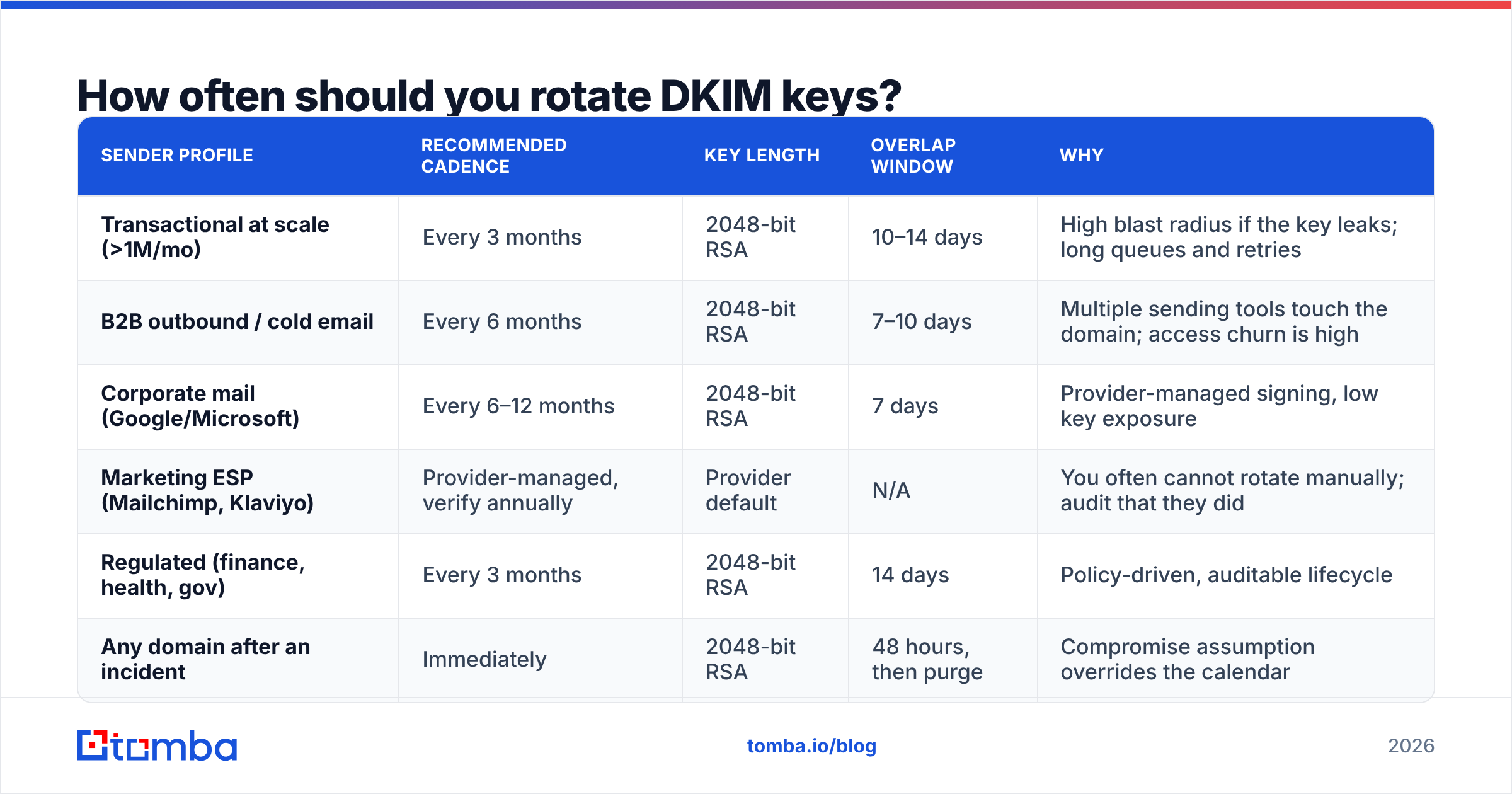
There is no protocol-mandated interval. The working consensus across sender guidance lands between quarterly and annually, scaled to volume and risk.
| Sender profile | Recommended cadence | Key length | Overlap window | Why |
|---|---|---|---|---|
| Transactional at scale (>1M/mo) | Every 3 months | 2048-bit RSA | 10–14 days | High blast radius if the key leaks; long queues and retries |
| B2B outbound / cold email | Every 6 months | 2048-bit RSA | 7–10 days | Multiple sending tools touch the domain; access churn is high |
| Corporate mail (Google/Microsoft) | Every 6–12 months | 2048-bit RSA | 7 days | Provider-managed signing, low key exposure |
| Marketing ESP (Mailchimp, Klaviyo) | Provider-managed, verify annually | Provider default | N/A | You often cannot rotate manually; audit that they did |
| Regulated (finance, health, gov) | Every 3 months | 2048-bit RSA | 14 days | Policy-driven, auditable lifecycle |
| Any domain after an incident | Immediately | 2048-bit RSA | 48 hours, then purge | Compromise assumption overrides the calendar |
Three triggers override the schedule entirely:
- Someone with DNS or MTA access leaves. Rotate that week, same as you would revoke their SSO.
- You migrate ESPs. The old provider still holds a private key that signs as your domain. Delete that selector once the migration is done, not "eventually."
- You find your key in a repo, a log, a config backup, or a support ticket. Treat it as public.
Which key length should you use: 1024, 2048, or Ed25519?#
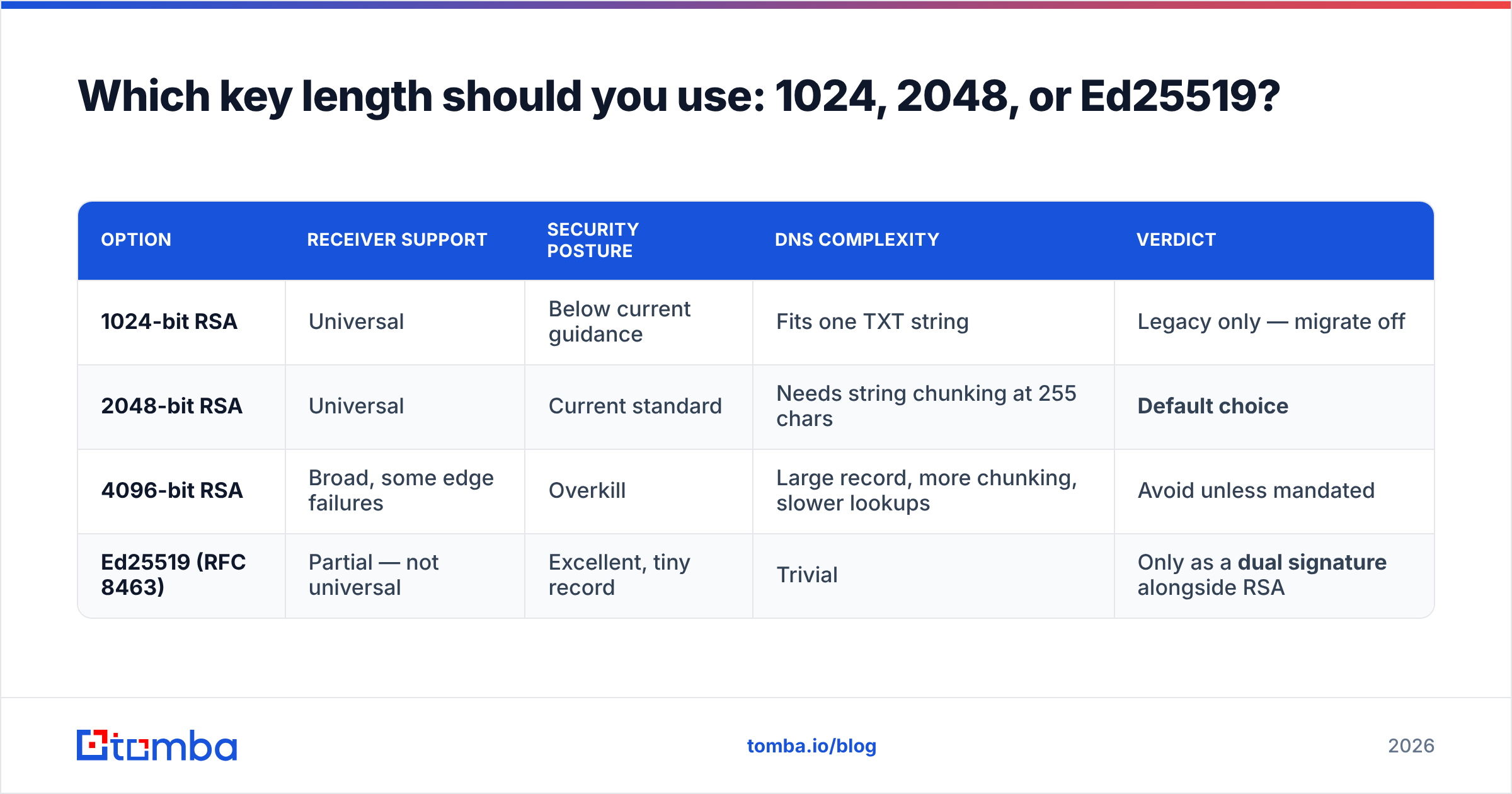
Use 2048-bit RSA. Everything else is a footnote.
| Option | Receiver support | Security posture | DNS complexity | Verdict |
|---|---|---|---|---|
| 1024-bit RSA | Universal | Below current guidance | Fits one TXT string | Legacy only — migrate off |
| 2048-bit RSA | Universal | Current standard | Needs string chunking at 255 chars | Default choice |
| 4096-bit RSA | Broad, some edge failures | Overkill | Large record, more chunking, slower lookups | Avoid unless mandated |
| Ed25519 (RFC 8463) | Partial — not universal | Excellent, tiny record | Trivial | Only as a dual signature alongside RSA |
Two practical notes.
A 2048-bit public key exceeds the 255-character limit for a single DNS TXT string. It must be split into multiple quoted strings inside one record, which the resolver concatenates. Most DNS providers handle this automatically; a few make you do it by hand, and a botched split is the single most common rotation failure. After publishing, always resolve the record and confirm the concatenated value matches your generated key byte for byte.
Ed25519 produces a public key short enough to fit anywhere and is cryptographically stronger per bit — but verification support is still incomplete across receivers. If you want it, sign with both an RSA key and an Ed25519 key under separate selectors. Receivers that understand Ed25519 use it; everyone else falls back to RSA. Never ship Ed25519-only.
How do you rotate a DKIM key without breaking authentication?#
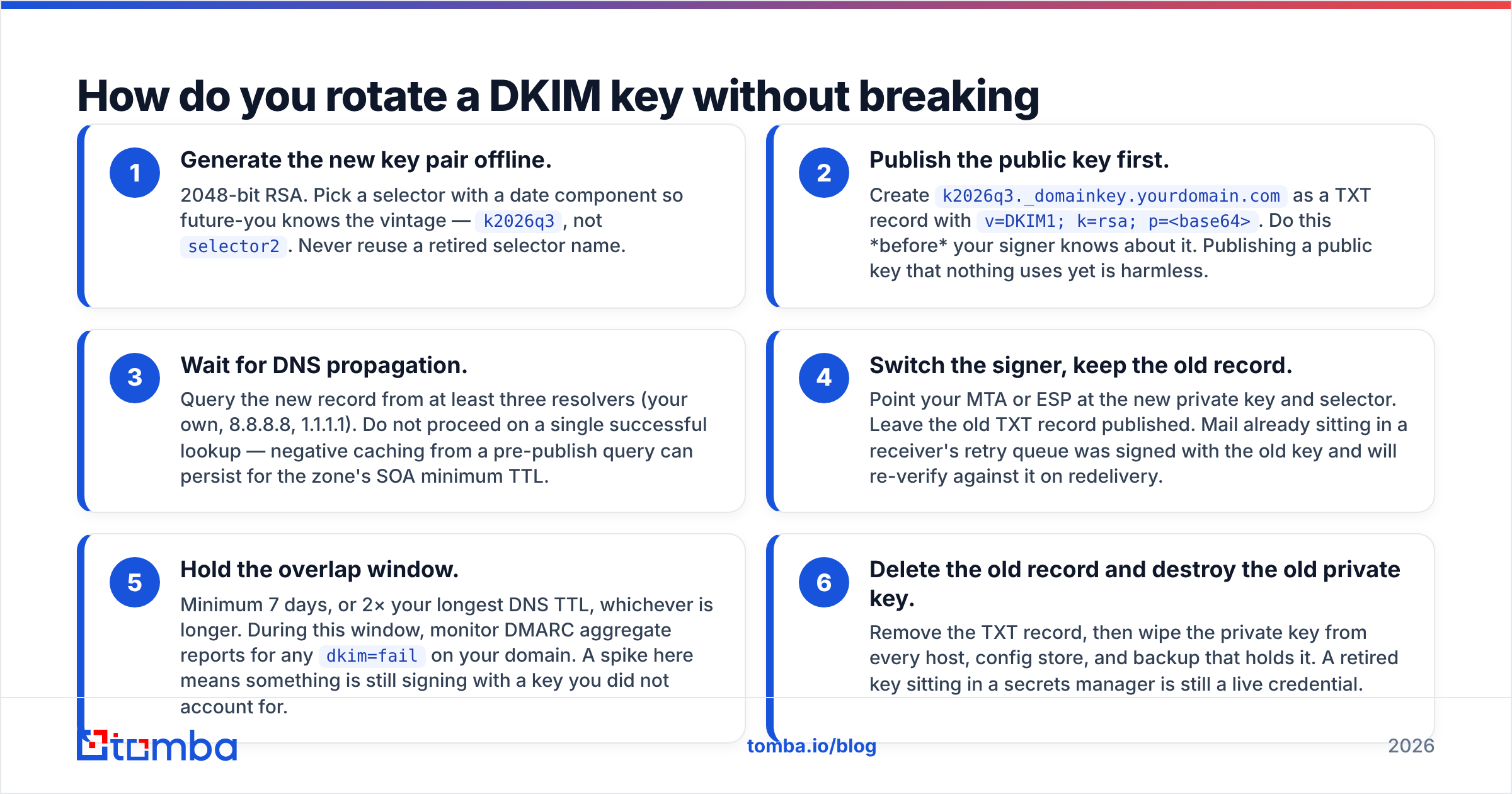
Six steps. The order matters, and step 4 is the one people skip.
- Generate the new key pair offline. 2048-bit RSA. Pick a selector with a date component so future-you knows the vintage —
k2026q3, notselector2. Never reuse a retired selector name. - Publish the public key first. Create
k2026q3._domainkey.yourdomain.comas a TXT record withv=DKIM1; k=rsa; p=<base64>. Do this before your signer knows about it. Publishing a public key that nothing uses yet is harmless. - Wait for DNS propagation. Query the new record from at least three resolvers (your own, 8.8.8.8, 1.1.1.1). Do not proceed on a single successful lookup — negative caching from a pre-publish query can persist for the zone's SOA minimum TTL.
- Switch the signer, keep the old record. Point your MTA or ESP at the new private key and selector. Leave the old TXT record published. Mail already sitting in a receiver's retry queue was signed with the old key and will re-verify against it on redelivery.
- Hold the overlap window. Minimum 7 days, or 2× your longest DNS TTL, whichever is longer. During this window, monitor DMARC aggregate reports for any
dkim=failon your domain. A spike here means something is still signing with a key you did not account for. - Delete the old record and destroy the old private key. Remove the TXT record, then wipe the private key from every host, config store, and backup that holds it. A retired key sitting in a secrets manager is still a live credential.

If your DMARC reports show a third party still signing with the retired selector after you switch, do not delete the record yet — find the sender first. That is usually a forgotten invoicing tool, a helpdesk, or a marketing platform someone onboarded two years ago.
How does rotation differ across email providers?#
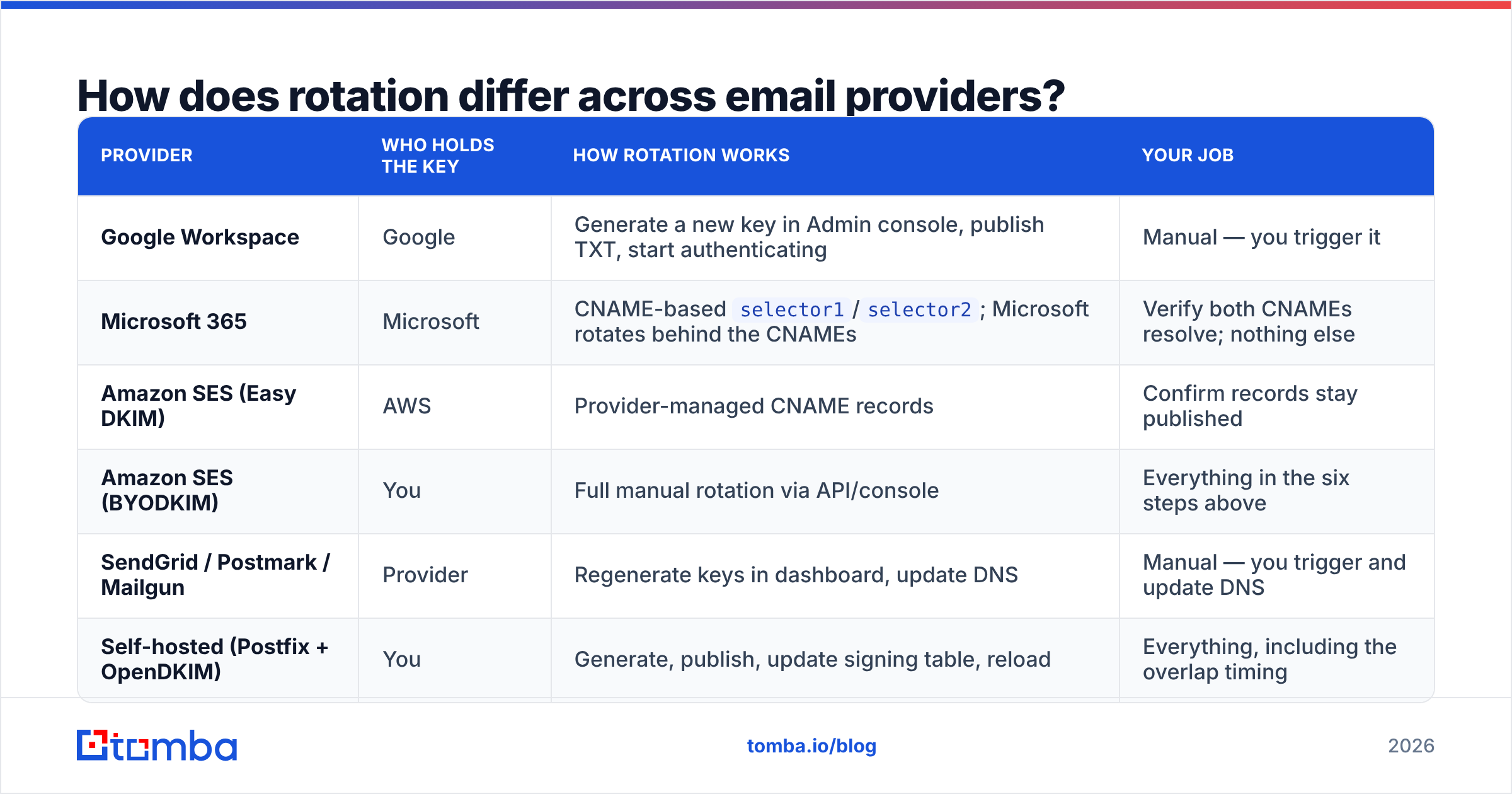
Who controls the private key determines how much of this you actually do yourself.
| Provider | Who holds the key | How rotation works | Your job |
|---|---|---|---|
| Google Workspace | Generate a new key in Admin console, publish TXT, start authenticating | Manual — you trigger it | |
| Microsoft 365 | Microsoft | CNAME-based selector1/selector2; Microsoft rotates behind the CNAMEs |
Verify both CNAMEs resolve; nothing else |
| Amazon SES (Easy DKIM) | AWS | Provider-managed CNAME records | Confirm records stay published |
| Amazon SES (BYODKIM) | You | Full manual rotation via API/console | Everything in the six steps above |
| SendGrid / Postmark / Mailgun | Provider | Regenerate keys in dashboard, update DNS | Manual — you trigger and update DNS |
| Self-hosted (Postfix + OpenDKIM) | You | Generate, publish, update signing table, reload | Everything, including the overlap timing |
The CNAME approach that Microsoft and SES Easy DKIM use is genuinely convenient: your DNS points at the provider's zone, and they rotate the underlying key without touching your records. The trade-off is that you have no cryptographic control and no way to force a rotation after an incident on their side. For most companies that is an acceptable trade. For anyone signing high-value transactional mail, BYODKIM with your own rotation schedule is the defensible choice.
What actually breaks during a DKIM rotation?#
Five failure modes, in rough order of how often they happen:
- The TXT record was chunked wrong. A 2048-bit key split across strings with a stray space, a missing quote, or a truncated final segment. The record resolves, so nothing looks broken, but every signature fails. Always verify by resolving and comparing the concatenated value.
- The signer switched before DNS propagated. Mail goes out signed with a key nobody can fetch. This produces a clean
dkim=noneordkim=permerroracross every receiver simultaneously — easy to spot in DMARC aggregate data, embarrassing to explain. - The old record was deleted too early. Queued and retried mail fails verification days after you thought the rotation was done. Deferred mail to a single large receiver can retry for 48–72 hours.
- A forgotten third-party sender. You rotated the key your MTA uses; the CRM, the billing system, and the support desk are all still signing with selectors you did not inventory. Run a DMARC report review before rotating, not after.
- SPF and DMARC drifted in the meantime. Rotation forces you to look at DNS, and that is usually when you discover your SPF record has 12 lookups and a dangling include. Run an SPF checker while you are in there, and confirm your sender reputation has not slid.
How does DKIM rotation interact with SPF and DMARC?#
DKIM rotation does not change DMARC alignment as long as the signing domain (d= in the signature) stays the same. You are swapping the key, not the identity.
Where it bites: if your DMARC policy is p=reject and your rotation goes wrong, you are not getting a spam-folder warning — you are getting hard rejections at the gateway. That argues for a specific sequencing:
- If you are at
p=noneorp=quarantine: rotate freely, monitor reports, fix issues at leisure. - If you are at
p=reject: do the rotation with the overlap window fully in place, verify from multiple resolvers, and check aggregate reports 24 hours in before deleting anything. Do not rotate and change DMARC policy in the same week — you will not know which change caused what. - If you are about to move to
p=reject: rotate first, confirm clean for two weeks, then tighten policy.
DKIM proves the message was signed by someone holding your key and not altered in transit. It says nothing about whether the recipient exists, wants your mail, or will mark it as spam. Perfect authentication on a list full of dead addresses just means your bounces are cryptographically verified.
What should your rotation checklist look like?#
Save this and run it every cycle:
- Pull the last 30 days of DMARC aggregate reports; inventory every selector currently signing for your domain
- Confirm every selector maps to a system you still use — delete orphans before rotating
- Generate a 2048-bit key with a dated selector name
- Publish the public TXT record; resolve it from three independent resolvers
- Verify the chunked base64 concatenates to exactly your generated key
- Switch the signer; leave the old record live
- Monitor DMARC reports daily for 7–14 days for
dkim=fail - Delete the old TXT record; destroy the old private key everywhere it exists
- Re-run an SPF checker and a blacklist checker while you have DNS open
- Log the rotation date, selector, and owner; set the calendar reminder for the next one
Assign an owner. The reason most domains run 2019-era keys is not that rotation is hard — it is that nobody's job description contains it.
Where does list quality fit into all this?#
Authentication and list hygiene solve different halves of the same problem, and only one of them is on a timer.
DKIM rotation, SPF, and DMARC prove who you are. They stop spoofing and they get you past the authentication gate. What they cannot do is stop a hard-bounce spike from a list of guessed addresses, and hard bounces are what move a domain from inbox to spam folder faster than any crypto misconfiguration.
If you are running outbound, the two need to run in parallel: rotate keys on schedule, and stop sending to addresses you have not confirmed exist. Run new contacts through an email verifier before they hit a sequence, and use catch-all verification for the domains that accept everything and bounce later.
Get the addresses right before you worry about the signature. Tomba's Email Finder returns verified, deliverable business emails with a confidence score on every result, so your carefully rotated 2048-bit key is signing mail that actually lands. The free tier gives you 25 searches a month; paid plans start at $49/mo. See Tomba pricing for the full breakdown, or wire it straight into your stack with the Tomba API.
Related guides#
Ready to find emails that actually work?
Join 150,000+ professionals who stopped guessing and started sending. Free credits on signup — no credit card required.
Get the Tomba newsletter
Practical outbound tactics and product updates — once every two weeks.
About the author