DKIM vs SPF vs DMARC: The 2026 Email Authentication Guide
SPF, DKIM, and DMARC are not three versions of the same thing. Here's what each record actually checks, which one to configure first, and how to reach p=reject without losing legitimate mail.
TL;DR
- SPF answers "is this server allowed to send for my domain?" It checks the envelope sender, not the address your recipient sees.
- DKIM answers "was this message altered, and can the domain prove it signed it?" It uses a cryptographic signature that survives forwarding.
- DMARC answers "do SPF or DKIM line up with the From: address the human reads — and what should you do if not?" It's the only one of the three that gives instructions and sends you reports.
- You need all three. SPF and DKIM alone are advisory; without DMARC, nothing enforces alignment and you get zero visibility.
- Google and Yahoo have required SPF + DKIM + DMARC for bulk senders since February 2024. In 2026 this is table stakes, not an optimization.
What are SPF, DKIM, and DMARC?#
Think of sending an email like mailing a physical letter that has to clear a security desk.
SPF is the guest list at the front door: the building's owner publishes a list of couriers allowed to drop off mail on their behalf. DKIM is a tamper-evident seal on the envelope — if someone opened and edited the letter in transit, the seal breaks. DMARC is the standing instruction posted at the desk: "if the courier isn't on the list and the seal is broken or doesn't match the name on the letterhead, shred it — and send me a daily log of every attempt."
Technically, all three are DNS TXT records published on your sending domain. Receiving mail servers look them up at delivery time and use the results as inputs to their filtering decision. None of them scan content. None of them care whether your copy is spammy. They answer one question only: is this mail really from who it claims to be from?
That distinction matters because teams routinely blame authentication for problems it was never designed to solve. A perfectly authenticated cold email to a stale, unverified list will still land in spam. Authentication buys you the right to be judged on your reputation — it does not create reputation.
How does SPF actually work?#
SPF (Sender Policy Framework) is a published list of IP addresses and hostnames permitted to send mail using your domain in the envelope sender (also called Return-Path or MAIL FROM).
A record looks like this:
v=spf1 include:_spf.google.com include:sendgrid.net ip4:198.51.100.7 ~allThe receiving server takes the connecting IP, resolves your SPF record, and checks for a match. ~all means softfail (accept but mark suspicious); -all means hardfail (reject anything unlisted).
Three things break SPF constantly:
- The 10-lookup limit. Every
include:,a,mx,ptr, andredirectcounts. Chain four ESPs together and you blow past the cap, which returnspermerror— treated as an authentication failure by most receivers. - Forwarding. When a recipient auto-forwards your message, the forwarding server becomes the sender. Its IP isn't on your list. SPF fails, every time.
- The alignment gap. SPF validates the envelope sender, which for most ESPs is something like
bounces@mail.yourprovider.com— not theyou@yourcompany.comyour prospect actually sees. Without DMARC alignment, an attacker can pass SPF on their own domain while spoofing yours in the visible From: header.
That third point is the one most people miss. SPF passing does not mean the visible sender is legitimate.
How does DKIM actually work?#
DKIM (DomainKeys Identified Mail) signs the message itself. Your sending platform holds a private key; you publish the matching public key in DNS at a selector like s1._domainkey.yourcompany.com.
At send time, the platform hashes a defined set of headers (From, Subject, Date, To, and often others) plus the body, encrypts that hash with the private key, and inserts it as a DKIM-Signature header. The receiver fetches your public key, recomputes the hash, and compares.
Two properties make DKIM stronger than SPF:
- It survives forwarding. The signature travels with the message, so relays and mailing lists don't automatically break it (though list servers that rewrite subject lines or append footers will).
- It proves integrity. A pass means the signed content arrived unmodified.
The practical failure modes are duller than the cryptography: keys under 1024 bits get ignored by major receivers, rotated keys that were never republished in DNS silently fail, and copy-pasting a long public key into a DNS panel that splits strings incorrectly produces a record nobody can parse. Per the DKIM specification overview, 2048-bit keys are the modern default — use them unless your DNS provider genuinely can't handle the record length.
What does DMARC add that SPF and DKIM can't?#
DMARC (Domain-based Message Authentication, Reporting and Conformance) does two things neither of the others can: it enforces alignment, and it sends you reports.
Alignment is the whole point. DMARC passes only if SPF or DKIM passes and the domain that passed matches the domain in the visible From: header. That closes the spoofing hole SPF leaves open. One pass is enough — you don't need both.
A minimal record:
v=DMARC1; p=none; rua=mailto:dmarc@yourcompany.com; pct=100; adkim=r; aspf=rp=is the policy:none(monitor),quarantine(spam folder),reject(bounce).rua=is where aggregate XML reports get sent — this is the visibility layer nobody else gives you.adkim/aspfset alignment strictness:rrelaxed (subdomains count),sstrict (exact match).
The reports are the underrated part. Within a week of publishing p=none with a rua address, you'll discover sending sources you forgot existed: the invoicing tool, the recruiting platform, a marketing app someone trialed in 2023. You cannot safely enforce a policy until you know every legitimate sender. The official DMARC specification site documents the full tag set if you need the edge cases.
DKIM vs SPF vs DMARC: what's the real difference?#
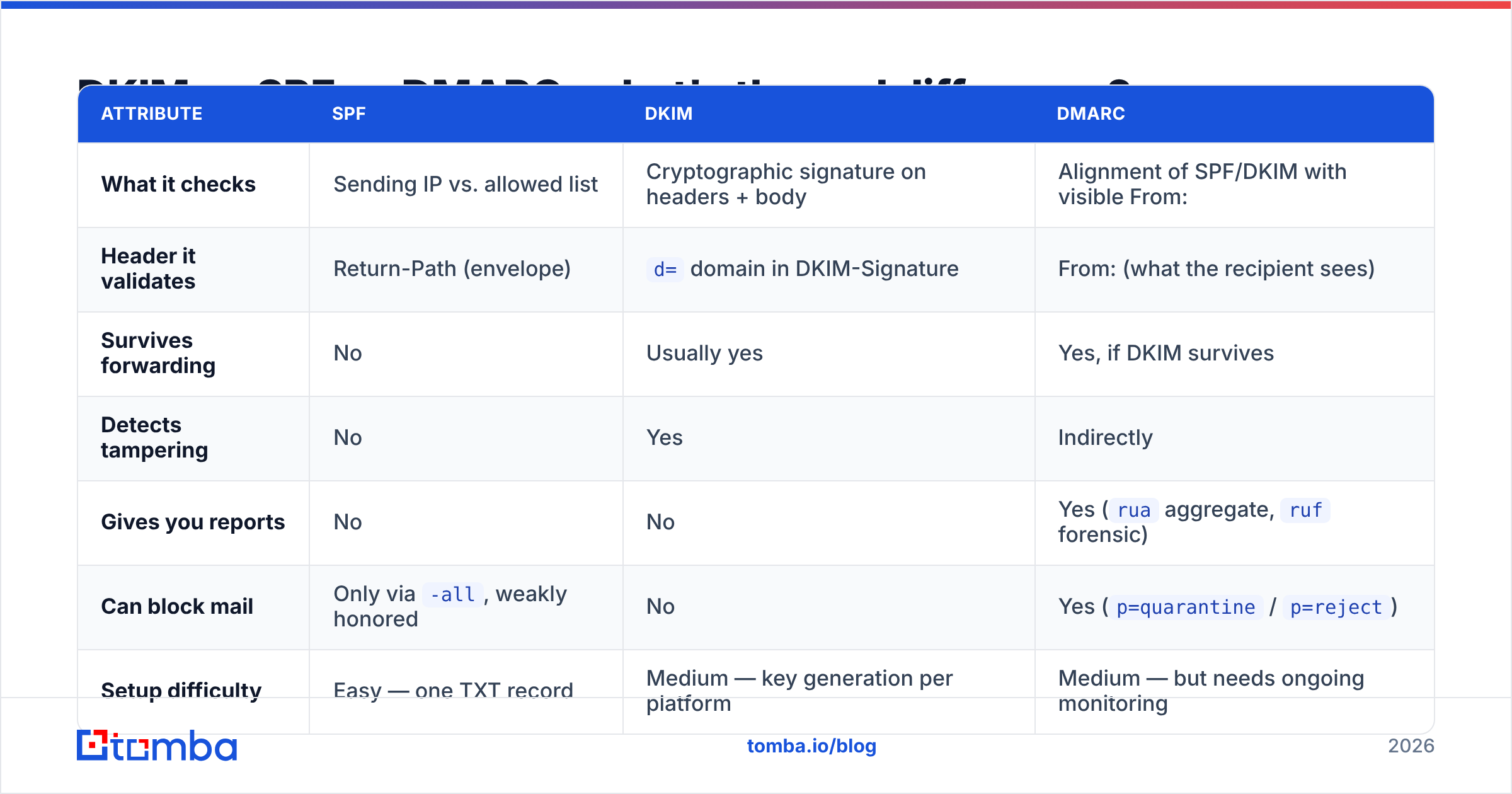
| Attribute | SPF | DKIM | DMARC |
|---|---|---|---|
| What it checks | Sending IP vs. allowed list | Cryptographic signature on headers + body | Alignment of SPF/DKIM with visible From: |
| Header it validates | Return-Path (envelope) | d= domain in DKIM-Signature |
From: (what the recipient sees) |
| Survives forwarding | No | Usually yes | Yes, if DKIM survives |
| Detects tampering | No | Yes | Indirectly |
| Gives you reports | No | No | Yes (rua aggregate, ruf forensic) |
| Can block mail | Only via -all, weakly honored |
No | Yes (p=quarantine / p=reject) |
| Setup difficulty | Easy — one TXT record | Medium — key generation per platform | Medium — but needs ongoing monitoring |
| Common breakage | 10-lookup limit, forwarding | Key rotation, list-server rewriting | Subdomains and third-party senders |
| Required by Google/Yahoo bulk rules | Yes | Yes | Yes |
Read the table row by row and the division of labor is obvious: SPF is cheap and brittle, DKIM is durable and portable, DMARC is the only one with teeth and the only one with a feedback loop.
Which one should you set up first?#
Order matters, because publishing DMARC enforcement before your sources are authenticated will bounce your own invoices.
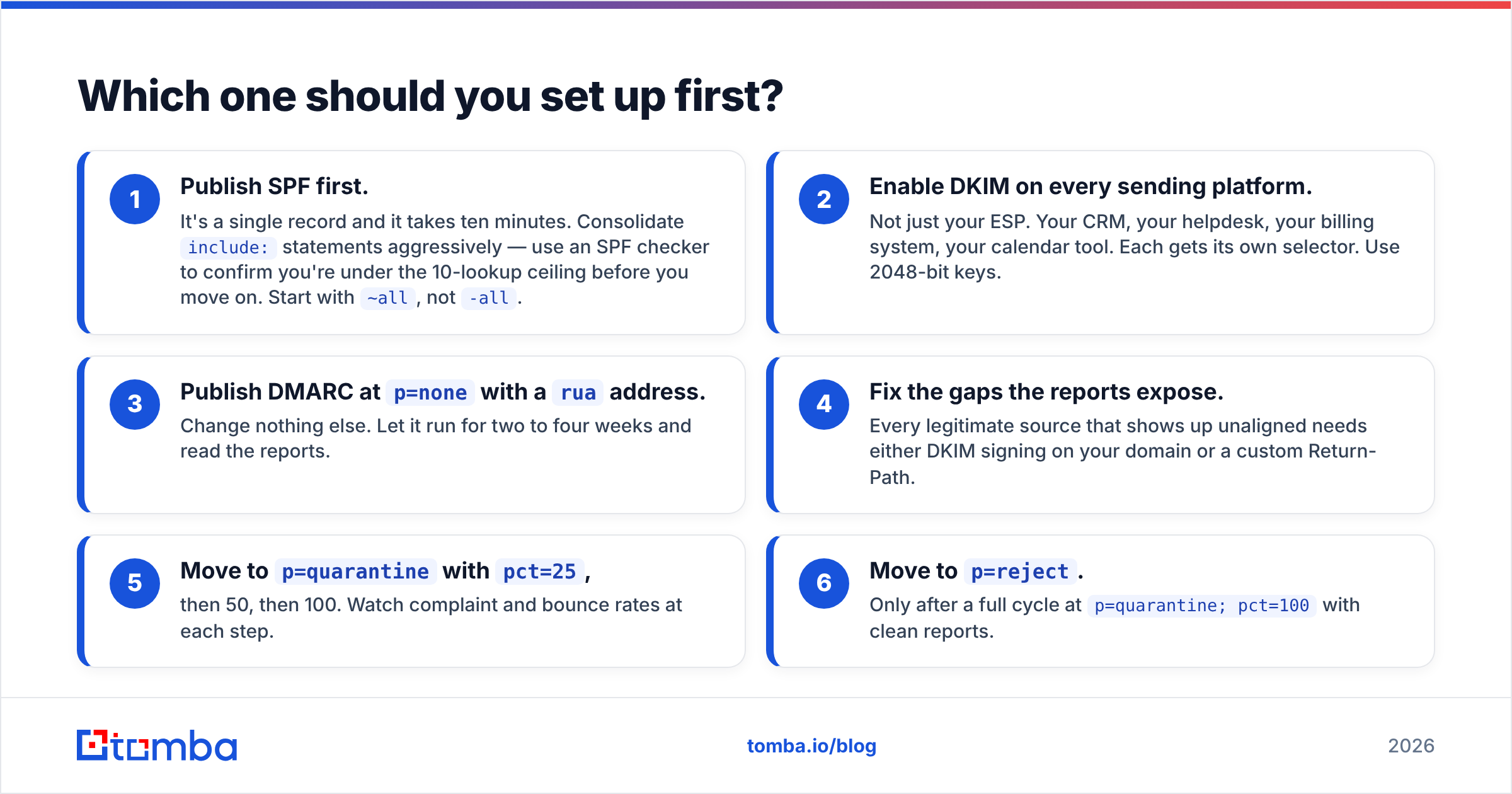
- Publish SPF first. It's a single record and it takes ten minutes. Consolidate
include:statements aggressively — use an SPF checker to confirm you're under the 10-lookup ceiling before you move on. Start with~all, not-all. - Enable DKIM on every sending platform. Not just your ESP. Your CRM, your helpdesk, your billing system, your calendar tool. Each gets its own selector. Use 2048-bit keys.
- Publish DMARC at
p=nonewith aruaaddress. Change nothing else. Let it run for two to four weeks and read the reports. - Fix the gaps the reports expose. Every legitimate source that shows up unaligned needs either DKIM signing on your domain or a custom Return-Path.
- Move to
p=quarantinewithpct=25, then 50, then 100. Watch complaint and bounce rates at each step. - Move to
p=reject. Only after a full cycle atp=quarantine; pct=100with clean reports.
The whole sequence takes six to ten weeks for a company with a normal SaaS stack. Rushing step 5 is how companies accidentally block their own payroll notifications.
What breaks authentication in real outbound campaigns?#
Authentication is necessary but not sufficient, and the failures in cold outbound tend to cluster in predictable places.
- Sending domain ≠ authenticated domain. Teams buy
getyourcompany.iofor outbound, forget to authenticate it separately, and wonder why placement collapsed. Every sending domain needs its own SPF, DKIM, and DMARC records. - Subdomain drift. DMARC on the root domain with relaxed alignment covers subdomains — but an explicit DMARC record on a subdomain overrides the parent. Audit both.
- Shared IP pools. Perfect authentication on a shared IP that another tenant burned still means poor placement. Authentication is identity, not sender reputation.
- List quality masquerading as an auth problem. A 12% bounce rate destroys placement regardless of DNS. Run every list through an email verifier before it touches a sequence, and treat catch-all domains as a separate risk tier rather than lumping them in with valid addresses.
- Content that trips filters anyway. Once you're authenticated, spam scoring is back on the table. A quick pass through a spam checker catches the obvious offenders — link-heavy bodies, tracking-pixel-only HTML, single-image emails.
Do SPF, DKIM, and DMARC actually improve inbox placement?#
Directly, no. Indirectly, enormously.
Mailbox providers do not reward you for authenticating — they penalize you for not doing it. Since Google and Yahoo's bulk sender requirements took effect in February 2024, any domain sending over 5,000 messages a day to Gmail addresses without all three is subject to rejection outright. Google's own sender guidelines spell out the thresholds, including the 0.3% spam complaint ceiling that sits alongside the authentication rules.
What authentication actually does is make your reputation portable and attributable. Without it, filters have no reliable identity to attach behavior to, so they default to suspicion. With it, your good sending history compounds — and a DMARC-protected domain can't be hijacked by a spoofer whose behavior would otherwise be scored against you.
The measurable effect shows up as stability rather than a spike. Authenticated domains with clean lists see less week-to-week variance in placement, which is the thing that actually protects a pipeline. If you're diagnosing a sudden drop, check email deliverability fundamentals and a blacklist checker before you assume the DNS records broke.
What about BIMI, MTA-STS, and ARC?#
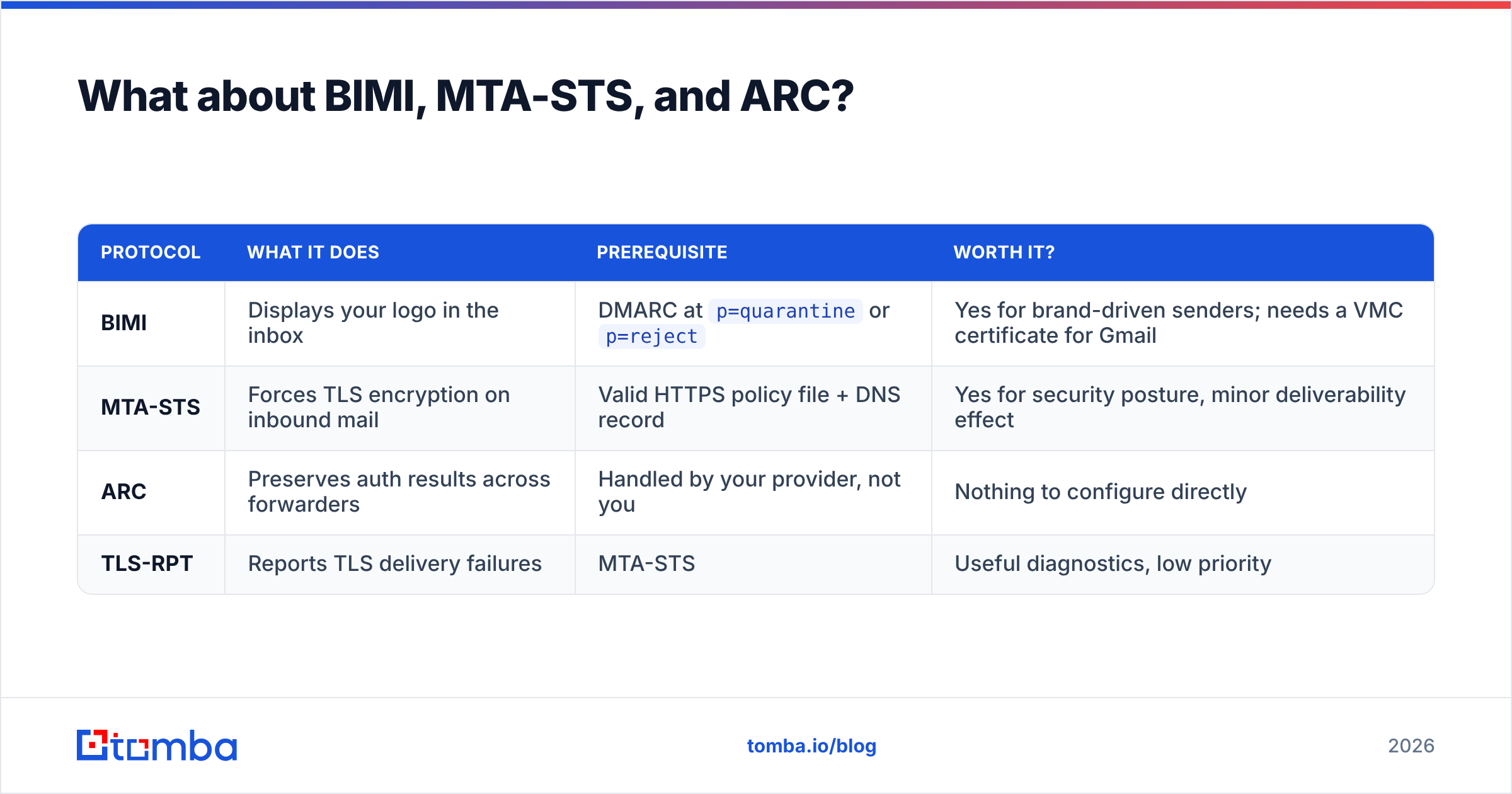
These are the second tier. Don't touch them until the first three are at enforcement.
| Protocol | What it does | Prerequisite | Worth it? |
|---|---|---|---|
| BIMI | Displays your logo in the inbox | DMARC at p=quarantine or p=reject |
Yes for brand-driven senders; needs a VMC certificate for Gmail |
| MTA-STS | Forces TLS encryption on inbound mail | Valid HTTPS policy file + DNS record | Yes for security posture, minor deliverability effect |
| ARC | Preserves auth results across forwarders | Handled by your provider, not you | Nothing to configure directly |
| TLS-RPT | Reports TLS delivery failures | MTA-STS | Useful diagnostics, low priority |
BIMI is the only one with a visible payoff for outbound teams, and it exists specifically to reward domains that reached DMARC enforcement. Treat it as the prize, not the project.
How do you audit your current setup in 20 minutes?#
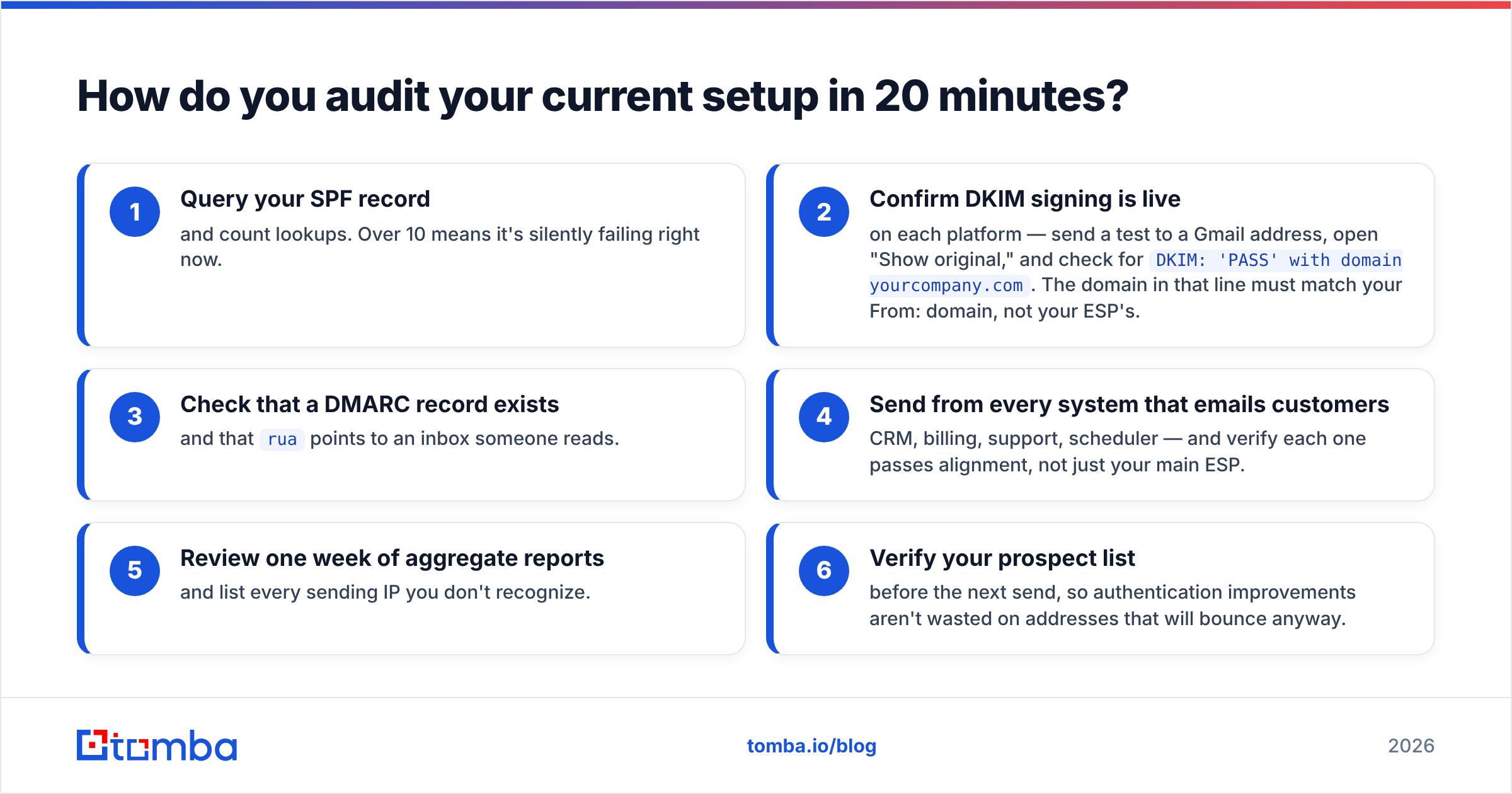
Run this checklist against every domain you send from:
- Query your SPF record and count lookups. Over 10 means it's silently failing right now.
- Confirm DKIM signing is live on each platform — send a test to a Gmail address, open "Show original," and check for
DKIM: 'PASS' with domain yourcompany.com. The domain in that line must match your From: domain, not your ESP's. - Check that a DMARC record exists and that
ruapoints to an inbox someone reads. - Send from every system that emails customers — CRM, billing, support, scheduler — and verify each one passes alignment, not just your main ESP.
- Review one week of aggregate reports and list every sending IP you don't recognize.
- Verify your prospect list before the next send, so authentication improvements aren't wasted on addresses that will bounce anyway.
Most teams find at least one broken source in step 4. It's almost always the tool nobody owns.
Frequently asked questions#
Can I use DKIM without SPF? Technically yes — DMARC passes on either. Practically no: some receivers weight SPF independently, and Google's bulk requirements list both.
Does -all in SPF break forwarding? It makes forwarded mail fail SPF, but if DKIM is aligned, DMARC still passes. This is exactly why DKIM matters.
How many DMARC records can a domain have? Exactly one. Multiple records at _dmarc invalidate the policy entirely.
Should I use p=reject immediately? No. Monitor at p=none for at least two weeks first. Enforcement without visibility blocks your own mail.
Do I need separate records for my cold outbound domain? Yes. Every sending domain needs its own complete set.
Where to go from here#
Authentication gets you to the door. Data quality gets you through it. Once SPF, DKIM, and DMARC are at enforcement, the biggest remaining lever on your reply rate is whether the addresses in your sequences are real, current, and belong to people who can actually buy.
That's the gap Tomba's Email Finder closes — verified professional addresses sourced by domain, name, or company, with verification built into the same workflow so bad addresses never enter your sender reputation math. The free tier covers 25 searches a month, and paid plans start at $49/mo; see Tomba pricing for the full breakdown. Fix your DNS this week, then fix your list — in that order.
Related guides#
Ready to find emails that actually work?
Join 150,000+ professionals who stopped guessing and started sending. Free credits on signup — no credit card required.
Get the Tomba newsletter
Practical outbound tactics and product updates — once every two weeks.
About the author