DMARC Checker: How to Read Your DMARC Record in 2026
A DMARC checker returns a record in under ten seconds. Reading it correctly is the hard part. Here's what p=none, sp=, pct=, and alignment actually mean for your cold email.
TL;DR
- A DMARC checker does two things: confirms a
_dmarc.yourdomain.comTXT record exists, and parses its tags. It does not tell you whether your mail is actually passing alignment — only aggregate reports do that. - A green checkmark next to
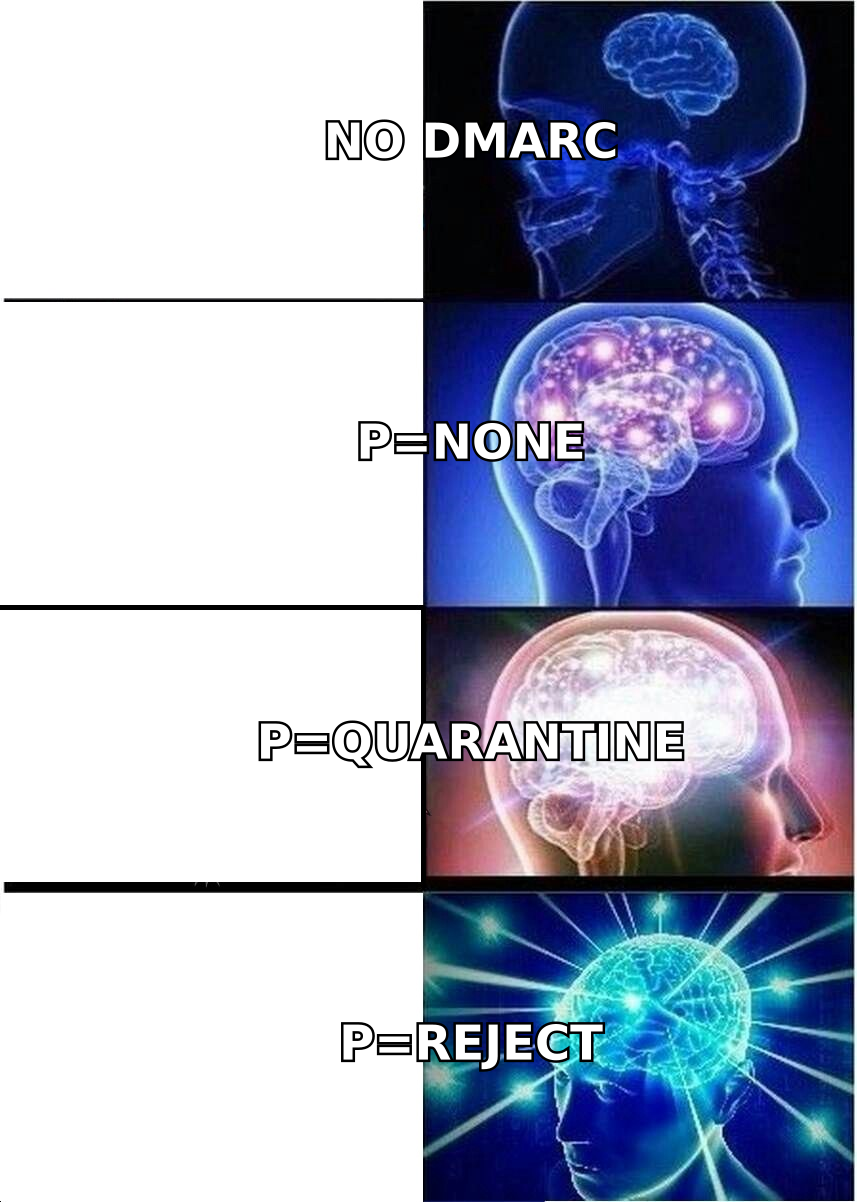
p=nonemeans "your record is syntactically valid and enforcing nothing." Most domains that think they're protected are sitting here. - The three tags that decide your fate are
p=(policy),rua=(where reports go), andadkim=/aspf=(alignment strictness). Everything else is tuning. - Since Google and Yahoo tightened bulk-sender rules, any domain sending over ~5,000 messages/day to their users needs a published DMARC record. "Published" is a low bar —
p=noneclears it. - Fix order that actually works: SPF → DKIM → DMARC at
p=nonewith reporting → read reports for 2–4 weeks →p=quarantine; pct=25→ ramp top=reject.
What is a DMARC checker, and what does it actually check?#
A DMARC checker is a lookup tool. You give it a domain, it queries DNS for the TXT record at _dmarc.<domain>, and it returns whatever string it finds, usually with the tags broken out into a readable table.
Think of it like checking whether your building has a fire policy posted on the wall. The checker confirms the sign exists and that the words on it are legible. It cannot tell you whether the sprinklers work, whether anyone runs drills, or whether the fire exit is chained shut. That's a different investigation.
Technically: DMARC (Domain-based Message Authentication, Reporting and Conformance, specified in RFC 7489) sits on top of SPF and DKIM. It answers a question neither of those answers alone — when authentication fails, what should the receiving mail server do about it? — and it adds the alignment requirement that makes spoofing genuinely hard.
So a DMARC checker reports on the policy layer. It's the last of three checks you should run, not the first. If your SPF record is broken, DMARC will be broken downstream of it regardless of how clean the DMARC syntax looks. Run an SPF checker first, confirm you're under the ten-lookup limit, then come back to DMARC.
What do the DMARC record tags actually mean?#
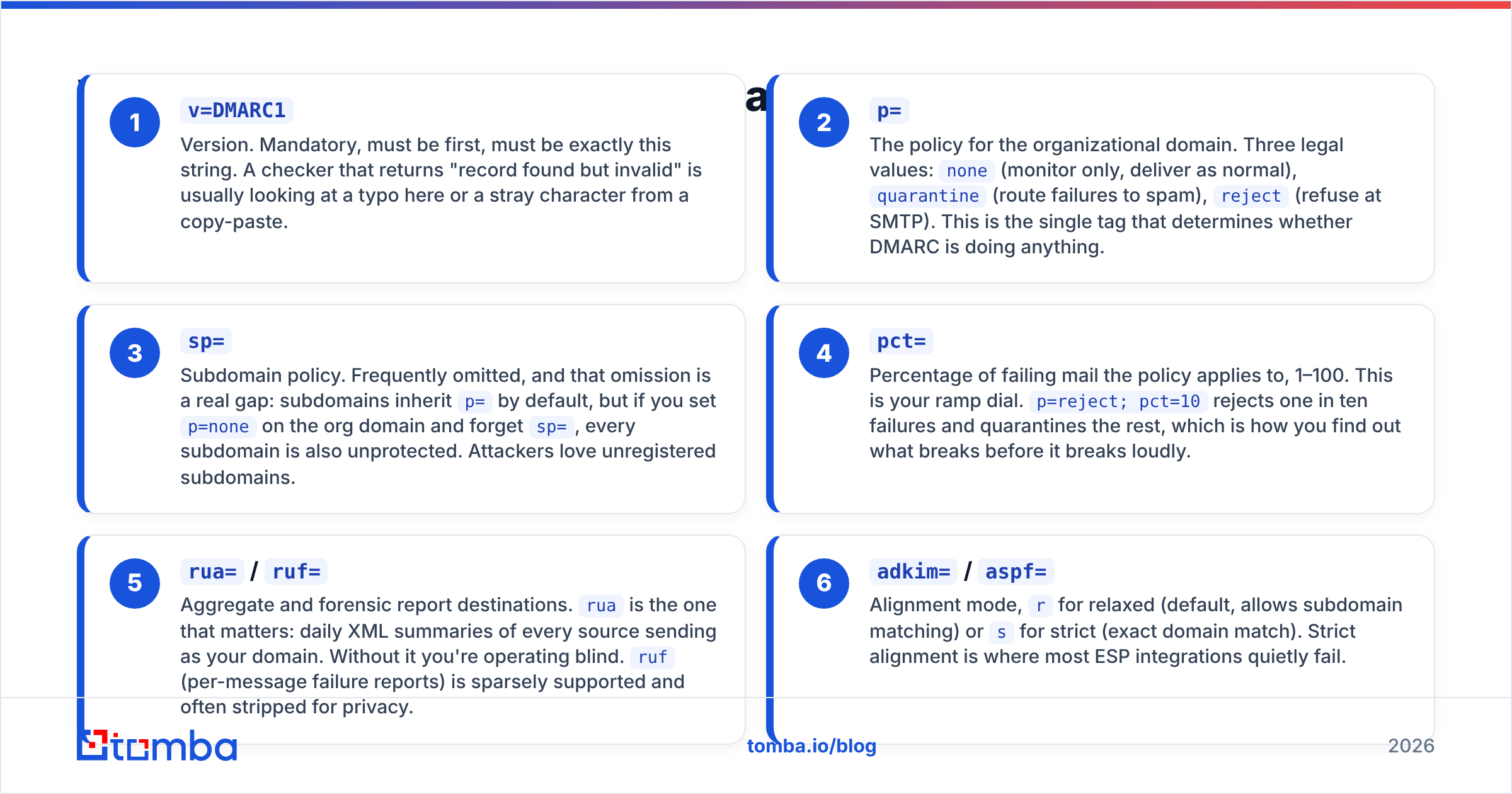
Here's a real-shaped record and what a checker is parsing when it shows you a table:
v=DMARC1; p=quarantine; sp=reject; pct=100; adkim=s; aspf=r; rua=mailto:dmarc@yourdomain.com; ruf=mailto:forensic@yourdomain.com; fo=1v=DMARC1— Version. Mandatory, must be first, must be exactly this string. A checker that returns "record found but invalid" is usually looking at a typo here or a stray character from a copy-paste.p=— The policy for the organizational domain. Three legal values:none(monitor only, deliver as normal),quarantine(route failures to spam),reject(refuse at SMTP). This is the single tag that determines whether DMARC is doing anything.sp=— Subdomain policy. Frequently omitted, and that omission is a real gap: subdomains inheritp=by default, but if you setp=noneon the org domain and forgetsp=, every subdomain is also unprotected. Attackers love unregistered subdomains.pct=— Percentage of failing mail the policy applies to, 1–100. This is your ramp dial.p=reject; pct=10rejects one in ten failures and quarantines the rest, which is how you find out what breaks before it breaks loudly.rua=/ruf=— Aggregate and forensic report destinations.ruais the one that matters: daily XML summaries of every source sending as your domain. Without it you're operating blind.ruf(per-message failure reports) is sparsely supported and often stripped for privacy.adkim=/aspf=— Alignment mode,rfor relaxed (default, allows subdomain matching) orsfor strict (exact domain match). Strict alignment is where most ESP integrations quietly fail.
What is DMARC alignment, and why does it break things?#
Alignment is the concept most people miss, and it's the reason a domain can pass SPF, pass DKIM, and still fail DMARC.
The analogy: SPF checks the return address on the envelope. DKIM checks the wax seal. DMARC checks that the name on the letterhead inside — the From: address your recipient actually sees — matches at least one of the two.
In practice:
- SPF alignment compares the
From:domain with the Return-Path / envelope-sender domain. If you send through a platform that usesbounces.sendingtool.comas the envelope sender and you haven't set up a custom return path, SPF passes but doesn't align. - DKIM alignment compares the
From:domain with thed=value in the DKIM signature. Sending platforms that sign with their own domain instead of yours pass DKIM but don't align.
This is why "we have SPF and DKIM, we're fine" is one of the most expensive assumptions in outbound. Under p=none you'd never notice. Flip to p=reject and half your third-party mail vanishes — invoices, transactional receipts, the marketing platform, the recruiting tool.
For the underlying vocabulary and how it connects to email deliverability as a whole, the glossary entry is a decent five-minute primer.
Which DMARC checker should you use?#
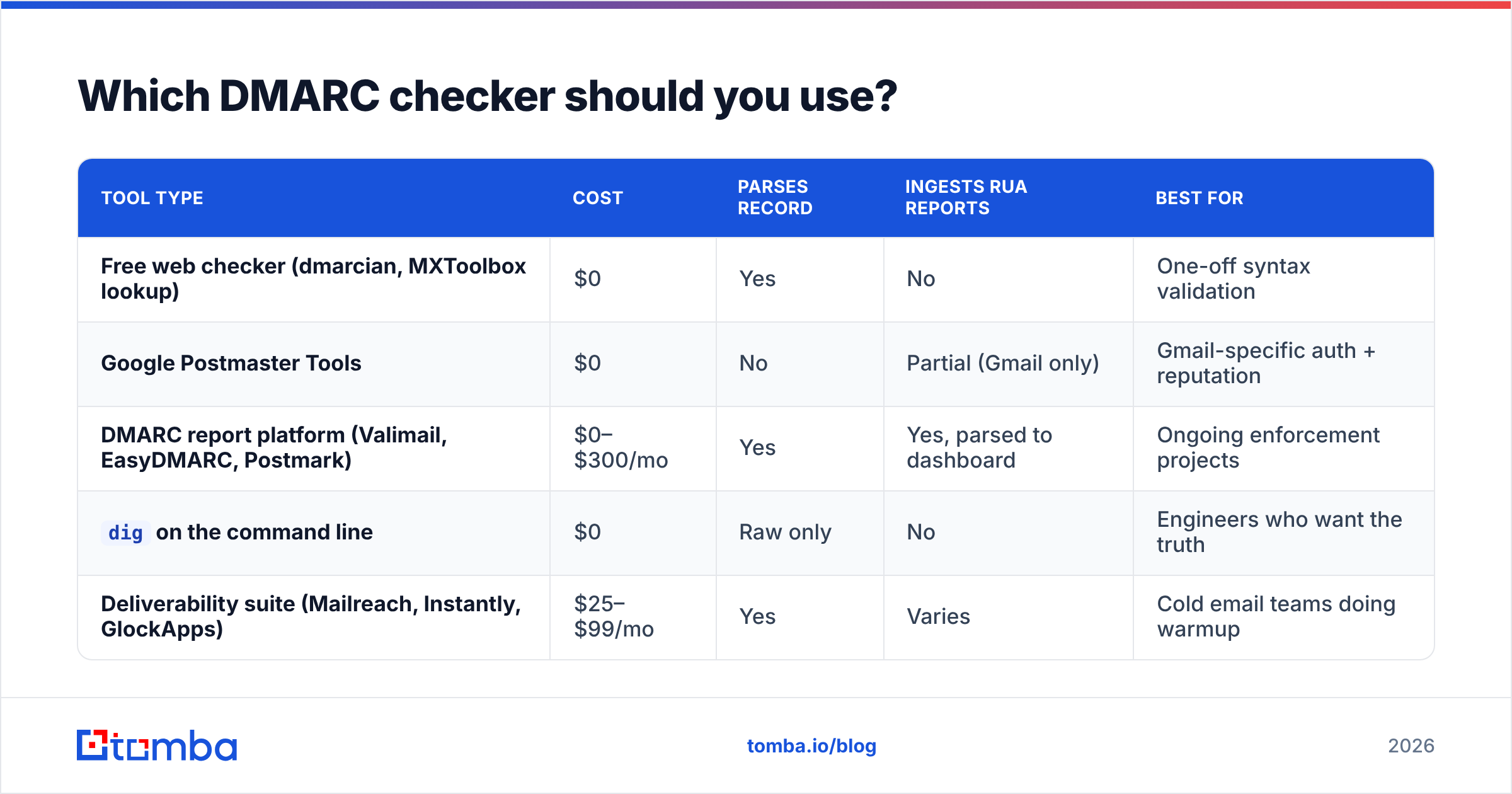
Most free checkers do the same DNS lookup. They differ on whether they parse alignment, monitor over time, and ingest aggregate reports. Here's the honest breakdown:
| Tool type | Cost | Parses record | Ingests rua reports | Best for |
|---|---|---|---|---|
| Free web checker (dmarcian, MXToolbox lookup) | $0 | Yes | No | One-off syntax validation |
| Google Postmaster Tools | $0 | No | Partial (Gmail only) | Gmail-specific auth + reputation |
| DMARC report platform (Valimail, EasyDMARC, Postmark) | $0–$300/mo | Yes | Yes, parsed to dashboard | Ongoing enforcement projects |
dig on the command line |
$0 | Raw only | No | Engineers who want the truth |
| Deliverability suite (Mailreach, Instantly, GlockApps) | $25–$99/mo | Yes | Varies | Cold email teams doing warmup |
If you only want the record, dig +short TXT _dmarc.yourdomain.com in a terminal is faster than any web UI and shows you exactly what resolvers see, including duplicate records — a failure mode most web checkers silently hide by displaying only the first result. Two DMARC TXT records on one host is a hard fail per spec.
If you're running a real enforcement project across multiple sending sources, you need report ingestion. Aggregate reports arrive as gzipped XML from dozens of receivers daily. Reading those by hand is possible for exactly one week before you give up.
What breaks when you run a DMARC checker on a real domain?#
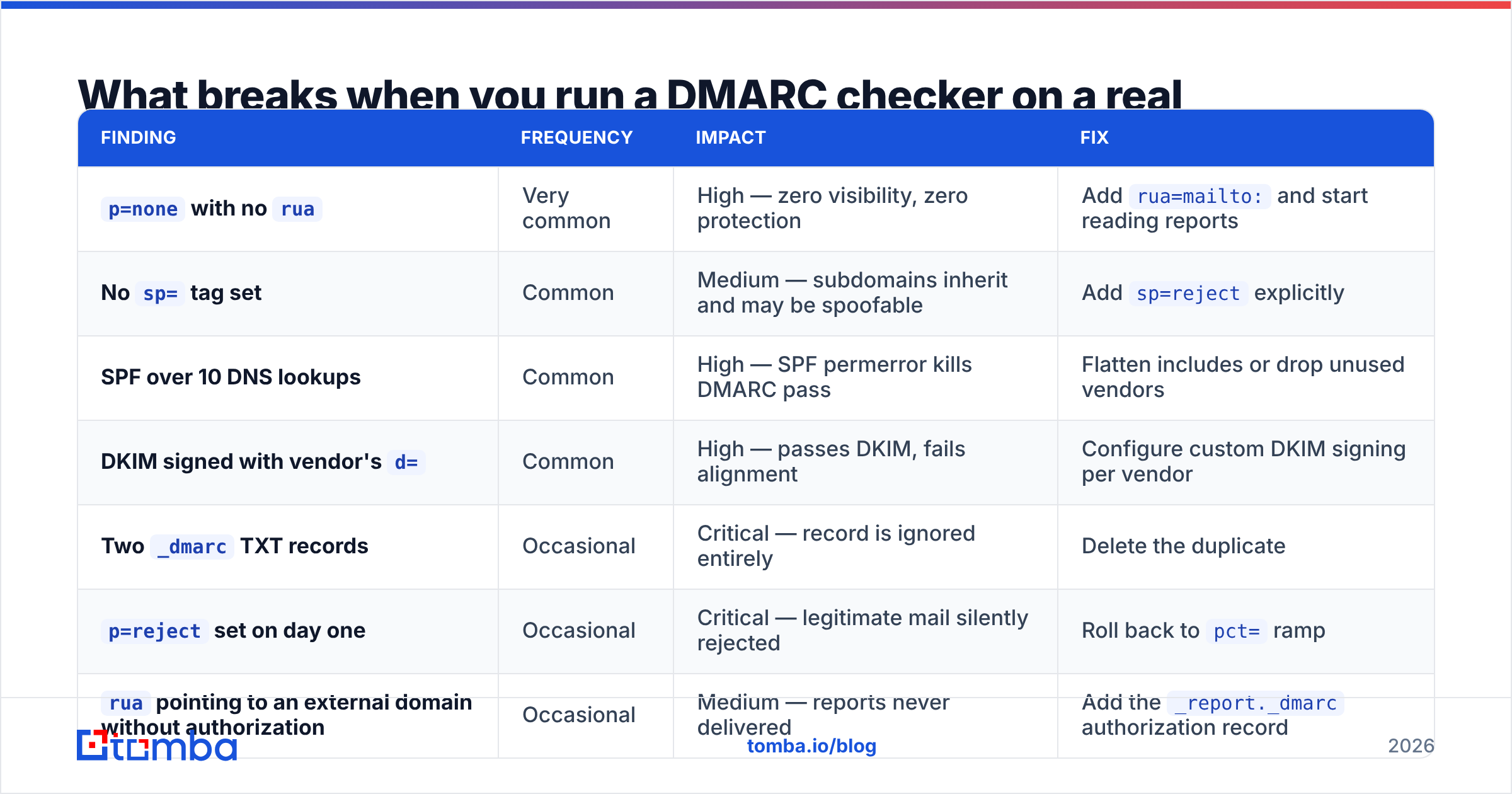
The patterns repeat. Here are the failures we see most, ranked by how often they appear versus how badly they hurt:
| Finding | Frequency | Impact | Fix |
|---|---|---|---|
p=none with no rua |
Very common | High — zero visibility, zero protection | Add rua=mailto: and start reading reports |
No sp= tag set |
Common | Medium — subdomains inherit and may be spoofable | Add sp=reject explicitly |
| SPF over 10 DNS lookups | Common | High — SPF permerror kills DMARC pass | Flatten includes or drop unused vendors |
DKIM signed with vendor's d= |
Common | High — passes DKIM, fails alignment | Configure custom DKIM signing per vendor |
Two _dmarc TXT records |
Occasional | Critical — record is ignored entirely | Delete the duplicate |
p=reject set on day one |
Occasional | Critical — legitimate mail silently rejected | Roll back to pct= ramp |
rua pointing to an external domain without authorization |
Occasional | Medium — reports never delivered | Add the _report._dmarc authorization record |
That last one catches people. If your DMARC record lives on yourdomain.com but rua=mailto:reports@analyticsvendor.com, the vendor's domain must publish yourdomain.com._report._dmarc.analyticsvendor.com with v=DMARC1. Otherwise conforming receivers won't send anything. Most vendors handle this automatically; some don't.
How do you move from p=none to p=reject safely?#
Never in one step. This is the part where a checker showing green causes more damage than a checker showing red.
Phase 1 — Inventory (week 1). List every system that sends as your domain. Marketing platform, CRM, invoicing, helpdesk, calendar invites, the ATS, the four SaaS tools someone connected in 2023. This list is always longer than you think. Aggregate reports will reveal the ones you forgot.
Phase 2 — Monitor (weeks 1–4). Publish v=DMARC1; p=none; rua=mailto:dmarc@yourdomain.com. Nothing changes for recipients. You start collecting data. Wait a full month if your billing cycle is monthly — quarterly senders will otherwise stay invisible.
Phase 3 — Fix alignment (weeks 2–6). For each legitimate source in the reports, get SPF or DKIM aligned. DKIM alignment is more durable because it survives forwarding; SPF breaks the moment a mailing list re-sends your message. Prioritize DKIM.
Phase 4 — Quarantine ramp (weeks 6–10). p=quarantine; pct=25, then 50, then 100. Watch reports between each step. If a source you forgot starts failing, it lands in spam rather than disappearing.
Phase 5 — Reject (week 10+). p=reject; pct=100; sp=reject. Keep reporting on permanently. Sources change; a new vendor added six months from now will break, and reports are how you find out in a day instead of a quarter.
Google's own bulk sender guidance confirms the sequencing: authenticate first, publish DMARC, then enforce. Their requirement for bulk senders is that a DMARC policy exists — p=none technically satisfies it, which is why so many domains stopped there and called it done.
Does DMARC actually improve cold email deliverability?#
Partly, and it's worth being precise about the limits.
DMARC at enforcement does three measurable things:
- Stops direct-domain spoofing. Nobody can send mail with your exact
From:domain from unauthorized infrastructure. Lookalike domains (your-domain.com,yourdornain.com) are unaffected — DMARC has no opinion on those. - Unlocks BIMI. Your logo in the inbox requires
p=quarantineorp=rejectat minimum. That's a visible trust signal. - Removes a negative signal. Gatekeepers increasingly treat a missing or
p=noneDMARC record as a mild risk factor for cold outbound specifically.
What DMARC does not do: it will not rescue a cold campaign with a 12% bounce rate. Authentication proves you are who you claim to be. It says nothing about whether recipients want your mail. A perfectly authenticated domain blasting stale lists still burns.
Bounce rate remains the single fastest way to torch sender reputation, which is why list hygiene has to run in parallel with authentication work, not after it. Clean the list with an email verifier before the send, and check your domain against major blocklists with a blacklist checker monthly. Authentication is the floor. Reputation is the ceiling.
What should you check every quarter?#
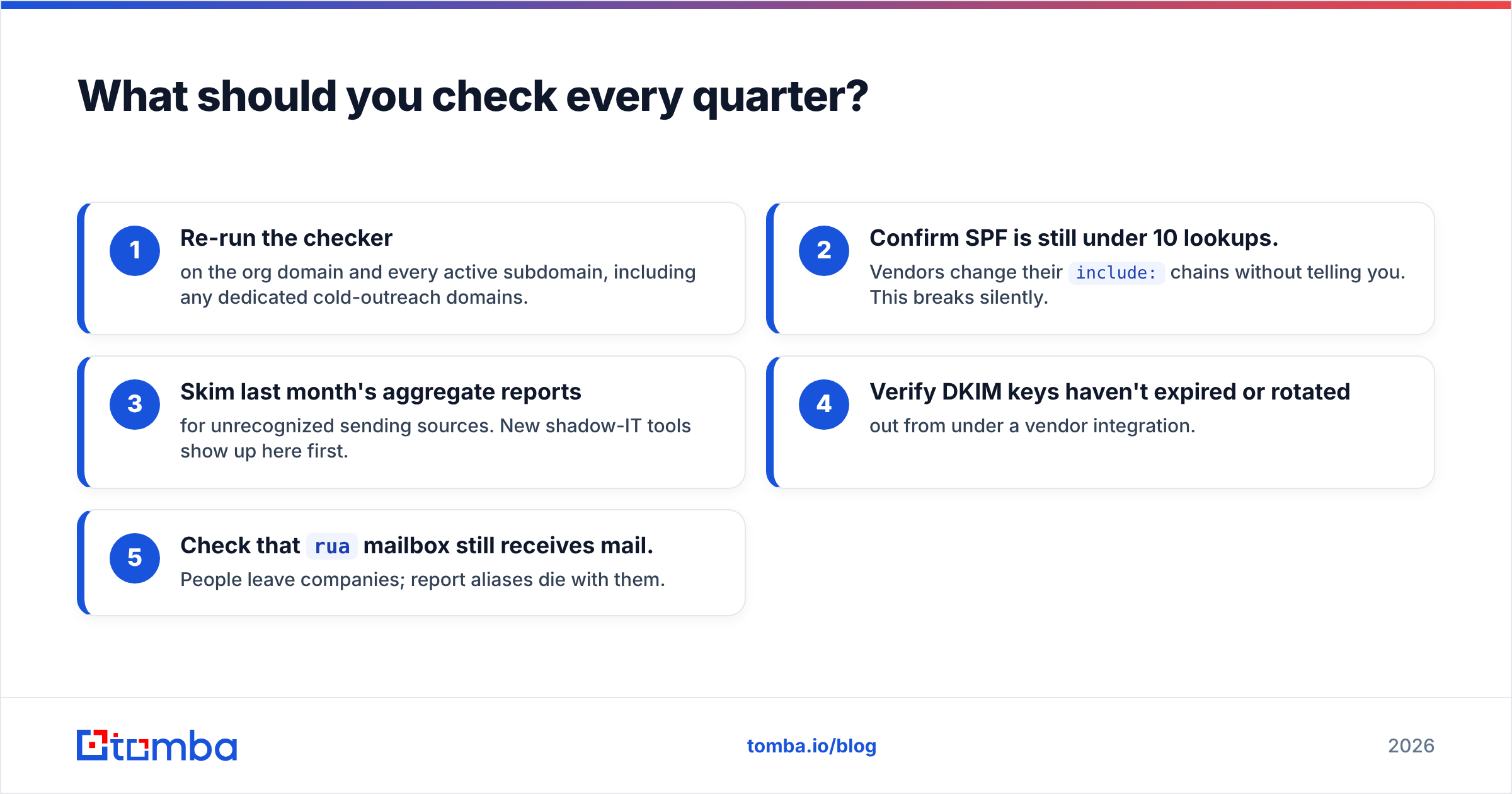
DMARC is not a set-and-forget record. Put a recurring 20-minute task on the calendar:
- Re-run the checker on the org domain and every active subdomain, including any dedicated cold-outreach domains.
- Confirm SPF is still under 10 lookups. Vendors change their
include:chains without telling you. This breaks silently. - Skim last month's aggregate reports for unrecognized sending sources. New shadow-IT tools show up here first.
- Verify DKIM keys haven't expired or rotated out from under a vendor integration.
- Check that
ruamailbox still receives mail. People leave companies; report aliases die with them.
The whole loop is cheaper than one deliverability incident. According to Gartner's framing of email security controls, the operational cost of authentication maintenance is trivial next to the cost of a successful business email compromise — and BEC almost always starts with a spoofable domain.
Where does the address data fit into this?#
Authentication and data quality are the two halves of the same problem. A locked-down DMARC policy on a domain sending to unverified addresses produces a beautifully authenticated bounce.
If you're building outbound lists, get the addresses right at the source rather than cleaning up afterward. Tomba's Email Finder resolves professional addresses by domain, name, or company with a confidence score attached, and every result runs through SMTP-level verification before it reaches you — so the list you load into your sequencer doesn't undo the deliverability work you just did on DNS. The free tier covers 25 searches a month, and paid plans start at $49/mo; full Tomba pricing is on the site.
Fix the record. Then fix the list. In that order.
Related guides#
Ready to find emails that actually work?
Join 150,000+ professionals who stopped guessing and started sending. Free credits on signup — no credit card required.
Get the Tomba newsletter
Practical outbound tactics and product updates — once every two weeks.
About the author