DMARC Configuration in 2026: A Step-by-Step Setup Guide
A practical DMARC configuration walkthrough: what each tag does, how SPF and DKIM alignment really work, how to move from p=none to p=reject without nuking your own mail, and how to read aggregate reports.
TL;DR
- DMARC is a DNS TXT record at
_dmarc.yourdomain.comthat tells receiving servers what to do when a message fails both SPF and DKIM alignment — not just SPF or DKIM checks. - Alignment is the part most people get wrong: SPF can pass and DMARC can still fail, because DMARC compares the domain in the visible
From:header against the domain that passed SPF or signed with DKIM. - Start at
p=nonewithrua=reporting on, spend 2–6 weeks fixing what the reports show, then step top=quarantine; pct=25before landing onp=reject. - Google and Yahoo have required DMARC for bulk senders since February 2024. If you send cold email at any volume,
p=noneis the floor, not the goal. - DMARC protects your domain from spoofing. It does not fix a bad list — bounces from invalid addresses still wreck sender reputation, so verification runs alongside DMARC, not instead of it.
What is DMARC and why does it decide whether your email lands?#
DMARC (Domain-based Message Authentication, Reporting and Conformance) is the referee that sits on top of SPF and DKIM.
Think of it like a delivery driver showing up at a secure building. SPF checks whether the van is on the approved vehicle list. DKIM checks whether the parcel's tamper seal is intact. Neither one checks whether the name on the parcel matches the company that owns the van. DMARC does exactly that — and then tells the guard what to do when it doesn't match: wave it through, hold it, or refuse it.
Technically, DMARC is published as a DNS TXT record at the subdomain _dmarc.yourdomain.com. It's defined in RFC 7489 and maintained by the industry group at dmarc.org. A minimal record looks like this:
v=DMARC1; p=none; rua=mailto:dmarc-reports@yourdomain.comThat's a complete, valid DMARC configuration. It does two things: it declares a policy (p=none — take no action) and it asks receivers to send you daily aggregate reports. The reporting half is the entire reason to start here.
Since February 2024, Google and Yahoo have required a DMARC record for anyone sending more than 5,000 messages a day to their users, along with one-click unsubscribe and a spam complaint rate under 0.3%. Microsoft followed with similar enforcement for Outlook consumer domains. If your outbound program touches Gmail inboxes — and it does — a missing DMARC record is now a hard blocker on email deliverability, not a nice-to-have.

What do you need before you write a DMARC record?#
DMARC is the last layer, not the first. Publish it before SPF and DKIM are solid and you'll either learn nothing or break your own mail.
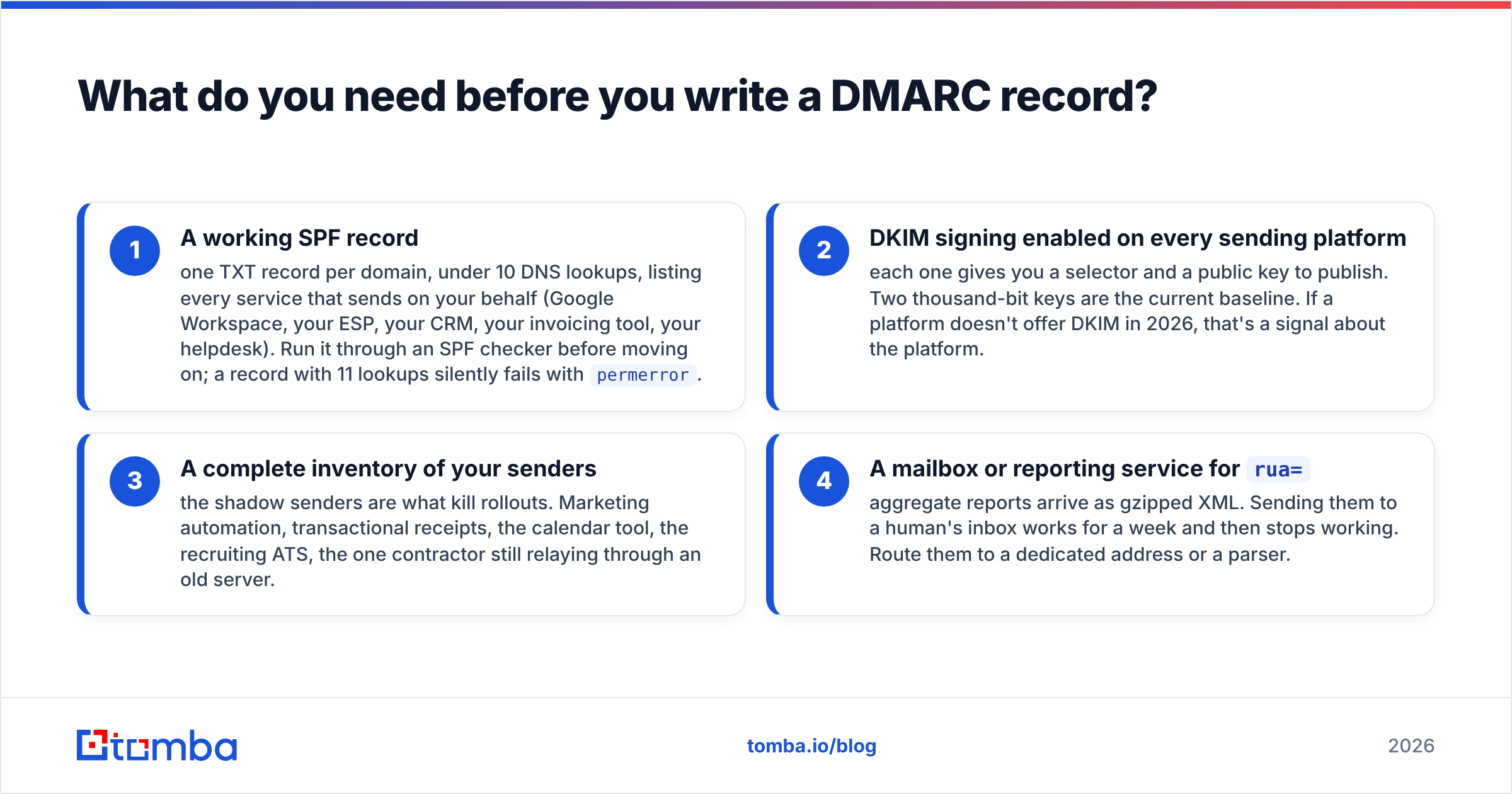
Get these four things in place first:
- A working SPF record — one TXT record per domain, under 10 DNS lookups, listing every service that sends on your behalf (Google Workspace, your ESP, your CRM, your invoicing tool, your helpdesk). Run it through an SPF checker before moving on; a record with 11 lookups silently fails with
permerror. - DKIM signing enabled on every sending platform — each one gives you a selector and a public key to publish. Two thousand-bit keys are the current baseline. If a platform doesn't offer DKIM in 2026, that's a signal about the platform.
- A complete inventory of your senders — the shadow senders are what kill rollouts. Marketing automation, transactional receipts, the calendar tool, the recruiting ATS, the one contractor still relaying through an old server.
- A mailbox or reporting service for
rua=— aggregate reports arrive as gzipped XML. Sending them to a human's inbox works for a week and then stops working. Route them to a dedicated address or a parser.
Skipping step three is the single most common reason a DMARC rollout stalls. You cannot enforce a policy on senders you haven't catalogued.
How does DMARC alignment actually work?#
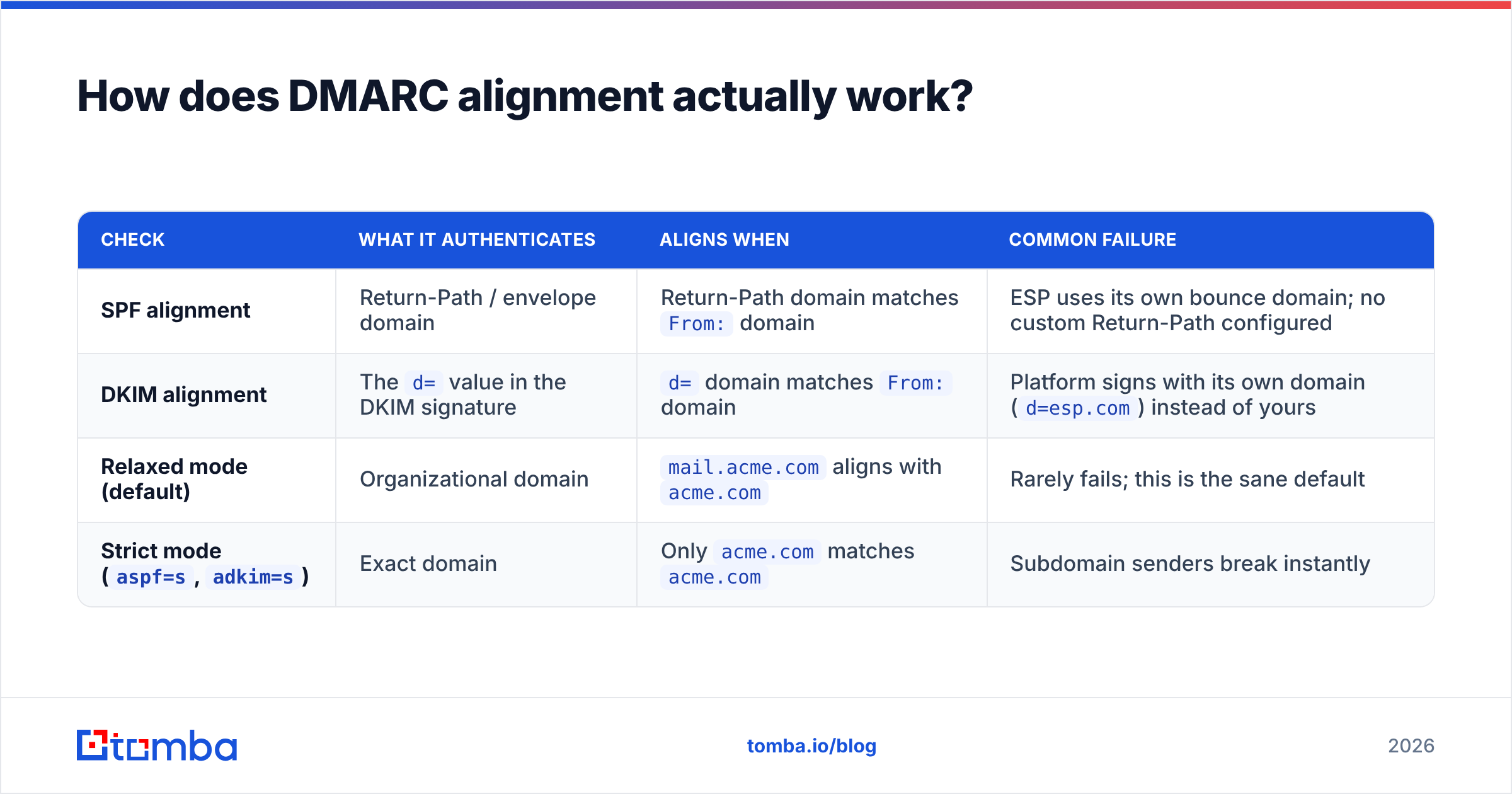
This is the concept that separates a working DMARC configuration from a broken one: DMARC passes only when SPF or DKIM passes and aligns with the From: domain.
Your recipient sees From: sarah@acme.com. But the envelope sender (Return-Path) your ESP uses might be bounces@mail.sendtool.net. SPF authenticates the envelope domain — sendtool.net — which passes SPF cleanly. It just doesn't align with acme.com, so DMARC ignores that pass entirely.
| Check | What it authenticates | Aligns when | Common failure |
|---|---|---|---|
| SPF alignment | Return-Path / envelope domain | Return-Path domain matches From: domain |
ESP uses its own bounce domain; no custom Return-Path configured |
| DKIM alignment | The d= value in the DKIM signature |
d= domain matches From: domain |
Platform signs with its own domain (d=esp.com) instead of yours |
| Relaxed mode (default) | Organizational domain | mail.acme.com aligns with acme.com |
Rarely fails; this is the sane default |
Strict mode (aspf=s, adkim=s) |
Exact domain | Only acme.com matches acme.com |
Subdomain senders break instantly |
Only one of the two needs to align. DKIM alignment is the more durable of the pair because it survives forwarding — SPF alignment breaks the moment a recipient auto-forwards your message to another address. If you're choosing where to spend configuration time, spend it on DKIM signing with your own domain.
Set a custom Return-Path (sometimes called a "custom bounce domain" or "CNAME for tracking") in every platform that offers one. It's usually a two-CNAME change and it converts a permanent SPF misalignment into a permanent pass.
What does each DMARC configuration tag do?#
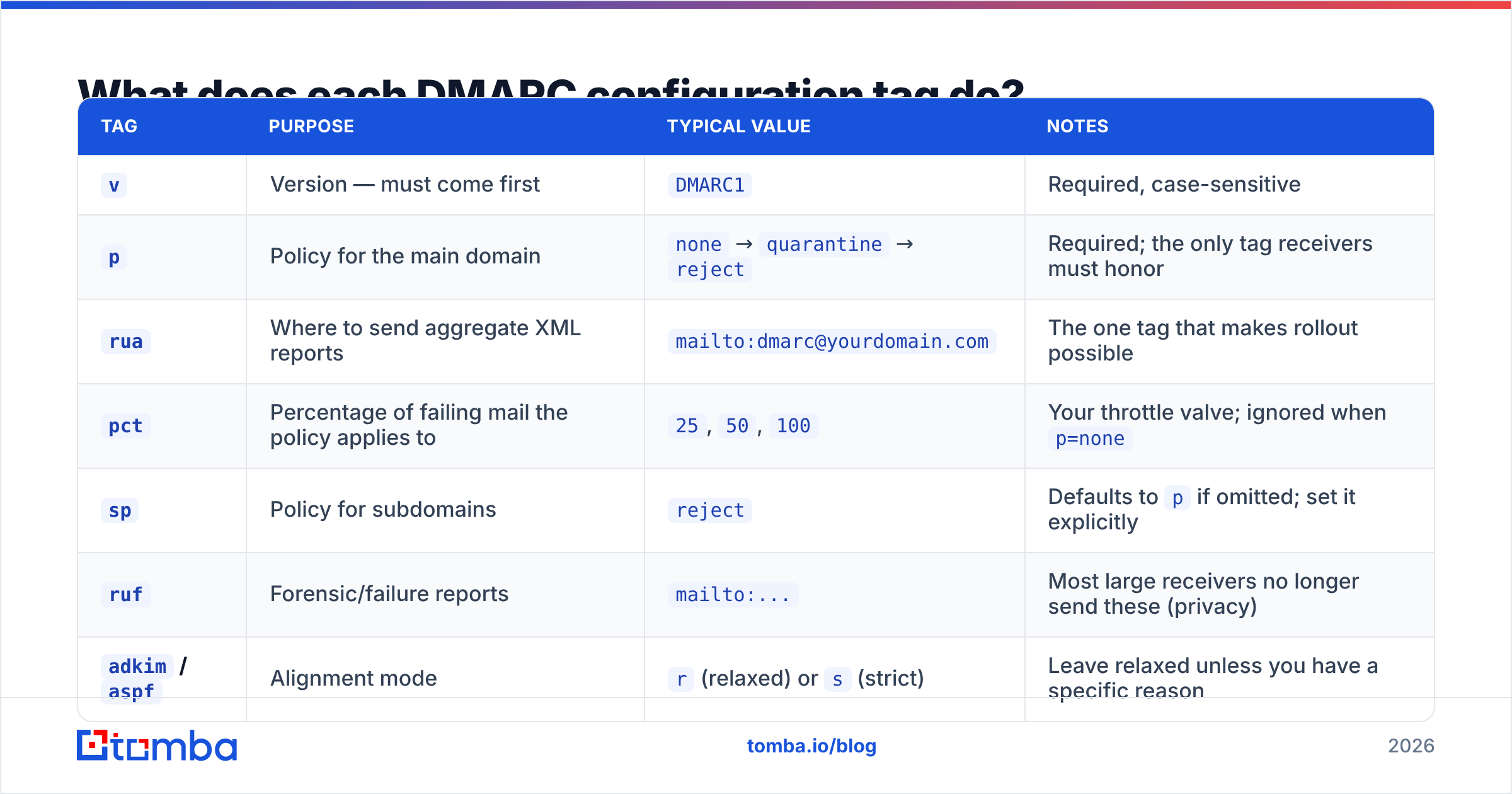
There are eleven tags in the spec. You'll realistically use five.
| Tag | Purpose | Typical value | Notes |
|---|---|---|---|
v |
Version — must come first | DMARC1 |
Required, case-sensitive |
p |
Policy for the main domain | none → quarantine → reject |
Required; the only tag receivers must honor |
rua |
Where to send aggregate XML reports | mailto:dmarc@yourdomain.com |
The one tag that makes rollout possible |
pct |
Percentage of failing mail the policy applies to | 25, 50, 100 |
Your throttle valve; ignored when p=none |
sp |
Policy for subdomains | reject |
Defaults to p if omitted; set it explicitly |
ruf |
Forensic/failure reports | mailto:... |
Most large receivers no longer send these (privacy) |
adkim / aspf |
Alignment mode | r (relaxed) or s (strict) |
Leave relaxed unless you have a specific reason |
fo |
Failure-report options | 1 |
Only meaningful if ruf is set |
A realistic mid-rollout record:
v=DMARC1; p=quarantine; pct=50; sp=quarantine;
rua=mailto:dmarc@acme.com; adkim=r; aspf=r
Two things to avoid. Don't use ruf pointed at a shared inbox — forensic reports can contain message content and headers, and you're inviting a compliance conversation. And don't set p=reject on your organizational domain while leaving sp unset if subdomains are still being audited; the subdomain policy inherits silently.
Which DMARC policy should you start with?#
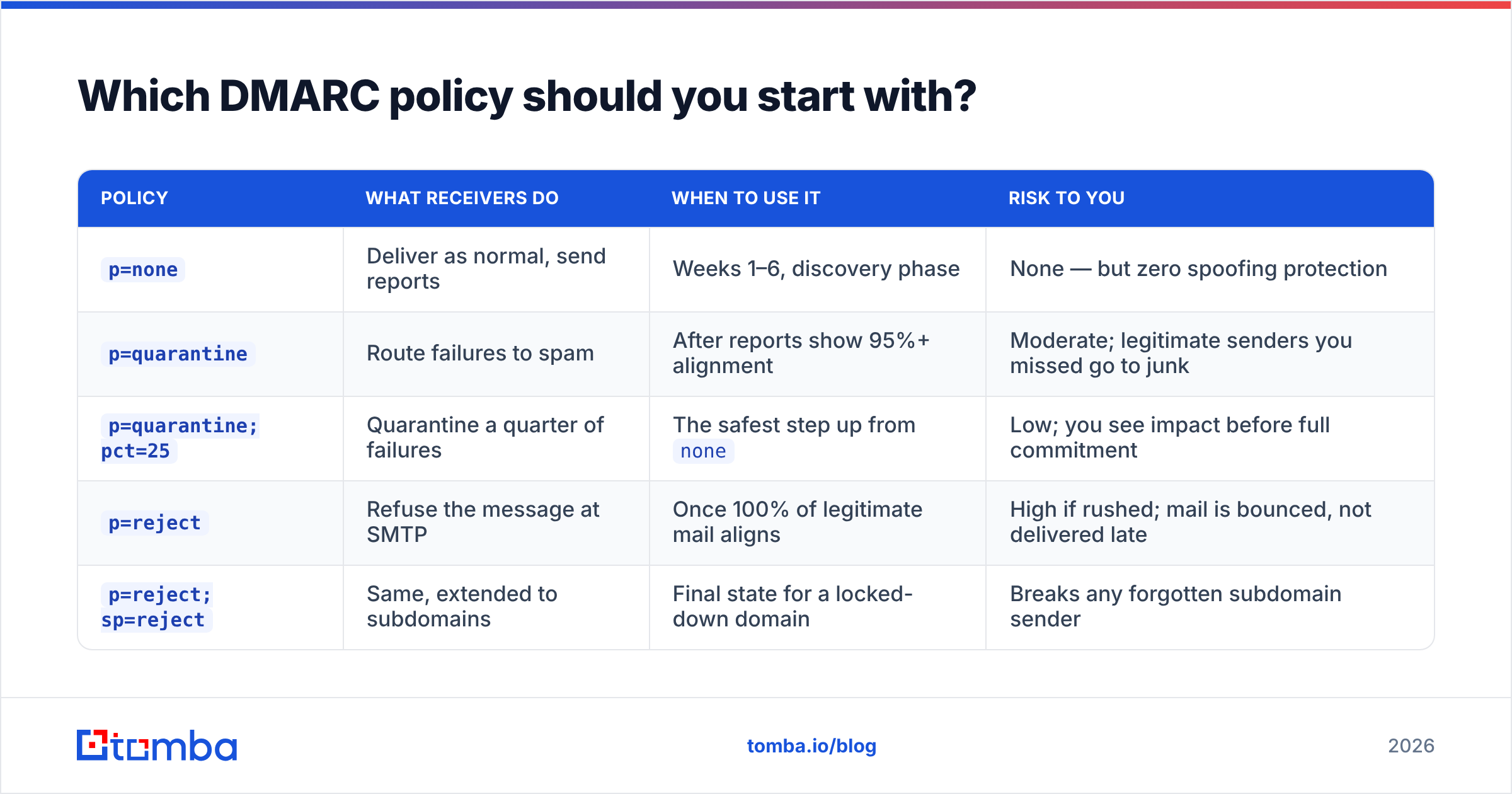
p=none, always. There is no scenario where a first-time DMARC configuration should start anywhere else.
| Policy | What receivers do | When to use it | Risk to you |
|---|---|---|---|
p=none |
Deliver as normal, send reports | Weeks 1–6, discovery phase | None — but zero spoofing protection |
p=quarantine |
Route failures to spam | After reports show 95%+ alignment | Moderate; legitimate senders you missed go to junk |
p=quarantine; pct=25 |
Quarantine a quarter of failures | The safest step up from none |
Low; you see impact before full commitment |
p=reject |
Refuse the message at SMTP | Once 100% of legitimate mail aligns | High if rushed; mail is bounced, not delivered late |
p=reject; sp=reject |
Same, extended to subdomains | Final state for a locked-down domain | Breaks any forgotten subdomain sender |
The pct tag is your safety valve, and it only affects quarantine and reject. pct=25 with p=reject means a quarter of failing messages get refused and three quarters pass through — enough signal to spot a problem, small enough to survive it.
A sane timeline for most B2B senders: two weeks at p=none, two weeks at quarantine; pct=25, two weeks at quarantine; pct=100, then reject; pct=25, then full reject. Roughly six to ten weeks end to end. Domains with a lot of third-party senders — enterprise marketing stacks, franchise structures — take longer, and that's fine.
How do you roll out DMARC configuration step by step?#
- Publish
p=nonewithrua=. DNS TXT record at_dmarc.yourdomain.com. Verify propagation before you do anything else — a typo in the hostname means you'll wait three weeks for reports that never come. - Collect reports for 14 days minimum. You need a full business cycle including monthly invoicing runs and whatever quarterly campaign your marketing team forgot to mention.
- Fix every legitimate sender that fails alignment. Custom Return-Path where available, DKIM signing with your domain where not. Add to SPF only as a last resort — you have ten lookups and they go fast.
- Step to
quarantine; pct=25. Watch reports and, more importantly, watch your reply rate and your support inbox. A quiet week is a green light. - Escalate
pctto 100, then swap toreject. Same pattern, same patience. - Set
spexplicitly and re-verify. Subdomains often host the mail you forgot about. - Keep the reporting address alive forever. DMARC isn't a project you finish. New vendors get onboarded, and each one is a fresh alignment question.
Google's Workspace DMARC documentation is the clearest vendor-side reference for step one if you're on Gmail, and it spells out exactly which selectors and hostnames to publish.

What breaks when you jump straight to p=reject?#
Everything you didn't know was sending mail.
The classic failure pattern: a team publishes p=reject on a Friday because a security questionnaire demanded it, and on Monday nobody can figure out why the billing system's receipts vanished. They didn't vanish — they were refused at SMTP, which means no bounce landed anywhere a human was watching.
The usual casualties:
- Third-party platforms signing with their own domain. Any tool where DKIM shows
d=vendor.comand no custom Return-Path exists is a guaranteed DMARC failure at enforcement. - Auto-forwarding. An employee forwarding company mail to a personal Gmail breaks SPF alignment on arrival. DKIM survives — which is exactly why DKIM alignment matters more.
- Mailing lists. Discussion lists rewrite headers and re-send. Some handle DMARC gracefully with From-rewriting; older listservs don't.
- Subdomains you inherited.
mail.oldbrand.acme.comfrom an acquisition three years ago, still relaying something.
Enforcement is also where a poorly maintained list turns into a reputation problem. DMARC governs authentication; it says nothing about whether the addresses you're sending to exist. Hard bounces from dead addresses damage sender reputation independently, and a domain with perfect DMARC and a 12% bounce rate still lands in spam. Run new lists through an email verifier before the first send, and check whether your sending IP has picked up any listings with a blacklist checker when metrics drop unexpectedly.
How do you read DMARC aggregate reports without drowning?#
Aggregate reports are gzipped XML, one per receiver per day, and they are genuinely unpleasant to read raw. Each report contains a set of records with a source IP, a message count, the SPF and DKIM results, and — the key field — the alignment disposition.
What you're looking for, in order:
- Unknown source IPs sending high volume. Either a forgotten legitimate sender or actual spoofing. Reverse-lookup the IP before panicking; it's usually the former.
- Known senders failing alignment. These are your fix list. Sort by volume descending and work down.
- Low-volume failures that never resolve. Forwarding noise. Don't chase these below roughly 1% of volume.
- Your alignment percentage trend. When 99%+ of legitimate volume passes for two consecutive weeks, you're ready to escalate policy.
For a domain sending under ~50k/month, parsing reports manually in a spreadsheet is survivable for the first month. Above that, use a dedicated DMARC reporting service — the free tiers from the major vendors cover most mid-market senders, and independent reviews on G2 are a reasonable starting point for comparison.
Does DMARC configuration improve cold email results?#
Indirectly, and meaningfully — but it's a floor, not a lever.
DMARC won't make a bad subject line perform. What it does is remove a category of reason for a receiving filter to distrust you. Gmail's bulk sender rules make authentication a prerequisite for consistent inbox placement, and once you're at p=quarantine or p=reject, nobody can spoof your domain into a phishing campaign that torches your reputation for you.
The compounding factors for outbound teams, in rough order of impact:
- Authentication complete — SPF, DKIM, DMARC at enforcement. Table stakes.
- List accuracy — bounce rate under 2%. This is where most cold campaigns actually fail.
- Volume ramp — warmed domains, gradual increase, no 500-message day one.
- Complaint rate — under 0.3%, driven by relevance and a working unsubscribe.
- Engagement signals — replies and opens, which is a copy and targeting problem, not a DNS problem.
Fix DMARC and you've cleared the first item. The second one is where a clean data source earns its cost: sending to 1,000 verified addresses beats sending to 3,000 scraped guesses on every metric that matters, including the ones your DMARC reports will never show you.
What's the fastest correct DMARC configuration checklist?#
- Publish SPF (< 10 lookups), enable DKIM on every sender, verify both.
- Add
_dmarcTXT:v=DMARC1; p=none; rua=mailto:dmarc@yourdomain.com. - Collect 14+ days of reports; inventory every sending source.
- Set custom Return-Path and domain-aligned DKIM on each third-party platform.
- Step to
p=quarantine; pct=25, then 100, thenp=reject. - Set
sp=explicitly. Don't leave subdomains to inheritance. - Keep the
ruaaddress monitored permanently; audit on every new vendor. - Pair enforcement with list hygiene — authentication and accuracy are separate problems.
Get the DNS right and your domain stops being a liability. Get the list right and your outbound starts converting.
Ready for the second half? Once your DMARC configuration is at enforcement, the constraint moves to data quality. Tomba Email Finder verifies every address before it's returned, so your hard-won sender reputation doesn't get spent on addresses that were never real. The free tier covers 25 searches a month, Starter is $49/mo, and Growth is $99/mo — see Tomba pricing for the full breakdown.
Related guides#
Ready to find emails that actually work?
Join 150,000+ professionals who stopped guessing and started sending. Free credits on signup — no credit card required.
Get the Tomba newsletter
Practical outbound tactics and product updates — once every two weeks.
About the author