DMARC Forensic Reports: What They Are and How to Use Them
DMARC forensic reports promise per-message failure detail — but most providers never send them. Here's what RUF actually gives you, who still supports it, and what to use instead.
TL;DR
- DMARC forensic reports (RUF) are per-message failure samples sent the moment an email fails DMARC. They contain redacted or full copies of the offending message — headers, and sometimes body.
- Almost nobody sends them anymore. Google, Microsoft, and Yahoo do not generate RUF reports for privacy and GDPR reasons. You will get a trickle from a handful of smaller mailbox providers, mostly in Europe and Asia.
- Aggregate reports (RUA) are the workhorse: daily XML rollups of pass/fail counts per sending IP. They tell you what is failing. RUF was supposed to tell you why.
- You should still publish an
ruf=tag if you own the mailbox and can handle PII — it costs nothing and occasionally surfaces a spoofing campaign you'd otherwise miss. - The real fix for "my cold email isn't landing" is rarely DMARC forensics. It's list hygiene, authentication alignment, and sending volume — in that order.
What are DMARC forensic reports?#
A DMARC forensic report is a copy of a single email that failed your DMARC check, sent back to you by the receiving mail server, usually within seconds of the failure.
Think of it like a security camera at a bank. Aggregate reports are the nightly log: "417 people entered, 3 were flagged." Forensic reports are the actual footage of those 3 people — you see their faces, what they carried, which door they used. Far more useful per incident, far more invasive, and far more likely to be turned off by the legal department.
Technically, forensic reports use the AFRF format defined in RFC 6591, wrapped as a message/feedback-report MIME part. You opt in by adding an ruf= tag to your DMARC TXT record:
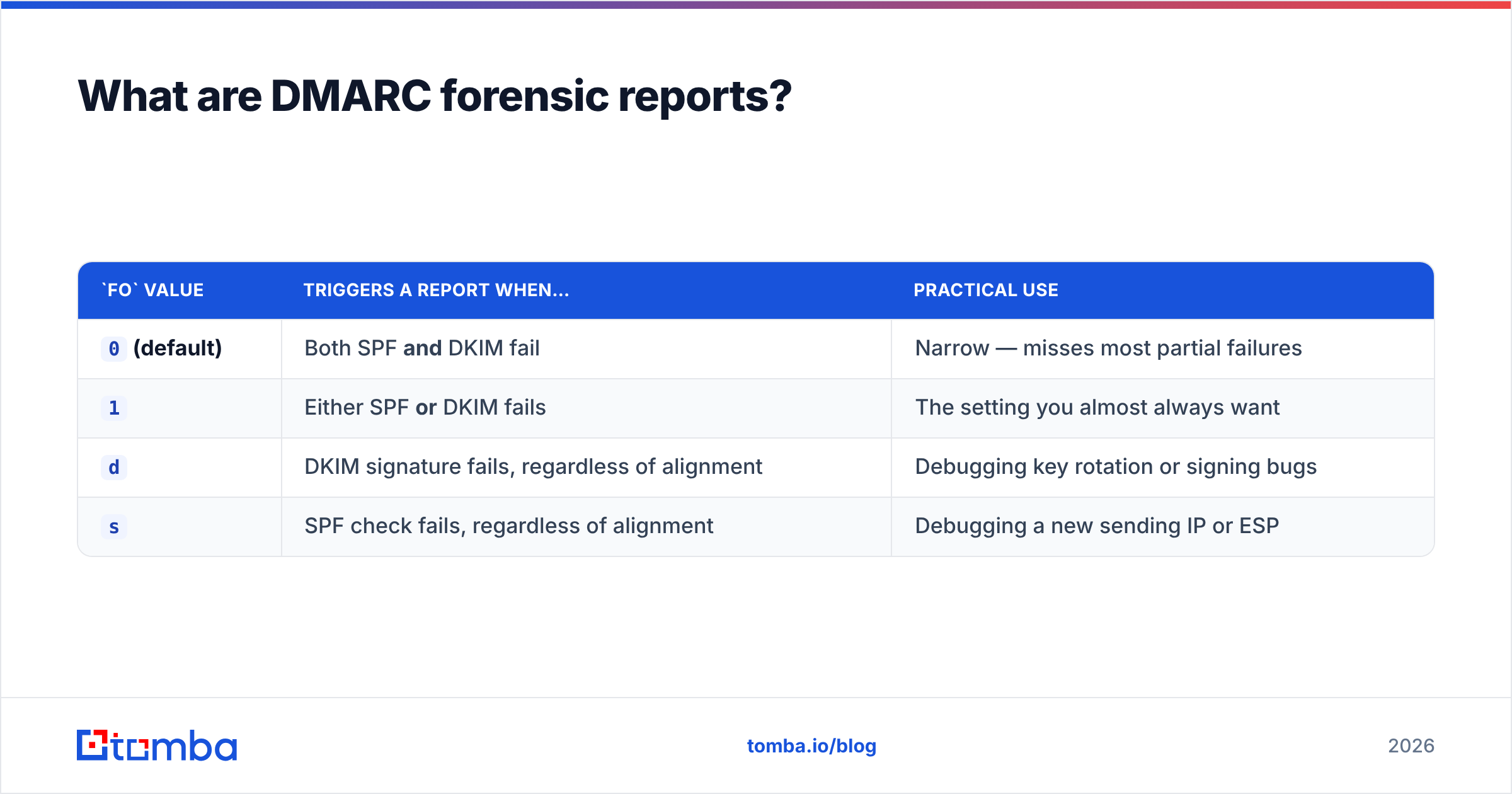
v=DMARC1; p=quarantine; rua=mailto:agg@yourdomain.com; ruf=mailto:forensic@yourdomain.com; fo=1The fo= tag controls when a report fires:
fo value |
Triggers a report when… | Practical use |
|---|---|---|
0 (default) |
Both SPF and DKIM fail | Narrow — misses most partial failures |
1 |
Either SPF or DKIM fails | The setting you almost always want |
d |
DKIM signature fails, regardless of alignment | Debugging key rotation or signing bugs |
s |
SPF check fails, regardless of alignment | Debugging a new sending IP or ESP |
Most guides tell you to set fo=0 because it's the default. Set fo=1. With fo=0 you only hear about a message when both authentication mechanisms collapse at once — which is exactly the case you'd already have caught in your aggregate data.
How are forensic reports different from aggregate reports?#
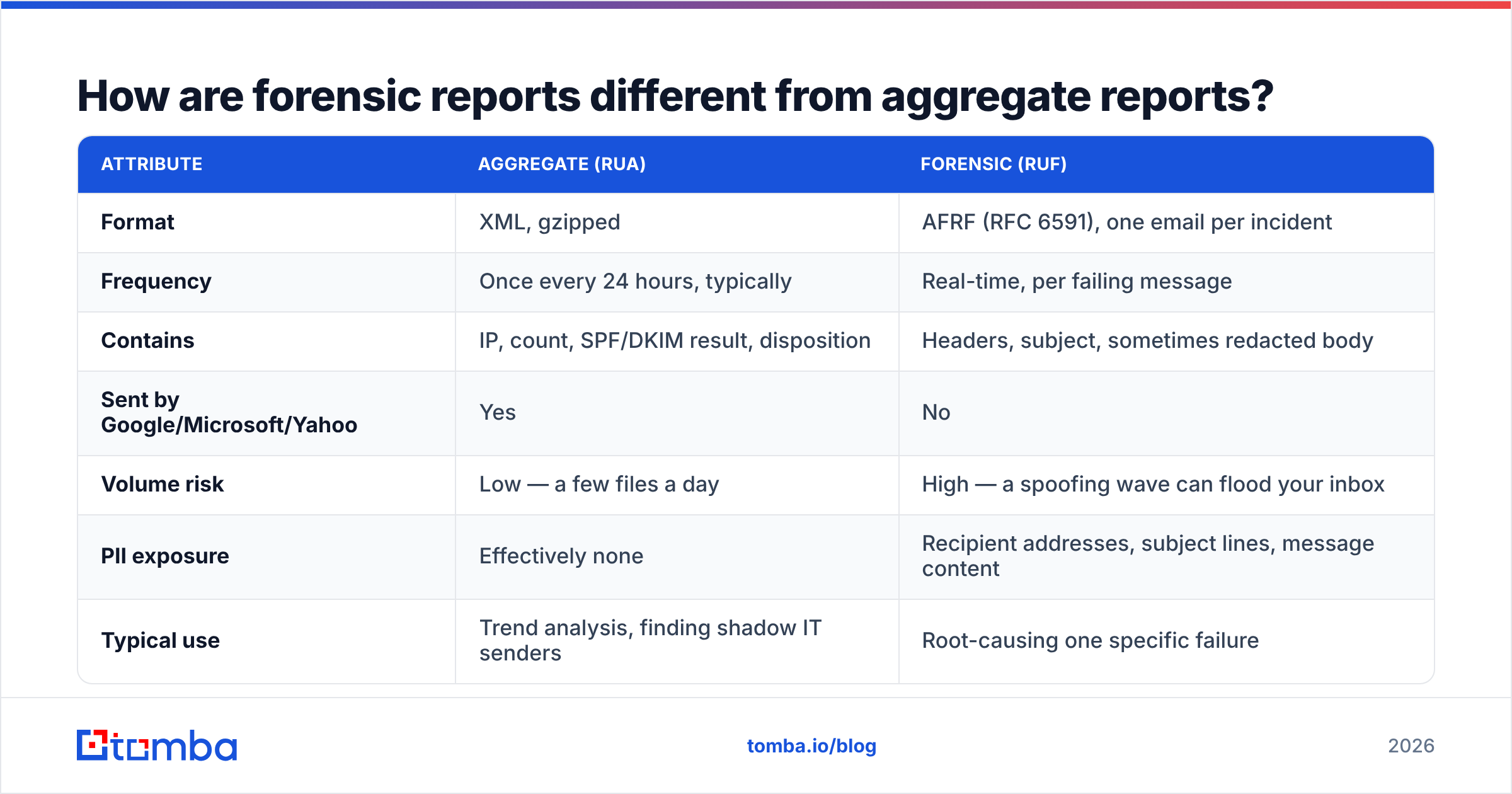
They answer different questions, and only one of them arrives reliably.
| Attribute | Aggregate (RUA) | Forensic (RUF) |
|---|---|---|
| Format | XML, gzipped | AFRF (RFC 6591), one email per incident |
| Frequency | Once every 24 hours, typically | Real-time, per failing message |
| Contains | IP, count, SPF/DKIM result, disposition | Headers, subject, sometimes redacted body |
| Sent by Google/Microsoft/Yahoo | Yes | No |
| Volume risk | Low — a few files a day | High — a spoofing wave can flood your inbox |
| PII exposure | Effectively none | Recipient addresses, subject lines, message content |
| Typical use | Trend analysis, finding shadow IT senders | Root-causing one specific failure |
Here is the practical consequence: if you publish only ruf= and skip rua=, you will have near-zero visibility into your own domain. If you publish only rua=, you still get 90% of the value. Aggregate reports are non-optional; forensic reports are a bonus round.

Why do so few providers actually send them?#
Three reasons, in descending order of importance.
- Privacy law. A forensic report contains a real recipient's email address and often their subject line. Under GDPR, forwarding that to a third-party domain — the spoofed domain, no less — is hard to justify. European providers were the first to restrict it; US providers followed.
- Abuse potential. An attacker who controls a domain can publish
ruf=pointing anywhere and then deliberately trigger failures to harvest message content from the receiver. The report becomes an exfiltration channel. - Cost. Generating and sending a message per failure is expensive at Gmail scale. Aggregate reports batch; forensic reports don't.
Google's own DMARC documentation covers aggregate report configuration and stays silent on failure reports — that silence is the answer. Microsoft behaves the same way. If you set up ruf= today and see nothing for a month, your record is probably fine; the senders just aren't sending.
Who still does, at least intermittently: some regional ISPs, a handful of European hosts, Mail.ru, and various corporate mail gateways running commercial DMARC appliances. Expect a slow drip, not a stream.
Should you enable DMARC forensic reports at all?#
Yes — with three conditions.
- Use a dedicated mailbox on a domain you control. Never route forensic reports to a shared team inbox or a helpdesk queue. The reports contain other people's data.
- Set
fo=1. Otherwise you're filtering out the failures you actually want to see. - Have a plan for volume. If someone spoofs your domain in a 2-million-message campaign and even 0.5% of receivers honor RUF, that's 10,000 emails in an afternoon. Rate-limit or auto-archive.
If you're publishing ruf= to a third-party DMARC monitoring vendor, check their data-processing terms first. You are, in effect, asking mailbox providers worldwide to forward your customers' subject lines to a company you may not have a DPA with.
There's also a legitimate case for not enabling it: if your domain has no history of being spoofed and your aggregate reports are clean, RUF adds risk without adding signal. Skipping it is a defensible choice, not negligence.
How do you read a forensic report when one arrives?#
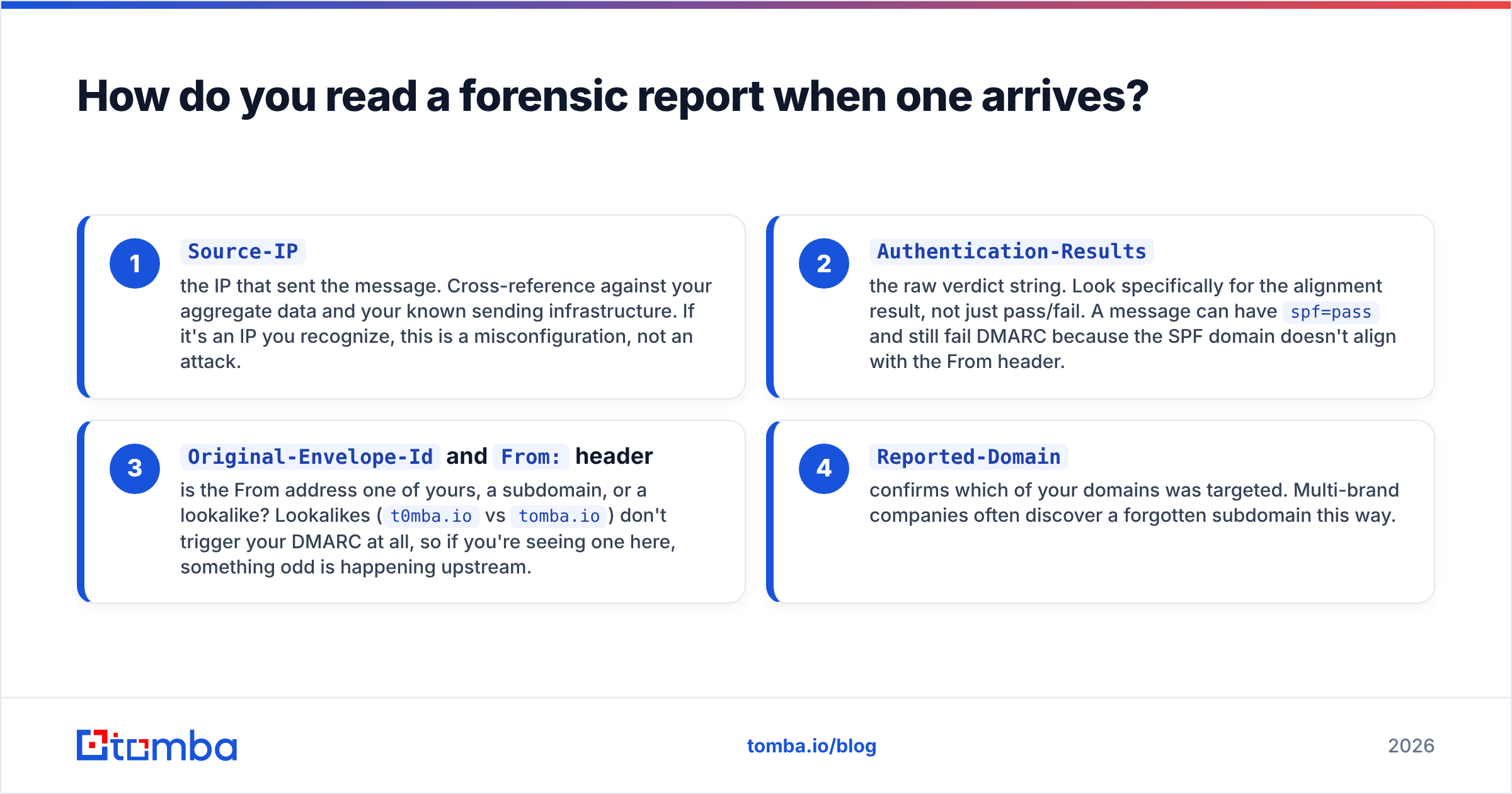
Open it and go straight to four fields. Everything else is noise on the first pass.
Source-IP— the IP that sent the message. Cross-reference against your aggregate data and your known sending infrastructure. If it's an IP you recognize, this is a misconfiguration, not an attack.Authentication-Results— the raw verdict string. Look specifically for the alignment result, not just pass/fail. A message can havespf=passand still fail DMARC because the SPF domain doesn't align with the From header.Original-Envelope-IdandFrom:header — is the From address one of yours, a subdomain, or a lookalike? Lookalikes (t0mba.iovstomba.io) don't trigger your DMARC at all, so if you're seeing one here, something odd is happening upstream.Reported-Domain— confirms which of your domains was targeted. Multi-brand companies often discover a forgotten subdomain this way.
The single most common finding is boring: a marketing tool, a ticketing system, or an old newsletter platform that someone in another department signed up for and never added to your SPF record. Shadow IT, not hackers. Fix it by adding the sender to SPF and DKIM, or by moving the traffic to a dedicated subdomain.
The second most common finding is forwarding. A recipient auto-forwards your mail to another address; the forwarding server breaks the SPF chain; DMARC fails. Nothing is wrong and nothing needs fixing — DKIM survives forwarding, which is exactly why you should sign everything.
What should you use instead — or alongside?#
Forensic reports sit at the very end of a diagnostic chain. If your cold outbound is underperforming, walk the chain from the front:
- Authentication basics. Publish SPF, DKIM, and DMARC correctly and confirm alignment. Run your record through an SPF checker and confirm you're under the 10-lookup limit — exceeding it silently voids SPF for every message.
- Reputation. Check whether your domain or IP is listed anywhere with a blacklist checker, and watch your Postmaster Tools reputation graph week over week. A slow slide from High to Medium is your earliest warning.
- List quality. This is where most "deliverability problems" actually originate. Bounces above roughly 3% will damage sender reputation faster than any DNS misconfiguration. Verify before you send, not after.
- Content and volume. Run drafts through a spam checker, and ramp sending volume gradually on new domains rather than switching on 500 sends a day.

Aggregate reports plus a solid verification workflow will resolve the overwhelming majority of what people hope forensic reports will resolve. DMARC tells you about authentication. It says nothing about whether the addresses you're mailing exist — and invalid addresses are the faster route to the spam folder.
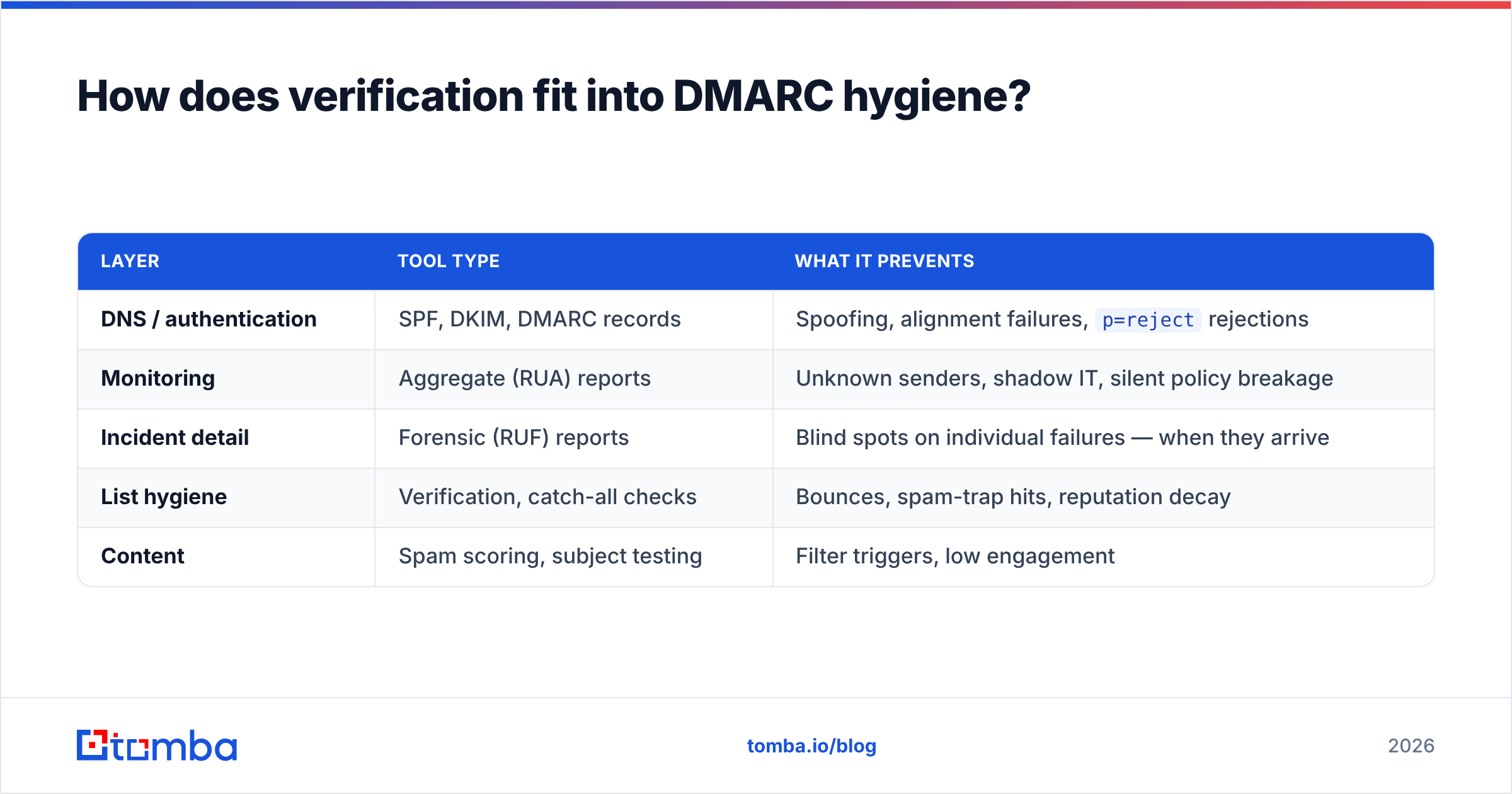
How does verification fit into DMARC hygiene?#
Directly, though the connection isn't obvious.
Every hard bounce is a signal to the receiving provider that you don't know who you're mailing. Enough of those and your mail gets filtered regardless of how perfect your DMARC record is. You can have p=reject, aligned DKIM, a clean SPF record, and still land in spam because 12% of your list is stale.
That's the gap email verification closes. Before a campaign goes out, run the list through syntax, MX, and SMTP-level checks, drop the invalids, and flag the catch-all domains for separate handling. Catch-all domains accept everything at the SMTP layer, so they need a catch-all verifier rather than a standard check — treating them as valid inflates your bounce rate later.
Then there's the sourcing side. If you're building lists from scraped or purchased data, you inherit whatever decay was already in them. Sourcing addresses from a live email finder that verifies at lookup time gives you a cleaner starting point than any amount of post-hoc cleanup.
| Layer | Tool type | What it prevents |
|---|---|---|
| DNS / authentication | SPF, DKIM, DMARC records | Spoofing, alignment failures, p=reject rejections |
| Monitoring | Aggregate (RUA) reports | Unknown senders, shadow IT, silent policy breakage |
| Incident detail | Forensic (RUF) reports | Blind spots on individual failures — when they arrive |
| List hygiene | Verification, catch-all checks | Bounces, spam-trap hits, reputation decay |
| Content | Spam scoring, subject testing | Filter triggers, low engagement |
Notice which row does the heaviest lifting. It isn't the forensic one.
What does a sensible DMARC record look like in 2026?#
Start permissive, monitor, then tighten. The staged rollout is:
- Month 1 —
p=none. Collect aggregate reports only. You are looking for legitimate senders you forgot about. Do not skip this; going straight to reject will break your invoicing system on day one. - Month 2 — fix alignment. Add every legitimate sender to SPF, enable DKIM signing everywhere, and move any sender you can't fix onto a subdomain with its own policy.
- Month 3 —
p=quarantine; pct=25. Ramp the percentage up as your aggregate reports stay clean. - Month 4+ —
p=reject. Keeprua=forever. Addruf=if you've satisfied the three conditions above.
A finished record:
v=DMARC1; p=reject; rua=mailto:dmarc-agg@yourdomain.com; ruf=mailto:dmarc-ruf@yourdomain.com; fo=1; adkim=s; aspf=s; pct=100adkim=s and aspf=s enforce strict alignment — the From domain must match exactly, not just at the organizational level. Use strict only after relaxed alignment has been clean for a full month; it will break subdomain senders that relaxed mode tolerated.
One nuance worth flagging: pct= does not apply to reporting, only to policy application. You'll get reports on 100% of failures even at pct=10. That makes the ramp genuinely safe to run slowly.
Where do most teams go wrong?#
- Publishing
ruf=to a mailbox nobody monitors. The reports arrive, sit unread, and create a data-retention liability with zero upside. - Treating an empty forensic inbox as proof of health. It usually means providers aren't sending, not that nothing is failing. Check aggregate data.
- Jumping to
p=rejectafter one clean week. Quarterly senders — annual renewals, tax notices, that one conference tool — won't show up in seven days of reports. - Assuming DMARC fixes deliverability. It fixes spoofing. Providers increasingly require it, but passing DMARC is table stakes, not an advantage. Everyone mailing you passes too.
- Ignoring subdomains. DMARC on
yourdomain.comdoesn't automatically covermail.yourdomain.comunless you usesp=. Attackers know this.
For a deeper primer on the underlying mechanics, the email deliverability glossary entry covers how filters weigh authentication against engagement, and G2's deliverability category is a reasonable place to compare monitoring vendors if you decide to outsource report parsing.
The bottom line#
DMARC forensic reports are a legacy diagnostic that privacy law has quietly retired. Publish ruf= with fo=1 if you have a dedicated, monitored mailbox and no compliance objection — the occasional report is genuinely useful for catching a spoofing campaign early. But build your process around aggregate reports, and don't wait on forensic data that may never arrive.
The larger point: authentication is the floor, not the ceiling. Once SPF, DKIM, and DMARC are aligned, the next multiplier on your reply rate is the quality of the addresses you're sending to. Clean, verified, sourced-at-send-time contacts beat a perfect DNS record every time.
If your outbound list is the weak link, start there. Tomba's Email Finder verifies addresses at lookup so you're not cleaning up bounces after the fact, with a free tier of 25 searches a month and paid plans from $49/mo — see Tomba pricing for the full breakdown. Fix the list, then let DMARC do the job it's actually good at.
Related guides#
Ready to find emails that actually work?
Join 150,000+ professionals who stopped guessing and started sending. Free credits on signup — no credit card required.
Get the Tomba newsletter
Practical outbound tactics and product updates — once every two weeks.
About the author