DMARC Record Explained: Setup, Syntax, and Fixes for 2026
Your DMARC record decides whether cold email lands in the inbox or gets rejected outright. Here's the exact syntax, the p=none trap, and how to reach enforcement without losing legitimate mail.
TL;DR
- A DMARC record is a single DNS TXT entry at
_dmarc.yourdomain.comthat tells receiving servers what to do when an email claiming to be from you fails SPF and DKIM alignment. - Since Google and Yahoo's 2024 bulk-sender rules, any domain sending more than 5,000 messages a day to Gmail needs a published DMARC record — and in practice, every cold-email domain needs one regardless of volume.
- The three policies are
p=none(monitor),p=quarantine(spam folder), andp=reject(bounce). Sitting onp=noneforever is the single most common mistake, and it buys you almost no deliverability benefit. - DMARC only passes when SPF or DKIM passes and the passing domain aligns with your visible From address. Alignment is the part most people miss.
- Fixing DMARC does nothing if you're mailing dead addresses. Bounce rate and authentication are separate levers, and you need both.
What is a DMARC record?#
A DMARC record is a public note to the internet saying: "Here's how to verify mail from my domain, and here's what to do with anything that fails."
Think of it like a bouncer's instruction card. SPF is the guest list of IP addresses allowed to send on your behalf. DKIM is the tamper-proof wax seal on the envelope. DMARC is the note that tells the bouncer what to do when someone shows up without a valid seal and isn't on the list — wave them through, put them in a holding room, or turn them away at the door.
Technically, DMARC stands for Domain-based Message Authentication, Reporting and Conformance, defined in RFC 7489. It lives as a DNS TXT record at the subdomain _dmarc.yourdomain.com. Receiving mail servers — Gmail, Outlook, corporate gateways — look it up on every inbound message from your domain.
Here's what a minimal record looks like:
v=DMARC1; p=none; rua=mailto:dmarc@yourdomain.comAnd a production-grade one:
v=DMARC1; p=reject; rua=mailto:dmarc@yourdomain.com; ruf=mailto:forensics@yourdomain.com; pct=100; adkim=s; aspf=r; fo=1The difference between those two lines is the difference between watching your domain get spoofed and actually stopping it.
What do the DMARC tags actually mean?#
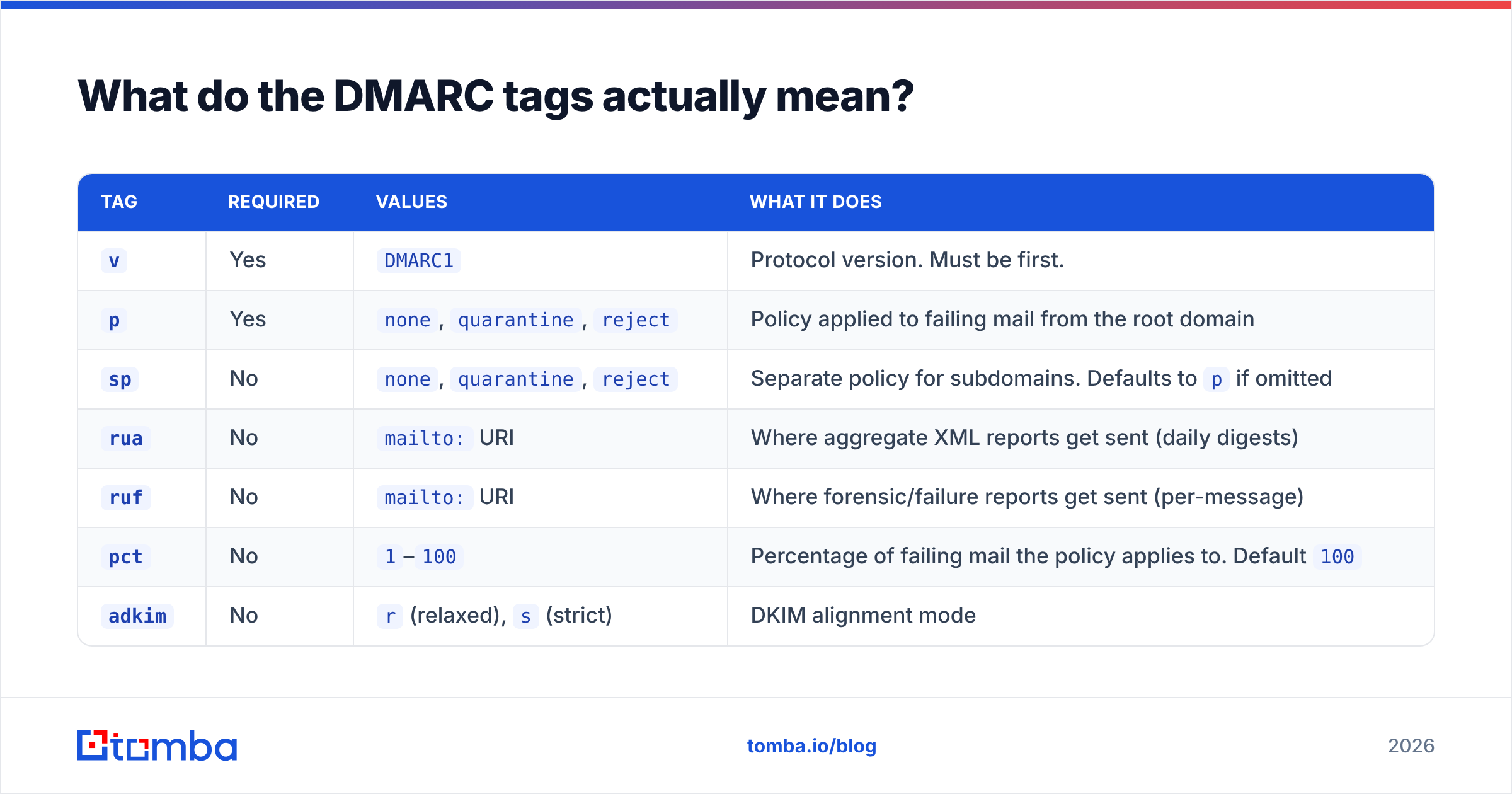
Every DMARC record is a semicolon-separated list of tag=value pairs. Only two are required: v and p. The rest control reporting, strictness, and rollout speed.
| Tag | Required | Values | What it does |
|---|---|---|---|
v |
Yes | DMARC1 |
Protocol version. Must be first. |
p |
Yes | none, quarantine, reject |
Policy applied to failing mail from the root domain |
sp |
No | none, quarantine, reject |
Separate policy for subdomains. Defaults to p if omitted |
rua |
No | mailto: URI |
Where aggregate XML reports get sent (daily digests) |
ruf |
No | mailto: URI |
Where forensic/failure reports get sent (per-message) |
pct |
No | 1–100 |
Percentage of failing mail the policy applies to. Default 100 |
adkim |
No | r (relaxed), s (strict) |
DKIM alignment mode |
aspf |
No | r (relaxed), s (strict) |
SPF alignment mode |
fo |
No | 0, 1, d, s |
Which failure conditions trigger a forensic report |
Two tags cause more confusion than the rest combined:
pctis a rollout dial, not a safety net.pct=25withp=rejectmeans one in four failing messages gets bounced and three in four fall through to the next-lower policy. It's for staged rollout, not permanent hedging.spis the forgotten hole. If you publishp=rejectbut never setsp, subdomains inheritreject— good. But if you setsp=none"temporarily," attackers will spoofbilling.yourdomain.comand your enforcement is theatre.
Why does DMARC fail even when SPF and DKIM pass?#
Because DMARC doesn't check whether SPF and DKIM passed. It checks whether they passed for the domain in your From header. That's alignment, and it's where most DMARC failures originate.
Say you send from you@acme.com through a marketing platform. The platform's return-path is bounces@mail.sendingtool.net. SPF checks the return-path domain — sendingtool.net — and passes cleanly. But sendingtool.net ≠ acme.com, so SPF alignment fails. If DKIM is signed with the platform's domain rather than yours, DKIM alignment fails too. Result: DMARC fails, even though both underlying checks returned "pass."
The fix is almost always one of these:
- Set up a custom DKIM signing domain with your ESP so the
d=value in the DKIM signature isacme.com, not the vendor's domain. - Configure a custom return-path (sometimes called a custom bounce domain or MAIL FROM domain) that's a subdomain of yours, like
bounce.acme.com. - Use relaxed alignment (
adkim=r,aspf=r, the defaults) somail.acme.comcounts as aligned withacme.com. Strict mode requires an exact match. - Audit forwarding paths. Mailing lists and auto-forwarders break SPF by design. DKIM usually survives forwarding, which is why DKIM alignment matters more than SPF alignment for real-world pass rates.
Run an SPF checker before you touch anything else — a syntax error or a lookup-limit overflow in your SPF record will quietly break alignment regardless of what your DMARC record says. SPF has a hard limit of 10 DNS lookups; exceed it and the whole check returns permerror.
How do you go from p=none to p=reject safely?#
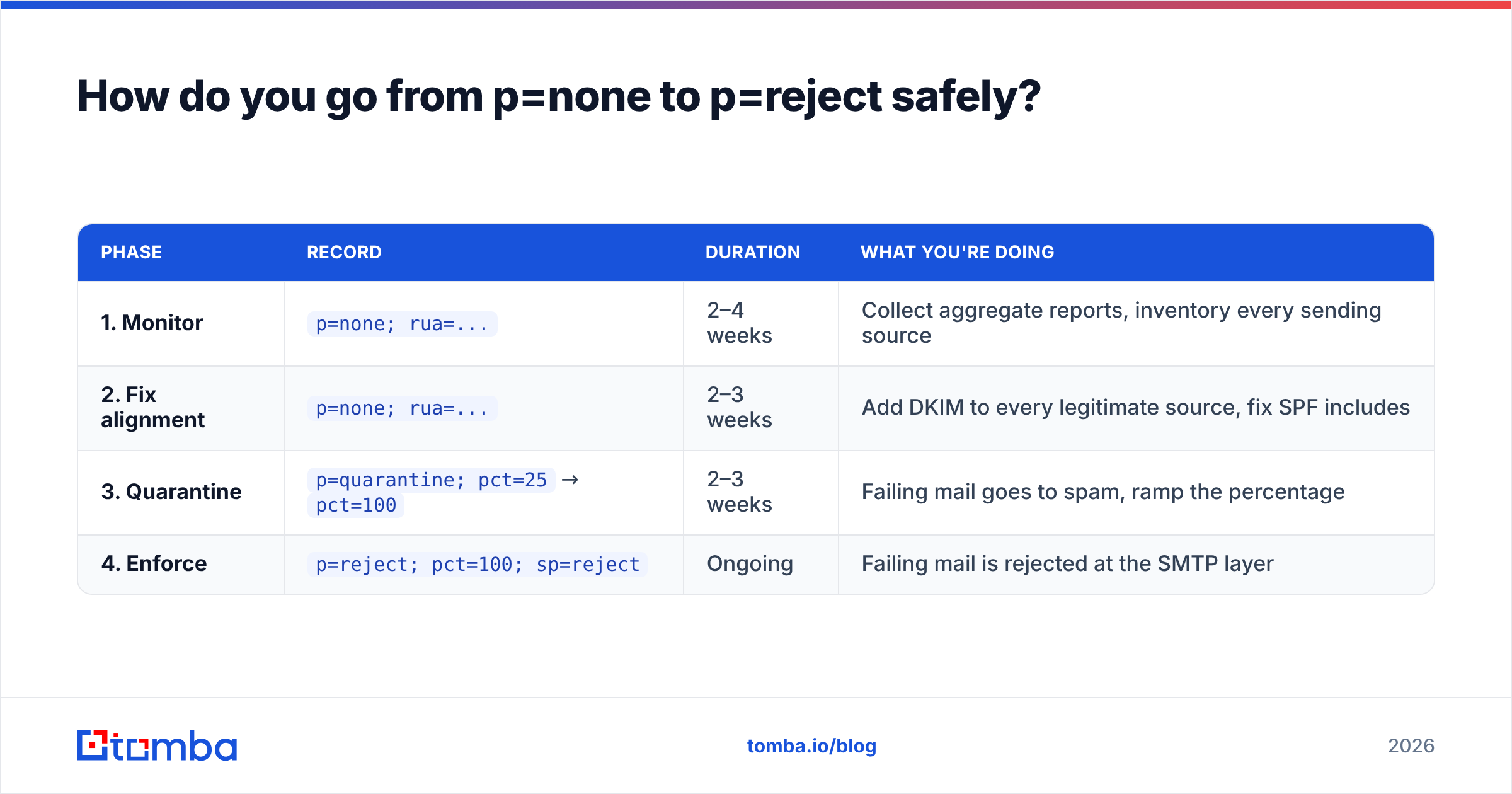
Treat it as a four-phase rollout over 6 to 12 weeks. Rushing straight to p=reject on a domain with unknown senders will bounce your own invoices, calendar invites, and support notifications.
| Phase | Record | Duration | What you're doing |
|---|---|---|---|
| 1. Monitor | p=none; rua=... |
2–4 weeks | Collect aggregate reports, inventory every sending source |
| 2. Fix alignment | p=none; rua=... |
2–3 weeks | Add DKIM to every legitimate source, fix SPF includes |
| 3. Quarantine | p=quarantine; pct=25 → pct=100 |
2–3 weeks | Failing mail goes to spam, ramp the percentage |
| 4. Enforce | p=reject; pct=100; sp=reject |
Ongoing | Failing mail is rejected at the SMTP layer |
Phase 1 in practice. Publish the monitoring record and wait. Within 24–72 hours you'll start receiving XML aggregate reports from Gmail, Microsoft, Yahoo, and others. Raw DMARC XML is unreadable by design — pipe it into a free parser or a paid dashboard. What you're looking for is a complete list of IPs sending as your domain. Expect surprises: an old CRM, a helpdesk tool nobody documented, an invoicing system from a department you forgot about.
Phase 2 is the real work. Every legitimate source from phase 1 needs DKIM signing with your domain. This is a per-vendor configuration task, usually documented under "email authentication" or "custom domain setup" in the vendor's help center. Google's own guidance covers Workspace specifics and is worth reading even if you're on Microsoft 365.
Phase 3 gives you a reversible test. Quarantine means failing mail goes to spam, not into the void. If a business-critical system breaks, you'll hear about it from a colleague finding the message in their junk folder rather than from a customer who never received an invoice.
Phase 4 is where the value lands. p=reject is the only policy that actually stops exact-domain spoofing. It's also what mailbox providers reward. Post-enforcement, most senders see a measurable lift in inbox placement — not because DMARC is a ranking signal on its own, but because it removes a chunk of negative signals attached to your domain by spoofers.

Does DMARC actually improve deliverability?#
Yes, but indirectly — and it's a floor, not a ceiling.
DMARC at enforcement does three things for email deliverability:
- It removes spoofed volume from your domain's reputation. If a phishing operation has been blasting millions of messages as
you@acme.com, every spam complaint against that traffic partly lands on your domain. Enforcement cuts it off. - It satisfies bulk-sender requirements. Google and Yahoo's rules require a DMARC record for senders exceeding 5,000 daily messages to their users, alongside SPF, DKIM, one-click unsubscribe, and a spam complaint rate below 0.3%.
- It signals operational maturity. Filtering systems weigh authentication completeness. A domain with aligned SPF, aligned DKIM, and
p=rejectclears a bar that a large share of spam never will.
What DMARC will not fix:
- A bad list. If 12% of your addresses bounce, no authentication record saves you. Bounce rate is a separate, heavier signal.
- Bad content. Spammy copy, image-only messages, and shortened link domains still trigger filters.
- A cold domain. A brand-new domain with perfect DMARC and zero sending history still needs warmup. Model the ramp with a warmup calculator before you scale volume.
- Complaint rate. Nothing in DNS stops people from hitting "report spam."
The honest framing: DMARC is table stakes. It gets you out of the penalty box. Getting into the primary inbox is a function of list quality, sender reputation, engagement, and content — in roughly that order.
What tools should you use to manage DMARC?#
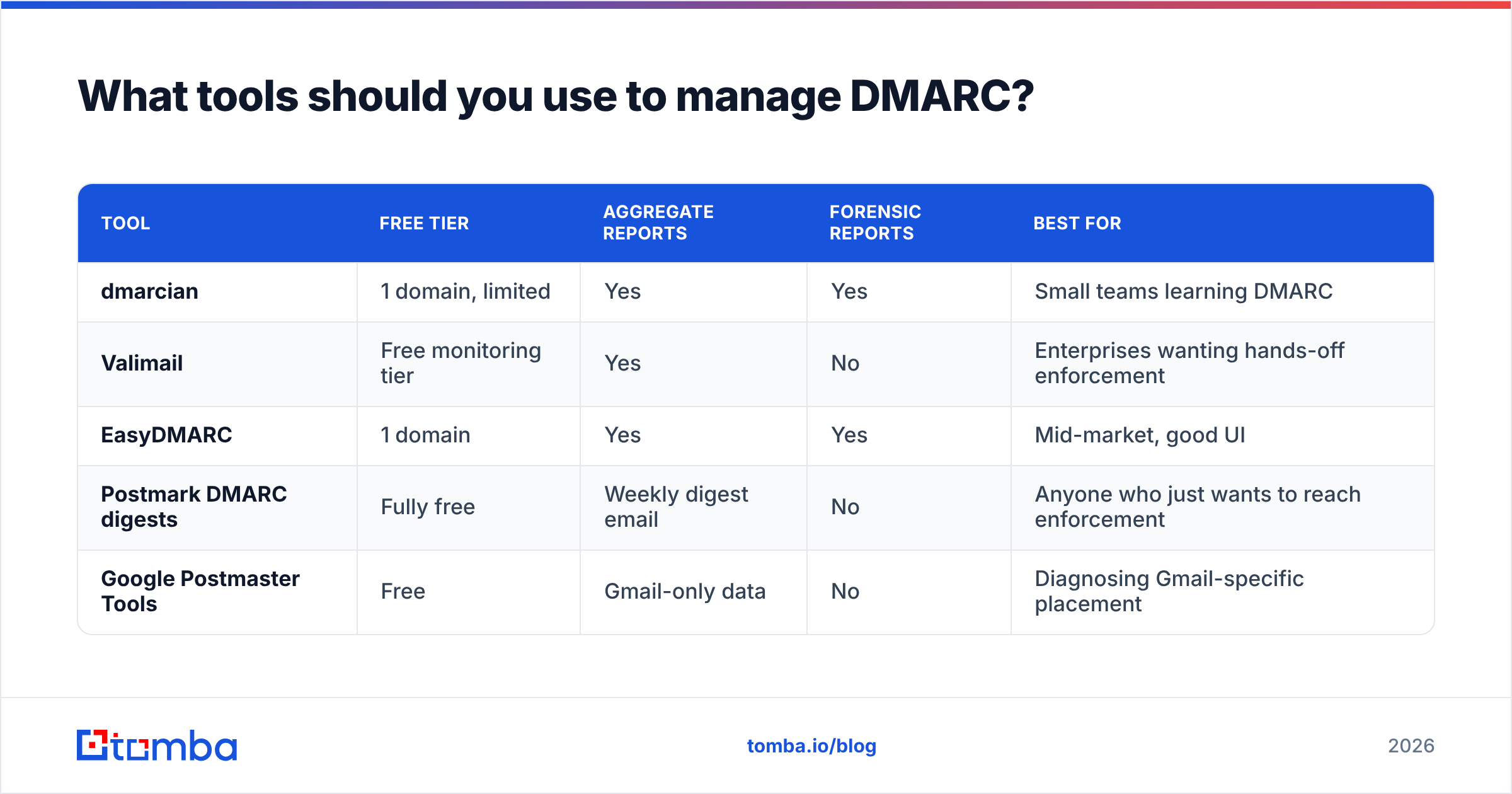
You need two things: a report parser and a validator. Here's how the common options compare.
| Tool | Free tier | Aggregate reports | Forensic reports | Best for |
|---|---|---|---|---|
| dmarcian | 1 domain, limited | Yes | Yes | Small teams learning DMARC |
| Valimail | Free monitoring tier | Yes | No | Enterprises wanting hands-off enforcement |
| EasyDMARC | 1 domain | Yes | Yes | Mid-market, good UI |
| Postmark DMARC digests | Fully free | Weekly digest email | No | Anyone who just wants to reach enforcement |
| Google Postmaster Tools | Free | Gmail-only data | No | Diagnosing Gmail-specific placement |
For most teams sending B2B outbound, Postmark's free weekly digest is enough to get from p=none to p=reject. You don't need an enterprise DMARC platform to fix four sending sources. Upgrade when you have 20+ sources across multiple business units, or when compliance requires an audit trail.
On the diagnostic side, before you blame DMARC for a placement problem, check the cheaper explanations first: run a blacklist checker on your sending IP and domain, and run your actual message through a spam checker. A listing on a major blocklist will crater placement no matter how clean your authentication is. Independent reviews on G2 are useful for comparing the paid platforms if you get to that stage.
What's the most common DMARC mistake?#
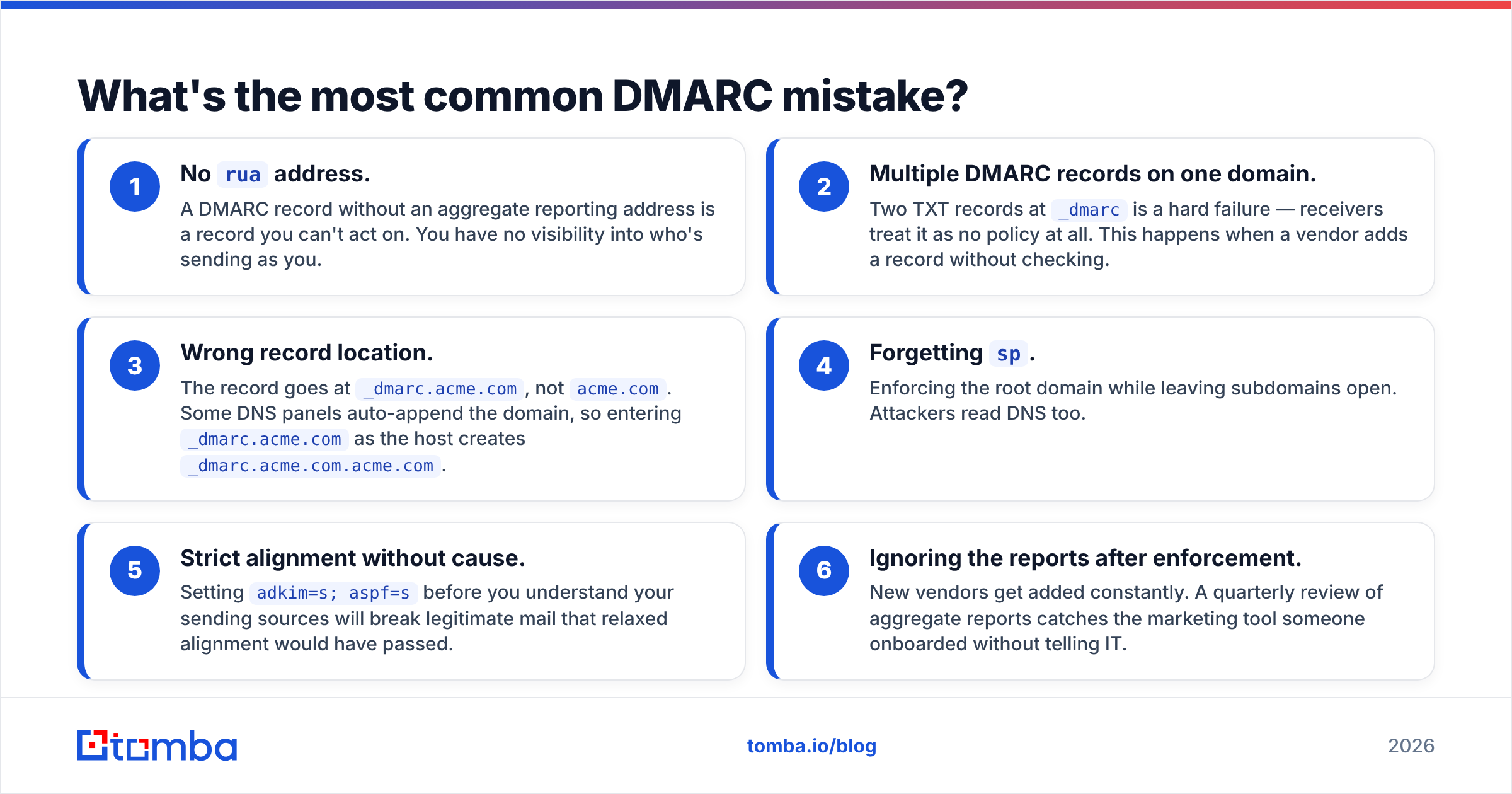
Publishing p=none and calling it done. Roughly the majority of domains with a DMARC record never advance past monitoring — the record exists, it satisfies a compliance checkbox, and it provides zero protection.
Other frequent failures, in rough order of how often they bite:
- No
ruaaddress. A DMARC record without an aggregate reporting address is a record you can't act on. You have no visibility into who's sending as you. - Multiple DMARC records on one domain. Two TXT records at
_dmarcis a hard failure — receivers treat it as no policy at all. This happens when a vendor adds a record without checking. - Wrong record location. The record goes at
_dmarc.acme.com, notacme.com. Some DNS panels auto-append the domain, so entering_dmarc.acme.comas the host creates_dmarc.acme.com.acme.com. - Forgetting
sp. Enforcing the root domain while leaving subdomains open. Attackers read DNS too. - Strict alignment without cause. Setting
adkim=s; aspf=sbefore you understand your sending sources will break legitimate mail that relaxed alignment would have passed. - Ignoring the reports after enforcement. New vendors get added constantly. A quarterly review of aggregate reports catches the marketing tool someone onboarded without telling IT.
Check your current record with a dig command before you assume anything:
dig +short TXT _dmarc.yourdomain.comIf that returns nothing, you have no DMARC record. If it returns two strings, you have a hard failure to fix today.
How does DMARC fit into a cold email setup?#
Authentication is the first of three layers. Skipping any one of them wastes the other two.
Layer 1 — Domain infrastructure. Separate sending domain (not your primary corporate domain), SPF within the 10-lookup limit, DKIM with 2048-bit keys, DMARC at p=reject, and a valid SPF record. Add MTA-STS and BIMI once you're at enforcement — BIMI requires p=quarantine or stricter, which is a nice forcing function.
Layer 2 — List hygiene. This is where most outbound programs actually die. Perfect DNS records and a 15% bounce rate still gets you filtered. Verify every address before it enters a sequence — an email verifier removes invalid, role-based, and disposable addresses, and a catch-all verifier handles the accept-all domains that basic verification marks "unknown." Keep hard bounces under 2% and you stay out of trouble.
Layer 3 — Volume and warmup. Ramp gradually. A domain going from 0 to 500 sends a day looks exactly like a compromised account to a filtering system, DMARC or not.
The sequencing matters. Fix DNS first because it's a one-time task with permanent benefit. Then fix your list, because that's the recurring cost. Then scale volume, because that's the part that compounds — but only on top of the first two.
Where should you start this week?#
Run dig +short TXT _dmarc.yourdomain.com. Whatever it returns dictates your next move:
- Nothing returned: publish
v=DMARC1; p=none; rua=mailto:dmarc@yourdomain.comtoday. Zero risk, immediate visibility. p=nonereturned: you've had monitoring long enough. Read this week's aggregate report, inventory your senders, and set a date forp=quarantine.p=quarantinereturned: check whetherpct=100and whetherspis set. If both are clean and reports show no legitimate failures for two weeks, move toreject.p=rejectreturned: you're done with DNS. Your deliverability problem, if you have one, is list quality or content.
That last case is the common one for teams who've already done the infrastructure work. Authentication gets you delivered; accurate contact data gets you replies. Tomba's Email Finder returns verified professional addresses with a confidence score attached, so bad data never reaches your sequence in the first place — the free tier covers 25 searches a month, and paid Tomba plans start at $49/mo with bulk processing and API access. Get the DNS right once, then keep the list clean forever.
Related guides#
Ready to find emails that actually work?
Join 150,000+ professionals who stopped guessing and started sending. Free credits on signup — no credit card required.
Get the Tomba newsletter
Practical outbound tactics and product updates — once every two weeks.
About the author