DMARC Reject: How to Move to p=reject Without Losing Email
p=reject is the only DMARC policy that actually blocks spoofed mail — and the one most senders stall on. Here's the staged rollout, the failure modes, and what to check before you flip it.
TL;DR
p=rejectis the only DMARC policy that instructs receivers to actually block mail failing authentication.p=noneblocks nothing — it is a reporting mode, not protection.- Google and Yahoo's bulk sender rules (5,000+ messages/day) require a DMARC record, but only at
p=noneminimum. Microsoft tightened enforcement for high-volume senders in 2025. The floor keeps rising. - The real risk in moving to reject is not spoofers — it's your own forgotten senders: the billing platform, the ATS, the conference registration tool, the CEO's newsletter service.
- A safe rollout is four stages over 8–12 weeks:
p=nonewith reports → fix alignment →p=quarantine pct=ramp →p=reject. - Cold outreach domains should hit
p=rejectbefore the first send, not after. Building on a domain with no enforcement means rebuilding your reputation later.
What Does DMARC Reject Actually Do?#
p=reject tells receiving mail servers to refuse any message that claims to be from your domain but fails both SPF and DKIM alignment. The message bounces at the SMTP conversation. It never reaches an inbox, a spam folder, or a quarantine.
Think of DMARC as the bouncer's instruction card at a private club. SPF and DKIM are the ID checks. DMARC is what you wrote on the card telling the bouncer what to do when the ID doesn't match: none means "let them in, but text me about it," quarantine means "send them to the back room," and reject means "turn them away at the door."
Technically, your DMARC record is a TXT record at _dmarc.yourdomain.com:
v=DMARC1; p=reject; rua=mailto:dmarc@yourdomain.com; ruf=mailto:forensics@yourdomain.com; fo=1; adkim=s; aspf=sThe critical word is alignment. A message passes DMARC when either:
- SPF passes and aligns — the envelope-from (Return-Path) domain matches your From: header domain, and the sending IP is authorized in your SPF record.
- DKIM passes and aligns — the message carries a valid DKIM signature whose
d=domain matches your From: header domain.
Only one needs to pass. This matters enormously, because forwarding breaks SPF almost every time but usually leaves DKIM intact. If you have DKIM properly aligned, forwarded mail survives p=reject. If you rely on SPF alone, mailing lists and auto-forwarders will start bouncing the day you flip the switch.

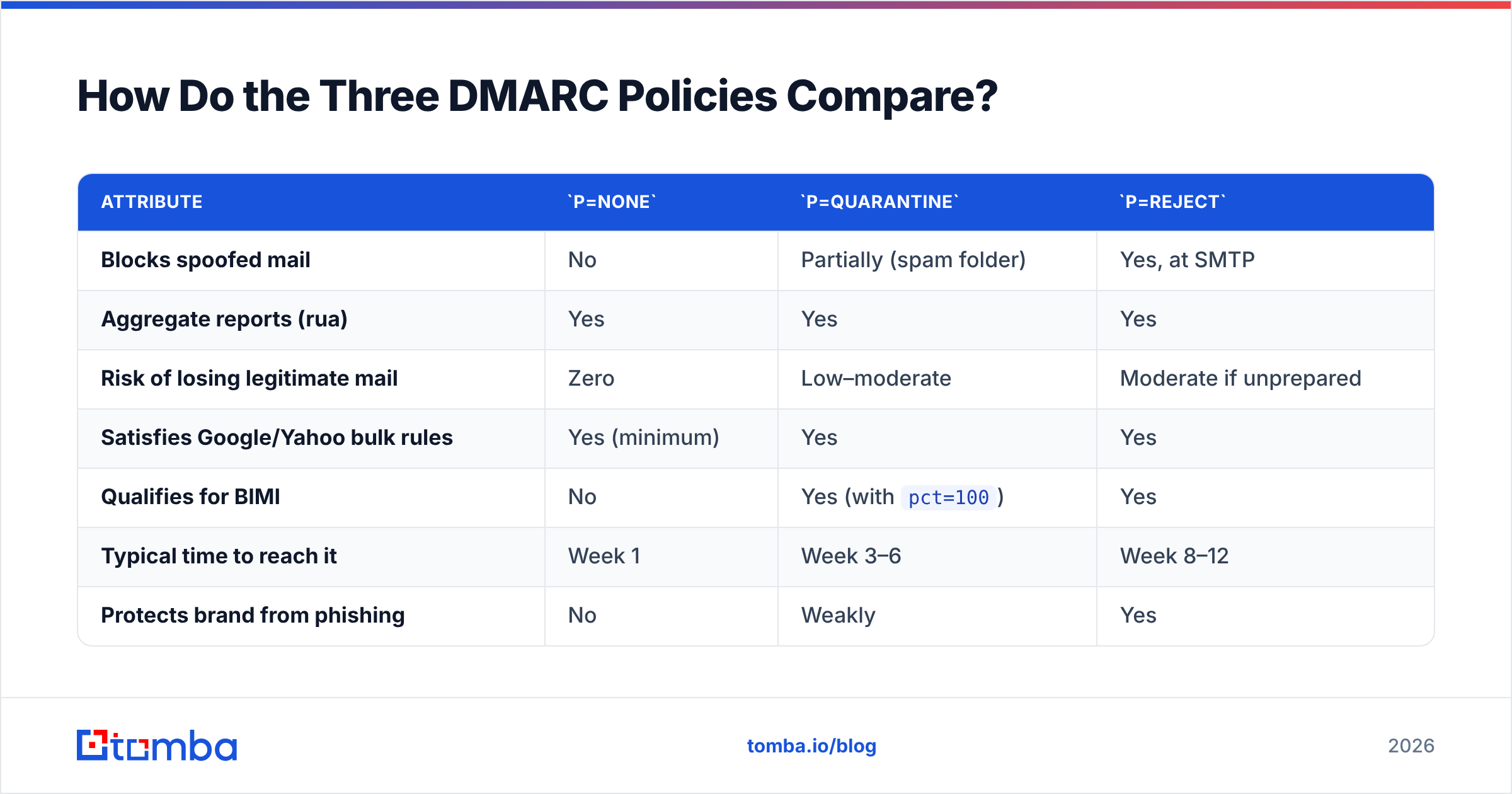
How Do the Three DMARC Policies Compare?#
| Attribute | p=none |
p=quarantine |
p=reject |
|---|---|---|---|
| Blocks spoofed mail | No | Partially (spam folder) | Yes, at SMTP |
| Aggregate reports (rua) | Yes | Yes | Yes |
| Risk of losing legitimate mail | Zero | Low–moderate | Moderate if unprepared |
| Satisfies Google/Yahoo bulk rules | Yes (minimum) | Yes | Yes |
| Qualifies for BIMI | No | Yes (with pct=100) |
Yes |
| Typical time to reach it | Week 1 | Week 3–6 | Week 8–12 |
| Protects brand from phishing | No | Weakly | Yes |
Supports pct= gradual ramp |
Irrelevant | Yes | Yes |
Two rows deserve a closer look.
BIMI eligibility. If you want your logo displayed next to your messages in Gmail, Yahoo, and Apple Mail, you need DMARC at quarantine with pct=100 or reject. p=none disqualifies you entirely. For any brand doing volume marketing, that alone justifies the migration work.
The pct= tag. You can write p=reject; pct=25 and receivers will apply reject to roughly a quarter of failing messages and fall back to the next-lower policy for the rest. This is your safety valve. Nobody serious goes from none to reject; pct=100 in one change.
Why Do Most Domains Stall at p=none?#
Because p=none feels like compliance and costs nothing. You publish the record, the Google Postmaster Tools compliance check goes green, and the deliverability ticket gets closed.
The problem is that p=none provides zero protection. Anyone can send mail claiming to be ceo@yourcompany.com and receivers will deliver it exactly as before. According to Gartner and most security frameworks, unauthenticated domain spoofing remains one of the cheapest entry vectors for business email compromise.
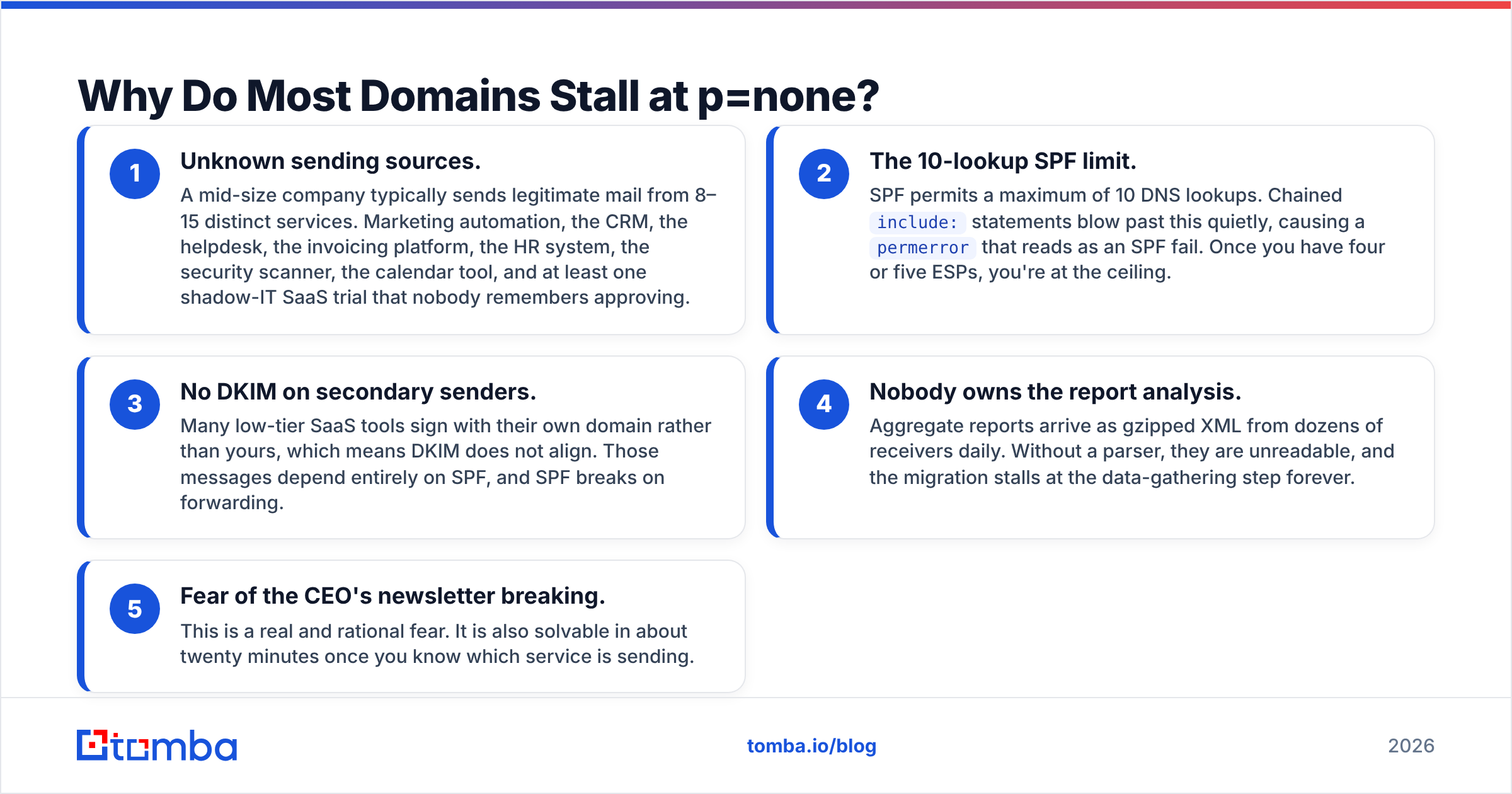
Here is what actually causes the stall, in order of frequency:
- Unknown sending sources. A mid-size company typically sends legitimate mail from 8–15 distinct services. Marketing automation, the CRM, the helpdesk, the invoicing platform, the HR system, the security scanner, the calendar tool, and at least one shadow-IT SaaS trial that nobody remembers approving.
- The 10-lookup SPF limit. SPF permits a maximum of 10 DNS lookups. Chained
include:statements blow past this quietly, causing apermerrorthat reads as an SPF fail. Once you have four or five ESPs, you're at the ceiling. - No DKIM on secondary senders. Many low-tier SaaS tools sign with their own domain rather than yours, which means DKIM does not align. Those messages depend entirely on SPF, and SPF breaks on forwarding.
- Nobody owns the report analysis. Aggregate reports arrive as gzipped XML from dozens of receivers daily. Without a parser, they are unreadable, and the migration stalls at the data-gathering step forever.
- Fear of the CEO's newsletter breaking. This is a real and rational fear. It is also solvable in about twenty minutes once you know which service is sending.
How Do You Roll Out p=reject Safely?#
Four stages. Do not skip one because the reports "look clean" after five days.
Stage 1 — Observe (Weeks 1–3). Publish v=DMARC1; p=none; rua=mailto:dmarc@yourdomain.com; fo=1. Route the reports into a parser — DMARCian, Postmark's free analyzer, Valimail, or an open-source tool like ParseDMARC. Wait a minimum of two full weeks. You need to capture monthly senders: invoicing runs, the quarterly newsletter, the payroll notification.
Stage 2 — Align everything (Weeks 3–6). For every legitimate source in the reports, get DKIM signing with your domain and confirm SPF alignment. Flatten your SPF record if you're near the lookup limit. Move relaxed alignment (adkim=r) to strict (adkim=s) only if you're confident — relaxed is fine for most senders and handles subdomains gracefully.
Stage 3 — Quarantine ramp (Weeks 6–9). Move to p=quarantine; pct=10, then 25, 50, 100 across three weeks. Watch your reports and your support inbox. Quarantined mail lands in spam, so a mistake here is recoverable — recipients can still find the message.
Stage 4 — Reject ramp (Weeks 9–12). p=reject; pct=25 → pct=50 → pct=100. Once you hit 100 with clean reports for two weeks, you're done. Keep the rua address live permanently; new SaaS tools will appear and you'll want to catch them.
A note on subdomains: use sp= to set a separate subdomain policy. Many teams run p=reject; sp=reject and then discover a legacy app sending from notifications.company.com. Setting sp=none temporarily buys you time on the parent domain rollout without leaving the main domain exposed.
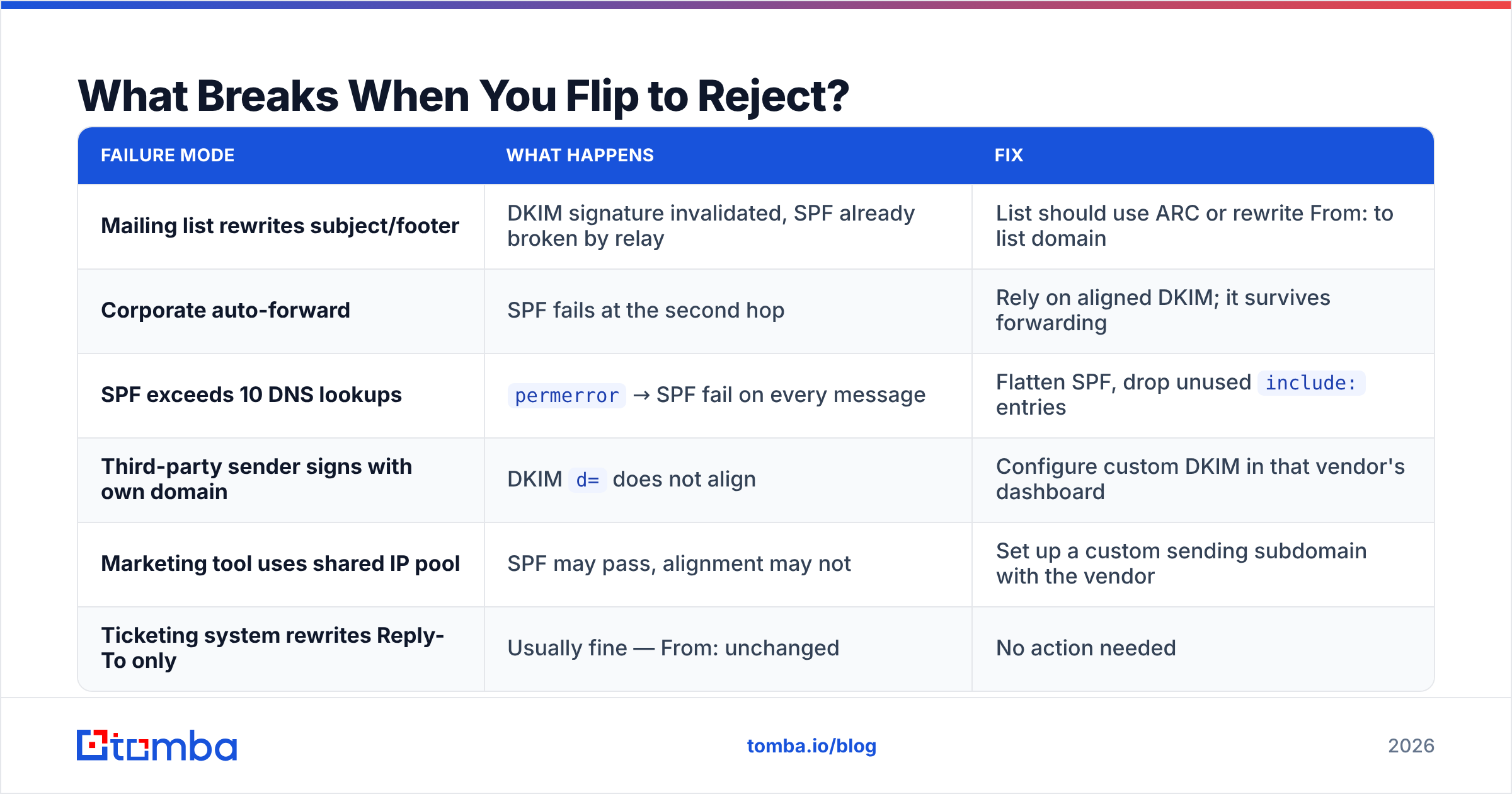
What Breaks When You Flip to Reject?#
Honest answer: mailing lists, forwarders, and anything that rewrites message bodies.
| Failure mode | What happens | Fix |
|---|---|---|
| Mailing list rewrites subject/footer | DKIM signature invalidated, SPF already broken by relay | List should use ARC or rewrite From: to list domain |
| Corporate auto-forward | SPF fails at the second hop | Rely on aligned DKIM; it survives forwarding |
| SPF exceeds 10 DNS lookups | permerror → SPF fail on every message |
Flatten SPF, drop unused include: entries |
| Third-party sender signs with own domain | DKIM d= does not align |
Configure custom DKIM in that vendor's dashboard |
| Marketing tool uses shared IP pool | SPF may pass, alignment may not | Set up a custom sending subdomain with the vendor |
| Ticketing system rewrites Reply-To only | Usually fine — From: unchanged | No action needed |
The ARC protocol (Authenticated Received Chain) exists specifically for the forwarding problem. Gmail and Microsoft both honor it. You cannot control whether an intermediary implements ARC, but the major list managers — Google Groups, Mailman 3 — do.
One thing that does not break: cold outreach, assuming you send from a domain you control with proper DKIM. p=reject on your sending domain does not affect whether recipients accept your mail. It affects whether forgers can impersonate you. If anything, enforcement helps — receivers treat authenticated domains more favorably.
Does DMARC Reject Improve Deliverability?#
Directly, modestly. Indirectly, substantially.
The direct effect: Gmail and Microsoft use DMARC enforcement as a positive reputation signal. It is one input among dozens, and it will not rescue a domain sending to bad lists. The indirect effect is larger — by moving to reject, you eliminate an entire class of reputation damage. Every phishing campaign impersonating your domain generates spam complaints that partially attach to your brand's reputation in receiver systems.
But enforcement is worthless if your list quality is bad. A perfectly authenticated p=reject domain sending to 30% invalid addresses will still get throttled and eventually blocked. Bounce rate is a harder signal than authentication. Before you spend three months on DMARC, run your list through an email verifier and cut the dead addresses — that produces a faster deliverability improvement than any DNS change.
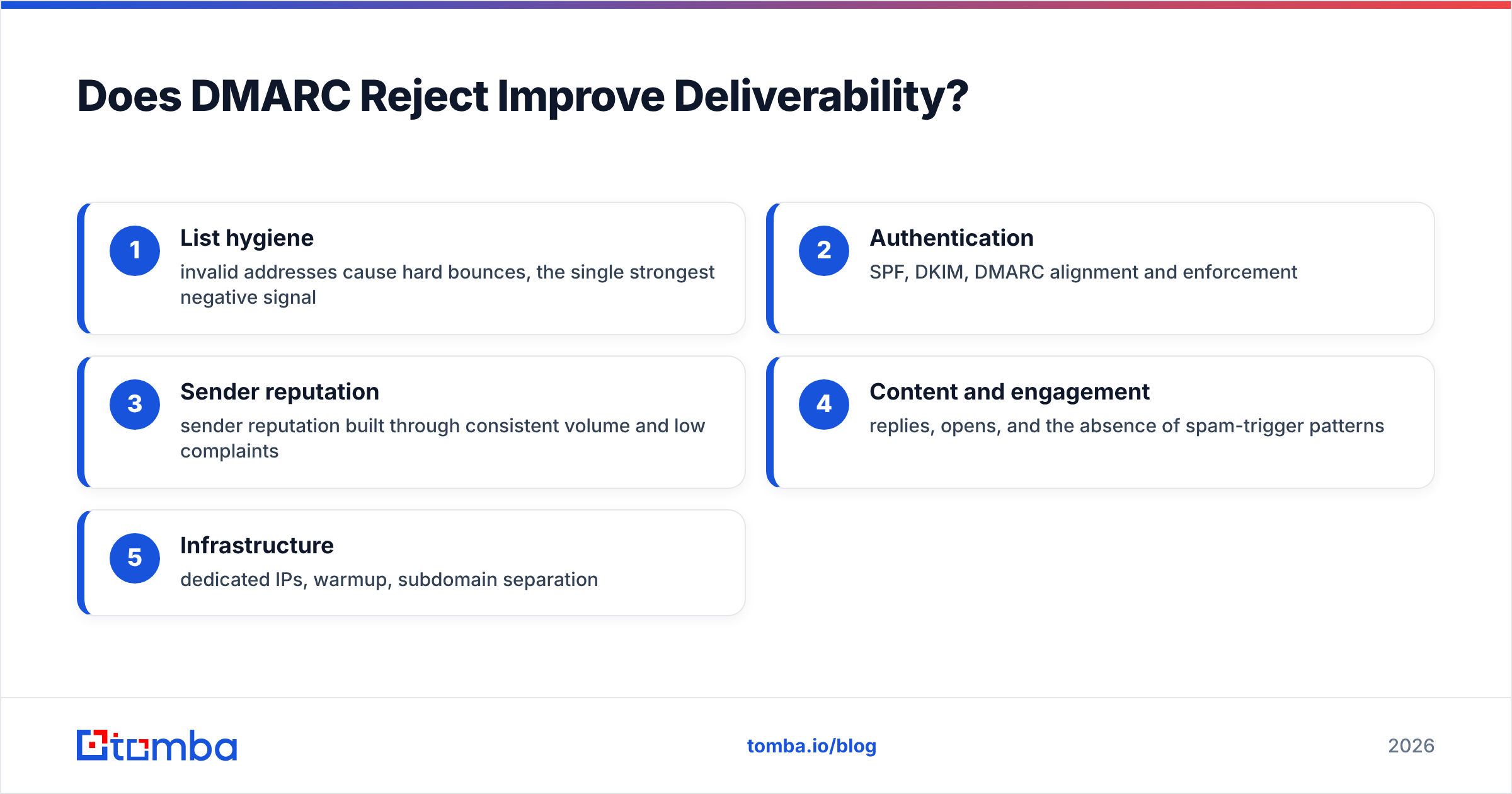
The full email deliverability stack has a rough priority order:
- List hygiene — invalid addresses cause hard bounces, the single strongest negative signal
- Authentication — SPF, DKIM, DMARC alignment and enforcement
- Sender reputation — sender reputation built through consistent volume and low complaints
- Content and engagement — replies, opens, and the absence of spam-trigger patterns
- Infrastructure — dedicated IPs, warmup, subdomain separation
Fix them in that order. Teams routinely invert this and spend a quarter on DMARC while sending to a list they bought in 2023.
What Should You Check Before Flipping the Switch?#
Run this list the week before you go to pct=100:
- Verify your SPF record resolves under 10 lookups. Use an SPF checker to confirm no
permerror. - Confirm DKIM alignment on every active sender. Send a test from each platform to a Gmail address and check "Show original" — the
dkim=pass header.d=value must match your From: domain. - Check your domain against blocklists. A blacklist checker run costs nothing and catches problems DMARC won't fix.
- Read two weeks of clean aggregate reports at
pct=50. Zero unexpected sources, zero unexplained failures. - Notify internal stakeholders. Marketing, HR, and finance all send mail. Tell them the date.
- Keep a rollback plan. Changing the TXT record back to
p=quarantinepropagates in minutes if your TTL is low. Set TTL to 300 seconds during the migration.
For an outbound team, the pre-flight also includes source data. Enforcement means nothing if half your prospect list is guesswork. Pulling verified contacts through a domain search before a campaign keeps bounce rates in the range where receivers stay friendly — and bounce rate, not DMARC policy, is what triggers throttling first.
Is Reject Right for Every Domain?#
Not quite. Three cases warrant nuance.
Parked and unused domains. These should go to p=reject immediately. There is no legitimate mail to break, and unused domains are prime spoofing targets. Publish v=DMARC1; p=reject; adkim=s; aspf=s plus a null SPF (v=spf1 -all) and an empty DKIM. Ten minutes of work, permanent protection.
Domains with heavy academic or list traffic. Universities and open-source projects send substantial mail through mailing lists that break authentication. p=quarantine is a defensible endpoint here until list managers universally adopt ARC. Yahoo's 2014 move to p=reject on yahoo.com famously broke thousands of mailing lists overnight — the lesson stuck.
Transactional-only domains. If a domain exists solely to send receipts from one ESP, reject is trivial to reach. Do it in a week.
For everyone else — commercial domains with a marketing team, a sales team, and a support desk — reject is the correct destination and the only question is pacing.
How Does This Fit With Cold Outreach Domains?#
Differently, and this catches people out.
Cold outreach typically runs on secondary domains: getcompany.com alongside company.com. The correct sequence for a new sending domain is:
- Register the domain and set up SPF, DKIM, and DMARC at
p=rejecton day one. There is no legitimate legacy mail to break. - Configure custom tracking domains and a dedicated sending subdomain.
- Warm the domain for 3–4 weeks with gradually escalating volume. Use an email warmup calculator to plan the ramp rather than guessing.
- Only then start real campaigns, at low volume per mailbox.
Skipping step 1 and adding DMARC later means you spend your warmup period building reputation on an unauthenticated domain, then change the authentication posture mid-flight. Receivers notice configuration changes. Start clean.
Also worth noting: Google's bulk sender requirements apply per sending domain, not per organization. A 400-message-per-day outreach domain sits below the 5,000 threshold and technically escapes the mandate — but the requirements are a floor, not a target. Meeting only the minimum on a cold domain is how you end up in spam by month three.
Frequently Asked Questions#
How long does it take to get to p=reject? Eight to twelve weeks for a typical mid-size company with 10–15 sending sources. Two weeks if you have one ESP and good records. Six months if nobody owns the project.
Can I skip quarantine and go straight to reject?
Technically yes, with pct= ramping. Practically, quarantine is a cheap safety net — mistakes land in spam instead of bouncing. Use it.
Does p=reject stop all phishing?
No. It stops exact-domain spoofing. Lookalike domains (c0mpany.com), display-name spoofing, and compromised accounts all bypass DMARC entirely. It closes one door, not the building.
Do I need the ruf (forensic) tag?
It's optional and most receivers don't send forensic reports due to privacy concerns. rua aggregate reports carry nearly all the actionable information.
What TTL should my DMARC record use? 300 seconds during migration so rollbacks propagate fast. Raise it to 3600 once stable.
Where to Start#
DMARC enforcement is a DNS project with an operational tail. The DNS part takes an afternoon; the discovery, alignment, and stakeholder work takes the rest of the quarter. Start with p=none and a report parser today, and put the pct=100 reject date on the calendar now — projects without a deadline stay at p=none forever.
And before the first campaign goes out on your newly-authenticated domain, make sure the addresses on the other end are real. Authentication controls whether receivers trust you; list quality controls whether they keep doing it. Run your prospect list through the Tomba Email Finder to source verified, deliverable contacts by domain or name, and pair it with bulk verification so your bounce rate stays where receivers ignore it. The free tier covers 25 searches a month, and paid plans start at $49/mo — see Tomba pricing for the full breakdown.
Related guides#
Ready to find emails that actually work?
Join 150,000+ professionals who stopped guessing and started sending. Free credits on signup — no credit card required.
Get the Tomba newsletter
Practical outbound tactics and product updates — once every two weeks.
About the author