Dock Alternatives: 9 Digital Sales Room Tools Compared for 2026
Dock made buyer portals mainstream, but it is not the only option. Here are nine Dock alternatives compared on pricing, onboarding depth, CRM sync and who each one actually fits.
TL;DR
- Dock is a buyer-facing workspace tool — digital sales rooms, mutual action plans, onboarding portals and security/vendor profiles in one link. It is strong on breadth, less specialised than tools built for a single stage.
- Most teams shop for Dock alternatives for three reasons: per-seat cost as the team grows, wanting deeper onboarding project management, or wanting engagement analytics that push back into the CRM automatically.
- The nine alternatives below split into three groups: sales-room-first (Trumpet, Aligned, GetAccept, Recapped), onboarding-first (Arrows, Accord), and enablement-platform (Highspot, Showpad) plus the DIY route (Notion).
- No portal fixes a bad list. If your rooms get opened by the wrong person or the invite bounces, the problem is contact data — not the portal.
- Fastest path: pick the tool that matches your dominant motion (deal room vs. onboarding), then feed it verified contacts so every stakeholder actually gets in.
What is Dock and who actually uses it?#
Dock is a workspace you share with a buyer instead of emailing them a pile of attachments. One link holds the deck, the pricing, the mutual action plan, the security documentation, the recorded demo and the onboarding checklist. The buyer sees a branded page; you see who opened what and when.
The pitch works because B2B buying groups have grown. When six to ten people have to agree, the champion becomes a courier — forwarding your PDF into a Slack thread where it dies. A shared workspace turns that forwarding problem into a single URL with tracking attached.
Dock's differentiator is scope. Most competitors do one job well: a deal room, or a customer onboarding tracker, or a content portal. Dock covers deal rooms, onboarding plans, client portals and security profiles under one subscription. For a 15-person revenue team that wants one vendor instead of three, that consolidation is the whole value proposition. You can see the current feature set and plan structure on Dock's own site.
That same breadth is why people search for Dock alternatives. Breadth means each individual module is good rather than best-in-class, and per-seat pricing across an entire GTM org adds up faster than the budget owner expected.
Why do teams look for Dock alternatives?#
Five patterns come up repeatedly in review threads on G2 and in RevOps communities:
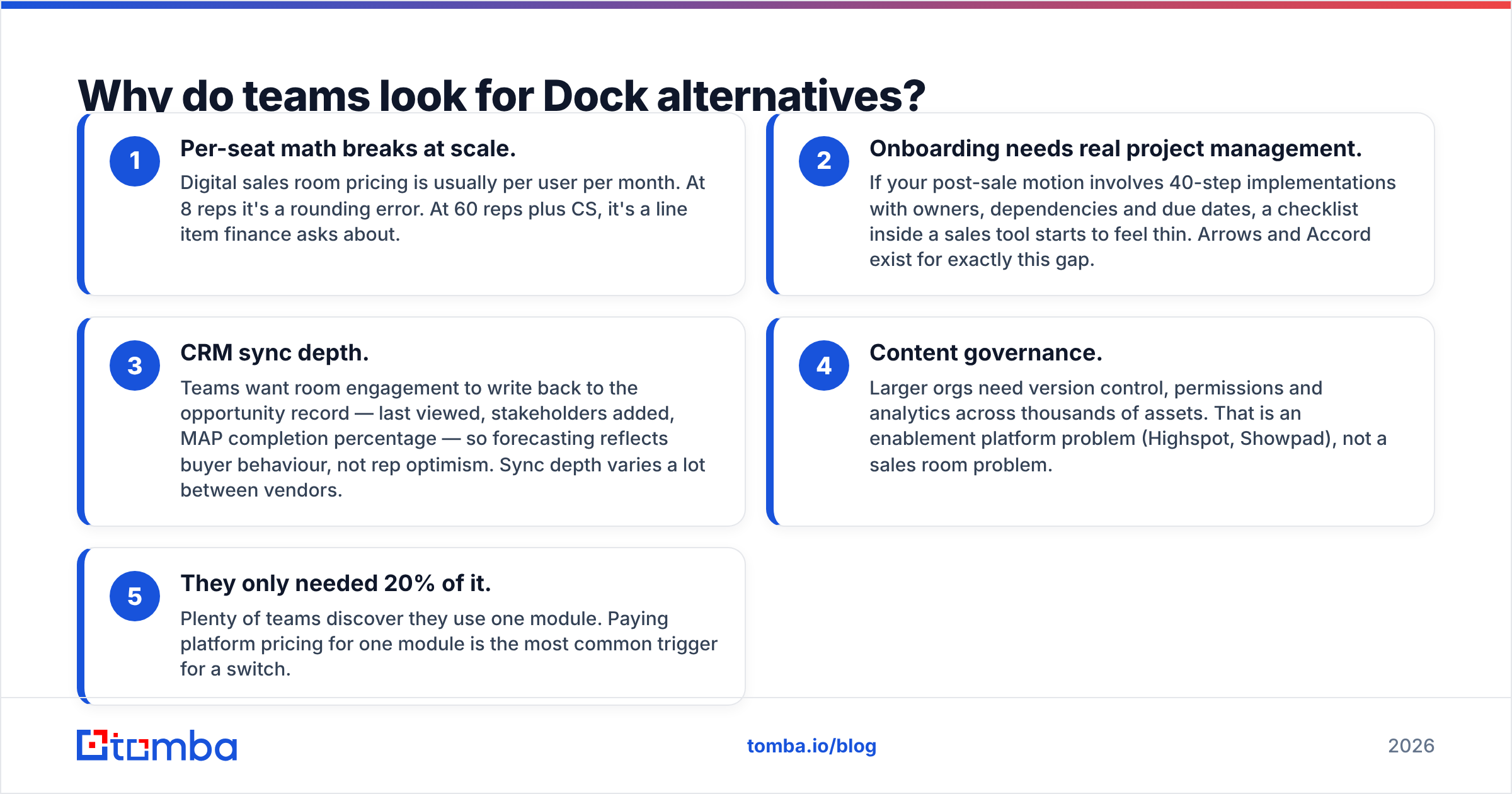
- Per-seat math breaks at scale. Digital sales room pricing is usually per user per month. At 8 reps it's a rounding error. At 60 reps plus CS, it's a line item finance asks about.
- Onboarding needs real project management. If your post-sale motion involves 40-step implementations with owners, dependencies and due dates, a checklist inside a sales tool starts to feel thin. Arrows and Accord exist for exactly this gap.
- CRM sync depth. Teams want room engagement to write back to the opportunity record — last viewed, stakeholders added, MAP completion percentage — so forecasting reflects buyer behaviour, not rep optimism. Sync depth varies a lot between vendors.
- Content governance. Larger orgs need version control, permissions and analytics across thousands of assets. That is an enablement platform problem (Highspot, Showpad), not a sales room problem.
- They only needed 20% of it. Plenty of teams discover they use one module. Paying platform pricing for one module is the most common trigger for a switch.
What are the best Dock alternatives in 2026?#
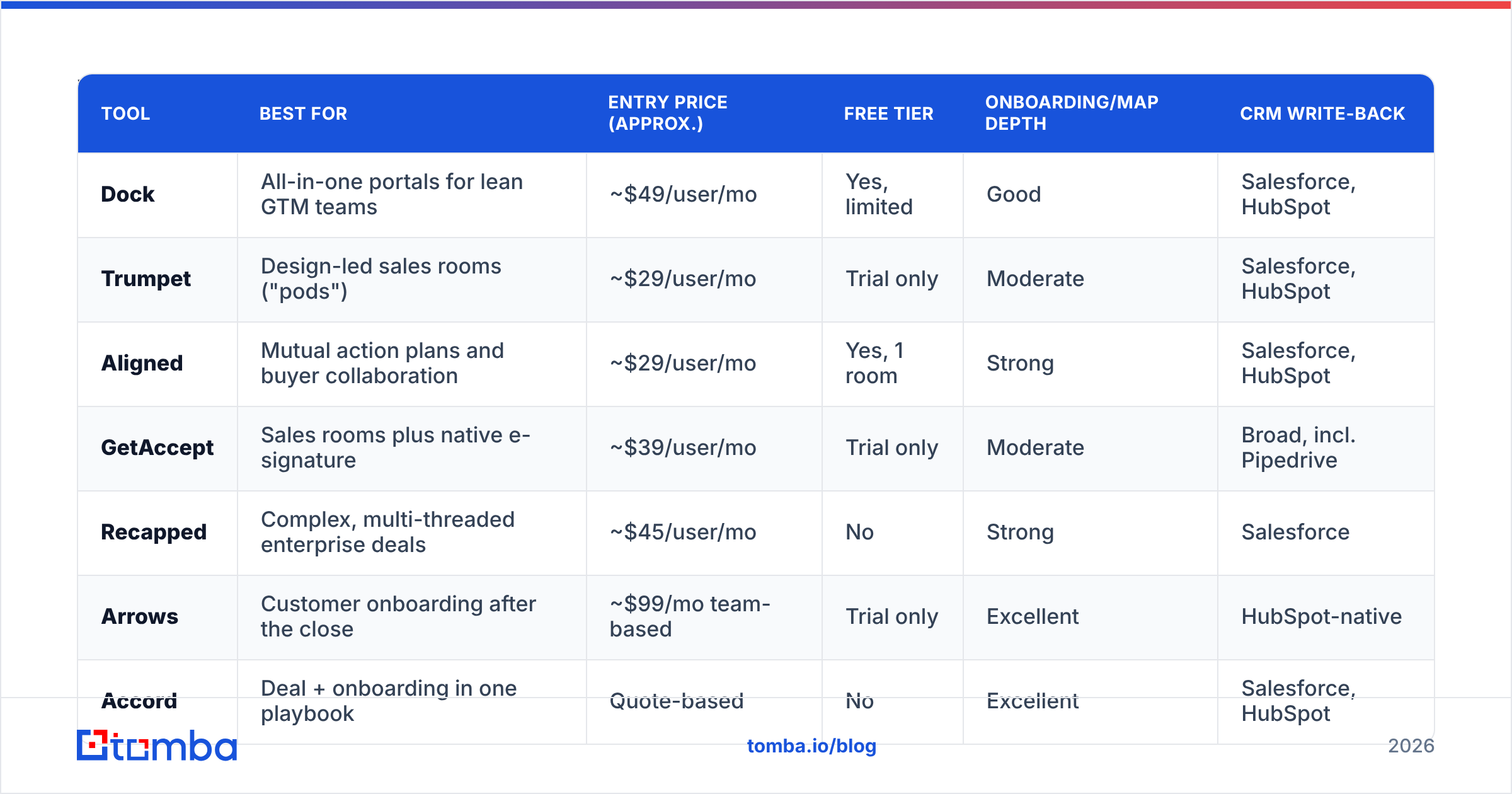
Here is the head-to-head. Prices are the publicly listed entry points at the time of writing and are rounded; every vendor negotiates annual contracts, so treat these as directional and verify on the vendor's pricing page before you budget.
| Tool | Best for | Entry price (approx.) | Free tier | Onboarding/MAP depth | CRM write-back |
|---|---|---|---|---|---|
| Dock | All-in-one portals for lean GTM teams | ~$49/user/mo | Yes, limited | Good | Salesforce, HubSpot |
| Trumpet | Design-led sales rooms ("pods") | ~$29/user/mo | Trial only | Moderate | Salesforce, HubSpot |
| Aligned | Mutual action plans and buyer collaboration | ~$29/user/mo | Yes, 1 room | Strong | Salesforce, HubSpot |
| GetAccept | Sales rooms plus native e-signature | ~$39/user/mo | Trial only | Moderate | Broad, incl. Pipedrive |
| Recapped | Complex, multi-threaded enterprise deals | ~$45/user/mo | No | Strong | Salesforce |
| Arrows | Customer onboarding after the close | ~$99/mo team-based | Trial only | Excellent | HubSpot-native |
| Accord | Deal + onboarding in one playbook | Quote-based | No | Excellent | Salesforce, HubSpot |
| Highspot | Enterprise content governance + coaching | Quote-based (enterprise) | No | Limited | Deep, enterprise |
| Notion | DIY portals on a near-zero budget | $10-15/user/mo | Yes | Manual | Via Zapier/Make |
Trumpet#
Trumpet builds "pods" — modular microsites that look designed rather than templated. If your brand matters and your buyers are marketing-adjacent, Trumpet wins on first impression. It handles mutual action plans and engagement tracking competently. Where it trails Dock is post-sale: it is built for the deal, not the twelve weeks after it.
Pick it if: your rooms are a brand touchpoint and your sales cycle is under 90 days.
Aligned#
Aligned is the most direct Dock competitor for deal rooms specifically. Its mutual action plan implementation is genuinely good — assignable tasks, due dates, buyer-side visibility into what they owe you. It also surfaces "hidden stakeholders": people who opened the room but were never on an email thread. That single feature is why multi-threading teams like it.
Pick it if: your deals stall because nobody knows who owes what next.
GetAccept#
GetAccept is the broadest of the sales-room-first tools because it bundles e-signature. If you currently pay for a sales room and DocuSign, consolidating can be net cheaper. The trade-off is that the portal side feels like part of a document platform rather than the main event.
Pick it if: contracts are a bottleneck and you want signature in the same flow.
Recapped#
Recapped is aimed squarely at complex enterprise cycles — long timelines, many stakeholders, formal procurement. Its mutual action plans are the most rigorous in this group, closer to a lightweight project plan than a checklist. It costs more and takes more setup discipline. Small teams typically find it heavier than they need.
Pick it if: your average deal has 8+ stakeholders and a 6-month cycle.
Arrows#

Arrows is not a Dock competitor for sales — it is a Dock competitor for the onboarding module, and it is better at it. Built HubSpot-native, it turns onboarding into tracked projects with customer-facing task lists, automated nudges and time-to-value reporting. Pricing is team-based rather than per-seat, which changes the math for larger CS orgs.
Pick it if: churn risk lives in your first 90 days, not your sales cycle.
Accord#
Accord tries to do what Dock does — one system across sale and onboarding — but with more process enforcement. It encodes your sales methodology into the room, so reps follow stages rather than improvising. That is a feature for sales leaders and an irritation for senior reps. Pricing is quote-based.
Pick it if: you're standardising a sales process across a growing team.
Highspot and Showpad#
Both are enterprise sales enablement platforms: content management, governance, training, coaching, analytics at scale. Buyer-facing rooms are one feature among dozens. If you have 200 reps and a content sprawl problem, these solve a category of problem Dock never claimed to. If you have 20 reps, the implementation cost alone rules them out.
Pick them if: your real problem is "nobody can find the current deck," not "buyers lose our links."
Notion (the DIY route)#
You can build a serviceable buyer portal in Notion with a template, public sharing and a database. What you lose: engagement analytics, CRM sync, automated nudges and any sense that a real vendor built this. What you gain: near-zero cost and total flexibility. Early-stage teams run this for a year before upgrading, and that is a reasonable sequence.
Pick it if: you have fewer than five reps and no budget line for GTM tooling.
How should you evaluate Dock alternatives?#
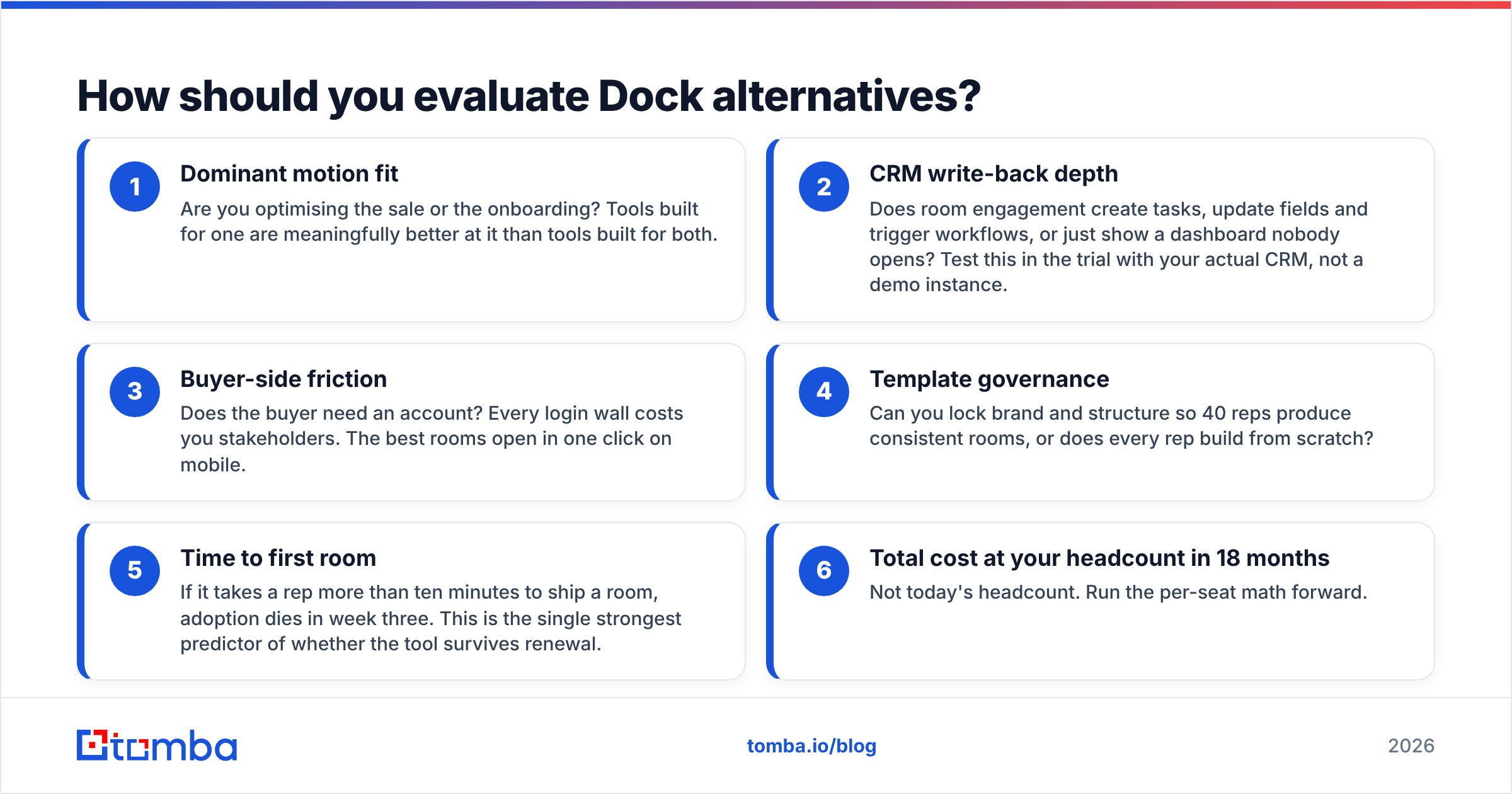
Score every shortlisted tool against these six criteria before you look at price:
- Dominant motion fit — Are you optimising the sale or the onboarding? Tools built for one are meaningfully better at it than tools built for both.
- CRM write-back depth — Does room engagement create tasks, update fields and trigger workflows, or just show a dashboard nobody opens? Test this in the trial with your actual CRM, not a demo instance.
- Buyer-side friction — Does the buyer need an account? Every login wall costs you stakeholders. The best rooms open in one click on mobile.
- Template governance — Can you lock brand and structure so 40 reps produce consistent rooms, or does every rep build from scratch?
- Time to first room — If it takes a rep more than ten minutes to ship a room, adoption dies in week three. This is the single strongest predictor of whether the tool survives renewal.
- Total cost at your headcount in 18 months — Not today's headcount. Run the per-seat math forward.
Vendors like HubSpot have pushed similar buyer-collaboration features into their native CRM tooling, so also check whether you already own 70% of this capability before adding a subscription.

Which Dock alternative fits your team size?#
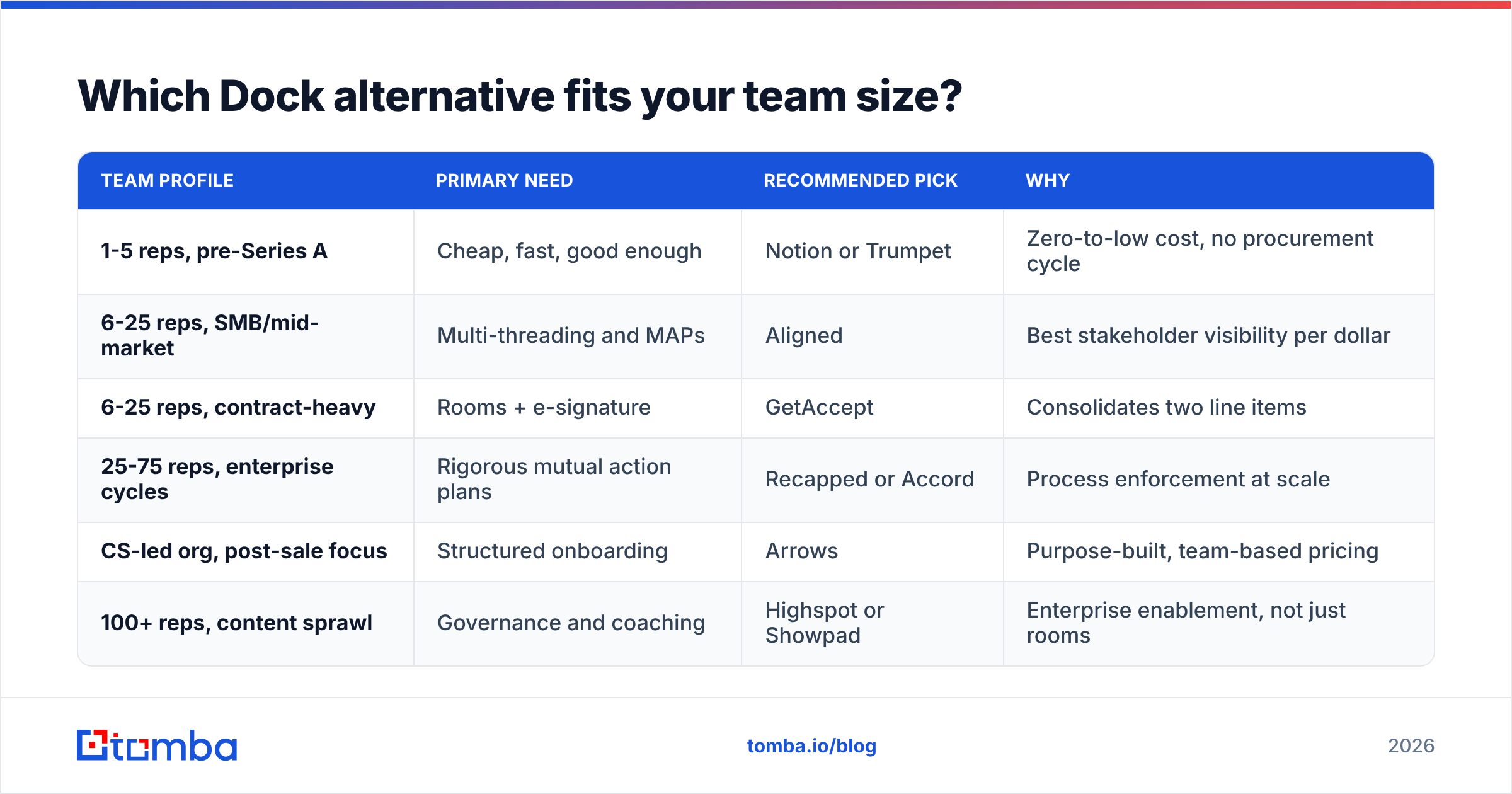
| Team profile | Primary need | Recommended pick | Why |
|---|---|---|---|
| 1-5 reps, pre-Series A | Cheap, fast, good enough | Notion or Trumpet | Zero-to-low cost, no procurement cycle |
| 6-25 reps, SMB/mid-market | Multi-threading and MAPs | Aligned | Best stakeholder visibility per dollar |
| 6-25 reps, contract-heavy | Rooms + e-signature | GetAccept | Consolidates two line items |
| 25-75 reps, enterprise cycles | Rigorous mutual action plans | Recapped or Accord | Process enforcement at scale |
| CS-led org, post-sale focus | Structured onboarding | Arrows | Purpose-built, team-based pricing |
| 100+ reps, content sprawl | Governance and coaching | Highspot or Showpad | Enterprise enablement, not just rooms |
Does a digital sales room actually move win rates?#
Honestly: it depends on what was broken. A sales room fixes information logistics — buyers losing files, champions failing to sell internally, deals stalling because next steps were vague. If that is your bottleneck, the lift is real and shows up as fewer "went dark" losses and shorter late-stage cycles.
It does not fix targeting, messaging, or pipeline volume. A team with a weak top of funnel that buys a sales room gets prettier links to nowhere. Diagnose first: pull your last 30 closed-lost deals and tag the reason. If "no decision / stalled internally" is above 30%, a room helps. If "no budget" or "wrong fit" dominates, spend the money upstream instead.
What feeds the room — and why data quality decides the outcome?#
Every one of these tools has the same silent dependency: the contacts you invite. A buyer portal only creates value when the right stakeholders open it. Three failure modes kill that:
- The invite bounces. You had the champion's old address after a job change. The room is never opened and nobody tells you.
- You only have one contact. Multi-threading tools like Aligned and Recapped surface stakeholder gaps, but they can't invent the VP of Security's email for you.
- CRM records are stale. Enrichment gaps mean rooms get shared to a generic info@ address that routes to nobody.
That is a contact-data problem, and it sits upstream of every portal decision. Using an email finder to build the full buying committee before you create the room — not after the champion goes quiet — is what makes multi-threading features useful instead of decorative. Same for data enrichment: titles, seniority and department fields let you decide who belongs in the room rather than guessing from a job title on LinkedIn.
If your CRM is the source of truth for room invitations, keep it clean at the point of entry. A HubSpot integration that enriches and verifies contacts on create means the room invite list is correct by default. It is unglamorous work, and it is the difference between a 70% room open rate and a 25% one.
Note that neither approach replaces the other. Portals are a distribution layer. Contact data is the addressing layer. Buying the first without fixing the second is the most common reason a sales room pilot gets quietly cancelled at renewal.
What should you do next?#
Shortlist two tools, not five. Run both on live deals for three weeks with the same three reps — pilots with different reps produce uninterpretable results. Measure two things only: percentage of rooms opened by more than two people, and average days from room creation to next committed step. Whichever tool wins those, buy.
And before the pilot starts, fix the list. Pull the full buying committee for every account in the pilot, verify each address, and load them into the CRM. The Tomba Email Finder does exactly that — find professional email addresses by domain, name or company, verify them before you send, and push them into the CRM your sales room syncs with. Free tier gives you 25 searches a month to test the accuracy on accounts you already know; paid plans start at $49/mo. Get the addressing right, and whichever Dock alternative you pick will actually get opened.
Related guides#
Ready to find emails that actually work?
Join 150,000+ professionals who stopped guessing and started sending. Free credits on signup — no credit card required.
Get the Tomba newsletter
Practical outbound tactics and product updates — once every two weeks.
About the author