Does Open Tracking Hurt Cold Email? The 2026 Evidence
Open tracking pixels rewrite your links, add a foreign domain, and inflate your data with bot opens. Here's what actually happens to deliverability — and when tracking is still worth keeping on.
TL;DR
- Open tracking does not directly flag you as spam, but it adds three real risks: a tracking domain in every message, an image request from a domain with no reputation, and a link-rewrite that can trip URL filters.
- Apple Mail Privacy Protection, Gmail image proxying, and security scanners now pre-fetch pixels. A meaningful share of your "opens" never involved a human.
- Click tracking is the bigger deliverability liability than open tracking — it rewrites the URL, which is what spam filters actually inspect.
- The safest configuration for cold outbound in 2026: open tracking off, click tracking off or on a well-warmed custom subdomain, and reply rate as your primary metric.
- If you keep tracking, use a dedicated subdomain (
link.yourdomain.com), never a shared vendor domain, and never on a domain younger than 30 days.
What does open tracking actually do to a cold email?#
Short answer: it adds a 1×1 transparent image hosted on a third-party domain, and that image request is what tells your sending tool "opened."
Think of it like putting a return-receipt sticker on an envelope. The sticker itself is not illegal, but it's a foreign object glued to your letter, and the mailroom scanner notices it. Some mailrooms shrug. Some flag the envelope for a closer look. And some open every envelope automatically to check the sticker, which means your receipts start coming back for letters nobody read.
Mechanically, three things get inserted into a tracked cold email:
- The pixel — an
<img>tag, usually 1×1 px,display:noneor styled invisible, pointing at a URL with a unique recipient ID. - The tracking domain — the host serving that pixel. On most tools this defaults to a shared vendor domain used by thousands of other senders.
- Rewritten links — if click tracking is on, every link in your body becomes a redirect through the same domain.
That third item is where most of the damage happens, and it's why "does open tracking hurt cold email" is usually the wrong question. The pixel is a minor signal. The rewritten URL is a major one.
Is open tracking a direct spam signal?#
No filter has a rule that says "contains tracking pixel → spam." What filters have is a scoring model, and tracking contributes to several inputs at once.
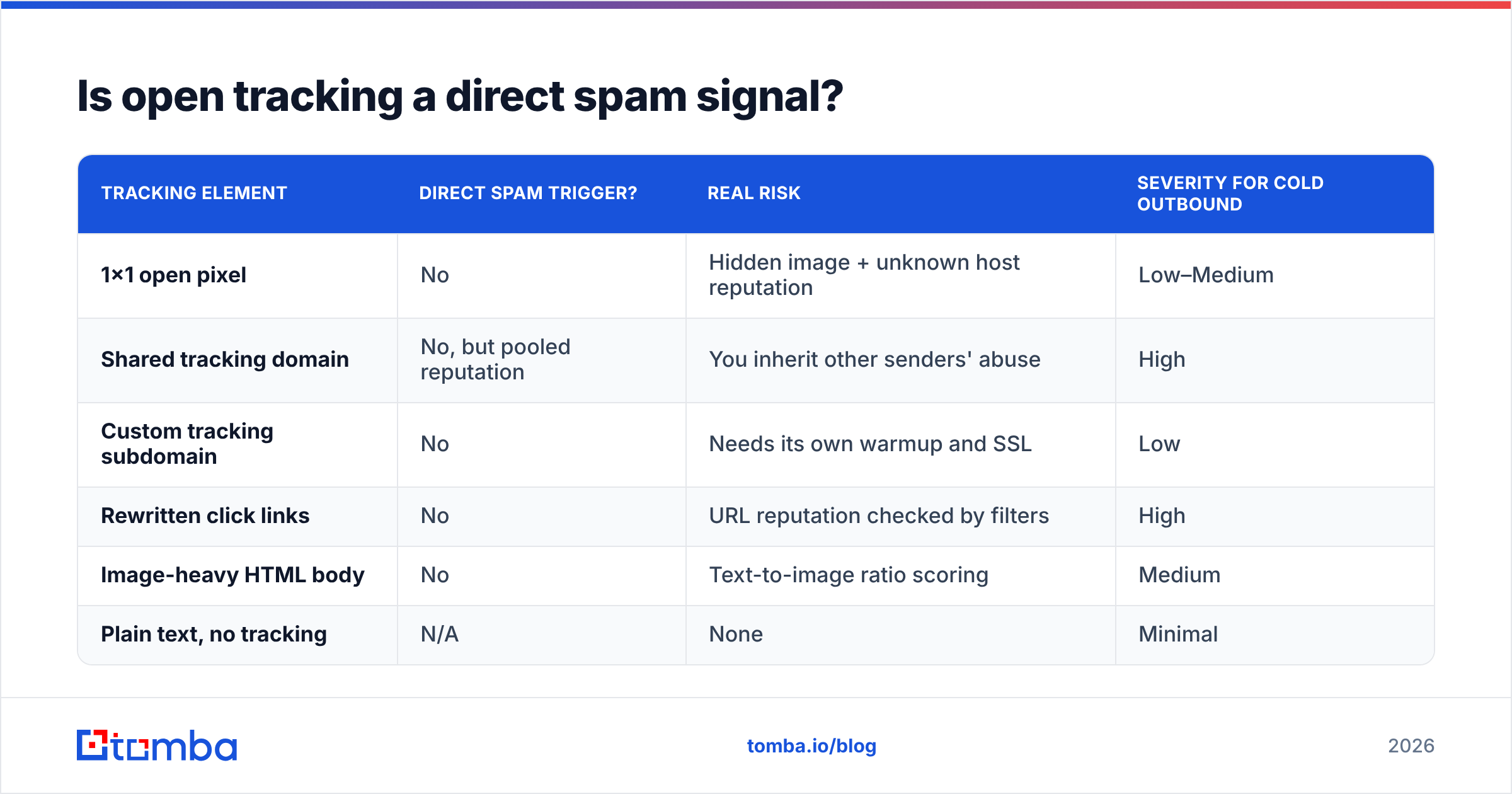
Here's the honest breakdown of what each element contributes:
| Tracking element | Direct spam trigger? | Real risk | Severity for cold outbound |
|---|---|---|---|
| 1×1 open pixel | No | Hidden image + unknown host reputation | Low–Medium |
| Shared tracking domain | No, but pooled reputation | You inherit other senders' abuse | High |
| Custom tracking subdomain | No | Needs its own warmup and SSL | Low |
| Rewritten click links | No | URL reputation checked by filters | High |
| Image-heavy HTML body | No | Text-to-image ratio scoring | Medium |
| Plain text, no tracking | N/A | None | Minimal |
The pattern is clear. The pixel by itself sits near the bottom. What sits at the top is domain reputation of whatever host you inject into the message — and that applies equally to open and click tracking.
Spamhaus and comparable blocklist operators do not list domains for serving pixels. They list domains that appear in messages recipients mark as spam. If your shared tracking domain appears in ten thousand campaigns a day and a fraction of those get complaints, that domain carries the scars into your message.

Wait — that image reference is wrong. Use the placeholder:

Why are your open rates lying to you in 2026?#
Because a large share of pixel loads are machines, not people.
Four separate systems now fetch your pixel before any human sees the message:
- Apple Mail Privacy Protection — proxies and pre-loads remote images for Apple Mail users on Mac, iPhone, and iPad. Every one registers as an open, at a generic geolocation, usually within minutes of delivery. Apple documents the behavior in its Mail Privacy Protection notes.
- Gmail image proxy — Google has served images through
googleusercontent.comsince 2013. It caches, which means repeat opens undercount, and it strips the recipient IP, which means your geo data is fiction. - Corporate security gateways — Mimecast, Proofpoint, Barracuda and friends detonate links and load remote content in a sandbox before delivery. Enterprise prospects generate phantom opens at scale, and often phantom clicks too.
- Anti-phishing crawlers — click every URL in a suspicious message. That's how a cold email to one person shows six clicks in eleven seconds.
The practical consequence: an inflated open rate for enterprise and Apple-heavy audiences, and a deflated one for Gmail-heavy audiences that block images by default. Both errors run in different directions on the same list, so you cannot correct for them with a flat multiplier.
If your dashboard shows 70%+ opens on cold traffic and a 1% reply rate, you are not looking at engagement. You are looking at security infrastructure.
Does open tracking hurt cold email deliverability — or just your data?#
Both, but unevenly. Data damage is guaranteed. Deliverability damage is conditional.
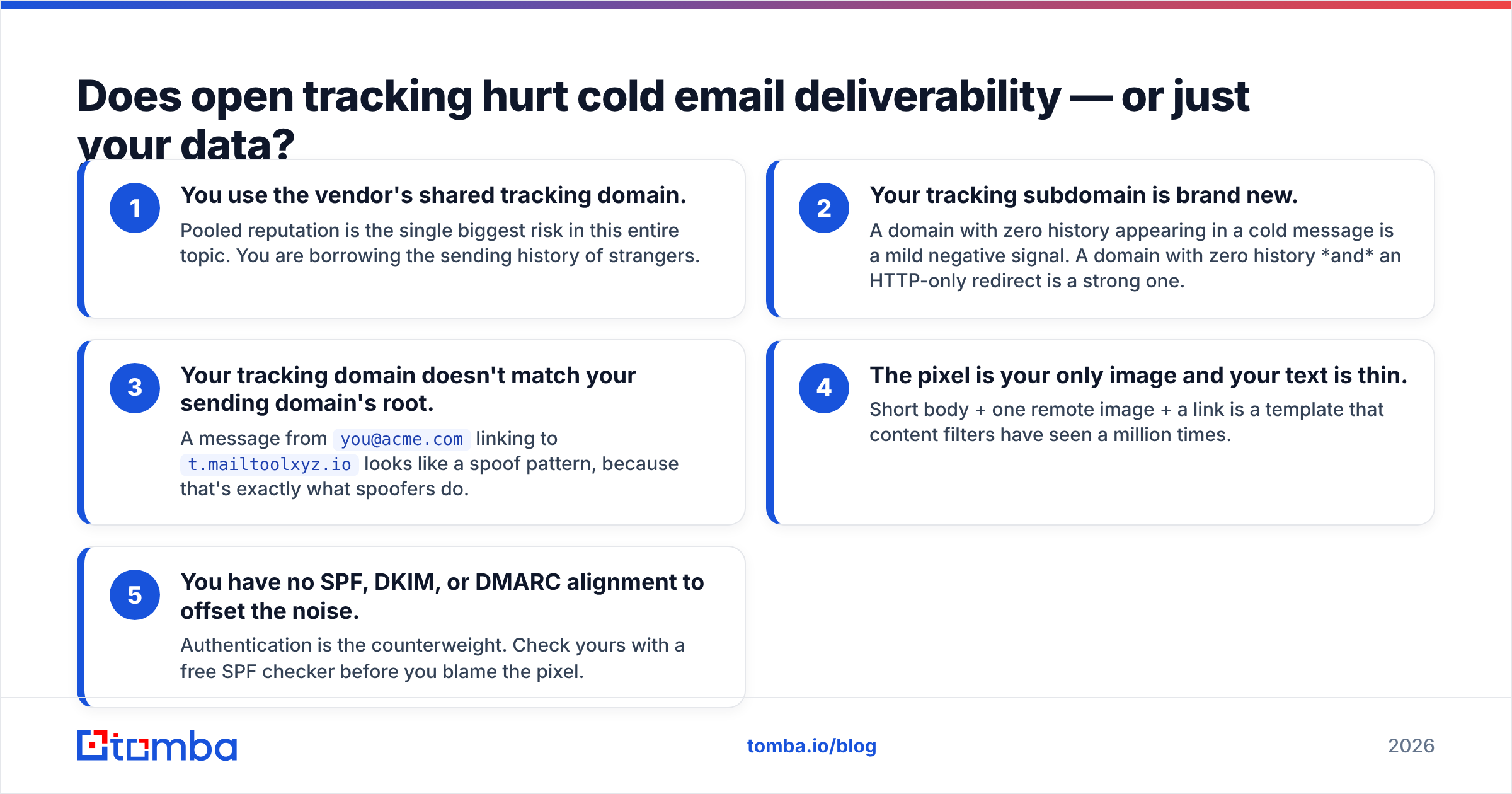
Deliverability damage happens when at least one of these is true:
- You use the vendor's shared tracking domain. Pooled reputation is the single biggest risk in this entire topic. You are borrowing the sending history of strangers.
- Your tracking subdomain is brand new. A domain with zero history appearing in a cold message is a mild negative signal. A domain with zero history and an HTTP-only redirect is a strong one.
- Your tracking domain doesn't match your sending domain's root. A message from
you@acme.comlinking tot.mailtoolxyz.iolooks like a spoof pattern, because that's exactly what spoofers do. - The pixel is your only image and your text is thin. Short body + one remote image + a link is a template that content filters have seen a million times.
- You have no SPF, DKIM, or DMARC alignment to offset the noise. Authentication is the counterweight. Check yours with a free SPF checker before you blame the pixel.
Data damage happens always. There is no configuration in which pixel-based open rates are reliable for cold outbound in 2026.
How does tracking-on compare with tracking-off in practice?#
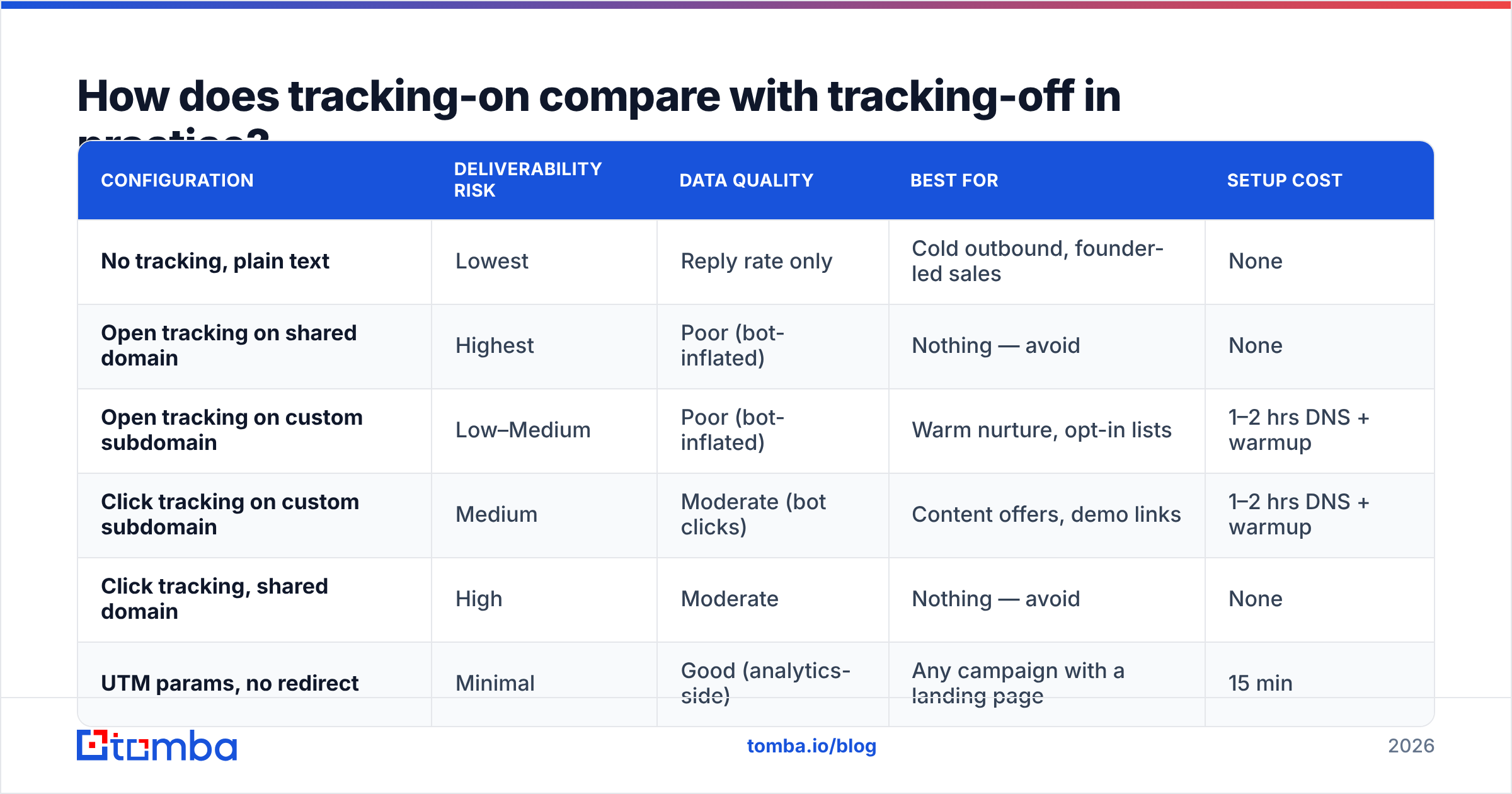
Here's the trade-off matrix teams actually use when deciding what to enable per campaign type.
| Configuration | Deliverability risk | Data quality | Best for | Setup cost |
|---|---|---|---|---|
| No tracking, plain text | Lowest | Reply rate only | Cold outbound, founder-led sales | None |
| Open tracking on shared domain | Highest | Poor (bot-inflated) | Nothing — avoid | None |
| Open tracking on custom subdomain | Low–Medium | Poor (bot-inflated) | Warm nurture, opt-in lists | 1–2 hrs DNS + warmup |
| Click tracking on custom subdomain | Medium | Moderate (bot clicks) | Content offers, demo links | 1–2 hrs DNS + warmup |
| Click tracking, shared domain | High | Moderate | Nothing — avoid | None |
| UTM params, no redirect | Minimal | Good (analytics-side) | Any campaign with a landing page | 15 min |
The row most teams miss is the last one. UTM parameters do not rewrite your domain. A link to yourdomain.com/demo?utm_source=outbound&utm_campaign=q3 stays a first-party link, passes through filters as your own domain, and gives you attribution in GA4 or your CRM without injecting a redirect host. You lose per-recipient click attribution, which matters less than most reps assume.
What should you measure instead of open rate?#
Replace opens with signals that require a human decision. Five that hold up:
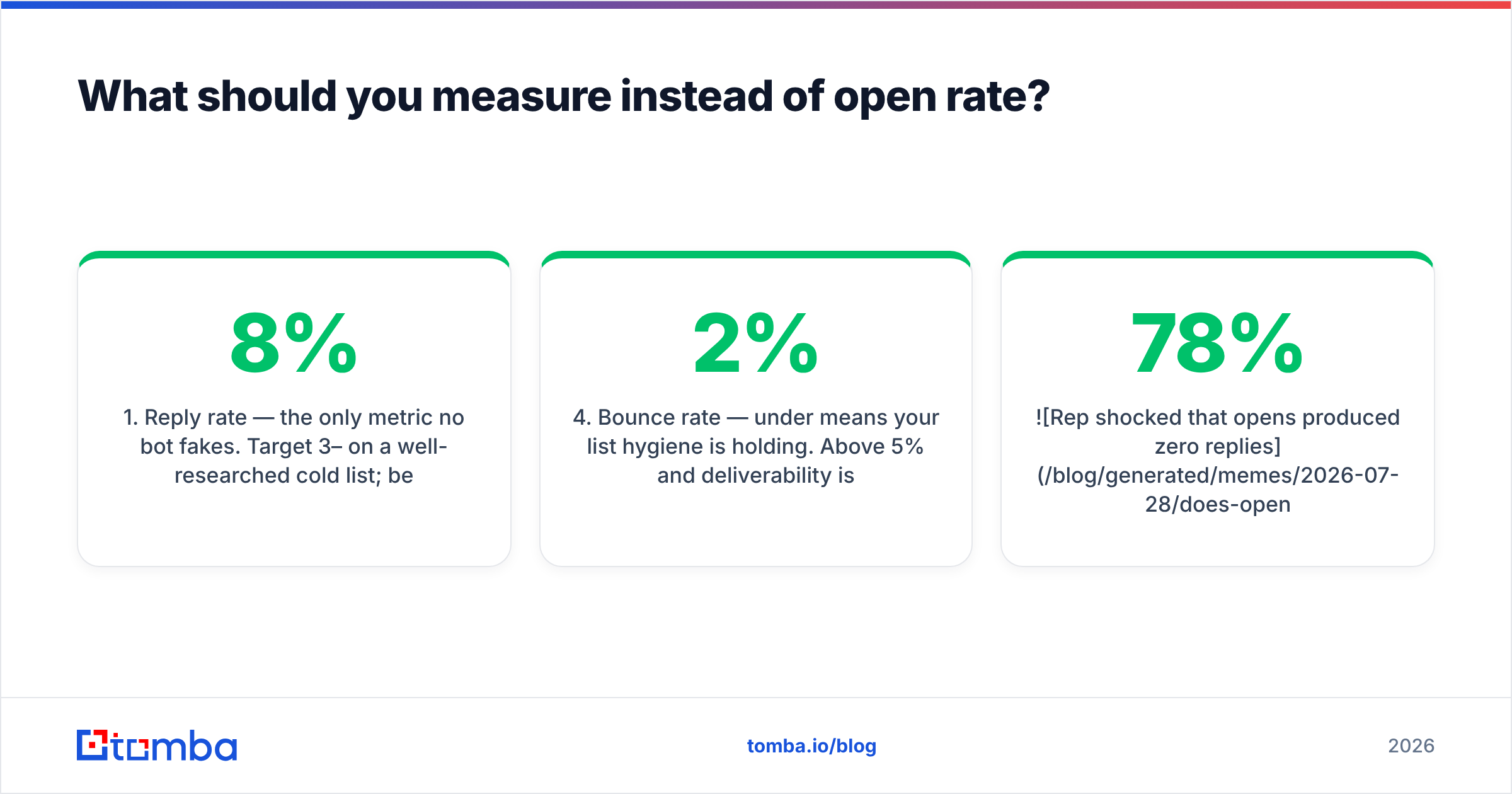
- Reply rate — the only metric no bot fakes. Target 3–8% on a well-researched cold list; below 1% means targeting or copy is broken, regardless of what opens say.
- Positive reply rate — replies minus unsubscribes, "not interested," and out-of-office. This is the number that actually correlates with pipeline.
- Landing page sessions with UTM match — server-side, first-party, and immune to pixel proxying.
- Bounce rate — under 2% means your list hygiene is holding. Above 5% and deliverability is degrading fast, which is a data problem, not a tracking problem.
- Meetings booked per 100 sent — the only rate a CFO cares about. Everything upstream is diagnostic.
Notice that four of these five improve when your list is accurate rather than when your tracking is clever. Bounce rate in particular is the metric that most quietly kills a domain: send to enough dead mailboxes and no amount of pixel hygiene saves your sender reputation. Running your list through an email verifier before launch removes the failure mode that tracking configuration cannot.
How do you configure tracking safely if you keep it?#
If your ops team demands open data — for a nurture sequence, a customer campaign, or an executive dashboard — configure it like this.
Step 1: Use a custom tracking subdomain on your sending root.
Set up link.yourdomain.com or go.yourdomain.com via CNAME to your vendor. Never the vendor default. This is the single highest-impact change available.
Step 2: Serve it over HTTPS with a valid certificate. Most vendors auto-provision this now. Verify it. An HTTP redirect in a 2026 cold email is a filter magnet.
Step 3: Warm the tracking subdomain alongside the sending domain. Give it at least 3–4 weeks of low-volume, high-engagement traffic before it appears in cold campaigns. Use a warmup calculator to pace the ramp rather than guessing.
Step 4: Keep the message plain-text-ish. No image headers, no HTML signature blocks with logos, no button graphics. If the pixel is the only remote asset in a mostly-text message, it stands out less than it would in a template with six images.
Step 5: Segment tracking by campaign type. Cold prospecting: tracking off. Warm nurture to opted-in contacts: tracking on. Customer comms: tracking on. This costs nothing and eliminates the risk where it matters most.
Step 6: Run a spam-score check on the final template. Send the exact tracked version through a spam checker and compare with the untracked version. If the score moves more than a point, your tracking setup has a problem you can fix before it costs you a domain.
What do the major sending platforms actually recommend?#
Vendor guidance has shifted noticeably since Apple's privacy changes landed. The consensus among deliverability teams:
| Platform / source | Stance on open tracking for cold outbound |
|---|---|
| Google Postmaster Tools | Doesn't measure opens at all — reports spam rate, IP/domain reputation, authentication |
| HubSpot | Documents open-rate distortion from privacy proxies; steers reporting toward clicks and replies |
| Most cold-email tools | Default open tracking OFF in newer onboarding flows |
| Deliverability consultants | Near-unanimous: off for cold, optional for warm |
| Enterprise marketing ops | On, because dashboards demand it — with custom domains and known caveats |
Google's own Postmaster Tools is the tell. The only vendor whose opinion determines whether you reach the inbox at Gmail does not track opens and does not give you open data. It reports spam complaint rate, domain reputation, and authentication results. Optimize for what the gatekeeper measures.
G2 reviews of deliverability tooling echo the same theme in the complaint sections: teams that chased open rates spent a quarter optimizing a number that turned out to be bot traffic.
Does turning off open tracking mean flying blind?#
No. It means changing what your instrument panel shows.
A cold campaign without open tracking still reports: sends, bounces, replies, positive replies, unsubscribes, and — with UTMs — landing page sessions and conversions. That's a complete funnel. What you lose is a mid-funnel proxy metric that was already unreliable.
The teams that struggle with this transition are the ones using opens for A/B testing subject lines. Fair concern, and here's the workaround: test subject lines against reply rate with a larger sample. It's slower, but it measures the outcome you want instead of a correlate. If you need faster subject-line iteration, run structured variants through a subject line tester before send rather than relying on post-send opens that Apple has already corrupted.
The second objection is follow-up timing — "I want to follow up with people who opened." In 2026 that trigger fires on machines as often as humans. A time-based follow-up cadence (day 3, day 7, day 12) outperforms an open-triggered one on cold lists, because the open signal has too much noise to act on.
What's the practical checklist?#
- Turn open tracking off for cold prospecting. Full stop.
- If click tracking is required, use a custom subdomain on your sending root, HTTPS, warmed for 30 days.
- Prefer UTM parameters over redirect links wherever a landing page is involved.
- Authenticate properly: SPF, DKIM, DMARC aligned. This matters more than every tracking decision combined.
- Verify your list before every send — bounces do far more damage than pixels.
- Report on reply rate, positive reply rate, and meetings booked. Delete open rate from the dashboard.
- Re-test your template's spam score whenever you change tracking configuration.
The uncomfortable summary: most teams worrying about whether open tracking hurts cold email have a bigger problem sitting upstream. A 12% bounce rate from stale contact data will sink a domain in two weeks. A tracking pixel on a custom subdomain will not.
Fix the data first. Cold outbound lives and dies on whether the address exists and belongs to the person you researched — everything downstream is optimization on top of that foundation. If you're building lists from company domains, LinkedIn profiles, or scraped sources, run them through Tomba Email Finder to get verified, deliverable addresses before a single message goes out. The free tier covers 25 searches a month so you can test accuracy on your own segment first, and paid plans start at $49/mo on the Starter tier — see Tomba pricing for the full breakdown. Clean data beats clever tracking every time.
Related guides#
Ready to find emails that actually work?
Join 150,000+ professionals who stopped guessing and started sending. Free credits on signup — no credit card required.
Get the Tomba newsletter
Practical outbound tactics and product updates — once every two weeks.
About the author